
Remove
Faster, easier editing with AI
“Expanding image content, removing people or objects, and optimizing photos are much easier with the current PhotoDirector 365.”




All-in-One Photo Editor

 PhotoDirector 365
PCWorld named PhotoDirector 365 Editors’ Choice 2026 and rated it 4.5 out of 5. PCMag lists it in The Best Photo Editing Software for 2026. TechRadar ranks it #2 for 2026.
PCWorld, PCMag, and TechRadar each put PhotoDirector 365 through its own test.
 Editors’ Choice · 4.5 out of 5
“Image analysis and built-in suggestions for improvement assist with editing and speed up workflow.”
 Rated Excellent · The Best Photo Editing Software for 2026 pick
“An affordable, AI-packed replacement for Lightroom and Photoshop.”
 Recommended · 4.5 out of 5
“A powerful multi-faceted beast ... offers Photoshop-like compositing tools, as well as numerous generative AI features, and all at an extremely competitive price.”
PCWorld’s verdict came down to two things: editing is faster with AI and automation, and the wizards are easy to use.
“Expanding image content, removing people or objects, and optimizing photos are much easier with the current PhotoDirector 365.”

“The software uses a portrait as its base and can automatically add office attire to the subject ... PhotoDirector 365 can also add a suitable background or setting.”
“Style transfer of all kinds ... creatively converting an image into manga-style graphics or generating templates with the help of AI prompts.”
PCMag: “... offers the workflow features of Adobe Lightroom, along with the image editing features of Photoshop ... at a lower cost.” TechRadar’s 2026 list calls it “Tackling Photoshop and Lightroom in one.”
The job you would open Lightroom for.

“The interface for assigning names to faces is clear and simple. Once you assign a name, it becomes a one-click button to assign to other photos with faces.” PCMag

“PhotoDirector includes all the basic adjustment tools that photographers need, including those for color, detail, and tone (exposure, contrast, and more).” PCMag
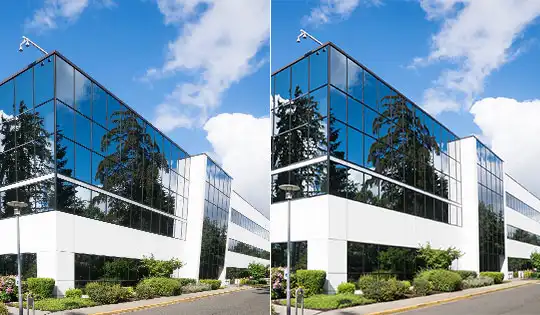
“The Auto Keystone option does a good job of straightening buildings and cropping the unusable sides of the photo.” PCMag
The job you would open Photoshop for.

“The Edit module takes more of a leaf from Photoshop ... allowing you to create complete image composites.” TechRadar

“You can import a photo and transform it based on specific criteria, such as changing the clothing someone wears or the background they’re shot in front of, or replacing an object with another.” TechRadar

“You can move the subject around in the new background, and the updated algorithm can handle complex subjects, such as those with unruly hair.” PCMag
Both reviewers also praised the price. PCMag: “Both the perpetual-license and subscription versions are affordable.” TechRadar: “Great value.” Compare plans · All features
PhotoDirector is desktop software, so adjustments, layers, and exports run on your computer. On a supported AI PC, AI PC Mode runs everyday AI features locally as well, with no credits.
PhotoDirector Essential is free, with no time limit. The AI tools the reviewers tested are part of PhotoDirector 365.
Products bought from the CyberLink online store come with a 30-day money-back guarantee, as long as the credits in the order are unused. See the refund policy
Yes. PCWorld gave PhotoDirector 365 its Editors’ Choice 2026 award and rated it 4.5 out of 5 in its August 2025 review. TechRadar rates it 4.5 out of 5, Recommended, and ranks it second in its Best photo editor list for 2026. PCMag rates it 4.0, Excellent, and picks it as Best for Combined Workflow, Editing, and Effects in The Best Photo Editing Software for 2026.
It is the reviewer’s own recommendation, given after hands-on testing. PCWorld gives it to the products its editors would pick in a category.
PCMag’s review calls PhotoDirector an affordable, AI-packed replacement for both, because it combines photo workflow with layer-based editing in one app. TechRadar’s 2026 list calls it “Tackling Photoshop and Lightroom in one.” If you want one app for organizing, developing, and compositing, that is the case the reviewers make.
PhotoDirector 365, the subscription version with the AI tools. PCWorld notes that the AI features need the subscription, and PCMag and TechRadar reviewed the same edition.
All three are online: PCWorld’s review, PCMag’s review, and TechRadar’s review. The two 2026 lists are PCMag’s The Best Photo Editing Software for 2026 and TechRadar’s Best photo editor of 2026.
Yes. The free download is PhotoDirector Essential, with no time limit. The AI tools the reviewers tested are part of the PhotoDirector 365 subscription.
About these awards. All ratings and award names on this page are the published work of the named publications. Quotations are excerpted from their reviews: ellipses mark omitted text, and the product name is written as PhotoDirector throughout. CyberLink does not pay for editorial review outcomes. Each entry links to the original review so you can check it yourself.
PCWorld is a trademark of Foundry. PCMag and Editors’ Choice are trademarks of Ziff Davis, LLC. TechRadar is a trademark of Future plc. Adobe, Lightroom and Photoshop are trademarks of Adobe Inc. Used here for identification only.
