


search cyberlink website user log-in change language
PhotoDirector 365 app icon

PhotoDirector 365

All-in-One Photo Editor

Get it on Google Play
PhotoDirector 365

Turn a Photo into a Painting in Seconds

Portrait, landscape or travel shot? Go from picture to painting in seconds with a sketch, watercolor or oil style. No drawing skills needed.

Portrait photo turned into a watercolor painting in PhotoDirector

What You Can Do with the Photo to Painting Tool

Turn Photo into Sketch in One Click

Turn a Photo into a Sketch in a Few Clicks

Start with a selfie, a family photo or a shot of your dog. Pick a sketch style, and PhotoDirector redraws the outlines and shading so the result looks like a real pencil drawing. The photo to sketch tool handles the composition for you, so going from picture to drawing doesn't take any settings or drawing skills.

Free Download 
Oil painting photo effect applied to a city street in PhotoDirector

Go from Photo to Oil Painting or Watercolor

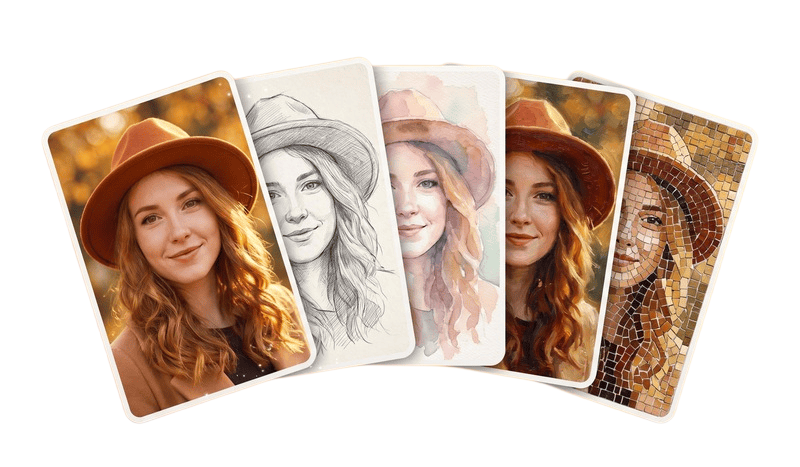
Turn a photo into watercolor art with soft, bright colors for a vacation landscape, or give a city shot the thick brushstrokes of a photo to oil painting effect. Browse the AI Art templates and compare watercolor, oil painting and mosaic looks side by side until you find the one that suits your picture.

Free Download 
Turn Photo into Line Art for Unique Gifts

Turn Photo into Line Art for Unique Gifts

The photo to line drawing styles strip a picture down to its main outlines for a clean, graphic look. Print your line art on a card, poster or framed print for a one-of-a-kind gift, or post it on social media. Want the effect on only part of the image? Apply the style, then brush the original photo back in where you want it.

Free Download 

How to Turn a Photo into a Painting with PhotoDirector

AI Art templates panel in PhotoDirector with sketch, watercolor and oil painting styles

Step 1 - Import Your Photo

In PhotoDirector, open the Guided & GenAI tab, then import the photo you want to turn into a painting or drawing.

Step 2 - Pick a Style in AI Art

Click AI Art and browse the templates for sketch, watercolor, oil painting and mosaic styles. Wondering how to turn a photo into a sketch? Pick any sketch style.

Step 3 - Compare and Export

Try a few styles and compare the results, then click Export to save your artwork. That's all it takes to convert a photo to a painting.

Frequently Asked Questions

The AI reads the photo's composition, outlines, shadows and colors, then redraws it in the style you choose. In PhotoDirector, open AI Art and pick a template. Your AI painting from a photo is ready in seconds, and you don't have to adjust anything by hand.

It depends on the look you want. A black-and-white sketch brings out the features of a portrait. Watercolor gives a soft, bright effect that works well for landscapes. Oil painting adds texture and rich colors, while mosaic rebuilds the image with small geometric patterns for a more graphic result.

Yes. Plenty of websites let you turn a picture into a painting online for free, and some offer a free photo to pencil sketch online. Free online tools often limit the styles you can use or the export resolution. With PhotoDirector, you can download the app for free, try the AI Art templates and keep editing your picture in the same place.

Choose a sharp, well-lit photo with a clearly visible subject and a simple background. The clearer the outlines, the more accurate the result. Portraits, selfies, pet photos, landscapes and travel or architecture shots usually give the best results.