



Genspark AI: Ultimate AI Super Agent to Transform Your Workflow

Genspark AI is an all-in-one autonomous AI platform designed to research, create, and execute tasks in one place. Positioned as an AI “superagent,” it can generate multimedia content, build presentations and spreadsheets, and even make phone calls on your behalf — without requiring coding skills. With a free plan offering daily credits and paid plans starting at $25/month, Genspark AI targets professionals, creators, and teams looking to automate complex workflows efficiently.
In this review, we'll cover what Genspark is, how the Super Agent works, pricing, and the best complementary visual tool to level up what Genspark offers.
- What Is Genspark AI?
- What Can Genspark Do? Key AI Features and Capabilities
- Is Genspark free? Plans & Pricing
- How to use Genspark: Step by step Tutorial
- How Is Genspark Different From ChatGPT or Other AI Tools?
- Free Add-on to Genspark Projects: Create images with MyEdit
- Frequently asked questions about Genspark
What Is Genspark AI?
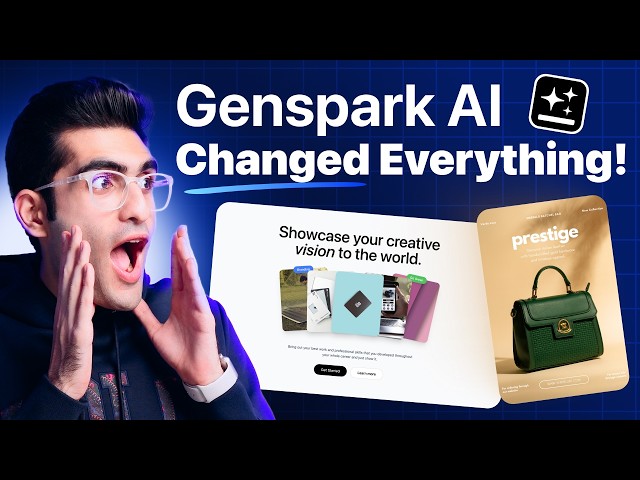
Genspark is an all-in-one workspace that combines search, synthesis, and action on a single platform. Its core, the Super Agent, can coordinate multiple AI models and over 80 tools to tackle complex tasks efficiently. The platform also creates Sparkpages—personalized, real-time result pages that consolidate information from multiple sources without ads or commercial bias, giving users a clean, objective view of the data.
What Can Genspark Do? Key AI Features and Capabilities

Genspark goes beyond a typical AI chatbot. Instead of simply answering questions, it combines multiple AI models and built-in tools to help you research, create content, automate tasks, and even interact with the real world. Here are some of the key capabilities that make the platform stand out.
These pages organize key insights, highlight different perspectives, and provide citations so you can verify the information. The result is a more interactive and efficient way to research topics like travel planning, product comparisons, or market trends.
Super Agent & Sparkpages
At the core of Genspark is the Super Agent, an AI system that can break down complex requests and coordinate multiple models to complete them. Rather than giving you a list of search results, Genspark generates Sparkpages—structured pages that gather and summarize information from many sources in real time.
AI Slides, Sheets and Docs
Genspark also includes built-in tools for creating everyday work documents. With a simple prompt, you can generate presentations, spreadsheets, or written reports.
For example, AI Slides can quickly turn ideas into a structured presentation, while AI Sheets helps analyze data or build datasets using plain language instead of complex formulas. This makes it especially useful for business reports, research summaries, or project planning.
AI Call For Me & Task Automation
One of Genspark’s most unique features is its ability to perform tasks outside the digital workspace. The AI Call For Me function can place real phone calls to businesses on your behalf, navigate automated menus, and even speak with customer service representatives.
Users can ask it to check business hours, book appointments, or confirm product availability. After the call, Genspark provides a transcript and summary of the conversation so users can keep track of the progress.
Creative and Multimedia Tools
Genspark also includes a set of AI-powered creative tools designed for content creation. Users can generate or edit visual media, enhance photos, or produce videos directly from text prompts.
The platform can even transform written content such as articles or PDFs into engaging audio formats like podcast-style conversations. This makes it useful for creators who want to quickly repurpose content into different formats.
AI Assistant for Productivity
Beyond content creation and research, Genspark can act as a personal productivity assistant. It can summarize long email threads, highlight important messages, and help draft replies based on your writing style.
When connected to productivity tools like Google Workspace, it can also prepare meeting summaries and gather relevant information before a call. These capabilities help automate routine administrative work and keep important tasks organized.
Is Genspark free? Plans & Pricing
Genspark AI offers a free plan, allowing anyone to try the platform without paying upfront. The free tier includes a limited number of daily credits, which you can use to try out features like AI-powered research, document generation, and the Super Agent workflow.
For heavier usage, Genspark also provides Plus and Pro subscription plans. These paid tiers offer significantly more monthly credits, access to more advanced AI models, and improved performance for demanding tasks.
| Plan | Price | Credits | What You Get | Best For |
|---|---|---|---|---|
| Free | $0 | 100–200 credits per day | Basic AI models, limited daily usage, unlimited chat within credit limits | New users exploring Genspark |
| Plus | $25/month | 12,000 credits per month | Access to advanced AI models, higher usage limits, faster performance | Creators, freelancers, and everyday productivity |
| Pro | $249/month | 125,000 credits per month | Priority processing, maximum credits, and high-volume usage | Businesses, agencies, and heavy AI users |
Genspark uses a credit-based system to power its AI features. Each action—such as generating a presentation, running a deep research task, or using advanced models—consumes a certain number of credits.
Here is a reference for approximate credit consumptions:
| Feature | Credit Consumption |
|---|---|
| Sparkpage search | 5–10 credits |
| Slide deck | 50–100 credits |
| AI call | 50+ credits |
| Video generation | 100–200+ credits |
| App deployment | High, depending on complexity |
Important Notes About Availability
Some paid plans may not be available in certain regions, including India, Brazil, and Indonesia. Pricing and availability may also vary depending on your location.
How to use Genspark: Step by step Tutorial
Getting started with Genspark AI is straightforward. The platform is designed to work with simple natural language prompts, allowing you to quickly generate research, documents, and other AI-powered outputs.

- Create a Genspark Account
Go to the Genspark website and sign up using your email address or a connected account such as Google.
- Claim Your Credits
New users usually receive free daily credits (around 100–200) after signing up. Genspark may also offer temporary promotions, such as unlimited access to certain features like AI Chat or AI image generation for new accounts.
- Choose the Right Tool
From the dashboard, select the tool that fits your task. You can use Super Agent for complex requests or choose specific modules like Slides, Sheets, or Chat.
- Enter Your Prompt
Type your request in clear, natural language. The more specific your instructions are, the better the results will be.
- Review and Refine the Results
Genspark will generate outputs such as Sparkpages, documents, or presentations. Review the results and add follow-up instructions if you want to refine them.
- Export or Share the Output
Once you’re satisfied, you can download, export, or share the content directly from the platform.
How Is Genspark Different From ChatGPT or Other AI Tools?
While many AI tools focus on generating answers or text, Genspark is designed to complete tasks and deliver finished results. It positions itself as a “super agent” that can break down complex requests and coordinate multiple AI models to handle different subtasks before combining everything into one final output.
This approach makes Genspark more action-oriented than traditional AI chat tools. In some cases, it can even perform real-world actions like making phone calls to businesses or automatically downloading files based on your instructions.
How Genspark Compares to Other AI Tools
Different AI platforms specialize in different areas:
- ChatGPT – Great for conversations, writing, brainstorming, and coding help.
- Perplexity AI – Strong for AI-powered search and cited research results.
- Notion AI – Designed for productivity tasks within the Notion workspace.
- Genspark AI – Combines research, content creation, and task automation in one platform.
In short, most AI tools are designed for conversation or content generation, while Genspark focuses on delivering completed results—such as a structured research page, a presentation, or a real-world task handled automatically.
Free Add-on to Genspark Projects: Create images with MyEdit
While Genspark is powerful for research, writing, and automation, you may still need visuals when creating presentations, reports, or social media content. This is where MyEdit can serve as a useful companion tool.
MyEdit offers a free AI Image Generator that allows you to quickly create custom visuals, icons, or illustrations to complement the documents and materials generated with Genspark. Instead of searching for stock images, you can simply describe the image you want and let the AI generate it for you.
How to Generate Images with MyEdit
Creating images with MyEdit only takes a few steps:

- Open MyEdit's AI Image Generator
- Describe the image you want
Enter a clear text prompt describing the visual, icon, or illustration you need.
- Upload a reference image (optional)
You can upload a reference photo to guide the AI with specific poses, styles, or subjects.
- Choose an AI model and style
Switch between available AI models such as Nano Banana Pro or Flux and select your preferred art style.
- Generate and download your image


Credits are recharged daily on free plan. This makes MyEdit a practical option for adding visual elements to presentations, marketing materials, or reports created with Genspark.
For more ideas on how to combine AI into your creative workflow, check out the guide to AI prompts for creativity, the best video prompts and the best free AI tools you need for creativity, work and more.
Get Started with Free Credits
Getting started with MyEdit is super easy. Just create an account or log in, and you can receive free daily credits to explore and experiment with its AI tools. Just click your profile icon in the top-right corner and select Earn Free Credits. No setup, no learning curve — just start creating right away.

Start generating images right now with MyEdit completely free of charge!
Frequently asked questions about Genspark
Genspark AI is a productivity and automation platform that helps with research, content creation, data analysis, and real-world task execution. It can generate documents, presentations, Sparkpages, and even make phone calls for you.
It depends on your needs. ChatGPT excels at conversation, writing, and brainstorming, while Genspark focuses on completing tasks—from research to content generation to real-world actions—using a multi-agent system.
Genspark offers a free plan with daily credits, suitable for testing and light tasks. Paid plans (Plus and Pro) provide more credits, access to advanced AI models, and faster performance for creators, teams, or heavy users.
No, Genspark AI is not a Chinese product. It is designed for global users and supports multiple languages.
Genspark itself focuses on text, research, and automation, but you can use AI image generators like MyEdit to create visuals, icons, or illustrations to complement your projects.
![The Best Deepfake App to Try for Fun [2026]](https://dl-file.cyberlink.com/web/content/b3026/l_Thumbnail.webp)


