




How to Add Easter Bunny to Photo with AI Free

Have you ever wondered how people seem to catch the Easter Bunny on camera every year? With the help of generative AI, you can easily add an Easter Bunny to a photo in just a few clicks.
In this guide, you'll learn how to add an Easter Bunny to photos for free using AI and get creative Easter photo ideas.

- How to an Add Easter Bunny to a Photo with AI Free
- More Fun Easter Photo Ideas
- FAQs About Add Easter Bunny to Photo
How to Add an Easter Bunny to a Photo with AI Free
The easiest way to add Easter Bunny to a photo is by using an AI photo editing tool like PhotoDirector, which includes an AI Replace feature that automatically generates realistic objects inside images.
- Download and install the PhotoDirector app for free
- Tap AI Replace and upload your photo
Import the photo where you want to add the bunny. Good photos to start with include:backyard Easter egg hunts, garden or living room scenes, kids holding Easter baskets and empty spaces where the bunny could appear.
- Highlight the area where the bunny should appear and enter a prompt
Use the brush tool to paint over the area where you want the bunny to appear. Next, type a prompt describing the bunny you want to generate.
💡Prompt Examples:•cute fluffy Easter bunny hiding colorful Easter eggs in the grass
•change apples to a white bunny
•realistic Easter bunny peeking from behind a tree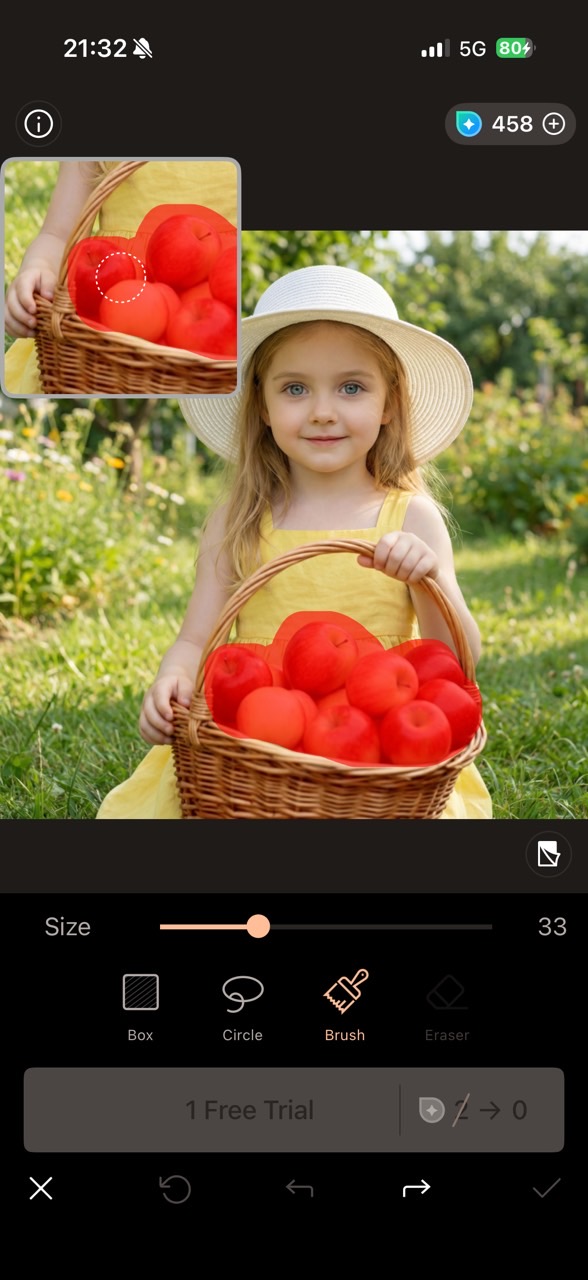
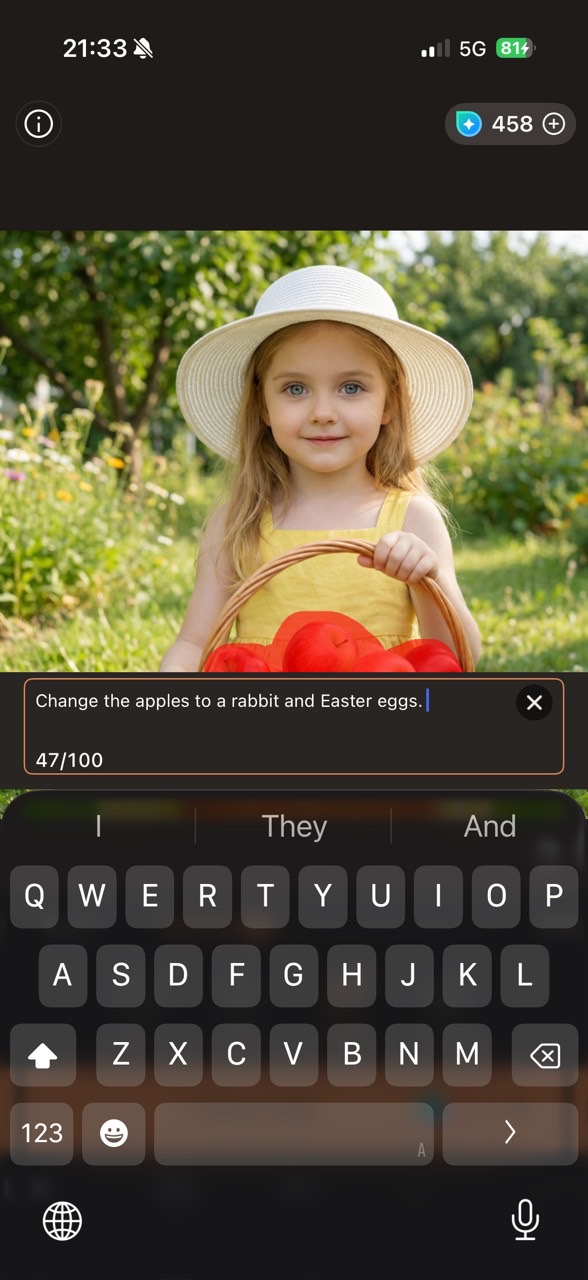
- Generate and export
Click Generate, and the AI will automatically place the bunny in your image. Once finished, save the photo and share your magical moment with friends and family.
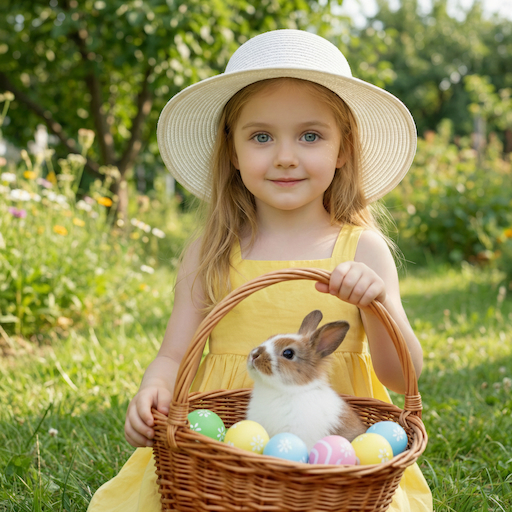


PhotoDirector also offers a series of Easter filters, allowing you to add a bunny to your photo or instantly create a festive bunny vibe with a single click in AI Creative Studio. The most popular styles include giant bunny, Easter queen and Alice in the Easterland. Let's cook up some Easter magic!


More Fun Easter Photo Ideas
Besides adding a bunny, you can use AI to create many other playful Easter scenes.
Adorable Baby Easter Photos
Easter is one of the sweetest holidays. With a few clicks and precise AI prompts, you can create memorable Easter infant photo shoots at a lower cost, without the need for an elaborate setup. Transform daily baby photos into a retro Easter vibe, a surprise egg hunt, or a dreamy carrot stand!

Stunning AI Bunny Filters
Looking to add a creative twist to your Easter celebrations this year? With PhotoDirector, it's extremely easy to create your own personalized bunny character with various AI filters.

Creative Easter Images
Easter is all about joy, family, and creativity. From colorful eggs and playful bunnies to festive decorations and heartwarming moments, you can bring your ideas to life with the 40 best Easter AI prompts. Whether you're creating a cozy family picnic scene or fun Easter coloring pages for kids, these creative ideas make it easier than ever to celebrate Easter in style.

Viral Easter Bunny Videos
Easter is the perfect time to create playful and heartwarming videos. With an AI video generator, you can easily animate a static rabbit photo or create a lively Easter bunny video using simple prompts. These AI-generated Easter bunny videos will definitely make your holiday more unique, engaging, and unforgettable!

FAQs About Add Easter Bunny to Photo
You can add an Easter Bunny to a photo using AI editing tools. Upload your photo, brush the area where the bunny should appear, type a prompt describing the bunny, and let the AI generate the image.
To create the illusion of catching the Easter Bunny, use AI photo editing tools to add a bunny hiding eggs, peeking behind objects, or running through the garden.
Many online AI photo editors allow you to add objects to images for free. Upload your picture, select an AI replace or generative fill tool, and type a prompt like “cute Easter bunny holding eggs.”
You can add bunny ears using mobile photo editing apps such as PhotoDirector, Snapchat filters, or Instagram effects. These apps include stickers, AR filters, or AI tools for adding Easter accessories.
Some popular free apps include PhotoDirector, Canva, and PicsArt. These apps allow you to generate or insert AI objects directly into photos.
Yes. Modern generative AI models can create realistic animals that match the lighting and perspective of your image, making the bunny look naturally part of the scene.
Rabbits became an Easter symbol because they represent fertility and new life, which aligns with springtime traditions. The Easter Bunny legend became popular in Europe and later spread to the United States.
Some apps and AI image generators offer Easter-themed filters or prompts that automatically create bunnies, eggs, and spring decorations in your photos.
Yes. AI photo editors make it easy to add objects like the Easter Bunny without needing Photoshop or advanced editing skills.

The CyberLink Editorial Team is composed of product testing specialists and content creation experts with over 20 years of hands-on experience and rigorous research in the multimedia editing industry. As the official voice of CyberLink, the team consistently delivers practical, easy-to-follow tutorials across video, photo, and audio editing, while highlighting AI innovations, product insights, and emerging industry trends. Their work empowers millions of creators worldwide each year to elevate their content. Beyond the blog, the team actively shares editing tips and product updates across YouTube, Facebook, Linkedin and Pinterest.
😎 Outside of their work, they enjoy capturing travel moments and meticulously editing photos and videos for their social channels.


