






How to Change Facial Expression with AI Online for Free

Ever wish you could fix an awkward facial expression in a photo?
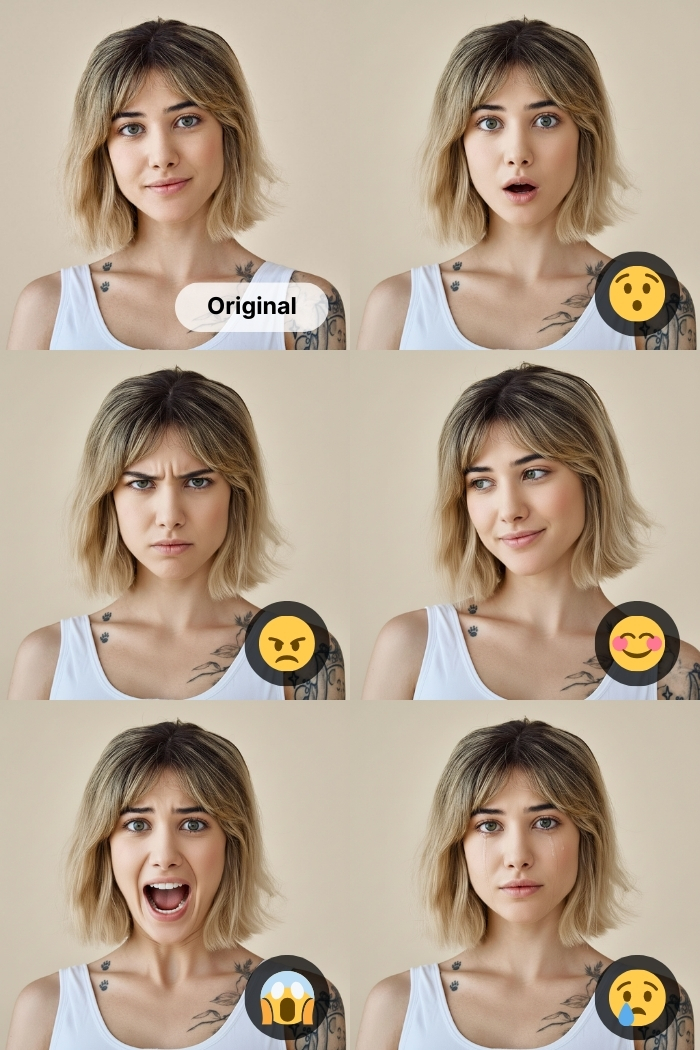
With AI facial expression changers, you can easily turn a neutral or tired face into a smile, playful look, or any emotion you want. No Photoshop skills required. This guide shows how to change facial expressions online for free, the best tools to use, and tips to keep results natural.

- How to Change Facial Expression Online with AI
- Best 9 AI Facial Expression Changers You Can Try Today
- How Changing Facial Expressions Can Improve Your Photos
- Tips to Get More Natural AI Facial Expression Results
- FAQs About Online Facial Expression Changers
How to Change Facial Expression Online with AI
Changing facial expressions online is surprisingly easy. You do not need design skills, acting skills, or a mirror.
- Open MyEdit in the web browser and head to Edit by Text.
- Upload your photo and select an AI model.
💡A photo with a clear, front-facing face, good lighting, and no objects covering the face will produce better results.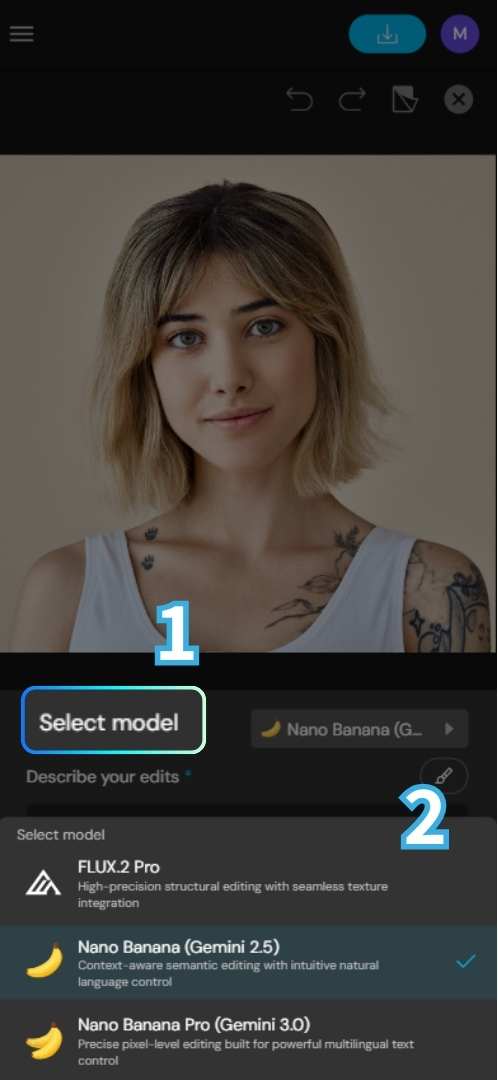
- Enter a prompt. Be specific but natural.
Prompt Example:
· Make the person look angry with furrowed brows.
· Change facial expression to a gentle smile.
· The girl is sad and her eyes are filled with tears.
· Soft, cute, slightly shy expression.
- Click "Generate" and let AI do its thing.


Best 9 AI Facial Expression Changers You Can Try Today
Below are the best tools for changing facial expressions online. Each tool below supports facial expression changes in different ways. If you want precise control and prompt based editing, MyEdit and OpenArt stand out.
| App Name | Best For | Platforms | AI-Powered? | Free Version? | Key Features |
|---|---|---|---|---|---|
| MyEdit | Prompt-based facial expression changes | Web Browser, iOS, Android | Yes | Yes (3 free credits/ day) | AI Replace, Prompt Editing, Natural Facial Adjustments |
| Media.io | Quick and easy facial expression edits | Web Browser | Yes | Yes (3 free credits/ day) | AI Face Tools, Simple UI, Fast Processing |
| Fotor | All-in-one photo editing with AI effects | Web Browser, iOS, Android | Yes | Yes | AI Portrait Tools, Filters, Retouching |
| OpenArt | Creative AI-driven facial transformations | Web Browser | Yes | Yes (40 one-time credits) | Generative AI Editing, Prompt Control |
| HeyPhoto | Real-time facial expression adjustments | Web Browser | Yes | Yes (watermark on the result) | Live Face Editing, Expression Sliders |
| Bylo AI | Fast AI-based face modifications | Web Browser | Yes | Yes (5 free credits/ day) | AI Face Transform, One-click Editing |
| CapCut | Social media content and video editing | iOS, Android, Windows, Mac | Yes | Yes | AI Effects, Face Filters, Video Editing |
| FaceApp | Popular face transformation effects | iOS, Android | Yes | Yes | Facial Expressions, Age and Smile Filters |
| PicsArt | Creative photo edits and effects | Web Browser, iOS, Android | Yes | Yes (5 free credits/ week) | AI Tools, Stickers, Retouching |
How Changing Facial Expressions Can Improve Your Photos
-
Family Photos Where Someone Looks Tired
In group photos, there is always one person blinking, yawning, or looking half asleep. AI facial expression tools help refresh their expression so everyone looks present and happy in the final photo.
-
Professional Headshots
A stiff or unfriendly expression can hurt your personal brand. Adjusting your facial expression to look relaxed and confident can make your headshot more approachable for resumes, LinkedIn, and company profiles.
-
Dating Profile Pictures
First impressions matter. A subtle smile or softer expression can make your photo feel warmer and more inviting, which often leads to higher match and like rates.
-
Social Media Content
Facial expressions should match your caption and mood. AI lets you fine tune expressions so your photo aligns with the story you want to tell.
-
Old Photos with Great Memories but Awkward Faces
You can keep the original moment while fixing stiff or strange expressions that distract from the memory.
-
Creative Projects or Memes
From exaggerated emotions to playful chaos, AI facial expression changes give creators more freedom to experiment.
Tips to Get More Natural AI Facial Expression Results
Before you go wild with prompts, keep these tips in mind:
- Change one emotion at a time
- Avoid extreme expressions unless you want comedy
- Use descriptive but simple language
- Smaller painted areas usually look more realistic
Think subtle glow up, not emotional jump scare.
FAQs About Online Facial Expression Changers
Snapchat offers built-in filters, but for more control, save the photo and edit it with an AI facial expression changer online.
Using an AI powered online editor like MyEdit is the easiest. No layers, no masks, no emotional breakdown.
Yes, but it requires advanced skills. AI tools are faster, easier, and less likely to ruin your weekend.
Use photo-editing tools that offer features like Edit by Text or AI Replace to adjust the photo. For prompt-based editing, tpye in prompts like “natural smile.”
Many tools offer free versions with limits. For casual editing, free plans are usually enough.
Not if you use good photos, subtle prompts, and reputable tools.

The CyberLink Editorial Team is composed of product testing specialists and content creation experts with over 20 years of hands-on experience and rigorous research in the multimedia editing industry. As the official voice of CyberLink, the team consistently delivers practical, easy-to-follow tutorials across video, photo, and audio editing, while highlighting AI innovations, product insights, and emerging industry trends. Their work empowers millions of creators worldwide each year to elevate their content. Beyond the blog, the team actively shares editing tips and product updates across YouTube, Facebook, Linkedin and Pinterest.
😎 Outside of their work, they enjoy capturing travel moments and meticulously editing photos and videos for their social channels.


