




How to Create Professional Product Photo Backgrounds for Amazon, Etsy and Shopify Sellers

Most online sellers spend hours getting their product photos right and barely think about the background. But the background is doing more work than you realise. It can get your Amazon listing automatically removed, tank your Etsy click-through rate, or make your Shopify store look unfinished. The rules are different on every platform, and most sellers only find out when something goes wrong.
You do not need three photoshoots to fix this. MyEdit's AI Background Editor removes your background and replaces it with exactly what each platform needs: pure white for Amazon, a styled preset for Etsy, a brand colour for Shopify. All from the same original photo, in your browser, in seconds.
- Why Each Platform Has Different Rules
- How to Edit Your Background with MyEdit
- Before and After Results by Platform
- Why MyEdit Works for Online Sellers
- Frequently Asked Questions
Why Does Every Marketplace Have Different Background Rules?

Each marketplace has a different relationship with its buyers, and the background rules reflect that. Amazon is a search-driven platform where products compete side by side in grid results — a standardised pure white background makes products easier to compare and is enforced automatically. Etsy is built around craft and personal connection, where styled lifestyle backgrounds consistently outperform plain white. Shopify gives you full freedom, but consistency across your catalog matters more than any specific background choice.
Here is exactly what each platform expects:
| Platform | Main image background | Secondary images | Enforced? |
|---|---|---|---|
| Amazon | Pure white, RGB 255,255,255. No exceptions. | White recommended, lifestyle and infographic allowed | Yes, non-compliant listings are automatically suppressed |
| Etsy | No requirement. Lifestyle and styled backgrounds encouraged | Any style, up to 10 images per listing | No, Etsy does not enforce background rules |
| Shopify | No requirement. Consistency across catalog is what matters | Any style, match your chosen brand aesthetic | No, no automated compliance checks |
How to Edit Your Product Photo Background with MyEdit


An original product photo taken at home transformed into a clean marketplace-ready image using MyEdit's AI Background Editor. The same workflow produces white, lifestyle, or branded results from a single upload.
-
Open MyEdit's AI Background Editor: Go to the Background Editor page in your browser. The tool runs entirely online with no software download required. Sign in or create a free account to get started.
-
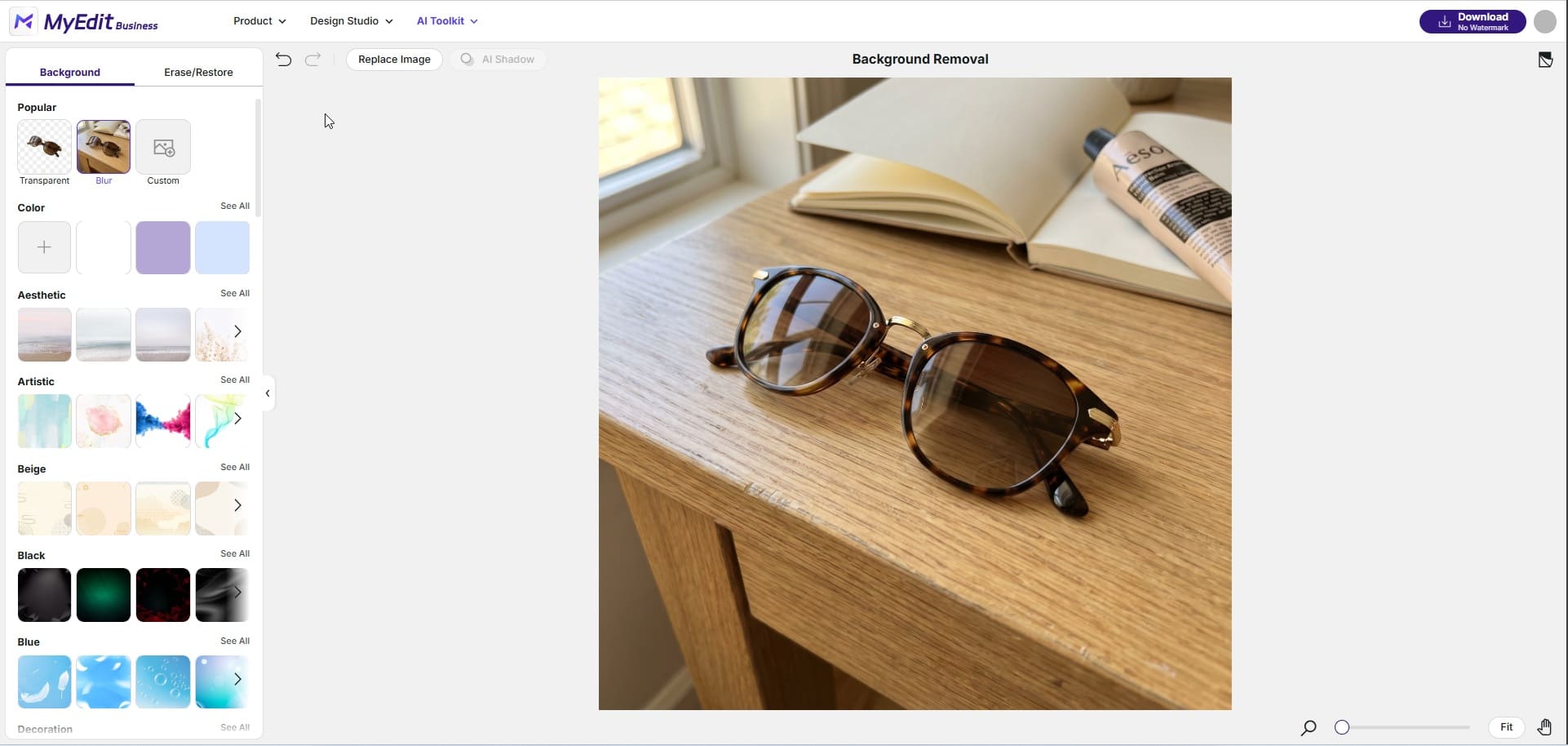
Upload your product photo: Drag and drop your image or click to upload. MyEdit supports JPG, PNG, WebP, GIF, and BMP files up to 50MB. You can upload a single product image or multiple photos at once for batch processing across your catalog.
-
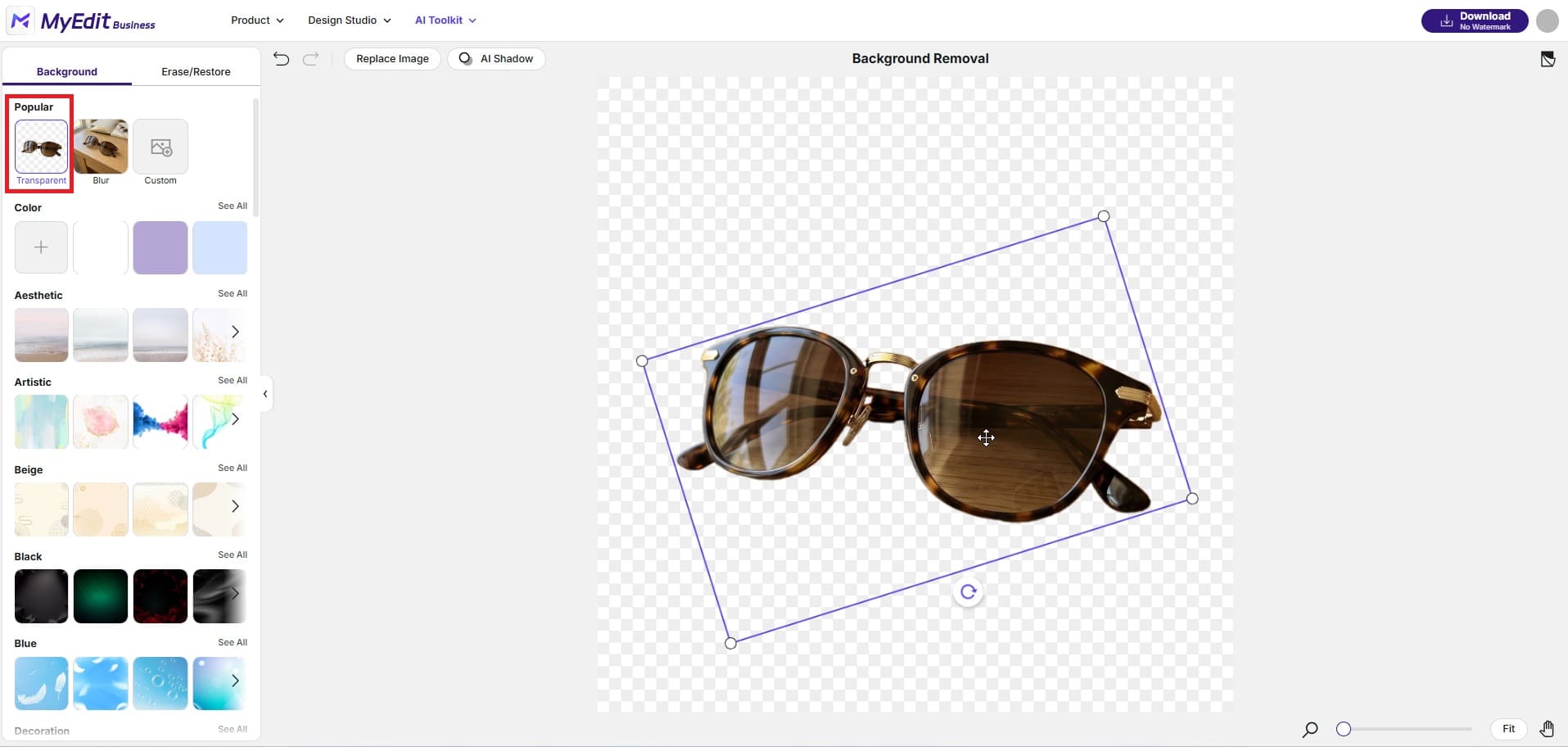
Let the AI remove the background: MyEdit automatically detects and isolates your product from the background. The AI handles complex edges including fine detail, transparent objects, and soft shadows. Once the cutout is ready, you can also reposition, rotate, or resize the product within the frame before applying your new background. Use the Erase/Restore tab to manually refine any edges if needed.
-
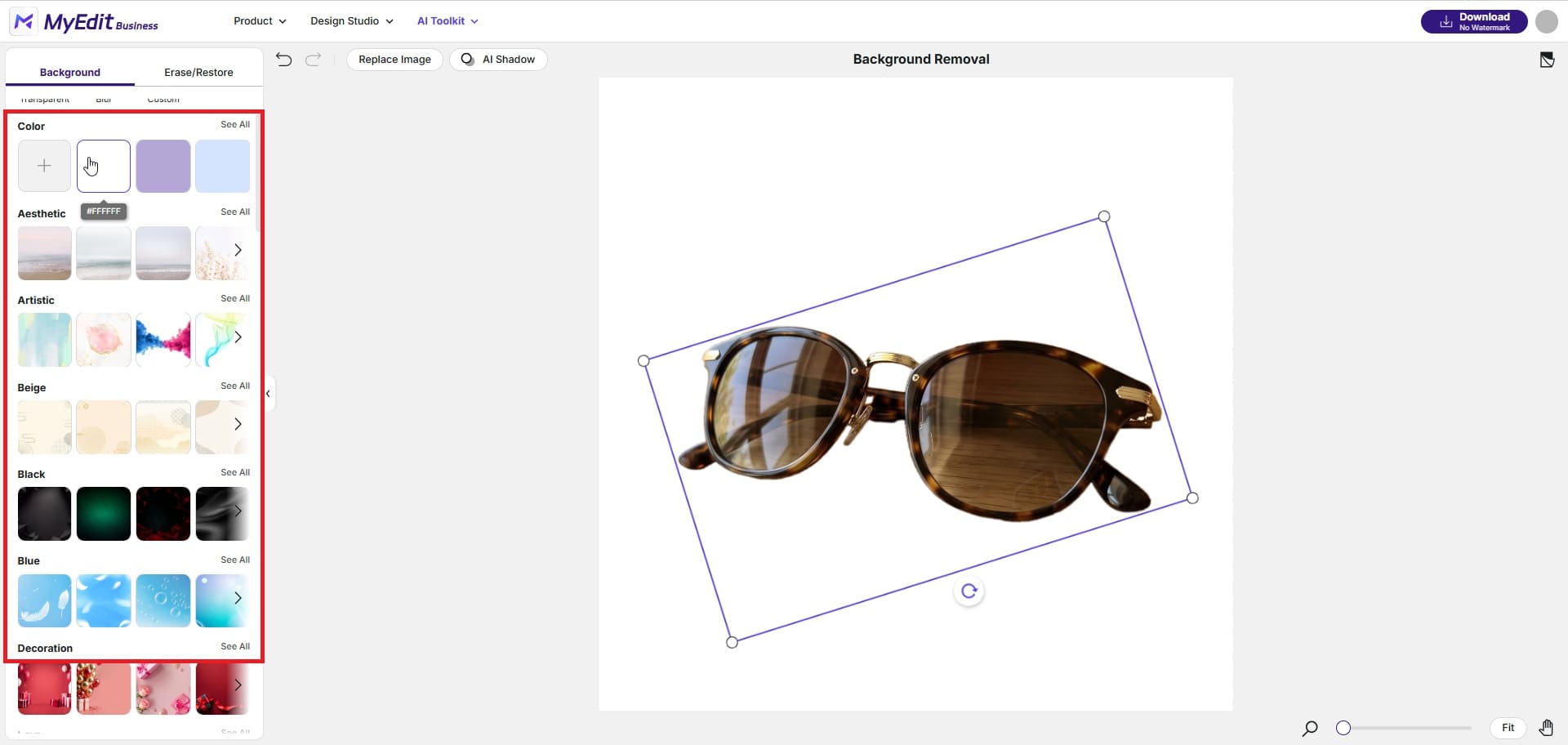
Choose and apply your new background: Select the background type that fits your platform. For Amazon, go to Color and use the picker to set RGB 255,255,255 for a compliant pure white. For Etsy, browse the preset template categories — Aesthetic, Beige, Artistic, and Decoration all work well for lifestyle and handmade products. For Shopify, pick a colour from your brand palette or upload a Custom image to match your store aesthetic. You can also apply a Blur background to keep the focus on the product without removing the original environment entirely.
-
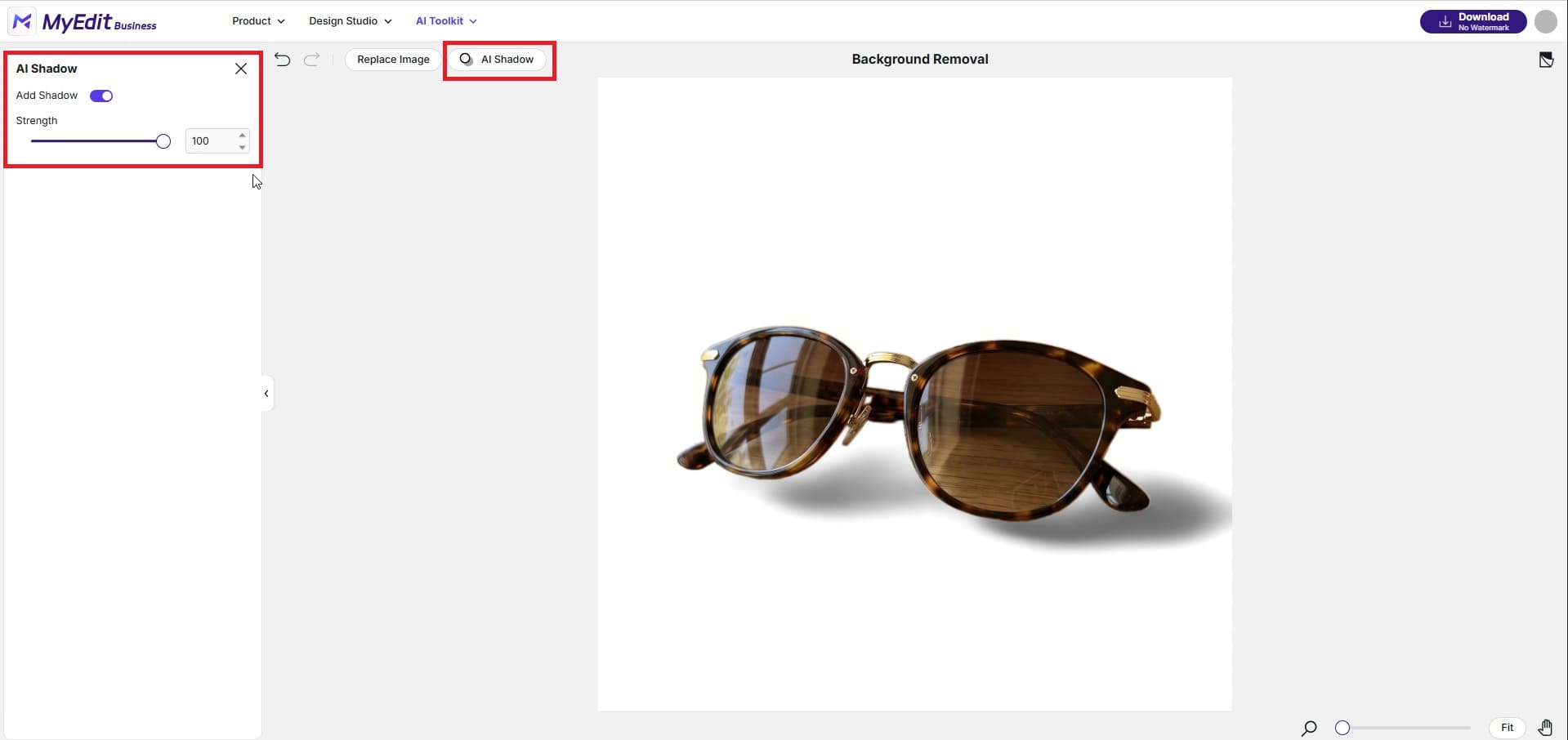
Add AI Shadow for a natural result: Click AI Shadow to add a realistic drop shadow or ground shadow beneath your product. This prevents the flat cutout effect that makes edited photos look artificial and gives your product natural depth on any background.
-
Download and upload to your listings: Download your finished image in high resolution. It is ready to use directly on Amazon, Etsy, Shopify, or any other platform. Go back to step 4 and select a different background to produce additional versions — white for Amazon, lifestyle preset for Etsy, brand colour for Shopify — all from the same original upload.


How the Same Photo Looks on Amazon, Etsy and Shopify
The three examples below show how the same original product photo produces a different result for each marketplace, all processed through MyEdit's AI Background Editor from a single upload.
Amazon: Cluttered Background to Compliant White Listing
A product photo taken at home converted into an Amazon-compliant listing image. MyEdit removes the original background and applies a pure white result that meets Amazon's RGB 255,255,255 requirement, eliminating the risk of automatic listing suppression.
Etsy: Plain Surface to Warm Lifestyle Background


The same product placed into a warm styled background using one of MyEdit's built-in preset templates. The result is an Etsy-ready listing image that feels personal and contextual, the kind of visual that performs significantly better in Etsy search results than a plain white background.
Shopify: Mismatched Background to Consistent Brand Look


The product placed on a clean, consistent branded background selected from MyEdit's colour and template options. The result fits seamlessly into a Shopify product grid, where visual consistency across listings is what separates a professional storefront from one that looks unfinished.
Why MyEdit Background Editor Works for Amazon, Etsy and Shopify Sellers

Most background removal tools give you a transparent cutout and leave you to figure out the rest. MyEdit's Background Editor covers the full workflow: remove the background, choose what replaces it, add a realistic shadow, and export a marketplace-ready image — all in one session. For sellers managing listings across multiple platforms, this means producing an Amazon-compliant white image, an Etsy lifestyle shot, and a branded Shopify visual from a single product photo without switching tools or re-uploading anything. Unlike Photoshop, which requires design skills and a subscription, MyEdit covers the entire background editing workflow in a browser with no experience needed.
- Platform-specific backgrounds in one tool: Switch between pure white for Amazon, preset lifestyle templates for Etsy, and brand colours for Shopify without leaving the editor or re-uploading your photo.
- Built-in preset template library: Browse categories including Aesthetic, Artistic, Beige, Black, Blue, and Decoration to find a background that fits your product and brand without sourcing images separately.
- Precise colour control for Amazon compliance: Use the built-in colour picker to set the exact RGB 255,255,255 value required for Amazon's main image standard. No guessing whether your white is white enough.
- AI Shadow for realistic results: Add a natural drop shadow or ground shadow after the background edit to avoid the flat cutout look that makes edited photos obvious to buyers.
- Batch processing at scale: Upload and process multiple product images in one session, ideal for sellers with large catalogs who need to standardise backgrounds across dozens or hundreds of listings.
- No design or editing skills needed: The entire workflow runs in a browser. Upload, remove, replace, download — no software, no learning curve, no Photoshop subscription required.
Conclusion
Shoppers cannot touch your products. Your photo background is part of what tells them whether to trust you. Getting it wrong on Amazon costs you the listing. Getting it wrong on Etsy costs you the click. Getting it wrong on Shopify costs you the sale. MyEdit's AI Background Editor gives every independent seller the tools to get it right on all three, from a single product photo, in a single session, with no design experience required. If your current product photos are not meeting the background standard each platform expects, this is where to start.
Related Articles:
- Best AI Tools to Boost Ecommerce
- Guide to Ecommerce Photo Editing
- Best AI Social Media Post Generators
FAQs: Product Photo Backgrounds for Amazon, Etsy and Shopify Sellers
Yes. Amazon requires a pure white background with an exact RGB value of 255,255,255 for the main product image on every listing. The background cannot be off-white, light grey, or close to white — it must be exact. Amazon's systems scan uploaded images automatically and suppress listings that do not comply. Secondary images in slots 2 through 9 have more flexibility and do not require a white background.
No. Etsy has no white background requirement. Sellers are actively encouraged to use lifestyle photography, styled backdrops, and creative compositions that reflect their brand. Clean, uncluttered backgrounds generally perform better than busy ones, but white is not required and is not always the best choice for Etsy listings.
Shopify has no enforced background requirements. The best background for a Shopify store is whichever style you apply consistently across your entire catalog. Whether you choose white, a brand colour, or a lifestyle setting, using the same approach on every product creates a professional and cohesive store appearance that builds buyer confidence and reduces bounce rates.
Not without editing. Amazon requires a specific pure white background that does not perform as well on Etsy, where lifestyle images convert better. For Shopify, brand consistency matters more than any particular background colour. The most practical approach is to start with one high-quality product photo and use a tool like MyEdit's AI Background Editor to produce a different background version for each platform from the same original image.
AI background editors like MyEdit let you remove an existing background and replace it with a pure white colour in seconds, directly in your browser. You upload your product photo, the AI isolates the product, and you apply white using the colour picker set to RGB 255,255,255. No Photoshop, no design skills, and no studio setup is needed.
The most common reason is that the main image background is not meeting Amazon's pure white RGB 255,255,255 standard. Even slightly off-white, cream, or light grey backgrounds trigger automatic suppression. Other common causes include the product filling less than 85% of the frame, visible text or watermarks on the main image, or an image resolution below 1000 pixels on the longest side. Using MyEdit's colour picker to set the exact RGB value eliminates the background compliance issue entirely.

The CyberLink Editorial Team is composed of product testing specialists and content creation experts with over 20 years of hands-on experience and rigorous research in the multimedia editing industry. As the official voice of CyberLink, the team consistently delivers practical, easy-to-follow tutorials across video, photo, and audio editing, while highlighting AI innovations, product insights, and emerging industry trends. Their work empowers millions of creators worldwide each year to elevate their content. Beyond the blog, the team actively shares editing tips and product updates across YouTube, Facebook, Linkedin and Pinterest.
😎 Outside of their work, they enjoy capturing travel moments and meticulously editing photos and videos for their social channels.


