





Setlog: What is the camera app trending in Asia?

Setlog is a trending vlog and video editing app popular in Korea and Hong Kong. People use it for creating aesthetic daily vlogs, photo dumps, and short-form lifestyle videos for TikTok, Instagram Reels, and Xiaohongshu-style content.
This article will walk you through Setlog features, how to use it, and how you can level-up your Setlog videos with PowerDirector App — so you and your friends can capture everyday moments together!
- Setlog is a viral vlog editing app trending in Asia
- Popular for daily vlogs, minimal edits, and lifestyle content
- Works well for TikTok, Instagram Reels, and short-form videos
- Can be combined with advanced editors like PowerDirector for more customization
- What Is Setlog? The Vlog App Trending in Korea & Hong Kong
- Why Is Setlog Going Viral on TikTok & Instagram?
- How to Use Setlog: Step-by-Step Tutorial
- Setlog App Review: Features, Pros & Cons
- Upgrade Your Setlog Videos with PowerDirector
- Setlog FAQ
What Is Setlog? The Vlog App Trending in Korea & Hong Kong

Setlog is a social Vlog App designed for creating minimalist and aesthetic vlog content.
All you have to do is record a 2-second clip every hour with a short caption. At the end of the day, the app automatically organizes your clips in chronological order and compiles them into one complete Mini Vlog. You can use it solo or record daily momnets with friends.
Setlog only supports real-time recording — no editing skills required. Even on an ordinary day, it's a great way to preserve those little moments with the people you care about!
Why Is Setlog Going Viral on TikTok & Instagram?
Setlog became viral because it matches current social media editing trends. Modern short-form content favors:
- Authentic “daily life” storytelling
- Soft film-style visuals
- Minimalist editing
- Fast-paced videos
Besides easily producing popular video content, its fresh take on social video sharing has driven significant engagement. 🔥
The fun of recording with friends and catching up with each other's lives through Setlog is the core engine of the app's growing popularity. It's all about casual, in-the-moment sharing.


How to Use Setlog: Step-by-Step Tutorial
Setlog supports an English interface and it's easy to navigate. Here's a breakdown of the basic workflow:
Setlog Step-by-Step Tutorial
- Download the Setlog App
Setlog app is available on both App Store and Google Play Store.
- Create or join a Log
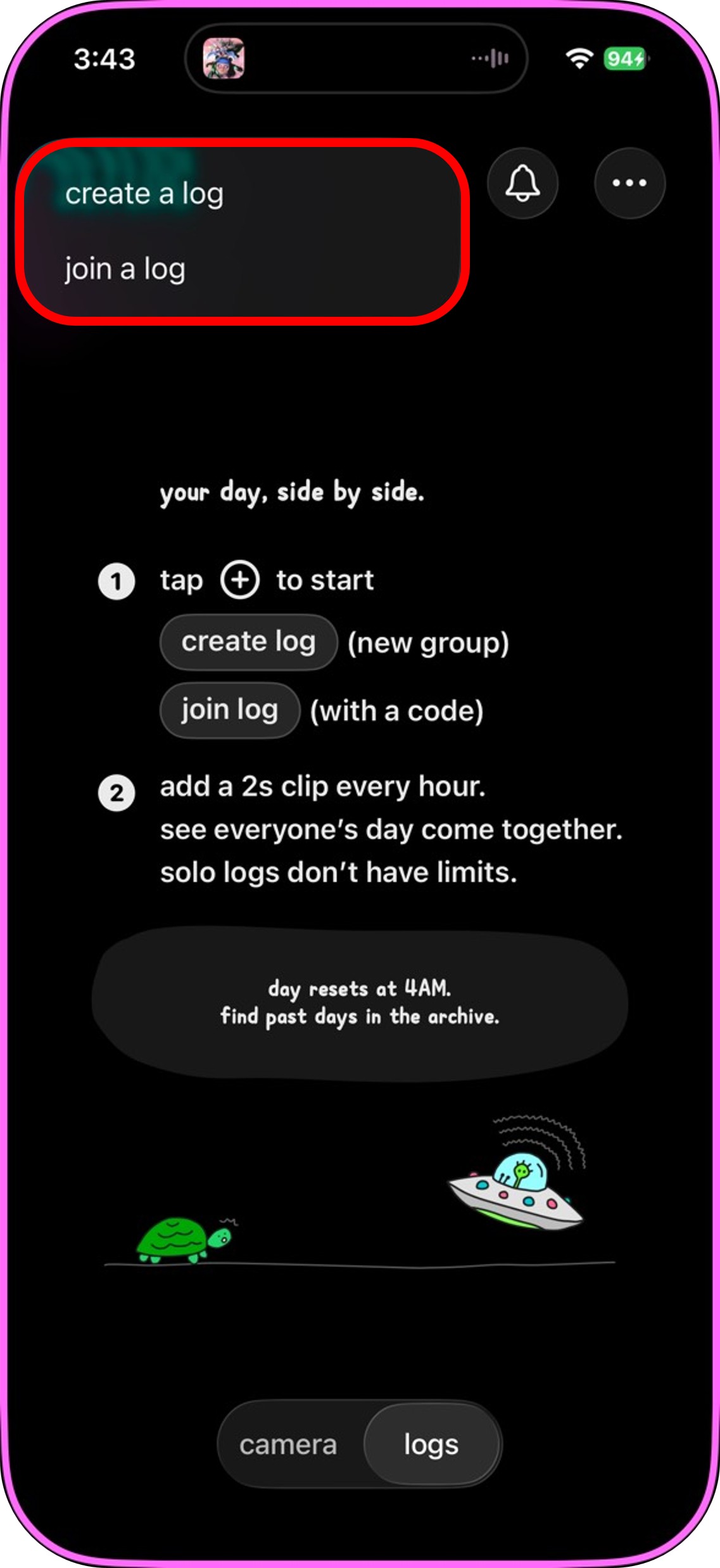
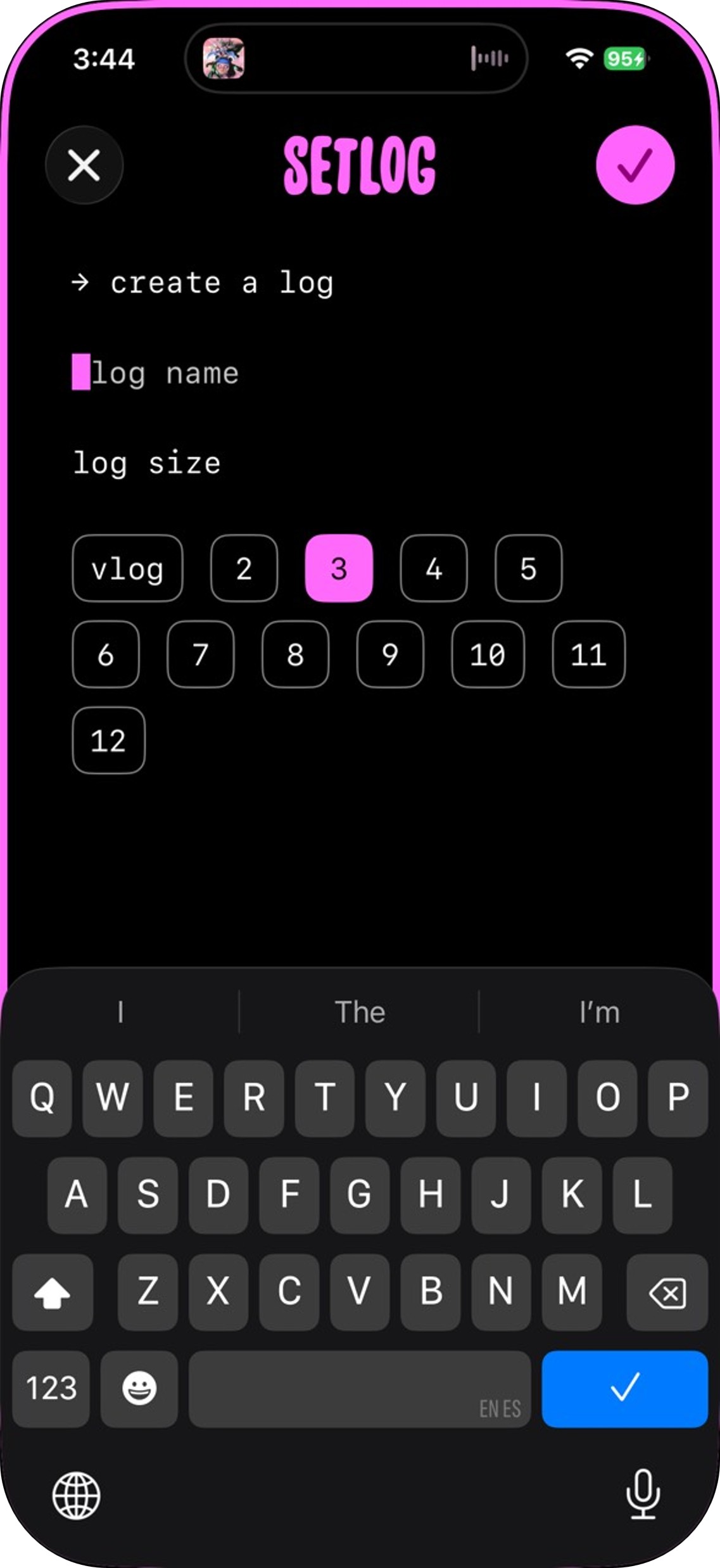
Open the Setlog app, tap the "+" icon in the top-right corner to create your own Log, or enter an invite code from a friend to join their group.
Each Log supports up to 12 members. Set a name, choose your group size, and you're ready to go.
- Start recording on the hour
Once inside your Log, the app will send you a reminder every hour to record a short clip of about 2 seconds, capturing whatever you're up to at that moment.
You cannot upload clips from your camera roll — everything must be recorded live, and you can't go back to fill in earlier hours. Lastly, remember to shoot in landscape mode!
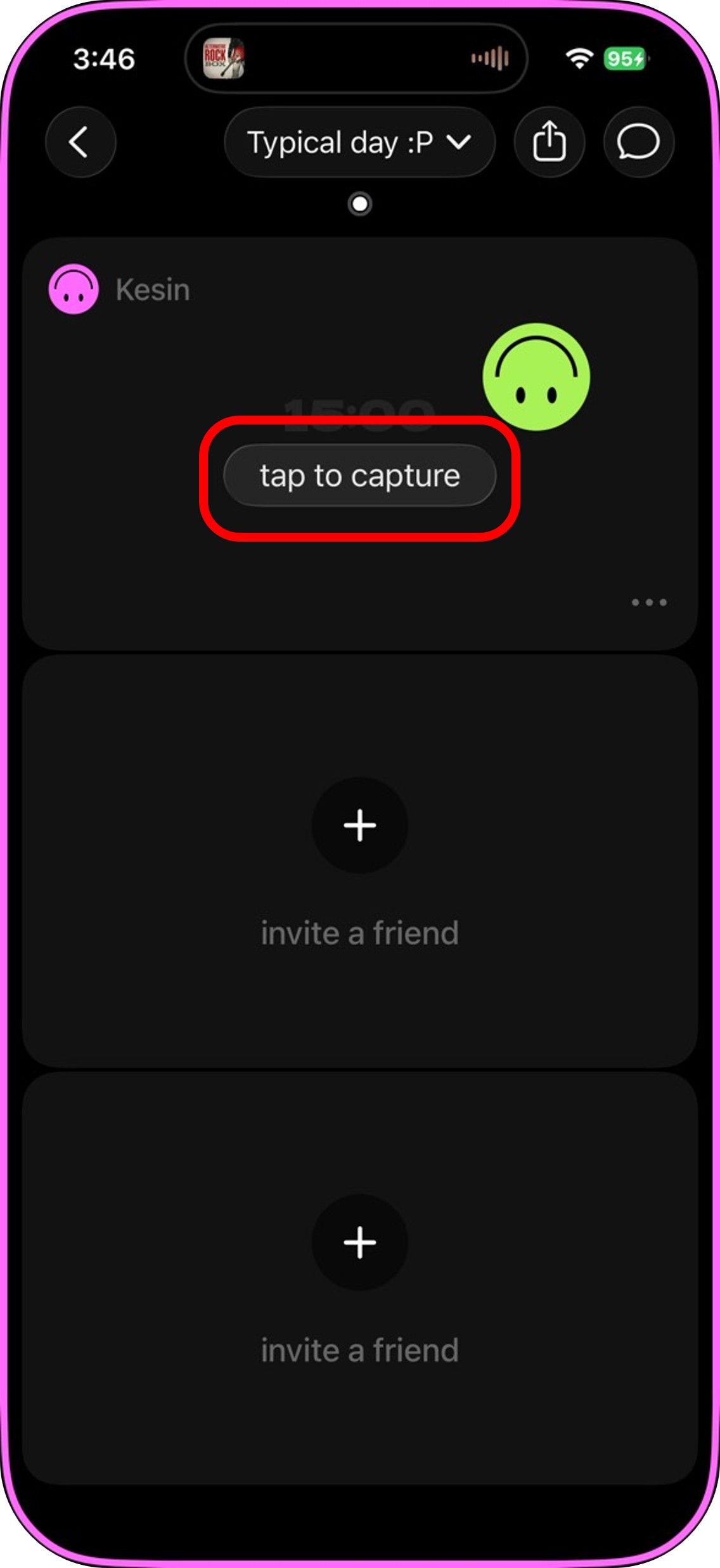
- Watch your friends' clips in sync
The clips are updated in real time in the split-screen view, so you can see what your friends are up to from their different locations once they upload their clips.
You can comment on a friend's clip or share reaction with emojis, making the whole experience more interactive and fun.💬
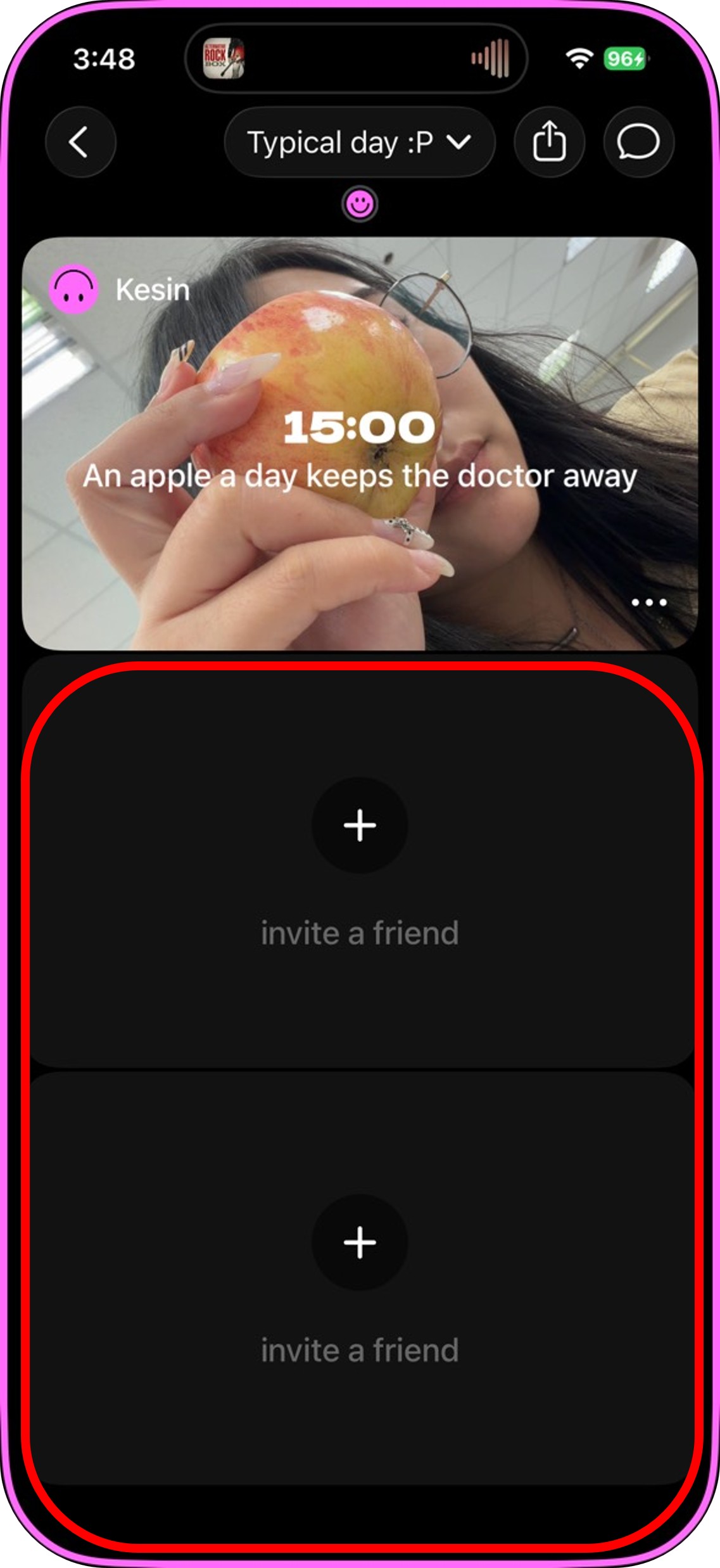
- Auto-generate your daily Vlog
At the end of the day, tap the share button in the top-right corner of your Log. The system will compile your day's footage and give you a preview.
To share the video of your day, tap "Share → Save Video" to export it directly to your camera roll!
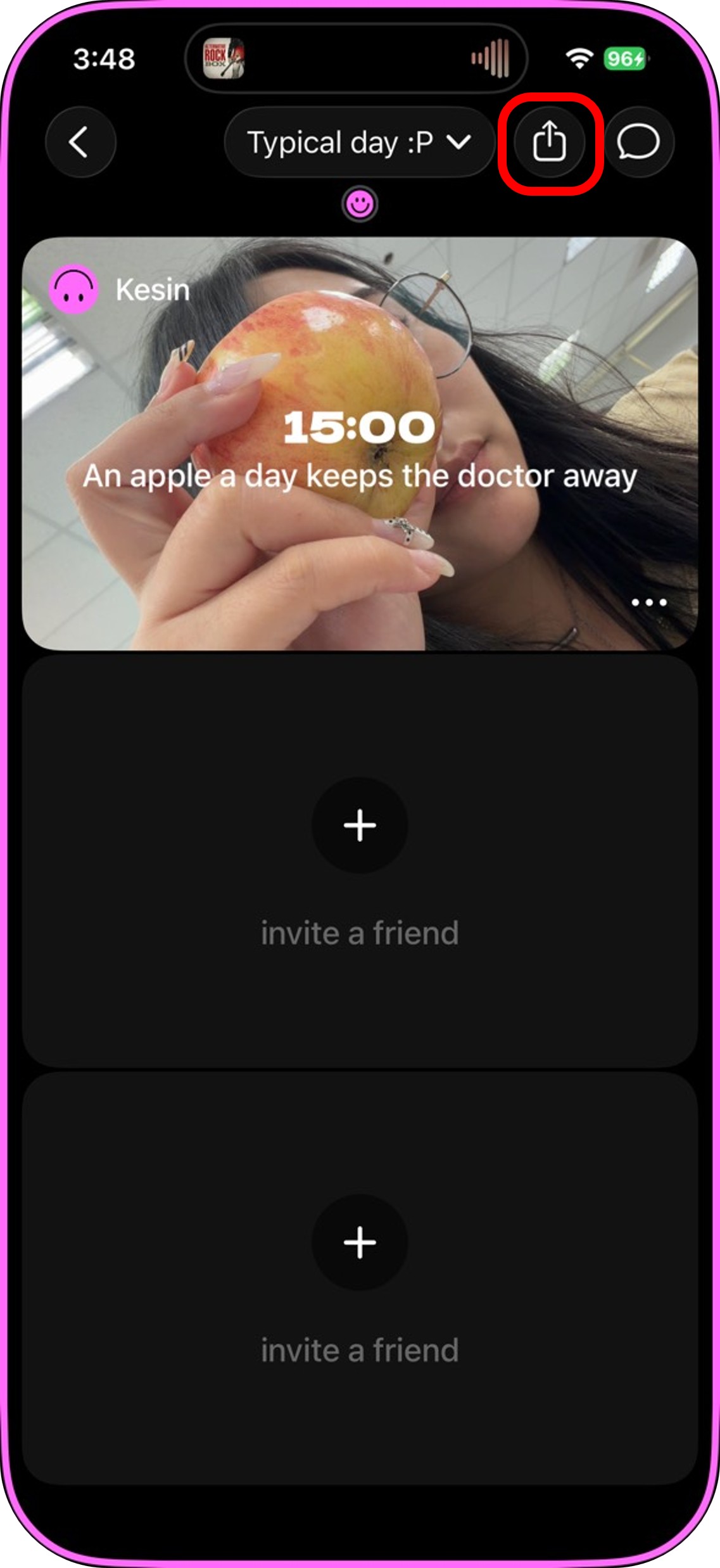


How to View Previous Logs on Setlog
Open your own log or a Log from a friend and swipe right to browse previous videos. To export a past Setlog, just tap the share button in the upper right corner.

Setlog App Review: Features, Pros & Cons
Setlog is a social video app that's genuinely easy to use. Here are the app's standout features:
- Sync and record with friends: You can create a "Log" and invite 2 to 12 friends to join. By recording at the same time each hour from different locations, everyone builds a shared daily diary — and that's the app's biggest draw.
- Automatic editing: All clips are automatically compiled into a video by the system. No editing or adjustments needed on your end.
- Clean, intuitive layout: Beyond the fun of multi-person split screens, the personal Vlog section uses a simple, fresh design aesthetic that resonates with younger users.
- Authentic content first: Live recording only. This keeps content true to real life and takes the pressure off over-polishing.
Pros
- Hourly reminders for clip recording to keep you on track
- Notification of friend uploads in real time
- One-tap video export
Cons
- Limited customization
- Unable to upload old footage
The most significant drawback is the lack of a built-in music feature. To share Vlogs on social media, most users add audio or music using a separate editing app like PowerDirector.
Upgrade Your Setlog Videos with PowerDirector
PowerDirector App is a full-featured video editing tool with multi-track editing, a rich library of media assets, and extensive font options — perfect for adding free music or making advanced tweaks to your Setlog footage.
The first thing you'll want to fix is Setlog's lack of background music. After importing your video, tap Audio to access the built-in royalty-free music library, or add audio from other sources to use as your BGM.🎵
If you want a more unique soundtrack, you can also use PowerDirector's AI music generation feature. Adding sound effects at scene transitions can also give your Vlog a stronger sense of rhythm and flow.

Even if your Setlog was recorded with friends, you can still reshape it into your own personal Vlog afterward. Just import a built-in color backdrop, overlay your Setlog footage, and trim the clips you want — giving you a stylized, bordered personal version.
PowerDirector App comes with a wide variety of built-in assets you can use freely. Toss in a few stickers and your video instantly feels more lively and fun!
When it comes to text, PowerDirector includes a huge selection of fonts spanning English, Chinese, Japanese, Korean, and more — ranging from cute and casual to elegant and formal to handwritten styles. You can freely adjust letter spacing, line height, and font styling. You can enjoy absolute freedom to add extra text in your preferred style and label each person's name in a group recording.


Editing your own Mini Vlog from scratch isn't as hard as it sounds! Even before Setlog existed, this horizontal short-video style was already trending on social media.
With PowerDirector's layer features and a mix of font styles and layouts, you can achieve a polished result completely for free — and every asset supports precise AI background removal.🪄

To sum it up — while Setlog exports are perfectly shareable as-is, there's definitely room to take them further with some post-production polish.
Pair your Setlogs with PowerDirector App to level up your Vlogs. Even just adding background music makes a huge difference!
Recommended Reads About Short Video Editing:
- How to Use Instagram Edits
- Best Free Video Editing Apps in 2026
- Best Free TikTok Editing Apps in 2026
Setlog FAQ
Setlog is a social Vlog App that lets you capture life in bite-sized clips and automatically compiles your daily moments into a complete video.
After joining or creating a Log, record a 2–4 second clip every hour. The system automatically compiles everything into a daily Vlog. You can also use it together with friends in sync.
Setlog is now available on Google Play, but many Android users have reported issues accessing the app. Make sure your Android version is 10 or above for the best chance of compatibility.
Setlog's minimalist editing style and Korean-inspired aesthetics fit current TikTok and Instagram trends. Moreover, its real-time sharing and authenticity in reflecting daily life moments resonate with audiences today.
Setlog is an easy-to-use social Vlog app that allows users to record short clips throughout a day and automatically compiles the clips into a daily Vlog video.

The CyberLink Editorial Team is composed of product testing specialists and content creation experts with over 20 years of hands-on experience and rigorous research in the multimedia editing industry. As the official voice of CyberLink, the team consistently delivers practical, easy-to-follow tutorials across video, photo, and audio editing, while highlighting AI innovations, product insights, and emerging industry trends. Their work empowers millions of creators worldwide each year to elevate their content. Beyond the blog, the team actively shares editing tips and product updates across YouTube, Facebook, Linkedin and Pinterest.
😎 Outside of their work, they enjoy capturing travel moments and meticulously editing photos and videos for their social channels.


