Video editing is the process of manipulating and rearranging video shots to create a new piece of footage. It can be used to create new stories, characters, and worlds - or to improve the quality of your existing videos.
Many different video editing software tools are available on the market, each with its own features and capabilities.
When choosing a video editor, it is essential to consider your own needs and objectives. For example, do you want a simple tool for making quick edits, or do you need something more powerful for advanced video production?
As an editor, you are always on the lookout for the next best editing software. While DaVinci Resolve has been a staple in the industry for years, some great alternatives have emerged recently.
Top 3 Best Alternatives to DaVinci Resolve Snapshot
1. PowerDirector - Best Overall
PowerDirector is the best overall alternative because of its robust feature set and easy-to-use interface. It is the only editor on our list that is beginner-friendly and includes thousands of video templates. Detailed Review >
Download from the App Store for iOS
and Android
.
2. Adobe Premiere Pro - Best for Creative Cloud Subscribers
Adobe Premiere Pro is best for Creative Cloud subscribers because of its tight integration with other Adobe products. If you are a creative professional, Adobe is always a top choice. Detailed Review >
3. Final Cut Pro - Best Professional Mac Software
Final Cut Pro is the best professional Mac software due to its advanced features and bundled applications. Perfect for the Apple loyalist. Detailed Review >
What is DaVinci Resolve?
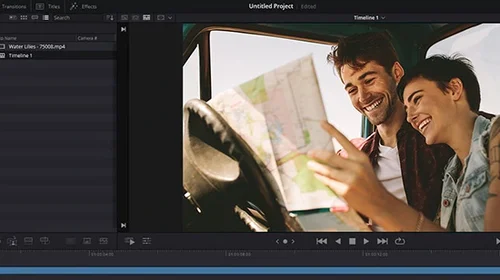
Initially developed by da Vinci Systems, this powerful application is now developed by Blackmagic Design. DaVinci Resolve offers a non-linear editing system for both MacOS and Windows. It also features color grading tools and support for 4K resolution videos.
This powerful application offers a comprehensive toolset for both tasks and is perfect for professionals or anyone who wants to take their video projects to the next level.
With DaVinci Resolve, you can quickly and easily correct color imbalances, adjust saturation and contrast, and achieve the perfect look for your video. The non-linear video editor is also perfect for creating polished, professional-looking videos with a wide range of features and effects that will give your project that extra touch of class.
5 Best Alternatives to DaVinci Resolve
1. PowerDirector - Best Overall
Compatibility: Windows, Mac
Overall Rating: 10 / 10
Beginner-friendly: 10 / 10
Key Features
Intuitive chroma key, motion tracking, and video masks
Complete keyframe control
Video collage and intro designer
PowerDirector is just what you need. It is a capable yet simple-to-use video editor powered by AI that can help you create stunning videos in no time. Cut, refine, and add effects to your videos with PowerDirector's intuitive workflow. And with its growing library of resources, you can keep adding new effects and refining your skills as you go.
PowerDirector's AI tools are a game-changer. For example, you can instantly replace a sky or remove distracting background noise while improving vocal tracks with Speech Enhancement. You can even auto-select an object to create a video mask or make any song fit the length of your project in one click. These features are a huge time saver while ensuring that your videos always look their best.
So whether you are a beginner or a seasoned pro, PowerDirector is the video editor that can help you achieve spectacular results quicker than any other software.
Reasons to Recommend
Makes it easy to create professional-quality videos, regardless of your experience level
Wide range of customizable templates and effects
Built-in transitions, motion graphics, and titles
Download the best video editor for FREE now!
Download from the App Store for iOS
and Android
.
2. Adobe Premiere Pro - Best for Creative Cloud Subscribers
Image from Adobe.
Compatibility: Windows, Mac
Overall Rating: 9 / 10
Beginner-friendly: 4 / 10
Key Features
Traditional timeline editing
Color Correction
Speech to text conversion
With Adobe Premiere Pro, you will enjoy greater flexibility and creativity in your video editing.
It provides an excellent workflow, powerful adjustment layers, and raw controls to keep your footage looking its best. Plus, its panel-based user interface is both organized and fully customizable.
Its comprehensive set of tools lets you experiment with different looks and styles to find the perfect one for your project. The only downside is if you have never edited before or used an Adobe product, it can be incredibly intimidating. There is extensive online help and tutorials, but it will still require a lot of time to learn.
Pros
Industry-standard tool
Integrates seamlessly with Creative Cloud apps
Cons
It can be difficult to add and edit titles
Subscription is very expensive
3. Final Cut Pro - Best Professional Mac Software
Image from BolderVideo.
Compatibility: Mac
Overall Rating: 8.5 / 10
Beginner-friendly: 4 / 10
Key Features
Color grading
Object tracker with Cinematic mode
Built-in chroma key
Final Cut Pro offers a wide range of powerful editing features to help you create the most stunning videos imaginable.
With its Apple-style interface, you can quickly and easily add effects, transitions, and titles to your videos if you are familiar with iMovie and other creative Apple software. And with its support for 4K and HDR video, you can be sure that your videos will look amazing on any screen.
With advanced organizing tools, you can easily keep track of your video projects and make sure they are edited to perfection. The most significant downsides of Final Cut Pro are it is only available on Mac, and the interface can be tricky to use in the beginning.
Pros
Runs beautifully on Apple machines
2D and 3D titles can be generated with ease
Cons
Expensive upfront cost
Video libraries need to be updated when the software updates
4. Blender - Best for VFX
Image from Blender Artists.
Compatibility: Windows, Mac
Overall Rating: 7 / 10
Beginner-friendly: 3 / 10
Key Features
Animation and rigging
Extensive modeling toolset
Rendering path tracer
Blender is best for VFX artists because of its powerful node-based compositor and 3D modeling tools.
If you are in the market for a powerful and versatile 3D animation tool, then you will want to check out Blender. This open-source software is free to download and use, making it an excellent option for budget-conscious artists and filmmakers. Blender is packed with features ideal for creating stunning visual effects.
It is challenging to learn because it can be used to create highly complex animations. But it's compatible with many video formats and can work well with other video editing software.
Pros
Offers high-end digital video sculpting tool
Multiple pipeline tool integration
Cons
Does not allow direct sharing to social media
Lacks advanced video editing features, including Multicam mode and 360-degree video support
5. Avid Media Composer - Best for Film Industry
Image from Avid.
Compatibility: Windows, Mac
Overall Rating: 7.5 / 10
Beginner-friendly: 3 / 10
Key Features
Custom workspaces for multiple monitor configurations
Avid Titler+
Effect Editor
Avid Media Composer is best for film industry professionals because of its deep post-production workflow integration.
Avid Media Composer provides control over every aspect of the video, from trimming and cutting to adding effects and transitions. Speed warp ensures smooth, precise edits, while the cut page makes it easy to rearrange and organize footage. You can also add titles, music, and other elements to your project.
It should be noted Avid is specifically designed for actual film productions. If you are an independent filmmaker this is a fabulous choice for you. If you are not, this software will be overkill and it is advised to use one of the other choices on this list.
Pros
Provides commendable hardware and software support
Trusted by filmmakers around the world for years
Cons
Free versions are very limited while premium is highly expensive
Not a product for social media content creators
Best Alternatives to DaVinci Resolve Comparison Chart
Software
PowerDirector
Adobe Premiere Pro
Final Cut Pro
Blender
Avid Media Composer
OS
Windows, Mac
Windows, Mac
Mac
Windows, Mac
Windows, Mac
Beginner-friendly
Yes
No
Yes
Yes
Yes
Video Editing Tools
Ideal for home movies, social media, general content creation, and filmmaking
Ideal for professional projects
Ideal for professional Apple users
Ideal for VFX artists
Ideal for professional filmmakers
AI Tools
Yes
No
No
Yes
No
Stock Content
Yes
Yes
Yes
Yes
Yes
Free Download
Download
Download
Download
Download
Download
How to Edit With an Alternative to DaVinci Resolve
Follow these steps to edit the video with our top alternative to DaVinci Resolve, PowerDirector.
Download PowerDirector for free on Windows or Mac.
Launch the software.
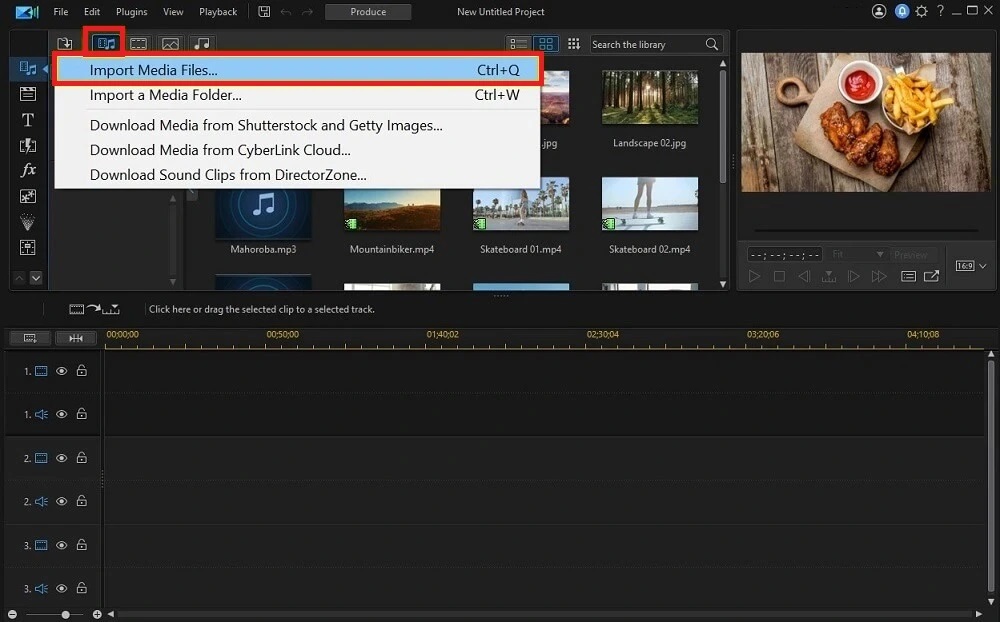
Upload video files by selecting Import Media Folder in the top left corner of the screen
.
Add the videos you want to cut together to the editing timeline.
Using the mouse rearrange, trim, and adjust your clips to be the length and in the order you want them.
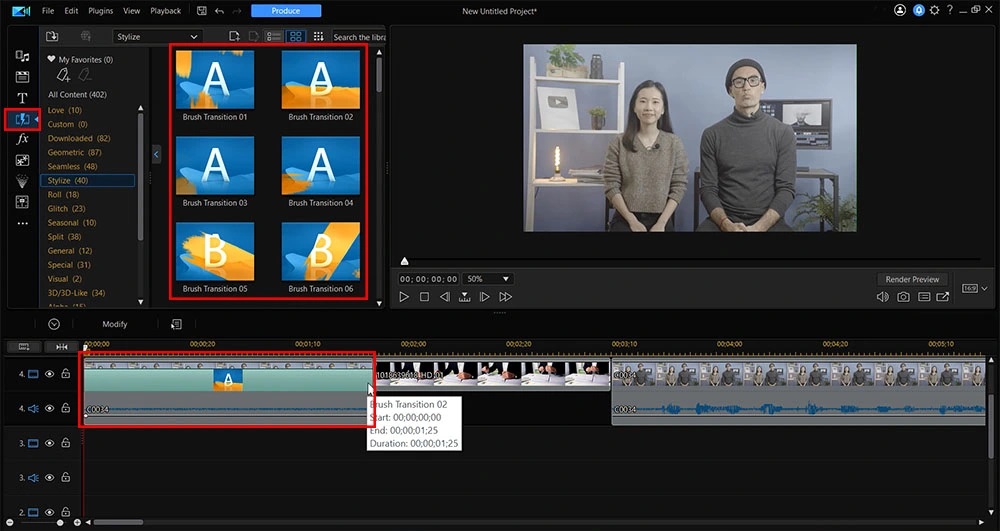
Add transitions at the beginning, end, or between clips. Select your transitions from the Transitions Room, which can be accessed via the lightning bolt-shaped icon located on the left side
.
Once you are satisfied with the results, you can Produce the edited video file.
Download the Best Alternatives to DaVinci Resolve for FREE!
There are many video editors out in the market, but few can compare to PowerDirector. This tool offers free high-quality editing and has all the essential tools professionals rely on for creating videos.
Download it for free now to see how easy it is to use and quickly you can create stunning content.
Download from the App Store for iOS
and Android
.
DaVinci Resolve FAQ
No, PowerDirector is. While DaVinci Resolve is a great video editor, it does have some drawbacks. Namely, the software can be challenging to learn and use for beginners. If you are looking for an easy-to-use video editor with all the bells and whistles, PowerDirector is your best bet. It has everything you need to create professional-quality videos without all the fuss.
There is no doubt that PowerDirector video editing software is better than DaVinci Resolve. It has many features that DaVinci Resolve does not offer in the free version. DaVinci Resolve premium that offers all features is costly, and the learning curve is also steep. For a beginner-friendly video editing tool, PowerDirector is the best.
The top ten features you should look for are
A user-friendly interface
Latest video format support
A wide range of audio format support
Video filters
Transition effects
Color grading
Motion tracking
A wide range of encoding and video export options
Video effects
Sound editing
If you are looking for a video editor that checks all of these boxes, we recommend PowerDirector.