






30 MidJourney Prompts to Copy & Paste (Plus Prompt Guide)

AI has transformed digital art, and MidJourney lets you create stunning images — from realistic portraits to epic landscapes — simply by crafting the right prompts. Discover the top prompts to unlock your creativity and generate amazing AI images.
For an even faster, more flexible experience, MyEdit lets you use reference images, experiment with styles, and see instant previews, making it easy to bring your creative ideas to life.
- MidJourney Styles and Prompt Guide
- Top MidJourney Image Prompts to Try
- Discover MyEdit: Best Alternative to MidJourney
- How to Generate Images Using AI Prompts
- AI Image Prompt FAQ
MidJourney Prompts Guide: Styles, Structure, and Tips

What is MidJourney?
MidJourney is an AI-powered image generator that turns text prompts into stunning visuals. Unlike traditional image tools, it can interpret detailed descriptions to create anything from realistic landscapes to fantastical scenes, making it ideal for artists, designers, and content creators.
What are MidJourney's Most Popular Styles?
MidJourney offers a variety of styles to influence the look and feel of your images, including:
- Realistic / Photorealistic: Detailed and life-like visuals
- Cinematic: Dramatic lighting, composition, and mood
- Fantasy / Sci-Fi: Mythical creatures, futuristic worlds
- Anime / Cartoon: Stylized characters and illustration
- Abstract / Artistic: Surreal, conceptual, or painterly artworks
How to Structure Your MidJourney Prompt
To get the best results, a MidJourney prompt should clearly combine subject, action, environment, style, and mood. A simple formula to follow is:
Prompt = Subject + Action / Pose + Environment + (Style + Lighting + Mood + Perspective)
Example of a Well-Structured MidJourney Prompt
AI Image Example:
“A young woman reading a book in a cozy library, cinematic lighting, realistic, ultra-detailed, 8K resolution, warm mood, soft focus.”
By clearly describing the subject, environment, style, and lighting, this prompt helps MidJourney generate a highly detailed and visually appealing image exactly as intended.
30 MidJourney Prompts to Copy/Paste for Stunning AI Images
Here are 30 ready-to-copy MidJourney prompts organized by category. Click any prompt to jump to its detailed example below.
Landscapes / Environments
- Sunset Mountain Vista
- Cyberpunk City Nights
- Alien Desert Planet
- Mystical Forest Path
- Stormy Ocean Horizon
Fantasy / Sci-Fi Scenes
- Dragon Over Castle
- Futuristic Space Station
- Floating Island Realm
- Galactic Battle Scene
- Post-Apocalyptic Cityscape
Cinematic / Dramatic Visuals
Abstract / Artistic / Concept Art
- Surreal Dreamscape
- Geometric Abstraction
- Textured Light Play
- Fantasy Concept Art
- Painterly Brushstroke Scene
Illustrations / Cartoon / Anime
- Fictional Cartoon Character
- Anime Warrior Portrait
- Comic Book Hero Pose
- Children’s Book Illustration
- Stylized Fantasy Creature
Portraits (Reference Optional)
- Fantasy Character Portrait
- Professional Corporate Portrait
- Vintage Historical Portrait
- Heroic Cinematic Portrait
- Mythical Being Portrait
Landscapes / Environments
Create breathtaking landscapes in seconds! From natural vistas to futuristic cities, these AI prompts turn your environment ideas into stunning visuals.
1. Sunset Mountain Vista
Perfect for creating dramatic outdoor scenes with beautiful lighting and natural textures.

Prompt sample: "Sunset over a mountain range, golden hour lighting, ultra-detailed, realistic landscape, dramatic sky, 8K, cinematic atmosphere"
Pro Tip: Emphasize lighting and sky details to enhance depth and realism.
2. Cyberpunk City Nights
Create a vibrant futuristic cityscape with neon lights, bustling streets, and cinematic flair.

Prompt sample: "Futuristic cyberpunk city at night, neon signs reflecting on wet streets, atmospheric fog, cinematic perspective, ultra-detailed, 8K"
Pro Tip: Use reflections, lighting, and atmosphere to bring the city to life.
3. Alien Desert Planet
Generate a surreal extraterrestrial landscape with dramatic terrain and alien skies.

Prompt sample: "Alien desert planet with jagged rocks and colorful sky, surreal atmosphere, ultra-detailed, cinematic, 8K resolution"
Pro Tip: Include unusual color palettes and terrain shapes to make the scene feel otherworldly.
4. Mystical Forest Path
Create an enchanting forest scene with magical lighting and hidden details.

Prompt sample: "Mystical forest path with glowing lights, foggy atmosphere, soft cinematic lighting, ultra-detailed, 8K, fantasy style"
Pro Tip: Focus on light rays, mist, and depth to enhance the magical feeling.
5. Stormy Ocean Horizon
Perfect for dramatic seascapes with moody skies and powerful waves.

Prompt sample: "Stormy ocean horizon, dark clouds, crashing waves, cinematic lighting, ultra-detailed, 8K, dramatic atmosphere"
Pro Tip: Emphasize contrast and wave motion to create a sense of energy and drama.
Fantasy / Sci-Fi Scenes
Bring epic worlds and futuristic visions to life! These prompts are perfect for dragons, space stations, floating islands, and other imaginative landscapes.
6. Dragon Over Castle
Create a fantasy scene with a majestic dragon soaring above a castle at sunset.

Prompt sample: "Dragon flying over medieval castle, sunset lighting, cinematic, ultra-detailed, 8K, fantasy style"
Pro Tip: Focus on scale and lighting to emphasize grandeur.
7. Futuristic Space Station
Generate a detailed sci-fi space station orbiting a planet with glowing lights and intricate architecture.

Prompt sample: "Futuristic space station orbiting Earth, glowing lights, ultra-detailed, cinematic perspective, 8K, sci-fi style"
Pro Tip: Include perspective and lighting to create depth and realism.
8. Floating Island Realm
Create a magical scene with floating islands, waterfalls, and mystical skies.

Prompt sample: "Floating islands with waterfalls, mystical skies, fantasy environment, ultra-detailed, 8K, cinematic lighting"
Pro Tip: Use mist and scale to enhance the otherworldly feeling.
9. Galactic Battle Scene
Illustrate an epic interstellar battle with spaceships, lasers, and cosmic backdrops.

Prompt sample: "Spaceship battle in galaxy, lasers and explosions, cinematic, ultra-detailed, 8K, sci-fi epic"
Pro Tip: Emphasize scale and movement to make the scene dynamic.
10. Post-Apocalyptic Cityscape
Create a ruined city with overgrown vegetation, broken streets, and dramatic skies.

Prompt sample: "Post-apocalyptic city, overgrown buildings, dramatic clouds, cinematic lighting, ultra-detailed, 8K"
Pro Tip: Focus on texture and atmosphere for realism.
Cinematic / Dramatic Visuals
Make your scenes feel like movie stills! Perfect for action shots, epic posters, or cinematic storytelling.
11. Heroic Action Shot
Create a dramatic action pose for a hero with dynamic lighting and perspective.

Prompt sample: "Hero in dynamic action pose, cinematic lighting, motion blur, ultra-detailed, 8K, dramatic scene"
Pro Tip: Use angles and lighting to emphasize movement and intensity.
12. Epic Movie Poster
Generate a poster-style image with dramatic composition, bold colors, and cinematic flair.

Prompt sample: "Epic movie poster, cinematic composition, dramatic lighting, ultra-detailed, 8K, visually striking"
Pro Tip: Focus on composition and color contrast for visual impact.
13. Golden Hour Drama
Create a scene with warm golden-hour lighting and long shadows for cinematic effect.

Prompt sample: "Landscape during golden hour, warm lighting, cinematic, ultra-detailed, 8K, dramatic shadows"
Pro Tip: Golden light enhances depth and mood.
14. Noir Detective Scene
Generate a moody, film-noir style scene with shadows, fog, and dramatic lighting.

Prompt sample: "Noir detective scene, rainy streets, cinematic shadows, ultra-detailed, 8K, moody atmosphere"
Pro Tip: Emphasize contrast and reflections to capture the noir feel.
15. Historical Epic Moment
Illustrate a grand historical scene with dramatic composition and epic scale.

Prompt sample: "Epic historical scene, cinematic composition, ultra-detailed, 8K, dramatic lighting, large-scale crowd"
Pro Tip: Use scale and perspective to enhance epic feel.
Abstract / Artistic / Concept Art
Explore imagination and creativity! Abstract shapes, painterly textures, and conceptual art made easy with AI prompts.
16. Surreal Dreamscape
Create a surreal environment blending reality and imagination with vibrant colors.

Prompt sample: "Surreal dreamscape, floating objects, vibrant colors, ultra-detailed, 8K, artistic style"
Pro Tip: Mix unexpected elements for a truly surreal effect.
17. Geometric Abstraction
Generate abstract art with geometric patterns, bold colors, and layered textures.

Prompt sample: "Abstract geometric shapes, layered patterns, bold vibrant colors, ultra-detailed, 8K, artistic composition"
Pro Tip: Focus on contrast and symmetry for visual interest.
18. Textured Light Play
Create abstract lighting and texture compositions with dynamic color and depth.

Prompt sample: "Abstract textured light composition, vibrant colors, ultra-detailed, 8K, artistic lighting effects"
Pro Tip: Play with light direction and textures for depth.
19. Fantasy Concept Art
Generate concept art for imaginary worlds, creatures, and environments.

Prompt sample: "Fantasy concept art, magical world, ultra-detailed, 8K, imaginative environment, cinematic lighting"
Pro Tip: Include key elements of the world to guide the AI.
20. Painterly Brushstroke Scene
Create a painterly style scene with visible brushstrokes and artistic flair.

Prompt sample: "Painterly landscape, visible brushstrokes, textured colors, ultra-detailed, 8K, artistic style"
Pro Tip: Emphasize brushstroke direction and color layering.
Illustrations / Cartoon / Anime
Bring your characters to life! From playful cartoons to dramatic anime and comic styles, these AI prompts generate vibrant and stylized illustrations.
21. Fictional Cartoon Character
Create an original cartoon character with exaggerated features and colorful style.

Prompt sample: "Original cartoon character, colorful outfit, exaggerated features, playful style, ultra-detailed, 8K, vibrant background"
Pro Tip: Emphasize shapes and colors to make the character pop.
22. Anime Warrior Portrait
Generate a dynamic anime-style warrior with dramatic pose and expressive design.

Prompt sample: "Anime warrior character, dynamic pose, detailed armor, dramatic lighting, ultra-detailed, 8K, anime style"
Pro Tip: Focus on action and pose for cinematic impact.
23. Comic Book Hero Pose
Create a superhero in a bold comic-book style, ready for action.

Prompt sample: "Superhero in dynamic action pose, comic book style, bold colors, ultra-detailed, 8K, dramatic perspective"
Pro Tip: Use perspective and motion lines to enhance energy.
24. Children’s Book Illustration
Generate a whimsical, colorful illustration suitable for children’s books.

Prompt sample: "Whimsical children’s book illustration, cute characters, vibrant colors, soft textures, ultra-detailed, 8K, playful style"
Pro Tip: Focus on bright colors and friendly character design.
25. Stylized Fantasy Creature
Create a unique fantasy creature in a cartoon or anime style.

Prompt sample: "Fantasy creature, stylized cartoon/anime design, exaggerated features, ultra-detailed, 8K, vibrant and imaginative"
Pro Tip: Mix unusual features and colors for originality.
Portraits (Reference Optional)
Create stunning, realistic portraits! These prompts work best with reference faces, allowing for professional, cinematic, or creative transformations.
26. Fantasy Character Portrait
Transform a reference face into a magical fantasy character with ethereal lighting and dramatic details.


Prompt sample: "Fantasy character portrait, glowing eyes, ethereal lighting, ultra-detailed, 8K, using reference face"
Pro Tip: Focus on lighting and subtle facial details to make the fantasy elements believable.
27. Professional Corporate Portrait
Perfect for creating polished, professional portraits suitable for business profiles and corporate headshots.


Prompt sample: "Professional corporate portrait, clean background, soft lighting, realistic facial details, 8K, using reference face"
Pro Tip: Keep expressions neutral and lighting flattering for a professional look.
28. Vintage Historical Portrait
Create a historical-style portrait, adding classic tones, textures, and lighting for an authentic vintage effect.


Prompt sample: "Vintage historical portrait, classic lighting, soft textures, ultra-detailed, 8K, using reference face"
Pro Tip: Focus on subtle color grading and shadows to enhance the vintage feel.
29. Heroic Cinematic Portrait
Create a bold, heroic portrait with cinematic lighting and a dramatic mood.


Prompt sample: "Heroic cinematic portrait, dramatic lighting, strong expression, ultra-detailed, 8K, using reference face"
Pro Tip: Use high-contrast lighting and bold angles for a powerful effect.
30. Mythical Being Portrait
Create a portrait of a mythical being, combining fantastical features and dramatic lighting for a striking transformation.


Prompt sample: "Mythical being portrait, magical aura, ultra-detailed, 8K, using reference face"
Pro Tip: Blend reference face details with fantasy enhancements for maximum impact.
Discover MyEdit: Powerful Alternative to MidJourney
MyEdit offers a suite of creative tools to bring your ideas to life. Design stunning images, animate moments, create personalized portraits, or transform photos into unique visuals — all in just a few clicks. Explore your creativity effortlessly with MyEdit.
AI Image Generator

The AI Image Generator lets you create stunning visuals quickly and easily. You can generate highly detailed results from simple prompts, and choose from multiple AI models, including Flux, Nano Banana (Gemini 2.5 & 3), and GPT-Image-1. Built-in templates and style presets make it simple to get professional results in seconds.
AI Art


AI Art allows you to transform any photo into a beautiful artistic creation. Import your image, select a style, and generate high-quality results in seconds.


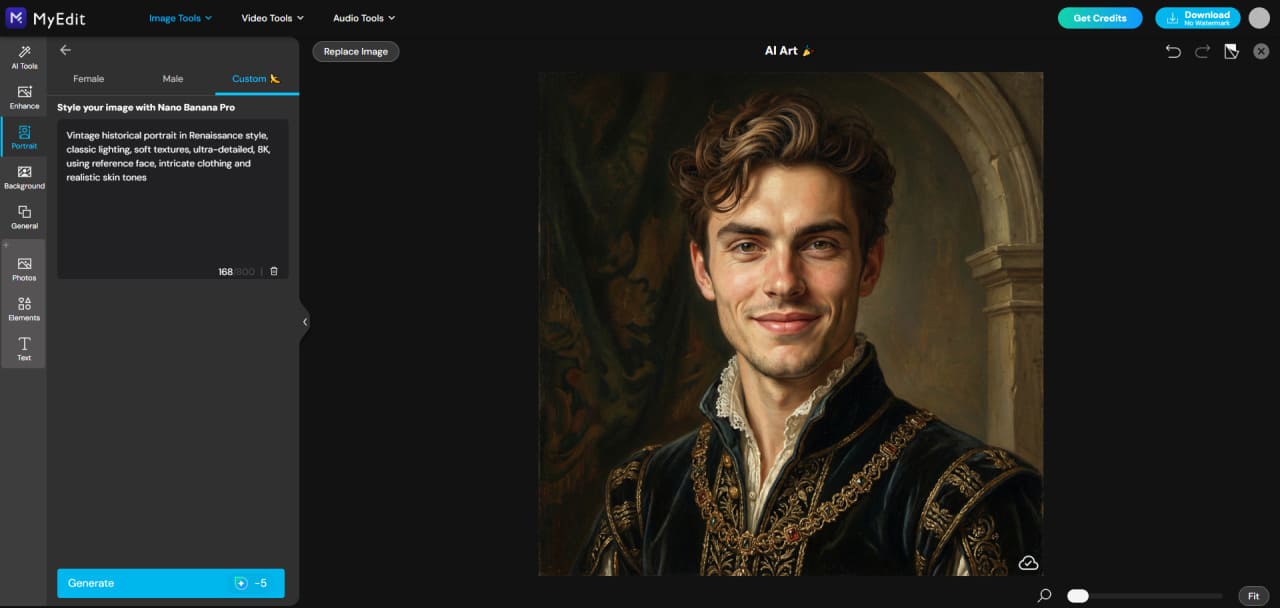
For personalized results, use Custom Mode to include multiple people as references — perfect for family, couples, or group compositions — and type prompts to guide the AI for precise outputs. Hundreds of built-in templates cover styles from cartoon, anime, watercolor, realistic, and more.
AI Image to Video


AI Image to Video converts your images into animated videos in seconds. Choose from multiple templates for any genre or create custom image-to-video content using your own prompts for full creative control. Fast generation allows multiple videos to be produced quickly.
AI Replace


AI Replace lets you add or swap any element in a photo. Simply brush over the area to change, type a prompt describing what you want added or replaced, and the AI handles the rest. Ideal for portraits, group shots, or creative edits — your imagination is the only limit.
How to Generate Stunning Images with MyEdit
Create Beautiful AI Images in Minutes
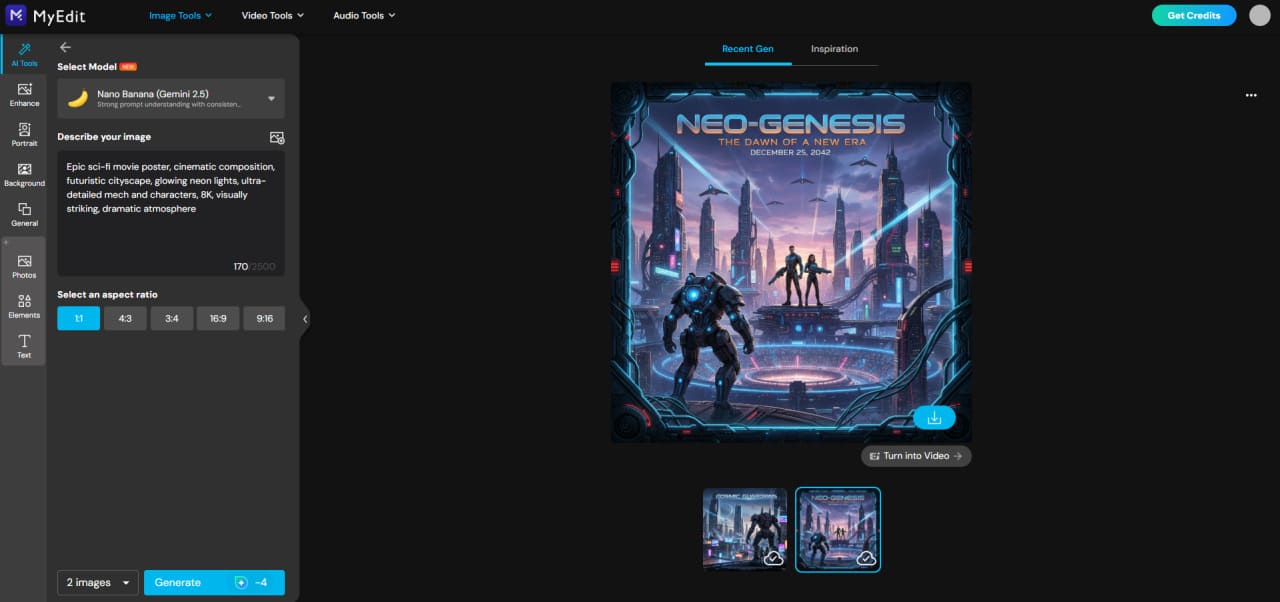
Creating amazing visuals with AI is easier than ever. Whether you’re generating portraits, landscapes, or abstract art, follow these simple steps using MyEdit.
- Go to MyEdit: Open the AI Image Generator directly in your browser—no installation required.
-
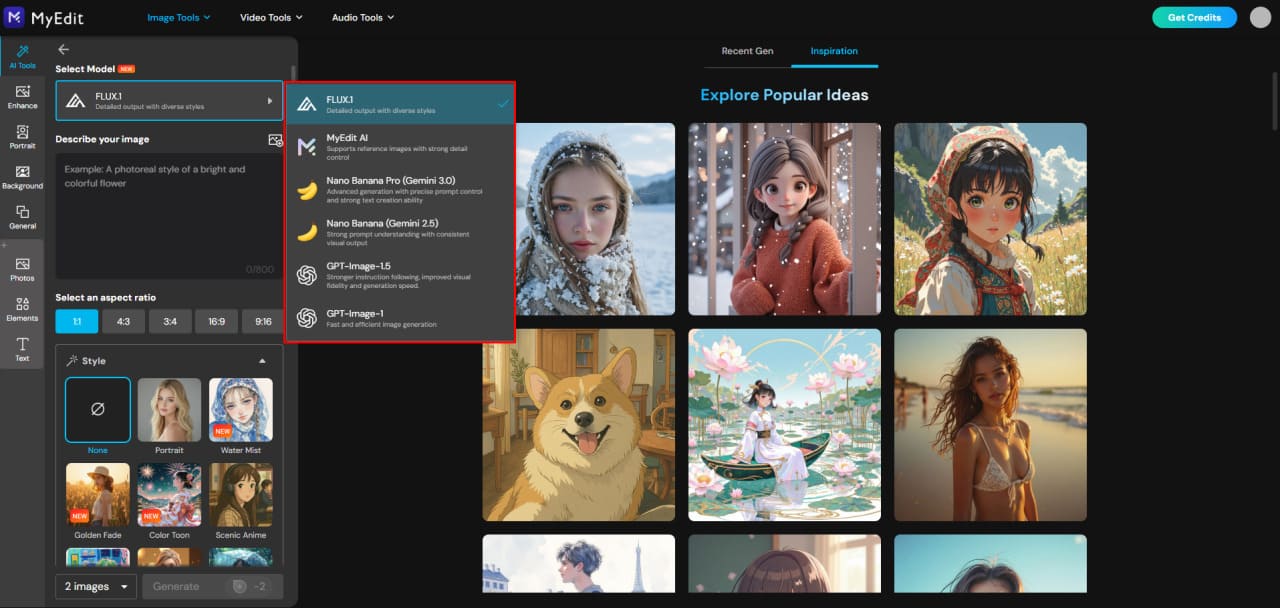
Select Your AI Model: Choose the model that best fits your creative goal.
Options include FLUX.1 (high-detail realism), MyEdit AI (balanced & versatile),
Nano Banana (stylized & playful), and GPT-Image (fast concept visuals).
-
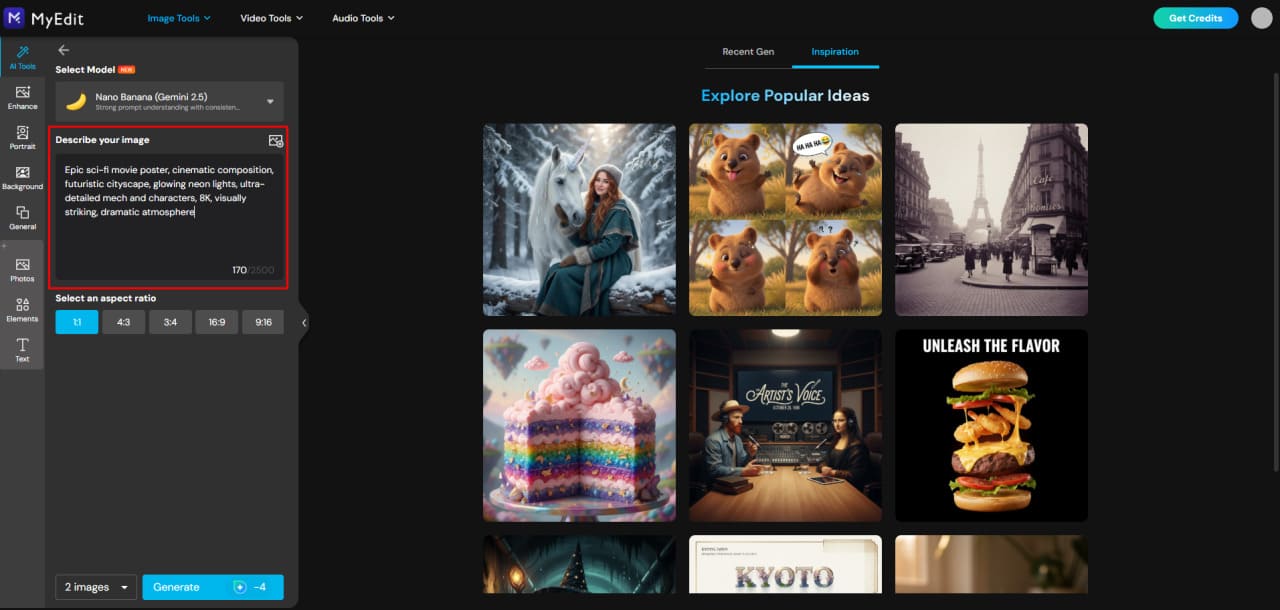
Enter Your AI Prompt: Copy one of our ready-to-use prompts from this article or write your own.
Add details like subject, style, lighting, mood, and environment for better results.
-
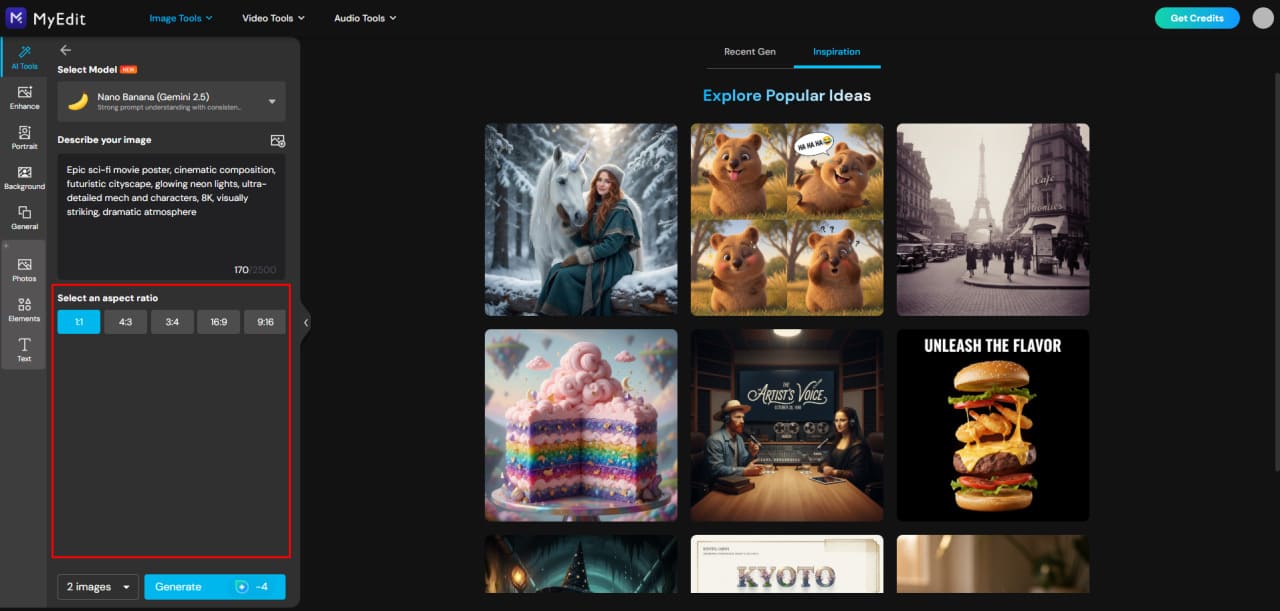
Adjust Your Settings:
Select your aspect ratio (available for all models).
For supported models, you can also apply a style reference such as
realistic, illustration, cinematic, or vintage, along with other visual options.
-
Generate Your Image: Click Generate and watch the AI bring your idea to life in seconds.


Custom AI Portraits & Group Creations
Create ultra-realistic portraits and group images using one or more reference faces. MyEdit’s Custom mode lets you guide the AI with clear prompts, poses, and environments for stunning results.
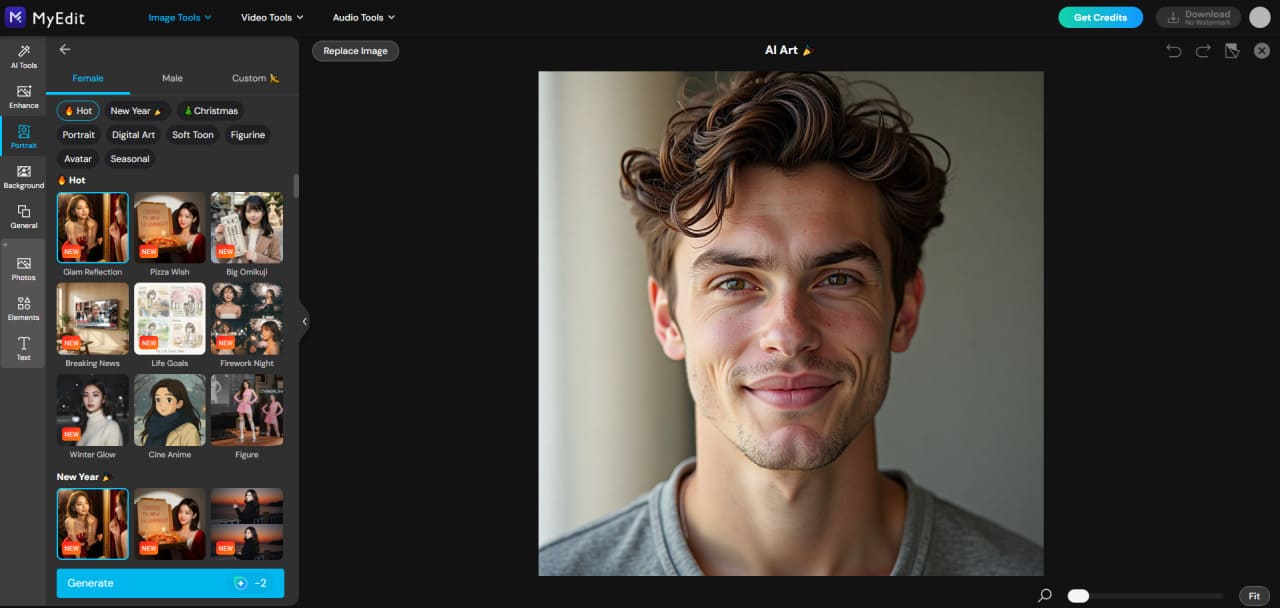
- Go to MyEdit: Open the AI Art and get ready to create your custom portraits.
-
Import your portrait(s): Upload a single face or multiple people from your device to use as reference.
-
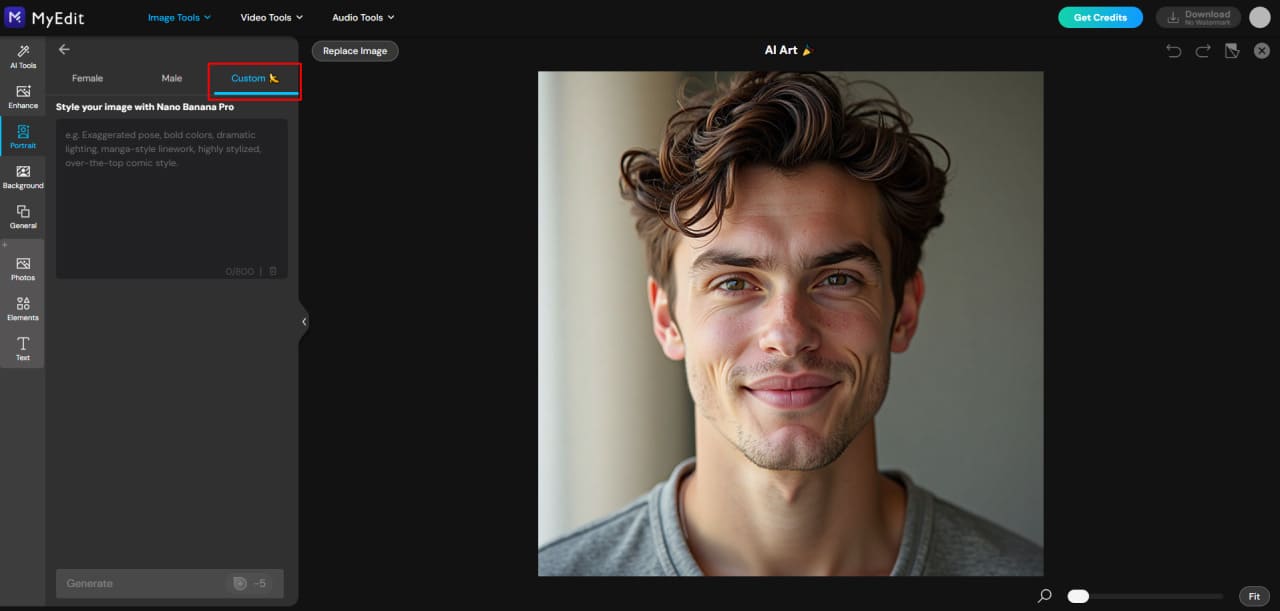
Select Custom mode: This allows the AI to detect each face and apply your desired style, pose, and environment.
-
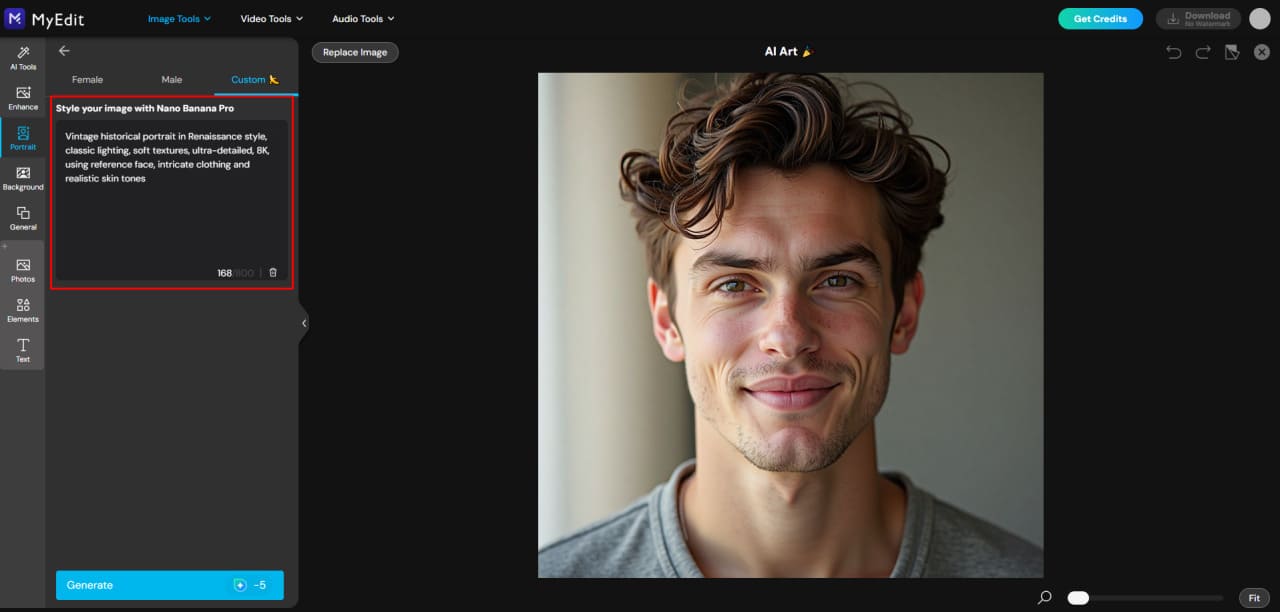
Type your prompt: Describe the scene, style, lighting, and mood. You can specify casual, professional, cinematic, or fantasy settings.
-
Generate your image: Click Generate and watch the AI bring your custom portrait or group scene to life in seconds.


Related Articles:
- ChatGPT Image Ideas & Photo Editing Prompts
- Ultimate Guide to Nano Banana Pro
- Gemini Polaroid Trend Using the Best Prompts
AI Image Prompt FAQ
The best prompt depends on the style, subject, and mood you want. A strong prompt usually includes subject, action/pose, environment, style, lighting, mood, and perspective, such as "Hyper-realistic portrait of a young woman, soft cinematic lighting, 8K, professional photography style". For faster experimentation, some creators use tools like MyEdit to quickly preview variations.
To write a good prompt, be specific about your subject, include environment, style, and lighting details, and use adjectives to convey mood and atmosphere. Keeping it clear and concise helps the AI generate better results. For those who prefer starting from images rather than text, MyEdit can be a helpful tool.
Generating images requires joining the MidJourney Discord and using the /imagine command with your prompt. You can adjust styles, aspect ratios, and parameters to refine the result. Alternatively, MyEdit offers a simpler interface where you can experiment with styles and see instant previews.
Yes, you can upload an image in Discord to use as a reference, guiding the AI on colors, style, or composition. For a smoother experience with reference images, MyEdit lets you upload a photo and immediately apply different styles or transformations.
The best prompts are clear, descriptive, and tailored to your desired result, whether it's realistic portraits, fantasy characters, cinematic landscapes, or abstract art. You can also experiment with tools like MyEdit to quickly test prompts and styles without worrying about complex structures.
Viral prompts often combine unexpected subjects, creative styles, and cinematic or hyper-detailed elements, for example, "Epic sci-fi cityscape, neon lights, flying cars, cinematic lighting, ultra-detailed, 8K". If you want to quickly try viral-style variations, MyEdit makes it easy to preview different styles and compositions.


