






ChatGPT Caricature Trend: Make a Caricature of Yourself and Your Job + 20 Prompt Examples

A hilarious new trend is taking the internet by storm: ChatGPT caricatures! In seconds, you can turn yourself — or anyone else — into a playful, exaggerated cartoon that highlights your personality, quirks, and even your job.
ChatGPT helps you craft the perfect prompt, but to actually bring it to life, MyEdit is the tool to use. With multiple AI models and simple customization, you can generate your caricature instantly — and even for free with your daily credits. Just drop in your prompt and watch the magic happen!
- How the ChatGPT Caricature Trend Works
- More ChatGPT Caricature Prompt Examples
- ChatGPT Caricature FAQ
How the ChatGPT Caricature Trend Works

Instagram networkingwithzo
What Is the ChatGPT Caricature Trend?
The ChatGPT caricature trend exploded in February 2026. Users discovered that with a simple prompt and a photo, ChatGPT could generate a funny, exaggerated caricature of anyone—highlighting facial features, personality traits, and even their profession.
Several key features contributed to the trend’s rapid popularity:
- Personalization: AI exaggerates traits unique to you.
- Humor: Cartoonish effects make it playful and shareable.
- Instant results: Quick generation keeps users engaged.
- Social-friendly: Perfect for profile pictures, stories, and viral posts.
Why It Went Viral
This trend became popular because it combines fun, creativity, and identity. People love seeing themselves reimagined in ways that a traditional caricature artist would do—but in seconds and digitally shareable.
- Shareable: Perfect for social media platforms like Instagram, TikTok, and X.
- Accessible: No drawing skill needed, just a photo and prompt.
- Engaging: Users enjoy comparing results with friends or colleagues.
How to Join the Trend (Step-by-Step)
Follow these steps to create your own ChatGPT caricature using the viral prompt:
- Prepare Your Photo: Choose a clear, front-facing headshot. Good lighting helps the AI capture your facial features accurately.
-
Use the Viral Prompt:
Copy this prompt into ChatGPT (or your preferred AI image tool):
“Create a caricature of me and my job based on everything you know about me.”
This tells the AI to exaggerate your identity, personality, and profession in a humorous style.
💡 Pro Tip
For more control over style, exaggeration, and props, you can later use tools like MyEdit's AI Image Generator to generate custom, high-quality caricatures that go beyond the basic ChatGPT prompt.
- Add Details for Customization: Enhance the prompt with your profession or tools of the trade, personality traits (funny, serious, energetic, calm), optional hobbies or props, and style preferences (cartoonish, hand-drawn, 3D, etc.).
- Generate Your Caricature: Click Generate or submit the prompt. You can try multiple variations to see different exaggerations and styles.
- Share or Save: Use your AI caricature as a profile picture, social media story, or gift. The fun, exaggerated style is perfect for engagement and virality.
Create Custom Caricatures With MyEdit AI

Why Upgrade to MyEdit
While the ChatGPT caricature prompt trend is fun for quick experiments, it has some limitations: style consistency, exaggeration options, props, and resolution. With MyEdit (and advanced models like Nano Banana), you can take your caricatures to the next level:
- Multiple AI models: FLUX, Nano Banana, MyEdit AI, GPT-Image, Stable Diffusion, Kling AI.
- Better control: Adjust style, exaggeration, props, and backgrounds.
- Consistent likeness: Keep facial features recognizable across multiple images.
- High-resolution output: Perfect for social media, prints, or gifts.
- Job-specific props & brand colors: Make your caricature truly yours.
20 Caricature Prompt Samples for Fun & Shareable AI Images
Looking for inspiration? Here are 20 ready-to-use caricature prompts you can try with AI, covering jobs, personality, social media styles, and artistic effects. Copy, paste, and create your own fun caricature instantly!
Caricature Prompts: Job-Focused
- Chef with giant kitchen tools and cartoonish expressions
- Engineer surrounded by blueprints and gadgets, funny expression
- Teacher with oversized books and glasses, emphasizing personality
- Nurse with exaggerated stethoscope and caring expression
- Gamer at a dramatic gaming setup, excited and energetic pose
Caricature Prompts: Personality-Focused
- Energetic, excited expression with exaggerated smile
- Calm, serene caricature highlighting facial features humorously
- Mischievous expression with playful eyebrows and grin
- Dramatic, over-the-top facial expression caricature
- Signature gesture or quirky habit highlighted humorously
Caricature Prompts: Social Media / Meme-Style
- Bright, colorful caricature suitable for profile pictures
- Meme-style exaggerated facial expression caricature
- Social media-ready caricature with dramatic pose and props
- Playful, eye-catching caricature perfect for TikTok or Instagram
- Funny, high-contrast caricature with expressive accessories like hats or glasses
Caricature Prompts: Artistic & Niche
- 3D render caricature with exaggerated features humorously
- Hand-drawn cartoon caricature with playful expressions
- Surreal, fantasy-style caricature exaggerating personality and profession
- Vintage 1920s comic-style caricature with bold lines and expressions
- Street-art or graffiti-style caricature, exaggerated and colorful
Caricature Prompts: Job-Focused
These prompts exaggerate professional traits, tools, and environments. Copy and paste them with a reference photo to create humorous, work-themed caricatures that are instantly recognizable and shareable.
1. Chef with Giant Kitchen Tools
Create a caricature of a chef using oversized kitchen tools with a playful, cartoonish expression, emphasizing personality and profession.


Prompt sample: "Exaggerate features of a chef with giant kitchen tools, playful cartoonish style, humorous expression, emphasize uniform and hat, keep facial identity recognizable, bright colors, dynamic pose, high detail"
2. Engineer Surrounded by Blueprints
Exaggerate an engineer with a funny expression, holding oversized blueprints and surrounded by gadgets, in a cartoon style.


Prompt sample: "Create a humorous caricature of an engineer holding oversized blueprints, surrounded by gadgets, exaggerated facial features, playful expression, cartoon style, preserve identity, dynamic perspective, vibrant colors"
3. Teacher with Oversized Books
Draw a caricature of a teacher holding giant books, wearing glasses, and with an exaggerated smile, in a comic/cartoon style.


Prompt sample: "Exaggerate a teacher holding oversized books, cartoonish expression with big smile and glasses, playful comic style, emphasize personality and profession, preserve facial identity, vibrant colors and exaggerated proportions"
4. Nurse with Exaggerated Stethoscope
Create a caricature of a nurse with a huge stethoscope, playful expression, and friendly posture, in a cartoon style.


Prompt sample: "Draw a nurse caricature with an oversized stethoscope, exaggerated facial features, friendly playful expression, cartoonish style, emphasize uniform and caring personality, bright colors, maintain facial identity"
5. Gamer at Dramatic Setup
Exaggerate a gamer at a dramatic gaming setup with big headphones, multiple screens, and an excited, energetic expression.


Prompt sample: "Create a caricature of a gamer at a dramatic setup with oversized headphones and multiple screens, excited energetic expression, exaggerated facial features, cartoon style, preserve identity, dynamic composition, bright playful colors"
Caricature Prompts: Personality-Focused
These prompts exaggerate facial expressions, moods, and quirks to highlight personality traits in a playful, humorous way. Copy and paste them with a reference photo to create expressive caricatures.
6. Energetic, Excited Expression
Create a caricature with an over-the-top energetic expression, big eyes, wide smile, and animated features for a lively, playful look.


Prompt sample: "Exaggerate facial features for an energetic, excited expression, large sparkling eyes, wide smile, playful cartoonish style, keep identity recognizable, dynamic pose, bright vibrant colors"
7. Calm, Serene Expression
Create a caricature emphasizing calmness, gentle smile, relaxed pose, and soft features, while humorously exaggerating subtle expressions.


Prompt sample: "Draw a caricature with calm, serene expression, soft exaggerated facial features, gentle smile, cartoon style, playful yet relaxed, preserve identity, light pastel colors"
8. Mischievous Expression
Generate a playful caricature with a mischievous grin, raised eyebrows, and animated, cartoonish exaggeration of facial features.


Prompt sample: "Exaggerate mischievous grin, raised eyebrows, playful eyes, cartoonish style, humorous expression, preserve identity, dynamic playful pose, vibrant colors"
9. Dramatic, Over-the-Top Expression
Create a caricature with exaggerated, theatrical expressions—big eyes, wide open mouth, exaggerated jaw and eyebrows—for a humorous, cinematic effect.


Prompt sample: "Draw an over-the-top dramatic expression caricature, exaggerated eyes, mouth, jaw and eyebrows, playful cartoon style, preserve identity, cinematic composition, bright colors"
10. Signature Gesture or Quirky Habit
Exaggerate a unique gesture, habit, or pose, making it the focus of a playful, humorous caricature that emphasizes personality.


Prompt sample: "Highlight a signature gesture or quirky habit, exaggerate pose and facial expression, cartoonish playful style, humorous and expressive, preserve identity, dynamic and vibrant composition"
Caricature Prompts: Social Media / Meme-Style
These prompts are designed for fun, shareable, and eye-catching caricatures perfect for profile pictures, memes, or social media posts. Exaggerate expressions, props, and colors for maximum impact.
11. Bright, Colorful Profile Picture
Create a caricature with exaggerated facial features, bright colors, and playful style, ideal for a standout social media profile picture.


Prompt sample: "Exaggerate facial features for a bright, colorful cartoon-style profile picture, playful expression, preserve identity, dynamic composition, high saturation, eye-catching style"
12. Meme-Style Exaggerated Expression
Create a funny, over-the-top caricature suitable for memes, emphasizing a dramatic facial expression or reaction.


Prompt sample: "Draw an exaggerated meme-style caricature, dramatic facial expression, cartoonish style, playful and humorous, preserve identity, bold colors, expressive pose"
13. Social Media-Ready with Props
Create a caricature featuring props, dynamic pose, and expressive exaggeration, perfect for sharing on social media.


Prompt sample: "Caricature with dramatic pose and props, exaggerated facial features, playful cartoon style, expressive and shareable, preserve identity, vibrant colors, social media-ready"
14. Playful TikTok / Instagram Style
Create a caricature with fun, dynamic poses, bright colors, and exaggerated features, optimized for TikTok or Instagram posts.


Prompt sample: "Exaggerate facial features and pose for playful TikTok / Instagram-style caricature, cartoonish style, bright colors, expressive, preserve identity, dynamic composition, shareable content"
15. High-Contrast Caricature with Accessories
Create a bold, humorous caricature emphasizing expressive accessories like hats or glasses, with high-contrast colors and exaggerated features.


Prompt sample: "Draw a high-contrast caricature with exaggerated facial features and expressive accessories like hats or glasses, cartoonish style, playful expression, preserve identity, bold vibrant colors"
Caricature Prompts: Artistic & Niche
These prompts focus on creative, artistic, and stylized caricatures. They exaggerate features and personality with unique visual styles, from 3D renders to vintage comics and street art.
16. 3D Render Caricature
Create a caricature in a 3D render style, exaggerating facial features humorously, with playful proportions and depth for a cinematic effect.


Prompt sample: "3D render caricature with exaggerated facial features, playful proportions, humorous cartoonish style, cinematic lighting, preserve identity, vibrant colors"
17. Hand-Drawn Cartoon Caricature
Create a caricature with a hand-drawn cartoon style, emphasizing playful expressions, bold lines, and exaggeration for a whimsical effect.


Prompt sample: "Hand-drawn cartoon caricature, exaggerated facial features, playful expressions, bold line style, whimsical cartoon effect, preserve identity, vibrant colors"
18. Surreal / Fantasy-Style Caricature
Create a surreal caricature blending fantasy elements, exaggerating personality traits or profession with imaginative, dreamlike visuals.


Prompt sample: "Surreal fantasy-style caricature, exaggerated personality and profession, imaginative whimsical elements, cartoonish humor, preserve identity, rich vibrant colors, dynamic composition"
19. Vintage 1920s Comic-Style Caricature
Create a caricature in vintage comic style, exaggerating features with bold lines, expressive poses, and classic black-and-white or sepia tones.


Prompt sample: "Vintage 1920s comic-style caricature, exaggerated facial features, bold expressive lines, classic monochrome or sepia tone, humorous expression, preserve identity"
20. Street-Art / Graffiti-Style Caricature
Create a caricature in street-art or graffiti style, emphasizing exaggerated features, bold colors, and playful, urban-inspired designs.


Prompt sample: "Street-art graffiti-style caricature, exaggerated facial features, bold urban colors, playful cartoonish expression, preserve identity, dynamic composition, humorous style"
How to Create Caricatures in MyEdit
Ready to turn your ChatGPT caricature idea into a fully customized, high-quality image? MyEdit lets you exaggerate features, add personality, and create hilarious or stylish caricatures with ease.
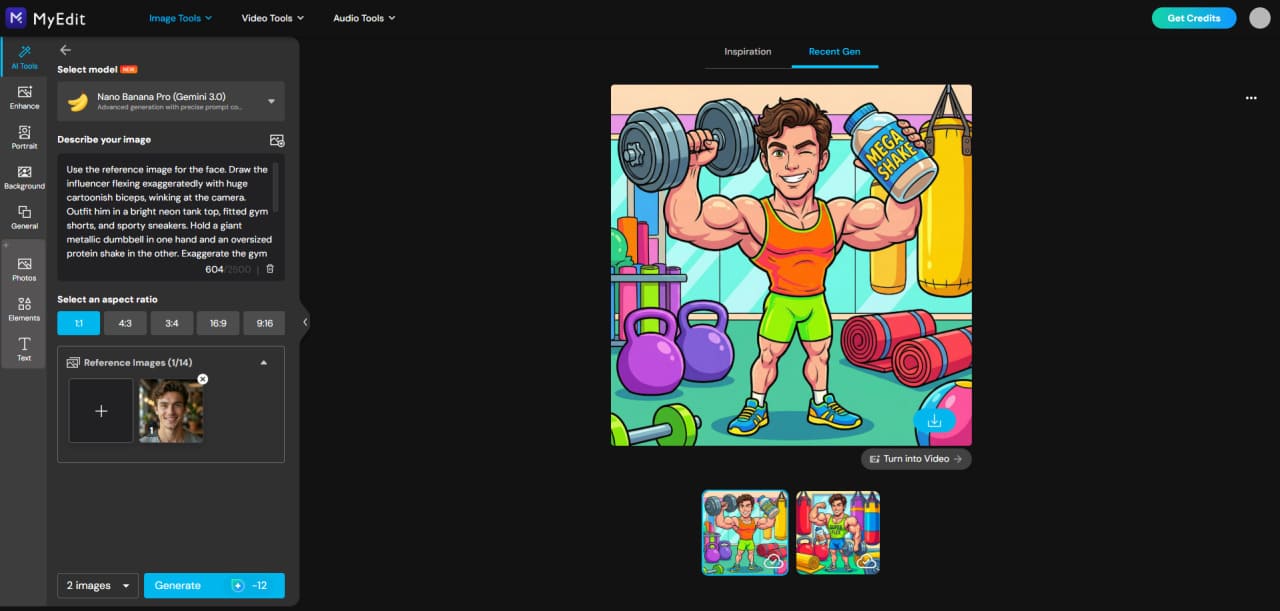
- Open MyEdit: Launch AI Image Generator to upload your photo and start your caricature.
-
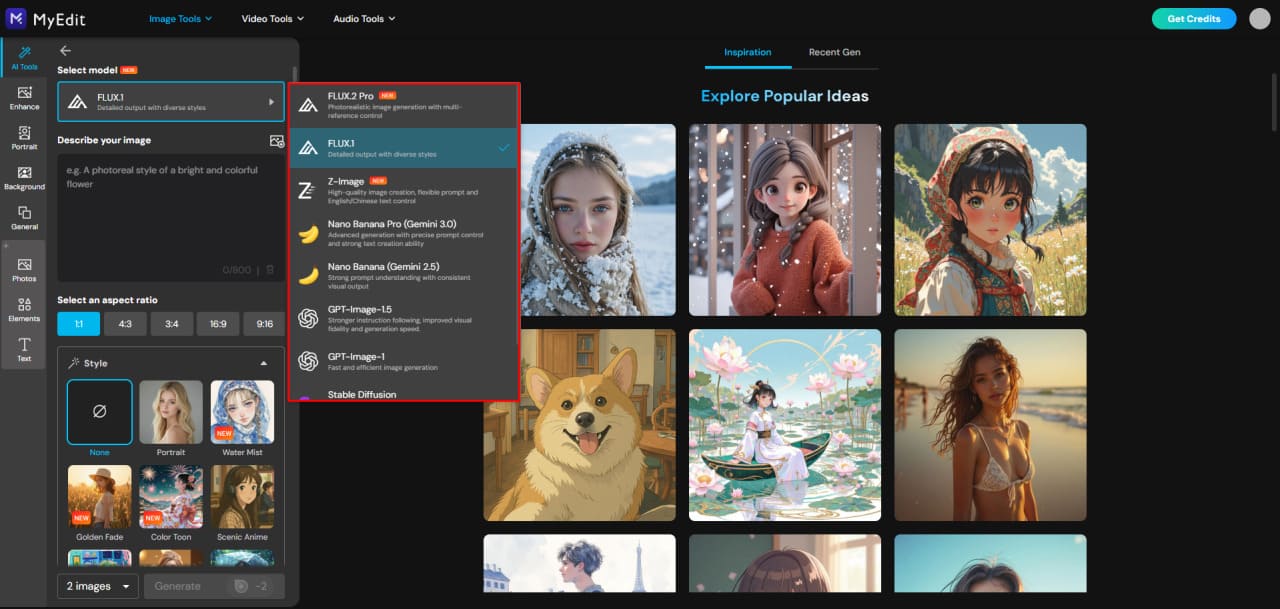
Select Your AI Model:
Choose the AI model that fits the style you want. FLUX for realistic details, MyEdit AI for versatility, GPT-Image for fast variations, Stable Diffusion for deep customization, Kling AI for cinematic effects. For the most fun and exaggerated caricatures, we recommend Nano Banana.
-
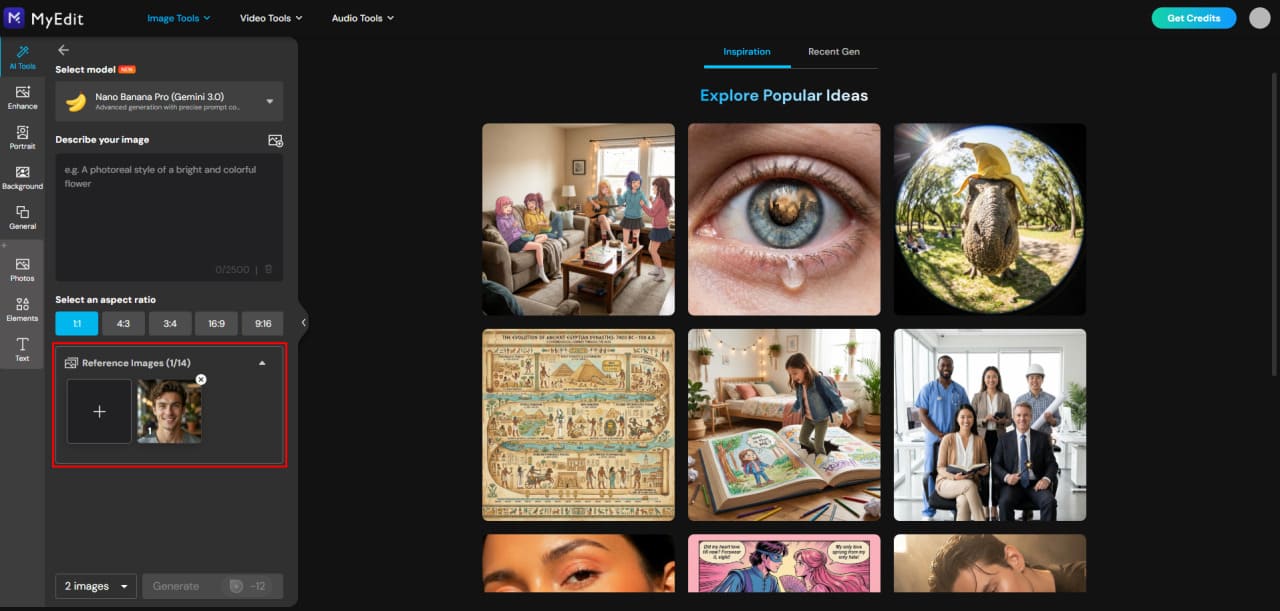
Upload Your Reference Photo:
Add the face you want to transform. Most models accept one photo, while some—like Gemini 3.0—support multiple references for consistent likeness.
-
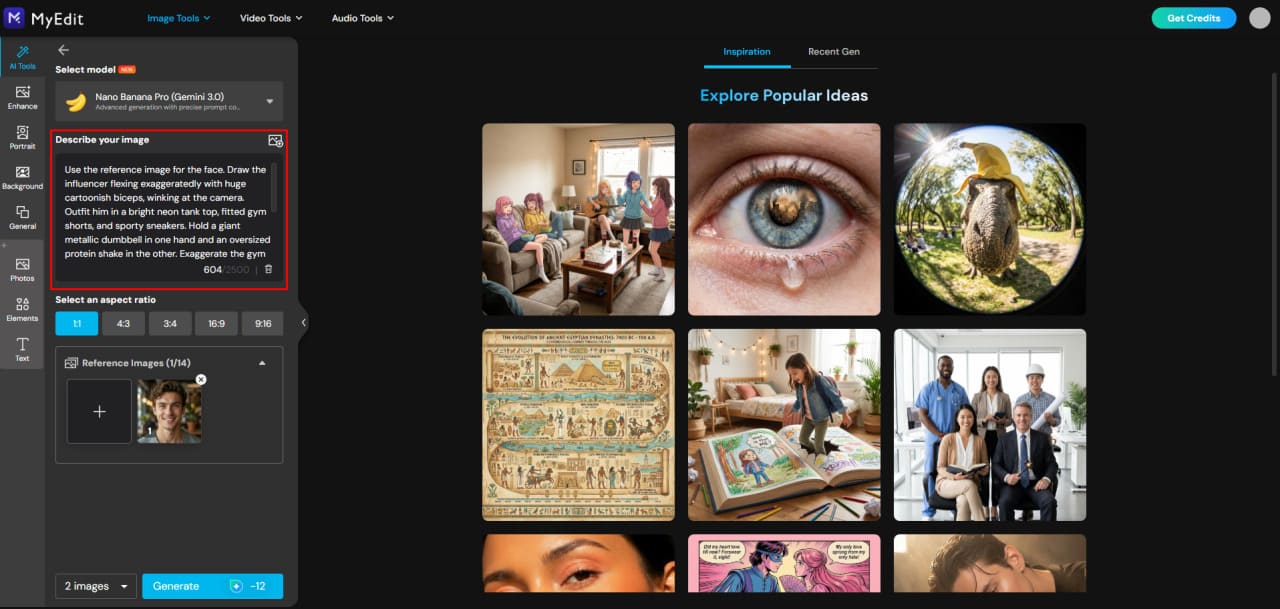
Enter Your Funny Prompt:
Describe the transformation—big smile, oversized features, cartoonish expressions, or any creative idea. Copy a prompt from the “More Caricature Prompt Ideas” section and adjust to match your photo.
-
Generate Your Caricature:
Click Generate to produce your caricature. Adjust the prompt or switch models to explore different results.


Pro Tips for Better Caricatures
- Mix multiple prompts to achieve unique combinations.
- Adjust exaggeration levels to fit your style preference.
- Choose the AI model based on desired style (cartoon, hand-drawn, 3D, cinematic).
- Use multiple reference photos if your model supports them for higher likeness accuracy.
Once you’re happy with your result, you can save, share, or even print your caricature. With MyEdit, your AI caricatures become fully customizable, high-quality artworks—going far beyond what ChatGPT alone can generate.
Related Articles:
- Best Funny AI Prompts to Create Hilarious Images
- How to Generate AI Baby Dance Video
- AI Image Prompt Examples You Can Copy & Paste
Funny Face Filters FAQ
The ChatGPT caricature trend exploded in February 2026, allowing users to generate humorous, exaggerated portraits based on what the AI knows about them from previous conversations. ChatGPT analyzes your traits, personality hints, and even job-related information to create a detailed caricature prompt. The popular trend prompt is: "Create a caricature of me and my job based on everything you know about me."
ChatGPT itself cannot directly generate images, but it can create text prompts for caricature generation. These prompts can then be used in AI image generators like MyEdit to produce fully customized, over-the-top caricatures in various styles.
To join the trend, you provide ChatGPT with a prompt describing the person, their personality, job, or signature gestures. For example: "Describe a fun caricature of me as a chef with exaggerated features and playful expression". You can then use this prompt in an AI image generator like MyEdit to instantly visualize the caricature.
While several AI image generators can create caricatures, MyEdit stands out for its flexibility and multiple specialized models. For playful, exaggerated results, the Nano Banana model excels in creating vibrant, cartoonish caricatures, while other models allow realistic, 3D, or stylized outputs.
A good caricature prompt includes:
- Reference traits: facial features, hairstyle, or clothing
- Personality or expression: playful, dramatic, mischievous, calm, etc.
- Props or context: job tools, accessories, or environment
- Desired style: cartoon, 3D, graffiti, Nano Banana, etc.
Start by uploading a reference photo of the person. Then, choose an AI model (like Nano Banana for cartoonish effects) and enter your caricature prompt describing the pose, expression, props, and style. Click Generate in MyEdit to create a fun, exaggerated caricature instantly.


