







Turn Your 2D Drawing Into a 3D Model: Easy Methods, Tools & Examples

Turning a 2D drawing into a 3D model has never been easier—or more popular. From sketches to product concepts and character art, creators are discovering how fun and accessible it is to bring flat images to life.
Traditionally, professional software like Blender or Maya can take years of practice to produce polished 3D models. Today, AI tools like MyEdit let you instantly convert a sketch into a 3D model—no experience required, ready for animation, rendering, or creative projects.
- Why Convert a 2D Drawing to a 3D Model?
- How to Convert a 2D Drawing to a 3D Model
- Most Popular 2D Drawing to 3D Model Ideas
- Best Tools for Drawing to 3D Model Conversion
- FAQ About Turning Drawings Into 3D Models
From Sketch to Object: Why 2D-to-3D Conversion Is So Popular

Turning a 2D drawing into a 3D model has become increasingly popular across all creative fields — from kids imagining their first characters to professional designers prototyping products. Thanks to modern AI, anyone can bring their ideas to life without needing years of 3D modeling experience.
Here’s why this trend is growing so fast:
- Instant visualization — Seeing your idea as a 3D object helps you improve it and make smarter design decisions.
- No technical skills required — AI removes the need for complex 3D modeling software or training.
- Great for creativity — Kids’ drawings, concept art, product sketches… everything can be transformed into something real.
- Perfect for rapid prototyping — Designers and makers can explore shapes, proportions, and styles faster than ever.
- Useful across many industries — Animation, gaming, toys, product design, architecture, fashion, and more.
Whether you’re a hobbyist or a professional, converting a sketch into a 3D model opens the door to faster creation, better visualization, and endless creative possibilities.
How to Turn a 2D Sketch Into a 3D Model: Beginner & Pro Methods
Whether you want an instant result or prefer hands-on 3D modeling, there are two reliable ways to turn your sketch into a 3D object. Here’s a quick look at how each method works.
How to Use AI to Turn a 2D Sketch Into a 3D Model (Easy & Fast)
With MyEdit AI, you can transform your 2D sketch into a 3D model in just a few clicks — no 3D skills required. Follow these simple steps:
- Open MyEdit: Launch AI Image Generator. This is where you’ll upload your sketch and generate a 3D model.
-
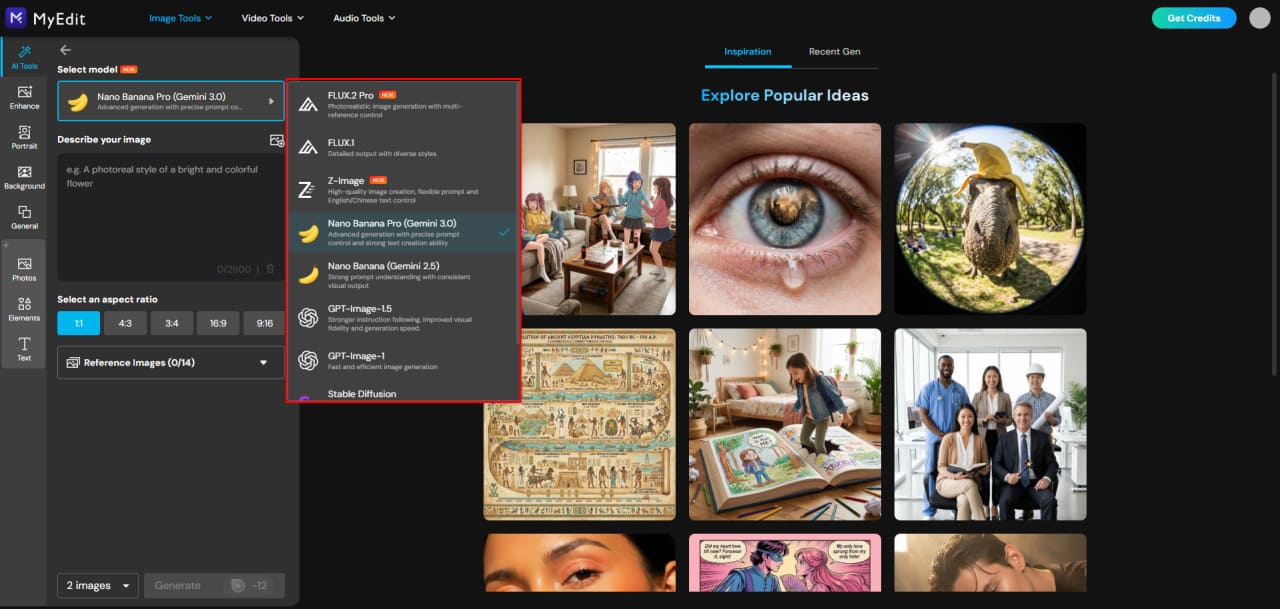
Select Your AI Model:
For best results, we recommend Nano Banana, which creates clean, detailed, and visually appealing 3D models from sketches.
-
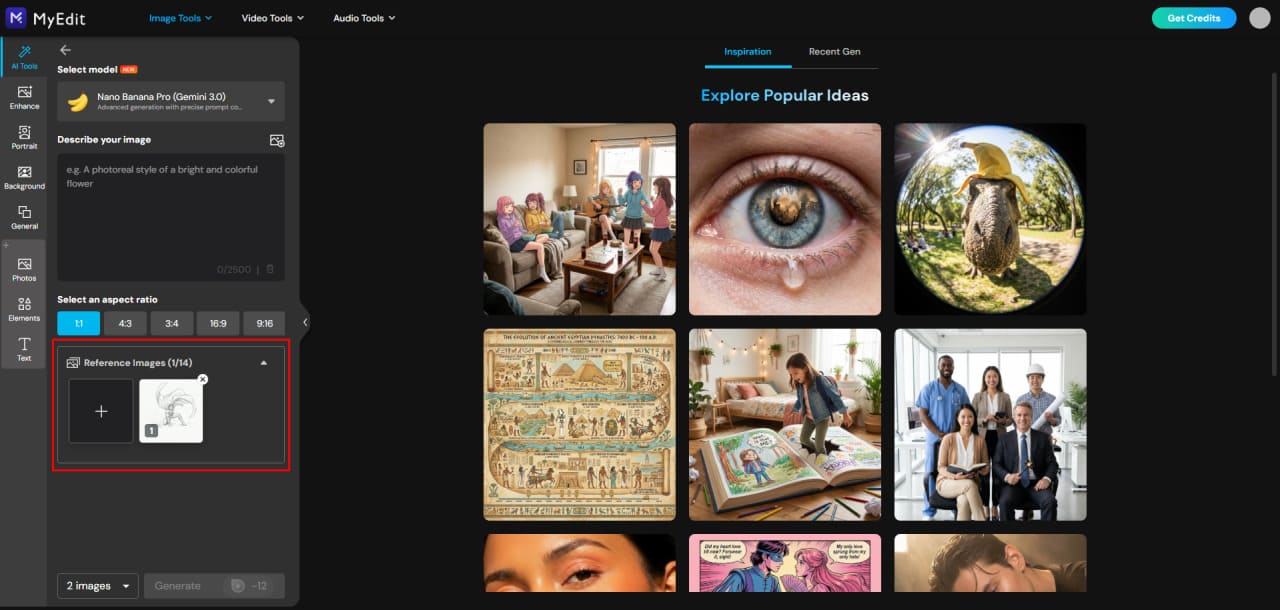
Upload Your 2D Sketch:
Add the drawing you want to convert. The AI will use it as a base to generate a 3D version while keeping the shapes and proportions accurate.
-
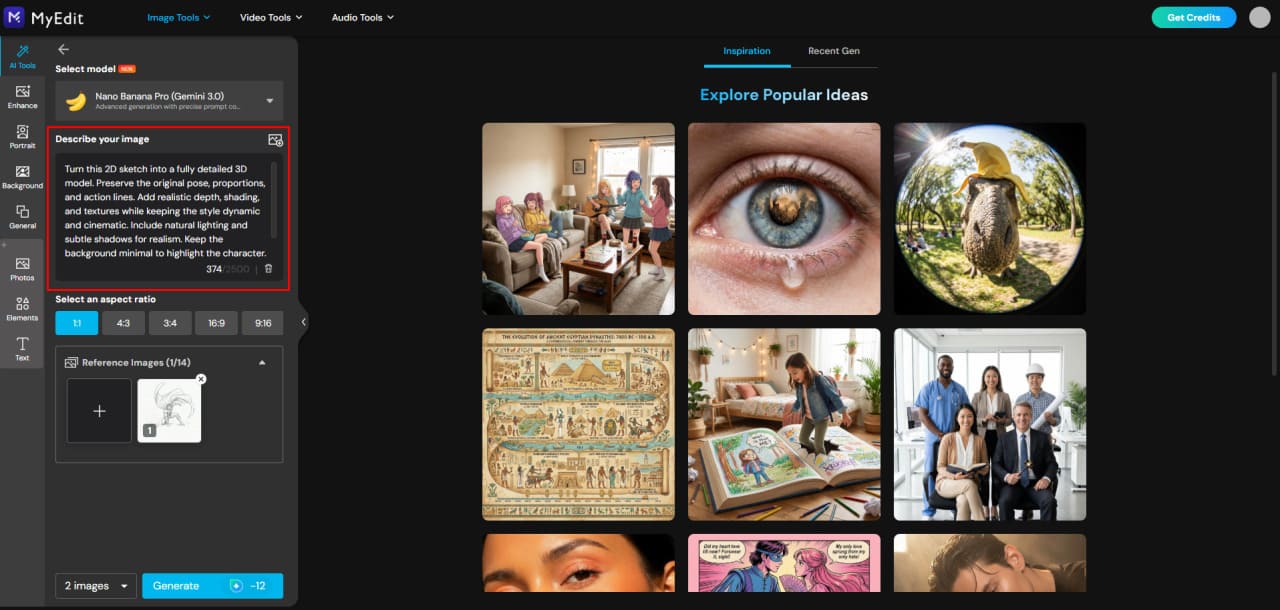
Enter a Prompt:
Describe what you want the AI to generate from your sketch. Include the type of object or character, the style (realistic, cartoonish, or stylized), and the perspective or pose. Be as precise as possible to get a 3D model that matches your original drawing. You can also refer to the example prompts in the next section for inspiration.
-
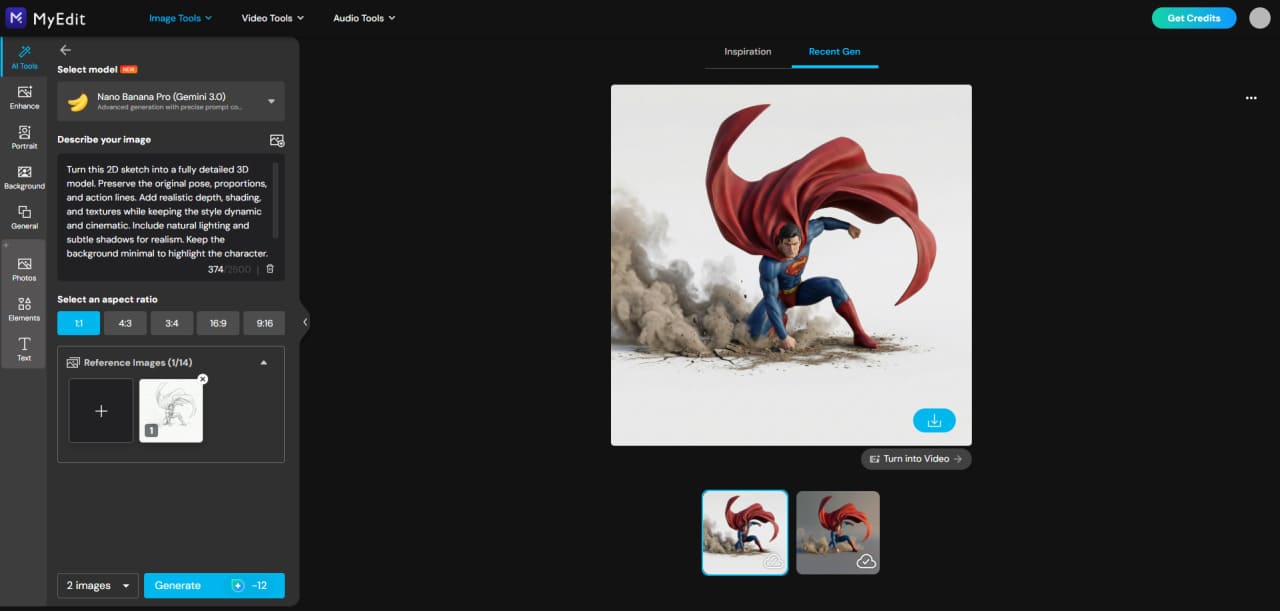
Generate Your 3D Model:
Click Generate to create your 3D model. You can adjust the prompt or try different settings to explore alternative results.


Turning 2D Sketches Into 3D Models in Blender (Professional Workflow)
For more control and detail, you can manually create a 3D model from your 2D sketch using Blender. This method takes longer but allows you to refine shapes, textures, and proportions exactly as you want.
- Open Blender and Set Up Your Workspace: Launch Blender and create a new project. Import your 2D sketch as a reference image to use while modeling.
- Start Blocking Out the Model: Use basic shapes like cubes, spheres, and cylinders to create the rough form of your object or character. Keep proportions similar to your original sketch.
- Sculpt and Refine Details: Switch to sculpting mode to add details, curves, and features. Refine the shape to closely match your 2D drawing while maintaining a 3D structure.
- Add Materials and Textures: Apply colors, textures, and surface details to your model. You can mimic the style of your sketch or create a fully realistic 3D look.
- Finalize and Export Your 3D Model: Check proportions, lighting, and details. When ready, export your 3D model in your preferred format (STL, OBJ, FBX, or GLB).
18 Inspiring Examples of 2D Drawings Transformed Into 3D Models
From simple sketches to professional concepts, these examples show how 2D drawings can be transformed into detailed 3D models. Each sample below was created using MyEdit, highlighting how easy and creative 2D-to-3D conversion can be.
Kids & Hobbyists
- Turn doodles into 3D toys or figurines
- Create cartoon-style avatars from sketches
- Transform simple characters into collectible models
Artists & Illustrators
- Convert character sketches into 3D models for portfolios
- Visualize objects or props from multiple angles
- Create stylized 3D elements for digital art or comics
Game & Animation Developers
- Prototype 3D game characters from concept art
- Convert environment sketches into 3D scene blocks
- Test character poses and animations using 3D models
Product Designers & Engineers
- Turn furniture sketches into 3D renderings
- Convert fashion sketches into 3D garment models
- Prototype gadgets, toys, or household items
Education & Learning
- Convert biology diagrams into 3D models
- Turn math or geometry sketches into interactive 3D objects
- 3D print classroom STEM projects from sketches
Marketing & E-commerce
- Convert logos into 3D emblems or product mockups
- Transform packaging concepts into 3D visuals
- Turn 2D illustrations into 3D social media content
Kids & Hobbyists: Turning Fun Sketches Into 3D Models
These examples show how kids’ doodles or simple sketches can be transformed into 3D models — from toys and figurines to playful avatars. Use a 2D sketch as a reference and MyEdit AI to bring them to life instantly.
1. Turn Doodles Into 3D Toys or Figurines
Transform a child’s drawing or a simple doodle into a 3D toy or figurine. This makes creative ideas tangible, perfect for 3D printing or keepsakes.


Prompt sample: "Convert this simple doodle into a colorful 3D toy model, maintain playful proportions, cartoonish style, preserve original shapes"
2. Create Cartoon-Style Avatars From Sketches
Turn a hand-drawn character sketch into a cute, stylized 3D avatar that can be used in games, videos, or virtual worlds.


Prompt sample: "Transform this character sketch into a stylized 3D avatar, cute proportions, cartoon style, preserve original personality and pose"
3. Transform Simple Characters Into Collectible Models
Convert simple characters into 3D collectible models, perfect for mini-figures, desktop displays, or fun gifts.


Prompt sample: "Generate a 3D model from this character sketch, stylized collectible figure, keep proportions simple and playful, colorful finish"
Artists & Illustrators: Bringing Sketches to Life in 3D
These examples show how professional or hobbyist artists can turn their 2D sketches into 3D models. Whether for portfolios, props, or comic elements, 3D conversion helps visualize concepts from every angle and adds depth to creative projects.
4. Convert Character Sketches Into 3D Models for Portfolios
Transform your hand-drawn character sketches into fully realized 3D models. This makes your portfolio stand out and allows potential clients or employers to see your characters from every angle.


Prompt sample: "Convert this character sketch into a detailed 3D model, preserve original style and proportions, maintain expressive features, ready for portfolio showcase"
5. Visualize Objects or Props From Multiple Angles
Turn sketches of objects, props, or accessories into 3D models to explore different perspectives, test proportions, and enhance scene composition.


Prompt sample: "Generate 3D models of these sketched props, realistic or stylized as needed, maintain accurate proportions and shapes"
6. Create Stylized 3D Elements for Digital Art or Comics
Convert individual sketches into 3D elements that can be used in comics, digital illustrations, or animation backgrounds. This adds depth and versatility to your creative work.


Prompt sample: "Transform this sketch into a stylized 3D element for comics or digital illustration, keep proportions and artistic style, add depth and shading"
Game & Animation Developers: Bringing Concept Art to Life
These examples show how game designers and animators can turn 2D concept art into 3D models for characters, environments, and animations. This helps speed up prototyping, visualize ideas in 3D, and test gameplay or motion before final production.
7. Prototype 3D Game Characters From Concept Art
Convert your 2D character sketches into fully modeled 3D versions to test proportions, design details, and overall appeal for games.


Prompt sample: "Transform this character concept art into a detailed 3D game model, preserve style and proportions, ready for animation and rigging"
8. Convert Environment Sketches Into 3D Scene Blocks
Turn 2D environment sketches into 3D scene blocks or basic level layouts. This helps visualize spatial design, camera angles, and overall composition in games or animation scenes.


Prompt sample: "Convert this 2D environment sketch into 3D scene blocks, preserve layout and perspective, maintain style consistent with concept art"
9. Test Character Poses and Animations Using 3D Models
Generate 3D models from character sketches to test poses, expressions, or motion sequences. This allows early iteration and easier adjustments before full animation production.


Prompt sample: "Generate a 3D model from this character sketch, ready for pose testing and animation, preserve proportions and style"
Product Designers & Engineers: From Sketch to Prototype
These examples show how designers and engineers can turn 2D sketches into 3D models for products, furniture, fashion, and gadgets. 3D conversion allows faster prototyping, accurate visualization, and easier iteration before production.
10. Turn Furniture Sketches Into 3D Renderings
Transform 2D furniture sketches into detailed 3D models to check proportions, materials, and design aesthetics before creating physical pieces.


Prompt sample: "Convert this furniture sketch into a realistic 3D model, maintain proportions and materials, ready for visualization or prototyping"
11. Convert Fashion Sketches Into 3D Garment Models
Turn fashion sketches into 3D garment models to preview drape, fit, and overall design. Perfect for virtual fashion shows or production planning.


Prompt sample: "Generate a 3D garment model from this fashion sketch, preserve design details and proportions, realistic fabric simulation"
12. Prototype Gadgets, Toys, or Household Items
Convert sketches of gadgets, toys, or household items into 3D models for prototyping, testing, or 3D printing. This allows rapid iteration and better visualization of designs.


Prompt sample: "Transform this gadget sketch into a detailed 3D prototype, maintain design accuracy, ready for review or 3D printing"
Education & Learning: Making Learning Interactive in 3D
These examples show how educators and students can turn 2D diagrams and sketches into 3D models. This makes complex concepts easier to understand, adds interactivity to lessons, and allows hands-on learning through 3D printing.
13. Convert Biology Diagrams Into 3D Models
Transform 2D biology diagrams, like cells, organs, or anatomical structures, into detailed 3D models. This helps students visualize and interact with biological concepts.


Prompt sample: "Convert this biology diagram into a 3D model, accurate structures and proportions, interactive and easy to visualize"
14. Turn Math or Geometry Sketches Into Interactive 3D Objects
Convert 2D geometry or math sketches into 3D models to explore shapes, angles, and formulas interactively, making abstract concepts easier to understand.


Prompt sample: "Transform this geometry sketch into a 3D model, accurate dimensions and angles, interactive visualization for learning"
15. 3D Print Classroom STEM Projects From Sketches
Turn 2D STEM project sketches into 3D models ready for printing, allowing students to build hands-on prototypes of their designs for experiments or classroom presentations.


Prompt sample: "Generate a 3D printable model from this STEM project sketch, preserve design and proportions, ready for classroom use"
Marketing & E-commerce: Bringing Brands and Products to Life
These examples show how marketers and e-commerce professionals can turn 2D designs into 3D models. From logos and packaging to social media visuals, 3D conversion makes content more engaging and helps showcase products in a dynamic way.
16. Convert Logos Into 3D Emblems or Product Mockups
Transform 2D logos into 3D emblems or mockups to showcase branding on products, displays, or promotional materials, making them more eye-catching.


Prompt sample: "Generate a 3D logo model from this 2D sketch, preserve all design elements, apply a clean metallic or glossy finish, add realistic lighting and shadow, maintain flat badge composition while giving depth, ready for digital presentations"
17. Transform Packaging Concepts Into 3D Visuals
Turn packaging sketches into 3D models to visualize boxes, bottles, or other product containers. This helps review design details, proportions, and aesthetics before production.


Prompt sample: "Generate a 3D model from this packaging sketch, preserve proportions and branding, ready for presentation and visualization"
18. Turn 2D Illustrations Into 3D Social Media Content
Convert flat illustrations into 3D visuals for social media posts, ads, or interactive content, making your marketing more dynamic and attention-grabbing.


Prompt sample: "Transform this 2D illustration into a 3D visual, maintain style and colors, ready for social media and marketing campaigns"
Top 5 Tools to Convert 2D Drawings Into 3D Models in 2026
Whether you’re a beginner, hobbyist, or professional, these 5 tools make turning 2D sketches into 3D models faster and easier than ever.
1. MyEdit
Best for Beginners & Quick AI 3D Conversions

With MyEdit, turning a flat 2D sketch into a detailed 3D model is effortless. Simply upload your sketch, guide the AI with a short prompt, and watch it generate a polished, fully dimensional model in seconds. No complicated software, no steep learning curve—just fast, impressive 3D results ready to animate, render, or explore from every angle.
Pros
- Instant 3D model generation from 2D sketches
- Easy-to-use AI interface with prompts
- Supports multiple reference images for better accuracy
Cons
- Limited control over fine 3D details compared to professional software
- Output quality can vary depending on sketch complexity
Key features
- AI-powered 2D → 3D conversion in seconds
- Multiple AI models for different styles and levels of realism
- Animate the 3D model generated from your 2D sketch
2. Blender
Best for Full‑Featured 3D Modeling & Refinement

Blender is a powerful, free, open‑source 3D creation suite that lets you model, sculpt, animate, and render detailed 3D assets with complete control.
Pros
- Extensive modeling, sculpting, and animation tools
- Completely free with strong community support
- Regular updates and tons of learning resources
Cons
- Steep learning curve for new users
- Complex interface can feel overwhelming
- Requires powerful hardware for heavy scenes
Key features
- Comprehensive 3D modeling and sculpting tools
- Advanced animation, rigging, and physics
- Real‑time rendering (EEVEE) and ray‑traced rendering (Cycles)
3. Meshy AI
Best for Quick AI‑Assisted 3D Model Generation

Meshy AI uses artificial intelligence to turn text descriptions or 2D images into 3D meshes in minutes, including options for materials and auto‑rigging.
Pros
- Fast 3D generation from text or images
- Multiple export formats and pipeline integrations
- AI texturing and optional rigging/animation support
Cons
- AI mesh quality sometimes needs cleanup
- Credit‑based system can get costly at scale
- Advanced results may require prompt refinement
Key features
- Text‑to‑3D and Image‑to‑3D model generation
- PBR texturing and smart remeshing for optimization
- Exports in FBX, OBJ, GLB, STL, and more with rigging options
4. Autodesk Maya
Best for Professional Animation & VFX

Autodesk Maya is the industry standard for 3D modeling, rigging, and animation used in film, games, and visual effects pipelines around the world.
Pros
- Advanced tools for character rigging and animation
- Deep integration with production pipelines
- Highly customizable via scripting and plugins
Cons
- Expensive subscription model
- Steeper learning curve than simpler tools
- High performance requirements for complex scenes
Key features
- Professional‑grade modeling, rigging, and VFX tools
- Industry‑standard for animation and cinematic pipelines
- Custom workspace and tool scripting
5. EaseMate AI
Best for One‑Click 2D to 3D Effects

EaseMate AI offers a simple online 2D‑to‑3D converter where you upload an image and instantly get a 3D‑style result with depth and texture — no software or sign‑up required.
Pros
- Free online conversion with no installation
- Very simple workflow — upload and go
- Transforms logos, sketches, and photos into 3D visuals quickly
Cons
- Quality and results vary greatly by image quality
- User support and features may feel lacking
- Some users report confusing credit or usage limits
Key features
- AI‑powered 2D to 3D image converter accessible in a web browser
- No design skills or software installation required
- Instant 3D depth, texture, and shading from flat drawings
Bring Your 2D Sketches to Life With MyEdit
Turning a simple 2D drawing into a full 3D model has never been easier. With MyEdit, you can transform your sketches into detailed 3D models in seconds—and even animate them to create dynamic, eye-catching content.
Create 3D Models From Your Sketches


Using the AI Image Generator, simply upload your sketch and provide a prompt. MyEdit preserves the original style and proportions while generating a polished 3D model, ready for visualization, 3D printing, or creative projects.
- Fast and easy: Turn sketches into 3D models in just a few clicks.
- Flexible style: Realistic, stylized, or playful results—choose what fits your project.
- Multiple references: Combine one or more sketches to guide the AI.
- High-quality output: Clean, detailed models suitable for both hobbyists and professionals.
Add Motion — Animate Your Model


Take it a step further with the AI Image to Video tool and bring your 3D models to life. Rotate, pose, or animate them in seconds—perfect for presentations, social media, or simply showing off your creations in motion.
With MyEdit, your sketches don’t just become 3D—they move, express, and shine. It’s the fastest way to see your ideas in full 3D and animation, all from a single image.
Related Articles:
- Best AI Image Generators to Try
- How to Create a Gemini 3D Figurine
- ChatGPT Image Ideas & Photo Editing Prompts
FAQ About Turning Drawings Into 3D Models
You can turn a 2D drawing into a 3D model by importing your sketch into 3D software, tracing the shapes, and extruding them into volume. AI tools like MyEdit simplify the process by automatically generating a 3D interpretation from a simple image.
The easiest method is using an AI converter that creates a 3D result from an uploaded drawing. MyEdit lets you upload any sketch and instantly get a 3D-style model without needing modeling experience.
Yes, modern AI tools can convert drawings into 3D-style models by analyzing shapes and generating depth automatically. MyEdit is one of the quickest solutions for turning sketches into 3D visuals.
Traditional options include Blender, Maya, and Fusion 360, which require manual modeling. AI tools like MyEdit offer faster automatic conversion from flat drawings to 3D-looking results.
The best tool depends on your skill level. For precise manual control, software like Blender or Maya works well. For fast and beginner-friendly results, MyEdit provides the simplest 2D-to-3D conversion experience.
Yes, you can scan or photograph your hand-drawn sketch and import it into 3D software or an AI tool. MyEdit can convert even rough hand-drawn lines into a 3D-style modeled output.
Absolutely. AI-based converters like MyEdit allow complete beginners to turn any drawing into a 3D-like model with no technical knowledge or software learning curve.
Common examples include game characters, product concepts, mascots, logos, kids' drawings, and architectural sketches. Many of these can be generated quickly using AI tools like MyEdit.

![5 Best Free Time Lapse Video Makers in 2026 [Windows & Mac]](https://dl-file.cyberlink.com/web/content/b809/l_Thumbnail.webp)
![9 Best Video Stabilizer Apps for iPhone & Android [2026]](https://dl-file.cyberlink.com/web/content/b569/l_Thumbnail.webp)


