




How to Virtually Try On Wedding Dresses at Home Before Your Boutique Appointment

Finding the right wedding dress is one of the most exciting parts of planning a wedding, but boutique appointments can feel overwhelming, especially when you have no idea which styles suit you. You show up, try on six dresses in an hour, and leave more confused than when you arrived.
Trying on wedding dresses at home virtually before your appointment changes that completely. You can explore styles at your own pace, shortlist the ones that feel right, and walk into the boutique knowing exactly what you are looking for.
MyEdit's AI Try-On makes this possible in seconds. Just upload a photo of yourself and try on any wedding dress style you have saved from a catalogue, Pinterest board, or designer website.
- Why Try on Wedding Dresses Virtually First
- What You Need to Get Started
- How to Try on Wedding Dresses with MyEdit
- Dress Styles and Bridesmaid Looks to Try
- Why MyEdit Works for Wedding Dress Try-On
- Frequently Asked Questions
Why Is It Worth Trying on Wedding Dresses Virtually Before Your Appointment?

Most brides go into their first boutique appointment with a vague Pinterest board and a lot of hope. The problem is that dresses look completely different on a hanger than they do on your body, and the pressure of a timed appointment with a consultant watching makes it hard to think clearly about what you actually like. Trying on wedding dresses at home virtually first solves this.
- See what actually suits you: Get a realistic preview of how different silhouettes, necklines, and fabrics look on your specific body shape before stepping into a boutique.
- Narrow down your shortlist: Go from hundreds of styles to three or four that genuinely excite you, without spending a single appointment on dresses that were never right for you.
- No time pressure: Explore at your own pace, from your sofa, without a consultant hovering or a one-hour slot running out.
- Walk in with confidence: Arrive at your boutique appointment knowing exactly what you want to focus on, which makes the whole experience significantly more enjoyable.
- Try styles you would normally dismiss: A ballgown you would never pick off the rail might look stunning on you virtually. It costs nothing to find out before ruling it out.
What You Need to Get Started

Getting started is simpler than you might expect. You only need three things:
- A photo of yourself: A full-body photo works best. Stand facing the camera in a simple fitted outfit, against a plain or neutral background. Good natural lighting makes a noticeable difference to the quality of the result.
- A saved image of the dress style you want to try: This can be from a designer catalogue, a Pinterest board, a wedding magazine website, or any bridal brand's online lookbook. Save the image to your device before uploading.
- A free MyEdit account: No software download is needed. The tool runs entirely in your browser on any device.
Where to find wedding dress inspiration to try on virtually:
- For trends and editorials: Pinterest, Vogue Bridal, Harper's Bazaar Bride
- For designer styles: Vera Wang, Monique Lhuillier, Pronovias, Carolina Herrera
- For budget-friendly options: BHLDN, Azazie, Cocomelody
- For unique independent designs: Etsy bridal, Not on the High Street
- For real bride inspiration: Instagram hashtags #weddingdress, #bridalgown, #bridestyle
- For searchable catalogs: The Knot, Brides.com: filter by silhouette, neckline, and price
How to Virtually Try on a Wedding Dress with MyEdit


From a simple full-body photo to a realistic preview of your chosen wedding dress style, all in a few clicks and with no appointment needed.
-
Open MyEdit's AI Try-On tool: Go to the AI Try-On page in your browser. No download is needed. Sign in or create a free account to get started.
-
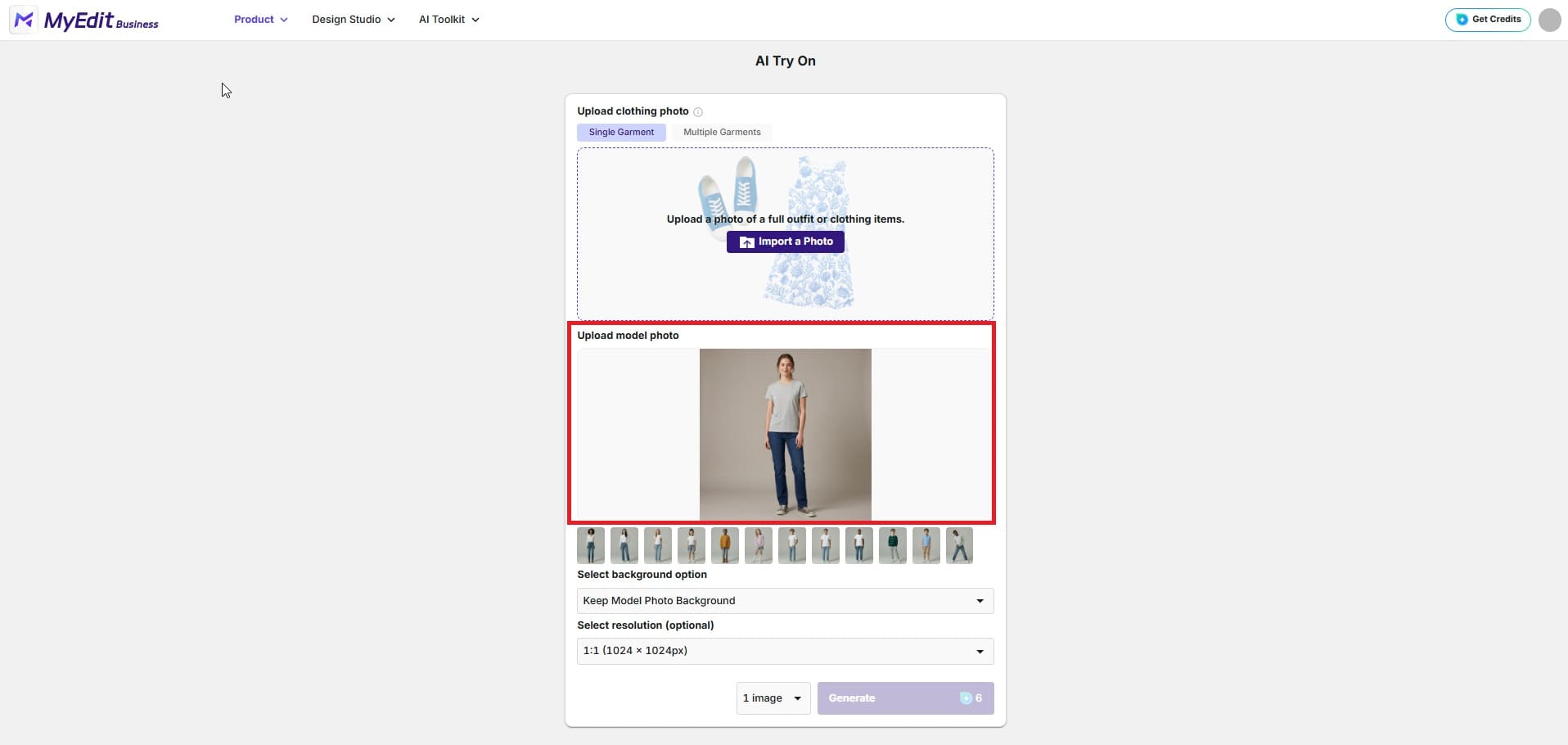
Upload your photo: Click upload and select your full-body photo. For the best result, choose a photo where you are facing the camera in a simple fitted outfit against a plain background. The clearer the photo, the more realistic the try-on result will be.
-
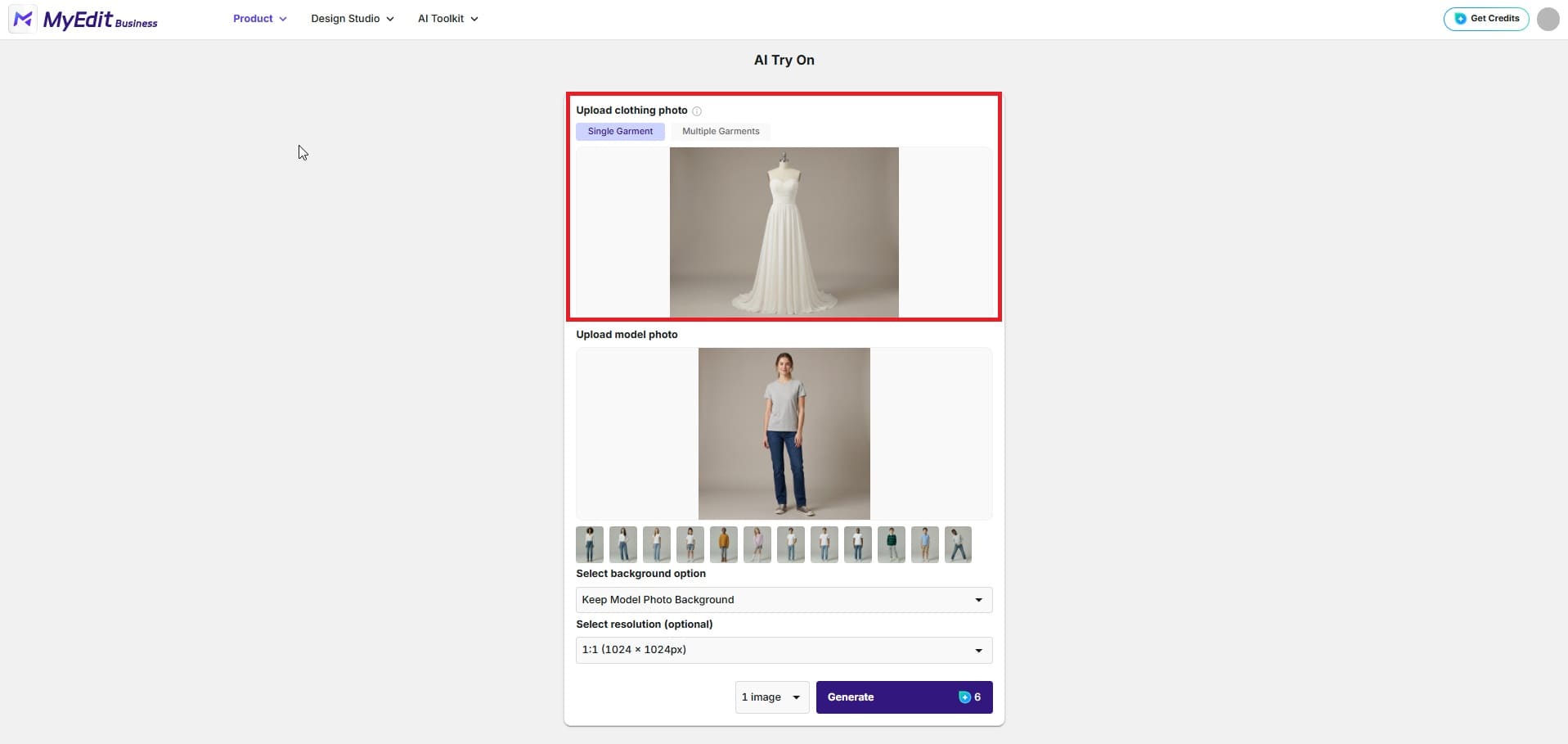
Upload or select your dress style: Upload the saved image of the wedding dress style you want to try from your chosen catalogue or inspiration source. You can also browse MyEdit's built-in style library if you want to explore looks without a specific dress in mind.
-
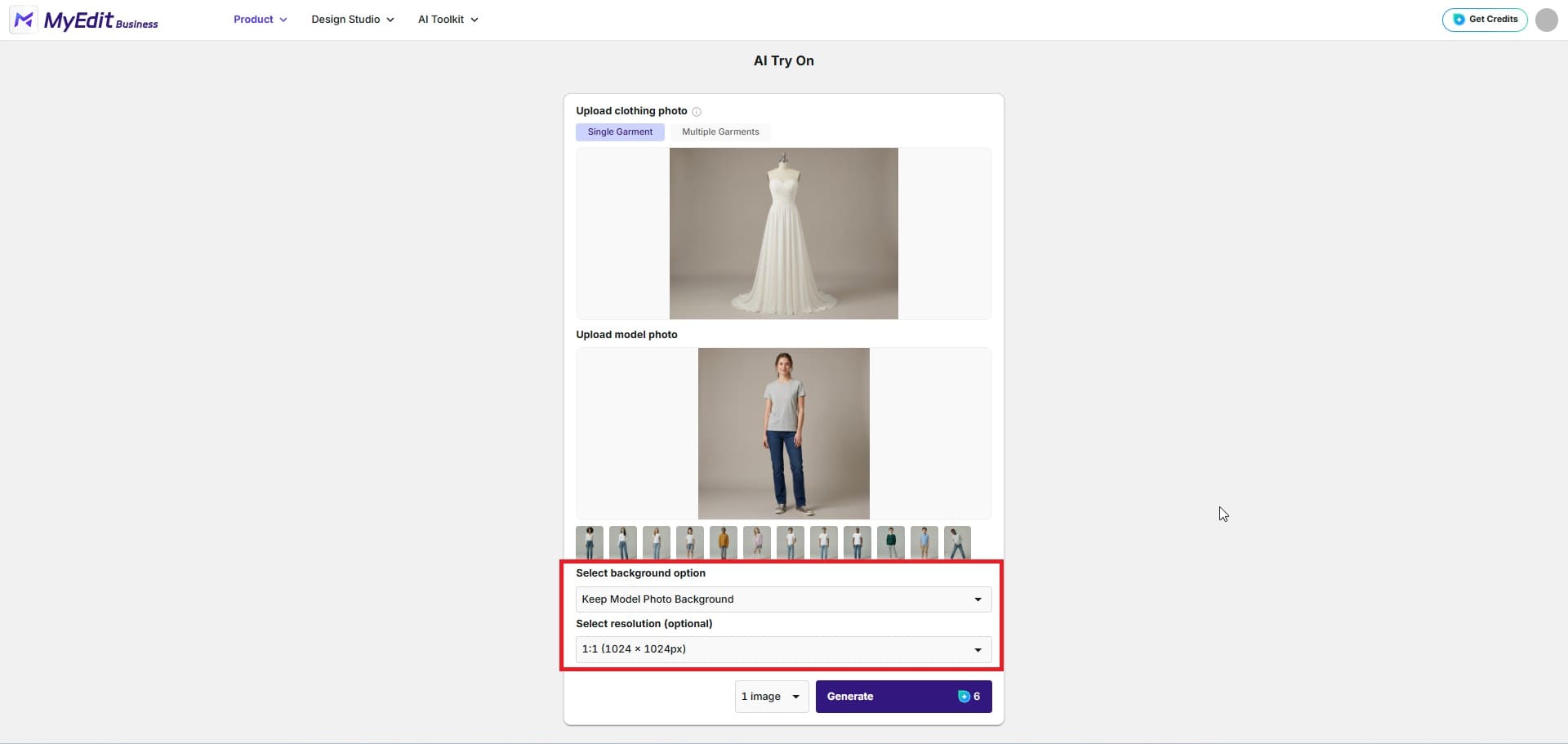
Adjust your output settings: Choose to keep the original background for a natural bridal portrait feel, or switch to
clean white if you want a clearer view of the dress silhouette. Then
select your resolution based on where you plan to save or share the
result.
-
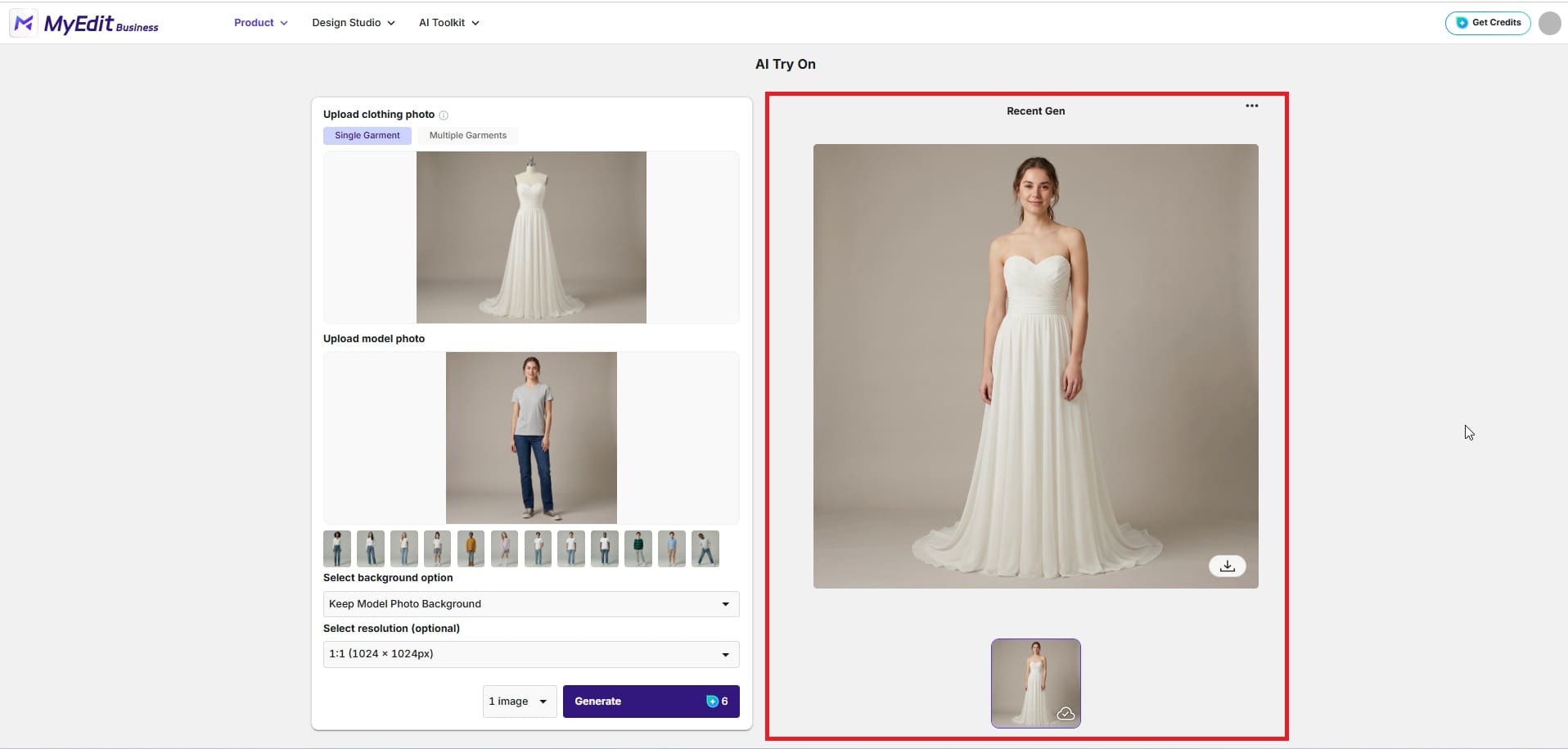
Generate your virtual try-on: Click Generate and MyEdit's AI will apply the dress to your photo, adapting the fit, drape, and proportion to your body shape. The result appears in seconds.
-
Save and compare: Download your result and repeat the process with other styles you want to compare. Building a small side-by-side collection of your favourite looks makes it much easier to identify which direction feels right before your boutique appointment.


Wedding Dress Styles and Bridesmaid Looks to Try on at Home
Not sure where to start with your virtual wedding dress try-on? Here are some of the most popular bridal styles to explore at home, along with a note on what makes each one worth trying before your boutique appointment. Bridesmaid dresses are included at the end since trying them on virtually as a group can save a lot of back-and-forth before everyone commits to a colour or silhouette.
A-line: The Most Universally Flattering Silhouette


The A-line is fitted at the bodice and gradually flares from the waist down, creating a classic silhouette that works beautifully on most body shapes. If you are unsure where to start, this is the style most bridal consultants recommend trying first. Seeing it on your own body virtually helps you decide whether you want to go fuller or more fitted before you step into the boutique.
Ballgown: Dramatic, Princess, and Worth Trying Before You Dismiss It


Many brides say they would never wear a ballgown — until they try one on and fall in love with it. The dramatic volume of a full ballgown skirt is genuinely hard to visualise from a catalogue photo. Trying it virtually first gives you a much better sense of whether the scale works for you and your venue before committing to an appointment slot.
Fitted and Minimalist: Sleek, Modern, and Very Dependent on Proportion


Fitted column and sheath dresses look stunning in editorial photos but are the most body-specific silhouette of all bridal styles. How a minimalist fitted dress sits on your particular proportions is genuinely difficult to predict from a flat image. A virtual try-on gives you an honest preview before you book a fitting with a specialist boutique.
Boho and Relaxed: for Outdoor, Garden, and Destination Weddings


Boho styles with flowing chiffon, lace details, and relaxed silhouettes vary enormously from one designer to the next. Trying a few different interpretations virtually helps you identify whether you prefer the more structured boho look or a fully relaxed and unstructured feel before committing to boutique appointments that specialise in this aesthetic.
Bridesmaid Dresses: Try on at Home Before the Group Appointment


Getting bridesmaids to agree on a dress style and colour is one of the most notoriously difficult parts of wedding planning. Having each bridesmaid try on bridesmaid dresses at home virtually before the group appointment means everyone arrives having already seen how the options look on them individually. It makes the final decision significantly faster and reduces the chance of someone feeling uncomfortable with a choice made under pressure in a boutique fitting room.
Why MyEdit Works for Virtual Wedding Dress Try-On at Home

Most virtual try-on experiences built into retailer websites only let you try on dresses from that specific brand's catalogue. MyEdit is different because it works with any dress image you bring to it: from any designer, any catalogue, any Pinterest board, or any bridal magazine. If you can save an image of the dress, you can try it on virtually at home. That freedom to explore styles across every price point and aesthetic without being tied to one brand's inventory is what makes it genuinely useful as a wedding planning tool rather than just a sales feature.
- Try any dress from any source: Upload a dress image from a designer website, a bridal catalogue, Pinterest, or any inspiration source. You are not limited to a single brand's collection.
- Realistic fit and drape: MyEdit's AI adapts the dress to your body shape and proportions, giving you a much more accurate preview than holding a catalogue photo next to your face in a mirror.
- Try as many styles as you like: There is no time pressure, no consultant hovering, and no limit on how many styles you can explore. Take your time and build a shortlist that genuinely excites you.
- Perfect for bridesmaid planning: Share the tool with your bridesmaids and have everyone try the same styles independently before a group decision is made.
- No app download needed: The tool runs entirely in your browser on any device: phone, tablet, or desktop. No installation required.
- Free to start: You can try the feature without a subscription. No commitment needed to see how it works on your own photo.
Conclusion
Your boutique appointment will be so much better when you already have a sense of what you love. Trying on wedding dresses at home virtually is not about replacing that experience. It is about walking into it prepared, confident, and genuinely excited rather than overwhelmed. MyEdit's AI Try-On gives you the freedom to explore every style that catches your eye, at your own pace, from your own sofa. Start with one dress that has been living on your Pinterest board and see what it actually looks like on you.
Related articles:
- How to Try On Any Clothing Style with AI
- How To Try on Y2K Fashion From Home
- Try the Best Random Outfit Generator
FAQs: Virtual Wedding Dress Try-On at Home
Yes. Tools like MyEdit's AI Try-On let you upload a photo of yourself and apply any wedding dress style you have saved from a catalogue, designer website, or Pinterest board. The AI adapts the dress to your body shape and generates a realistic preview in seconds, with no boutique appointment or fitting required.
MyEdit is one of the most flexible options for virtual wedding dress try-on because it works with dress images from any source — not just a single brand's catalogue. You can try on styles from any designer, bridal magazine, or inspiration board you have saved, making it a genuinely useful planning tool rather than a retailer-specific feature.
The process is the same as trying on a wedding dress. Each bridesmaid uploads a full-body photo and applies the shortlisted dress style using MyEdit's AI Try-On. Having everyone try the options independently at home before a group appointment means the final decision is based on how each person genuinely feels in the dress, rather than a rushed choice made under boutique pressure.
Modern AI try-on tools have improved significantly and produce results that are realistic enough to give you a genuine sense of how a silhouette, neckline, or skirt volume will look on your specific body shape. The results are not a substitute for a physical fitting, but they are accurate enough to confidently narrow down your shortlist before a boutique appointment.
With MyEdit, yes. Unlike virtual try-on features built into specific retailer websites, MyEdit works with any dress image you upload — from any designer, catalogue, or inspiration source. If you can save an image of the dress, you can try it on virtually.
A full-body photo works best. Stand facing the camera in a simple fitted outfit against a plain or neutral background. Good natural lighting makes a noticeable difference to the quality of the result. Avoid baggy clothing, heavy patterns, or very dark outfits as these can affect how accurately the AI applies the dress.

The CyberLink Editorial Team is composed of product testing specialists and content creation experts with over 20 years of hands-on experience and rigorous research in the multimedia editing industry. As the official voice of CyberLink, the team consistently delivers practical, easy-to-follow tutorials across video, photo, and audio editing, while highlighting AI innovations, product insights, and emerging industry trends. Their work empowers millions of creators worldwide each year to elevate their content. Beyond the blog, the team actively shares editing tips and product updates across YouTube, Facebook, Linkedin and Pinterest.
😎 Outside of their work, they enjoy capturing travel moments and meticulously editing photos and videos for their social channels.


