




How to Make Cooking Tutorial Videos for YouTube

Cooking videos are one of the most watched and loved types of content on YouTube. Whether you're passionate about food, want to build a brand, or just love sharing recipes, making cooking videos is a great way to connect with a global audience. In this guide, we'll walk you through how to create high-quality, engaging cooking videos-from filming to editing, and everything in between.
- Why You Should Start Making Cooking Videos
- Plan Your Cooking Content
- Must-Have Equipment for Cooking Videos
- Filming Tips for Cooking Videos
- How to Edit Cooking Videos Using CyberLink PowerDirector
- Optimize Your Cooking Videos for YouTube SEO
- Promote Your Cooking Videos
- Common Mistakes to Avoid
- FAQ: Cooking Videos on YouTube
Why You Should Start Making Cooking Videos

YouTube is packed with food lovers looking for inspiration. From 5-minute meals to gourmet dishes, there's an audience for every kind of recipe. Cooking videos can help you:
- Share your culinary skills
- Grow a YouTube channel
- Earn money through ads, sponsorships, and affiliate marketing
- Connect with people who share your love of food
Plan Your Cooking Content
Before you hit record, start with a plan:
- Pick a niche: Quick meals, baking, vegan dishes, or cultural cuisines
- Outline your recipe: Break it into clear steps
- Think visual: Recipes that look good on camera tend to perform better
- Add a hook: Something that makes viewers want to keep watching (e.g., "Only 3 ingredients!")
Must-Have Equipment for Cooking Videos
You don't need a Hollywood setup to start-but the right gear makes a difference.
Camera
- A DSLR or mirrorless camera is great, but even a smartphone with a good lens can shoot HD or 4K video.

Tripod or Overhead Rig
- Use a sturdy tripod for stability and an overhead mount to capture top-down shots of your cooking process.

Lighting
- Softbox lights or ring lights help brighten up kitchen spaces. Natural window light works great too.

Microphone
- A lavalier or shotgun mic ensures your instructions are heard clearly over kitchen noise.

Editing Software
- After filming your cooking video, it's time to trim and edit. Using software with built-in AI tools can save time and help you create professional results-even if you're new to editing.

Bonus gear
- Reflectors for softening shadows, gimbals for motion shots, and extra SD cards or batteries for longer shoots.

Filming Tips for Cooking Videos
- Frame your shots: Use a mix of close-ups, overheads, and talking head angles.
- Stay clean: Keep the background clutter-free and ingredients neatly arranged.
- Narrate or voiceover: Explain what you're doing in real-time or record a voiceover afterward.
- Be yourself: Personality matters! Smile, be engaging, and talk to your audience like they're in your kitchen.
How to Edit Cooking Videos Using CyberLink PowerDirector
Editing can make or break a cooking video. PowerDirector is a user-friendly yet powerful tool that helps you polish your content like a pro.
- Download and Install PowerDirectorDownload from the App Store for iOS and Android.
- Cut the Fluff
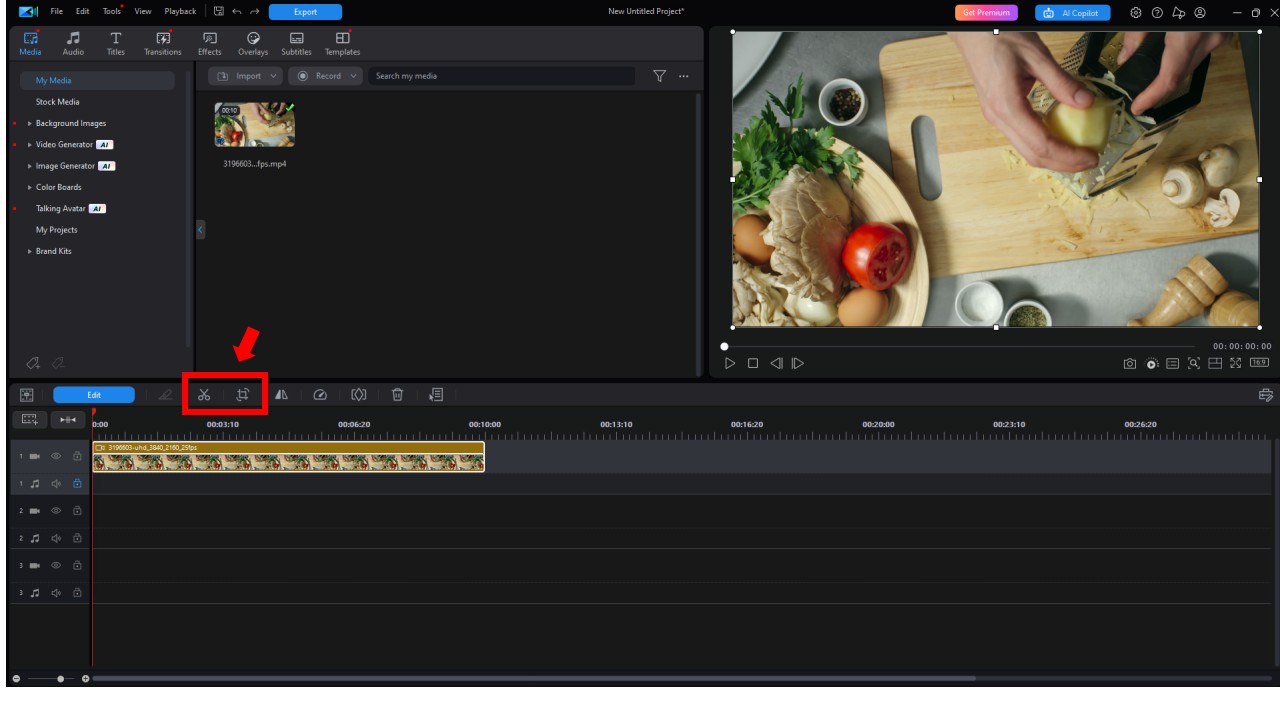
Trim out mistakes, long silences, or unnecessary steps. Viewers prefer fast-paced, informative content. To do this, select the desired clip and click Trim or Crop from the submenu above the timeline.
- Add Step-by-Step Text
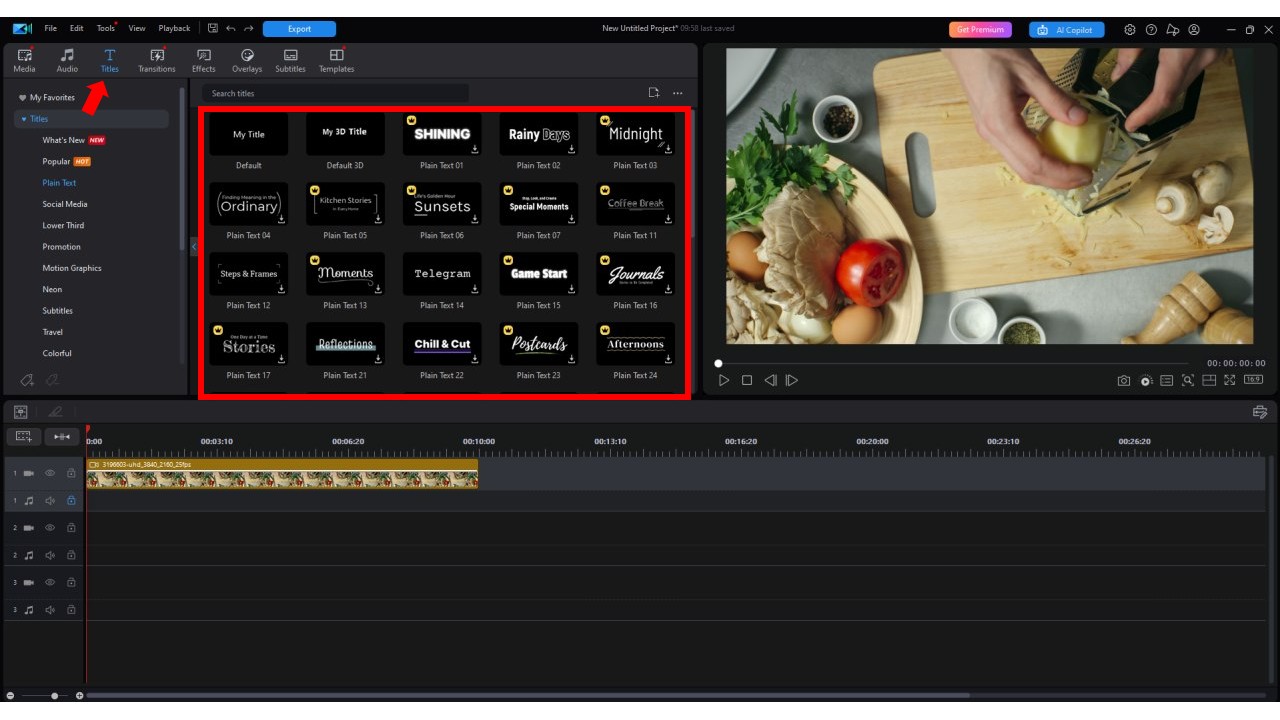
Use text overlays to show ingredients, steps, or timers. PowerDirector's templates make this easy. Go to the Titles tab on the top navigation bar and select one of the presets.
- Insert Music & Adjust Audio
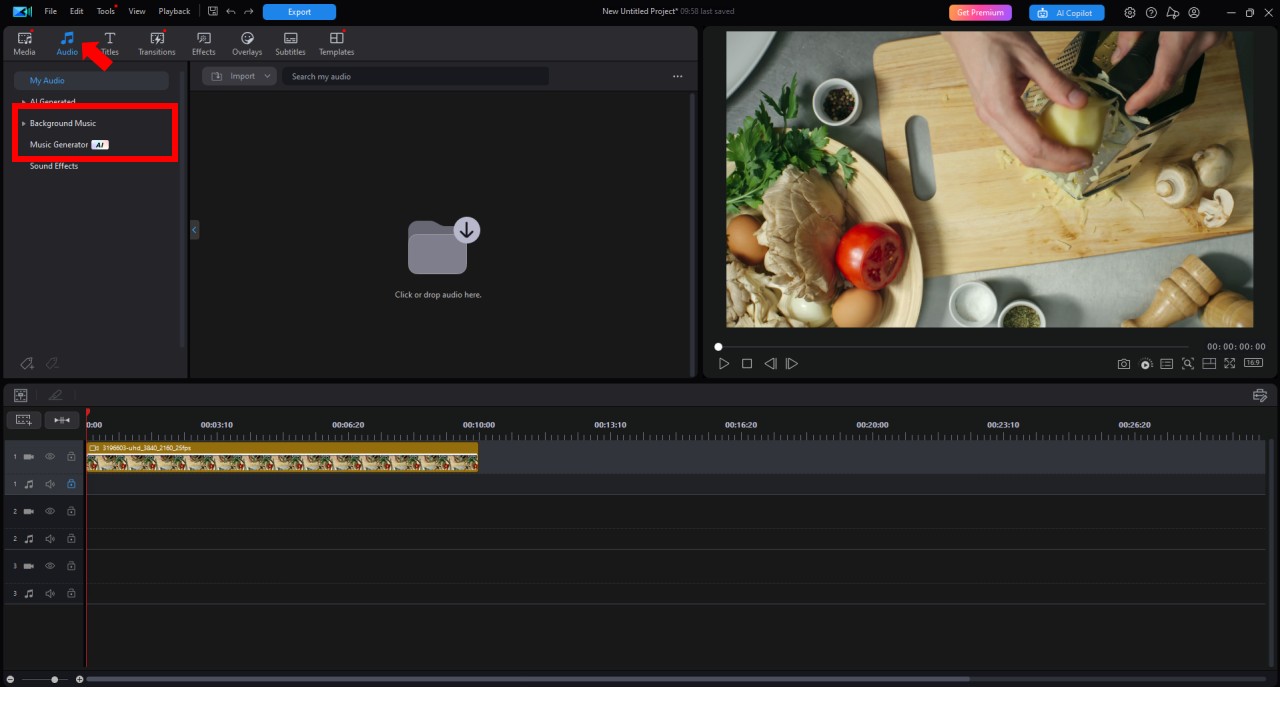
Choose royalty-free music or generate it using AI. Click on Audio in the top navigation menu. From there, you can choose Background Music from world-class libraries like Shutterstock, Meta, and Stripe-or use the Music Generator to create your own custom soundtrack. Lower background music when speaking. PowerDirector has built-in audio mixing tools to balance everything.
- Speed Up or Slow Down
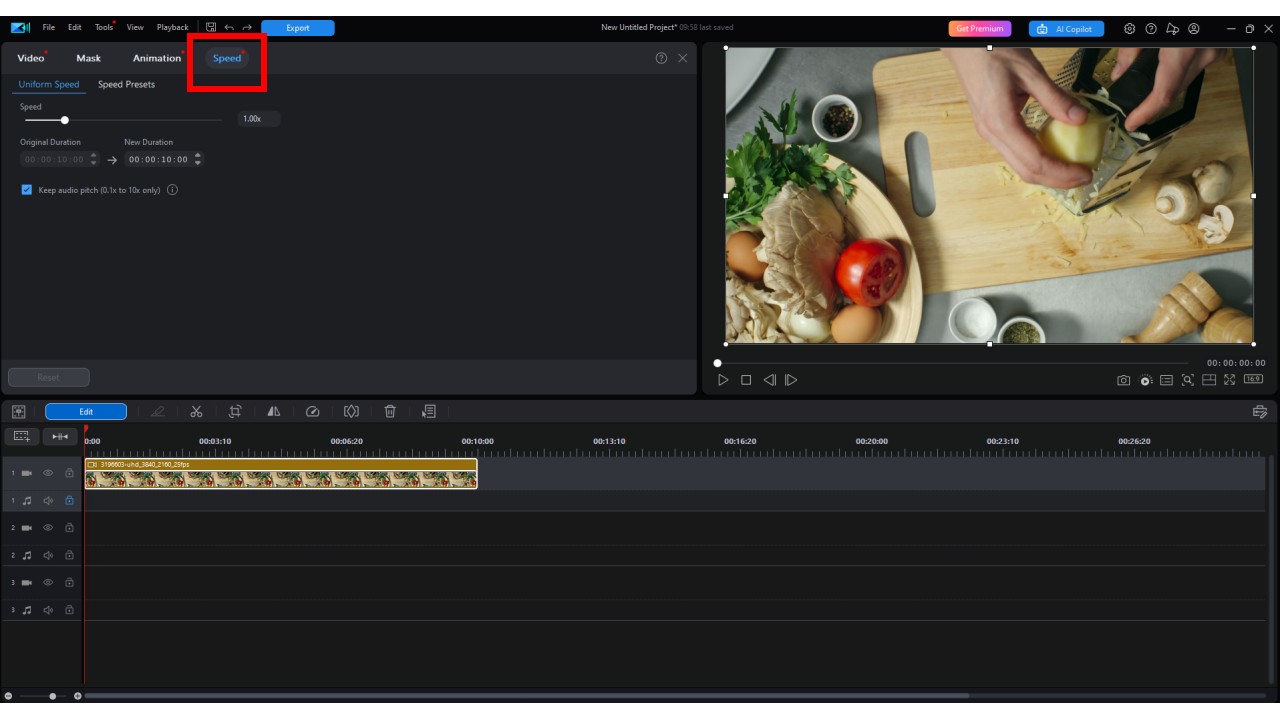
Speed up repetitive tasks like chopping, or slow down key moments to emphasize technique. First, select the desired clip. Then, from the submenu above the timeline click Change the speed of the selected clip tool.
- Add Transitions & Filters
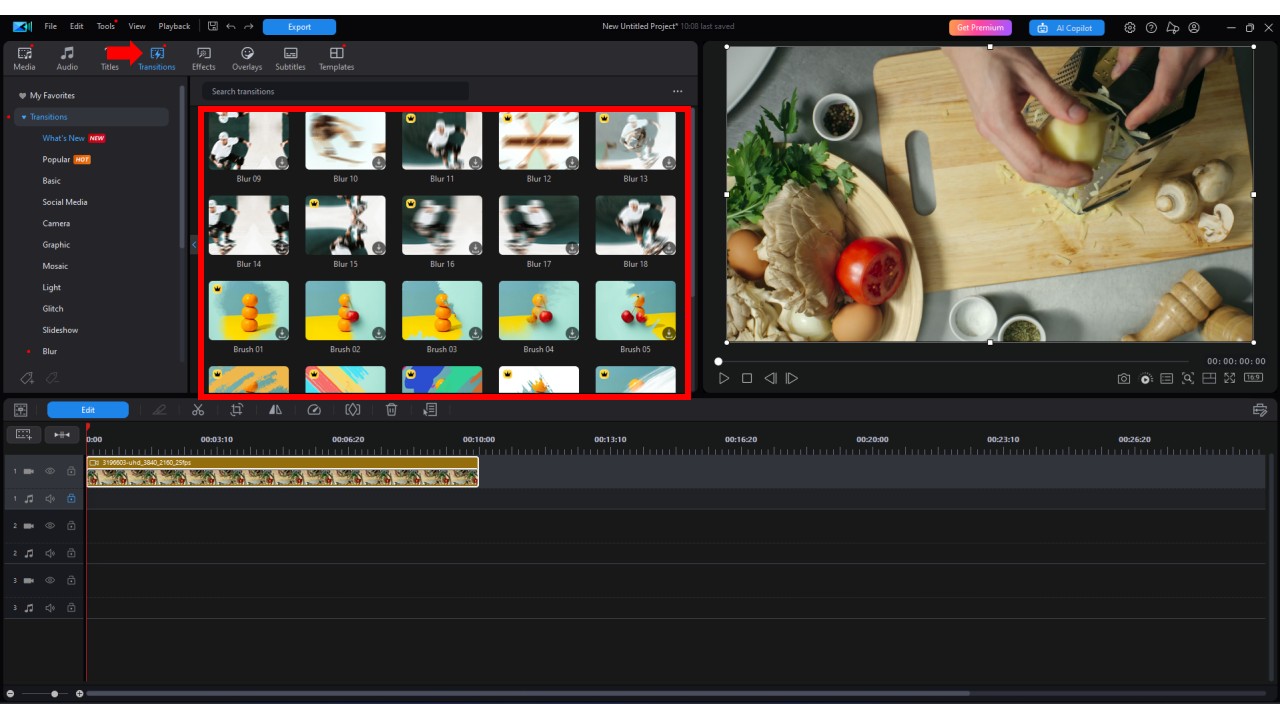
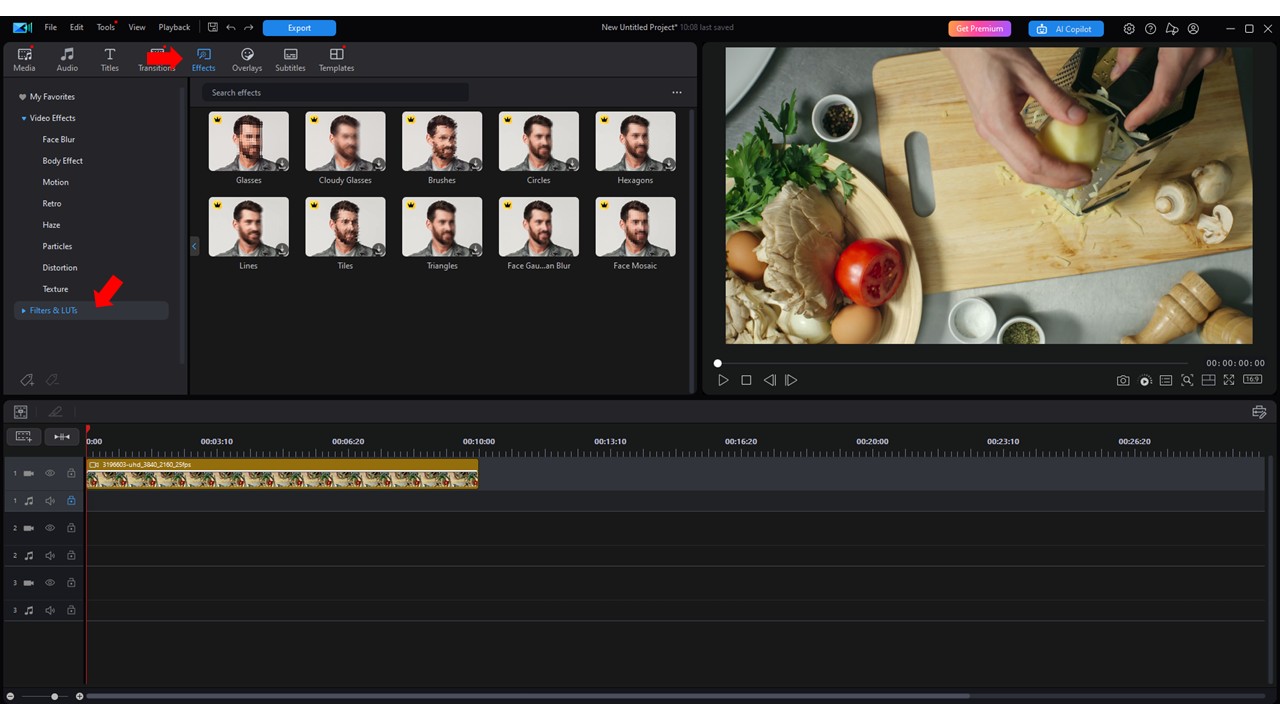
Use clean transitions between steps. Color grading tools can enhance food visuals, making dishes look more appetizing. PowerDirector contains hundreds of transition presets. Just go to the Transitions tab on the top navigation menu. To add filters, go to Effects and then click Filters & LUTs.
- Export for YouTube
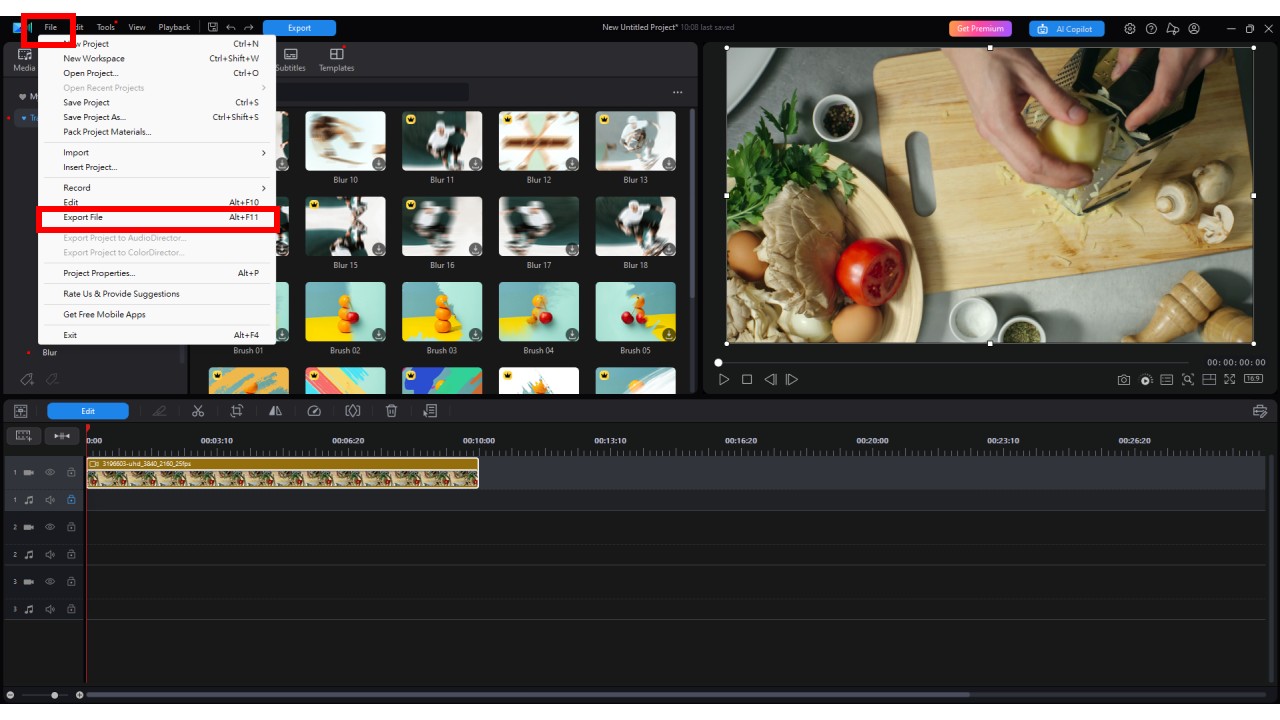
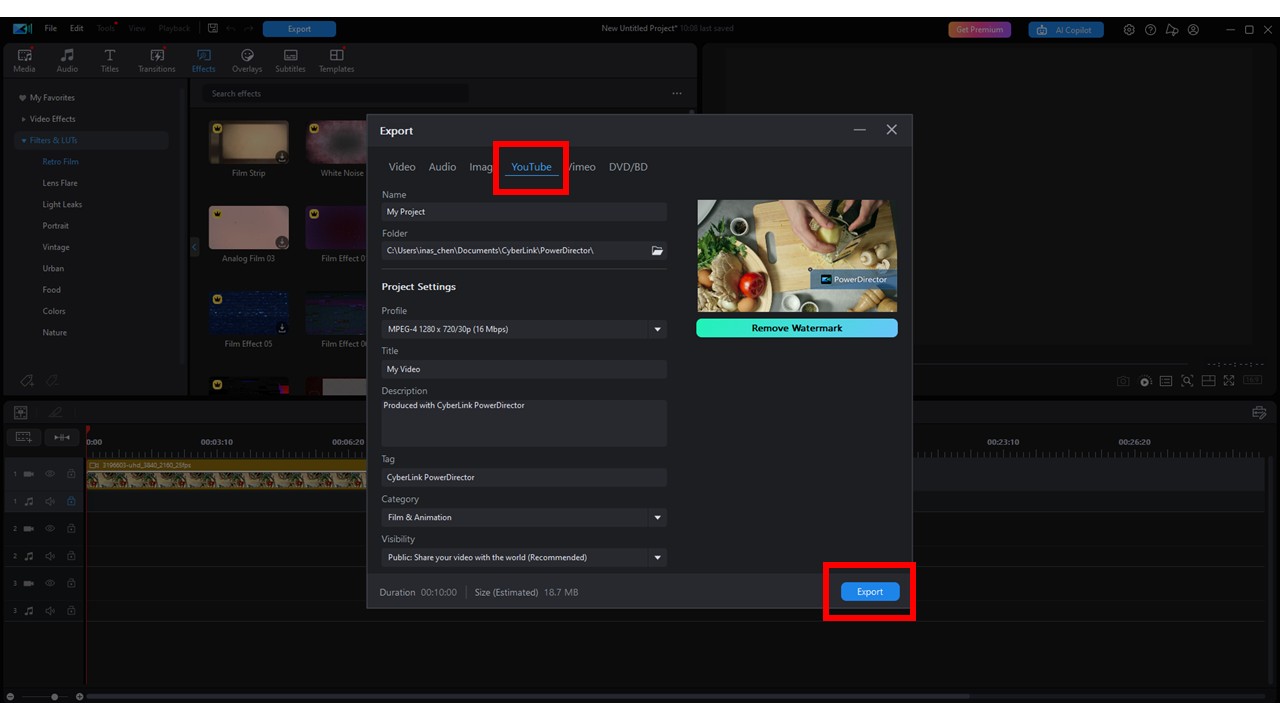
Export in 1080p or 4K with the correct YouTube presets. PowerDirector optimizes files for easy uploading. Click on File on the top left and click Export File. On the export pop up window, select YouTube from the menu and fill the the information. Click Export once you're finished.


Optimize Your Cooking Videos for YouTube SEO
Don't forget to make your videos discoverable! Here's how to optimize them:
- Title: Use keywords like "Easy Vegan Pasta|Cooking Videos for Beginners"
- Description: Include your recipe steps, links, and keywords
- Tags: Use tags like "cooking videos," "easy recipes," "how to cook"
- Thumbnail: Design a bright, clickable image of your finished dish
- Chapters: Break down steps in your video with timestamps
- CTA: Ask viewers to like, subscribe, or comment their favorite recipe
Promote Your Cooking Videos

Great videos deserve to be seen. Here are a few ways to boost visibility:
- Share on Instagram, TikTok, or Pinterest
- Post behind-the-scenes clips or kitchen tips as Shorts
- Collaborate with food bloggers or other YouTubers
- Turn your video into a blog post or recipe card
- Use email newsletters to keep fans in the loop
Common Mistakes to Avoid
- Poor lighting: Makes food look unappealing
- Shaky footage: Distracts viewers. If you mess up during filing, don't worry. Software like PowerDirector has AI tools to fix shaky footage in post production.
- Unclear audio: Viewers won't stick around if they can't hear you. With AI software like PowerDirector, you can fix this in post-production with AI Restoration Assistant.
- Long-winded intros: Get to the recipe quickly
- No call to action: Ask viewers to engage!
FAQs: Making Makeup Videos
A: Aim for 5-10 minutes. Long enough to teach, short enough to retain attention.
A: Only if it's royalty-free or licensed. PowerDirector includes music you can safely use.
A: PowerDirector stands out for its balance of power and simplicity-perfect for food content.
A: Be clear, visual, and add your personality. Great food and engaging energy go a long way.
A: Not at all. Clean space, good lighting, and strong presentation are what matter most.
Final Tips
Creating cooking videos is a journey-and like any good recipe, it takes practice. Start with what you have, keep things simple, and stay consistent. Whether you're sharing a family recipe or putting your own twist on a classic, your kitchen has the potential to reach millions.
So, grab your camera, hit record, and let the world taste your talent-one video at a time.


![How to Edit Videos on Your Phone [iPhone & Android] Step by Step Guide](https://dl-file.cyberlink.com/web/content/b102/l_Thumbnail.webp)


