



Open Eyes in Photo Online Free with AI (Plus an Open Eyes App)

A perfectly timed photo can still be ruined by one simple issue: closed eyes. Whether it's a group shot, portrait, or candid moment, blinking at the wrong time is surprisingly common.
Beyond traditional photography tips, recent breakthroughs in AI photo editing have made fixing closed eyes fast, accurate, and easy for anyone to achieve.
- AI tools can fix closed eyes in photos within seconds using generative fill or replacement features.
- AI eye editing can also enhance photos beyond fixing blinks, including eye color changes, eye bag removal, and object removal.
- For Mobile & Desktop: Download PhotoDirectorfor free. It offers precise control and natural results.
- For Online Users (No Install): Use MyEdit. It is ideal for quick edits.
- Natural-looking results depend on accurate masking and clear prompts such as “open eyes” or “natural eyes.”

- How AI Open Eyes Technology Works
- How to Fix Closed Eyes with an App
- How to Open Closed Eyes Online
- More AI Eye Editing Features You Should Try
- Final Thoughts
- FAQ About How to Open Eyes
How AI Open Eyes Technology Works
AI eye-opening tools rely on deep learning models trained on large datasets of human faces. These models understand facial structure, symmetry, and eye details to generate realistic results. Here's what happens behind the scenes:
- Facial Recognition: AI detects key landmarks like eyelids, pupils, and eyebrows.
- Contextual Reconstruction: It predicts what your open eyes should look like based on surrounding features.
- Texture Matching: Skin tone, lighting, and shadows are adjusted for consistency.
- Natural Blending: The generated eyes are seamlessly merged into the original photo.
How to Fix Closed Eyes in a Photo with the Best Open Eyes App
- Download PhotoDirector app for free.
- Tap on AI Replace in AI Photos and upload your photos.
- Paint over your closed eyes with the brush and enter prompts “open eyes”
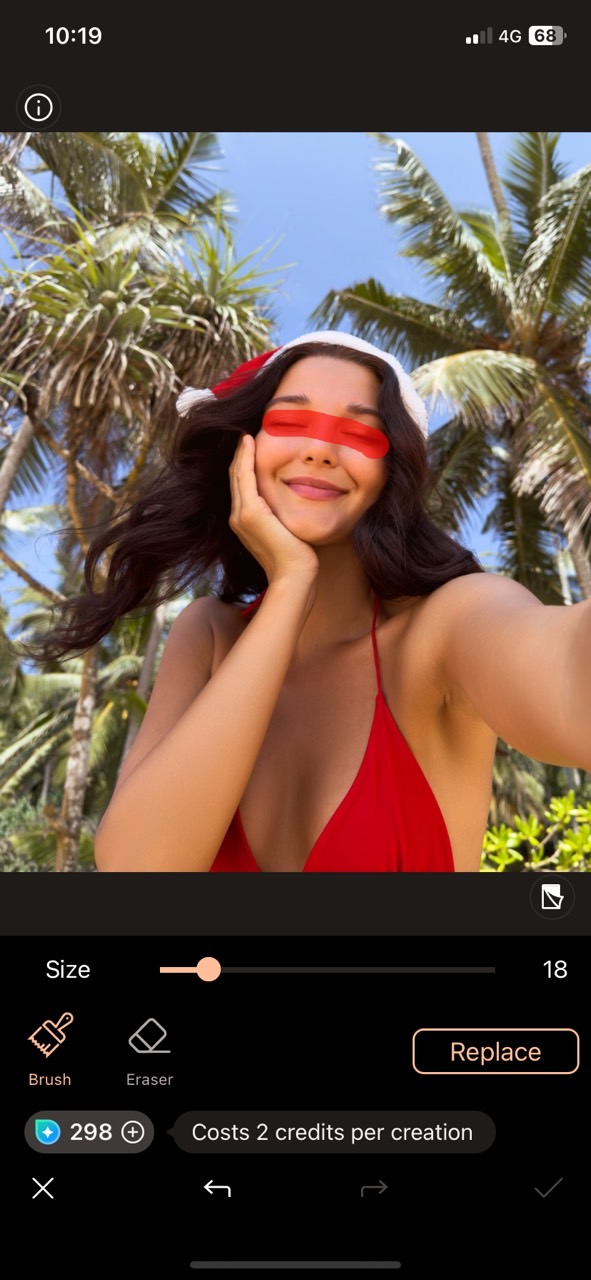
- Save and share your photo
 Download from the App Store for iOS and Android.


How to Open Closed Eyes Online for Free
- Go to MyEdit and find AI Replace.
💡Get free MyEdit credits every day just by logging in. - Upload your photo.
- Use the brush to paint over your closed eyes and type “open eyes” in the description box.
- Click generate and share the result.

More AI Eye Editing Features You Should Try
Eyes are the windows to the soul, and a pair of stunning eyes will make your photo stand out. Here are more eye features you can try!
Remove Things Covering Your Eyes

Sometimes, your sparkling eyes end up hidden behind bulky sunglasses or those stubborn bangs - such a shame! You can simply remove them by following these steps:
- Tap on AI Replace and pick your photo
- Paint over the sunglasses or bangs with the brush
- Type in “eyes” in the prompt box
Beside removing things on your face, you can also replace unwanted objects or erase people in the background using AI Replace.
Change Your Eye Color

Ever wondered how you'd look with green, orange, or even striking blue eyes? Just give it a try with the best eye color changer by following these steps:
- Tap on AI Replace and pick your photo
- Paint over your eyes with the brush
- Type in “green eyes ”, “orange eyes”, “black eyes” or any eye color you want to try in the prompt box
Remove Eye Bags

Do not let eye bags ruin your beauty! Remove eye bags now to find your younger self by following these steps:
- Click Beautify and pick your photo
- Select Eye Bags
- Drag the slider to remove your eye bags
Enlarge Your Eyes

Bigger eyes give you a more naive and cuter look. Enlarge your eyes by following these steps:
- Click Beautify and pick your photo
- Select Reshape and tap on Eyes
- Click Size and drag the slider to enlarge your eyes
Final Thoughts
Thanks to PhotoDirector, you don't need to struggle with tiny imperfections in your favorite selfies, family photos, or even pet photos! Easily fix closed eyes, remove unwanted objects covering your face, change your eye color to whatever you like, and even make eye bags disappear. With advanced AI, the results look natural and realistic, so you can avoid those awkward moments when people suspect your photo has been heavily edited.
Best of all, no editing skills are required — and it's completely free to download. Try it out today and say goodbye to the fear of photos ruined by closed eyes!
If you want to learn more about perfecting your photos, check out our Ultimate Guide to Photo Retouching.
FAQ About How to Open Eyes
You can effortlessly open closed eyes in a photo with AI. With the AI Replace feature in PhotoDirector, it is quick and easy to select your closed eyes, type in prompts and let the magic work!
Of course! Easily fix closed eyes in a photo in the best iOS open eyes app - PhotoDirector. The advanced AI technology allows you to open your eyes with 3 steps in seconds:
- Select AI Replace
- Paint over your closed eyes and enter prompts “open eyes”
- Save the result
Yes! Thanks to AI, opening closed eyes in photos has never been this easy! The best open eyes app, PhotoDirector, offers this amazing feature and helps you fix closed eyes in seconds.
Absolutely yes! Just like fixing closed eyes in a single-person photo, you can use AI Replace with PhotoDirector and select every closed eye in the group shot and open them all at once.
If you're talking about photos, the easiest way is to use AI Replace in PhotoDirector. Simply highlight your closed eyes, enter “open eyes” as a prompt, and the AI will naturally open them in seconds.
If you often end up with closed eyes in real photos, here are some quick tips to help:
- Look slightly above the camera
- Blink right before the shot
- Avoid direct flash
- Relax your face
- Take multiple shots
If you really had a hard time trying to open eyes when taking a shot and ended up failing a thousand times, don't worry! For photos, you don't have to retake them. With the AI-powered open eyes tool, you can instantly transform closed eyes into natural-looking open eyes, even if your eyes were shut during the shot.

The CyberLink Editorial Team is composed of product testing specialists and content creation experts with over 20 years of hands-on experience and rigorous research in the multimedia editing industry. As the official voice of CyberLink, the team consistently delivers practical, easy-to-follow tutorials across video, photo, and audio editing, while highlighting AI innovations, product insights, and emerging industry trends. Their work empowers millions of creators worldwide each year to elevate their content. Beyond the blog, the team actively shares editing tips and product updates across YouTube, Facebook, Linkedin and Pinterest.
😎 Outside of their work, they enjoy capturing travel moments and meticulously editing photos and videos for their social channels.


