




How to Write a Song and Lyrics: Beginner’s Guide Using AI
Want to write your own song but don’t know where to start? Songwriting involves more than just lyrics — it’s about melody, rhythm, and flow. This beginner-friendly guide breaks it down into simple steps so you can create a song from scratch.
We’ll cover how to find a theme, write lyrics, and arrange your track. You’ll also see how AI tools like MyEdit can speed up the process, helping you generate ideas and refine your lyrics into a full song.
- How to Write a Song: Step-by-Step Guide
- Turn Your Song into a Full Track with AI
- FAQ About Making Your Own Song
How to Write a Song: Step-by-Step Guide
New to songwriting? Here’s a simple step-by-step guide that shows you how to write a song from your first idea to your final lines.
Find Your Song Theme or Topic

Every song starts with a central idea. Before writing any lyrics, decide what your song is really about—love, confidence, heartbreak, motivation, storytelling, or a specific moment in your life. A clear theme helps you stay focused and makes the rest of the writing process easier.
If you’re unsure where to start, think about:
- A strong emotion you want to express
- A story you want to tell
- A message or lesson you want to share
- A mood or vibe you want the listener to feel
Once you choose your theme, you’ll have a foundation for your lyrics, melody, and song structure.
Learn the Basics of Songwriting

Songwriting starts with understanding the core elements that make a song work: lyrics, melody, chords, and emotion. These fundamentals help you build a song that feels cohesive and connects with listeners.
Lyrics:
Your lyrics communicate your message or story. Focus on clarity, emotion, and strong imagery. Simple lines often land better than overly complex writing.
Melody:
The melody is the part people remember. Aim for a pattern of notes that feels natural and catchy. Try humming freely or improvising over basic chords to discover melodic ideas.
Chords & Harmony:
Chords support the melody and set the emotional tone. You don’t need complicated progressions—many hit songs use just 3–4 chords.
Emotion & Delivery:
How you perform your song matters as much as the writing. Think about the mood, pacing, and vocal style that best express your story.
Structure Your Song

Once you understand the elements of songwriting, the next step is organizing them into a structure that flows. Song structure helps listeners follow your story and makes your track feel complete.
Most popular songs follow one of these formats:
- Verse – Chorus – Verse – Chorus – Bridge – Chorus
- Verse – Pre-Chorus – Chorus – Verse – Pre-Chorus – Chorus
- Verse – Chorus – Verse – Chorus
Verse:
Introduces the story or theme with fresh details each time.
Pre-Chorus (optional):
Builds momentum and leads into the chorus.
Chorus:
The emotional and melodic highlight — the part listeners remember.
Bridge (optional):
Adds contrast with a new melody, perspective, or emotion.
Outro:
Wraps up the song by repeating the hook or fading out.
AI-Powered Lyrics Writing and Editing

Struggling to write lyrics or turn your ideas into a full song? MyEdit’s Lyrics to Song tool helps you create clean, structured, and emotionally strong lyrics in seconds. Just describe your idea, choose a style, and let the AI shape your song for you.
- Open the tool: Launch the Lyrics to Song tool from MyEdit directly in your browser — no app or installation needed.
-
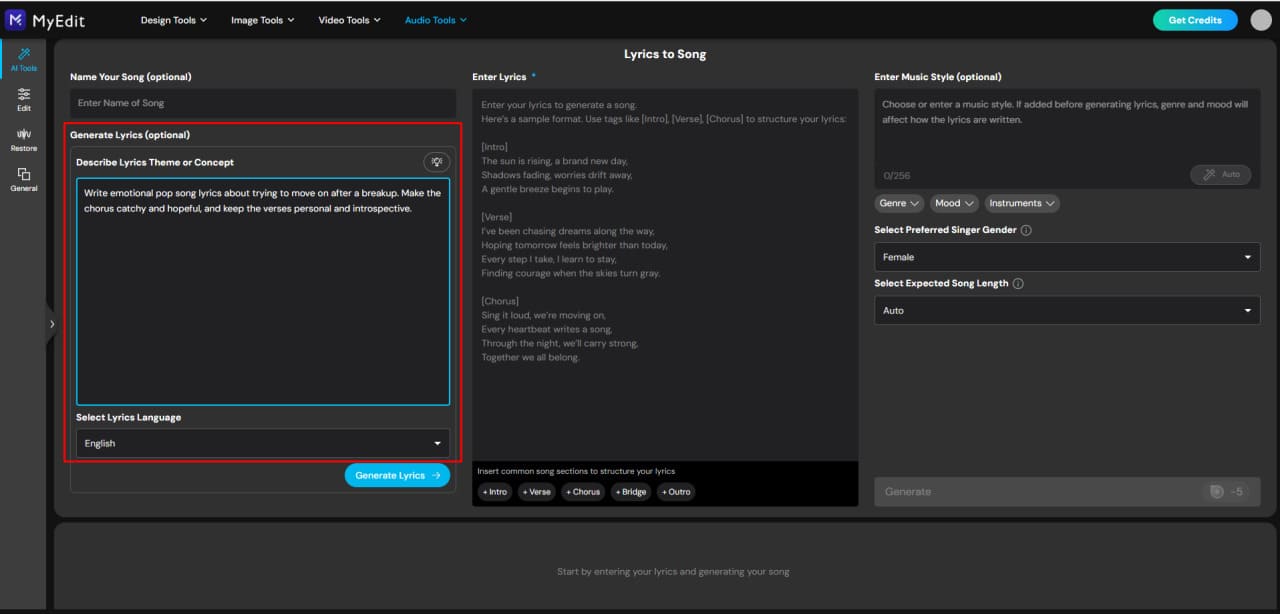
Describe your song idea: Tell the AI your theme, emotion, or story.
Examples:
“A slow emotional song about missing someone.”
“An upbeat pop track about starting a new chapter.”
-
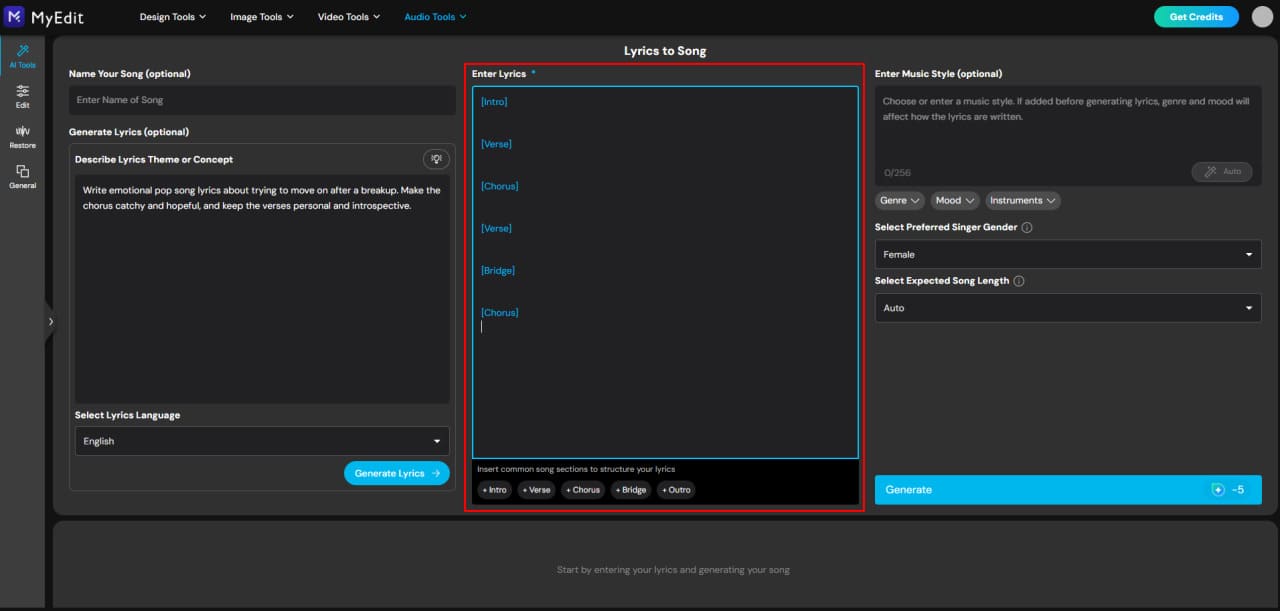
Choose your song structure: Select or specify the sections you want the AI to follow — such as Verse, Chorus, Bridge, or Outro.
Common example: Verse → Chorus → Verse → Chorus → Bridge → Chorus.
-
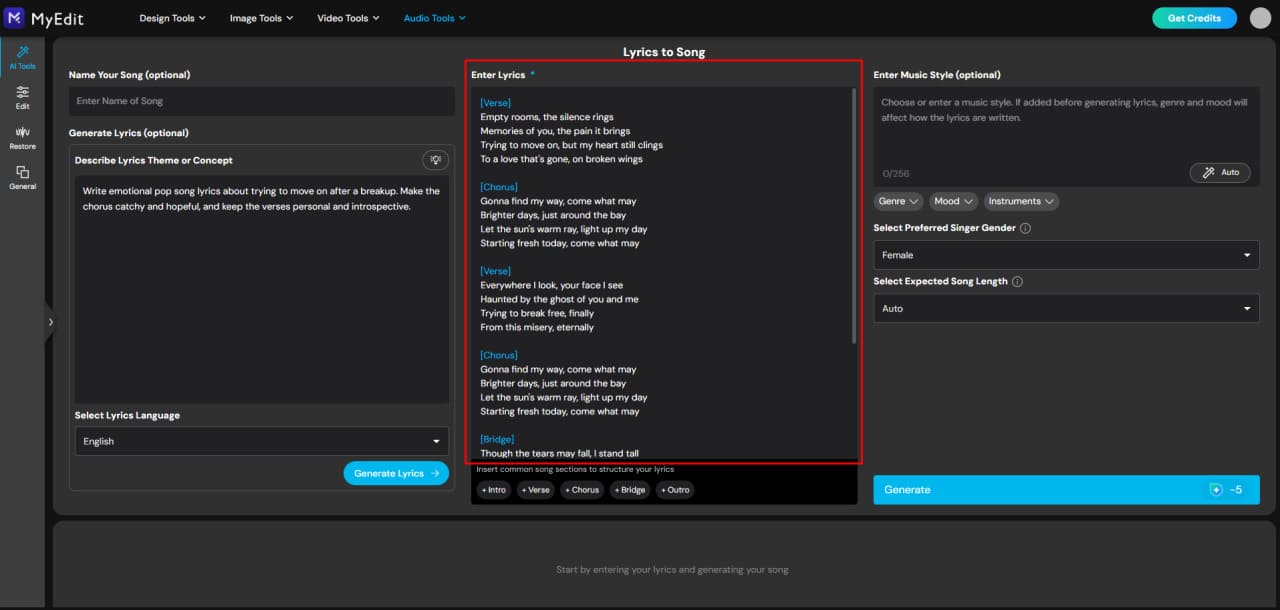
Generate and refine your lyrics: Click Generate to instantly get a full set of lyrics.
Want a stronger hook, smoother flow, or more emotion? Simply regenerate or adjust your prompt until the song feels right.


Expert Tips for Writing Great Lyrics

Great lyrics balance clarity, emotion, and rhythm. Whether you’re writing your first song or refining your tenth, these tips help you express your message in a way listeners can feel and remember.
• Keep your message simple: Focus on one clear idea or emotion so the song doesn’t feel scattered.
• Use imagery to create emotion: Show, don’t just tell — describe scenes, feelings, or moments.
• Write in your natural voice: Authentic lines connect better than overly complex phrasing.
• Make the chorus memorable: Use repetition, a strong hook, and concise lines.
• Edit in layers: First draft for ideas, second for clarity, third for rhythm and flow.
• Don’t force rhymes: Meaning and emotion come first — rhyme only if it feels natural.
Example of a strong prompt:
“Write emotional pop song lyrics about trying to move on after a breakup. Make the chorus catchy and hopeful, and keep the verses personal and introspective.”
Turn Your Lyrics into a Full Track with AI
Now it’s time to bring your lyrics to life. Learn how to shape your song’s flow, choose the right instruments and style, and turn your words into a full, polished track.
Build Your Song Flow and Delivery

Flow and delivery are what make your song feel alive. It’s not just the words — it’s how they move with the rhythm, where you place emphasis, and how you pace each line.
- Match your lyrics to the rhythm: Experiment with different tempos and beats to see how your words fit naturally. Some lines may flow quickly, others more slowly — find the balance that feels right.
- Play with pacing and phrasing: Break long lines into shorter phrases or combine short lines for emphasis. Use pauses strategically to create tension or highlight important moments.
- Emphasize emotion: Stress key words or phrases to convey the feeling behind your lyrics, whether it’s excitement, sadness, or joy.
- Practice out loud: Singing or speaking your lyrics helps you spot awkward phrasing and refine the flow until it feels smooth and natural.
Even small adjustments — changing a word, shifting a pause, or adding a subtle pause — can dramatically improve how your song is delivered and how it connects with listeners.
Choose Instruments, Styles, and Tempo

The instruments, style, and tempo of your song shape its mood and energy. Making the right choices helps your lyrics feel natural and your track engaging.
- Pick your instruments: Decide which instruments suit your song’s vibe — piano, guitar, drums, or electronic sounds. Consider how each instrument complements your lyrics and melody.
- Choose a musical style: Match the genre and arrangement to your song’s theme. Pop, rock, hip-hop, ballad, or electronic — the style affects energy, phrasing, and instrumentation.
- Set the tempo: Adjust the speed of your track to fit the mood. Fast tempos create excitement and energy, while slower tempos emphasize emotion and lyrics.
- Experiment and iterate: Try different combinations of instruments, styles, and tempo. Small adjustments can dramatically change the feel and impact of your song.
By thoughtfully selecting these elements, you set the foundation for a polished and compelling track that brings your lyrics to life.
Use AI to Generate a Complete Song

Once your lyrics and melody ideas are ready, AI tools can help you turn them into a complete song — adding instruments, rhythm, and style while keeping your creative vision intact.
- Open your AI songwriting tool: Launch the AI platform in your browser. No installation is required, making it quick and easy to start generating music.
-
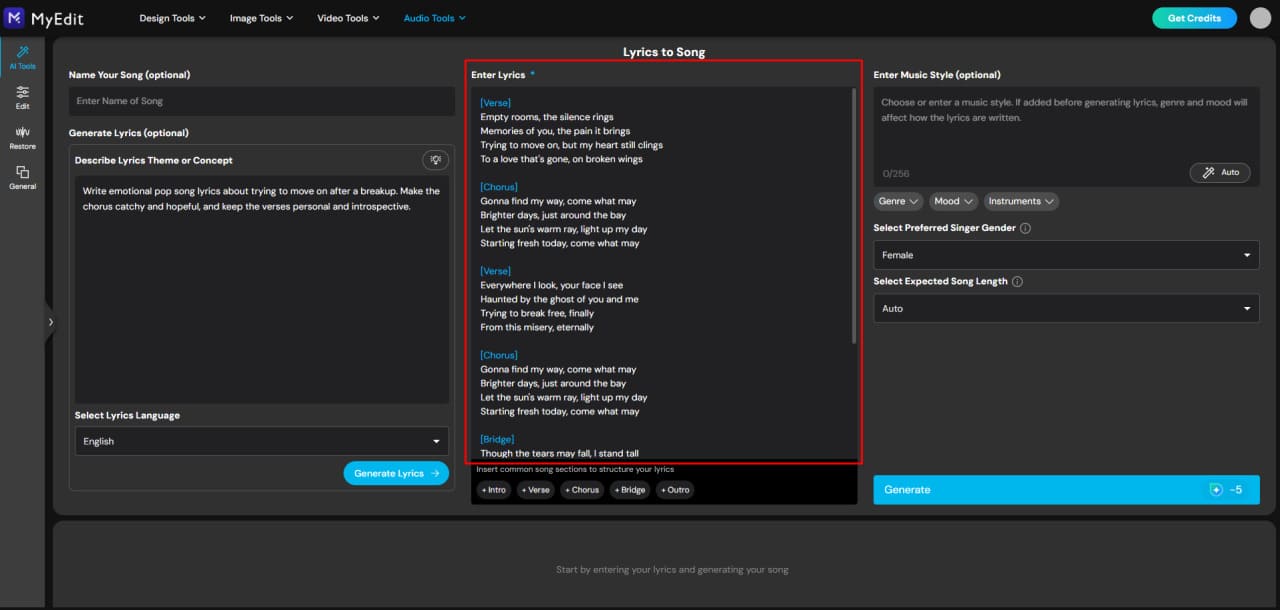
Input your lyrics: Paste your written lyrics and organize verses, choruses, and bridges. Clear formatting and line breaks help the AI create a smoother, more natural flow.
-
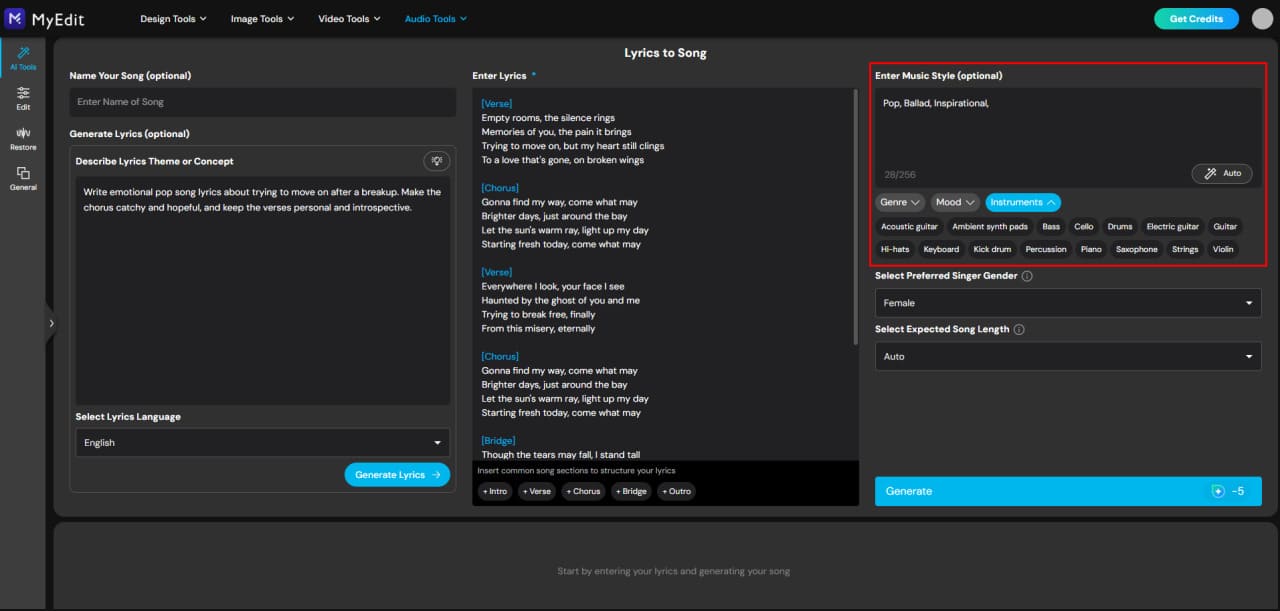
Choose instruments, style, and mood: Select the type of instrumentation, tempo, and musical style to match your song. Many AI tools can also automatically suggest arrangements that fit your lyrics.
-
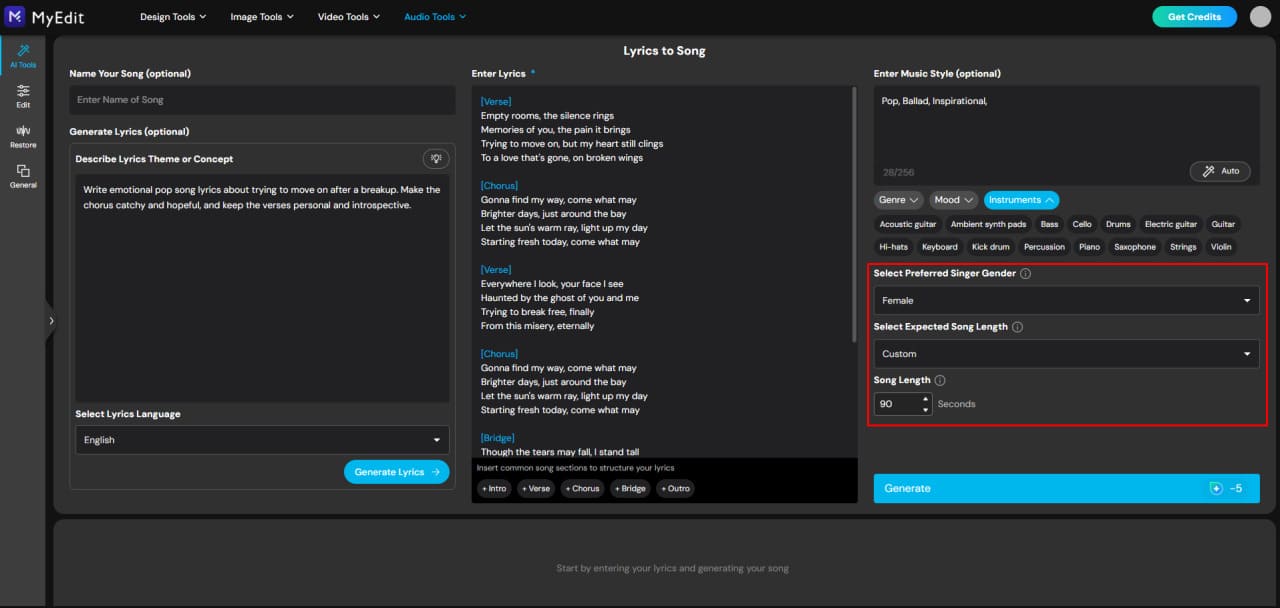
Set track length and vocal style: Specify the duration of your song and choose a vocal type that suits your lyrics, whether soft, powerful, or expressive. This helps the AI produce a cohesive and professional-sounding track.
- Generate and refine your song: Click Generate to hear your full track. Make adjustments as needed — tweak instruments, tempo, or vocal delivery until the song matches your vision.


Fine-Tune and Polish Your Song

Once your song is generated, spending time on refinement makes all the difference. Polishing ensures your track sounds smooth, professional, and engaging from start to finish.
- Listen critically: Play your song from start to finish and note any parts that feel rushed, uneven, or out of place.
- Adjust pacing and dynamics: Modify the tempo, volume, or intensity of sections to create contrast and keep listeners engaged.
- Balance instruments and vocals: Ensure no element overpowers another. Each instrument and vocal line should complement the lyrics and overall mood.
- Refine transitions: Smoothly connect verses, choruses, and bridges so the song flows naturally without abrupt jumps.
- Iterate and test: Make small adjustments, listen again, and repeat until the song feels polished and cohesive.
Even subtle tweaks — a slight pause, a minor melody change, or a shift in rhythm — can elevate your track and make your song truly shine.
Related Articles:
- Create Lyrics and Rap Songs Instantly
- How to Generate Song Lyrics with MyEdit
- The #1 Country Song in the U.S. Was Created by AI
FAQ About Making Your Own Song
Start with a theme or idea, brainstorm lyrics, and experiment with melody. Learn the basics of structure — verse, chorus, bridge — and gradually combine lyrics with rhythm. For beginners, using an AI tool like MyEdit Lyrics to Song can help generate ideas and polish your first lyrics.
Focus on one idea or emotion you want to express. Write a few lines or a chorus first, then build verses around it. Your first song is about learning and experimenting — MyEdit can suggest rhymes, hooks, or full verses to guide you.
Combine lyrics, melody, and rhythm. Start by writing your lyrics or a hook, then decide on a chord progression or beat. You can use instruments, loops, or digital software to arrange your song. MyEdit can help turn your lyrics into a complete song track quickly.
Choose a key and chord progression that fits your mood, then develop a melody that complements your lyrics. Experiment with tempo, rhythm, and dynamics. AI tools like MyEdit can suggest melody patterns or arrangements that match your lyrics.
Look for inspiration in personal experiences, emotions, or stories. Try prompts, freewriting, or AI lyric generators to spark ideas. MyEdit Lyrics to Song can instantly generate lyrics or song ideas based on your theme, making it easier to get started.
AI tools can help generate lyrics, melodies, or full tracks. Input your theme, mood, or style, then refine the AI suggestions. MyEdit lets you turn your AI-generated lyrics into a polished song with melody, instruments, and vocals.
Yes, as long as you comply with the tool’s licensing terms. Most AI-generated songs are legally usable for personal projects and, in many cases, commercial use — check the terms of the AI platform. MyEdit provides clear licensing for songs created with its AI features.

The CyberLink Editorial Team is composed of product testing specialists and content creation experts with over 20 years of hands-on experience and rigorous research in the multimedia editing industry. As the official voice of CyberLink, the team consistently delivers practical, easy-to-follow tutorials across video, photo, and audio editing, while highlighting AI innovations, product insights, and emerging industry trends. Their work empowers millions of creators worldwide each year to elevate their content. Beyond the blog, the team actively shares editing tips and product updates across YouTube, Facebook, Linkedin and Pinterest.
😎 Outside of their work, they enjoy capturing travel moments and meticulously editing photos and videos for their social channels.


