






Top 5 Free Santa Voice Text to Speech Generators for 2026

Bring Santa to life this holiday season! Create jolly, festive Santa messages for greetings, videos, or social media in just a few clicks using AI text-to-speech.
MyEdit makes it easy with its wide selection of Santa voices, flexible customization, and instant previews — craft the perfect holiday message in seconds, hassle-free!
- What Is a Santa Voice Generator?
- Best Santa Text to Speech Tools
- How to Pick the Right Tool
- Creating Your Own Santa Voice
- Tips for Crafting the Perfect Santa Message
- Santa Voice FAQ
What Is a Santa Text to Speech Tool?
A Santa text to speech (TTS) toolis a software, app, or online service that converts written text into a voice that sounds like Santa Claus. Using advanced AI voice technology, these tools can generate a warm, jolly, and festive voice that mimics the classic “Ho Ho Ho” tone associated with Santa.
These tools are especially popular during the holiday season because they allow you to:
- Create personalized Christmas messages for friends, family, or children.
- Add a festive voice to videos, e-cards, or social media content.
- Produce jingles, greetings, or announcements for schools, businesses, and events.
Unlike generic TTS tools, Santa voice generators are designed to capture the deep, cheerful, and magical qualities of Santa’s voice. Some even let you adjust pitch, speed, and tone, giving you full control over how your Santa sounds. For more ways to create jolly holiday messages, check out our Top Santa Claus AI Voice Changers guide.
Top 5 Best Santa Text to Speech Tools & Apps in 2026
Bring Santa to life this holiday season! Here are the top Santa text to speech tools to create jolly, festive voices in seconds.
- MyEdit – Best for Custom AI Santa Voices
- PowerDirector App – Easy Santa Voice for Videos
- Murf.ai – High-Quality Santa TTS with Voice Controls
- ElevenLabs – Realistic & Expressive Santa Voices
- Lovo AI – Wide Range of Festive Santa Voice Styles
1. MyEdit
Best for: Creating realistic Santa voices with flexible AI text-to-speech features

Pros
- Supports multiple languages and voice styles
- High-quality, natural-sounding AI voices
- User-friendly interface with flexible input options
Cons
- Limited text length
Key features
- Instant Text-to-Speech conversion
- Customizable voice options (speed, pitch, tone)
- Supports multiple file formats and direct text input
- Variety of voice profiles including festive Santa tones
With MyEdit, you can quickly convert text into natural-sounding Santa voices directly in your browser, without downloads. Simply type or upload your message, select a festive voice, and generate your audio — perfect for holiday greetings, videos, or social media content. You can preview, refine, and download your recordings with ease.
2. PowerDirector App
Best for: Creating animated Santa video messages using AI Talking Avatars and built-in video editing tools

Pros
- AI Talking Avatar brings any Santa portrait to life
- High-quality AI voices and built-in TTS options
- Full video editing suite with effects, transitions, and captions
Cons
- Some effects and advanced features require a premium subscription
Key features
- AI Talking Avatar: animate any Santa portrait with your script
- Multiple AI voices, including festive tones
- Video editing tools: trim, transitions, effects, and subtitles
- HD video export for social media, family, or holiday greetings
PowerDirector lets you turn any Santa image into a talking holiday greeter in seconds. Just upload a portrait, type or paste your message, and the AI generates both the voice and the facial animation. Add music, effects, or festive titles to finish the video, and you’ll have a polished Santa greeting ready to share.
3. Murf.ai
Best for: High-quality Santa TTS with flexible voice controls

Pros
- Natural, human-like Santa voices
- Customizable pitch, speed, and tone
- Supports multiple languages
Cons
- Advanced controls may take practice to master
Key features
- Realistic text-to-speech engine
- Custom pitch, speed, pauses, and pronunciation
- Multi-language voice support
- Export audio for videos or messages
With Murf.ai, you can generate realistic Santa messages quickly. Fine-tune tone and pacing, then export audio for video greetings or personal messages.
4. ElevenLabs
Best for: Realistic and expressive Santa voices for storytelling

Pros
- Ultra-realistic, expressive voices
- Supports multiple languages and accents
- Advanced emotional tone and inflection control
Cons
- Premium features required for voice cloning and dubbing
- Overkill for simple messages
Key features
- Hyper-realistic TTS with expressive tone
- Large voice library with accents and styles
- Voice cloning and dubbing
- Good for narrations, audiobooks, or professional messages
ElevenLabs is ideal for Santa messages that need warmth and expression. Perfect for storytelling, video intros, or heartfelt greetings.
5. Lovo AI
Best for: Quick Santa messages with a variety of voices and languages

Pros
- Large library of voices and languages
- Fast and easy to use
- Good balance of simplicity and flexibility
Cons
- Some advanced voices require subscription
- Less expressive than premium TTS tools
Key features
- Fast TTS conversion with multiple voices and languages
- Flexible voice styles and accents
- Beginner-friendly interface
- Great for social media or casual holiday greetings
With Lovo AI, you can generate Santa-style messages quickly for social media, holiday greetings, or multilingual audiences. Just type your text, pick a voice, and get festive audio in seconds.
How to Choose the Right Santa Text-to-Speech Generator

Not all Santa text to speech tools are the same. Here’s how to pick the best one for your holiday messages:
- Voice Quality: Choose a tool that sounds natural, warm, and jolly.
- Customization: Look for options to adjust pitch, speed, and tone for a perfect Santa voice.
- Voice Library: Tools with multiple Santa voices or accents give you more variety.
- Ease of Use: A simple interface lets you create your Santa message quickly.
- Output & Sharing: Check if you can download audio or share it directly to videos or social media.
- Cost: Free trials are great, but premium features may offer more realistic voices.
Keeping these tips in mind will help you choose a Santa voice generator that’s fun, flexible, and perfect for your holiday projects.
How to Generate a Santa Voice with Text-to-Speech (Step-by-Step Guide)
Follow these quick steps to turn any message into a warm and cheerful Santa voice using MyEdit.
- Open the tool: Launch the Santa Text to Voice from MyEdit directly in your browser — no app or installation needed.
-
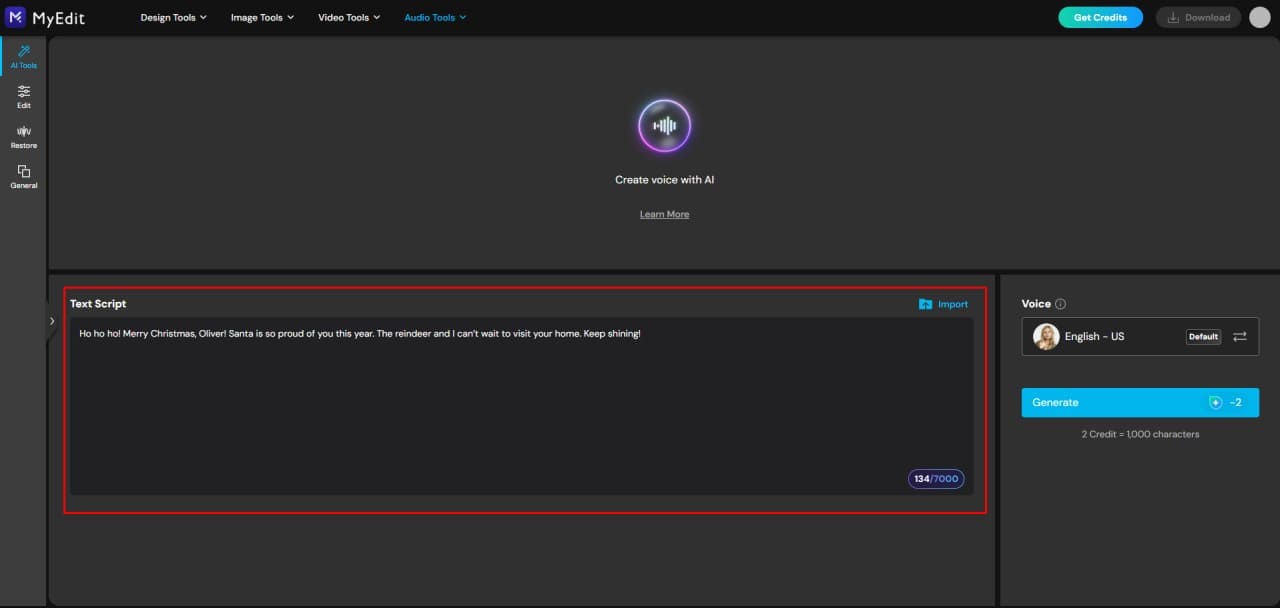
Write or paste your Santa message: Type your holiday greeting directly into the text box, or upload a text file if you’ve already prepared your script.
-
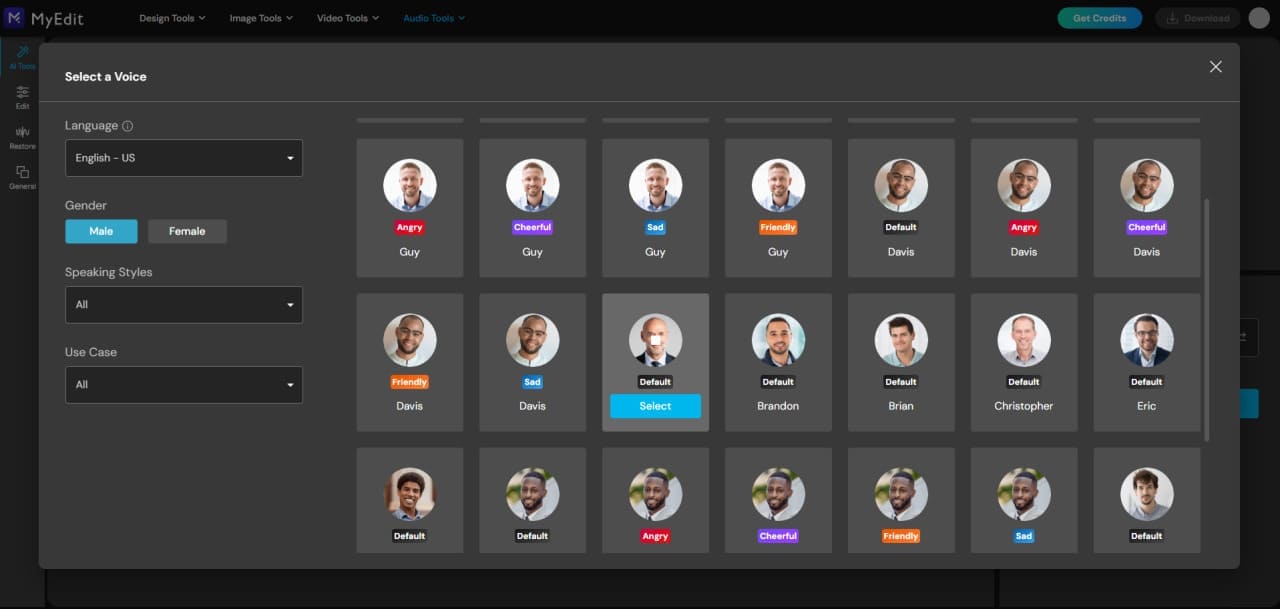
Select a Santa-like voice: Browse the AI voice profiles and choose a warm, friendly male voice. For the closest match, try the “Andrew” voice profile.
-
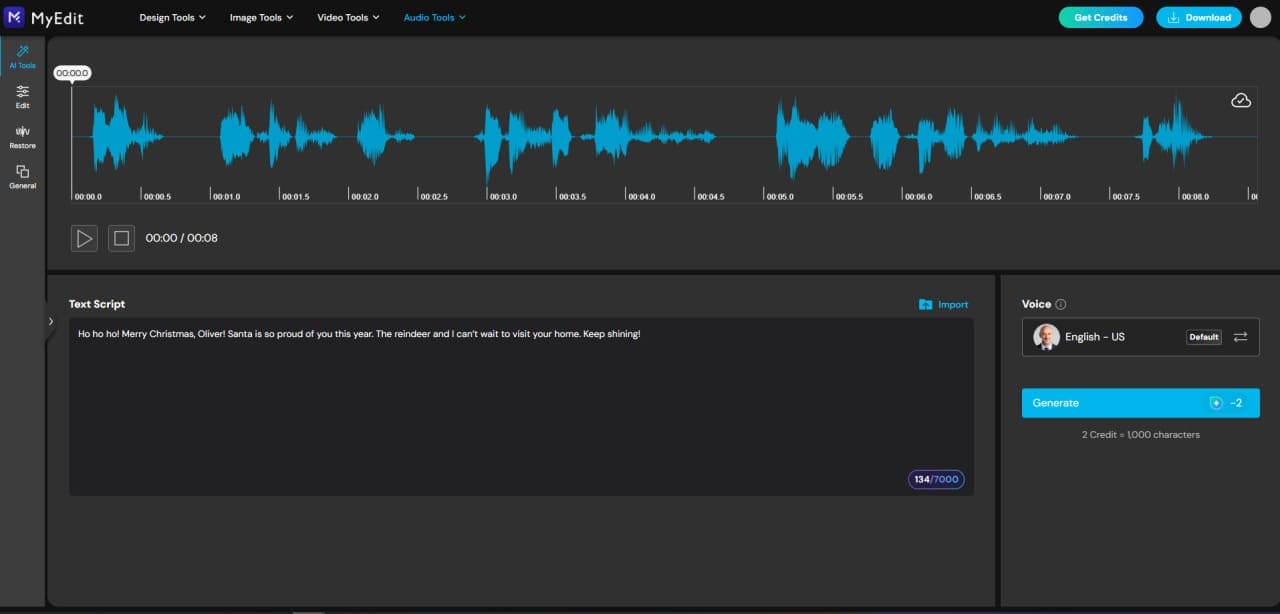
Generate your Santa recording: Click Generate to turn your text into a cheerful Santa voice. Preview, refine, and download your audio once you're happy with the result.


Tips for Writing the Perfect Santa Message

Want your Santa voice to sound extra magical? Follow these simple tips:
- Keep it cheerful: Use jolly words and a warm tone, just like Santa.
- Be personal: Mention names or small details to make the message feel special.
- Include festive elements: Reference gifts, reindeer, elves, or holiday traditions.
- Short and sweet: 10–20 seconds is perfect for social media or kids’ messages.
- Use playful rhythm: A little “Ho Ho Ho” or pauses can make the voice more lively.
- Test and tweak: Preview your message and adjust pitch, speed, or wording for the best effect.
By following these tips, your Santa text to speech messages will feel fun, festive, and truly magical!
Related Articles:
- Best Christmas Quotes to Share This Holiday Season
- Top Santa Claus AI Voice Changers for Holiday Fun
- How to Make Your Own Holiday Videos
Santa Text to Speech FAQ
A Santa text-to-speech (TTS) tool is a software, app, or online service that converts typed text into a Santa-like voice. It’s perfect for sending personalized holiday greetings, narrating festive stories, or creating fun video messages without recording your own voice.
Simply type your message into a Santa TTS tool, choose a Santa-like voice, adjust tone, speed, and emphasis, then generate the audio. You can download or share the message instantly for holiday greetings or videos.
Some of the top Santa TTS tools include:
- MyEdit – best for custom AI Santa voices and flexible TTS options
- PowerDirector App – ideal for combining Santa voices with videos
- Murf.ai – high-quality Santa voices with advanced voice controls
- ElevenLabs – realistic and expressive Santa voice generation
- Lovo AI – wide range of festive Santa voice styles
Yes! Many Santa TTS tools let you add generated voices directly to videos, allowing you to create greeting clips, social media content, or holiday stories with professional-quality audio. PowerDirector App is particularly good for video integration.
For app-based solutions, PowerDirector App and MyEdit are top picks. Both allow you to generate realistic Santa voices and export them easily for video or audio messages.
Modern AI TTS tools produce highly natural-sounding Santa voices with realistic tone, pacing, and expression. The results often sound close to a real human voice, making your holiday messages more magical and engaging.

The CyberLink Editorial Team is composed of product testing specialists and content creation experts with over 20 years of hands-on experience and rigorous research in the multimedia editing industry. As the official voice of CyberLink, the team consistently delivers practical, easy-to-follow tutorials across video, photo, and audio editing, while highlighting AI innovations, product insights, and emerging industry trends. Their work empowers millions of creators worldwide each year to elevate their content. Beyond the blog, the team actively shares editing tips and product updates across YouTube, Facebook, Linkedin and Pinterest.
😎 Outside of their work, they enjoy capturing travel moments and meticulously editing photos and videos for their social channels.


