






Top 5 Santa Claus AI Voice Changers for Holiday Fun in 2026

Want to add a touch of holiday magic to your messages, videos, or live streams? A Santa voice generator lets you turn text or your own voice into a warm, jolly Santa Claus voice in just a few clicks.
For the easiest and most versatile experience, MyEdit is a top choice. You can create realistic Santa voices online, experiment with fun voice effects, and make personalized holiday messages or videos—all without downloading any software.
- What Is a Santa Voice Simulator?
- Best Santa Claus AI Voice Simulators
- How to Choose the Right Tool
- How to Sound Like Santa Claus
- Santa Voice Generator FAQ
What Is a Santa Voice Changer?
A Santa voice changer is an AI-powered tool that transforms your own voice into a realistic, jolly Santa Claus voice. Using advanced voice modulation, pitch adjustment, and festive sound effects, these tools recreate Santa’s classic warm and cheerful tone, complete with the iconic “ho-ho-ho.”
Voice changers are perfect for holiday video messages, social media clips, livestreams, greeting cards, and fun surprises for kids. They allow anyone to instantly sound like Santa without recording or editing complex audio.
Want to explore how to generate Santa’s voice directly from text instead? Check out our Santa Text to Speech guide for the best tools and step-by-step instructions.
Top 5 Santa Claus AI Voice Simulators in 2026
Bring holiday magic to your messages and videos with the top Santa voice simulators, delivering realistic and jolly Santa voices in seconds.
- MyEdit – Best for Online Santa Voice Simulation
- PowerDirector – Best for Creating Santa Voices in Videos
- Voicemod – Best for Live Santa Voice Changing
- Santa Voice Changer – Best for Free Quick Santa Voices on Mobile
- Voice.ai – Best for Realistic AI Santa Voice Generation
1. MyEdit
Best for Online Santa Voice Simulation

Pros
- Easy to use directly in the browser
- Multiple voice profiles including a realistic Santa voice
- Additional fun voice effects like Robot, Demon, and Duck
Cons
- Audio file size must be under 100 MB
Key features
- Browser-based, no download required
- AI-powered Santa voice simulation
- Multiple voice profiles and fun audio effects
- Simple text-to-speech and voice cloning options
MyEdit is a versatile online tool that lets you transform any recording or text into a realistic Santa Claus voice. Its simple interface and wide range of voice options make it perfect for creating holiday messages, social media clips, or festive videos in minutes.
Whether you’re sending a cheerful greeting to friends, creating content for children, or adding a Santa voice to a holiday project, MyEdit delivers high-quality results without requiring software installation.

Try MyEdit now to create your own Santa voice online!
2. PowerDirector
Best for Creating Santa Voices in Videos

Pros
- Integrated video editor with Santa voice changer
- High-quality voice profiles
- Available on Android and iOS
Cons
- Some advanced editing features are premium
Key features
- Mobile video editing with voice effects
- Santa voice profiles for recordings and clips
- Easy import/export of audio and video
- Multiple audio effects and filters
PowerDirector is ideal for video creators who want to add a Santa voice to their holiday clips or social media content, all from a mobile device.
3. Voicemod
Best for Live Santa Voice Changing

Pros
- Live voice changing for calls, games, and streaming
- Includes Santa voice profile
- Adjustable voice intensity and effects
Cons
- Requires download and some storage space
- Santa voice may not always be available in free version
- Limited mobile functionality compared to desktop
Key features
- Windows and MacOS support
- Real-time voice modulation
- Customizable voice effects
- Works with games, streaming apps, and calls
Voicemod is perfect for gamers or content creators who want to sound like Santa live, adding holiday fun to streams, calls, or online videos.
4. Santa Voice Changer
Best for Free Quick Santa Voices on Mobile

Pros
- Free and quick to use
- Simple Santa voice profile
- Record or import audio directly in the app
Cons
- Limited audio quality
- Android only
Key features
- Android app
- Santa voice profile
- Record or import voice
- Easy to save and share audio
Santa Voice Changer is ideal for anyone who wants quick, fun Santa, Elf, Reindeer, and other holiday voices on Android without installing complex software or paying for premium options.
5. Voice.ai
Best for Realistic AI Santa Voice Generation

Pros
- AI-powered realistic Santa voice generation
- Customizable voice tone and style
- High-quality output suitable for social media or YouTube
Cons
- Requires an account and subscription for full features
Key features
- Web browser support
- AI text-to-speech Santa voice
- Customizable tone and pitch
- Professional audio output for videos and social content
Voice.ai is the choice for users who want the most realistic Santa voice using AI, ideal for professional content creators, YouTubers, or social media campaigns.
How to Choose the Right Santa Voice Generator

Choosing the best Santa Claus AI voice depends on how you plan to use it. Here are the key factors to consider when comparing tools:
1. Voice Quality & Realism
Look for generators that deliver a warm, deep, and natural Santa tone—not robotic audio. High-quality tools offer expressive speech, clear pronunciation, and the classic “jolly” character.
2. Type of Tool (AI Voice vs. Voice Changer)
Some platforms generate a Santa voice from text, while others modify your real-time voice. Pick the format that fits your project: recordings, calls, videos, or live streams.
3. Ease of Use
A good Santa voice app should be simple: type text, choose a Santa voice, and export. Mobile apps are great for quick messages; online tools offer more flexibility.
4. Voice Styles & Customization
The best generators allow you to adjust tone, speed, emotion, or choose between classic Santa, cartoon Santa, deep Santa, etc.
5. Export Quality & Formats
Check whether the tool exports in WAV/MP3 and provides clean audio suitable for videos, social media, greeting cards, or professional use.
6. Pricing & Free Options
Some tools offer free Santa voices with usage limits, while others charge per download or require a subscription. Choose based on how much content you plan to create.
7. Safety & Family-Friendly Use
If children will listen to your messages, choose a tool with safe content policies and clean audio output.
How to Sound Like Santa Using a Santa Claus Voice Changer
Transform your regular voice into Santa’s cheerful tone in just a few clicks! Follow these simple steps with MyEdit’s Santa Voice Changer to create fun holiday messages, greetings, or voiceovers.
- Open the tool: Launch the Santa Voice Changer from MyEdit directly in your browser — no app or installation needed.
-
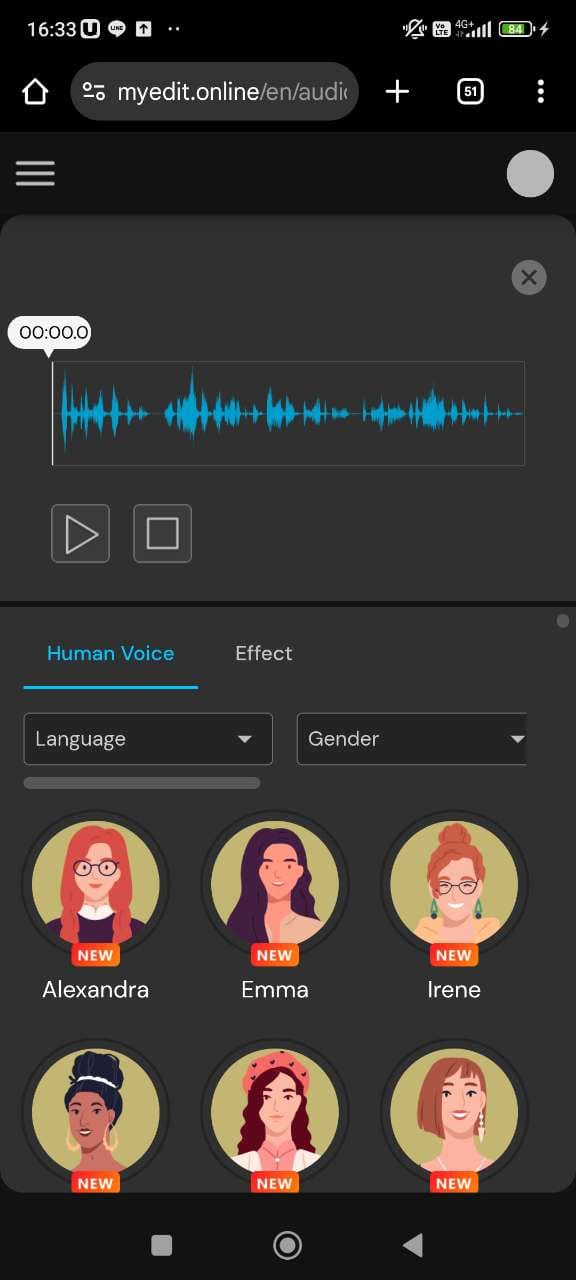
Upload your audio: Import the file you want to transform into a Santa voice.
-
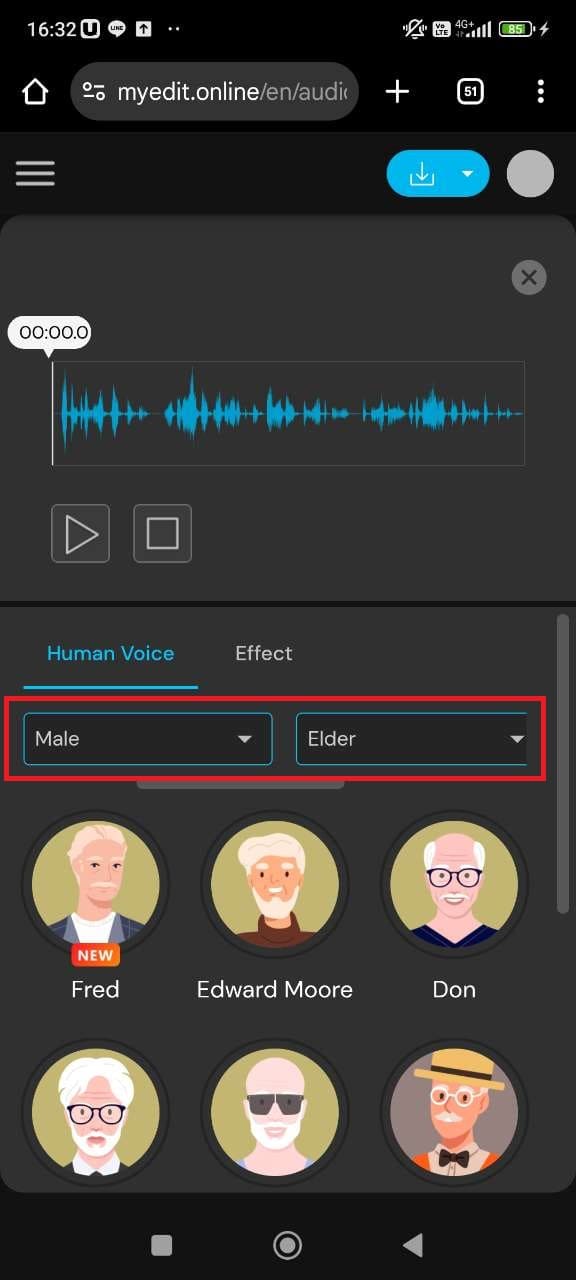
Browse the Santa voice profiles: Select Male and Elder in the filters to find voice profiles that sound closest to Santa.
-
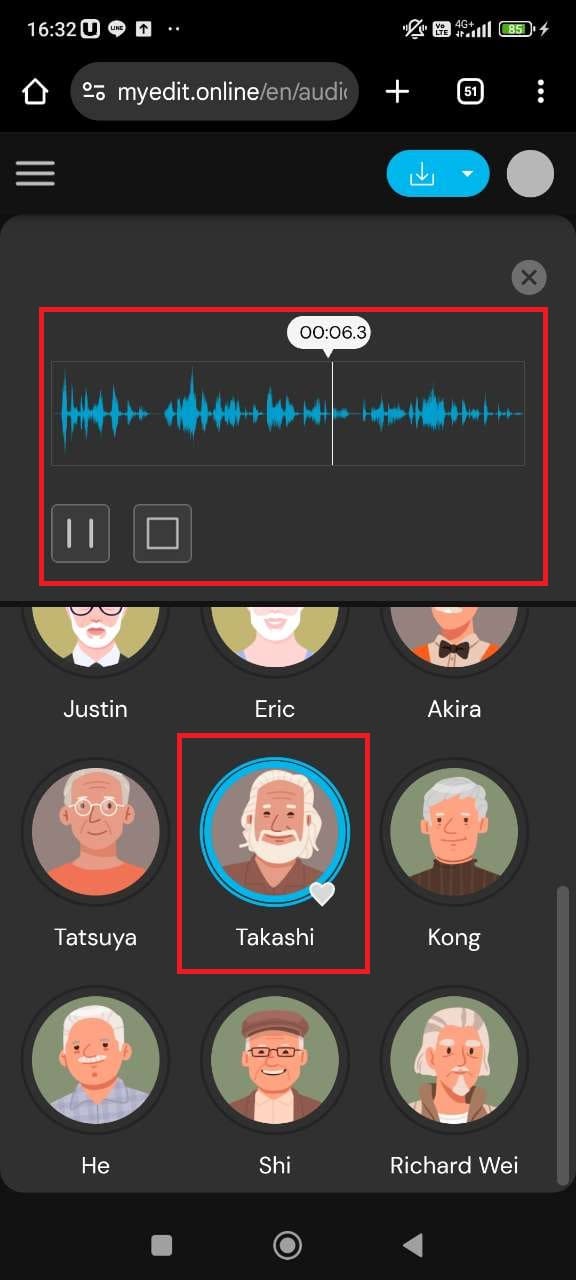
Preview and apply: Listen to the selected Santa voice profile and make adjustments if needed. Once happy, export your new audio file.


Related Articles:
- Best Christmas Quotes to Share This Holiday Season
- Funny Christmas Memes & How to Make One
- Best Free Santa Voice Text to Speech Generators
Santa Voice Generator FAQ
The easiest way to sound like Santa is to use a Santa voice changer. These tools adjust your pitch, warmth, and timbre to recreate Santa’s deep, cheerful tone. Simply upload or record your voice, apply the Santa preset, and download the transformed audio. For the most realistic result, try MyEdit, which offers instant Santa-style filters you can apply in one click.
You can create an AI Santa voice using either a voice changer or a text-to-speech tool. A voice changer lets you record yourself and apply a Santa preset, while text-to-speech generates a Santa-style voice from written text. MyEdit offers both options, so you can talk as Santa or instantly generate a fully AI-voiced Santa message.
Record your message, upload it to a voice changer, and choose a Santa or deep warm male voice preset. The AI adds bass, resonance, and a friendly tone to match Santa’s iconic sound. Once processed, you can download the Santa-style version of your audio in seconds.
The best Santa Claus voice generator should provide natural tone, fast processing, and options for both voice-changing and text-to-speech. MyEdit stands out thanks to its realistic AI voices, Santa-style presets, and built-in audio enhancement tools.
Yes. Several online tools offer free Santa voice filters. MyEdit provides a free version where you can record or upload a clip and apply a Santa-style effect in one click, with no software download needed.
Any voice-changing app with a Santa preset can create a fun Christmas message, but MyEdit is one of the simplest options. It works directly in your browser, so you can record a message and apply the Santa effect from your phone or computer.
To generate a Santa message, write your text, paste it into an AI text-to-speech tool, and select a Santa-style voice. The AI will read your message in Santa’s tone, ready to download and share. With MyEdit, you can also record your own voice and transform it into Santa for a more personal touch.

The CyberLink Editorial Team is composed of product testing specialists and content creation experts with over 20 years of hands-on experience and rigorous research in the multimedia editing industry. As the official voice of CyberLink, the team consistently delivers practical, easy-to-follow tutorials across video, photo, and audio editing, while highlighting AI innovations, product insights, and emerging industry trends. Their work empowers millions of creators worldwide each year to elevate their content. Beyond the blog, the team actively shares editing tips and product updates across YouTube, Facebook, Linkedin and Pinterest.
😎 Outside of their work, they enjoy capturing travel moments and meticulously editing photos and videos for their social channels.


