







AI Dance Generator: Turn Photos into Viral Dancing Videos with MyEdit

Short-form videos have taken over the internet, and adding motion to your content is one of the easiest ways to boost engagement. That's where the AI Dance Generator trend comes in.
With the help of AI, you can now turn still images into fun, realistic dance animations. And with tools like MyEdit’s image to video feature, it only takes a few clicks to make your photos move. Whether you're animating a selfie or a pet, AI-powered dancing videos are entertaining, easy to make, and perfect for going viral.
In this article, we'll walk through how to create your own dance video with MyEdit, what to do if something goes wrong, and a few creative ideas to take your content further.
Disclosure: MyEdit is CyberLink's own product, and it's the tool we used to build the walkthrough above.
- What Is an AI Dance Generator?
- Why AI Dance Videos Are Trending Right Now
- Before You Start: What You'll Need
- How to Use MyEdit as an AI Dance Generator
- Common Issues & Troubleshooting
- Creative Ways to Use AI Dance Videos
- FAQs About AI Dance Generators
What Is an AI Dance Generator?
An AI Dance Generator is a digital tool that transforms static images into animated videos by applying realistic dance motions. Instead of spending hours animating frame-by-frame or using advanced software, these tools rely on artificial intelligence to detect body parts, predict movement, and bring photos to life.

At its core, the tool uses pose estimation and motion transfer technology. You upload a photo, and the AI applies pre-defined dance choreography to your image. The result? A realistic, often hilarious animation that makes it look like your photo is busting a move on the dance floor.
Common use cases include:
- Social media content
- Cosplay and fan art animations
- Memes and viral videos
- Gaming avatars
- Marketing visuals and digital storytelling
Why AI Dance Videos Are Trending Right Now
The rise of TikTok and Instagram Reels has made dance videos a cultural phenomenon, but not everyone wants to step in front of a camera or knows how to dance. AI dance tools solve that by letting you animate a photo instead.
With AI, you can:
- Make a pet or baby photo dance to trending audio
- Add personality to your profile pic
- Remix memes and viral dances
- Turn still illustrations or digital art into animated content


Because these clips are fun and unexpected, they tend to grab attention fast, and the trend is still new enough that creators who jump in now can stand out in a crowded feed.
Before You Start: What You'll Need
Here's what to have ready before you begin:
- A MyEdit account (free to create)
- A clear, front-facing photo, see the image tips in the FAQ below for what works best
Note: Only use this feature with your own photos or images you have permission to use. Don't upload photos of other people, celebrities, or public figures without their consent.
How to Use MyEdit as an AI Dance Generator
How we tested this: We ran through this walkthrough on a Windows 11 laptop in Chrome in August 2026, using both the dance templates and a Custom prompt on a front-facing photo. You'll need credits to use the Image to Video tool.
- Go to MyEdit
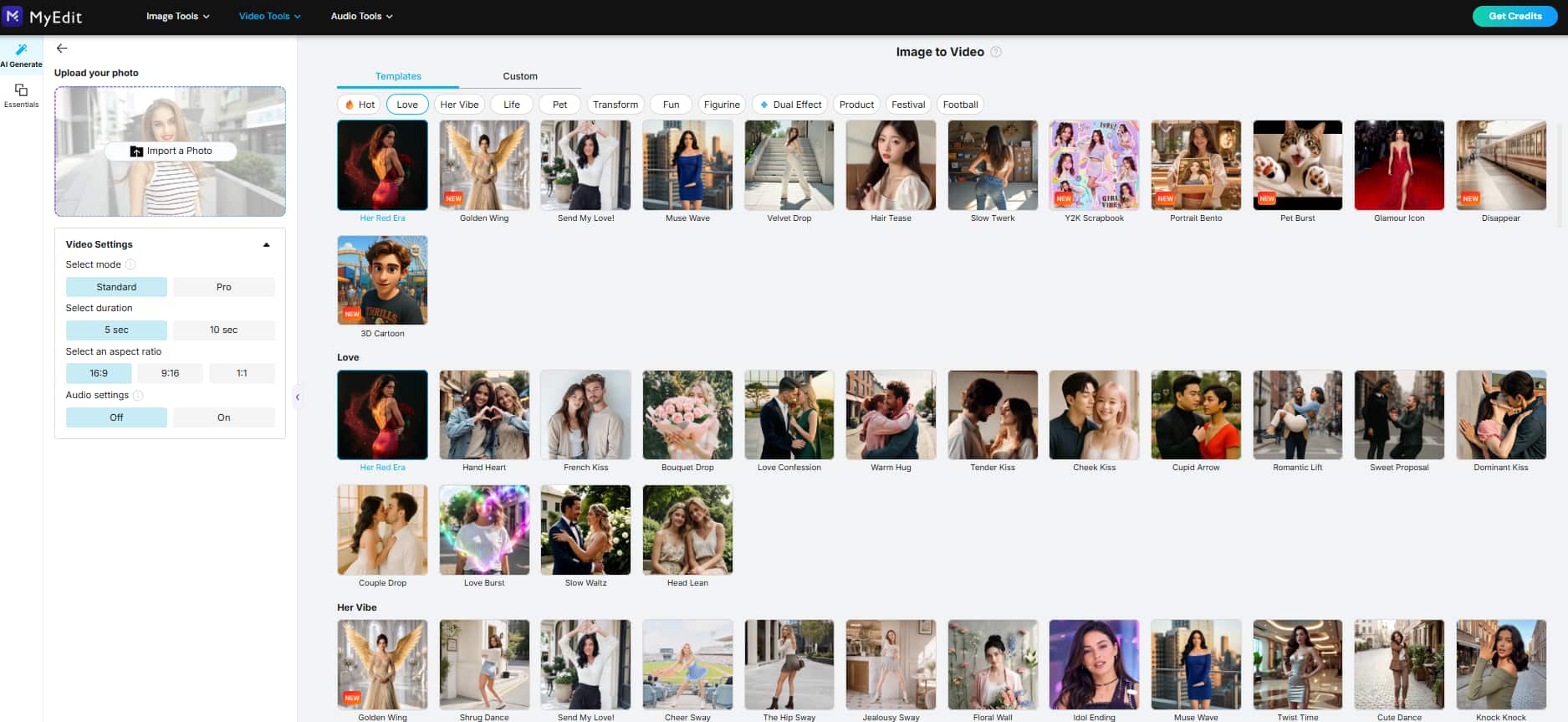
Head over to MyEdit’s Image to Video Template tool.
- Pick Options & Customize
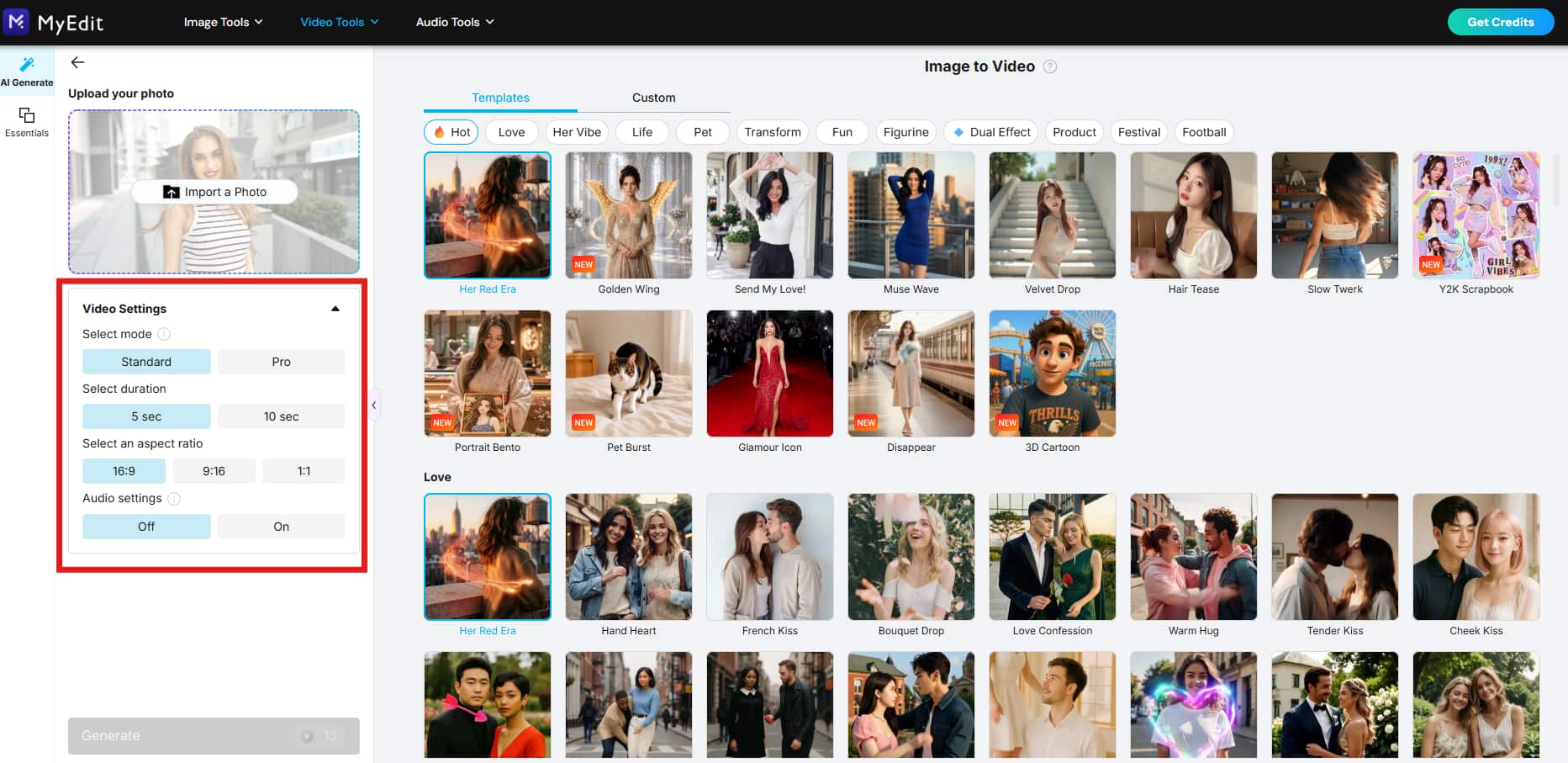
Pick your desired settings, such as duration, aspect ratio, etc. On the left menu bar labeled AI Generate, select Slow Waltz or Dance Group.
You can also select the Custom option and input a prompt such as “Make the person in this photo dance.”
- Upload Your Photo
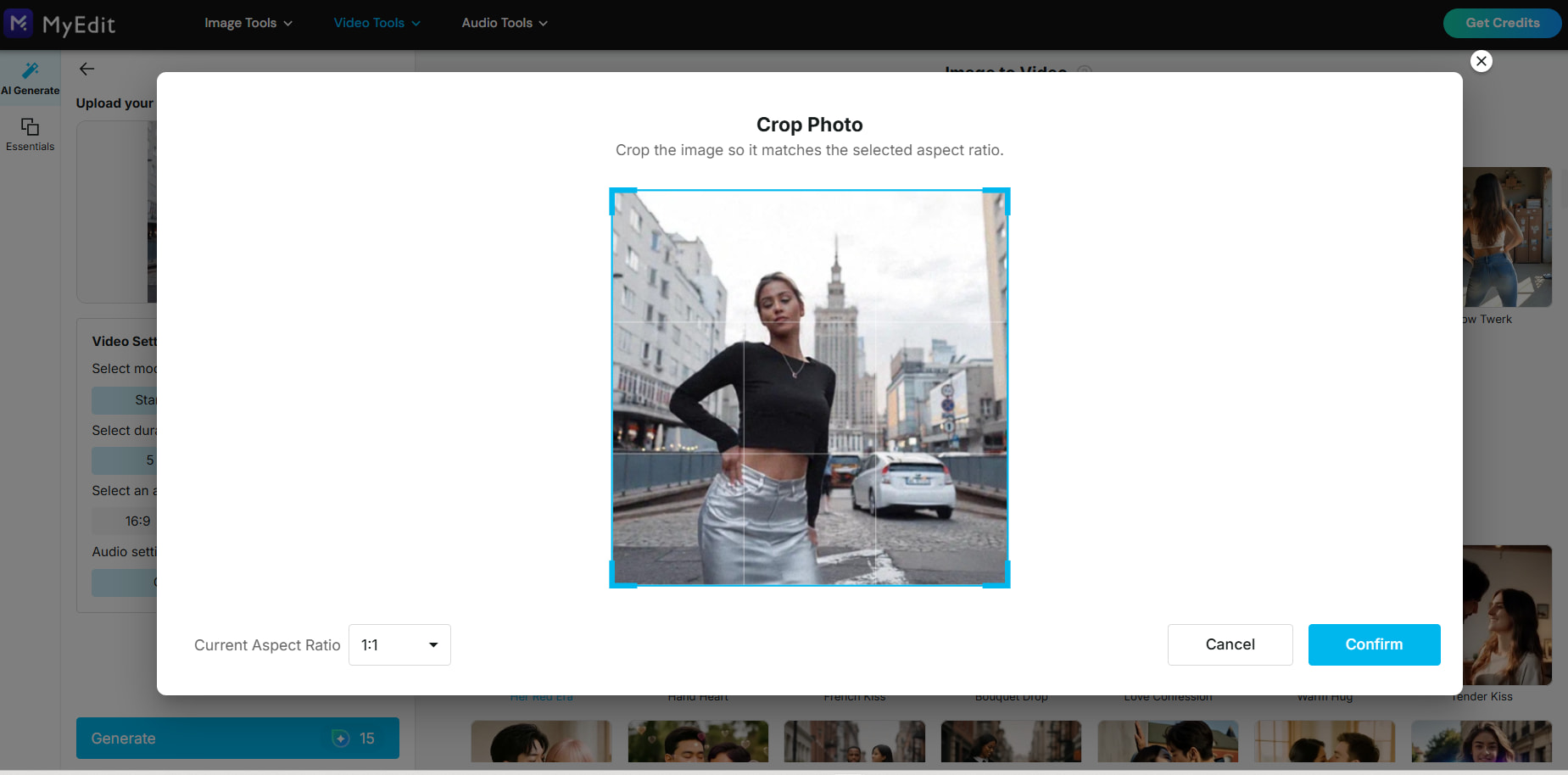
Upload the photo you want to animate. You may need to crop the photo based on the aspect ratio you selected.
- Generate the Dancing Effect
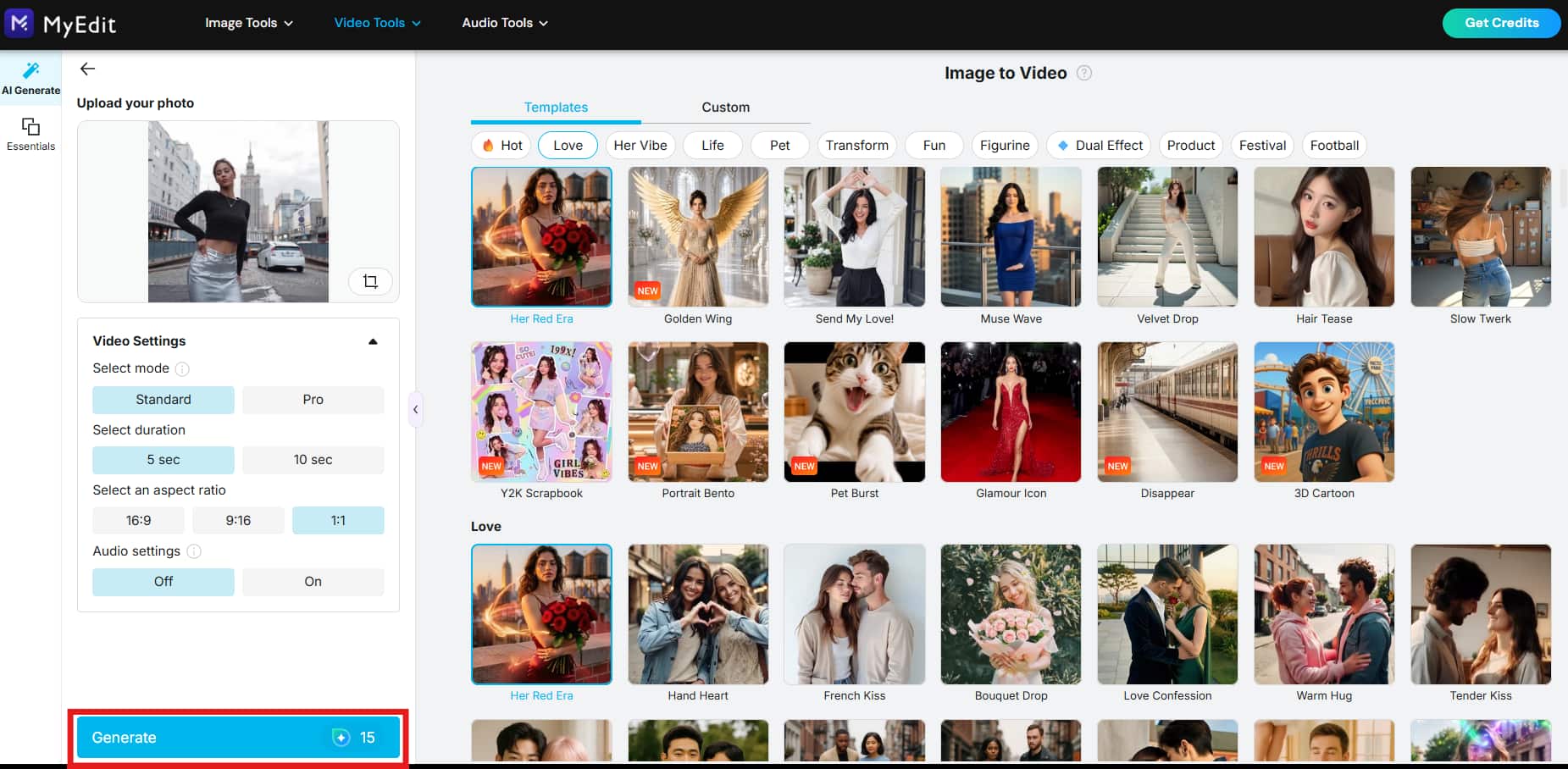
Click Generate on the AI Generate Menu bar on the left. It may take a few minutes for your video to generate.
- Download & Export
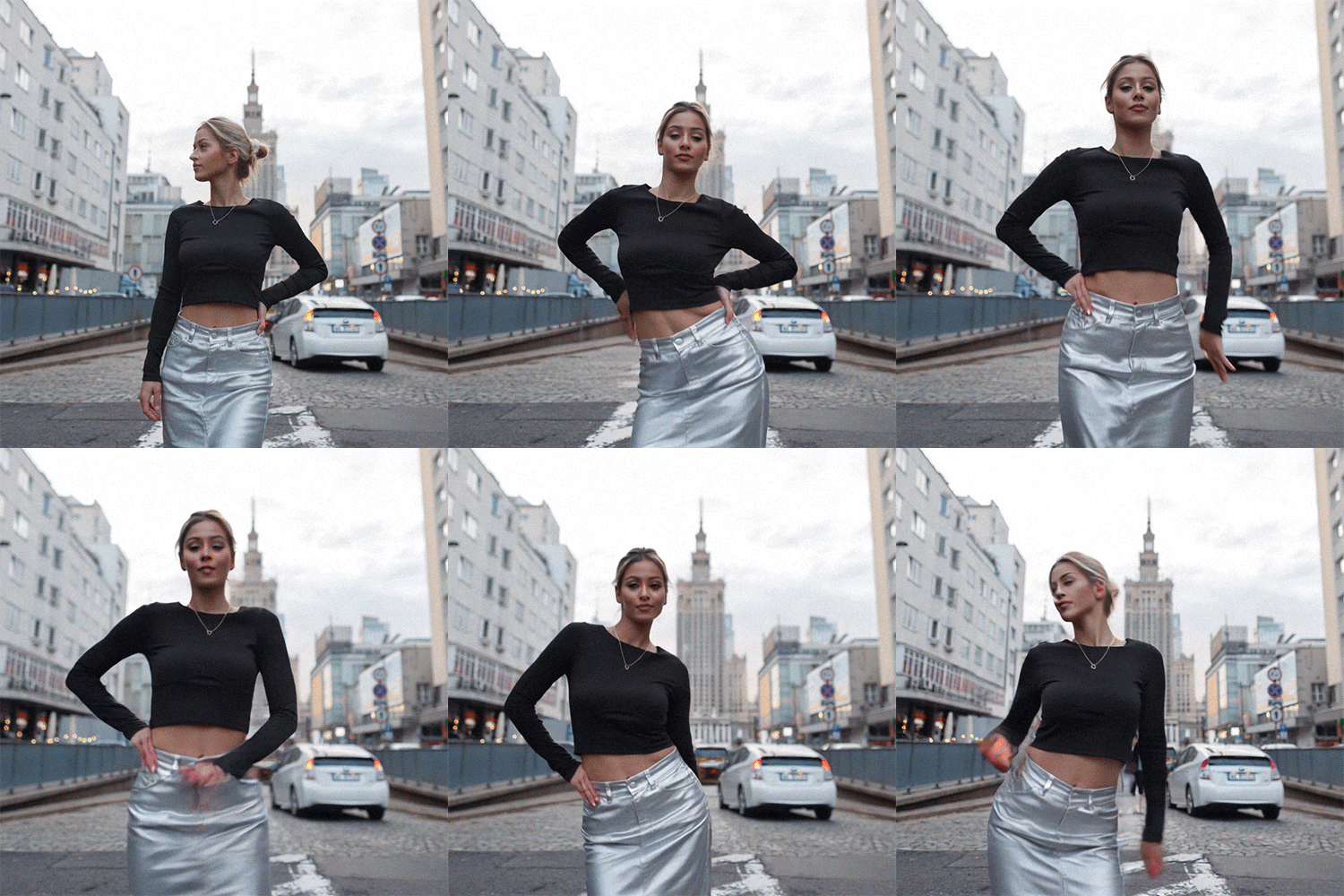
Once rendered, you can preview and download the dancing video.


Common Issues & Troubleshooting
If your dance video doesn't turn out the way you expected, here are a few things to check:
- Photo rejected or looks distorted: Use a higher-resolution image. Heavily compressed, blurry, or very low-res photos tend to produce distorted or unnatural motion.
- Movement looks unnatural: This is more common with side-angle, partially cropped, or obscured photos. Front-facing, full-body shots work best.
- Can't find the dance presets: Make sure you're in the Image to Video Template tool with the AI Tools tab selected on the left menu.
Creative Ways to Use AI Dance Videos
Looking for inspiration to make your dance videos go viral? Here are a few ideas to level up your content:
- Pair with trending audio: Sync your animation with popular music or sound bites to catch the algorithm’s attention.
- Make a mini-series: Animate multiple photos in a series to build a recurring theme for your content.
- Celebrate events: Use dance videos to celebrate holidays, milestones, or promotions in a fun and playful way.
- Remix memes: Turn classic reaction memes or viral images into dancing versions for fresh laughs.
- Engage your audience: Ask followers to submit photos and turn them into dancing videos as part of a challenge or giveaway.
The best part? These videos are quick to make but pack a big visual punch.
Want to explore more ways to animate photos? Check out our guide to Viggle AI alternatives for motion-swap tools beyond dance presets, or see how to make an AI baby dance video for a step-by-step walkthrough using baby and child photos.
FAQs About AI Dance Generators
A: MyEdit turns a photo into a dance video using either ready-made presets (like Slow Waltz or Dance Group) or a custom text prompt if you want more control over the motion. Results are best with a clear, front-facing photo, side angles or low-res images tend to produce less natural movement (see our troubleshooting tips above).
A: It’s a tool that uses artificial intelligence to turn static images into dancing videos by applying dance motions.
A: Front-facing portraits or full-body photos deliver the most natural motion. Avoid low-res or heavily cropped images for best results.
A: Yes, MyEdit includes a variety of animation presets. Some tools also allow you to upload custom dance motions.
A: Absolutely. AI dance videos are perfect for TikTok, Instagram, YouTube Shorts, and even GIFs for messaging platforms.

The CyberLink Editorial Team is composed of product testing specialists and content creation experts with over 20 years of hands-on experience and rigorous research in the multimedia editing industry. As the official voice of CyberLink, the team consistently delivers practical, easy-to-follow tutorials across video, photo, and audio editing, while highlighting AI innovations, product insights, and emerging industry trends. Their work empowers millions of creators worldwide each year to elevate their content. Beyond the blog, the team actively shares editing tips and product updates across YouTube, Facebook, Linkedin and Pinterest.
😎 Outside of their work, they enjoy capturing travel moments and meticulously editing photos and videos for their social channels.


