







72 Gemini AI Prompts for Boys & Men Portraits to Copy

Most boys and men have plenty of photos and almost none that look the way they actually want to be seen. AI portrait generation closes that gap: feed it one clear reference photo and a well-written prompt, and you get a portrait with the setting, styling and lighting you asked for, with the face still recognisably yours.
Below are 72 copy-and-paste prompts written for Gemini's reference-photo workflow, grouped by what you are actually trying to make. Every example on this page was generated in MyEdit, CyberLink's own AI editing platform, using Nano Banana 2, which is Google's current Gemini image model.
Equipment and date: Windows 11 laptop, latest version of Google Chrome, MyEdit running in the browser. Tested in August 2026.
What we did: we ran every prompt on this page through MyEdit's AI Image Generator using Nano Banana 2 (Google's Gemini 3.1 Flash Image model) at 2K resolution. Each generation cost 5 credits and finished in just under a minute. The before/after pair shown with each prompt is the reference photo and the result of that run. We also ran one image-to-video test through MyEdit's AI Image to Video tool using Veo 3.1, at 20 credits.
What we verified separately: the model naming against Google's own Gemini API image-generation documentation, and MyEdit plan pricing against the in-product purchase screen in US dollars.
Scope limit: we did not run these prompts inside the Gemini app itself, so results there will differ. We did not compare output quality against other generators, and we did not score or rank the prompts against each other. Credit costs are what MyEdit charged at the time of testing and can change.
- Why Use Gemini AI for Boys' and Men's Portraits
- 72 Best Gemini AI Prompts for Boys and Men
- MyEdit: The Recommended Gemini AI Alternative
- How to Create Boys and Men Portraits with MyEdit
- Gemini AI Prompts for Boys and Men: FAQ
Why Use Gemini AI for Boys' and Men's Portraits

Gemini's image model works from a reference photo rather than from a text description alone. That is the whole reason it suits portraits: the model keeps facial structure and identity while it changes lighting, expression, clothing or background. A text-only generator invents a face. A reference-photo generator edits the one you gave it.
- Recognisable results: facial features carry across the edit, so the portrait still looks like the person in the reference photo.
- Style without a photoshoot: change the setting, wardrobe or colour grade without booking a studio.
- Fast iteration: adjust one clause in the prompt and regenerate rather than starting over.
- Practical uses: profile photos, portfolio updates, personal projects and social content.
One thing worth knowing before you start: the model name matters more than the tool name. Google's image generation sits under the Nano Banana label, and the family currently includes Nano Banana 2, Nano Banana Pro and Nano Banana 2 Lite. The same prompt will not give you the same picture on two different models, so if you are trying to reproduce a result from this page, match the model as well as the wording.
Before you upload a photo of a child:
Several prompts on this page are written for teenagers and younger boys. If the reference photo is not of you, get the parent's or guardian's permission before you upload it, and think twice before publishing an AI-generated likeness of a child on a public account. Generated images also carry invisible provenance watermarking, so treat them as clearly labelled AI output rather than as photographs.
Q: Does Gemini keep the face from my reference photo?
A: Largely, yes. Reference-photo generation is designed to preserve facial structure while changing the scene around it. Accuracy drops with low-resolution, heavily shadowed or side-angle reference photos, so a clear, front-facing, well-lit source gives the most consistent likeness.
Q: Do I need a different prompt for a boy than for a man?
A: The structure is the same, but state the age range explicitly. Prompts that omit it tend to default to an adult, which is the single most common reason a teen portrait comes back looking a decade too old.
For prompts covering girls, women, couples, families and groups, see our wider collection: Viral Gemini AI Prompts for Portraits, Couples and Families.
72 Best Gemini AI Prompts for Boys and Men Portraits to Copy and Paste
Ready-to-use prompts for realistic, stylish and creative portraits of boys and men. Copy, paste and adjust for your own reference photo.
A note on the 16 prompts marked 🇮🇳: those are written around Indian settings, clothing and festivals, because that is where a large share of the demand for this kind of prompt sits. They are marked so you can skip them if they are not relevant to you. Everything else on this page is location-neutral and works anywhere.
How to Adapt Any Prompt on This Page
Each prompt below follows the same five-part structure. Once you can see it, you can rewrite any of them for your own purposes instead of hunting for an exact match.
- Subject and age: "teen boy", "young man", "bearded man". Leave this out and the model guesses, usually older than you wanted.
- Wardrobe and props: the two or three garments that define the look. More than three and the model starts dropping items.
- Setting: where the person is, plus what should be blurred behind them.
- Light: the highest-leverage clause in the whole prompt. "Golden hour", "tungsten streetlight", "overcast daylight" and "hard side light" each produce a completely different picture from otherwise identical wording.
- Technical finish: "realistic skin texture", "shallow depth of field", "cinematic color grade", and the closing instruction "using reference photo".
Two habits that make the biggest difference in practice: change one clause at a time so you can tell what actually caused the change, and keep "realistic skin texture" in the prompt for photographic looks, because dropping it is what produces the over-smoothed plastic finish that makes an image read as AI at a glance.
Trending Boys and Teen Prompts
- Winter Selfie, Frozen Lake Backdrop
- Retro 90s Studio Portrait
- Teen in Hoodie, Street Style
- Casual Teen Portrait, Natural Light
- Boy on Stairs, Relaxed Pose
- Teen with Headphones, Moody Lighting
- Golden-Hour Teen Portrait
- Low-Angle Confident Street Vibe
- Walking Teen, Candid City Photo
- Minimalist Teen Portrait, Clean Background
- Teen with Backpack, Daily Life Look
- Gym Teen Portrait, Sports Lighting
- Bright Portrait, Clean Studio Light
- Enhanced Lighting, Blurred Background
- 🇮🇳 Teen in Kurta, Old Delhi Lane
- 🇮🇳 Rooftop Portrait, Indian City Skyline
- 🇮🇳 Cricket Ground Attitude Shot
Men's Portrait Prompts
- Professional Headshot, Neutral Background
- Man in Suit, Confident Pose
- Casual Portrait, Window Light
- Bearded Portrait, Cinematic Light
- Business-Casual Clean Look
- Outdoor Lifestyle Portrait
- Close-Up, Realistic Skin
- Editorial Portrait, Dramatic Framing
- Hairstyle Change, Fade Haircut
- Add a Full Beard, Realistic Style
- Fitness Portrait, Gym Lighting
- Moody Portrait with Soft Shadows
- 🇮🇳 Man in Sherwani, Royal Pose
- 🇮🇳 Businessman, Mumbai Skyline
- 🇮🇳 Man with Stubble, Chai Stall Night Portrait
Viral and Social Media Aesthetic Prompts
- Soft Pastel Aesthetic Portrait
- Moody Rim-Lit Portrait
- Film-Style Muted Tones
- Neon-Lit Cyber Aesthetic
- High-Contrast B&W Portrait
- Backlit Silhouette Portrait
- Minimalist Beige-Tone Portrait
- Cinematic Color-Graded Look
- Sharpened DSLR-Style Portrait
- Instagram-Style Clean Framing
- 🇮🇳 Diwali Bokeh Portrait
- 🇮🇳 Night Cricket Match Vibes
- 🇮🇳 Luxury Goa Beach Portrait
- 🇮🇳 Monsoon Street Aesthetic
Manga, Anime and Caricature Prompts
- Anime Boy Portrait, Clean Line Art
- Manga Teen with Expressive Eyes
- Semi-Realistic Anime Style
- Cartoon Boy, Exaggerated Features
- Chibi Boy Character, Cute Proportions
- Caricature-Style Playful Portrait
- Illustrated Anime-Inspired Boy
Cinematic and Storytelling Prompts
- Dramatic Shadows, Emotional Mood
- Man in Rain, City Lights
- Movie-Style Intense Close-Up
- Teen Walking Under Streetlights
- Epic Hero Portrait, Strong Lighting
- Storytelling Background Portrait
- 🇮🇳 Bollywood-Style Dramatic Portrait
- 🇮🇳 Desert Warrior, Rajasthan Dunes
Seasonal and Event-Based Prompts
- Valentine's Day Portrait, Soft Pink
- New Year Celebration Portrait
- Christmas / Winter Cozy Portrait
- Summer Vacation Bright Portrait
- Back-to-School Teen Portrait
- Halloween Portrait, Moody Lighting
- Birthday Portrait, Joyful Mood
- 🇮🇳 Diwali Portrait, Festive Warm Glow
- 🇮🇳 Holi Portrait, Color Powder Burst
- 🇮🇳 Eid Celebration Portrait
- 🇮🇳 Cricket Match Day Portrait
Trending Boys and Teen Prompts
Popular boys and teen portrait styles, built for realistic results that keep the face recognisable while changing setting, clothing and light.
1. Winter Selfie, Frozen Lake Backdrop
This prompt captures the carefree energy of a winter outdoor selfie. The frozen lake and snow-covered trees create a naturally beautiful background, while the warm knit accessories add a cozy contrast against the cold. Good for seasonal social media content or travel-themed portrait shots.


Teen boy taking a selfie outdoors in winter, white knit beanie, brown knit scarf, cream puffer jacket, curly hair, frozen lake and snow-covered trees in background, overcast natural light, joyful smile, realistic skin texture, shallow depth of field, using reference photo
2. Retro 90s Studio Portrait
This prompt lands the nostalgic 90s streetwear aesthetic. The bold colour-blocked windbreaker, baggy ripped jeans and trucker cap combine for a full-body studio portrait with strong attitude. The warm beige background and dramatic side shadow give it an editorial quality that suits fashion or lifestyle content.


Teen boy full-body studio portrait, retro 90s color-block windbreaker in teal and purple, baggy ripped jeans, white sneakers, navy trucker cap, silver chain necklace, arms crossed confident pose, warm beige studio background, dramatic side shadow, realistic skin and fabric texture, using reference photo
3. Teen in Hoodie, Street Style
This prompt is built for a casual urban portrait, useful for teens who want a relaxed streetwear look. It leans on natural poses and daylight so the portrait reads as authentic rather than staged.


Teen boy wearing hoodie, standing on urban street, casual pose, natural daylight, realistic skin texture, soft shadows, shallow depth of field, using reference photo
4. Casual Teen Portrait, Natural Light
Use this prompt to capture personality in an everyday setting. Natural lighting and a relaxed expression keep the portrait approachable, which is what most lifestyle and social media shots are after.


Teen boy casual portrait, natural sunlight, relaxed expression, soft shadows, realistic skin and hair texture, shallow depth of field, using reference photo
5. Boy on Stairs, Relaxed Pose
This prompt works well for dynamic lifestyle shots. The stairs create depth and context, and the seated pose keeps the subject looking natural rather than posed.


Teen boy sitting on stairs, relaxed pose, soft morning light, realistic skin tones, subtle background blur, casual outfit, using reference photo
6. Teen with Headphones, Moody Lighting
A good fit for a modern, cinematic portrait. The moody lighting shapes the face and adds a storytelling quality that flat lighting cannot.


Teen boy with headphones, moody indoor lighting, cinematic mood, soft shadows, realistic skin texture, casual outfit, shallow depth of field, using reference photo
7. Golden-Hour Teen Portrait
This prompt uses warm, golden-hour sunlight to bring out natural skin tones and create a soft, atmospheric portrait. It suits outdoor lifestyle shots where you want warmth rather than contrast.


Teen boy portrait at golden hour, warm sunlight, realistic skin tone, soft glow, outdoor setting, subtle background blur, natural pose, using reference photo
8. Low-Angle Confident Street Vibe
Use this prompt for portraits with energy and presence. The low-angle perspective adds drama and makes the subject stand out in urban or street settings.


Teen boy street portrait, low-angle view, confident stance, urban background, natural light, realistic skin, soft shadows, using reference photo
9. Walking Teen, Candid City Photo
This prompt captures natural motion and candid energy, which is what separates a lifestyle shot from a static portrait.


Teen boy walking on city street, candid pose, casual outfit, natural lighting, shallow depth of field, realistic textures, using reference photo
10. Minimalist Teen Portrait, Clean Background
Built for profile pictures and social media, this prompt creates clean, focused portraits where the subject stands out against a simple background.


Teen boy portrait, minimalist style, clean background, natural expression, soft lighting, realistic skin and hair, using reference photo
11. Teen with Backpack, Daily Life Look
A straightforward everyday-life prompt. It emphasises realism and natural posture, which makes it a safe choice when you want the result to look like a real photo.


Teen boy with backpack, standing outdoors, casual daily life pose, natural sunlight, realistic skin, soft background blur, using reference photo
12. Gym Teen Portrait, Sports Lighting
A sports-setting portrait. The prompt describes the environment, the kit and the lighting rather than the subject's body, which keeps the result about the photography and gives the model less room to distort proportions.


Teen boy in gym attire, standing by training equipment, directional overhead gym lighting, natural posture, realistic skin and fabric texture, subtle background blur, using reference photo
13. Bright Portrait, Clean Studio Light
A polished portrait built on lighting rather than retouching. Even key light and a soft fill do most of the work, and asking for natural skin texture stops the model from over-smoothing the face.


Teen boy portrait, even studio lighting, soft fill light, natural expression, natural skin texture retained, soft shadows, realistic detail, using reference photo
14. Enhanced Lighting, Blurred Background
This prompt creates a professional-looking portrait where lighting and background blur pull attention to the face and expression.


Teen boy portrait, enhanced lighting, blurred background, natural pose, realistic skin and hair texture, soft shadows, using reference photo
15. 🇮🇳 Teen in Kurta, Old Delhi Lane
This prompt places the subject in one of the most visually rich urban settings in India. The narrow alley, warm afternoon light and traditional kurta produce a cultural portrait rather than a generic one.


Indian teen boy wearing a pastel kurta, walking through a narrow Old Delhi alley, warm afternoon light, rickshaws and spice stalls softly blurred in background, candid lifestyle feel, realistic skin texture, shallow depth of field, using reference photo
16. 🇮🇳 Rooftop Portrait, Indian City Skyline
Rooftop portraits are a recurring format on Indian social feeds because they combine urban texture with golden-hour warmth. This prompt captures the hazy, layered look of an Indian cityscape at dusk, water tanks and temple spires included.


Teen boy on a rooftop terrace at golden hour, Indian cityscape with water tanks and temple spires blurred behind him, warm atmospheric haze, casual streetwear outfit, confident lean against the ledge, realistic skin tone, cinematic color grade, using reference photo
17. 🇮🇳 Cricket Ground Attitude Shot
Cricket sits at the centre of Indian youth culture, and this prompt taps that directly. The floodlights and low-angle composition give the portrait a dramatic, high-impact feel.


Teen boy in cricket whites holding a bat over his shoulder, stadium floodlights glowing at dusk, dramatic low-angle view, athletic confident pose, shallow depth of field, cinematic mood, realistic skin and fabric texture, using reference photo
Men's Portrait Prompts
Realistic and professional portraits of men, from casual lifestyle shots to corporate headshots, including hairstyle and beard variations.
18. Professional Headshot, Neutral Background
Built for clean, professional portraits suitable for a CV, a LinkedIn profile or a company page. The neutral background keeps attention on the face and expression.


Professional male headshot, neutral background, sharp focus on face, realistic skin texture, soft shadows, natural expression, using reference photo
19. Man in Suit, Confident Pose
Use this prompt for a formal portrait that reads as confident and professional. It suits executive portraits and business branding images.


Man wearing suit, confident pose, neutral studio lighting, realistic skin and hair texture, soft shadows, professional expression, using reference photo
20. Casual Portrait, Window Light
A relaxed lifestyle portrait. Window light creates natural shadows and highlights, which adds realism and warmth that studio lighting tends to flatten.


Man casual portrait, sitting by window, soft natural light, realistic skin texture, relaxed expression, subtle background blur, using reference photo
21. Bearded Portrait, Cinematic Light
Good for adding drama and character. The cinematic lighting emphasises facial structure and beard texture for a mature, stylised look.


Man with medium beard, cinematic lighting, soft shadows, realistic skin texture, dramatic mood, studio background, using reference photo
22. Business-Casual Clean Look
Use this prompt for professional but approachable portraits. It fits corporate websites and branding that needs to look polished without looking stiff.


Man business-casual attire, clean look, natural lighting, realistic skin and hair texture, relaxed expression, subtle background blur, using reference photo
23. Outdoor Lifestyle Portrait
A casual outdoor portrait built on natural light. It puts as much weight on the setting as on the subject, which is what personal branding shots usually need.


Man outdoor portrait, casual outfit, natural daylight, realistic skin texture, soft background blur, relaxed posture, using reference photo
24. Close-Up, Realistic Skin
For detailed portraits that keep facial features and skin texture intact. Asking explicitly for realistic texture is what stops the model from producing a plastic-looking result.


Close-up male portrait, realistic skin texture, soft lighting, neutral background, focused expression, using reference photo
25. Editorial Portrait, Dramatic Framing
Use this prompt for creative, high-impact portraits. Dramatic framing and lighting give a magazine feel while keeping the result photographic.


Man editorial portrait, dramatic framing, studio lighting, realistic skin and hair, confident expression, using reference photo
26. Hairstyle Change, Fade Haircut
This prompt lets you try a hairstyle variation, specifically a modern fade, without changing anything else about the reference photo.


Man with fade haircut, realistic hair texture, neutral lighting, natural expression, using reference photo
27. Add a Full Beard, Realistic Style
Use this prompt to add a full, realistic beard to a portrait. It is the quickest way to preview facial hair before committing to it.


Man with full beard, realistic hair texture, natural lighting, neutral background, soft shadows, using reference photo
28. Fitness Portrait, Gym Lighting
A fitness-setting portrait. The lighting does the work here, and describing the environment rather than the physique produces a more believable result.


Man fitness portrait, gym setting, directional gym lighting, realistic skin and fabric texture, confident pose, using reference photo
29. Moody Portrait with Soft Shadows
A cinematic, atmospheric portrait. Soft shadows add depth and shape the face without the harshness of high-contrast lighting.


Man portrait, moody lighting, soft shadows, realistic skin texture, relaxed expression, studio background, using reference photo
30. 🇮🇳 Man in Sherwani, Royal Pose
The sherwani is one of India's most elegant and culturally significant garments, and portraits in this style are widely shared. This prompt pairs traditional attire with an architectural backdrop for a regal, editorial result.


Indian man wearing an ivory embroidered sherwani, standing in a palace courtyard with arched marble columns, warm ambient lighting, confident regal posture, shallow depth of field, realistic fabric texture, using reference photo
31. 🇮🇳 Businessman, Mumbai Skyline
Sharp professional styling against an iconic urban backdrop makes this a strong option for a LinkedIn or personal branding portrait with a sense of place.


Indian man in a sharp navy blazer and open-collar shirt, standing by a floor-to-ceiling office window, Bandra-Worli Sea Link visible behind him at dusk, cinematic city glow, professional yet modern mood, realistic skin texture, shallow depth of field, using reference photo
32. 🇮🇳 Man with Stubble, Chai Stall Night Portrait
The roadside chai stall at night is an instantly recognisable Indian setting that feels both intimate and cinematic. The warm tungsten light and rising steam create a documentary-style portrait with real emotional texture.


Bearded Indian man sitting at a roadside chai stall at night, warm yellow tungsten lighting, steam rising from a glass of tea, rustic wooden background, candid documentary feel, realistic skin texture, soft shadows, using reference photo
Viral and Social Media Aesthetic Prompts
Eye-catching, shareable looks built for social feeds, from soft pastel treatments to full cinematic colour grades.
33. Soft Pastel Aesthetic Portrait
For gentle, dreamy portraits that fit Instagram and TikTok aesthetics. Soft pastel colours and smooth lighting make the subject look approachable.


Portrait with soft pastel colors, gentle lighting, smooth skin texture, dreamy aesthetic, realistic hair, shallow depth of field, using reference photo
34. Moody Rim-Lit Portrait
Creates a dramatic, cinematic look using rim lighting to separate the subject from the background. It works well for reel covers and profile pictures.


Portrait with moody rim light, dark background, dramatic shadows, realistic skin and hair, cinematic mood, using reference photo
35. Film-Style Muted Tones
This prompt gives portraits a film vibe with muted colours and soft contrast. It suits artistic social content and storytelling aesthetics.


Portrait in muted film tones, soft lighting, realistic skin texture, natural pose, subtle background blur, using reference photo
36. Neon-Lit Cyber Aesthetic
For bold, futuristic portraits. Neon colours and hard lighting make the image pop, which suits gaming and tech-focused posts.


Portrait with neon lights, cyberpunk style, vibrant colors, dramatic shadows, realistic skin and hair, urban background, using reference photo
37. High-Contrast B&W Portrait
This prompt creates striking black-and-white portraits with strong contrast, which is a reliable way to make a minimalist image stand out in a feed.


High-contrast black-and-white portrait, realistic skin texture, sharp details, soft background blur, natural expression, using reference photo
38. Backlit Silhouette Portrait
Use this prompt for artistic silhouette portraits. Backlighting adds a cinematic feel and works well for mood-heavy posts.


Backlit silhouette portrait, soft glow around subject, realistic hair and skin highlights, dramatic mood, using reference photo
39. Minimalist Beige-Tone Portrait
For clean, modern portraits. The neutral beige palette gives a stylish, minimalist look that fits aesthetic-led profiles.


Portrait in minimalist beige tones, soft lighting, realistic skin texture, calm expression, shallow depth of field, using reference photo
40. Cinematic Color-Graded Look
For professional cinematic-style portraits. Colour grading adds mood and consistency, which matters if you are producing a set of images rather than one.


Portrait with cinematic color grading, soft light, realistic skin, subtle shadows, dramatic composition, using reference photo
41. Sharpened DSLR-Style Portrait
Emulates professional DSLR photography. Sharp focus and detailed texture make the portrait crisp enough for portfolio use.


DSLR-style portrait, sharp focus, realistic skin and hair texture, natural expression, soft background blur, using reference photo
42. Instagram-Style Clean Framing
This prompt creates portraits optimised for social layouts. Clean composition, soft lighting and realistic texture make it feed-ready without further editing.


Instagram-style portrait, clean framing, soft natural light, realistic skin and hair, subtle background blur, natural pose, using reference photo
43. 🇮🇳 Diwali Bokeh Portrait
Diwali is one of the most visually striking festivals anywhere, and Diwali portrait edits circulate widely every year. This prompt uses the warm bokeh of diyas and fairy lights to get a festive but editorial-quality result.


Indian boy standing in a dimly lit courtyard during Diwali, warm orange and gold bokeh from diyas and string lights surrounding him, traditional kurta, soft glow on face, festive yet editorial mood, realistic skin tone, shallow depth of field, using reference photo
44. 🇮🇳 Night Cricket Match Vibes
Cricket season drives a spike in sports-themed content on Indian social media. This prompt creates a high-energy, floodlit stadium portrait that suits reel covers and profile updates during a tournament. It describes generic team colours rather than naming a league, which both avoids trademarked kit and stops the generator refusing the prompt.


Young Indian man in a brightly colored generic cricket team jersey, stadium floodlights blazing behind him, crowd softly blurred, dramatic rim lighting, high-energy attitude pose, vibrant saturated colors, reel cover aesthetic, realistic skin texture, using reference photo
45. 🇮🇳 Luxury Goa Beach Portrait
Goa is the default destination for aspirational lifestyle content in India, and the beach-at-sunset portrait is one of the most consistently repeated formats. This prompt aims for travel magazine quality with warm ocean tones and relaxed styling.


Stylish Indian man in a linen open shirt and white trousers on a Goa beach at sunset, golden ocean reflection, relaxed confidence, shallow depth of field, warm color grade, travel influencer aesthetic, realistic skin and hair texture, using reference photo
46. 🇮🇳 Monsoon Street Aesthetic
The Indian monsoon has a distinctly cinematic quality: wet streets, warm light bleeding through rain, and a mood that is instantly recognisable to the audience. This prompt blends muted film tones with moody rim lighting.


Indian teen boy standing on a rain-soaked street during monsoon, warm tungsten streetlights reflecting in puddles, muted teal and orange color grade, wet hair and clothes, cinematic mood, shallow depth of field, film-style aesthetic, using reference photo
Manga, Anime and Caricature Prompts
Stylised illustration outputs for anime, manga and caricature work, useful for avatars, stickers and character design.
47. Anime Boy Portrait, Clean Line Art
For classic anime-style portraits with crisp line work. It suits character design, fan art and stylised social content.


Anime boy portrait, clean line art, expressive eyes, detailed hair, soft color palette, minimal background, using reference photo
48. Manga Teen with Expressive Eyes
This prompt emphasises expressive eyes and facial features, which is what gives manga illustration its emotional range.


Manga-style teen boy, large expressive eyes, detailed hair, soft shading, light background, stylized pose, using reference photo
49. Semi-Realistic Anime Style
Combines realistic texture with anime-style features. Useful when a full illustration looks too far from the original face.


Semi-realistic anime boy, realistic skin and hair, soft lighting, expressive features, subtle background, using reference photo
50. Cartoon Boy, Exaggerated Features
For playful cartoon-style portraits. Exaggerated features add personality and make the character recognisable at small sizes.


Cartoon boy portrait, exaggerated facial features, bright colors, dynamic expression, simplified background, using reference photo
51. Chibi Boy Character, Cute Proportions
This prompt creates small, cute characters with large heads and expressive eyes, which works well for avatars and sticker packs.


Chibi boy character, large head, small body, cute proportions, bright colors, playful pose, using reference photo
52. Caricature-Style Playful Portrait
For humorous, exaggerated portraits. It amplifies the most distinctive facial traits to create a recognisable stylised version of the subject.


Caricature boy portrait, exaggerated facial features, playful expression, bold lines, bright colors, using reference photo
53. Illustrated Anime-Inspired Boy
Creates a fully illustrated portrait in an anime-inspired style, blending stylisation with expressive detail for a finished look.


Illustrated anime-inspired boy, detailed hair and eyes, soft shading, expressive pose, vibrant colors, subtle background, using reference photo
Cinematic and Storytelling Prompts
Dramatic, story-driven portraits built around lighting and setting rather than pose alone.
54. Dramatic Shadows, Emotional Mood
This prompt leans on high-contrast lighting to convey emotion and depth. It is the fastest route to a portrait that looks like a film still.


Portrait with dramatic shadows, emotional expression, soft cinematic lighting, realistic skin and hair texture, subtle background, using reference photo
55. Man in Rain, City Lights
Creates a cinematic urban portrait using rain and city lights for atmosphere. It suits dramatic storytelling and film-inspired visuals.


Man portrait in rain, city lights reflection, cinematic lighting, realistic skin and hair, moody background, soft wet surface effects, using reference photo
56. Movie-Style Intense Close-Up
For portraits that emphasise emotion and detail. The close-up framing highlights facial features and raises the storytelling impact.


Intense movie-style close-up portrait, detailed facial features, dramatic lighting, realistic skin texture, subtle depth of field, using reference photo
57. Teen Walking Under Streetlights
This prompt captures a moody, cinematic urban scene. The streetlights and natural walking pose add depth and narrative.


Teen boy walking under streetlights, urban night scene, realistic skin and hair, soft shadows, cinematic mood, using reference photo
58. Epic Hero Portrait, Strong Lighting
Creates a heroic, cinematic feel with bold lighting and confident posture. It suits character art and dramatic social visuals.


Epic hero portrait of man, strong dramatic lighting, confident pose, realistic skin and hair, cinematic background, using reference photo
59. Storytelling Background Portrait
For adding narrative context to a portrait. The background tells a story while the subject stays realistic and in focus.


Portrait with storytelling background, realistic male or teen, natural pose, cinematic lighting, soft depth of field, using reference photo
60. 🇮🇳 Bollywood-Style Dramatic Portrait
Bollywood's visual grammar, meaning rain-soaked streets, neon hoardings and heightened emotion, is deeply embedded in Indian pop culture and translates well into AI portrait aesthetics. This prompt recreates that language for content that feels familiar and aspirational at once.


Indian man in a dark half-open shirt, standing in the rain on a Mumbai street at night, neon hoardings reflecting in puddles, cinematic color grading with teal and orange tones, intense emotional expression, dramatic shadows, slow-motion freeze feel, realistic skin texture, using reference photo
61. 🇮🇳 Desert Warrior, Rajasthan Dunes
Rajasthan's golden dunes at magic hour are among the most photogenic landscapes in India, and warrior or royal-themed edits set against them are widely shared. This prompt delivers an epic, larger-than-life portrait.


Young Indian man in a dramatic white kurta and turban, standing on golden Thar desert dunes at magic hour, strong backlight creating a halo effect, wind-blown fabric, epic wide-angle hero composition, cinematic warm tones, realistic skin and fabric texture, using reference photo
Seasonal and Event-Based Prompts
Portraits tied to a season or occasion, useful for greeting visuals, seasonal posts and festive content.
62. Valentine's Day Portrait, Soft Pink
Creates a romantic, soft aesthetic with pastel pink tones. It suits Valentine's Day posts and other affectionate seasonal content.


Teen or man portrait, soft pink tones, romantic lighting, realistic skin and hair, gentle expression, Valentine's Day theme, using reference photo
63. New Year Celebration Portrait
Captures the celebratory mood of New Year's Eve. Use it for seasonal greetings and party-themed portraits.


Portrait celebrating New Year, festive lighting, sparkling background, realistic skin and hair, joyful expression, using reference photo
64. Christmas / Winter Cozy Portrait
This prompt evokes a warm, cosy holiday feel. It works for Christmas greetings, seasonal cards and winter social content.


Portrait in cozy winter/Christmas setting, warm lighting, realistic skin and hair, soft textures, festive background, using reference photo
65. Summer Vacation Bright Portrait
For sunny, cheerful portraits that read as summer. It suits seasonal social content and vacation-themed visuals.


Summer vacation portrait, bright sunlight, realistic skin and hair, casual outfit, outdoor background, cheerful expression, using reference photo
66. Back-to-School Teen Portrait
Captures the energy and styling of a back-to-school theme. It suits teen portraits and seasonal lifestyle content.


Teen portrait, back-to-school theme, backpack, casual outfit, natural lighting, realistic skin and hair, using reference photo
67. Halloween Portrait, Moody Lighting
Create spooky or playful Halloween-themed portraits with dramatic lighting. It suits seasonal events and costume-focused content.


Halloween portrait, moody lighting, spooky or playful expression, realistic skin and hair, costume or props, using reference photo
68. Birthday Portrait, Joyful Mood
Captures the celebratory spirit of a birthday. Useful for personalised greetings and festive portraits.


Birthday portrait, joyful expression, festive background, realistic skin and hair, colorful decorations, using reference photo
69. 🇮🇳 Diwali Portrait, Festive Warm Glow
Diwali is the single biggest content moment on Indian social media. This prompt focuses on the festive outfit and warm ambient glow rather than bokeh, see prompt 43 for the bokeh variant, which gives a more composed, greeting-card result.


Indian man in a rich maroon or navy kurta, standing in a beautifully decorated home entrance lit by diyas and warm fairy lights, festive Diwali atmosphere, soft warm glow on face, subtle rangoli visible in foreground, elegant and joyful expression, realistic skin texture, using reference photo
70. 🇮🇳 Holi Portrait, Color Powder Burst
Holi is one of the most photogenic festivals anywhere, and Holi portraits are consistently among the most shared seasonal edits in India. The burst of colour powder against bright daylight creates a joyful, high-energy image.


Indian teen boy mid-throw during Holi, vibrant clouds of pink, yellow, and green color powder exploding around him, bright natural daylight, joyful laughing expression, casual white kurta stained with color, candid energy, realistic skin and fabric texture, using reference photo
71. 🇮🇳 Eid Celebration Portrait
Eid is among India's most widely celebrated festivals, and Eid portrait edits, particularly in traditional white or pastel outfits, are heavily requested during the season. This prompt balances cultural specificity with a clean editorial style.


Young Indian man in a crisp white kurta-pyjama on Eid morning, soft warm sunlight, sincere and joyful smile, subtle mosque architecture or decorative archway softly blurred in background, clean and elegant festive mood, realistic skin texture, shallow depth of field, using reference photo
72. 🇮🇳 Cricket Match Day Portrait
Match days are a national event in India, and fan portraits in team colours flood social media throughout a tournament. This prompt captures the enthusiasm of a fan in the stands. As with prompt 44, it describes generic team colours instead of naming a league, which keeps the kit free of trademarked designs.


Indian teen boy dressed in bright generic cricket team colors, face paint on cheek, inside a stadium with evening floodlights and blurred crowd behind him, excited and passionate expression, vibrant saturated colors, dynamic low-angle composition, realistic skin texture, using reference photo
MyEdit: The Recommended Gemini AI Alternative for Boys and Men
MyEdit is CyberLink's own AI platform, and it is where every example on this page was made. The reason we used it rather than the Gemini app is model choice: MyEdit exposes several image models side by side, so you can run the same prompt through more than one and keep the result you prefer. What it does not give you is Gemini's conversational back-and-forth, so if you like refining an image by chatting about it, the Gemini app is the better place to work.
AI Art


AI Art transforms a portrait from a reference image, either with a written prompt or a pre-made template, to change style, lighting or overall look.
Custom Mode gives you control over the transformation. Use it to:
- Photo edits: adjust lighting, skin tone, background or colour balance
- Portrait refinements: sharper detail, softer shadows, more natural retouching
- Creative transformations: change style, outfit or environment for storytelling or character design
- Group or scene edits: handle multiple subjects in one image with consistent lighting and perspective


Template Mode applies a pre-designed style in one click instead of a written prompt. It is faster and more repeatable than Custom Mode, and correspondingly less controllable.
AI Image Generator

The AI Image Generator is the tool we used for this article. It takes a text prompt with or without a reference photo, and lets you pick which model runs it. At 2K on Nano Banana 2, a single generation cost us 5 credits and took just under a minute.
That number is worth putting next to the free allowance: MyEdit gives you 3 free credits a day, so on the free tier a 2K generation is roughly one image every two days. A paid plan includes 500 credits a month, which is where a page of 72 prompts becomes practical. Creator Pro is $7 a month billed annually at $84 a year, or $18 month to month; Studio Pro is $9 a month billed annually at $108 a year, or $22 month to month. Both include a discount on additional credits.
AI Image to Video


AI Image to Video turns a finished portrait into a short animated clip by adding motion, subtle expression changes or camera movement. We ran one test through it with Veo 3.1 at a cost of 20 credits. Video is substantially more expensive than stills: on the current tiers a Veo 3.1 clip runs 20, 30 or 40 credits for 4, 6 or 8 seconds, so a single 8-second clip costs more than a full week of free daily credits.
How to Create Boys and Men Portraits with MyEdit
This is the exact sequence we used to produce the before/after pairs on this page. It differs from a straight Gemini session in one respect that matters: you choose the model and the output resolution yourself, before you generate, rather than accepting whichever model the app hands you.
- Open the AI Image Generator: go to MyEdit's AI Image Generator in your browser. Nothing to install.
-
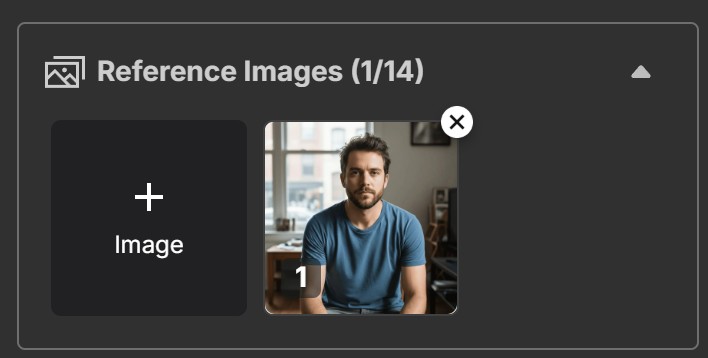
Upload your reference photo: import a clear photo of the boy or man you are working from. A front-facing, evenly lit shot preserves the likeness far better than a side angle or a photo with hard shadows across the face.
-
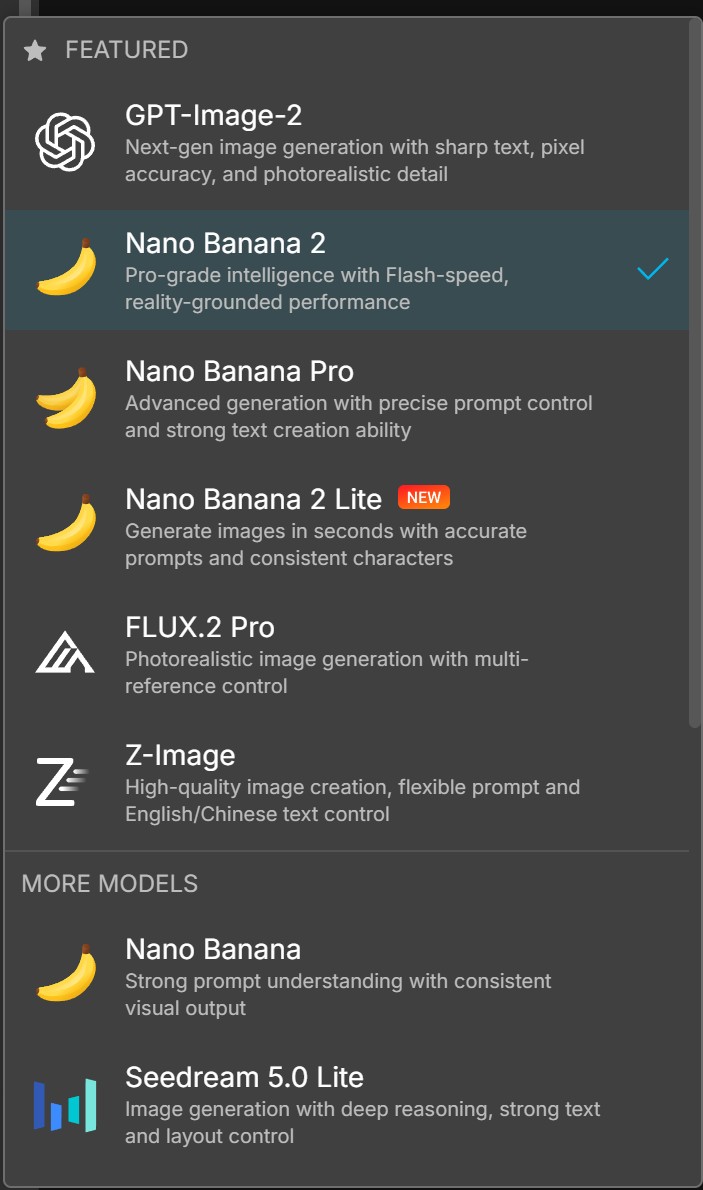
Choose your model: select Nano Banana 2 if you want to reproduce the results on this page, since that is the model every example here was generated with. Switching models changes the output noticeably even when the prompt is identical, so change it deliberately rather than by accident.
-
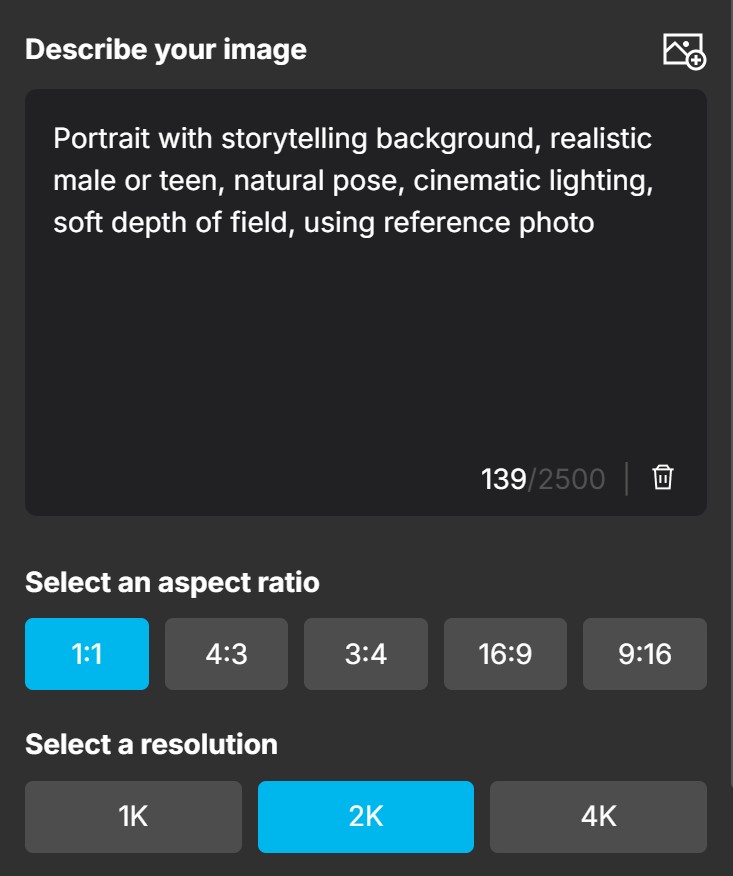
Paste your prompt and set the resolution: copy any prompt from this page, then set the output to 2K, which is what we used throughout. Keep the closing instruction "using reference photo" in place, because that clause is what tells the model to work from your upload rather than inventing a face.
-
Generate, then iterate: generation took just under a minute per image in our testing and cost 5 credits each time. Budget for more than one attempt: the first result is rarely the keeper, and changing a single clause is cheaper and more informative than rewriting the whole prompt.
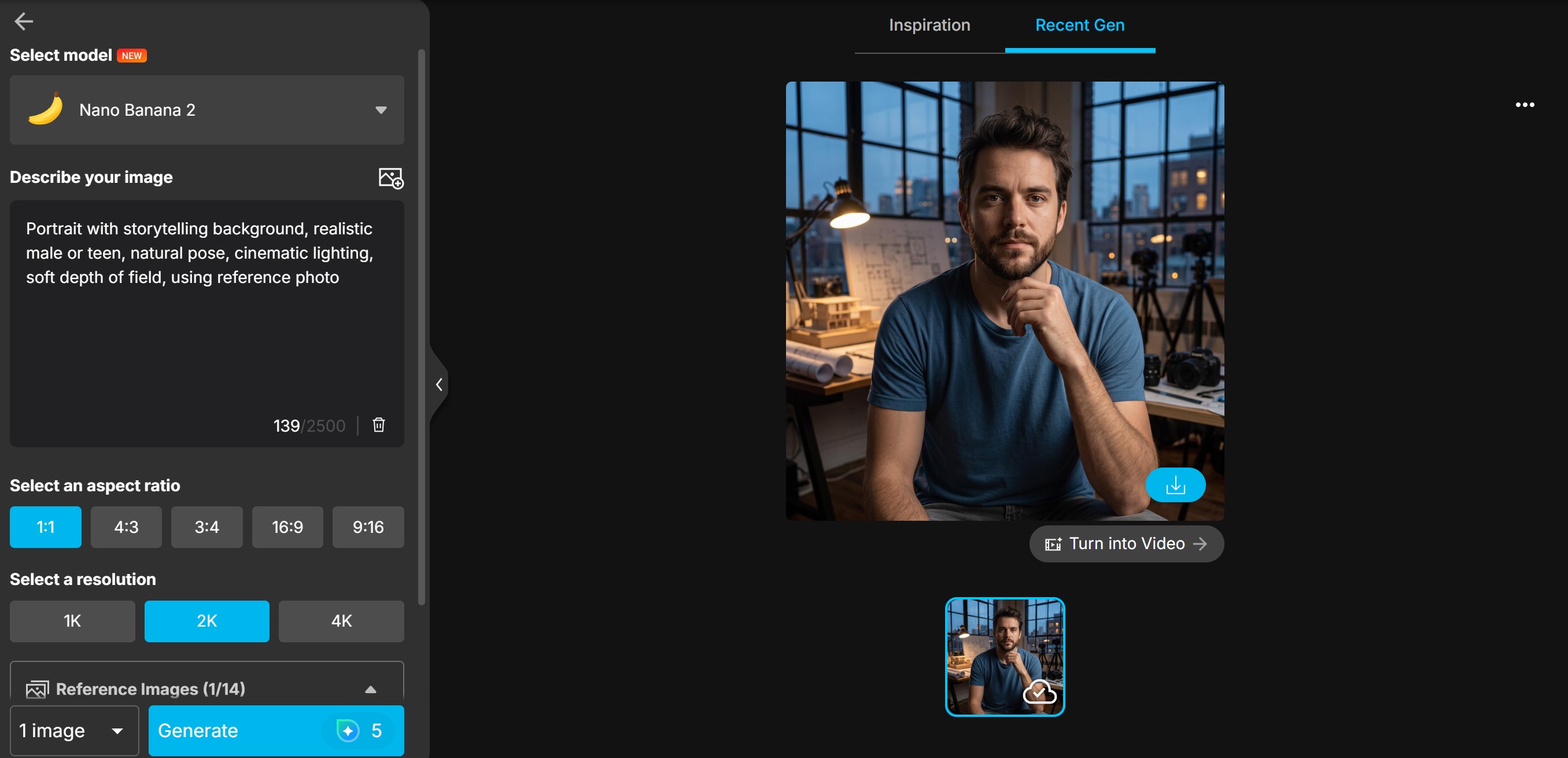


If the likeness drifts, the fix is almost always the reference photo rather than the prompt. Re-shoot or re-crop so the face is front-on, evenly lit and large in the frame, and rerun the same wording before you start editing the prompt itself.
Q: How much does one portrait cost in MyEdit?
A: A 2K generation with Nano Banana 2 cost 5 credits in our testing. MyEdit provides 3 free credits per day, so the free tier covers roughly one 2K image every two days. Paid plans include 500 credits a month.
Q: Why does the video cost so much more than the image?
A: Video generation is priced per second of output. A Veo 3.1 clip costs 20, 30 or 40 credits for 4, 6 or 8 seconds, against 5 credits for a still image, so one short clip is worth several portraits.
Sources for this guide:
The prompts, the before/after examples and the credit and timing figures come from our own testing in MyEdit. The following were checked against outside sources rather than taken from our own results:
- Model naming and the Nano Banana family: Google, Gemini API image generation documentation.
- MyEdit plan pricing in US dollars: the in-product subscription screen, captured in August 2026.
Everything else on this page, including every generated example, was produced first-hand in the tool and at the settings stated in the methodology box above.
Related articles:
- Viral Gemini AI Prompts for Portraits, Couples and Families
- Gemini AI Romantic Prompts for Couples
- Best ChatGPT Photo Editing Prompts
Transparency note:
MyEdit is a CyberLink product, and CyberLink publishes this blog. We have stated the real per-generation credit cost, the free daily allowance and the point at which the free tier stops being practical, and we have said plainly where the Gemini app is the better tool than ours.
FAQs on Gemini AI Prompts for Boys and Men
There is no single best prompt, but the ones that work share a structure: state the age range, two or three defining garments, the setting, the lighting, and a technical finish. For example: "Professional male headshot, short dark hair, neutral grey background, soft key light with gentle fill, realistic skin texture, using reference photo." The lighting clause changes the result more than any other part, so if you only edit one thing between attempts, edit that.
State the age explicitly, because prompts that leave it out default to an adult face. Add the expression and the environment, for example: "Portrait of an 8-year-old boy, casual outfit, natural daylight in a garden, relaxed smile, realistic skin texture, using reference photo." If you are generating a portrait of a child who is not your own, get the parent's or guardian's permission before you upload the photo.
Yes. Describe the cut in the terms a barber would use rather than by trend name, since trend names date quickly and the model may not recognise them: length, texture, parting and fade level. "Curly medium-length hair with a side part and natural texture" gives a far more predictable result than naming a style. Keep the rest of the prompt unchanged between attempts so you can see what the hair change alone did.
Work through the five parts in order: subject and age, wardrobe, setting, light, technical finish. "Teen boy portrait, short messy hair, casual hoodie, city sidewalk at golden hour, relaxed pose, realistic skin texture, shallow depth of field, using reference photo." Adding more than three wardrobe items tends to make the model drop some of them, so keep that section short.
Copy the prompt text, paste it into the prompt field, attach your reference photo, and leave the closing phrase "using reference photo" in place, since that is what tells the model to work from your upload instead of generating a face from scratch. Then change one clause at a time. Rewriting the whole prompt between attempts makes it impossible to tell which change caused the improvement.
Technically yes, and the prompt structure is the same as for adults with the age stated explicitly. There are two things worth settling first, though: get permission from the child's parent or guardian before uploading their photo, and decide whether you are comfortable publishing an AI likeness of a child publicly. Generated images carry provenance watermarking, so they can be identified as AI output.
Style in these prompts comes from lighting and colour grading far more than from clothing. A plain hoodie shot at golden hour with a shallow depth of field will read as more stylish than an elaborate outfit under flat light. Specify the light source, the time of day and the colour treatment, then let the wardrobe stay simple.
Yes. Reference-photo generation is an editing workflow rather than a creation one: you supply the image and describe what should change. It handles background swaps, wardrobe changes, lighting and colour well. It is less reliable at small precise fixes, such as removing one specific object, where a brush-based edit gives you more control than a written instruction.
Three things account for most of the difference. Start from a front-facing, evenly lit, high-resolution reference photo, because likeness accuracy is set by the input more than the prompt. Keep "realistic skin texture" in the prompt for photographic looks, or the output turns over-smoothed. And generate at the highest resolution you are willing to pay for. Every example on this page was generated at 2K.
The CyberLink Editorial Team is composed of product testing specialists and content creation experts with over 20 years of hands-on experience and rigorous research in the multimedia editing industry. As the official voice of CyberLink, the team consistently delivers practical, easy-to-follow tutorials across video, photo, and audio editing, while highlighting AI innovations, product insights, and emerging industry trends. Their work empowers millions of creators worldwide each year to elevate their content. Beyond the blog, the team actively shares editing tips and product updates across YouTube, Facebook, Linkedin and Pinterest.
😎 Outside of their work, they enjoy capturing travel moments and meticulously editing photos and videos for their social channels.


