




How to Get On-Model Product Photos for Your Etsy, Shopify or Amazon Store Without a Photoshoot

Running an online clothing store means your product photos carry the entire sale. Customers want to see how garments actually look when worn, not lying flat on a table or hanging on a rack. But booking a model shoot costs hundreds of dollars per session, takes days to organise, and by the time the edited photos come back, the momentum is already gone.
The good news is that you no longer need a model, a photographer, or a studio to show your clothes being worn. MyEdit's AI Try-On lets you upload any product photo and generate a realistic on-model visual in seconds, directly in your browser. It works for Etsy listings, Shopify product pages, Amazon galleries, and any other marketplace where on-model images drive conversions.
- Why Flat Lays Hurt Your Clothing Sales
- How to Use MyEdit AI Try-On Step by Step
- AI Try-On Results on Real Product Photos
- Why MyEdit Works for Etsy, Shopify and Amazon
- Frequently Asked Questions
Why Can't I Just Use Flat Lay Photos for My Clothing Store?

You can use flat lays, and many sellers do. The problem is that shoppers have a much harder time picturing how a garment will actually look on their body when it is shown on a surface or a hanger. On-model images remove that mental effort, which is why they consistently outperform flat lays on conversion rate across Etsy, Shopify, and Amazon.
The challenge for independent sellers is the cost. A basic model shoot runs between $300 and $800 per session before editing, and that figure multiplies fast when you have a large or frequently updated catalog. AI Try-On tools close this gap by digitally placing your garment onto a realistic AI-generated model, simulating how the fabric drapes, folds, and fits on a human body. You upload your product image, the AI handles the placement and fit, and you get a professional on-model photo ready for your listings in seconds. No editing experience needed, no software to install.
How to Use MyEdit AI Try-On Step by Step


A standard flat-lay product photo transformed into a realistic on-model image using MyEdit's AI Try-On. No photoshoot, no model booking, no editing skills required.
-
Open MyEdit's AI Try-On tool: Go to the AI Try-On page in your browser. The tool runs entirely online with no software download required. Sign in or create a free account to get started.
-
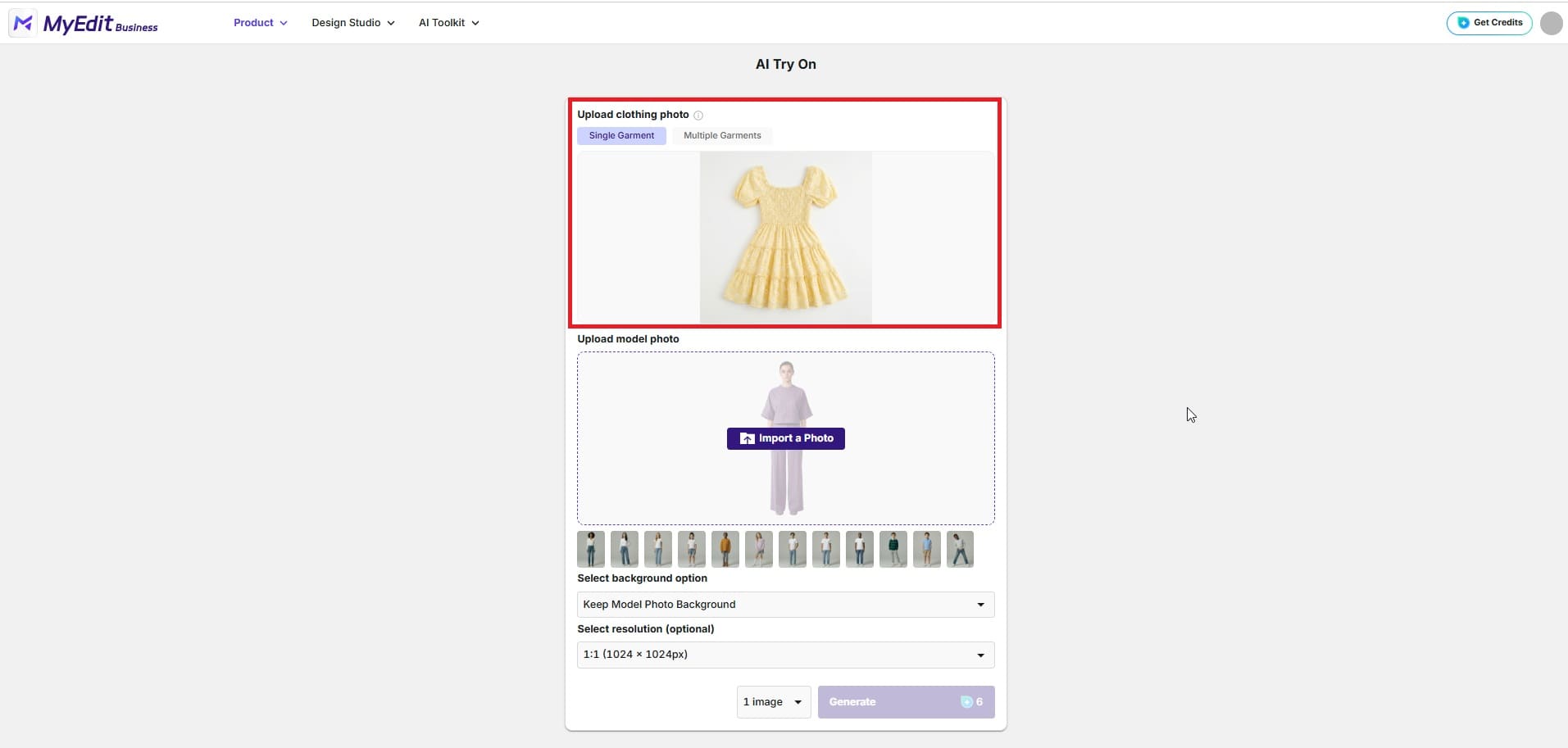
Upload your garment photos: Click the upload button and select one or multiple product images at once. This is particularly useful if you are processing a full catalog in one session. Flat lay photos, hanger shots, and ghost mannequin images all work well. For best results, use photos with a clean, light background so the AI can clearly identify each garment.
-
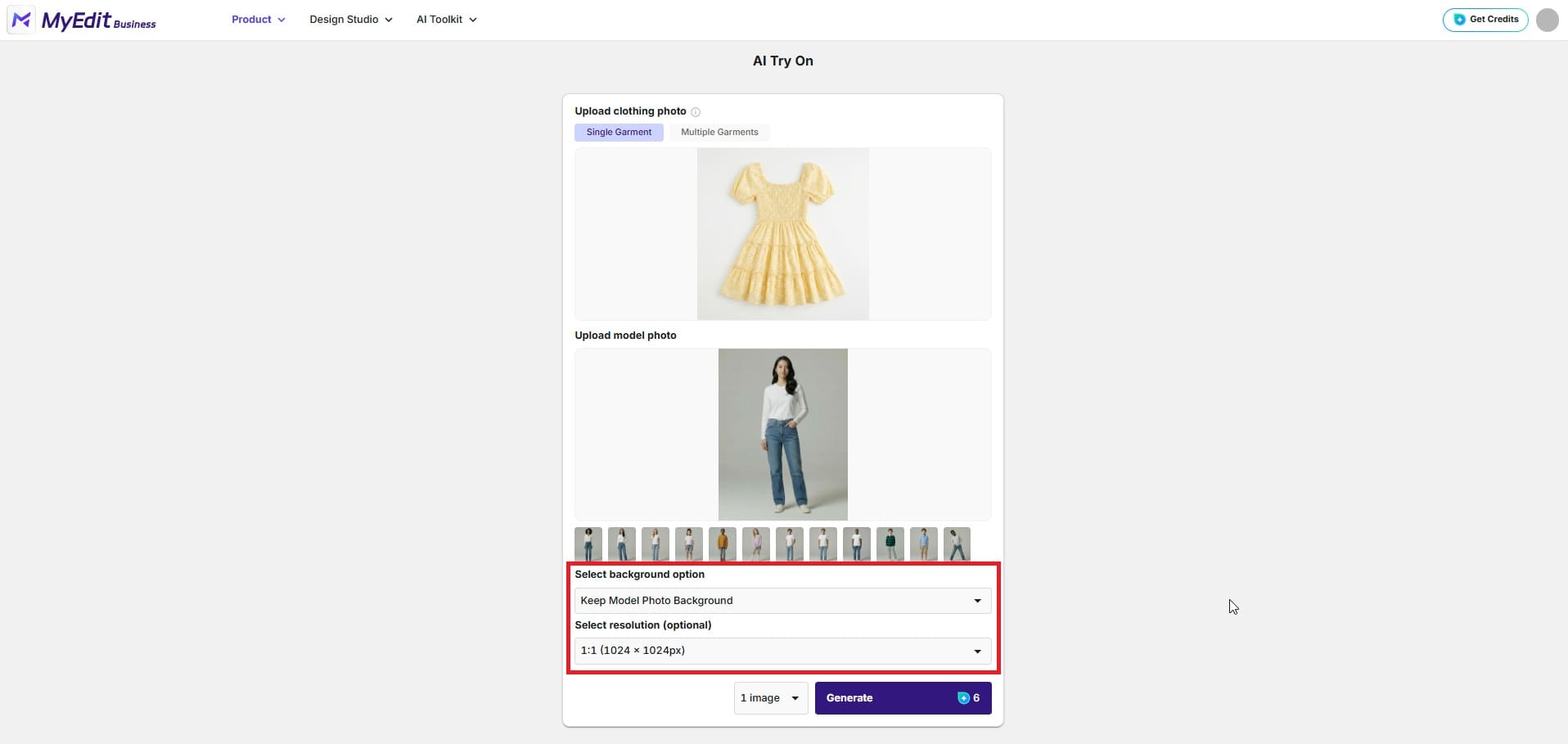
Select your AI model: Browse the available model options and choose the body type, pose, and style that best matches your brand. You can also import your own photo to use as the model base, which is useful if you want to maintain a consistent look across all your listings. You can also crop the output to focus on a specific area of the model, for example showing only the upper body when highlighting a top, or a close-up of the waist and hem for a skirt.
-
Customise the output settings: Before generating, adjust two key options to match your marketplace requirements. First, choose your background: keep the original model background for a lifestyle look, or switch to a clean white background for platforms like Amazon that require it. Second, select your output resolution depending on where the image will be used — 1:1 (1024x1024px or 2048x2048px) for standard product listings, 3:4 (896x1200px) for Shopify and Etsy, or 9:16 (1536x2752px) for TikTok Shop and vertical social formats.
-
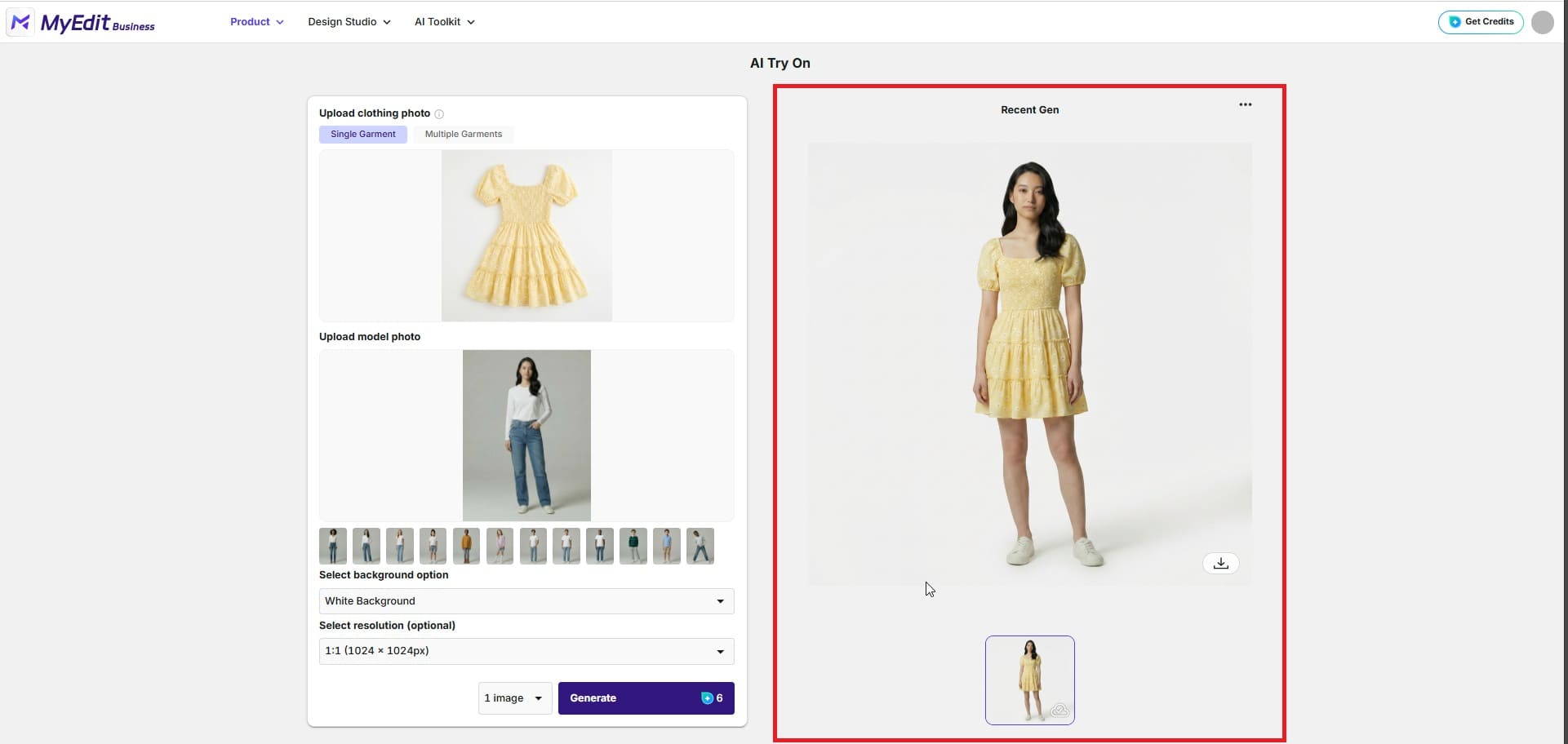
Generate and review your result: Click Generate and the AI will produce a realistic on-model photo within seconds. Check that the fabric drape, fit, and overall presentation look natural. If you want a different pose or model variation, you can regenerate with adjusted settings.
-
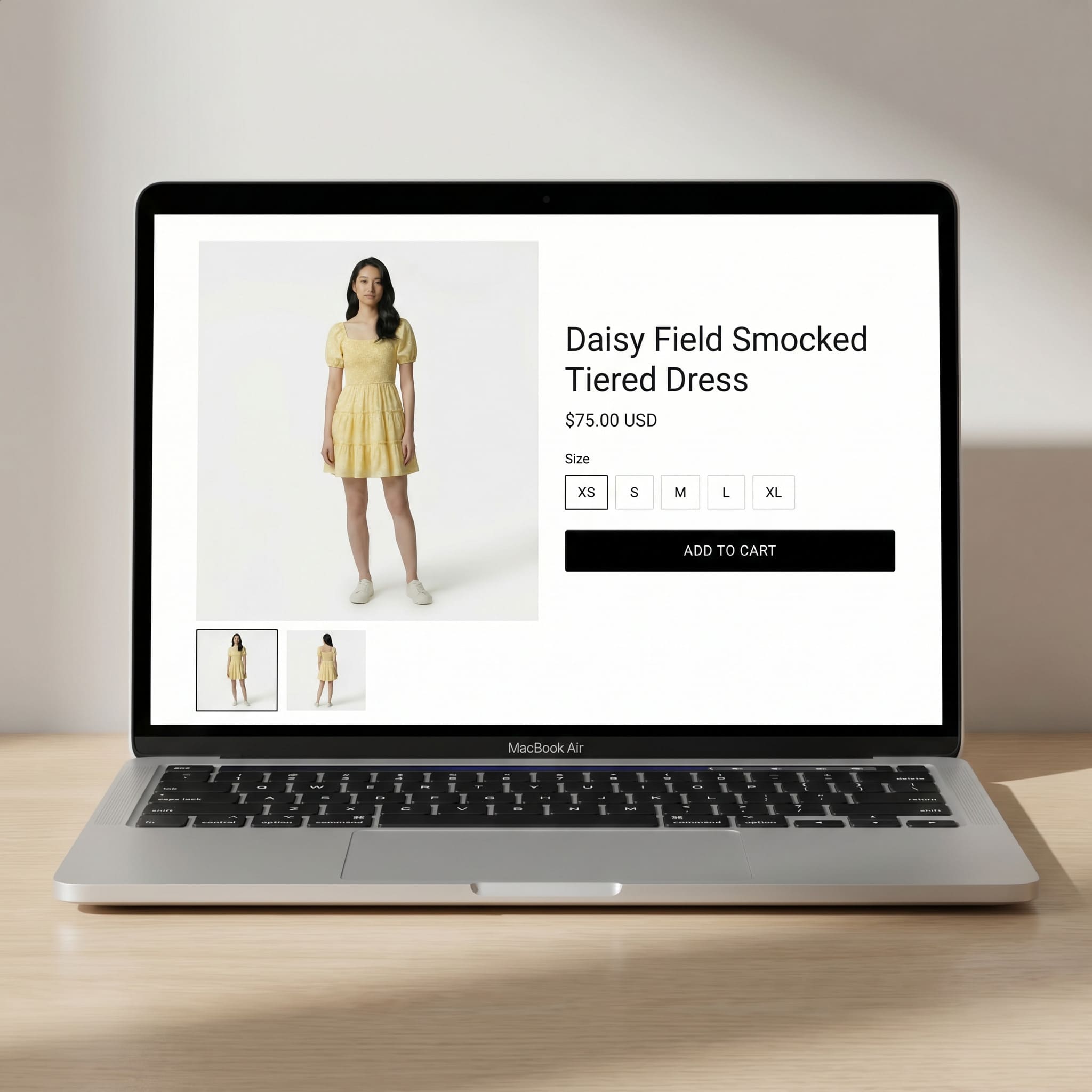
Download and publish to your listings: Once you are happy with the result, download the image in high resolution. It is ready to upload directly to your Etsy listing, Shopify product page, Amazon gallery, or any other platform. You can also use MyEdit's other editing tools to make any final adjustments before publishing.


AI Try-On Results on Real Product Photos
Here are four examples of real garment types processed through MyEdit's AI Try-On, showing what the before and after looks like for each product category.
Summer Dress: Hanger Shot to On-Model Listing Image


A basic hanger shot turned into a natural on-model image, ready for an Etsy listing or Shopify product page. The AI preserves the print, colour, and silhouette of the dress while placing it realistically on the model's body.
Casual Jacket: Flat Lay to Styled On-Model Shot


Flat lay photo converted into a styled on-model shot with realistic fabric drape and natural fit. Particularly useful for outerwear where silhouette and fit are key purchase drivers for buyers browsing Amazon or Shopify.
Formal Blouse: Ghost Mannequin to Professional Listing Photo


Ghost mannequin image converted into a professional on-model photo suitable for Amazon listings and brand lookbooks. The structured shape and collar details are retained accurately in the AI output.
Knitwear: Product-Only Photo to Model Wearing the Piece


A standalone product shot of a knitwear piece shown on a model with accurate texture rendering. This example shows how the AI handles fabric volume and natural drape on heavier materials, a common challenge for sellers of winter collections on Etsy and Shopify.
Why MyEdit AI Try-On Works for Etsy, Shopify and Amazon Sellers

Most independent sellers on Etsy, Shopify, and Amazon do not have the budget for regular model photoshoots, and when you are listing dozens of SKUs the cost becomes impossible to justify. MyEdit's AI Try-On is built around this exact situation: upload a product photo, get a professional on-model result in seconds, and move straight on to the next listing. There are no scheduling conflicts, no reshoot costs, and no waiting days for edited files. Unlike hiring models or working with studio photography services, the turnaround is immediate and the cost stays predictable regardless of how many products you need to shoot.
- No photoshoot required: Generate realistic on-model images from any flat lay, hanger shot, or ghost mannequin photo. No studio, no model, no photographer needed.
- Ready for any marketplace: Output images meet the visual quality expected by Etsy, Shopify, Amazon, and other major platforms. Clean, professional, and ready to upload straight away.
- Scale your catalog without scaling your costs: Process multiple garments in one session at a fraction of traditional shoot costs. Ideal for sellers with large or frequently refreshed product ranges.
- Mix and match separate garments: Upload tops, bottoms, and outfits individually and combine them on the same model to create full look variations without additional shooting. Perfect for sellers who want to show styling options across their catalog.
- Consistent look across all listings: Apply the same model and style settings across your entire catalog to build a coherent brand aesthetic, something that is difficult to maintain across multiple separate photoshoots.
- No design or editing skills needed: The tool is fully browser-based. If you can upload a file and click generate, you can produce professional results immediately.
Conclusion
Shoppers buy clothes they can picture themselves wearing. Flat lays and hanger shots ask buyers to do that imagining work alone. On-model photos do it for them, which is why they consistently convert better across Etsy, Shopify, and Amazon. MyEdit's AI Try-On gives every independent seller access to that advantage, with no photoshoot required and no experience needed.
Related Articles:
- Best AI Tools to Boost Ecommerce
- Guide to Ecommerce Photo Editing
- Best AI Social Media Post Generators
FAQs: AI Virtual Try-On for Etsy, Shopify and Amazon Clothing Sellers
Yes. AI Try-On tools like MyEdit analyse your garment photo and digitally place it onto a realistic AI-generated model, simulating how the fabric drapes and fits on a real body. The result is a professional on-model image produced entirely without a photoshoot.
AI virtual try-on tools have made professional on-model photography accessible for sellers of any size. By uploading a flat lay or hanger shot of your garment to a tool like MyEdit, you can generate realistic on-model visuals in seconds. No model booking, no photographer, and no studio is required.
MyEdit offers a free plan that lets you generate on-model product images using AI Try-On directly in your browser. No software download is needed and you can test the feature on your own product photos without a subscription.
Flat lay photos, hanger shots, and ghost mannequin images all produce good results. The AI works best when the garment is clearly visible against a clean, light background. Photos where clothing is heavily folded, poorly lit, or partially hidden tend to produce less accurate results.
Yes. Images generated with MyEdit's AI Try-On can be used on all major e-commerce platforms including Etsy, Shopify, and Amazon. They meet the visual quality standards these marketplaces expect, and you keep full rights to use the images commercially in your listings.

The CyberLink Editorial Team is composed of product testing specialists and content creation experts with over 20 years of hands-on experience and rigorous research in the multimedia editing industry. As the official voice of CyberLink, the team consistently delivers practical, easy-to-follow tutorials across video, photo, and audio editing, while highlighting AI innovations, product insights, and emerging industry trends. Their work empowers millions of creators worldwide each year to elevate their content. Beyond the blog, the team actively shares editing tips and product updates across YouTube, Facebook, Linkedin and Pinterest.
😎 Outside of their work, they enjoy capturing travel moments and meticulously editing photos and videos for their social channels.

![How to Start an Online Store [2026 Complete Guide]](https://dl-file.cyberlink.com/web/content/b3474/l_Thumbnail.webp)


