







Sora Is Shutting Down: The Best Alternatives to Use in 2026

OpenAI just confirmed that Sora, the AI video generator that took the internet by storm in late 2025, is shutting down. The app closes on April 26, 2026, and the API follows on September 24, 2026. If you have been using Sora in your creative workflow, the window to act is short.
This guide covers everything you need to know about the Sora shutdown and what to do next. The short answer: MyEdit already runs Kling, Veo 3, and Vidu in one place, so you can keep creating without missing a beat.
- What Was Sora and Why Is It Closing?
- Shutdown Dates and How to Export Your Videos
- Best Sora Alternatives in 2026
- Kling, Veo 3, Vidu: All on MyEdit
- Sora Shutdown FAQ
What Was Sora and Why Is OpenAI Shutting It Down?

Sora in 2025: The AI Video App Everyone Wanted Access To
OpenAI first previewed Sora in February 2024, and it immediately changed how people thought about AI video generation. The original model could produce surprisingly realistic short clips from a simple text prompt, something no tool had done convincingly before.
Sora 2 launched on September 30, 2025, and raised the bar significantly. It introduced synchronized dialogue and sound effects, improved physics simulation, multi-shot consistency, and a standalone iOS and Android app. Within five days of launch, the Sora app hit number one on the Apple App Store. Users could generate text-to-video and image-to-video clips, apply cinematic styles, extend existing videos, remix scenes, and even insert their own face into any scenario using the "Characters" feature.
For creators, filmmakers, marketers, and social media teams, Sora 2 felt like the closest thing to a real film camera powered entirely by AI. The hype was real, and for a few months, it delivered.
The Real Reasons OpenAI Is Closing Sora
On March 24, 2026, OpenAI announced it was shutting down Sora. No single official reason was given, but the picture that emerged from reporting by the Wall Street Journal, TechCrunch, and CNN tells a clear story.
- The cost was unsustainable: Sora was burning through roughly $1 million per day in compute costs. Video generation is significantly more expensive to run than text or image generation, and those costs did not come down fast enough.
- User growth stalled: After peaking at around one million active users, the app declined to fewer than 500,000 by the time the shutdown was announced. Revenue from in-app purchases totaled an estimated $2.1 million over the app's entire lifetime, far below what was needed to justify the infrastructure.
- OpenAI is refocusing on enterprise: With a potential IPO on the horizon and growing competition from Anthropic, OpenAI decided to redirect compute resources toward coding tools and enterprise products, where revenue is more predictable.
- The Disney deal collapsed: Disney had committed $1 billion to a partnership with Sora. According to reports, Disney found out about the shutdown less than an hour before the public announcement. The deal died with the app.
The shutdown is not a sign that AI video is dead. It is a sign that running a consumer AI video platform at this scale is still not economically viable for a company with OpenAI's priorities. The underlying technology, and the demand for it, is very much alive.
Sora Shutdown Dates and What to Do Before It Closes
When Does Sora Shut Down Exactly?
OpenAI has confirmed a two-stage shutdown timeline:
- April 26, 2026: The Sora web and app experiences are discontinued. This includes sora.com and the Sora iOS and Android apps.
- September 24, 2026: The Sora API is discontinued. All video generation via the API, including Sora 2 and Sora 2 Pro model endpoints, will stop working.
After these dates, OpenAI has confirmed that all data associated with your Sora account will be permanently deleted. There is no guarantee of a recovery window after the cutoff.
How to Export Your Sora Videos Before They Are Gone
If you have videos in your Sora library, export them now. Here is how:
- Go to sora.chatgpt.com/exports/me
- Click Export
- Wait for the export to process. Large libraries may take some time.
- When ready, OpenAI will send an email to your account address with a download link.
- Download the ZIP file containing all your generated videos and images.
Do not wait until the last day. Export times vary and OpenAI has not guaranteed a recovery window after April 26.
The Best Sora Alternatives in 2026
The good news is that the AI video generation market has continued to grow, and several strong alternatives are available right now. Here are the tools most capable of replacing Sora in your workflow.
Kling 3.0
Developed by Kuaishou, Kling 3.0 has emerged as one of the most capable text-to-video and image-to-video models available. It produces high-quality, physically consistent video clips with natural motion and strong prompt adherence. Kling is particularly well suited for short-form social media content, product videos, and cinematic scene generation.
- Best for: Realistic video, social media content, product showcases
- Input types: Text-to-video, image-to-video
- Strengths: Natural motion, strong physics, fast generation
Google Veo 3
Google Veo 3 is currently one of the highest-rated models on AI video leaderboards. Released in May 2025, it offers text-to-video generation with integrated high-fidelity audio, making it one of the few tools that genuinely matches or exceeds Sora 2 in output quality. Veo 3 excels at cinematic visuals, detailed scene compositions, and realistic human motion.
- Best for: Cinematic content, high-quality productions, audio-integrated videos
- Input types: Text-to-video
- Strengths: Exceptional visual quality, native audio generation, strong prompt control
Vidu
Vidu is a fast-growing AI video model with a strong focus on creative flexibility and ease of use. It supports text-to-video and image-to-video generation with a range of style controls, making it a practical choice for creators who want quick results across different visual aesthetics without a steep learning curve.
- Best for: Creative content, varied visual styles, quick iterations
- Input types: Text-to-video, image-to-video
- Strengths: Style flexibility, accessible interface, fast output
Quick Comparison: Sora Alternatives in 2026
| Model | Input Types | Audio | Best For |
|---|---|---|---|
| Kling 3.0 | Text, Image | No | Realistic video, social content |
| Google Veo 3 | Text | Yes | Cinematic, high-quality production |
| Vidu | Text, Image | No | Creative styles, fast iteration |
| Sora 2 (closing) | Text, Image | Yes | App closes April 26, 2026 |
One Platform, All the Top AI Video Models: MyEdit
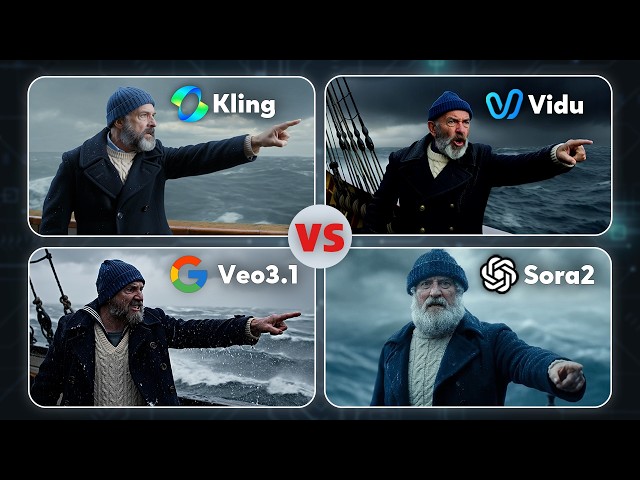
The biggest challenge when Sora shuts down is not finding a replacement model. It is having to choose between multiple platforms, manage separate accounts, and rebuild your workflow from scratch for each tool.
MyEdit solves that by giving you access to Kling, Veo 3, Vidu, and the Sora API (until September 24, 2026) in a single platform. You do not need to pick one model and commit. You can test all of them, switch between them for different projects, and keep everything in one place.
- Multiple models, one platform: Kling 3.0, Veo 3, Vidu, and Sora API all accessible from a single interface
- No workflow rebuild required: the same prompt structure you used in Sora works directly in MyEdit
- Web-based: no software to install, works in any browser on any device
- For creators and teams: whether you generate one video a week or hundreds, MyEdit scales with your output
How to Create AI Videos with MyEdit in Minutes
Switching from Sora to MyEdit takes less than a minute. Here is how to generate your first AI video using the Text to Video tool:
-
Open MyEdit's Text to Video tool: Go to the Text to Video page in your browser. No download or installation needed. Sign in or create a free account to get started.
-
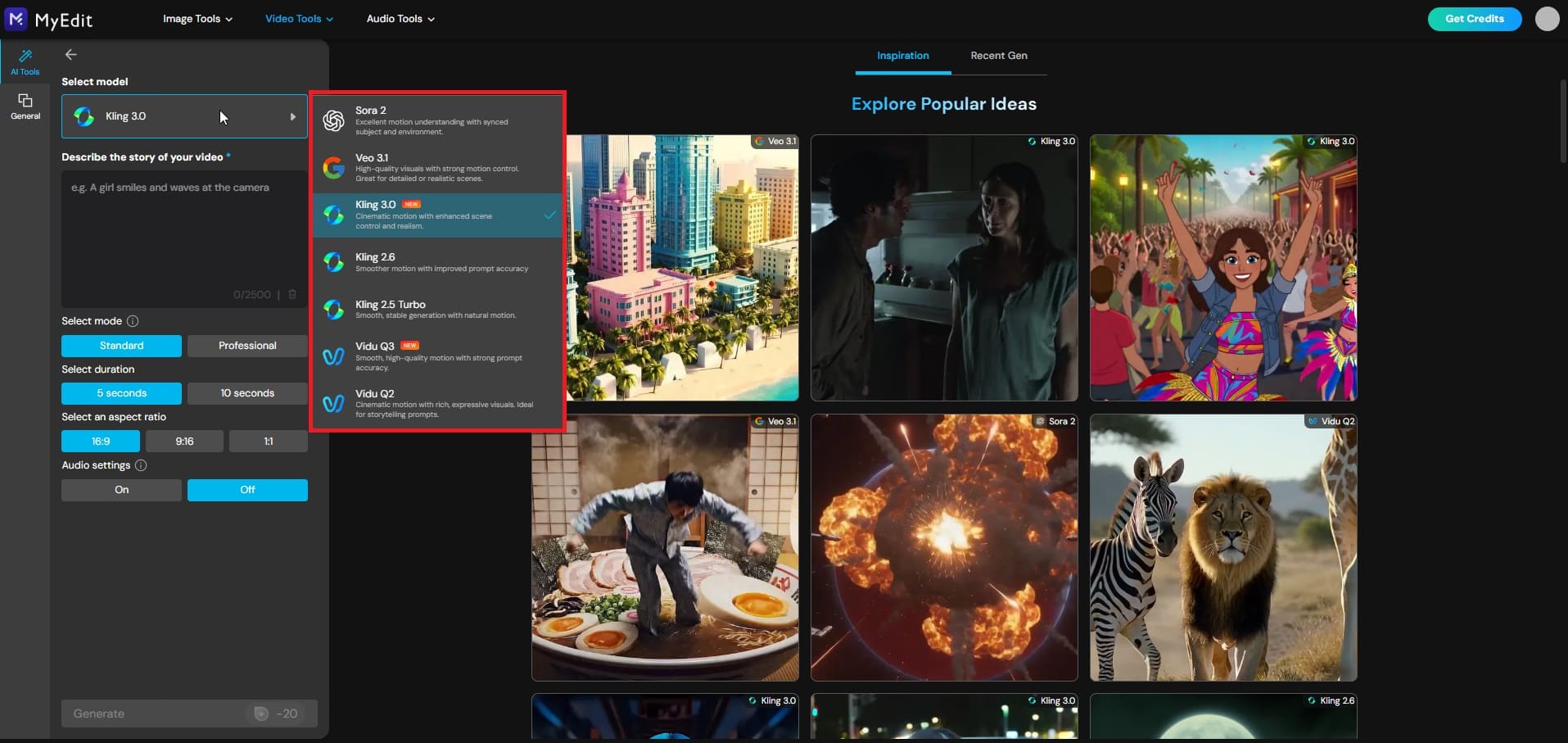
Select your AI video model: Choose from Kling, Veo 3, Vidu, or Sora (available until September 24, 2026). Each model has different strengths — Kling for realistic motion, Veo 3 for cinematic quality with audio, Vidu for creative styles.
-
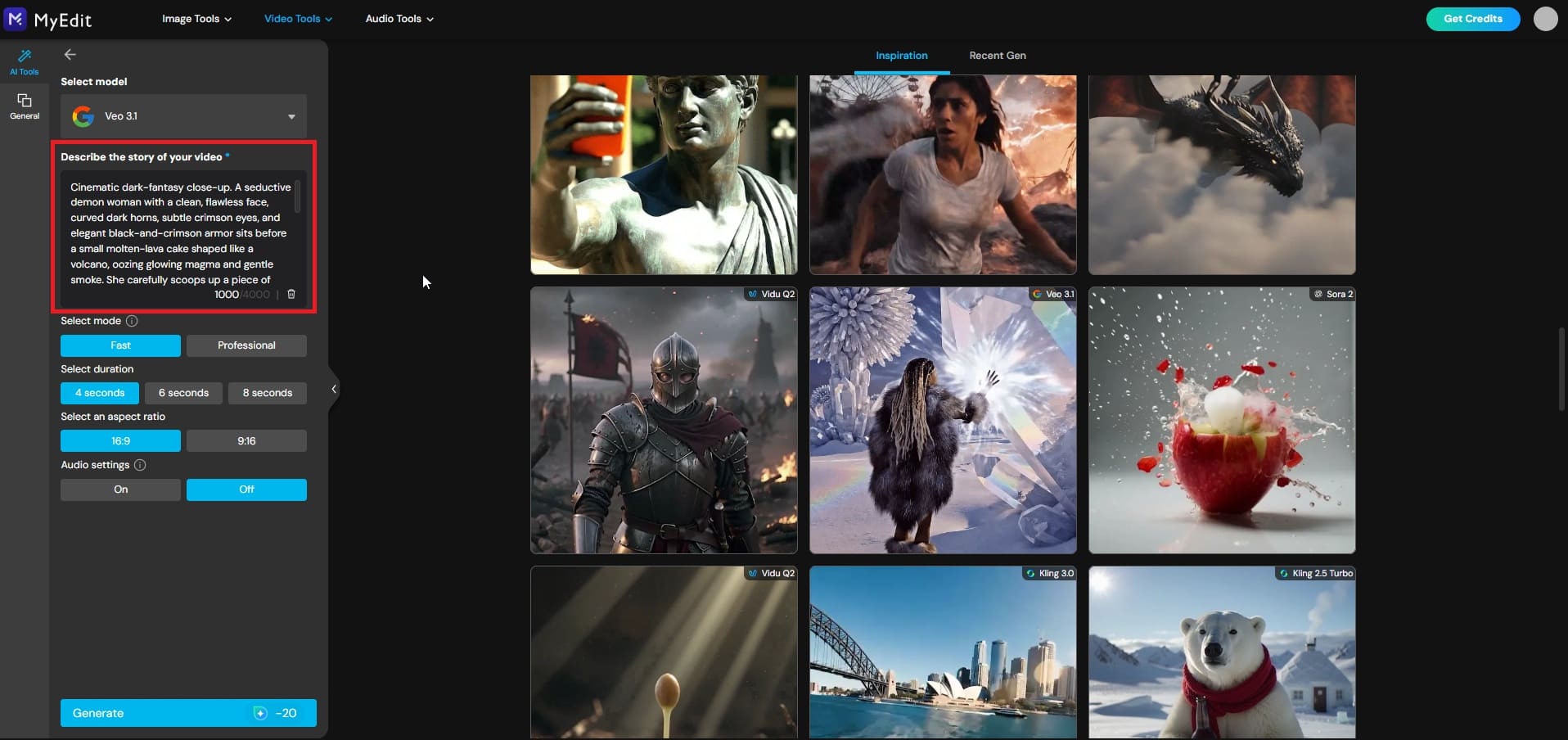
Enter your prompt: Describe the scene, style, camera angle, and mood you want. Your existing Sora prompts work directly — no rewriting needed. The more specific your description, the more consistent the result.
-
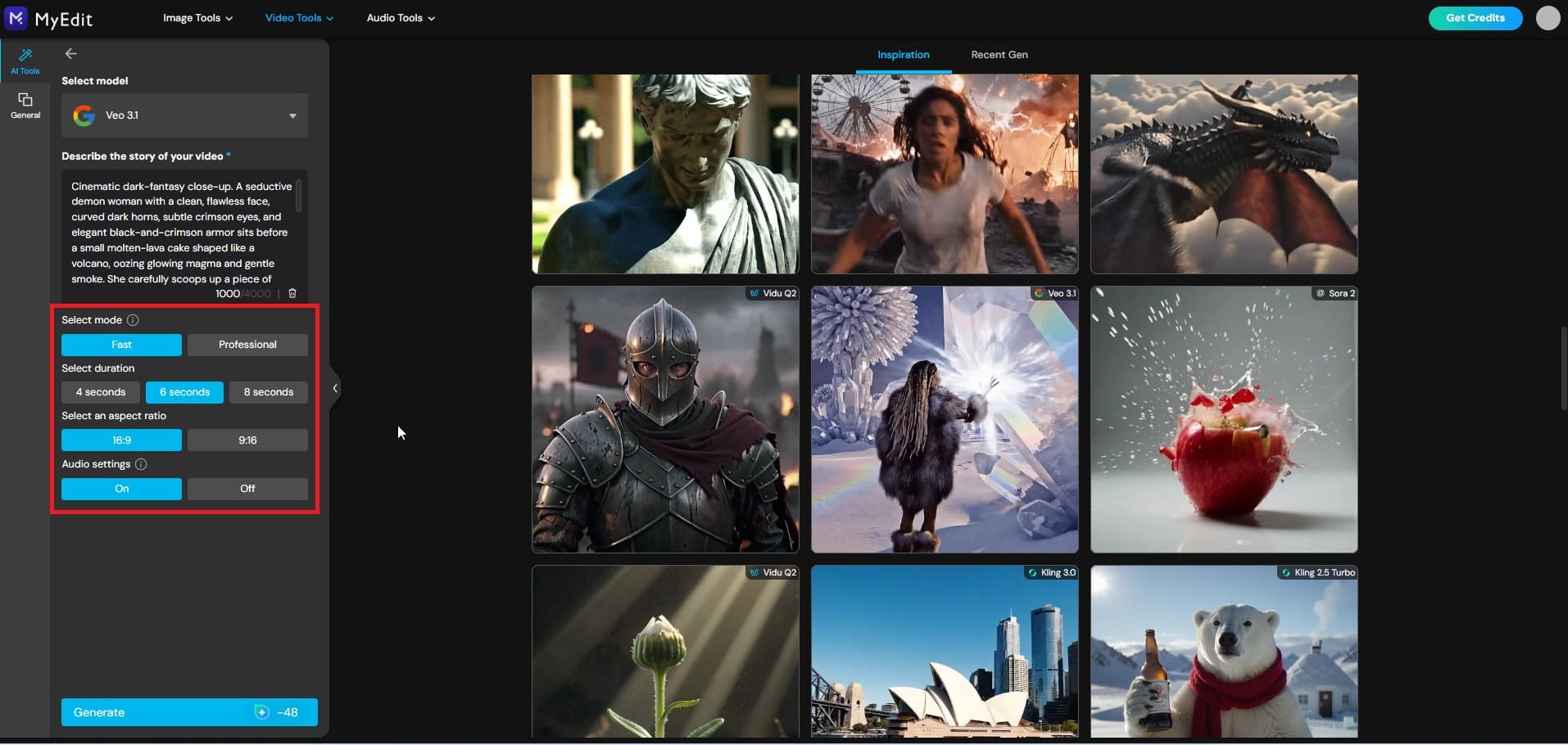
Customize your video settings: Before generating, set your preferences to match your project needs. Select your mode — Standard for quick results or Advanced for more precise control. Choose your video duration from the available presets, pick your aspect ratio (landscape, portrait, or square), and toggle audio generation on if you want synchronized sound added to your video.
-
Generate and download your video: Click Generate and your video will be ready in seconds. Download it directly and use it across any platform — social media, presentations, or creative projects.
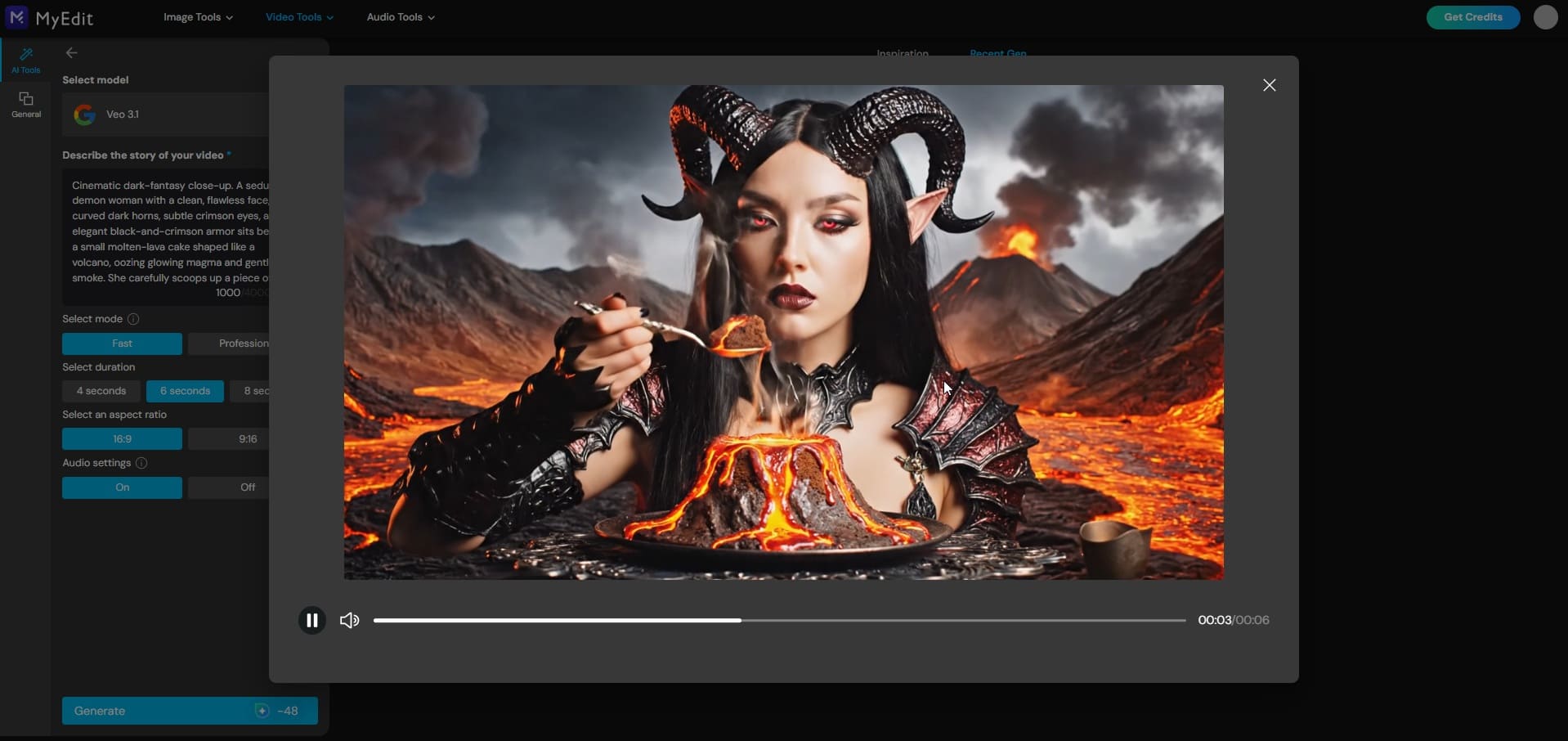


Explore MyEdit AI Video Features
Beyond Text to Video, MyEdit covers every AI video use case Sora users relied on and several it never offered.
Text to Video
Turn any text description into a short, cinematic AI video in seconds. Select your model, enter your prompt, and MyEdit handles the rest.
Prompt sample: "A lone surfer rides a massive ocean wave at golden hour, slow motion, cinematic wide shot, warm amber light, realistic water physics, 35mm film."
Image to Video


Upload any still image and MyEdit animates it into a natural, fluid video clip. Choose from a library of preset motion templates for instant results, or describe the movement yourself using a custom prompt. Product photos, portraits, landscapes, illustrations — any image becomes a video in seconds.
Prompt sample: "Animate this portrait naturally — gentle head movement, soft blinking, subtle hair movement in the breeze. Keep the style and lighting of the original image."
Character Motion Swap
Apply any motion or dance from a reference video to a static image of a person. Upload your photo, provide a motion reference video, and MyEdit transfers the movement onto your character.
What you need: a clear static image of a person (photo, illustration, or AI-generated portrait) and a reference video containing the motion or dance you want to apply. MyEdit does the rest.
If you are looking for the fastest way to migrate your Sora workflow without losing momentum, MyEdit is the most practical option available right now.
Related Articles:
- Best Sora 2 Video Prompts & Ultimate Prompting Guide
- Turn Text into Video in Google Gemini with Veo 3
- Best AI Video Prompts for Gemini, MyEdit & More
Frequently Asked Questions About the Sora Shutdown
The Sora app and web experience shuts down on April 26, 2026. The Sora API, used by developers and third-party platforms, shuts down on September 24, 2026. After these dates, all user data associated with Sora accounts will be permanently deleted by OpenAI.
The consumer app and web experience closes on April 26, 2026. The Sora API remains active until September 24, 2026, meaning platforms that integrated Sora via API, including MyEdit, can continue offering Sora-based video generation until that date. After September 24, the model is fully discontinued with no official replacement announced by OpenAI.
Go to sora.chatgpt.com/exports/me, click Export, and wait for OpenAI to email you a download link with a ZIP file of all your generated content. Export times vary depending on your library size. OpenAI strongly recommends exporting before April 26, as content recovery after that date is not guaranteed.
Most leading AI video generators in 2026, including Kling, Veo 3, and Vidu, offer free tiers or trial credits. Kling 3.0 and Vidu both provide limited free generation for new users. MyEdit also offers free access to test multiple models before committing to a paid plan. For the most consistent output quality, a paid plan on any of these tools will outperform free-tier limits.
Yes. Prompt structure transfers well across AI video models. The core principles, describing the subject, scene, camera framing, lighting, mood, and motion, work the same way in Kling, Veo 3, and Vidu as they did in Sora. You may need to adjust some phrasing or add model-specific style cues, but your existing Sora prompts are a strong starting point on any alternative platform.
OpenAI cited high compute costs and a strategic shift toward enterprise and productivity tools. Reports from the Wall Street Journal and TechCrunch indicate that Sora was costing approximately $1 million per day to operate while active user numbers declined from a peak of one million to under 500,000. OpenAI chose to redirect those compute resources toward its core products, including coding tools and its next-generation language models, ahead of a potential IPO.

The CyberLink Editorial Team is composed of product testing specialists and content creation experts with over 20 years of hands-on experience and rigorous research in the multimedia editing industry. As the official voice of CyberLink, the team consistently delivers practical, easy-to-follow tutorials across video, photo, and audio editing, while highlighting AI innovations, product insights, and emerging industry trends. Their work empowers millions of creators worldwide each year to elevate their content. Beyond the blog, the team actively shares editing tips and product updates across YouTube, Facebook, Linkedin and Pinterest.
😎 Outside of their work, they enjoy capturing travel moments and meticulously editing photos and videos for their social channels.


