





Piercing Filter: Try on a Nose Ring, Septum, Lip Piercing, and More in Seconds

Ever wondered how you’d look with a nose ring or eyebrow piercing? Thanks to AI and augmented reality, you can now test out different piercing styles instantly — no needles, no pain, and no commitment.
Whether you’re serious about getting a new piercing or just curious for fun, piercing filters and virtual piercing apps let you see the result in seconds. It’s quick, easy, and surprisingly realistic.
Why guess when you can try it on first with PhotoDirector?
- What Is a Piercing Filter?
- How to Use a Piercing Filter
- How Would I Look with a Nose Ring?
- Best Virtual Piercing App & Online Tools
- AI Piercing Filter FAQ
What Is a Piercing Filter and How Does It Work?
A piercing filter is a virtual tool that uses AI and augmented reality (AR) to digitally add realistic-looking piercings to your face in a photo or through your device’s camera. It’s a fun, commitment-free way to experiment with different piercing styles before deciding on the real thing.
Here’s why more people are turning to AI piercing filters before heading to the piercing studio:
- Try before you buy — see exactly how a piercing would look on your face.
- No commitment or pain — it’s 100% virtual.
- Test multiple styles and placements — hoops, studs, septums, and more.
- Adjust size, position, and angle — for a realistic, custom fit.
- Perfect for sharing on social media — without the permanent change.
- Save and compare different looks to find your favorite.
These are some of the most commonly searched and used piercing filter styles:
- Nose Ring Filter (hoop or stud)
- Septum Piercing Filter
- Lip Piercing Filter (labret, Monroe, medusa)
- Eyebrow Piercing Filter
- Ear Piercing Filters (helix, industrial, tragus, conch)
- Cheek and Dermal Piercing Filters
How to Use a Piercing Filter to Try Virtual Piercings

Trying out a piercing look has never been easier with a virtual filter. Follow these simple steps to see how you’d look with a nose ring, septum piercing, or any other style in just seconds.
- Download PhotoDirector – Install the free app on your Android or iOS device.
- Open the AI Replace Tool – Launch the app and go to the AI Replace feature. Upload a clear photo of your face to get started.

- Highlight the Area – Use the brush tool to select the area where you want to add the piercing (e.g., nose, eyebrow, lip).
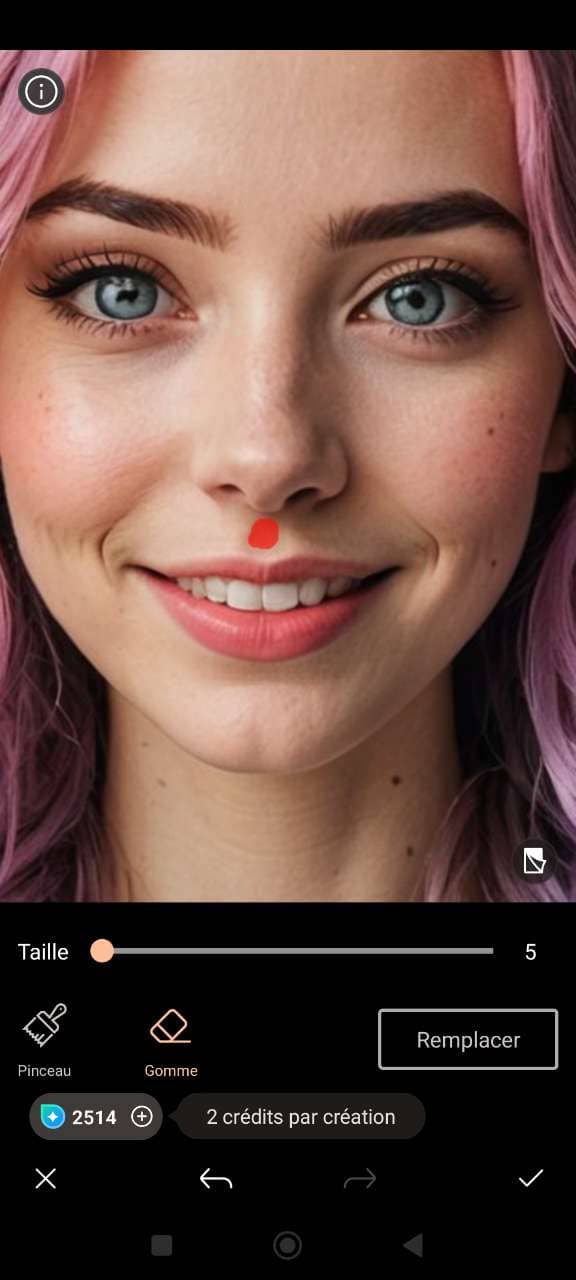
- Enter Your Prompt – Type a simple prompt like “add a nose ring” or “place a septum piercing” to specify the style you want.
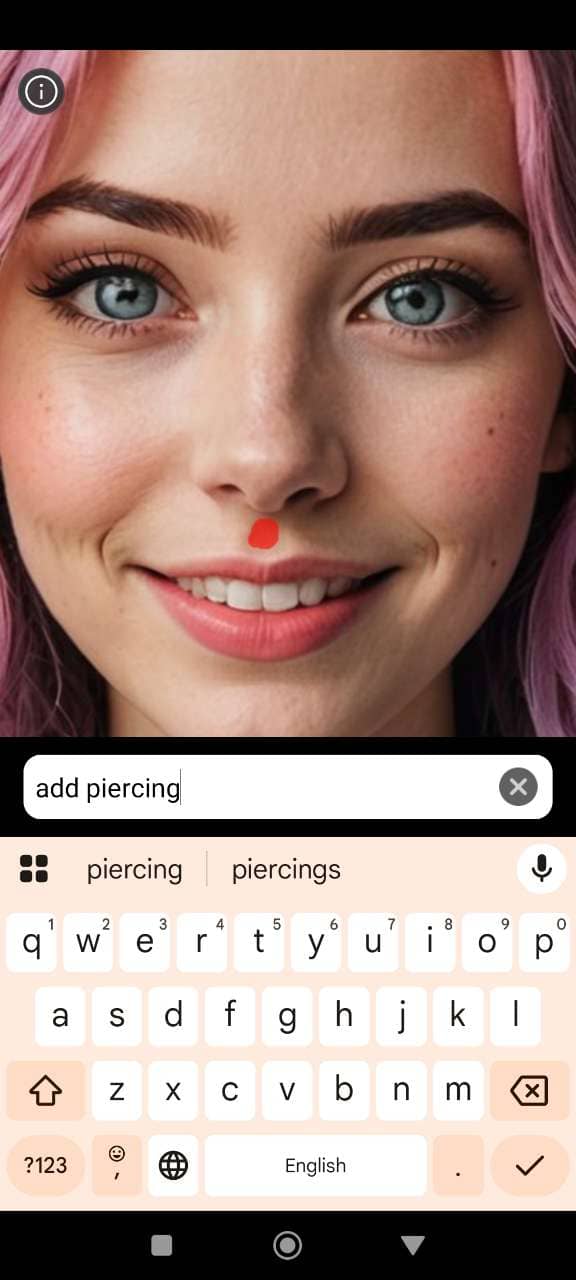
- Generate and Share – Let the AI work its magic! Once the piercing is added, you can download or share the image with friends to get their reactions.
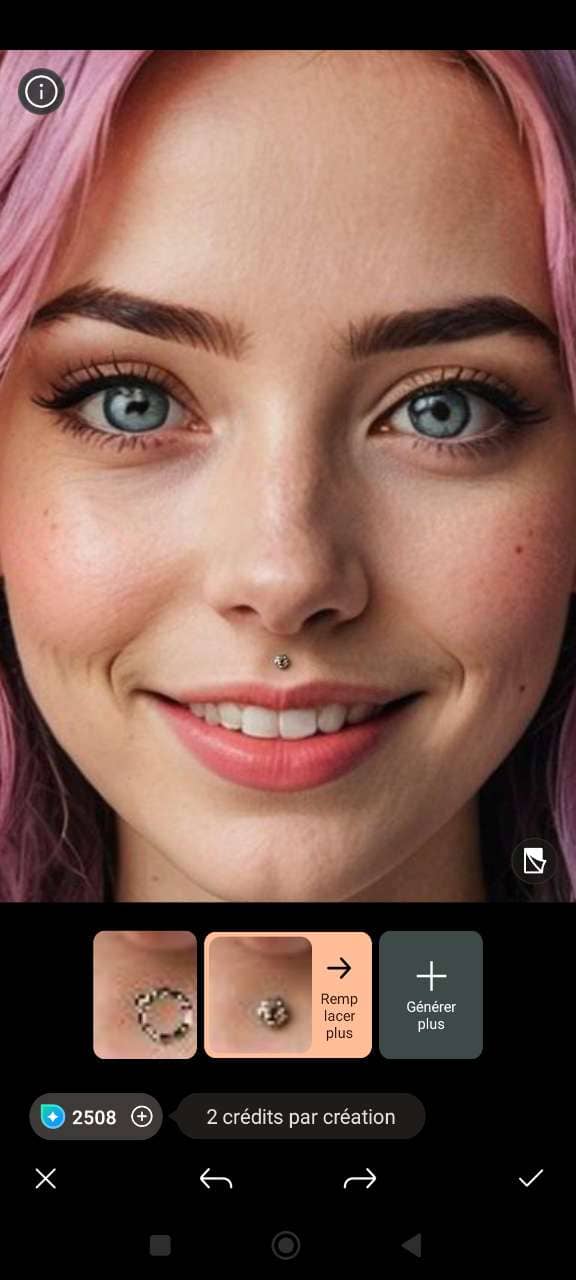


How Would I Look with a Nose Ring? Try a Nose Piercing Filter
Curious about a nose ring? See how it would look on you instantly with a virtual piercing filter.
- Download PhotoDirector – First, grab the free app from the Google Play Store or Apple App Store.
- Open the AI Replace Tool – Open the app and navigate to the AI Replace tool. Upload a clear photo of your face to get started.

- Select the Piercing Area – Use the brush tool to highlight the area where you want to add your nose piercing (such as the nostril or septum).
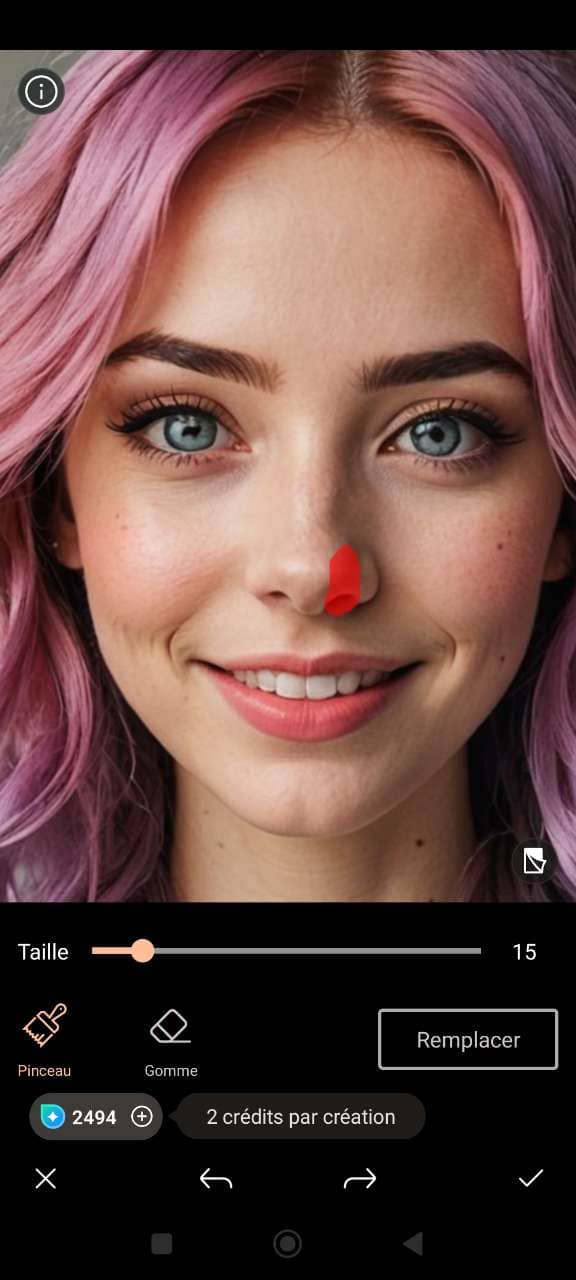
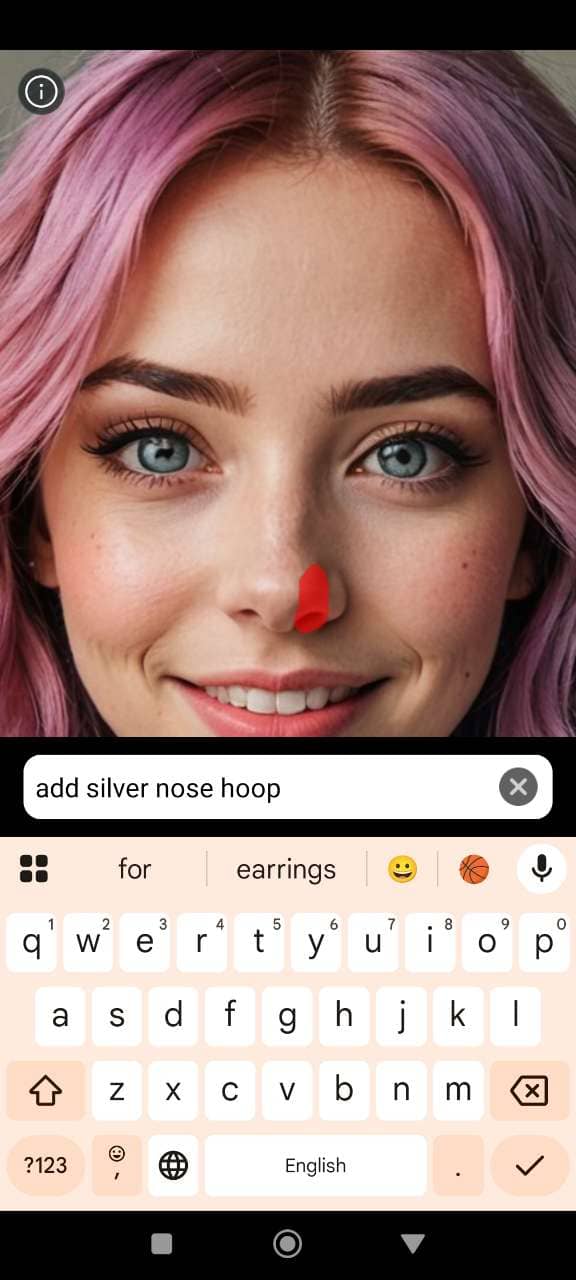
- Enter Your Prompt – Type a simple prompt, like “add nose ring” or “apply septum piercing,” to tell the AI what style you want to see.
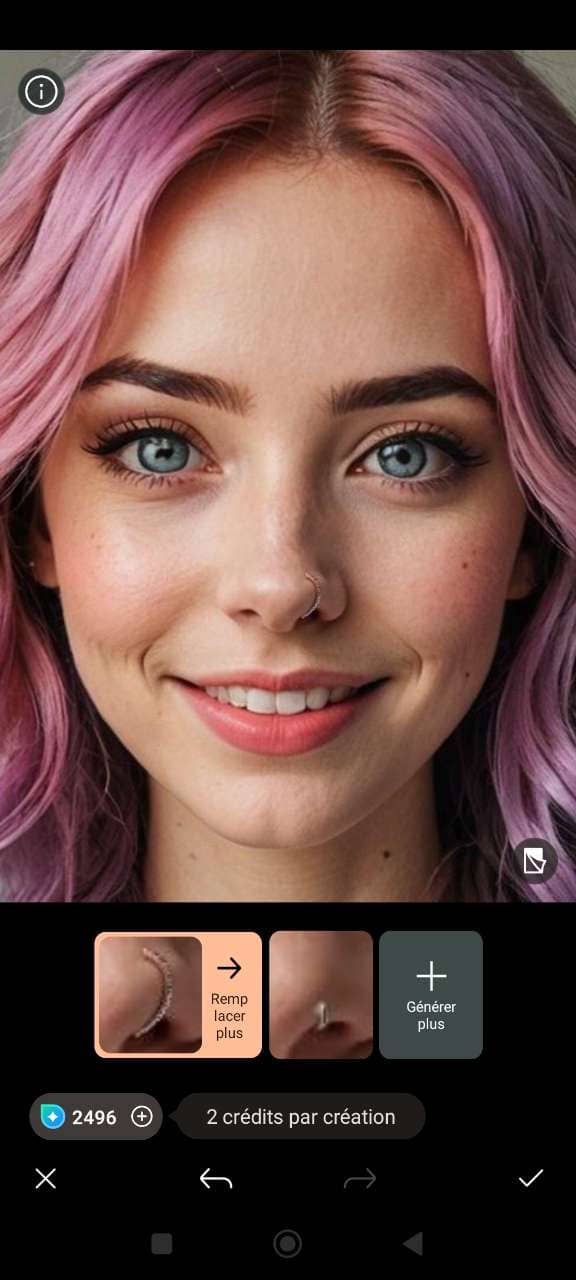
- Generate and Share – Let the AI work its magic. Once your new look is ready, download the image or share it with friends to get their opinions!


Top 4 Best Piercing Apps and Virtual Piercing Testers Online in 2026
1. PhotoDirector

PhotoDirector is a versatile app that lets you try on piercings like nose rings, septum piercings, and lip studs using its AI Replace tool. Simply upload your photo, select the piercing area, and let the app apply the piercing style you choose. It’s quick, easy to use, and allows you to see how different piercings would look on you before committing to a real one. Available for both Android and iOS.
2. MyEdit Online

MyEdit Online is an online tool that offers a similar experience to PhotoDirector with its AI Replace tool. You can upload your photo and virtually try on piercings, including nose rings and septum piercings. It’s great for those looking to test out new styles before making a permanent decision. PhotoDirector is perfect for those who prefer an online solution without needing to install an app.
3. YouCam Makeup

YouCam Makeup isn’t primarily a piercing app, but you can experiment with a couple of virtual piercing looks through its “Looks” templates. Currently, it’s limited to two styles: Heartscape and Vortex. While the options are few, it’s fun for a quick try-on and super easy to use. Available for both iOS and Android.
4. Snapchat

Snapchat is known for its wide range of filters, and it also offers piercing filters that let you try on different styles, including nose rings and septum piercings. The filters are simple to use, and you can instantly share your new look with friends. While Snapchat doesn’t offer the customization of the AI Replace tool found in PhotoDirector, it’s a fun, quick way to see how you’d look with a piercing.
Related Articles:
- What Would I Look Like Skinny?
- Try the Best Free Wigs Online Tools & Apps
- Know How You Look with Braces
If you want to learn more about perfecting your photos, check out our Ultimate Guide to Photo Retouching.
AI Piercing Filter FAQ
- Install PhotoDirector from the Google Play Store or Apple App Store.
- Launch the app and upload a clear photo of your face.
- Use the brush tool to select the nostril or septum.
- Type "add nose ring" or "apply septum piercing."
- Let the AI do its magic, then download or share the result!
- Get PhotoDirector from your app store.
- Upload a photo and navigate to the tool.
- Use the brush tool for accurate placement.
- Type in the style, e.g., "nose ring" or "septum piercing."
- Let the AI work and tweak the placement. Save or share your new look!
Yes, with PhotoDirector, you can try on piercings using the AI Replace tool. Upload your photo and explore different styles in seconds.
You can see if a piercing will look good by using the AI Replace tool in PhotoDirector. Try different styles virtually to visualize how they'd look before committing.
While PhotoDirector specializes in piercings, other apps may offer similar AI Replace tools to try on earrings virtually by uploading your photo.
Use PhotoDirector to upload your photo and let the AI Replace tool help you find the perfect nose ring for your face shape.

The CyberLink Editorial Team is composed of product testing specialists and content creation experts with over 20 years of hands-on experience and rigorous research in the multimedia editing industry. As the official voice of CyberLink, the team consistently delivers practical, easy-to-follow tutorials across video, photo, and audio editing, while highlighting AI innovations, product insights, and emerging industry trends. Their work empowers millions of creators worldwide each year to elevate their content. Beyond the blog, the team actively shares editing tips and product updates across YouTube, Facebook, Linkedin and Pinterest.
😎 Outside of their work, they enjoy capturing travel moments and meticulously editing photos and videos for their social channels.


