



AI Puppy Trend: Create Puppy Photos Online For Free [Prompts Included]
![AI Puppy Trend: Create Puppy Photos Online For Free [Prompts Included]](https://dl-file.cyberlink.com/web/content/b4400/s_ai-puppy-banner.webp)
You can definitely feel the puppy vibes all over your TikTok and Instagram pages! Want to be surrounded by the cute fluffy creatures too?
This blog shows you how to create adorable puppy photos with Gemini Prompts, the best online AI animal filter and bringing them to life with animations🐶

- What is the Viral AI Puppy Trend?
- How to Create AI Puppy Photos
- How to Animate Your Puppy Photos
- 6 Lovely AI Animal Photo Prompts You Should Try
- FAQ About AI Puppy Photo
What is the Viral AI Puppy Trend?
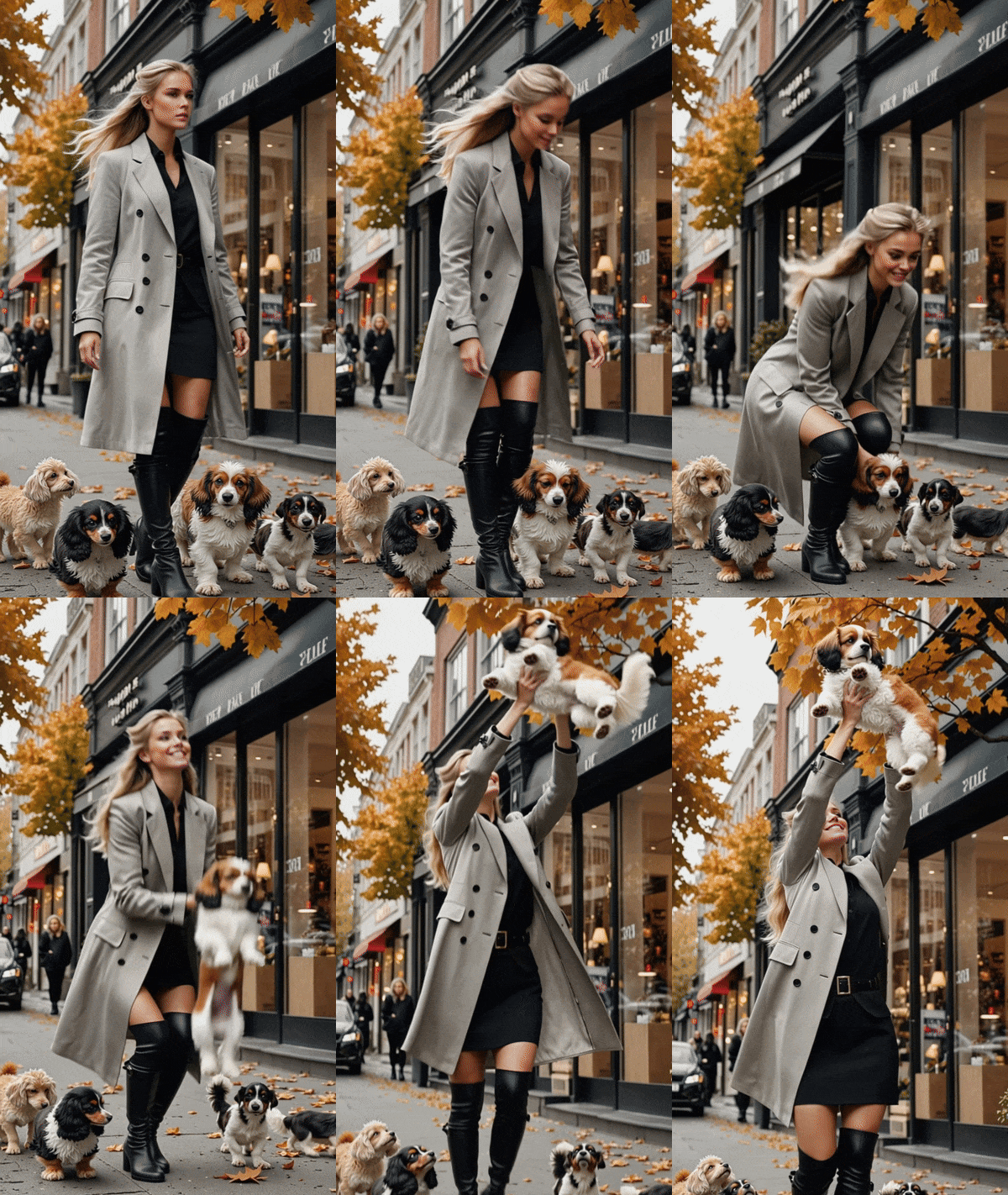
The AI puppy trend is the most adorable new craze going viral on social media, featuring people surrounded by a pack of fluffy little dogs wandering around them on the street. Many influencers whose fashion photos used to feel a bit distant now look instantly cute and full of energy thanks to these tiny companions.

Normally, taking photos like this would be time-consuming and require somehow managing a bunch of energetic puppies. But now, with a simple prompt in Gemini or a more feature-rich and user-friendly AI photo editing tool like MyEdit, you can hop on the trend in minutes. And if adding puppies to a photo feels too basic, you can even turn your images into short videos to stand out from other creators with ease.
How to Create AI Puppy Photos
Gemini
The trending Gemini image model Nano Banana can create AI puppy scenes. Simply upload your photo, select “Tools” >> “🍌Create Images” in Gemini and enter the prompt below:
Recommended AI Puppy Photo Prompts
Add lots of puppies to this image, keeping the character's face and body untouched and leaving the rest of the photo exactly as it is.

This prompt is adjustable, so feel free to change puppies to other animals or objects. Find more animal prompts worth trying here.
MyEdit
- Go to MyEdit’s AI Replace and upload your full-body photo.
- Use the brush to paint over the area where you want to add your puppy. Type "add many fluffy puppies in the photo" and click the generate button.
🎁Free users can have 3 credits for free per day, allowing 1-2 generation.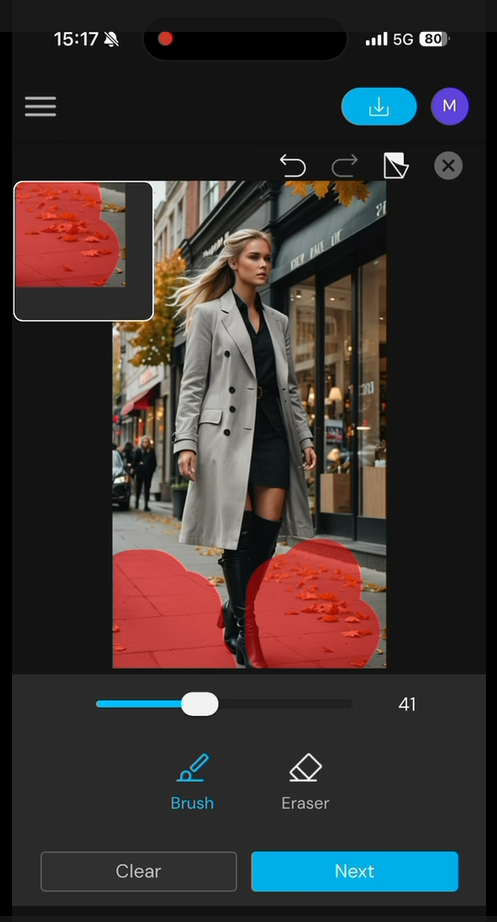
- Your AI puppy photo will be ready in seconds. Save and share with your friends.

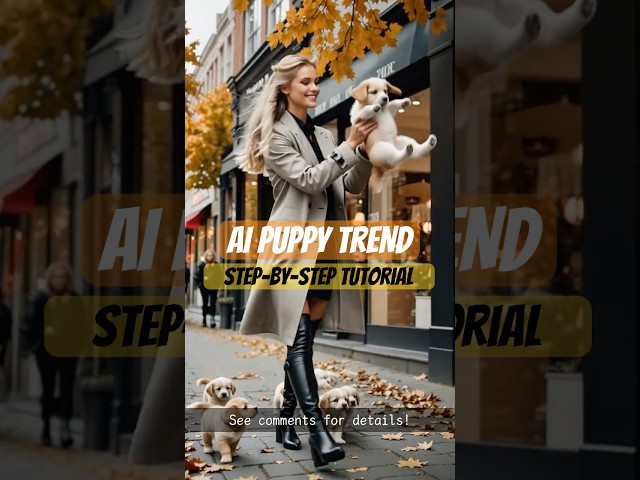
How to Animate Your Puppy Photos
- Go to MyEdit and select AI Image to Video, then upload the photo you want to animate.
- Enter "The woman and puppies walk" in the custom box. You can also write your own prompt to unleash your creativity.
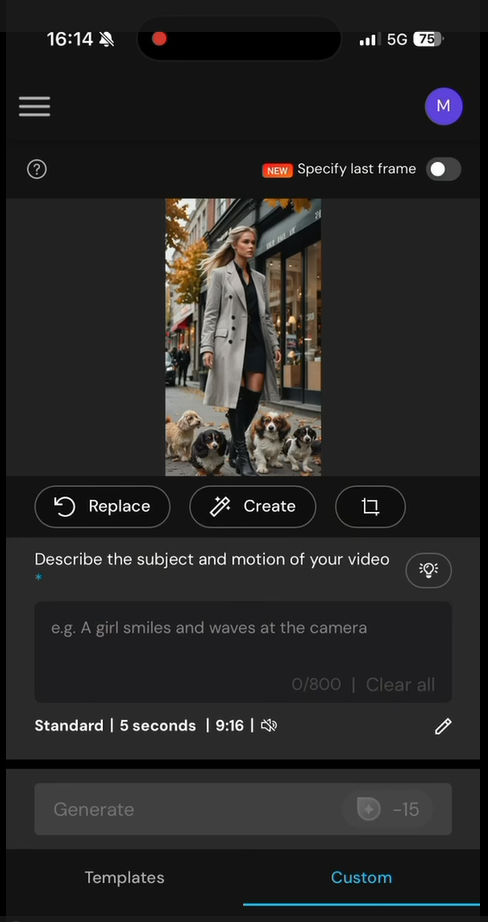
- Wait a moment and your puppy animation will be ready!


6 Lovely AI Animal Photo Prompts You Should Try
😻 AI Kitty Photo
AI Kitty Photo Prompts
Add lots of puppies to this image, keeping the character's face and body untouched and leaving the rest of the photo exactly as it is.
💡Cat lovers? Try to create a funny AI cat video now!
🐾 AI Quokka Photo
AI Quokka Photo Prompts
Add a bunch of adorable brown quokkas to this image, keeping the character's face and body untouched and leaving the rest of the photo exactly as it is.
🐰 AI Rabbit Photo
AI Rabbit Photo Prompts
Add many soft grey rabbits to this image, keeping the character's face and body untouched and leaving the rest of the photo exactly as it is.
🐯 AI Tiger Photo
AI Tiger Photo Prompts
Add several cute mini orange tigers to this image, keeping the character's face and body untouched and leaving the rest of the photo exactly as it is.
🦄 AI Unicorn Photo
AI Unicorn Photo Prompts
Add lots of tiny pastel unicorns to this image, keeping the character's face and body untouched and leaving the rest of the photo exactly as it is.
🦨 AI Skunk Photo
AI Skunk Photo Prompts
Add a group of little black-and-white skunks to this image, keeping the character's face and body untouched and leaving the rest of the photo exactly as it is.
FAQ About AI Puppy Photo
An AI puppy photo is an image generated or enhanced using artificial intelligence to add realistic or stylized puppies into a picture. It can look natural, cartoon-like, or fantasy-themed depending on the model.
Most AI editors analyze your original image, detect people or objects that should remain untouched, and place AI-generated puppies based on lighting, depth, and perspective for a natural look.
It depends on how the AI tool handles rights for generated content. Many platforms allow personal use but require specific licenses for commercial projects. Be careful with the photo input. Do not use any images without a commercial license.
Yes. Many apps or online tools support both replacement and addition, letting you swap animals or remove unwanted subjects.

The CyberLink Editorial Team is composed of product testing specialists and content creation experts with over 20 years of hands-on experience and rigorous research in the multimedia editing industry. As the official voice of CyberLink, the team consistently delivers practical, easy-to-follow tutorials across video, photo, and audio editing, while highlighting AI innovations, product insights, and emerging industry trends. Their work empowers millions of creators worldwide each year to elevate their content. Beyond the blog, the team actively shares editing tips and product updates across YouTube, Facebook, Linkedin and Pinterest.
😎 Outside of their work, they enjoy capturing travel moments and meticulously editing photos and videos for their social channels.


