







How to Add Santa Hat to Photo With AI

No Christmas feels complete without a classic red Santa hat🧑🎄 With advanced AI, you can create a festive holiday photo with a Santa hat on, all without actually wearing one and risking your perfectly styled hair.
In this article, you’ll learn how to add a christmas hat to your photo and discover more festive Christmas elements and filters to celebrate the warmest holiday of the year with your family and friends.

- How to Add a Santa Hat to Your Christmas Photo
- Add More Christmas Magic to Your Picture
- FAQ About Add Santa Hat to Photo
How to Add a Santa Hat to Your Christmas Photo
- Download the best photo editing app, PhotoDirector, for free.
- Navigate to "AI Replace" via "AI Photos" on the bottom bar.
- Upload your photo. Use the brush to paint over the area where the Santa Hat should be. Enter "Christmas hat" in the prompt box.
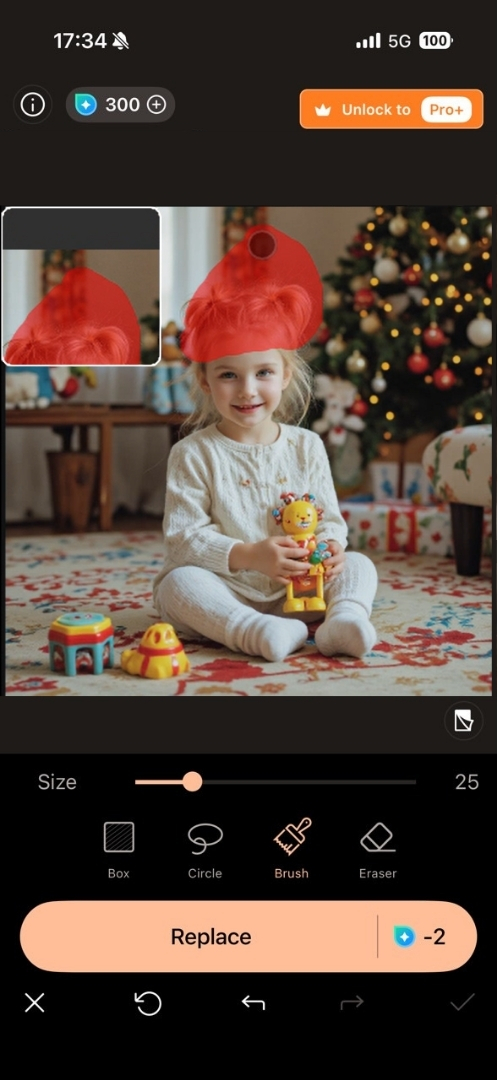
- Click "Replace" and let the AI do its magic.

 Download from the App Store for iOS and Android.


Add More Christmas Magic to Your Picture
Profiles & Social Media
Besides wearing a Santa Hat, you can transform an ordinary portrait into a Christmas aesthetic photo with "AI Art." Add angel wings, turn into a festive elf, or take a snap with your holiday twin. There are more than 50 styles you can try for both male and female subjects.

If you think simply posting photos on social media is too boring, you have to try the latest AI feature—Image to Video—to create Christmas transformation videos. Whether turning into a cute gingerbread person, delivering gifts, or elegantly wearing a Christmas dress, these videos are sure to catch your followers' attention.


Cards & Greetings
During the holiday season, sending Christmas cards and greetings is a simple way to share joy with friends and family. Some people enjoy finding the perfect words to express their feelings—our collection of Xmas quotes can offer a little inspiration.


Others like to add humor to their greetings, and Xmas memes are a fun way to bring a smile.


For those who enjoy getting creative, there are tools like the Christmas card maker to design your own Christmas eCard, which let you add personal touches, photos, or festive designs.


Marketing & Business
The holiday season is a key time for businesses to engage customers. Simple Christmas marketing, like festive social posts or email campaigns, can go a long way. For ecommerce stores, classic ideas, such as themed bundles or limited-time offers, can tell customers that it's time for holiday shopping. If you want to boost more sales, you may try some creative ideas for your ecommerce business.Blending seasonal cheer with smart tactics helps brands connect and boost sales without feeling pushy.

FAQ About Add Santa Hat to Photo
Most photo editors, such as PhotoDirector, Youcam Perfect and Santa Hats 2, let you add accessories through stickers or overlays. Upload your photo, pick the accessory you want, place it on the image, adjust the size and angle, and save your edit.
You can apply Christmas effects by using editors that offer holiday filters or overlays. Upload your image, choose effects like snow, lights, or festive frames, apply them, and export your final photo.
Apps with AI background replacement features, like Promeo, PhotoDirector and Photoroom, can automatically detect your subject and place it in a Christmas scene, such as a snowy landscape, cozy living room, or festive holiday backdrop.
Use an online editor, such as MyEdit, Fotor and OpenArt, that includes Christmas stickers or provide AI replace feature. Upload your photo, search for a Santa hat, drag it onto your image, adjust its size and angle to fit naturally, and download your edited picture.

The CyberLink Editorial Team is composed of product testing specialists and content creation experts with over 20 years of hands-on experience and rigorous research in the multimedia editing industry. As the official voice of CyberLink, the team consistently delivers practical, easy-to-follow tutorials across video, photo, and audio editing, while highlighting AI innovations, product insights, and emerging industry trends. Their work empowers millions of creators worldwide each year to elevate their content. Beyond the blog, the team actively shares editing tips and product updates across YouTube, Facebook, Linkedin and Pinterest.
😎 Outside of their work, they enjoy capturing travel moments and meticulously editing photos and videos for their social channels.


