



20 Best AI Video Prompts for Gemini, MyEdit & More — For Indian Creators and Worldwide Users

Creating professional-quality AI videos starts with a clear, well-structured prompt. A good prompt guides the AI, saving time while producing visuals that match your vision. Whether you’re experimenting with text-to-video or image-to-video, using the best AI prompts ensures your creations are high-quality, trendy, and visually engaging.
With tools like MyEdit Text to Video and Image to Video , you can instantly turn your prompts into polished videos, explore creative styles, and refine ideas efficiently—all without trial-and-error frustration.
- Why Good AI Video Prompts Matter
- How to Structure AI Video Prompts
- Top Prompts to Generate Stunning AI Videos
- How to Generate AI Videos from Text and Images
- Expert Tips to Write Effective Prompts
- The Best AI Video Prompt Generator
- AI Video Prompt FAQs
Why Good AI Video Prompts Matter

Crafting effective AI video prompts is essential to generate high-quality videos efficiently. A well-written prompt improves both visuals and narrative quality, while reducing unnecessary time and resource usage.
Key Benefits of Good AI Video Prompts
- Higher Quality Videos – Detailed prompts help AI create visuals that closely match your vision.
- Time Efficiency – Accurate prompts reduce trial-and-error, speeding up production.
- Cost Savings – Optimized prompts use fewer AI resources, lowering generation costs.
- Creative Control – Structured prompts give you control over style, motion, camera angles, and more.
Effective prompts produce clear, visually compelling videos. Indian creators often use them for marketing content, social media reels, and cultural or festival-themed videos, while global users apply similar principles for professional and creative projects.
How to Structure AI Video Prompts for Better Results

Creating high-quality AI videos starts with a clear, well-structured prompt. The formula below is just a quick shortcut to help you remember the key parts—use it as a guide, not a strict rule.
Prompt = Subject + Action + Scene + (Camera Movement + Lighting + Style)
Focus on the Key Elements
A strong AI video prompt usually includes these basics:
- Subject / Action – Who or what is in the video and what they are doing. Example: “A girl dancing in a forest.”
- Style / Mood – The visual style or atmosphere. Example: “Cinematic, soft lighting, 4K.”
- Background / Environment – Where the scene takes place. Example: “Dense forest with sunlight streaming through trees.”
- Camera / Motion – Perspective, angle, or movement. Example: “Tracking shot, close-up, slow pan.”
- Duration / Timing – How long the video is or sequence of actions. Example: “10-second loop of dancing.”
Add Extra Details for Better Quality
Optional details can make your AI video more polished and creative:
- Lighting & Color – “Golden hour sunlight,” “neon glow.”
- Animation / Effects – “Floating particles,” “hand-drawn style.”
- References / Inspiration – “In the style of Studio Ghibli,” “futuristic cyberpunk city.”
Example of a Well-Structured Prompt
Text-to-Video Example:
“A futuristic cityscape at sunset, cinematic style, flying cars, neon lights, 10-second aerial view with smooth camera pan.”
Image-to-Video Example:
“Animate this portrait of a cat wearing a wizard hat, walking across a moonlit forest, soft glowing particles, 5-second loop.”
These examples show how clearly describing what is happening, the style, environment, and motion helps the AI produce high-quality results.
20 Ready-to-Use Prompts to Generate Stunning AI Videos
These prompts cover short clips, cinematic sequences, and social media-friendly videos. Indian creators can explore traditional or modern themes, festival visuals, and couple/family-oriented scenes, while global users adapt them for other creative and trending content.
Best AI Prompts for Converting Text into Videos
- Winter Festival
- Futuristic City
- Toy Workshop
- Flying Dragon
- Travel Market
- Halloween Patch
- Forest Picnic
- Synthwave City
- Beach Party
- Floating Bubbles
Best Prompts for Image-to-Video AI Generation
- Holiday Photo
- Cherry Blossom Portrait
- Coffee Galaxy
- Dog in Garden
- Product Showcase
- Mural Animation
- Couple Portrait
- Mountain Landscape
- Spaceship Takeoff
- Snow Globe
Best AI Prompts for Converting Text into Videos
Use these ready-to-go prompts to create stunning videos with MyEdit Text to Video . Each prompt is designed to inspire creativity and help you generate high-quality AI videos quickly and easily.
1. Winter Festival
Perfect for showcasing festive events, seasonal promotions, or creating cozy holiday-themed content with AI video.
Prompt sample: "A cozy winter festival at dusk with twinkling lights, gentle snowfall, joyful crowd, cinematic lighting, 4K, wide aerial shot"
Pro Tip: Focus on lighting and crowd movement to make the scene feel lively and immersive.
2. Futuristic City
Great for tech, sci-fi, or cyberpunk-inspired content and social media reels.
Prompt sample: "Futuristic hovercars racing through neon city streets, rain reflections, dynamic follow cam, cinematic lighting, 4K"
Pro Tip: Highlight reflections and neon colors for a vibrant cyberpunk look.
3. Toy Workshop
Ideal for playful, educational, or children-focused content and animations.
Prompt sample: "Tiny robots building whimsical toys in a playful workshop, bright colors, cheerful motion, 4K"
Pro Tip: Focus on smooth animation loops to make the scene fun and engaging.
4. Flying Dragon
Best for fantasy storytelling, game trailers, or epic cinematic scenes.
Prompt sample: "Majestic dragon soaring over snowy peaks as the sun rises, epic wide aerial shot, cinematic lighting, 4K"
Pro Tip: Emphasize scale and motion to create a dramatic effect.
5. Travel Market
Perfect for travel promotions, cultural storytelling, or immersive city guides.
Prompt sample: "Backpacker walking along colorful Moroccan market streets at sunset, bustling crowd, cinematic pan, 4K"
Pro Tip: Capture dynamic crowd movement to make the scene lively.
6. Halloween Patch
Great for Halloween-themed videos, seasonal marketing, or fun spooky content.
Prompt sample: "Halloween pumpkin patch with glowing jack‑o‑lanterns and bats flying, spooky fun, cinematic lighting, 4K"
Pro Tip: Play with light and shadows to enhance the spooky atmosphere.
7. Forest Picnic
Ideal for nature, wellness, or whimsical storytelling content.
Prompt sample: "Forest picnic scene with animals dancing and sunlight dappled through trees, whimsical, cinematic lighting, 4K"
Pro Tip: Emphasize sunlight and gentle motion for a peaceful, magical feel.
8. Synthwave City
Perfect for retro-futuristic vibes, music videos, or trendy social media clips.
Prompt sample: "Retro synthwave city highway at night, glowing grids and neon lights, dynamic zoom, 4K"
Pro Tip: Highlight neon reflections and camera movement to capture retro energy.
9. Beach Party
Great for summer promotions, lifestyle content, or lively travel reels.
Prompt sample: "Summer beach party with dancing crowds, animated waves, flying kites, bright lighting, 4K"
Pro Tip: Use vibrant colors and motion to make the scene feel energetic and fun.
10. Floating Bubbles
Ideal for creative, surreal, or playful content that grabs attention.
Prompt sample: "Giant floating bubbles over a cartoon village with colorful reflections, playful surreal style, 4K"
Pro Tip: Emphasize reflections and motion to make the animation visually captivating.
Best Prompts for Image-to-Video AI Generation
These prompts are perfect for turning your images into dynamic AI videos with MyEdit Image to Video . Use them to add motion, style, and creativity to your visuals in just a few clicks.
11. Holiday Photo
Perfect for turning your family or friends’ holiday photos into festive animated videos with snow, lights, and cozy effects.
Prompt sample: "Family photo in a cozy living room, animated snowfall, twinkling lights, warm cinematic lighting, 4K"
Pro Tip: Add subtle motion to decorations or falling snow to make the scene feel lively and festive.
12. Cherry Blossom Portrait
Turn springtime photos into gentle, flowing animations with blooming cherry trees for seasonal or aesthetic content.
Prompt sample: "Portrait of a person under cherry blossoms, petals falling, soft sunlight, cinematic 4K"
Pro Tip: Add subtle petal motion and soft lighting to make the scene dreamy.
13. Coffee Galaxy
Perfect for creative, eye-catching content by turning a simple coffee image into a surreal animated galaxy scene.
Prompt sample: "Top-down photo of a coffee cup, transforming into swirling galaxy, colorful stars, cosmic lighting, 4K"
Pro Tip: Enhance the motion of stars and swirls for a mesmerizing effect.
14. Dog in Garden
Bring pet photos to life with playful movements, perfect for social media or pet-focused content.
Prompt sample: "Dog playing in a flower garden, tail wagging, butterflies flying, bright sunlight, cinematic 4K"
Pro Tip: Animate small movements like tail wagging or butterflies to make it lively.
15. Product Showcase
Great for marketing or e-commerce by turning product images into animated promotional videos.
Prompt sample: "Image of a smartwatch, rotating in 3D, glowing highlights, sleek studio lighting, 4K"
Pro Tip: Use smooth rotation and reflections to emphasize product quality.
16. Mural Animation
Perfect for art-focused content, bringing static murals or paintings to life with subtle motion and effects.
Prompt sample: "Animate the mural coming to life: characters stepping off the wall, paint flowing like liquid, colors morphing and glowing, magical surreal motion, soft cinematic lighting, 4K, dreamlike and immersive."
Pro Tip: Emphasize brush strokes or paint flow for a more immersive effect.
17. Couple Portrait
Ideal for creating romantic, engaging animated content for anniversaries, weddings, or social posts.
Prompt sample: "Couple holding hands in a park, leaves gently falling, warm golden hour light, cinematic 4K"
Pro Tip: Use subtle background motion like swaying leaves to enhance realism.
18. Mountain Landscape
Perfect for travel content, nature blogs, or inspirational scenes by animating landscape photos.
Prompt sample: "Mountain range at sunrise, clouds drifting, animated sunlight, cinematic 4K"
Pro Tip: Animate clouds or mist for a calming, immersive effect.
19. Spaceship Takeoff
Great for sci-fi or tech content by animating space or concept art images into dynamic motion clips.
Prompt sample: "Spaceship launching from futuristic spaceport, smoke and light effects, cinematic 4K"
Pro Tip: Focus on dynamic lighting and smoke movement for realism.
20. Snow Globe
Perfect for seasonal or whimsical content by animating photos into playful snow globe scenes.
Prompt sample: "Image inside a snow globe, snow falling around, animated reflections, cozy lighting, 4K"
Pro Tip: Emphasize snow motion and reflections to make the animation magical.
How to Generate AI Videos from Text and Images
Whether you want to turn written ideas or photos into animated videos, the process is quick and easy with the right tools. Follow these step-by-step guides to create stunning AI videos from text or images.
How to Turn Text into AI Videos Quickly and Easily
Creating videos from text has never been easier. Follow these simple steps to transform your ideas into stunning AI videos in just minutes using MyEdit Text to Video.
- Open MyEdit: Launch the MyEdit AI Video Generator directly in your browser—no downloads or installations needed.
-
Choose Mode & Settings: Select a generation mode—Standard, Professional, or Master—for progressively better results. Then set your video duration, aspect ratio, and audio options.
Note: Standard and Professional generate background audio, while Master can generate spoken dialogue.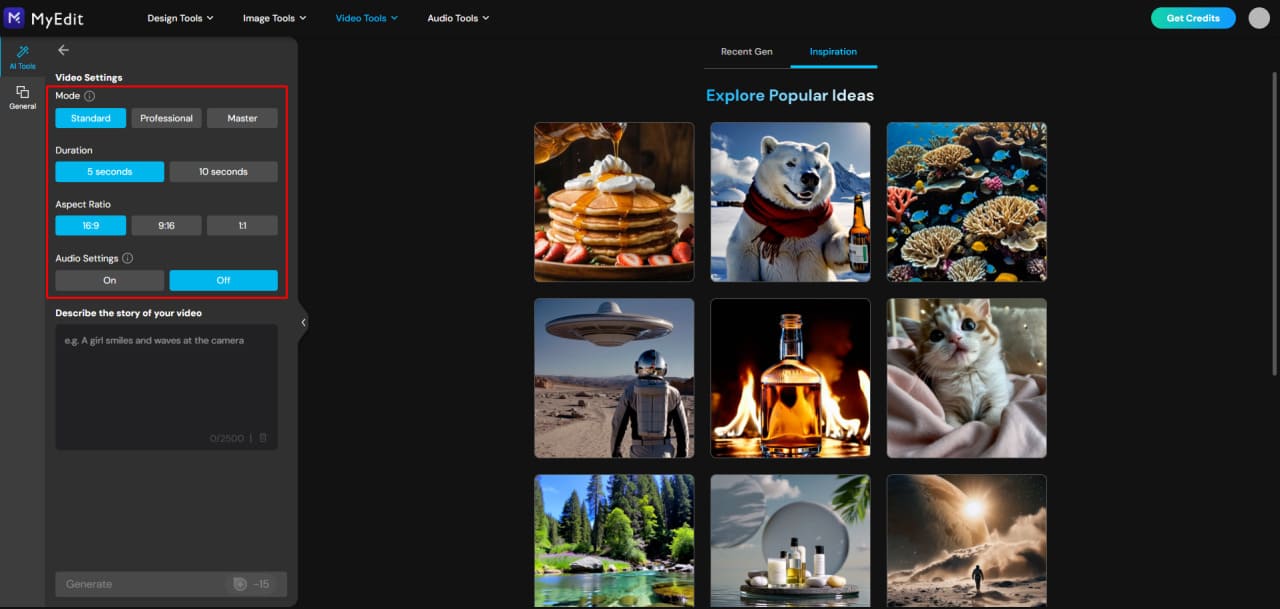
-
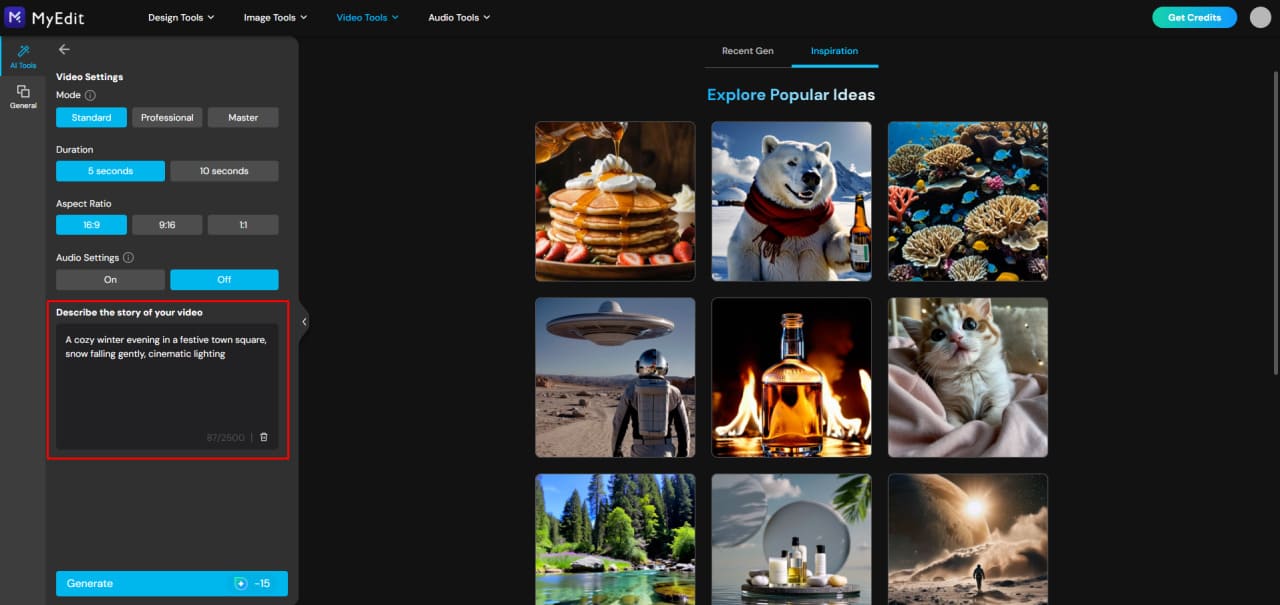
Enter Your Video Details: Choose your video’s duration and aspect ratio. Then, type a clear, descriptive prompt to tell the AI what you want.
Example: “A cozy winter evening in a festive town square, snow falling gently, cinematic lighting”.
-
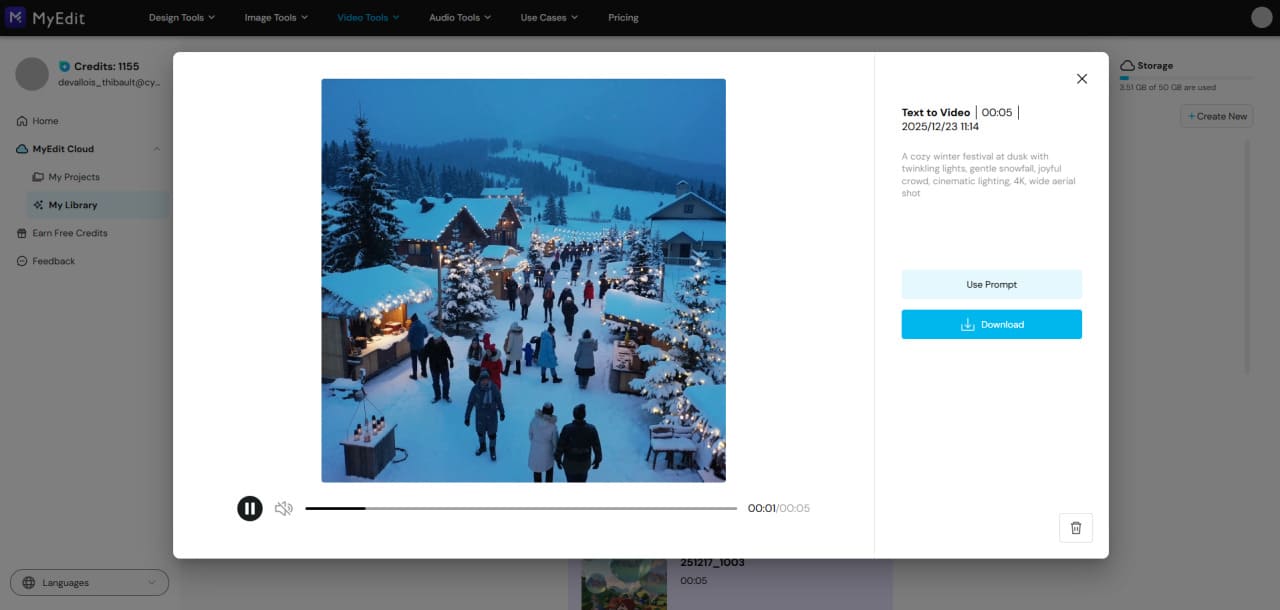
Generate and Download: Click Generate, watch the AI bring your prompt to life, then download or share your video instantly.


How to Animate Images into Stunning AI Videos
Bring your photos to life in just a few clicks! Using MyEdit Image to Video, you can easily turn static images into fun, animated videos with smooth motion and creative effects.
- Open MyEdit: Launch the MyEdit AI Image to Video Generator directly in your browser—no downloads or installation required.
-
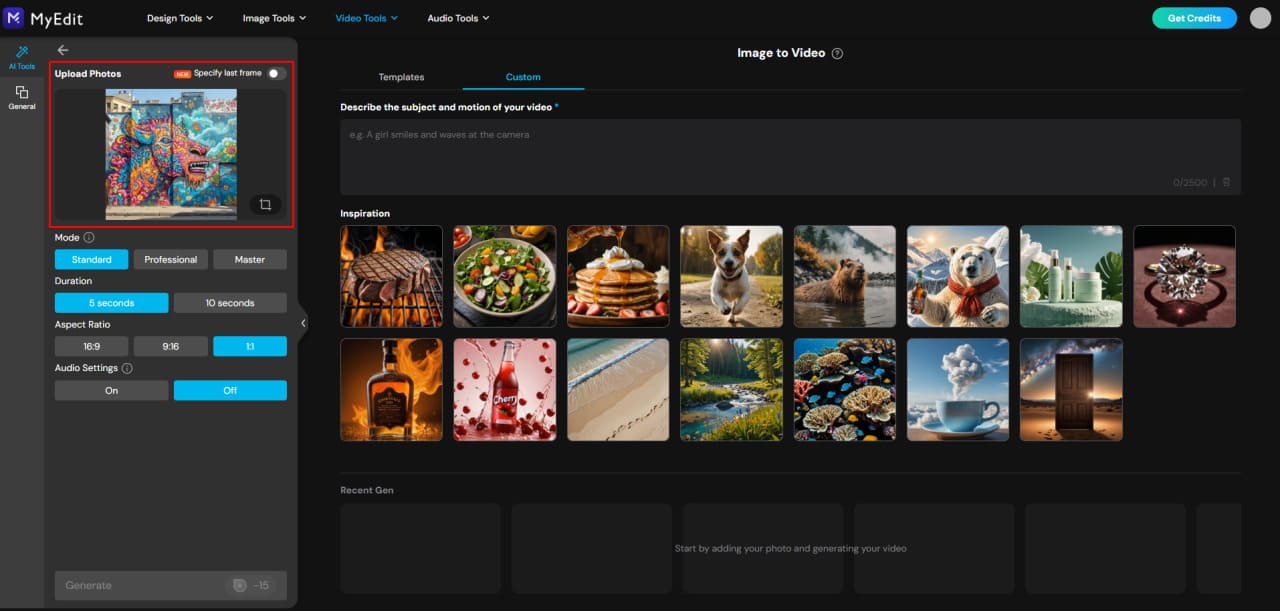
Upload Your Image: Choose a photo of one or two people, or a group image, and upload it to MyEdit.
-
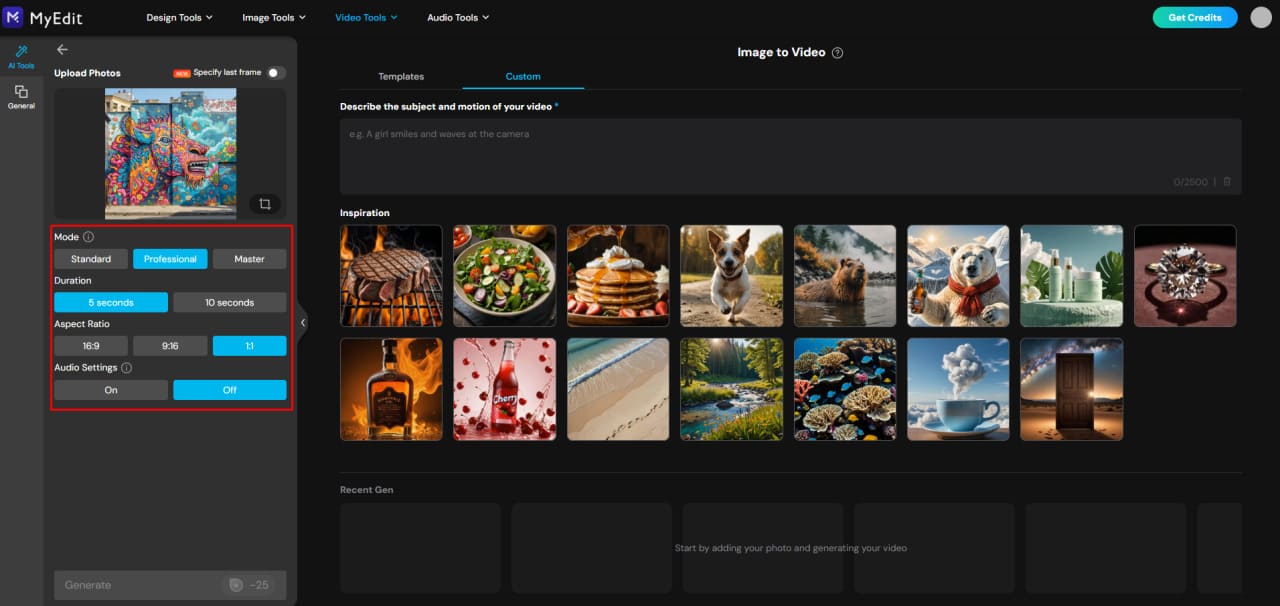
Choose Mode & Settings: Select a generation mode—Standard, Professional, or Master—for progressively better image-to-video results. Then choose your video duration, aspect ratio, and audio settings.
Note: Standard and Professional generate background audio, while Master can generate spoken dialogue.
-
Use Templates or Custom Prompts: Quickly apply a ready-made animation template for fun effects, or type your own prompt in the Custom field to create unique animations tailored to your image.
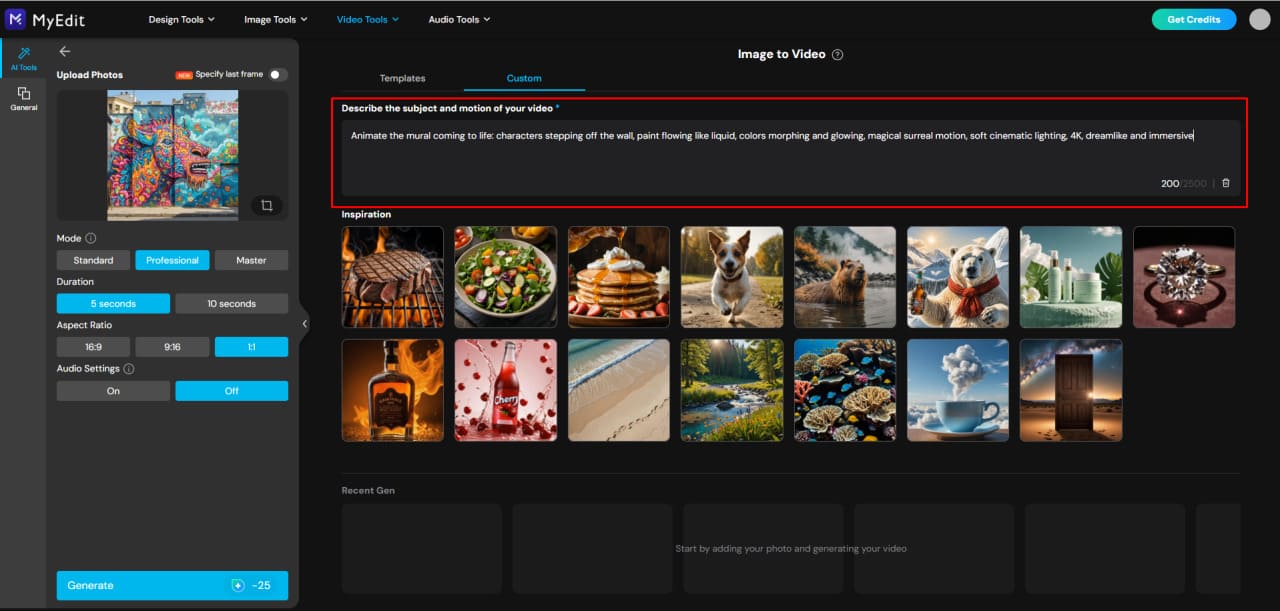
Pro Tip: Custom prompts give you full control, but templates are great for quick, polished animations without extra effort.
-
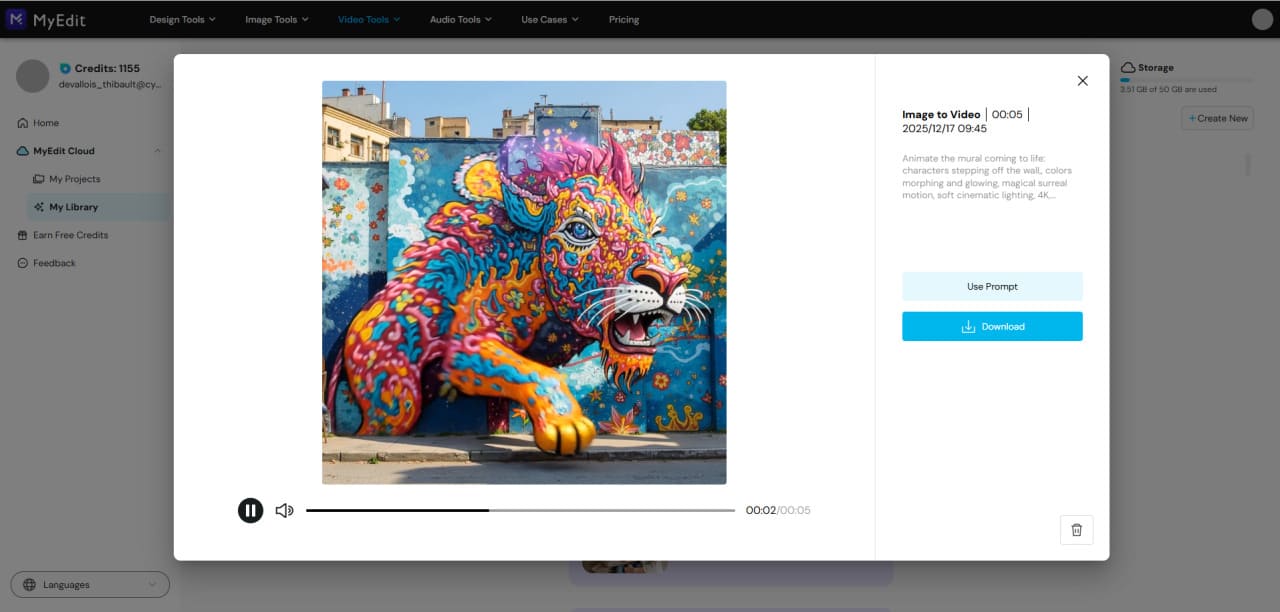
Generate, Preview, and Share: Let the AI process your image and create a smooth animation. Once ready, preview your video, then download or share it instantly!


Expert Tips for Crafting Powerful AI Video Prompts
Even with a strong prompt structure, a few expert tweaks can make your AI videos more creative, polished, and engaging. These tips help you get the best results from any AI video generator.
1. Be Specific with Descriptions
Use clear, vivid adjectives to describe the subject, scene, and mood. Instead of "a dog in a park," try "a playful golden retriever chasing a frisbee in a sunlit park with autumn leaves."
2. Include Perspective and Camera Details
Adding information about camera angle, movement, or shot type can make videos feel cinematic. For example: "wide-angle shot, slow pan, overhead view."
3. Reference Styles and Trends
Mention art styles, genres, or trending aesthetics to guide the AI. Examples: "inspired by Studio Ghibli," "retro synthwave," or "3D cartoon style."
4. Use Action Words
Dynamic verbs help bring scenes to life. Words like "soaring," "dancing," or "gliding" can make animations more engaging.
5. Balance Detail with Brevity
Too little detail may confuse the AI, while too much can overwhelm it. Keep prompts concise but descriptive, focusing on the elements that matter most.
6. Experiment and Iterate
Don't be afraid to tweak your prompts. Test different adjectives, camera angles, or scene elements to see what produces the best results.
7. Use Seasonal or Trending Themes
Incorporate timely or trending topics to make your videos more relevant and shareable, like "winter festival lights" or "Valentine's Day animation."
MyEdit: The Best AI Video Prompt Generator
Creating stunning AI videos starts with the right prompt—and MyEdit is the ultimate AI video prompt generator. Turn text or images into high-quality videos in minutes, using ready-to-use prompts or customizing your own.
Experiment with trending styles, preview instantly, and share your creations effortlessly. Try MyEdit today and bring your ideas to life faster than ever!
Try MyEdit today and see how easy it is to generate incredible AI videos with the perfect prompts!
Related Articles:
- Turn Text into Video in Google Gemini with Veo 3
- Grok Imagine Complete Guide for AI Image & Video
- How to Create Gemini AI 3D Figurine Trend
AI Video Prompt FAQs
Yes! AI can generate videos directly from text or image prompts. By describing a scene, action, or style, AI video generators like MyEdit can create animations, cinematic clips, or fun effects instantly without advanced video editing skills.
Start with a clear structure: Subject + Action + Scene + (Camera + Lighting + Style). Keep prompts descriptive but concise, and include optional details like mood, effects, or references. Using ready-to-use or tested prompts can save time and improve video quality.
Upload your image to an AI image-to-video tool like MyEdit Image to Video, choose an animation effect or type a custom prompt, and generate the video. The AI will animate your photo, creating smooth, shareable clips in minutes.
Good AI prompts are clear, descriptive, and structured. Examples include:
- "A cozy winter evening in a festive town square, cinematic lighting, 10-second loop."
- "A futuristic city with flying cars, neon lights, dynamic camera pan."
- "A couple hugging under cherry blossoms, soft lighting, slow-motion."
Using such prompts ensures the AI understands the scene, action, and style you want.
MyEdit is one of the best AI video prompt generators. It offers ready-to-use prompts for text-to-video and image-to-video projects, allows custom prompts, and provides instant previews—making it fast, easy, and creative.
Enter your prompt into MyEdit's text-to-video or image-to-video AI tool, select your video settings (duration, aspect ratio, style), and click generate. The AI will process your prompt and create the video automatically.
The best AI prompt generator combines ready-to-use prompts, customization options, and fast video generation. MyEdit meets all these criteria, letting users create high-quality AI videos from text or images effortlessly.
Yes. You can create India-focused videos by including cultural details like festivals, traditional clothing, regional locations, and recognizable Indian landmarks in your prompts.
With 15+ years in product marketing and AI content strategy, I love bridging the gap between complex technology and user-centric design. As a Creative Director, I host the official YouTube channel, where I share educational content and interview creative professionals. Connect with me here to catch up on my latest professional events and projects!


