If you value open source freedom and customization, Wan 2.2 Animate is one of the most compelling AI video models available today, and it is the model behind many of the "dancing photo" clips filling short-form feeds. Power users can run it on their own hardware, while creators without a GPU can reach the same model through a browser.
In this guide you will learn what Wan 2.2 actually is, where it sits in a Wan line that has since moved behind Alibaba's cloud, how to run a character motion swap online with MyEdit's Character Motion Swap (MyEdit is CyberLink's own product, and this guide is published on CyberLink's blog), and how to run Wan 2.2 Animate locally in ComfyUI.
💡 Quick verdict:
Quick verdict: Wan 2.2 is the last Wan model Alibaba released as downloadable weights under Apache 2.0, and Wan2.2-Animate-14B is the specific checkpoint that performs character motion swap. Run it locally if you want full control, no per-clip cost and no uploading of your source footage, and budget for a 14B checkpoint, pose and masking nodes and a capable GPU. Use a hosted route if you want a finished clip in one sitting: our own test through MyEdit returned a 5.8 second video in about 5 minutes for 18 credits, with clean motion but a clear loss of the source portrait's likeness.
🧪 How We Tested This
Equipment and date: Windows 11 laptop, Google Chrome (latest version), MyEdit running in the browser. August 2026.
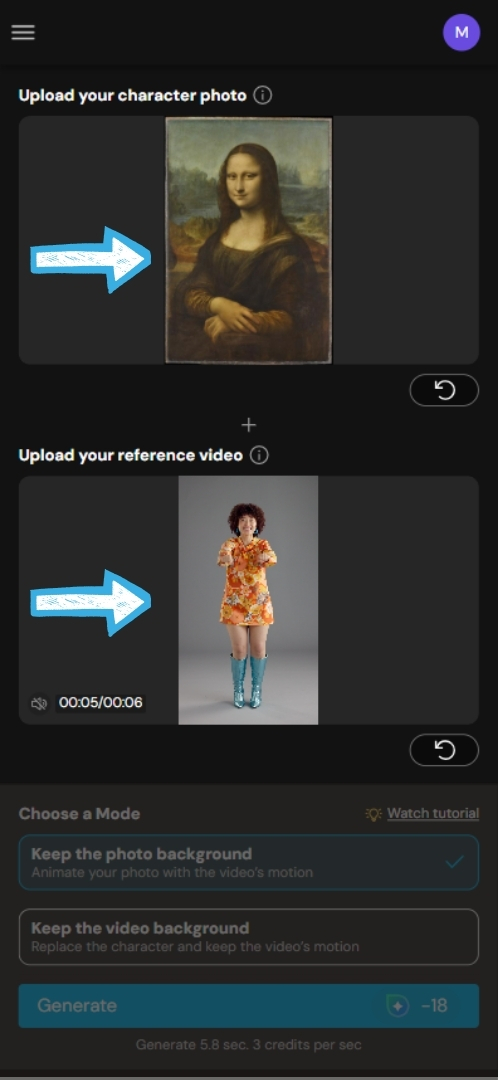
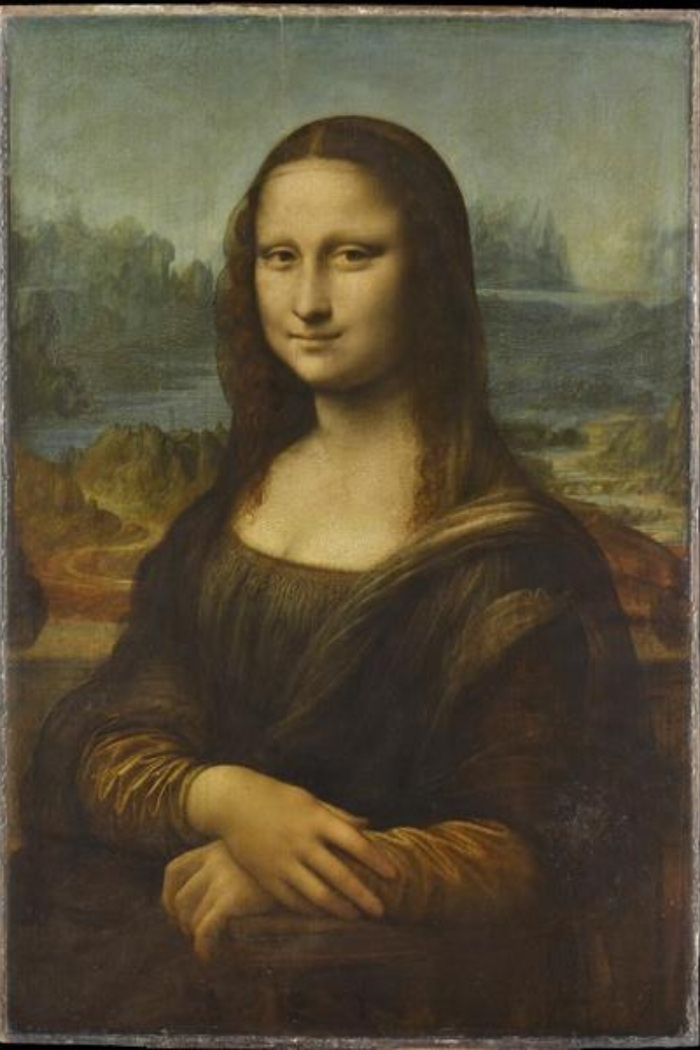
What we did: one Character Motion Swap generation with the Wan 2.2 Animate model, in "Keep the photo background" mode, pairing a public domain painting (the Mona Lisa) as the character photo with a 6 second reference dance clip. The tool quoted 3 credits per second of output and charged 18 credits for a 5.8 second result. Generation took about 5 minutes.
What we verified separately: Wan 2.2's model variants, resolutions and license against Alibaba's own model cards on Hugging Face; the local workflow, checkpoints and custom nodes against ComfyUI's official Wan 2.2 Animate documentation; the availability of Wan 2.5 and later against Alibaba Cloud's own announcements and Model Studio documentation; the closed-model claims in the FAQ against that vendor's own documentation.
Scope limit: we did not install or run Wan 2.2 Animate locally, so nothing in the ComfyUI section comes from our own run. We did not run this task in any other video tool either, so the comparative lines in the FAQ rest on published vendor documentation rather than our own tests. One generation is not a quality benchmark, and results vary a lot with the image and clip you pair.
Transparency note:MyEdit is a product of CyberLink, the company that publishes this blog. To keep this guide honest, we state MyEdit's real cost per second of output and its free daily allowance instead of calling it free, we report what our own test got wrong as well as what it got right, and the guide covers running Wan 2.2 Animate yourself as the better route when control, cost or privacy matter more.
Wan 2.2 is Alibaba Tongyi Lab's open weights AI video generation model, released on July 28, 2025 under the Apache 2.0 license. It generates video from text or image prompts, and its smallest variant runs on a single consumer graphics card, which is what made local video generation practical for people without a data center.
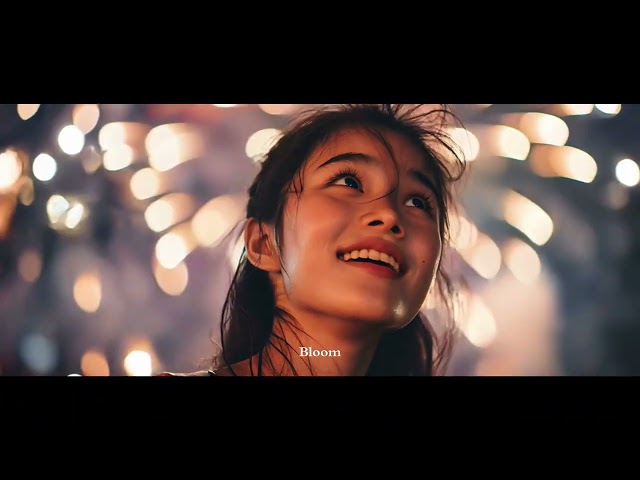
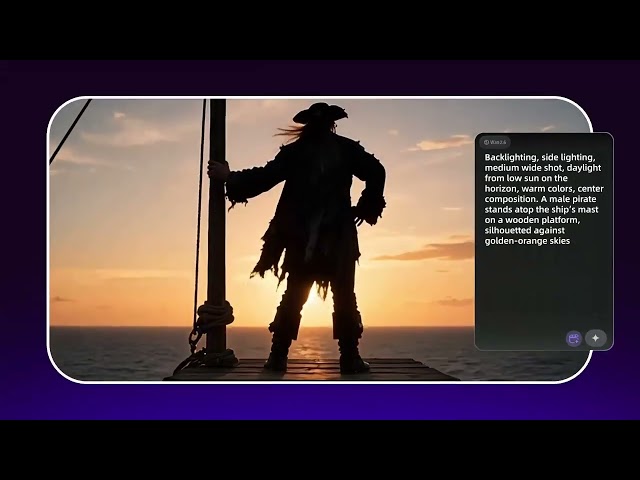
⏶ Sample videos generated with Wan 2.2, from a third-party showcase reel rather than our own output
Built for both flexibility and performance, Wan 2.2 delivers sharp 720p output at 24fps, realistic motion and strong prompt adherence. Its open license lets developers and studios use, modify and deploy it commercially, which is the main reason a whole ecosystem of workflows, quantized builds and fine-tunes grew around it.
Where Wan 2.2 Sits in the Wan Line
Wan 2.1
The release that put open weights video generation within reach of consumer hardware, with a small model aimed at modest GPUs and a 14B model for higher quality output.
Wan 2.2 (July 2025)
The upgrade that introduced a Mixture-of-Experts architecture to video diffusion and shipped five checkpoints: T2V-A14B and I2V-A14B for text to video and image to video at 480p and 720p, the compact TI2V-5B at 720p and 24fps, S2V-14B for audio driven video, and Animate-14B for character animation and replacement. All under Apache 2.0.
Wan 2.2 Animate (September 2025)
The checkpoint that matters for motion swap. Wan2.2-Animate-14B is a unified model for character animation and replacement: it either makes the character in your image copy the motion in a reference video, or drops your character into that video in place of the performer. It is the model behind MyEdit's Character Motion Swap.
Wan 2.5 and Wan 2.6 (Hosted Only)
This is where the open line stops. Alibaba announced Wan 2.6 on December 16, 2025 with multi-shot storytelling, audio and video synchronization, a reference to video model and clips of up to 15 seconds, but distributed it through Alibaba Cloud's Model Studio and the Wan website rather than as downloadable weights. The same applies to Wan 2.5.
⏶ Wan 2.6 multi-shot storytelling demo, from a third-party showcase reel rather than our own output
Wan 2.7 and Wan 3.0
Alibaba Cloud's Model Studio documentation now lists the wan2.7 family for hosted video generation, and Wan 3.0 went into hosted public beta in August 2026. As of September 2026 neither has published weights, so Wan 2.2 remains the newest Wan you can actually download and run yourself. If you need what the later versions offer, you are using an API, not a local model.
Wan 2.2 Key Features
Mixture-of-Experts (MoE) Architecture
The A14B models use two experts, a high noise expert that handles overall layout early in the denoising process and a low noise expert that refines detail later. That adds up to 27B parameters in total but only 14B active per step, so capacity goes up without a matching jump in memory use.
Open Weights and a Permissive License
Apache 2.0 covers the released checkpoints, including commercial use, and Alibaba claims no rights over what you generate. Community LoRAs, FP8 and GGUF builds and acceleration LoRAs all exist because of it.
720p Output at 24fps
The open checkpoints top out at 720p. TI2V-5B generates a 5 second 720p clip at 24fps in under 9 minutes on a single RTX 4090, according to Alibaba's model card. There is no native 1080p path in the downloadable models, only upscaling or a hosted newer version.
Cinematic Aesthetic Control
Wan 2.2 was trained on curated aesthetic data labeled for lighting, composition, contrast and color tone, which is what lets prompts steer the look of a shot rather than just its content.
Two Motion Modes in Wan 2.2 Animate
Animation mode makes your character mimic the motion in the driving video. Replacement mode swaps your character into that video while keeping its scene, lighting and camera work. A relighting component helps the replaced character sit naturally in the original environment.
Wan 2.2 Advantages and Costs
The Model Itself Costs Nothing
There is no license fee and no per-clip charge. Your costs are hardware, electricity and time, or the credits a hosted platform charges if you would rather not run it yourself.
Your Footage Stays on Your Machine
Running locally means the reference video and the character image never leave your computer, which matters when the source material is a client's, a colleague's or your own face.
Competitive Quality for an Open Model
Alibaba reports that Wan 2.2 outperforms leading commercial models across most dimensions of Wan-Bench 2.0. That is the vendor's own benchmark, so treat it as a claim rather than an independent result, but the model's adoption in the ComfyUI ecosystem is real and easy to verify.
Customizable in a Way Closed Models Are Not
LoRA fine-tuning, quantization for smaller cards and custom node graphs are all open to you. Closed competitors such as Google Veo give you a prompt box and a price list.
Versatile Creative Applications
From TikTok and YouTube Shorts to brand ads and educational clips, the same model covers text to video, image to video, audio driven video and character animation.
How to Use Wan 2.2 Animate Online for Character Motion Swap & Animation
If you prefer cloud based tools, lack GPU hardware, or would rather not deal with ComfyUI workflows and dependencies, MyEdit runs Wan 2.2 Animate behind a browser interface. Here is the exact flow we ran in August 2026.
Open MyEdit in the web browser and head to Character Motion Swap.
Upload your photo and add a reference video.
💡For better results, use footage of a single character and match the shot type: a waist-up portrait with a waist-up clip, a full-body photo with a full-body clip. This is the step where our own test went wrong, and the section below explains what it cost us.
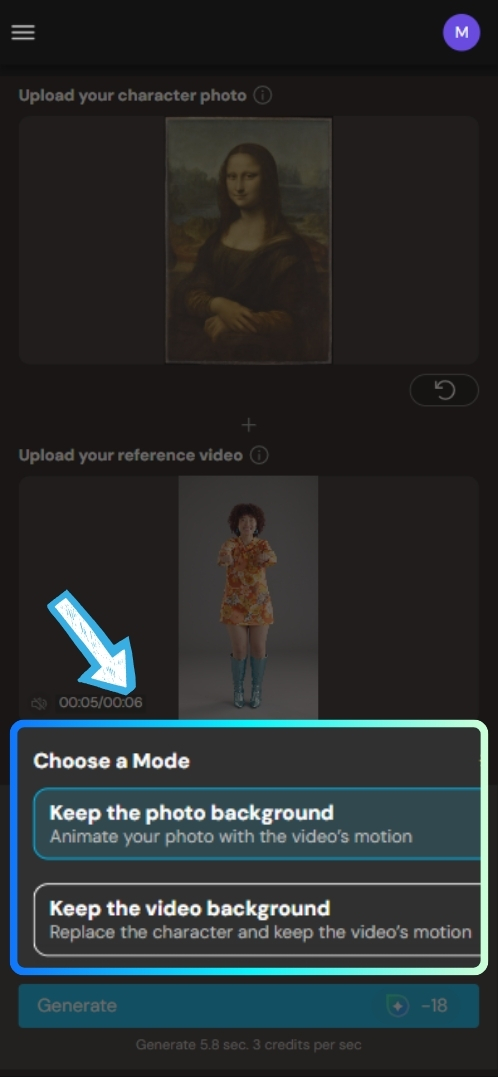
Choose a mode. Keep the photo background animates your photo with the video's motion and leaves your original background in place. Keep the video background replaces the character in the clip and keeps its scene, motion and camera work.
Check the credit estimate shown above the Generate button, then click "Generate." The tool charges 3 credits per second of output, so our 5.8 second result cost 18 credits. Generation took about 5 minutes, and you can work on something else while it runs.
+=
What we noticed in our test:
The motion transferred cleanly and the timing held, but the likeness did not. We paired a waist-up painting (the Mona Lisa, public domain) with a full-body dance clip, and the figure that came back reads as a different woman performing the same moves inside the painting's landscape. MyEdit's own guidance is to match the composition and shot type of the image and the reference video, and our result is a good argument for following it. If preserving a specific face is the point of your clip, start from a clear, front-facing photograph framed like the footage you plan to drive it with, and expect to test more than one pairing before you get a keeper.
If you do not have motion ideas or reference videos, MyEdit also offers various built-in templates, useful for social media posts, short videos and creative experimentation.
Get a sneak peek at MyEdit's Image to Video templates.
How to Run Wan 2.2 Animate Locally in ComfyUI: Requirements and Workflow
Running Wan 2.2 Animate locally gives you full control, no per-clip cost and no uploads, but it asks for real hardware and a setup session. Note that motion swap needs a specific checkpoint: Wan2.2-Animate-14B, not S2V-14B (which is audio driven) and not TI2V-5B (which is text and image to video).
Check Your Hardware Against the Model You Need
· Text or image to video (TI2V-5B): ComfyUI notes the 5B model fits comfortably in 8GB of VRAM with native offloading
· Character motion swap (Animate-14B): a 24GB card such as an RTX 4090 is the comfortable target. Community FP8 and GGUF builds run on less, at some cost in speed or quality, and ComfyUI's own guide advises starting with a small output size if VRAM is tight
· CPU: modern multi core processor
· RAM: 16GB minimum, 32GB recommended
· Storage: SSD with 50GB or more free, since the Animate repository alone runs to tens of gigabytes
· OS: Windows or Linux, with current NVIDIA drivers and CUDA installed
Install or Update ComfyUI
Download ComfyUI from its official site, install Python and the required dependencies, then launch it and confirm the interface loads. Update an existing install before you start, since the Animate nodes are recent.
Add the Wan 2.2 Animate Model Files
Download the Wan2.2-Animate-14B weights, or the scaled FP8 build that ComfyUI recommends for consumer cards, plus the Wan 2.1 VAE, the UMT5 XXL text encoder and the CLIP Vision encoder. Each file goes in its own ComfyUI folder, and the exact names and paths are listed in ComfyUI's official Animate tutorial.
Install the Custom Nodes
The workflow depends on ComfyUI-KJNodes and comfyui_controlnet_aux. The DWPose Estimator from the latter preprocesses your driving video into pose and face control videos, which is the step that makes motion transfer work. If you use ComfyUI-Manager, "Install missing nodes" handles both after you load the workflow.
Load the Workflow and Pick a Mode
Load the "Wan2.2 Animate" template, then choose between Mix, which replaces the character in your video with the one from your reference image, and Move, which animates the character in your image using the motion from the video. Keep the output width and height at multiples of 16, start small on your first run, upload your reference image and driving video, then generate.
💡For the exact file list, node graph and the settings that extend output beyond a few seconds, follow the official Wan 2.2 Animate workflow tutorial from ComfyUI.
Who Wan 2.2 Animate Character Motion Swap Is For (and Who Should Skip It)
Wan 2.2 Animate is particularly valuable for creators and professionals who need believable motion without filming it.
Content Creators & Influencers - Animate portraits and brand visuals without recording video.
Marketing & Social Media Teams - Produce short form videos faster and at lower cost.
Game & Animation Artists - Prototype character motion before full production.
AI Hobbyists & Developers - Experiment with open source AI video pipelines, fine-tune with LoRAs and keep everything local.
Who should skip it:
Anyone who needs a specific face to survive intact, especially from a painted, illustrated or heavily stylized source. Our test lost the likeness of the portrait we started from.
Anyone who needs native 1080p or 4K from an open model. The downloadable checkpoints stop at 720p.
Anyone expecting a genuinely free workflow with no hardware. Three free daily credits on MyEdit buy one second of output, and a usable clip needs a paid plan or a credit pack.
Anyone producing long form or multi-shot narrative video. Extending output means chaining generations, and drift compounds as you go.
Common Limitations of Wan 2.2 Animate
Wan 2.2 Animate is a strong model, but it has real limits. Knowing them up front saves credits and reruns.
Output tops out at 720p and 24fps in the open checkpoints. There is no native 1080p route without upscaling or a hosted newer version.
Local motion swap needs the 14B Animate checkpoint plus pose estimation and masking nodes, so a capable GPU and a real setup session. Online tools remove that barrier, at a per-second credit cost.
Likeness can drift. In our test, a waist-up painting driven by a full-body dance clip came back as a recognizably different person performing the same moves. Matching the shot type of image and reference video is the single biggest lever you control.
Output quality depends heavily on the reference video. One clear subject, steady framing and even lighting beat a busy clip every time.
It is not built for long form. Extending output means chaining generations, and small inconsistencies compound across the joins.
"Free" has limits on hosted routes. At MyEdit, 3 free daily credits cover one second of output, so anything usable needs a plan or a credit pack.
Sources for this guide:
Everything in this guide about Wan 2.2's architecture, variants, license and local workflow comes from published documentation rather than our own machine, since we tested only the online route.
Wan 2.6 capabilities and distribution:Alibaba Cloud announcement, December 2025, plus Alibaba Cloud Model Studio's video generation documentation for the currently listed hosted models.
Closed-model capabilities mentioned in the FAQ: Google's Veo 3.1 documentation.
MyEdit modes, credit cost and plan pricing: MyEdit's Character Motion Swap and pricing pages.
What is first-hand: the online walkthrough, the credit figures, the generation time and the likeness observation all come from our own August 2026 test.
Wan2.2-Animate-14B. It is the unified model for character animation and replacement, and it is the one hosted tools use for motion swap. S2V-14B is audio driven and TI2V-5B handles text and image to video, so neither will do this job.
Text or image to video with TI2V-5B: around 8GB of VRAM with ComfyUI's native offloading
Character motion swap with Animate-14B: a 24GB card such as an RTX 4090 is the comfortable target, with FP8 or GGUF community builds as the lower-VRAM option
CPU: modern multi core processor
RAM: 16GB minimum, 32GB recommended
Storage: SSD with at least 50GB free
OS: Windows or Linux, with current NVIDIA drivers and CUDA
Not natively. The open checkpoints generate at 480p and 720p, with 720p at 24fps as the ceiling. Anything higher means upscaling the output afterwards, or using one of Alibaba's hosted newer models, which are not downloadable.
The model is. Wan 2.2 is released under Apache 2.0, which allows commercial use, and Alibaba claims no rights over what you generate. Your real costs are hardware and electricity if you run it locally, or credits if you use a hosted platform.
No. Alibaba distributes Wan 2.5, 2.6 and 3.0 through Model Studio and the Wan website rather than as downloadable weights. As of September 2026, Wan 2.2 is the most recent Wan model with published weights, so it is the one to use if running the model yourself matters to you.
Not online. Hosted platforms handle the complexity, so you upload, choose a mode and click generate. Locally you will work with ComfyUI node graphs, install custom nodes and put model files in specific folders, which is not programming but is a genuine technical setup.
It charges 3 credits per second of output, so our 5.8 second test clip cost 18 credits. The free tier gives 3 credits a day, which covers one second, so a usable clip needs a plan or a credit pack. Creator Pro is $7 per month billed yearly ($84) or $18 billed monthly and includes 500 credits per month, which works out to roughly 166 seconds of output; Studio Pro is $9 per month billed yearly or $22 monthly. Results carry no watermark.
Keep the photo background animates the character in your image using the motion from the reference video, while your original background stays put. Keep the video background does the opposite: your character replaces the performer in the clip, and the video's scene, camera work and timing are preserved.
For motion transfer it is the strongest option you can run yourself, and its two-mode Animate checkpoint is more purpose-built for this task than general text to video models. Closed models often win on polish, resolution and ease of use, and some, such as Veo 3.1, have no motion transfer mode at all. The honest answer depends on whether openness or convenience matters more to you.
AI Trends & Tool Review SpecialistsCyberlink AI Research Team
As industry experts in generative AI, the CyberLink AI Research Team has spent over 5 years benchmarking and analyzing the rapidly evolving landscape of creative technology. The team conducts rigorous testing of emerging AI tools for content creation, delivering weekly insights and practical workflows that help millions of creators worldwide each year identify the most suitable AI solutions to enhance their productivity.
😜 Outside of their research, the team actively experiments with AI-driven video creation, builds content across social platforms, and explores new side projects, all with the long-term goal of achieving greater creative and financial freedom.