







What Is the Waving Lizard Meme? Make Your Own Viral Lizard GIF

If your For You page suddenly feels 30 percent greener, you are not alone. The Waving Lizard Meme featuring a tiny green reptile named Tom has taken over TikTok, Reels, and group chats everywhere.
In this article, we will break down the origin, the dopamine science, and how you can create your own Tom the Lizard meme and gif in minutes.

- How to Create Your Own Tom the Lizard Meme Video and GIF
- Where Is the Lizard Meme From
- Why the Waving Lizard Went Viral on TikTok
- Best Caption Ideas for Your Tom Meme
- FAQs About Tom the Lizard
How to Create Your Own Tom the Lizard Meme Video and GIF
You do not need Pixar-level animation skills. Here are three easy ways to create your own Lizard meme GIF or video.
1. Image to Video (Beginner-Friendly and Fast)
- Download and install the PowerDirector app for free
- Tap Image to Video and upload a lizard image
- Choose a template or enter a custom prompt
There are more than 100 built-in templates including flying, dancing, or meme-style motion. If you have your own idea, switch to custom prompt box for a unique animation.
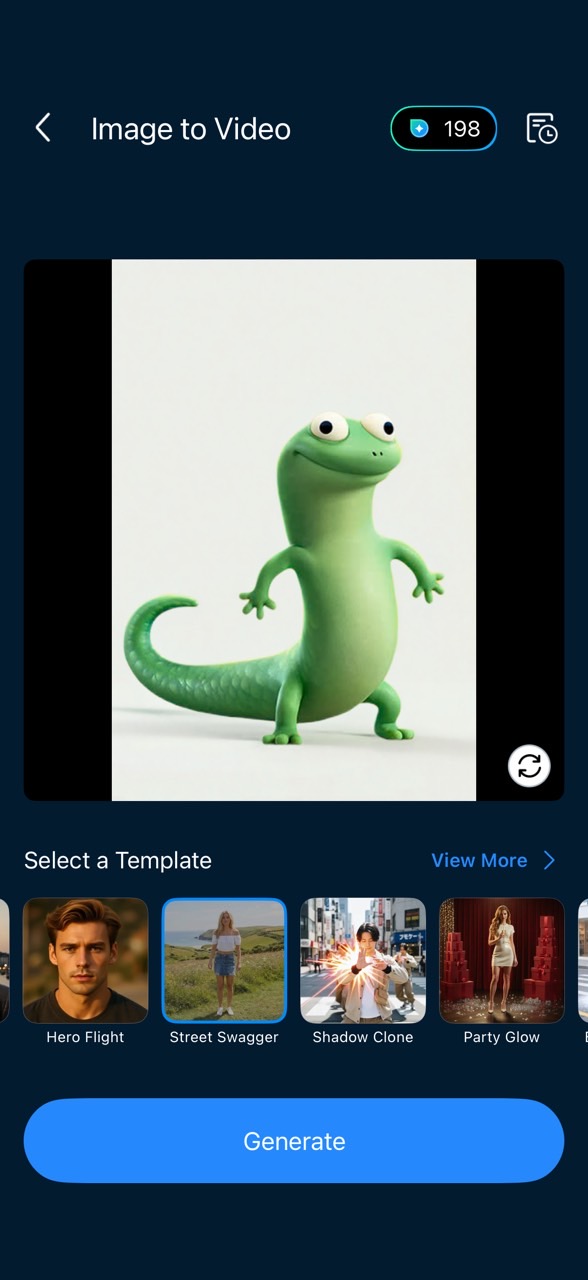
- Export and share your personalized Lizard meme


2. Character Motion Swap
Want Tom to copy a viral dance or dramatic scene? This is your move.
- Download and install the PowerDirector app for free
- Tap Character Motion Swap and upload a lizard image
- Upload a reference video
Use footage of a single character. Choose between the original photo background or the background from the video.
- Click Generate and let AI work its magic
3. Replace the Background for Meme Context
Want Tom waving in space? In your office? In a disaster movie?
- Download and install the PowerDirector app for free
- Upload your desired background video or photo
- Add a video clip and remove its background
Tap "Overlay" and upload a Tom video. Select the lizard clip and scroll to "Background ➡️ Cutout."
- Adjust and customize
Adjust the positioning. Add text or effects to customize the meme.
- Export and share
Adjust the positioning. Add text or effects to customize the meme.


Where Is the Lizard Meme From? Its Origin and Iconic Debut Scene
The "Lizard Meme" first scurried onto the scene during a surprise post-credit teaser for Elio, Pixar's June 2025 release. But here's the kicker: the lizard wasn't even in the movie.
The post-credit scene was actually a sneak peek for Pixar's latest project, Hoppers (hitting theaters March 6). Described as a sci-fi comedy, Hoppers follows a college student who "infiltrates" the world of beavers—a concept fans have jokingly dubbed "Avatar with woodland creatures."
The Scene That Launched a Thousand Clips
In the teaser, a small green lizard stands solitary in a dark room, transfixed by the glow of a smartphone. He taps the lizard emoji. A Siri-like voice flatly responds:
“Lizard.”
He taps it again.
“Lizard.”
And again.
“Lizard.”
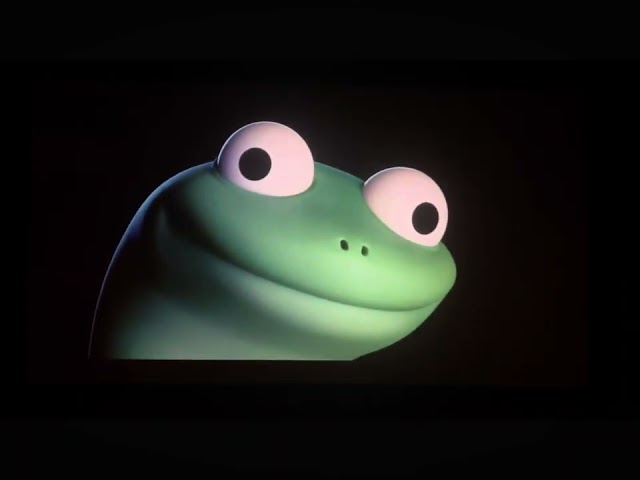
Pixar later identified this tiny, dopamine-seeking philosopher as Tom. In that moment of repetitive absurdity, a meme legend was born.
Why the Waving Lizard Went Viral on TikTok?
The meme went viral because it perfectly captures modern digital life. The internet loves three things:
- Absurdity
- Repetition
- Tiny hits of dopamine
Tom delivers all three.
Most of the funniest remixes revolve around small repeatable actions that give us micro-bursts of satisfaction. Think of pressing a crosswalk button repeatedly or refreshing your email even though you know nothing new has arrived. These actions are almost mindless. Yet each press gives us a microscopic reward. In chaotic times where everything feels overwhelming, watching a lizard calmly press an emoji and hear “lizard” repeated back feels oddly grounding.
Best Caption Ideas for Your Tom Meme
If you want engagement, pair your video with captions like:
- POV: You found your comfort button
- Me when I see my bestie on the street
- Me pressing refresh like…
- My last two brain cells
Memes are 50 percent timing and 50 percent relatability. Keep it short and absurd.
FAQs About Tom the Lizard
Tom appeared in the post-credit teaser attached to Elio, previewing Pixar's upcoming film Hoppers.
Tom is a green animated character revealed in the teaser for Hoppers. He went viral after repeatedly pressing a lizard emoji and hearing a robotic voice say “lizard.”
The viral cartoon reptile dominating TikTok is Tom from Pixar's upcoming film Hoppers.
Pixar confirmed the character's name is Tom.
Hoppers is scheduled to release on March 6 2026.
The repetition mirrors small dopamine-triggering behaviors. Watching Tom press the emoji repeatedly creates a calming loop effect similar to satisfying ASMR-style content.
Yes. With AI video tools like PowerDirector's animation features, you can animate, remix, or replace backgrounds to create your own Tom meme in minutes.

As industry experts in generative AI, the CyberLink AI Research Team has spent over 5 years benchmarking and analyzing the rapidly evolving landscape of creative technology. The team conducts rigorous testing of emerging AI tools for content creation, delivering weekly insights and practical workflows that help millions of creators worldwide each year identify the most suitable AI solutions to enhance their productivity.
😜 Outside of their research, the team actively experiments with AI-driven video creation, builds content across social platforms, and explores new side projects, all with the long-term goal of achieving greater creative and financial freedom.


![10 Best AI Face Generators You Should Try in 2026 [Free & Paid]](https://dl-file.cyberlink.com/web/content/b2982/l_Thumbnail.webp)


