






90 Best AI Image Prompts to Copy and Paste for Any Generator

The right prompt is what separates a generic AI image from one you actually want to use. Whether you write for MidJourney, Stable Diffusion, Grok Imagine, Gemini or ChatGPT, the underlying craft is the same: describe the subject, the setting, the light and the framing precisely enough that the model has nothing left to guess.
This guide brings together 90 prompts you can copy and paste, grouped by the job you are trying to do rather than by the tool you happen to use: text-to-image scenes, reference-face portraits, photo editing, inpainting and outpainting, and social visuals. Every text-to-image and reference-face example on this page was generated with MyEdit; the photo-editing, inpainting, outpainting and social examples are republished from our earlier guides to those tools, and each of those sections says so at the top. Every entry includes a note on what to change when the result is not quite right.
Equipment and date: Windows 11 laptop, latest version of Google Chrome, August 2026.
What we did: we ran the 65 text-to-image and reference-face prompts in this guide through the MyEdit AI Image Generator using the GPT-Image-2 model at 2K resolution. Each generation costs 6 credits and took roughly one minute to return. The prompt field accepts up to 8,000 characters, the aspect ratio selector offers 1:1, 4:3, 3:4, 16:9 and 9:16, and the reference-image panel accepts up to 16 uploads, which is what the portrait and editing prompts below rely on.
What we verified separately: the model list was read directly from the generator's model picker in August 2026. MidJourney's current default model and its browser access were checked against MidJourney's official version documentation, which records V8.2 as the default since July 24, 2026.
Scope limit: we did not run these prompts inside MidJourney, Stable Diffusion, Grok Imagine, Gemini or ChatGPT, so results in those tools will differ, sometimes considerably, from the same wording. Our own generations cover 65 of the 90 prompts, the text-to-image and reference-face sections. The 25 examples in the photo-editing, inpainting, outpainting and social sections were produced for our earlier Grok and Stable Diffusion guides and are republished here rather than regenerated for this page, which each of those sections states at the top. We also did not measure output quality against any competing generator.
- How AI Image Prompts Work
- Which AI Generator for Which Job
- 35 Text-to-Image Prompts
- 30 Reference-Face Portrait Prompts
- 11 Photo-Editing Prompts
- 8 Inpainting and Outpainting Prompts
- 6 Viral and Social Prompts
- How to Run These Prompts in MyEdit
- AI Image Prompt FAQ
How AI Image Prompts Work

An image model does not understand your intent. It matches your wording against patterns it learned, and it fills every gap you leave with whatever was most common in its training data. That is why vague prompts return generic stock-looking images: the gaps did the work, not you.
A useful prompt closes those gaps in a predictable order. Use this as a flexible template rather than a rule:
Prompt = Subject + Action or Pose + Environment + (Style + Lighting + Mood + Perspective)
The Four Elements That Do Most of the Work
- Subject, action, pose: who or what is in the scene and what they are doing. Example: "A young woman reading a book under a tree."
- Style and mood: the artistic register. Example: "Watercolor painting, dreamy, soft lighting."
- Background and environment: where the scene takes place. Example: "Autumn park with falling leaves."
- Perspective and composition: camera angle and framing. Example: "Close-up portrait, slightly tilted."
Optional Details Worth Adding
- Lighting and color: "golden hour sunlight," "vibrant neon tones."
- Artistic effects: "oil painting texture," "cinematic depth of field."
- Aesthetic references: describe the look you want rather than naming a living artist or a studio. "Soft hand-painted animation style with pastel skies" works; naming a specific studio is frequently rejected by current generators and raises rights questions.
A Worked Example
Weak: "A wizard in a forest."
Strong: "A young wizard standing in a mystical forest, holding a glowing staff, cinematic lighting, detailed fantasy art, close-up portrait."
The second version names the subject, the action, the environment, the light, the register and the framing. Same idea, far less guessing.
Q: Does prompt length improve results?
A: Only up to a point. What helps is specificity, not word count. Adding a fifth adjective to describe the same thing rarely changes the output, while naming the light source, the lens or the framing usually does. MyEdit's prompt field accepts up to 8,000 characters, but most of the prompts on this page sit between 15 and 40 words.
Q: Why does the same prompt give a different image every time?
A: Image models sample from a distribution, so each run starts from different random noise. Fixing the wording narrows the range of outcomes but never collapses it to one. If you need consistency across several images, supply a reference image instead of relying on wording alone.
Which AI Generator for Which Job
The prompts below work across generators, but the tools are not interchangeable. They differ in the prompt style they reward, in whether you can feed them a reference photo, and in where you run them. This table is our read on where each one fits, based on published documentation and on our own use of MyEdit.
| Generator | Best suited to | Prompt style that works | Reference images | Main limitation |
|---|---|---|---|---|
| MyEdit AI Image Generator | Running one prompt across several models without changing tool | Natural sentences; model picker changes the register | Yes, up to 16 per generation | Runs on credits. The free allowance is 3 credits a day and one GPT-Image-2 image costs 6, so the free tier does not cover a single generation per day |
| MidJourney | Stylized, art-directed images with a strong house aesthetic | Descriptive sentences plus parameters such as --ar | Yes, via image prompts | Subscription only, with no free tier; the aesthetic is opinionated and hard to suppress |
| Stable Diffusion | Local or self-hosted work, fine-tuned styles, heavy inpainting | Short comma-separated tags rather than flowing sentences | Yes, through image-to-image and inpainting | Requires technical setup; results vary sharply between checkpoints and versions |
| Grok Imagine | Fast social and editorial visuals, conversational edits | Plain instructions, including "change X, keep Y" edits | Yes | Tied to an X account and its plan limits; less granular control over composition |
| Gemini (Nano Banana family) | Photo-realistic people, likeness consistency, quick retouching | Conversational, with follow-up corrections | Yes | Model names and behaviour change often, so prompt recipes age quickly |
| ChatGPT (GPT-Image) | Complex multi-part instructions and in-image text | Long structured prompts, including JSON-style blocks | Yes | Free-tier generation is rate limited and slows down at peak times |
What Changes From Tool to Tool
- MidJourney no longer requires Discord. You can run it entirely in the browser at midjourney.com, and the Discord bot remains available on the same account. Its official version documentation lists V8.2 as the default model since July 24, 2026, so prompt guides written for V7 are dated even when the techniques still apply. Parameters go at the end of the prompt, and a square ratio via
--ar 1:1matters for anything logo-like. - Stable Diffusion is an open-weight family rather than a single product. SD 1.5, SDXL and SD 3.5 all remain in use, and community checkpoints change the output more than the wording does. It rewards short tag-style prompts and it is the strongest option for masked editing.
- Grok Imagine is xAI's image product. It handles instruction-style edits well, which is why the editing prompts further down are written as "change this, preserve that."
- Gemini's Nano Banana models are the ones most people reach for when a real face has to stay recognisable across several images.
- MyEdit exposes several of these engines behind one prompt field. In August 2026 the picker listed GPT-Image-2, Nano Banana Pro, Nano Banana 2, Nano Banana 2 Lite, Seedream 5.0 Pro, FLUX.2 Pro, Z-Image, Nano Banana, Seedream 5.0 Lite and GPT-Image-1.5, with GPT-Image-2 as the featured default. Model line-ups change, so check the picker before assuming a model is still there.
Q: Will a prompt written for MidJourney work in Stable Diffusion?
A: The content will carry over; the phrasing will not always. MidJourney reads flowing descriptive sentences well, while Stable Diffusion tends to respond better to short comma-separated tags. Strip the sentence structure, keep the nouns and the style words, and drop any -- parameters, which other tools do not read.
Q: Which model should I pick for a photorealistic portrait?
A: For a face that has to stay recognisable, use a model that accepts reference images and supply one. We generated the portraits on this page with GPT-Image-2 in MyEdit using the reference-image panel, which accepts up to 16 uploads per generation.
35 Text-to-Image Prompts for Scenes, Characters and Concepts
These 35 prompts start from nothing but text. Click any entry to jump to its example and prompt.
Portraits and Characters
- Hyper-Realistic Portrait of a Young Woman
- Futuristic Cyborg Character Portrait
- Fantasy Wizard Character, Magical Staff
- Cute Cartoon Animal Character
- Steampunk Inventor Portrait
- Mystical Elf Archer Portrait
Landscapes and Environments
- Mystical Forest with Glowing Lights
- Futuristic Cyberpunk City at Night
- Serene Beach at Sunrise
- Epic Mountain Range, Dramatic Sky
- Colorful Cliffside Village
- Deserted Ancient Ruins at Sunset
Concept Art and Abstract
- Surreal Floating Islands, Dreamy Colors
- Sci-Fi Mech Robot Concept, Detailed Art
- Abstract Geometric Shapes, Vibrant Palette
- Fantasy Castle in the Clouds, Epic Atmosphere
- Cosmic Galaxy with Planets and Nebula
- Magical Potion Laboratory, Steampunk Style
Marketing and Social Media Visuals
- Product Mockup for Website or App
- Advertisement Banner with AI-Generated Background
- Social Media Post or Instagram Story Visual
- YouTube Thumbnail, Eye-Catching Composition
- Fashion Lookbook Mockup
- Product Launch Poster, Vibrant Colors
Trending Styles and Fun Prompts
- Cartoon Animal Friends
- Whimsical Storybook Tea Party
- Pop Art Party Portrait
- Cute Chibi Characters
- Humanized Pet Street Portrait
- Retro Anime Action Poster
Seasonal and Holiday Prompts
- New Year Fireworks Celebration
- Christmas Dinner Table Scene
- Easter Cartoon Bunny with Basket
- Halloween Haunted House
- Spring Portrait with Flowers in a Sunlit Garden
Portraits and Characters
Character work is where wording pays off fastest. Name the light, the framing and one or two physical details, and leave the rest alone.
1. Hyper-Realistic Portrait of a Young Woman
Useful for profile pictures, character studies and testing how a model handles skin and hair.

Prompt sample: "Close-up hyper-realistic portrait of a young woman, soft natural lighting, cinematic, 8K, professional photography style"
Pro Tip: If skin looks plastic, add a texture cue such as "visible pores, natural skin texture" rather than raising the resolution keyword.
2. Futuristic Cyborg Character Portrait
Good for sci-fi illustration, concept art and game character sheets.

Prompt sample: "Futuristic cyborg character with neon implants, glowing eyes, cyberpunk city background, cinematic lighting, 8K"
Pro Tip: Name where the glow lands. "Neon rim light on the left cheekbone" reads far better than "glowing."
3. Fantasy Wizard Character, Magical Staff
Built for fantasy storytelling, tabletop characters and magical illustration.

Prompt sample: "Fantasy wizard holding a glowing magical staff, long flowing robes, mystical forest background, cinematic lighting, 8K"
Pro Tip: Give the pose a verb. "Raising the staff mid-incantation" produces far more dynamic results than a static description.
4. Cute Cartoon Animal Character
A single mascot-style character for children's books, stickers or app illustration.

Prompt sample: "Adorable cartoon fox wearing a tiny backpack, bright forest background, playful style, vivid colors, 8K"
Pro Tip: Keep it to one character. Adding a second animal here usually costs you the clean silhouette that makes a mascot readable.
5. Steampunk Inventor Portrait
For concept art, historical fantasy and character design with a mechanical bent.

Prompt sample: "Steampunk inventor with goggles and mechanical gadgets, vintage laboratory background, cinematic lighting, 8K"
Pro Tip: Name the metals. "Brass and oiled leather" anchors the palette better than the word steampunk on its own.
6. Mystical Elf Archer Portrait
Suited to fantasy characters, role-playing portraits and game concept art.

Prompt sample: "Mystical elf archer with silver bow, forest background, flowing hair, cinematic lighting, 8K"
Pro Tip: Hands on weapons are still a weak point. A three-quarter view with the bow partly out of frame hides the problem entirely.
Landscapes and Environments
Landscapes live or die on light and depth. Say what time of day it is and what sits in the foreground.
7. Mystical Forest with Glowing Lights
For fantasy backgrounds, atmospheric scenes and title art.

Prompt sample: "Dense mystical forest with glowing lights, fog, magical creatures, cinematic lighting, 8K"
Pro Tip: Ask for light shafts explicitly. "God rays cutting through mist" is the phrase that reliably produces depth.
8. Futuristic Cyberpunk City at Night
For sci-fi environments, game backdrops and neon-heavy illustration.

Prompt sample: "Futuristic cyberpunk city at night, neon lights reflecting on wet street, bustling crowd, cinematic wide-angle, 8K"
Pro Tip: Wet ground is the shortcut. Reflections give the model somewhere to put the neon and instantly add depth.
9. Serene Beach at Sunrise
For calm nature scenes, travel visuals and wellness content.

Prompt sample: "Serene beach at sunrise with soft waves, golden sky, gentle reflections, cinematic lighting, 8K"
Pro Tip: Add one foreground object, a piece of driftwood or a line of footprints, or the composition stays flat.
10. Epic Mountain Range, Dramatic Sky
For adventure imagery, landscape art and title cards.

Prompt sample: "Epic mountain range with dramatic sky, clouds, sunrise highlights, cinematic wide shot, 8K"
Pro Tip: Scale needs a reference. Adding "a tiny hiker on the ridge" changes how large the range reads.
11. Colorful Cliffside Village
For travel-style photography, scenic backgrounds and postcard visuals.

Prompt sample: "Colorful cliffside village on the Italian coast, vibrant houses stacked on steep cliffs, Mediterranean sea in background, golden hour lighting, cinematic 8K"
Pro Tip: Name two or three house colors instead of saying colorful, and the palette stops looking randomly assigned.
12. Deserted Ancient Ruins at Sunset
For historical, adventure and mystery scenes.

Prompt sample: "Deserted ancient ruins at sunset, warm golden light, long shadows, cinematic composition, 8K"
Pro Tip: Ask for weathering. "Cracked stone, creeping vines, drifting dust" is what makes ruins read as old rather than new.
Concept Art and Abstract
Concept work rewards odd combinations. Give the model one impossible element and one grounded one.
13. Surreal Floating Islands, Dreamy Colors
For dreamlike environments and surreal landscape art. This one stays uninhabited on purpose, so the scale of the islands carries the image.

Prompt sample: "Surreal floating islands with waterfalls pouring into open sky, soft dreamy colors, layered mist, no people, cinematic lighting, 8K"
Pro Tip: Adding "no people" is what keeps this from turning into a character scene, which is the default the model drifts toward.
14. Sci-Fi Mech Robot Concept, Detailed Art
For futuristic concept art, game assets and mechanical design.

Prompt sample: "Detailed sci-fi mech robot, futuristic battlefield background, cinematic lighting, 8K, dynamic pose"
Pro Tip: Ask for panel lines and worn paint. Clean mechs read as toys; scuffed ones read as machines.
15. Abstract Geometric Shapes, Vibrant Palette
For backgrounds, cover art and presentation graphics.

Prompt sample: "Abstract geometric shapes, vibrant color palette, 3D depth, glowing edges, cinematic 8K"
Pro Tip: Specify a background tone. Without it these tend to arrive on grey and lose all their contrast.
16. Fantasy Castle in the Clouds, Epic Atmosphere
For fairy-tale illustration, game environments and book covers.

Prompt sample: "Fantasy castle floating among clouds, epic lighting, magical atmosphere, cinematic wide shot, 8K"
Pro Tip: Put the castle off-center and give the clouds two thirds of the frame. Centered castles look like stock art.
17. Cosmic Galaxy with Planets and Nebula
For space art, science fiction and cosmic storytelling.

Prompt sample: "Cosmic galaxy with colorful nebulae, planets, stars, glowing cosmic dust, cinematic 8K"
Pro Tip: Limit yourself to two dominant colors. Nebula prompts collapse into mud when you name four.
18. Magical Potion Laboratory, Steampunk Style
For fantasy interiors, alchemy scenes and game environments.

Prompt sample: "Steampunk potion laboratory with glowing vials, gears, mystical atmosphere, cinematic lighting, 8K"
Pro Tip: Name the light source as the vials themselves. Self-lit objects give interiors their glow without a visible lamp.
Marketing and Social Media Visuals
Commercial visuals need negative space for text. Ask for it explicitly or you will be cropping later.
19. Product Mockup for Website or App
For showing digital products, apps and interfaces in a realistic setting.

Prompt sample: "Realistic product mockup of a smartphone app, clean modern background, cinematic lighting, 8K"
Pro Tip: Generated screen content is rarely usable. Ask for a blank or blurred screen and composite your real interface on top.
20. Advertisement Banner with AI-Generated Background
For online ads, campaign visuals and social banners.

Prompt sample: "Vibrant advertisement banner with AI-generated abstract background, generous empty space on the right for text, dynamic composition, cinematic lighting, 8K"
Pro Tip: Naming which side the empty space belongs on is the difference between a usable banner and a re-crop.
21. Social Media Post or Instagram Story Visual
For vertical content built to hold attention in a feed.

Prompt sample: "Eye-catching vertical story visual, bright colors, bold focal point, clear space at top and bottom for captions, 9:16, 8K"
Pro Tip: Set the aspect ratio in the tool rather than in the prompt. Wording alone rarely produces a true 9:16 frame.
22. YouTube Thumbnail, Eye-Catching Composition
For thumbnails that stay readable at small sizes.

Prompt sample: "Vibrant YouTube thumbnail, single bold subject on the left, high contrast, simple background, cinematic lighting, 16:9, 8K"
Pro Tip: Leave the text to your editor. Generated lettering is inconsistent even on models that render text well.
23. Fashion Lookbook Mockup
For collections, styling boards and fashion campaign concepts.

Prompt sample: "Fashion lookbook mockup featuring models on urban streets, stylish outfits, cinematic lighting, 8K"
Pro Tip: Describe fabric behaviour, not just garments. "Loose linen catching the wind" gives the model something to render.
24. Product Launch Poster, Vibrant Colors
For announcements, events and promotional visuals.

Prompt sample: "Vibrant product launch poster with 3D product render, colorful background, cinematic lighting, 8K"
Pro Tip: A low camera angle makes an object look important. It is the cheapest change you can make to this prompt.
Trending Styles and Fun Prompts
Playful prompts are the best place to learn how a model exaggerates, because mistakes are part of the charm.
25. Cartoon Animal Friends
A group scene rather than a single mascot, for lighthearted illustration.

Prompt sample: "Cute cartoon animals playing together in a colorful meadow, expressive faces, vibrant colors, 8K"
Pro Tip: Name the number of animals. Left open, the model tends to fill the frame and lose every individual face.
26. Whimsical Storybook Tea Party
For picture-book pages and gentle fantasy scenes on the ground rather than in the sky.

Prompt sample: "Whimsical storybook illustration of small woodland creatures having a tea party in a sunlit clearing, soft magical lighting, warm palette, 8K"
Pro Tip: Storybook scenes need a table, a path or a doorway. One piece of furniture is what stops the scene from floating.
27. Pop Art Party Portrait
For bold, high-contrast group visuals with a comic register.

Prompt sample: "Pop art style group of friends at a fun party, bright colors, comic-style outlines, dynamic composition, 8K"
Pro Tip: Ask for halftone dots by name. It is the detail that separates pop art from generic flat illustration.
28. Cute Chibi Characters
For stylized mini-characters with exaggerated proportions.

Prompt sample: "Chibi-style characters having fun in a colorful park, exaggerated expressions, cute details, 8K"
Pro Tip: State the head-to-body ratio, roughly one to two, if the proportions come back too realistic.
29. Humanized Pet Street Portrait
For playful anthropomorphic visuals and pet-themed social content.

Prompt sample: "Humanized pets walking in a lively street, wearing fashionable clothes, interacting naturally, vibrant colors, cinematic 8K"
Pro Tip: Keep the animal head realistic and humanize only the body. Fully stylized versions lose the joke.
30. Retro Anime Action Poster
For high-energy, nostalgic action illustration.

Prompt sample: "Retro anime action poster with dynamic characters, explosive background, bold colors, cinematic lighting, 8K"
Pro Tip: Ask for film grain and slightly faded colors. Clean output reads as modern anime, not retro.
Seasonal and Holiday Prompts
Seasonal images date quickly. Describe the season through light and materials rather than through a specific year or a national holiday, and the prompt keeps working.
31. New Year Fireworks Celebration
For celebration graphics and festive backgrounds.

Prompt sample: "City skyline at midnight, fireworks bursting over the river, reflections on water, cinematic, vibrant colors, 8K"
Pro Tip: Leaving the year out of the prompt keeps the image reusable. Generated digits are unreliable anyway.
32. Christmas Dinner Table Scene
For holiday invitations, cards and festive social posts.

Prompt sample: "Christmas dinner table scene, festive food, candles, decorations, cozy warm lighting, holiday atmosphere, ultra-detailed, cinematic photography style"
Pro Tip: Add "birds-eye view" for a flat-lay social version, or "painting style" for a card illustration.
33. Easter Cartoon Bunny with Basket
For spring cards, children's content and cheerful social posts.

Prompt sample: "Cute cartoon Easter bunny holding a basket of colorful pastel eggs, smiling and playful, bright spring background, soft shadows, whimsical style, cheerful vibe"
Pro Tip: Pastel palettes need a dark accent somewhere or the whole image washes out at small sizes.
34. Halloween Haunted House
For seasonal backgrounds, cards and spooky social content.

Prompt sample: "Haunted house on Halloween night, glowing jack-o-lanterns, foggy atmosphere, cinematic lighting, spooky vibe, dark moody background, detailed 8K"
Pro Tip: One warm light source against a cold blue night does more for the mood than any number of spooky adjectives.
35. Spring Portrait with Flowers in a Sunlit Garden
For seasonal cards, sentimental designs and warm lifestyle visuals that are not tied to one country's calendar.

Prompt sample: "Person holding a bunch of flowers in a sunlit garden, warm lighting, soft focus, realistic portrait, gentle expression, spring atmosphere, cinematic 8K"
Pro Tip: Backlight through petals is what sells this one. Ask for "sun behind the flowers, light passing through the petals."
Q: Do keywords like "8K" and "cinematic" actually change anything?
A: They are style cues, not resolution settings. They push the model toward images that were captioned that way, which usually means more contrast and shallower depth of field. The actual output size comes from the resolution setting in the tool, which for GPT-Image-2 in MyEdit is 1K or 2K.
Q: How do I get the same character in several images?
A: Generate the character once, then feed that image back as a reference for every subsequent prompt instead of rewriting the description. Wording alone will not hold a face across generations.
30 Reference-Face Portrait Prompts
These 30 prompts start from a photo instead of a blank field. You upload one or more faces as a reference, and the prompt describes what should change around them. In the MyEdit AI Image Generator the reference panel accepts up to 16 uploads per generation, which is what makes couple, family and group scenes possible.
Before you use someone else's photo: only upload images of people who have agreed to it. Generating a recognisable likeness without permission can breach privacy and publicity rights regardless of which tool you use.
Single Portrait Prompts
- Cinematic Headshot with Studio Lighting
- Magazine-Style Fashion Portrait
- Epic Adventure Traveler Portrait
- Anime-Inspired Character Portrait
- Fantasy Royal Portrait
Couple Portrait Prompts
- Romantic Sunset Couple Portrait
- Casual City Stroll Couple
- Fantasy Couple Adventure
- Elegant Gala Couple Portrait
- Playful Outdoor Couple Portrait
Family Portrait Prompts
- Cozy Living Room Family Portrait
- Outdoor Picnic Family Portrait
- Holiday Celebration Family Portrait
- Beach Vacation Family Portrait
- Formal Family Portrait
Friends and Group Portrait Prompts
- Coffee Shop Friends Portrait
- Outdoor Adventure Friends Portrait
- Party Celebration Friends Portrait
- Team Collaboration Portrait
- Travel Crew Portrait
Professional Headshot Prompts
- CEO Boardroom Portrait
- Consultant LinkedIn Headshot
- Photographer Cinematic Lighting
- Doctor Lab Coat Portrait
- Consultant Modern Neutral Studio
Hairstyle Prompts
Single Portrait Prompts
Use one reference face to move a real likeness into a new setting, register or era.
36. Cinematic Headshot with Studio Lighting
For professional headshots and dramatic portrait work.


Prompt sample: "Ultra-realistic cinematic headshot of a woman, studio lighting, soft shadows, dramatic focus, 8K, using reference face"
Pro Tip: Name the key light position. "Key light from camera left, soft fill on the right" is what makes it read as a studio shot.
37. Magazine-Style Fashion Portrait
For editorial looks, campaign concepts and styled portraits.


Prompt sample: "High-fashion magazine portrait, elegant pose, studio lighting, sharp details, glamorous styling, 8K, using reference face"
Pro Tip: Editorial work needs a color grade. Add "cool shadows, warm highlights" and the image stops looking like a snapshot.
38. Epic Adventure Traveler Portrait
For travel content, outdoor storytelling and cinematic character shots.


Prompt sample: "Epic adventure portrait of a traveler, mountain background, golden hour lighting, realistic detail, 8K, using reference face"
Pro Tip: Ask for wind. Hair and fabric in motion is what separates an adventure portrait from a person standing in front of a mountain.
39. Anime-Inspired Character Portrait
For stylized portraits that keep a recognisable likeness.


Prompt sample: "Anime-style portrait with bright colors, expressive eyes, dynamic hair, 8K, using reference face"
Pro Tip: Stylization fights likeness. Ask for "anime style, preserve facial structure" or you will get a generic character.
40. Fantasy Royal Portrait
For fantasy characters, royalty concepts and game-inspired art.


Prompt sample: "Fantasy royal portrait, ornate crown and robes, cinematic lighting, mystical background, 8K, using reference face"
Pro Tip: Describe the crown's material rather than its shape. "Tarnished silver set with dark stones" gives the model something to render.
Couple Portrait Prompts
Two references, one scene. Say which person is on which side and the composition holds up.
41. Romantic Sunset Couple Portrait
For romantic moments with warm cinematic light.


Prompt sample: "Romantic couple portrait at sunset, soft golden light, gentle embrace, cinematic composition, 8K, using reference faces"
Pro Tip: Two faces means two references. Upload both and say which person stands on which side.
42. Casual City Stroll Couple
For lifestyle, travel and relaxed urban portraits.


Prompt sample: "Couple walking in city streets, casual clothing, soft sunlight, realistic style, 8K, using reference faces"
Pro Tip: Ask for mid-stride rather than posed. Walking shots hide the awkward hand placement that ruins standing couples.
43. Fantasy Couple Adventure
For game art, fantasy illustration and cosplay-style portraits.


Prompt sample: "Fantasy couple standing on cliff edge, flowing capes, dramatic sky, cinematic lighting, 8K, using reference faces"
Pro Tip: Capes and long coats give the model motion to work with, which is why they read better than fitted armour here.
44. Elegant Gala Couple Portrait
For formal, glamorous and red-carpet-style portraits.


Prompt sample: "Couple in evening gowns and tuxedos, elegant ballroom lighting, refined composition, 8K, using reference faces"
Pro Tip: Formal wear needs even light. Ask for "soft even lighting, no harsh shadows" or the fabric detail disappears.
45. Playful Outdoor Couple Portrait
For fun, casual outdoor lifestyle shoots.


Prompt sample: "Playful couple laughing outdoors, sunny day, dynamic movement, realistic style, 8K, using reference faces"
Pro Tip: Genuine laughter is hard to generate. Naming the cause, "laughing at something off-frame," helps more than the word candid.
Family Portrait Prompts
Group scenes need a headcount. State how many people and roughly how old they are.
46. Cozy Living Room Family Portrait
For intimate, relaxed family moments at home.


Prompt sample: "Family sitting together in cozy living room, warm lighting, smiling faces, realistic style, 8K, using reference faces"
Pro Tip: State how many people and their approximate ages. Left open, group prompts invent extra family members.
47. Outdoor Picnic Family Portrait
For playful family moments in natural settings.


Prompt sample: "Family enjoying a sunny picnic, lush green park, playful interaction, cinematic lighting, 8K, using reference faces"
Pro Tip: Dappled light through trees is the detail that makes an outdoor family shot look photographed rather than composited.
48. Holiday Celebration Family Portrait
For festive and seasonal family portraits.


Prompt sample: "Family celebrating together, decorated room, joyful expressions, warm festive lighting, 8K, using reference faces"
Pro Tip: Keep the decorations generic. Naming a specific holiday narrows the image to one market and one date.
49. Beach Vacation Family Portrait
For travel, lifestyle and summer portraits.


Prompt sample: "Family posing on sunny beach, casual clothing, playful interaction, realistic style, 8K, using reference faces"
Pro Tip: Harsh midday sun flattens faces. Ask for late afternoon light and the skin tones improve immediately.
50. Formal Family Portrait
For elegant, posed group photos.


Prompt sample: "Family dressed formally, studio lighting, poised posture, cinematic composition, 8K, using reference faces"
Pro Tip: Ask for staggered heights. A single flat row is the default and it always looks like a school photo.
Friends and Group Portrait Prompts
Lively group shots where interaction matters more than posing.
51. Coffee Shop Friends Portrait
For casual, social and lifestyle group portraits.


Prompt sample: "Group of friends chatting in a cozy coffee shop, warm lighting, candid poses, realistic style, 8K, using reference faces"
Pro Tip: Window light on one side plus a warm interior lamp on the other is the combination that makes cafe scenes work.
52. Outdoor Adventure Friends Portrait
For active, travel and nature-themed group shots.


Prompt sample: "Group of friends hiking in mountains, dynamic poses, sunlight, realistic style, 8K, using reference faces"
Pro Tip: Put the group slightly off-center and give the landscape room. Centered groups shrink the scenery to a backdrop.
53. Party Celebration Friends Portrait
For lively, festive and nightlife visuals.


Prompt sample: "Friends celebrating at a party, colorful lights, candid laughter, cinematic style, 8K, using reference faces"
Pro Tip: Colored practical lights in frame, not just colored grading, is what makes party scenes feel lit rather than filtered.
54. Team Collaboration Portrait
For professional and startup team shots.


Prompt sample: "Startup team working together, modern office, professional attire, natural interaction, realistic style, 8K, using reference faces"
Pro Tip: Give the team something to look at. A shared screen or a whiteboard fixes the vacant expressions these prompts default to.
55. Travel Crew Portrait
For group travel, vacation and adventure imagery.


Prompt sample: "Group of friends exploring a scenic location, casual outfits, joyful interaction, cinematic lighting, 8K, using reference faces"
Pro Tip: Name the location type rather than a real landmark. Generated landmarks are usually wrong in a way readers notice.
Professional Headshot Prompts
Headshots for profiles, directories and press pages, where the likeness has to stay exact.
56. CEO Boardroom Portrait
An authoritative but approachable headshot for leadership profiles and press pages.


Prompt sample: "Confident executive in a modern boardroom, tailored dark suit, neutral background, studio lighting, serious but approachable expression, realistic high-resolution corporate headshot, using reference face"
Pro Tip: Ask for a slight smile with the eyes rather than the mouth. Full smiles read as stock; flat expressions read as cold.
57. Consultant LinkedIn Headshot
A networking-ready headshot that balances authority and warmth.


Prompt sample: "Professional consultant, neutral office background, confident but approachable expression, soft lighting, realistic skin texture, LinkedIn-ready headshot, using reference face"
Pro Tip: Ask for a shallow depth of field so the office falls out of focus. Sharp backgrounds compete with the face.
58. Photographer Cinematic Lighting
A moodier professional portrait for creatives and visual storytellers.


Prompt sample: "Professional headshot of a photographer using cinematic lighting, moody yet balanced light, dark neutral background, calm confident expression, sharp facial details, realistic photography-style portrait, using reference face"
Pro Tip: Moody lighting eats detail. Ask for a rim light on the shoulder to keep the subject separated from the background.
59. Doctor Lab Coat Portrait
A credibility-forward headshot for clinical profiles and directories.


Prompt sample: "Professional doctor headshot wearing a clean lab coat, neutral medical office background, soft balanced lighting, confident and reassuring expression, realistic skin tones, high-quality professional portrait, using reference face"
Pro Tip: Generated badges and lanyards produce unreadable text. Ask for a plain coat with no ID card and add the real one later.
60. Consultant Modern Neutral Studio
A clean, distraction-free headshot for freelancers and independent professionals.


Prompt sample: "Professional consultant headshot in a modern neutral studio, smart casual outfit, clean background, soft balanced lighting, confident and approachable expression, realistic high-resolution portrait, using reference face"
Pro Tip: Name the background tone, light grey or warm beige, or you will get a different colour on every generation.
Hairstyle Prompts
Try a cut on your own photo before a salon appointment. Keep the face, change the hair.
61. Classic Bob with Side Part
A chin-length bob with a sleek side part, for trying a cut before committing to it.


Prompt sample: "Woman with sleek chin-length bob, side part, smooth straight hair, natural shine, soft indoor lighting, realistic hairstyle, using reference photo"
Pro Tip: Say where the parting sits. "Deep side part on the left" avoids the symmetrical centre part the model defaults to.
62. Classic Long Layers
Long layered hair with movement and face-framing shape.


Prompt sample: "Woman with long layered hair, natural volume, subtle highlights, smooth texture, soft indoor lighting, realistic hair flow, using reference photo"
Pro Tip: Ask for the shortest layer to sit at the jaw. Without a reference point, layers come back as an undefined mass.
63. Full Blunt Bangs
Straight-across bangs that reframe the face.


Prompt sample: "Woman with full blunt bangs, straight-across, smooth texture, shiny hair, precise edges, realistic hair flow, soft indoor lighting, using reference photo"
Pro Tip: Specify where the fringe lands relative to the eyebrows, or the length varies wildly between generations.
64. Low Fade
A clean low fade that tapers toward the neckline, with length left on top.


Prompt sample: "Man with low fade haircut, slightly longer top, clean taper on sides and back, smooth texture, realistic hair flow, soft indoor lighting, using reference photo"
Pro Tip: Name the fade height. "Fade starting just above the ear" is the instruction barbers use and the model responds to it.
65. Messy Medium-Length Hair
Relaxed medium-length hair with texture and movement.


Prompt sample: "Man with messy medium-length hair, subtle waves, natural shine, relaxed style, realistic hair flow, soft indoor lighting, using reference photo"
Pro Tip: Add "matte finish, no product shine" if the result comes back looking wet rather than casually undone.
Q: How many reference photos should I upload for one person?
A: Two or three taken from different angles usually beat a single frontal shot, because the model gets more information about bone structure. The MyEdit reference panel accepts up to 16 images per generation, so there is room for several angles plus a style reference.
Q: The generated face does not look like me. What should I change?
A: Reduce how much the prompt is asking for. Every extra instruction about costume, lighting and environment competes with likeness. Strip the prompt back to the face and the setting, get the likeness right, then add style back one element at a time.
11 Photo-Editing Prompts
These prompts change an existing photo rather than creating one. The pattern that works across every tool is the same: state what to change, then state what to preserve. The second half is what stops the model from redoing the whole image.
Where these examples come from: the before-and-after images in this section were produced for our earlier Grok prompt guide and are republished here rather than regenerated for this page. The prompts themselves work in MyEdit and in any tool that accepts a reference photo.
- Enhance Lighting and Color
- Background Replacement
- Colorize a Black-and-White Photo
- Hair Color Change
- Photo Restoration
- Low-Light Improvement
- Cinematic Color Grading
- Object Removal
- Image Upscale
- Pencil Sketch Conversion
- Painterly Illustration
66. Enhance Lighting and Color
Fixes a flat photo without making it look processed.


Prompt sample: "Enhance image lighting, adjust color balance, improve sharpness, maintain natural look, using reference photo"
Pro Tip: Say "subtle" and mean it. These prompts overshoot by default, and the giveaway is haloing around high-contrast edges.
67. Background Replacement
Swaps the setting while keeping the subject's edges and shadows believable.


Prompt sample: "Replace background with clean minimal environment, preserve shadows and edges, using reference photo"
Pro Tip: Match the light direction. If the subject is lit from the left, ask for a background lit from the left or the composite falls apart.
68. Colorize a Black-and-White Photo
Adds plausible color to an archive photo without inventing detail.


Prompt sample: "Colorize black-and-white image with realistic skin tones and natural colors, using reference photo"
Pro Tip: Name the era. Colour palettes differ enough between decades that "1950s colour film" produces a more convincing result than "realistic".
69. Hair Color Change
Changes hair color while keeping highlights and texture intact.


Prompt sample: "Change hair color to natural shade with realistic highlights and lighting, using reference photo"
Pro Tip: Ask for the roots to stay slightly darker. Uniform colour is the single clearest sign of an AI hair edit.
70. Photo Restoration
Repairs scratches, fading and damage on an old print.


Prompt sample: "Restore old or damaged photo, remove scratches, correct colors, improve clarity, using reference photo"
Pro Tip: Add "do not change facial features" explicitly. Restoration prompts drift toward smoothing faces into different people.
71. Low-Light Improvement
Recovers a dark photo without turning noise into smudge.


Prompt sample: "Improve low-light photo, enhance details, balance exposure, maintain natural look, using reference photo"
Pro Tip: Ask it to keep some grain. Fully denoised low-light shots look like plastic; a little noise reads as a real photograph.
72. Cinematic Color Grading
Applies a film-style grade to an ordinary photo.


Prompt sample: "Apply cinematic color grading, dramatic lighting, enhance mood, using reference photo"
Pro Tip: Name the grade rather than the word cinematic. "Teal shadows, warm skin tones, slightly lifted blacks" is a real instruction.
73. Object Removal
Takes an unwanted element out and rebuilds what was behind it.


Prompt sample: "Remove unwanted objects, seamlessly fill background, preserve lighting and shadows, using reference photo"
Pro Tip: Name the object and its position. "Remove the sign on the right" works; "remove distractions" removes whatever it feels like.
74. Image Upscale
Raises resolution while keeping detail honest.


Prompt sample: "Upscale image, preserve fine details, avoid over-sharpening, using reference photo"
Pro Tip: Upscaling invents detail it cannot know. Check text, eyes and jewellery first, because that is where the invention shows.
75. Pencil Sketch Conversion
Turns a photograph into a drawn portrait with real shading.


Prompt sample: "Convert photo to pencil sketch, realistic shading, line work, textures, using reference photo"
Pro Tip: Ask for visible paper grain. Without it, sketch conversions look like a filter rather than a drawing.
76. Painterly Illustration
Converts a photo into a painted image with visible brushwork.


Prompt sample: "Convert photo to painterly illustration, visible brush strokes, soft textures, artistic colors, using reference photo"
Pro Tip: Specify where the brushwork is loosest. "Loose strokes in the background, tighter on the face" mimics how painters actually work.
Q: Why does the whole photo change when I only wanted to fix one thing?
A: Because the prompt did not say what to keep. Every editing prompt above ends with a preservation clause such as "maintain original pose and lighting" for exactly this reason. Where the tool offers a brush or mask, use it, and the model only touches the selected area.
Q: Can I stack several edits in one prompt?
A: You can, but results get less predictable with each instruction. Running two prompts in sequence, lighting first and then colour, is usually faster than debugging one prompt that tries to do both.
8 Inpainting and Outpainting Prompts
Inpainting rebuilds a selected area inside the frame. Outpainting invents what sits beyond the frame. Both need a prompt that describes the new content and, just as importantly, the lighting and perspective it has to match.
Where these examples come from: the before-and-after images in this section were produced for our earlier Stable Diffusion prompt guide and are republished here rather than regenerated for this page.
- Smooth Skin and Brighten Eyes
- Replace a Jacket
- Add a Hat and Sunglasses
- Correct Hands to Natural Positions
- Change a Summer Garden to Snowy Winter
- Extend a Mountain Landscape
- Expand a City Skyline
- Extend a Fantasy Castle Scene
77. Smooth Skin and Brighten Eyes
A restrained retouch on one area, leaving the rest of the frame untouched.


Prompt sample: "Smooth skin texture and enhance eye brightness in the portrait, maintain natural facial features, soft lighting, photorealistic style"
Pro Tip: Mask only the cheeks and under-eyes. Masking the whole face is how portraits end up looking waxy.
78. Replace a Jacket
Swaps one garment while the pose, lighting and background stay put.


Prompt sample: "Replace the current jacket in the portrait with a red leather biker jacket, maintain original pose and lighting, photorealistic style"
Pro Tip: Include the collar and shoulders in the mask. Cutting at the seam leaves a visible join where the two jackets meet.
79. Add a Hat and Sunglasses
Adds accessories that sit correctly on the head rather than floating over it.


Prompt sample: "Add a fedora hat and sunglasses to the portrait, maintain facial expression and lighting, photorealistic style, subtle shadowing"
Pro Tip: Ask for the shadow the hat casts on the forehead. Accessories without cast shadows always look pasted on.
80. Correct Hands to Natural Positions
Fixes the part of a portrait that generators still get wrong most often.


Prompt sample: "Correct the hands in the portrait to natural, relaxed positions, maintain original pose and lighting, photorealistic style"
Pro Tip: Mask each hand separately and regenerate one at a time. Masking both at once tends to produce two matching errors.
81. Change a Summer Garden to Snowy Winter
A seasonal transformation that keeps the architecture and layout in place.


Prompt sample: "Change the summer garden scene into a snowy winter landscape, maintain trees and buildings, soft snow lighting, photorealistic style, subtle snow textures"
Pro Tip: Winter light is colder and lower. Add "cool blue shadows, low sun angle" or the snow will sit under summer lighting.
82. Extend a Mountain Landscape
Outpainting: pushes the frame outward and invents what sits beyond it.


Prompt sample: "Extend the mountain landscape to include a dense forest valley, maintain lighting and atmosphere, photorealistic style, ultra-detailed, panoramic composition"
Pro Tip: Extend one side at a time. Expanding in every direction at once produces horizon lines that do not meet.
83. Expand a City Skyline
Outpainting a built environment while keeping perspective consistent.


Prompt sample: "Expand the city skyline with additional skyscrapers, neon signs, and cyberpunk details, maintain perspective and night lighting, highly detailed, cinematic atmosphere"
Pro Tip: Name the vanishing point side. Architecture is where broken perspective shows first and is hardest to fix afterwards.
84. Extend a Fantasy Castle Scene
Outpainting an illustration, where matching the original style matters more than realism.


Prompt sample: "Extend the fantasy castle scene to include a flying dragon and enchanted forest surroundings, maintain lighting and castle style, cinematic fantasy illustration, ultra-detailed"
Pro Tip: Repeat the original style words in the extension prompt. Outpainting drifts toward photorealism unless you hold it back.
In MyEdit, masked edits of this kind run through AI Replace, where you brush the area and describe the change instead of writing a mask into the prompt.


6 Viral and Social Prompts
Social visuals have one job: survive being seen at thumbnail size in a scrolling feed. That means one subject, one idea and enough contrast to read on a phone. Keep these built on original characters and your own photos rather than on existing meme images, which usually carry someone else's copyright.
Where these examples come from: the before-and-after images in this section were produced for our earlier Grok prompt guide and are republished here rather than regenerated for this page.
- Bold Quote Visual
- Relatable Meme
- Before and After Comparison
- 2x2 Emotion Collage
- Minimal Social Visual
- Caricature Portrait
85. Bold Quote Visual
A high-contrast background built to carry a short line of text.


Prompt sample: "Bold quote visual, high-contrast background, modern typography, generous empty space in the centre, social media ready, using reference photo"
Pro Tip: Generate the background, add the words in your editor. Generated type is inconsistent and rarely on-brand.
86. Relatable Meme
An expressive, generic reaction image you can caption yourself.


Prompt sample: "Relatable meme image, expressive characters, humorous everyday situation, simple background, social media ready, using reference photo"
Pro Tip: Keep it to original characters and situations. Recreating a known meme format usually means recreating someone else's photograph.
87. Before and After Comparison
A side-by-side layout that makes a change obvious at a glance.


Prompt sample: "Before and after comparison image, clear split layout, highlight the transformation, social media ready, using reference photo"
Pro Tip: Ask for identical framing on both halves. If the crop shifts, the viewer reads it as two photos rather than one change.
88. 2x2 Emotion Collage
Four panels of the same subject with different expressions.


Prompt sample: "2x2 collage image, four different emotions or reactions, consistent style and lighting across all panels, social media ready, using reference photo"
Pro Tip: Name all four emotions explicitly. Left open, you get four versions of the same neutral face.
89. Minimal Social Visual
A clean, uncluttered image for a single short message.


Prompt sample: "Minimal social media visual, single subject, plenty of negative space, modern design, muted palette, using reference photo"
Pro Tip: Minimal means one subject and one accent colour. Adding a second accent is what turns minimal into generic.
90. Caricature Portrait
An exaggerated portrait that keeps the person recognisable.


Prompt sample: "Caricature portrait, exaggerated facial features, oversized head, expressive eyes, bold colors, cartoon style, preserve identity, using reference photo"
Pro Tip: Pick one feature to exaggerate. Exaggerating everything at once cancels out and you lose the likeness entirely.
How to Run These Prompts in MyEdit
The 65 text-to-image and reference-face examples on this page were produced in the MyEdit AI Image Generator, which puts several models behind one prompt field so you can test the same wording against different engines without changing tool. There are two routes: start from text, or start from a photo.

Starting From a Text Prompt
This is the route for anything in the text-to-image section: scenes, characters, concept art and seasonal visuals.
- Open the generator: go to the AI Image Generator in your browser. Nothing to install.
-
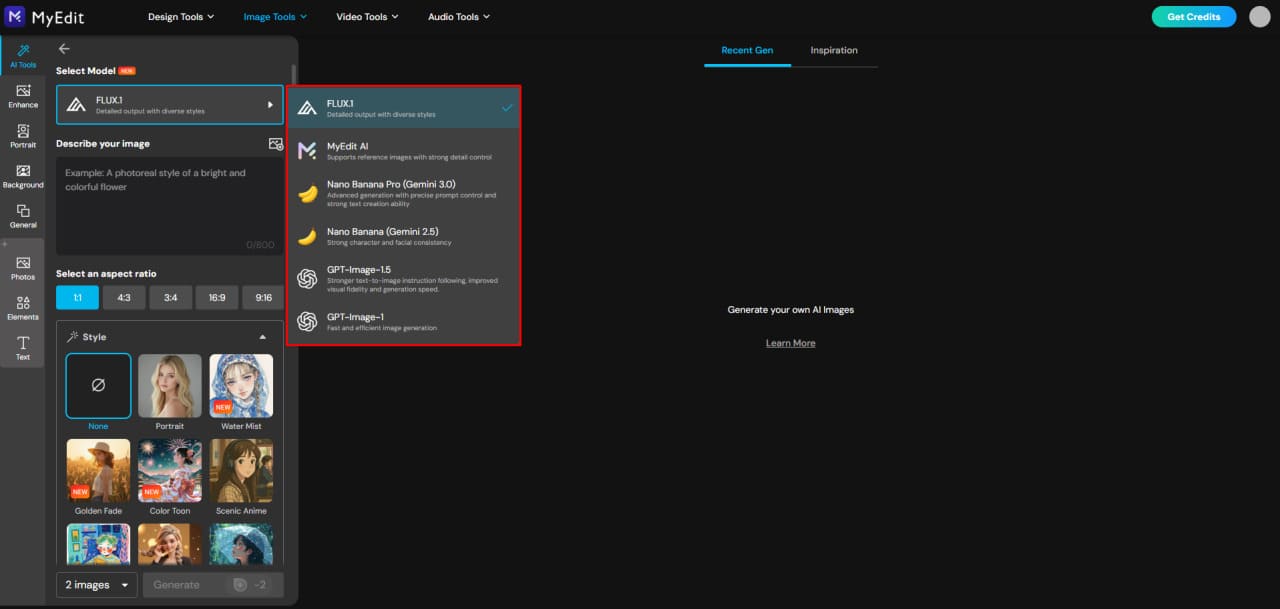
Pick a model: the picker groups a featured set above the rest. In August 2026 it listed GPT-Image-2, Nano Banana Pro, Nano Banana 2, Nano Banana 2 Lite, Seedream 5.0 Pro, FLUX.2 Pro and Z-Image in the featured group, with more below. We used GPT-Image-2 for every example we generated for this page.
-
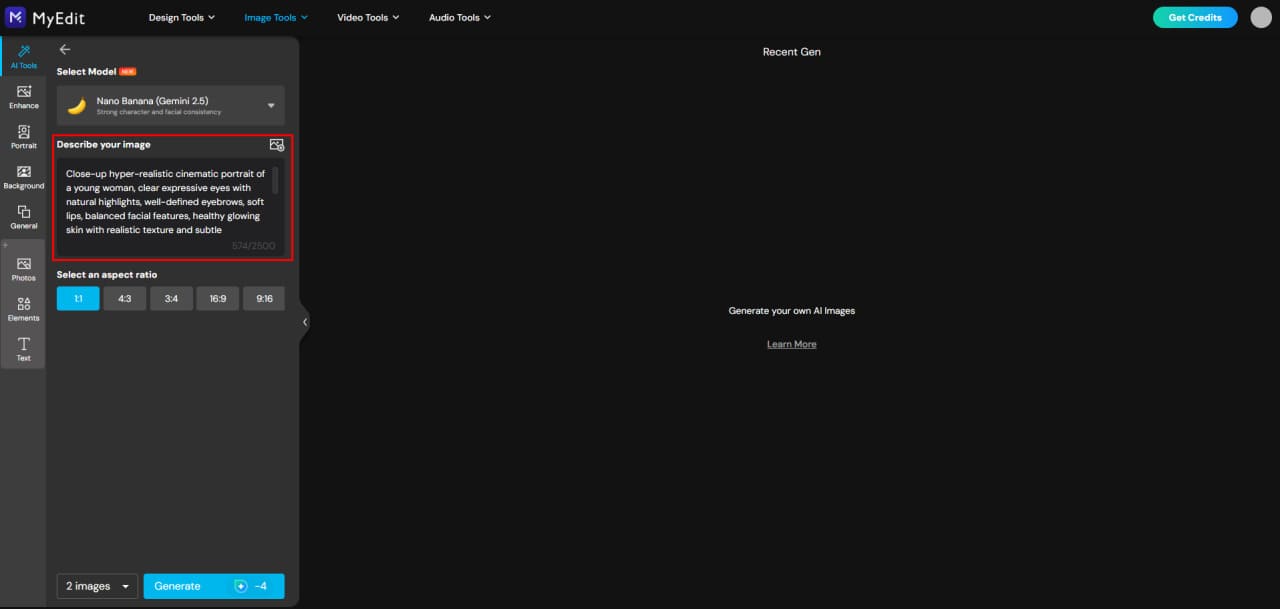
Paste your prompt: copy one from this article or write your own using the formula near the top of the page. The field takes up to 8,000 characters, which is far more than any prompt here needs.
-
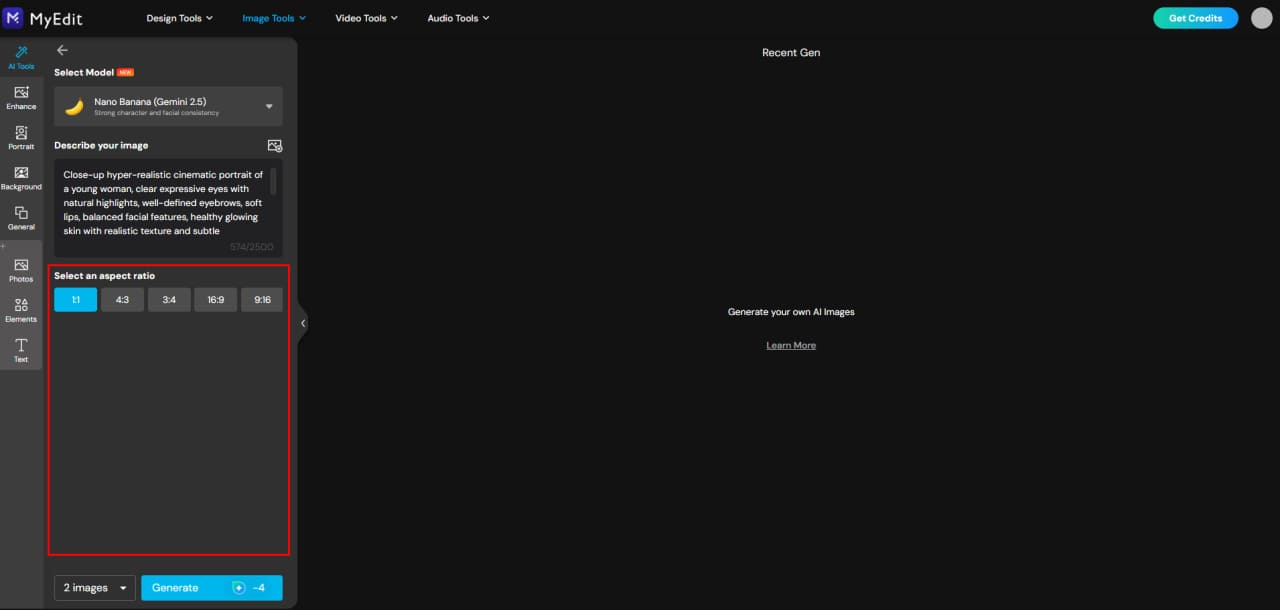
Set the frame: choose an aspect ratio from 1:1, 4:3, 3:4, 16:9 or 9:16, and a resolution of 1K or 2K. Set the ratio here rather than asking for it in the prompt, which is unreliable in every tool.
-
Generate: click Generate. In our testing each image took roughly a minute to come back.
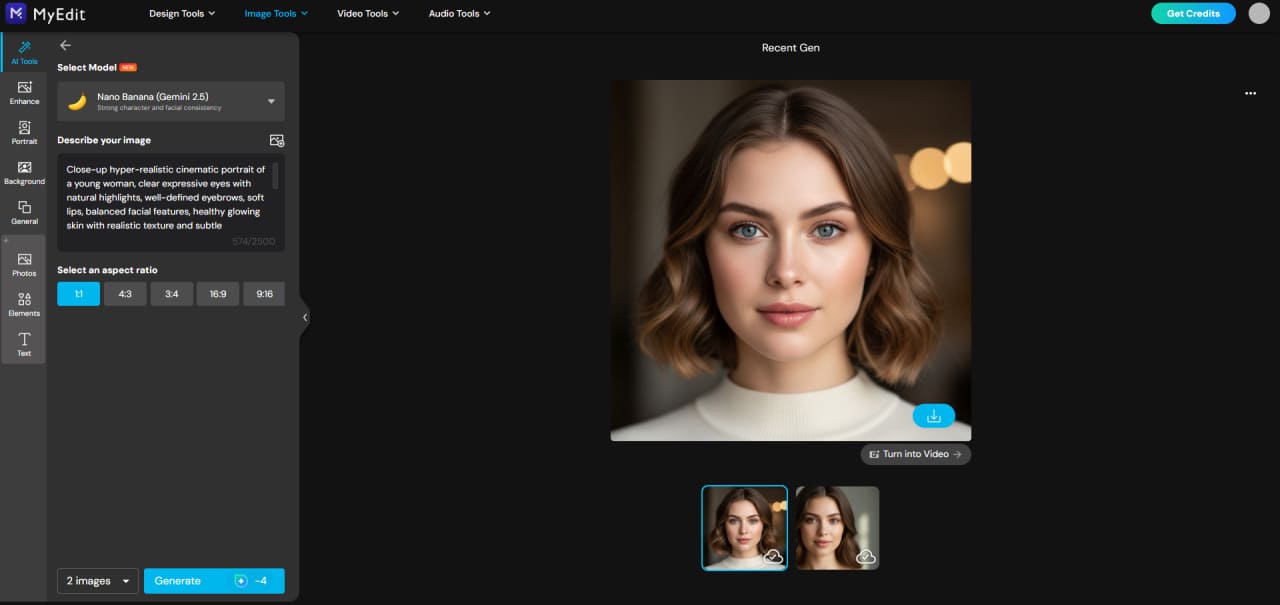


Starting From a Reference Photo
This is the route for the portrait, editing, inpainting and social prompts, where an existing image is the starting point.
- Open the same generator. Reference images are part of the AI Image Generator, not a separate tool.
- Expand the reference image panel below the aspect ratio and resolution controls, and upload your photos. The panel accepts up to 16 images per generation, which is what makes couple, family and group prompts possible: one or more faces, plus an optional style reference.
- Write the prompt as a pair of instructions. Say what to keep from the reference, faces, pose, structure, and what to change: lighting, background, style, wardrobe. Every reference-based prompt above follows this shape.
- Generate, then narrow. If the likeness is off, remove style instructions until it locks in, then add them back one at a time.
If you would rather not write prompts at all, AI Filter applies preset styles to an uploaded photo instead, and AI Image to Video animates a finished image once you have one you like.


What It Costs to Run
Worth knowing before you plan a batch. In MyEdit, one generation with GPT-Image-2 costs 6 credits, and the free plan grants 3 credits per day. That means the free allowance does not cover a single image per day at this model, so anything beyond occasional experimentation needs a paid plan or a credit pack. Costs differ by model, and the credit price is shown on the Generate button before you commit, so check it there rather than assuming.
The practical consequence for this article: working through a section of ten prompts is a 60-credit exercise. Test one prompt, confirm the direction, then run the rest.
Q: Do I need a different tool for editing than for generating?
A: No. The AI Image Generator handles both, because uploading a reference photo turns a text prompt into an edit instruction. A separate brush-based tool, AI Replace, exists for masked edits where you want to protect the rest of the frame.
Q: How many credits does one image cost?
A: Six with GPT-Image-2, which is what we used throughout. The figure appears on the Generate button and changes with the model, so confirm it before running a batch.
Sources for this guide:
The prompts, the credit costs and the interface details come from our own use of MyEdit in August 2026. Claims about third-party generators are sourced separately, since we did not test those tools ourselves.
- MidJourney model version and browser access: MidJourney, official version documentation, which records V8.2 as the default model since July 24, 2026.
- MyEdit model line-up, credit cost, prompt limit, aspect ratios and reference-image capacity: read directly from the AI Image Generator interface, August 2026.
- Stable Diffusion release family: described at the level all published sources agree on, SD 1.5, SDXL and SD 3.5, without asserting a current flagship version, because sources conflict on that point.
What is first-hand here is the MyEdit side: the model used, the time each generation took, what it cost and what the interface allows. Everything said about MidJourney, Stable Diffusion, Grok Imagine, Gemini and ChatGPT is sourced, not tested.
Related articles:
- The Ultimate AI Prompt Guide: Images, Videos and Creative Ideas
- 16 Best ChatGPT Photo Editing Prompts
- 50 Professional MidJourney Logo Prompts You Can Copy and Paste
- Gemini Polaroid Trend: How to Create It Using the Best Prompts
Transparency note:
MyEdit is a CyberLink product, and CyberLink publishes this blog. To keep the comparison honest we judged it on the same criteria as every other generator in the table above, declared its main limitation in that table alongside everyone else's, published what a generation actually costs in credits against the free daily allowance, and stated plainly which claims come from our own testing and which come from other tools' documentation.
AI Image Prompt FAQ
Name the subject and what it is doing, then the environment, then the style, lighting and framing. Anything you leave out, the model fills in with whatever was most common in its training data, which is where generic results come from. A prompt of 15 to 40 words that specifies those five things will beat a 100-word prompt that piles up adjectives about the same one.
Subject and action, then environment, then style, lighting, mood and perspective. Some tools reward a different phrasing of the same content: MidJourney reads flowing sentences well, while Stable Diffusion tends to respond better to short comma-separated tags. The elements stay the same; only the punctuation changes.
The content transfers, the syntax does not always. Drop any tool-specific parameters such as MidJourney's double-dash flags, since other generators read them as literal text. Expect different output from identical wording, because each model was trained differently and interprets the same style words its own way.
Pick one that accepts reference images and supply one, because a photograph constrains the result far more effectively than any adjective. We generated the text-to-image and reference-face examples on this page with GPT-Image-2 inside MyEdit, using its reference-image panel for the portrait prompts. Model line-ups change frequently, so check what your tool currently offers rather than trusting any guide's list.
Yes, and for faces you should. A reference photo carries bone structure, proportion and pose that wording cannot reliably reproduce. In the MyEdit AI Image Generator the reference panel takes up to 16 images per generation, so you can supply several angles of the same person plus a separate style reference.
In MyEdit, one generation with GPT-Image-2 costs 6 credits, and the free plan grants 3 credits a day, so the free tier does not cover one image per day at that model. Other models carry different prices and the cost is shown on the Generate button before you run it. Most subscription generators price by compute time or monthly quota rather than per image, so compare on what you actually produce in a month.
Write the instruction in two halves: what to change, and what to keep. "Replace the background with a clean minimal environment, preserve shadows and edges" works because the second clause stops the model from rebuilding the subject too. Where a brush or mask is available, use it, and the edit is confined to the area you select.
Inpainting rebuilds a selected area inside the existing frame, which is how you remove an object, swap a garment or fix hands. Outpainting invents new content beyond the original edges to widen or lengthen the image. Both need the prompt to describe not only the new content but the lighting and perspective it has to match.
Image models sample from a range of possible outputs, and each run starts from different random noise. Sharper wording narrows that range but never reduces it to a single result. If you need consistency across a set of images, generate one you like and feed it back as a reference for the rest instead of rewriting the description.
It depends on the tool's terms and on what went into the prompt, so check the licence of the generator you used. Two things reliably cause problems regardless of platform: prompts built on a trademarked character or franchise, and images of a real person generated without their agreement. Prompts describing an aesthetic rather than naming a rights holder avoid the first, and using only photos of consenting people avoids the second.
The CyberLink Editorial Team is composed of product testing specialists and content creation experts with over 20 years of hands-on experience and rigorous research in the multimedia editing industry. As the official voice of CyberLink, the team consistently delivers practical, easy-to-follow tutorials across video, photo, and audio editing, while highlighting AI innovations, product insights, and emerging industry trends. Their work empowers millions of creators worldwide each year to elevate their content. Beyond the blog, the team actively shares editing tips and product updates across YouTube, Facebook, Linkedin and Pinterest.
😎 Outside of their work, they enjoy capturing travel moments and meticulously editing photos and videos for their social channels.


