



30 Best Sora 2 Video Prompts & Ultimate Prompting Guide

Even though Sora 2, which revolutionized filmmaking in 2025 with its real-world framing, lighting and storytelling, is scheduled to shut down its app on April 26, 2026, and its API on September 24, 2026, the legacy of its video prompts lives on. The same prompts that powered Sora 2's success can still be used to create stunning visuals across other video generation models.
In this guide, you will learn how to write effective Sora 2 prompts, explore professional prompting structures, and get 30 ready-to-use Sora 2 video prompts designed for viral content.
- What Is Sora 2?
- How to Write Effective Sora 2 Prompts Like a Pro
- How to Generate AI Videos With the Best Sora 2 Alternative
- 30 Best Sora 2 Video Prompts
- Common Sora 2 Prompting Mistakes
- Sora 2 Prompt Checklist Before You Generate
- Sora 2 vs Other AI Video Models: When to Use It
- FAQs About Sora 2 Prompting
What Is Sora 2? How OpenAI's Latest Video Model Works
⚠️If you want to know more about why Sora 2 is shutting down and find an alternative, check out our blog: Sora Is Shutting Down: The Best Alternatives to Use in 2026!
Sora 2 is OpenAI's next-generation text-to-video and image-to-video model, designed to generate short, high-fidelity video clips with consistent motion, realistic lighting, and cinematic composition. Unlike earlier AI video tools that focused mainly on visuals, Sora 2 treats video generation like real filmmaking. It understands camera framing, depth of field, subject movement, lighting direction, and even dialogue timing.
At its core, Sora 2 transforms prompts into a sequence of coherent frames, maintaining spatial and temporal consistency across the clip. This allows creators to produce videos that feel intentional rather than chaotic. Short clips between 4 and 12 seconds work best, especially when prompts describe clear actions and simple camera movement.
▼ The showcase released by OpenAI.
How to Write Effective Sora 2 Prompts? Structures & Tips
Writing for Sora 2 is less like "chatting" and more like briefing a cinematographer. If you are too vague, the AI will improvise; if you are too rigid, you might lose that "AI magic." We have listed some fundamental yet highly useful tips below. By following these rules, you can produce high-quality results whether you are using Sora or any other AI video tool.
For a more detailed guide, refer to the official Sora 2 Prompting Guide.
The Core Philosophy
- Brief Like a Director: Think of the model as a camera crew that hasn't seen your script. Be specific about the "shot," not just the "subject."
- Balance Control vs. Creativity: Detailed prompts give consistency; lighter prompts (shorter descriptions) allow the model to surprise you with beautiful, unexpected interpretations.
- Prepare to Iterate: Your first generation is a "take." Small tweaks to lighting or camera angles can shift the result dramatically.
Professional Prompt Anatomy
- Framing & Lens: (e.g., "Wide establishing shot, 35mm lens")
- Subject & Action: Describe the "beat." (e.g., "A traveler takes three steps, pauses, and looks at a map.")
- Lighting & Palette: (e.g., "Golden hour sunlight, amber and teal tones")
- Sound & Dialogue: (e.g., "Dialogue: 'We're finally here.' Ambience: Wind howling.")
Clarity Wins: Specificity Table
| Weak prompt | Strong prompt |
|---|---|
| A futuristic city | Glass skyscrapers with animated billboards, elevated skyways, autonomous vehicles gliding below, cool blue and magenta lighting |
| Character enters the room | Door opens slowly, character steps in with one foot, pauses, scans the room, then fully enters on the final beat |
| Fast-paced action scene | Handheld camera, quick lateral pan as the runner sprints five steps, sharp stop, heavy motion blur on background |
| Romantic moment | Couple stands inches apart, warm rim light outlining profiles, city lights softly blurred behind them |
Pro-Level Feature: Using Image Inputs & Remixing
- Image-to-Video: Upload a photo or a DALL-E 3 generation to "lock in" character design or wardrobe. Sora 2 uses the image as the first frame and your text to animate it.
- The Remix Logic: Use the Remix feature to change one thing at a time (e.g., "Same shot, but change the jacket to red"). This prevents "gambling" with entirely new seeds.
How to Generate AI Videos With the Best Sora 2 Alternative
Sadly, we won't be able to generate videos with Sora 2 in the near future, but many other incredible AI video models are available, each with its own unique strengths.
Instead of dealing with multiple expensive subscriptions and a clunky workflow, we highly recommend MyEdit. It’s an easy-to-use online hub backed by CyberLink’s 30 years of video expertise, offering a stable way to create high-end AI videos with consistent quality and the latest models.
Text to Video on MyEdit
- Go to Text to Video in MyEdit.
- Choose the AI video model.
💡You can try the prompts with Google Veo 3.1, Vidu Q3, and Kling 3.
- Enter your prompt in the prompt box.
💡If you have no ideas about what to create, simply copy and paste prompts from the best Sora 2 prompt collections.
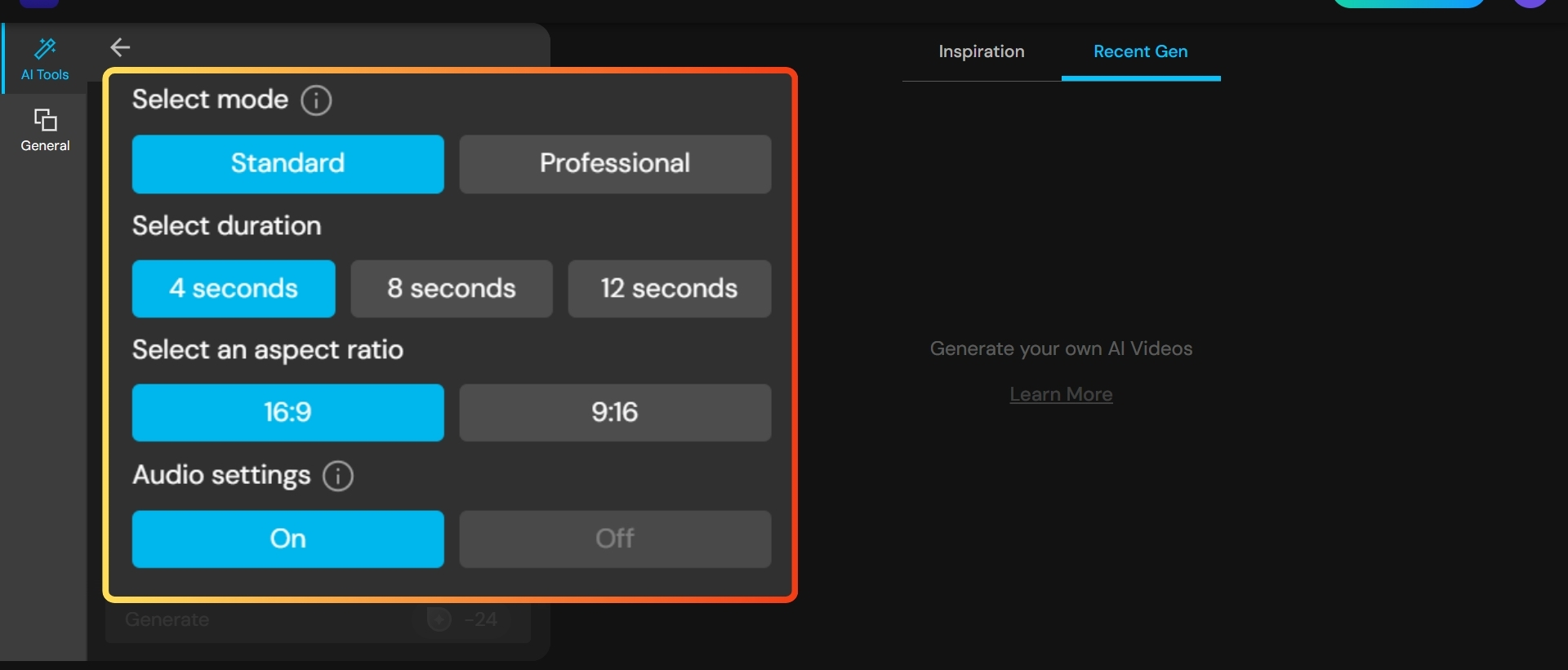
- Select mode (Standard/Professional), time length (4s/8s/12s), aspect ratio (16:9/9:16), audio (On/Off).
- Click "Generate" and wait for your masterpiece!

Image to Video on MyEdit
- Go to Image to Video in MyEdit.
- Upload your image and choose an AI video model.
💡You can try the prompts with Google Veo 3.1, Vidu Q3, Kling O3 and Kling 3.
- Enter your prompt in the prompt box.
- Select mode (Standard/Professional), time length (4s/8s/12s), aspect ratio (16:9/9:16), audio (On/Off).
- Click "Generate" and wait for your masterpiece!
30 Ready-to-Use Sora 2 Video Prompts for Viral Content
Here are some fun video prompts worth trying. These prompts leave plenty of creative freedom for the AI, so you can start by testing them as they are. Then, based on your needs, add more details using the prompting guide above to create results that better match your vision.
🤣 Comedy and Meme
- A cat in a business suit delivers a motivational speech to bored office workers.
- A "Distracted Boyfriend" meme recreated in a 1920s silent film style, grainy texture, over-the-top acting.
- A serious nature documentary voiceover about a squirrel stealing snacks.
🥹 Warm and Emotional
- Close-up on an elderly woman's hands playing a piano. As she plays, the reflection in the wood shows her younger self's hands.
- Two old friends reunite at a quiet train station after 20 years.
- A child leaves a handwritten note on a rainy bus stop bench.
❤️ Love and Romance
- 35mm film, golden hour. A couple dances on a rainy Parisian balcony. Dialogue: "Don't let go." Ambience: Soft accordion and rain.
- A couple locking eyes across a crowded subway platform.
- A handwritten love letter read aloud over city night shots.
🎬 Movie Trailer Style
- High-octane drone shot chasing a red sports car through a mountain pass. Sound: Roaring engine and epic orchestral swell.
- A hero walks alone through fog as a title card fades in.
- A montage of intense close-ups cut to silence.
👻 Horror and Urban Legends
- A flickering hallway where shadows move independently.
- A night security camera captures something standing still for too long.
- A handheld "found footage" style shot of a long, dark hallway. A single red balloon floats slowly toward the camera.
🎤 Street Interviews
- Asking strangers what happiness means, shot documentary-style.
- Rapid-fire questions with jump cuts and natural reactions.
- A single question answered by ten different faces.
🐾 Pets
- A Golden Retriever wearing sunglasses dancing on a moving surfboard, looking incredibly chill.
- A hamster navigating an absurdly complex maze.
- A parrot reacting dramatically to everyday sounds.
🌌 Surreal and Sci-Fi
- A city floating upside down above the ocean.
- Inside a spaceship cockpit, stars warping into light-speed streaks. Dialogue: "Engage." Sound: Low-frequency engine hum.
- Time freezing as one person continues moving.
🌐 Internet Culture
- A fake product commercial that slowly becomes unhinged.
- A cinematic reveal of a very normal object.
- Before-and-after glow-up parody montage.
✨ Aesthetic and Experimental
- Hands reaching through drifting fabric in slow motion.
- A single candle burning down as light changes.
- A mirror reflection that reacts a second too late.
Common Sora 2 Prompting Mistakes to Avoid
- Describing multiple complex actions in one short clip
- Mixing conflicting visual styles
- Vague verbs like “moves” or “looks”
- Overloading dialogue in a 4-second shot
- Ignoring lighting consistency across clips
Quick Sora 2 Prompt Checklist Before You Generate
- One main subject
- One clear action
- One camera move
- Defined lighting logic
- Appropriate clip length
- Optional but clear style cue
Sora 2 vs Other AI Video Models: When to Use It
Sora 2 excels at:
- Cinematic realism
- Controlled motion
- Narrative shots
- Dialogue-driven scenes
It may not be ideal for:
- Ultra-long videos
- Fast-cut music videos
- Highly abstract motion experiments
FAQs About Sora 2 Prompting Guide
Focus on the "Shot List" method: Define the camera framing first, then the subject's actions in "beats" (counts of seconds), and finish with lighting and audio cues.
While there isn't a strict word limit, the model performs best with prompts between 80–150 words. Overloading it with too many conflicting instructions can cause visual "hallucinations."
Yes! By adding a Dialogue: block at the end of your prompt, Sora 2 will animate the character's mouth to match the text and generate a corresponding voice.
The Sora iOS app remains available until April 26, 2026, followed by API access which continues through September 24, 2026.
Viral videos often use the Remix tool to create "impossible" variations of familiar memes or high-end cinematic "fake" trailers that look indistinguishable from 35mm film.
As industry experts in generative AI, the CyberLink AI Research Team has spent over 5 years benchmarking and analyzing the rapidly evolving landscape of creative technology. The team conducts rigorous testing of emerging AI tools for content creation, delivering weekly insights and practical workflows that help millions of creators worldwide each year identify the most suitable AI solutions to enhance their productivity.
😜 Outside of their research, the team actively experiments with AI-driven video creation, builds content across social platforms, and explores new side projects, all with the long-term goal of achieving greater creative and financial freedom.


