







What Will I Look Like When I Grow Up? 20 Old Age Filter Prompts to Try

Aging filters are everywhere lately, and it’s easy to see why—they let you preview a future version of yourself in seconds. Whether you’re just curious or want to share a fun transformation, AI makes it surprisingly realistic with just one photo.
If you want clean, accurate results, MyEdit makes the process simple. Upload a reference image, add a quick prompt, and the AI instantly generates a natural-looking older version of you—or even a full age-progression animation.
- What Is an AI Old Age Filter?
- How to Use an Online Old Age Filter
- Best Old Face Filter Prompts You Need to Try
- Tips for More Natural Old Age Filter Photos
- Why Use the MyEdit Online Old Age Filter?
- Old Age Filter FAQ
What Is an AI Old Age Filter and Why They’re Trending?

Have you ever wondered what you might look like in 20, 30, or even 50 years? That’s exactly what an AI old age filter lets you do. Sometimes called a photo ager or old face filter, this tool uses artificial intelligence to digitally age your face in a photo, adding wrinkles, changing hair color, and subtly transforming features to create a realistic look at the future you.
These filters have become a huge trend online, and it’s easy to see why. People love them for all sorts of reasons:
- Curiosity – just to see what they will look like when they grow up.
- Fun – sharing funny or surprising aged photos with friends on social media.
- Family insights – comparing aging across generations or imagining children’s future appearances.
- Creative projects – writers, artists, and designers use them to visualize characters over time.
With tools like MyEdit, old age filters are no longer just simple apps—they’re AI-powered, fast, and realistic, making them a must-try feature
Disclaimer
Use these AI face filters responsibly. Only upload images of individuals with their explicit consent. The creators are not liable for misuse, and generating or sharing altered images without permission may violate privacy or applicable laws.
How to Use an Online Old Age Filter (Step-by-Step Guide)
Using an AI old age filter is simple, and with MyEdit you can generate a realistic aged version of yourself in just a few minutes. Here’s the exact process to follow to get the most accurate results.
- Open MyEdit: Go to AI Image Generator. This is where you’ll upload a face reference and create your realistic aged photo.
-
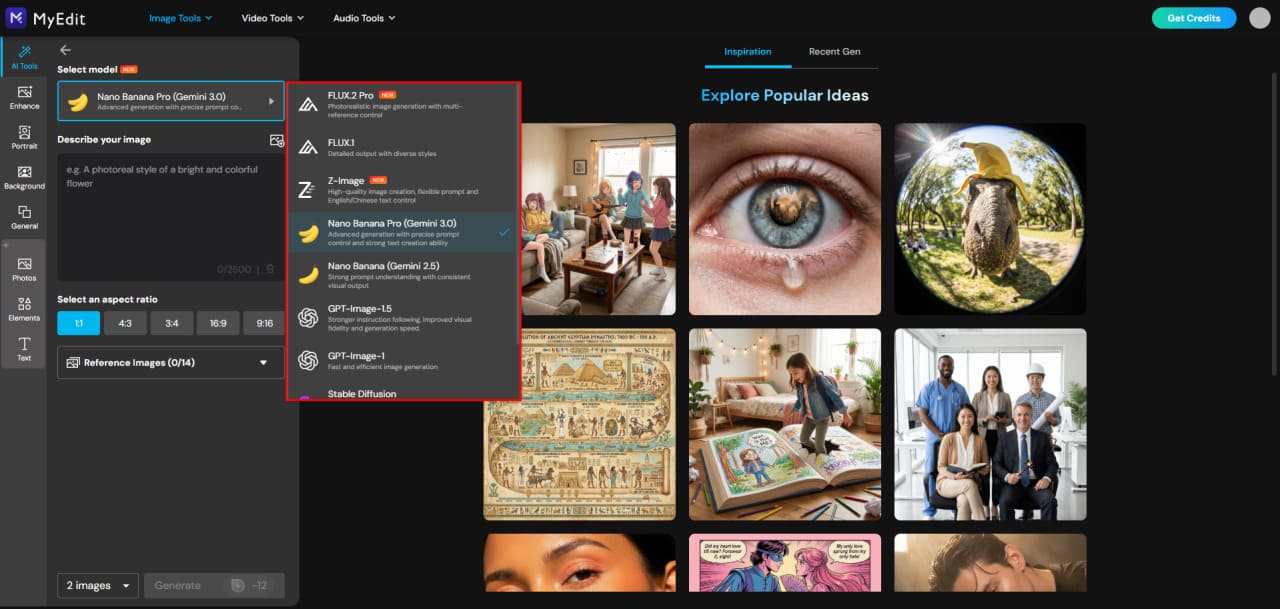
Choose Your AI Model:
For the most accurate aging effects, select Gemini 2.5 or higher.
These models handle wrinkles, skin texture, and subtle age transformations far more realistically than standard filters.
-
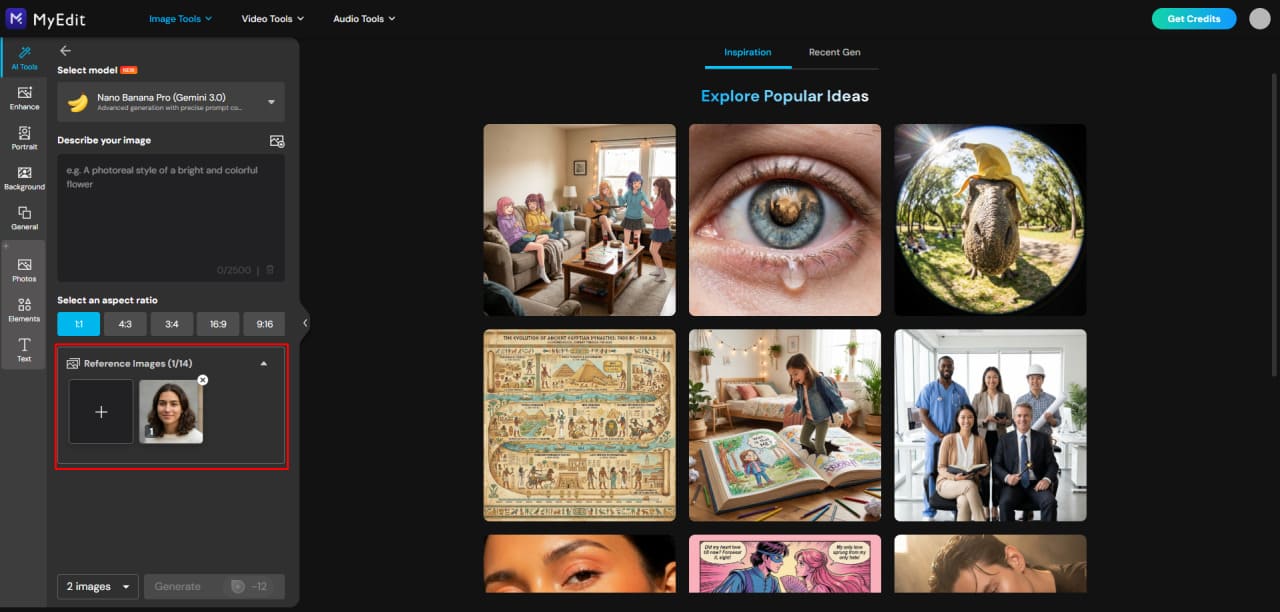
Upload Your Reference Photo:
Add a clear portrait of the person you want to age.
The cleaner the image (good lighting, front-facing, unobstructed face), the more natural and detailed the aging effect will look.
-
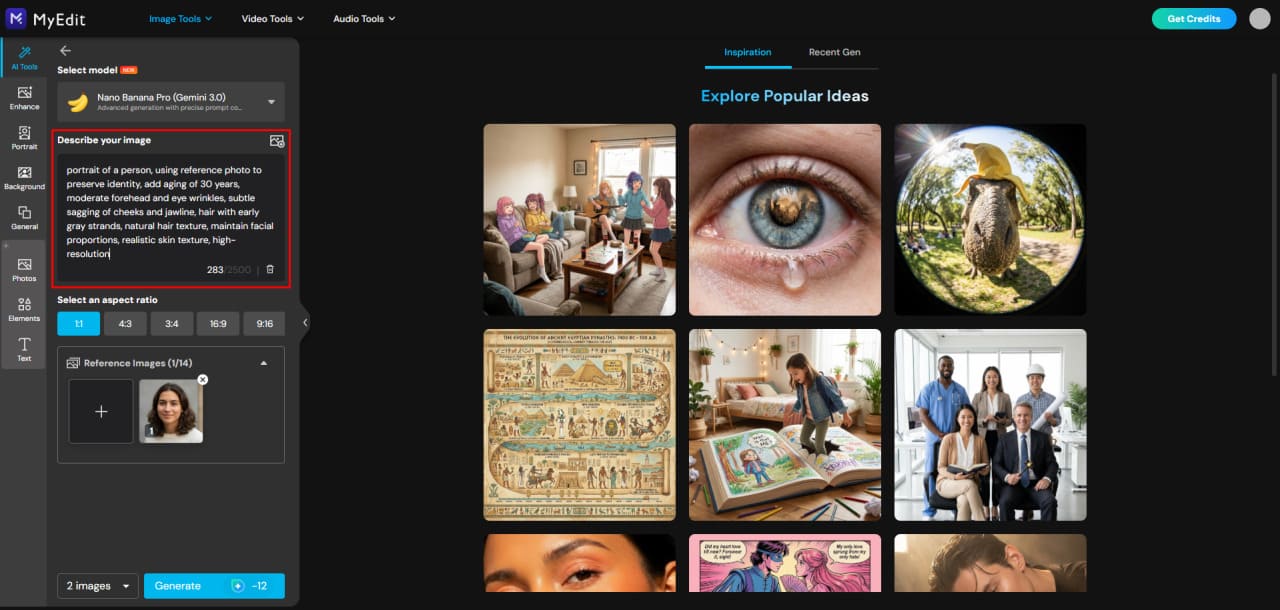
Enter Your Aging Prompt:
Write a simple prompt describing how old you want the person to look.
You can aim for subtle aging (“age 20 years”) or extreme transformations (“90-year-old version”).
Feel free to copy prompts from the list in this article to get even better results.
-
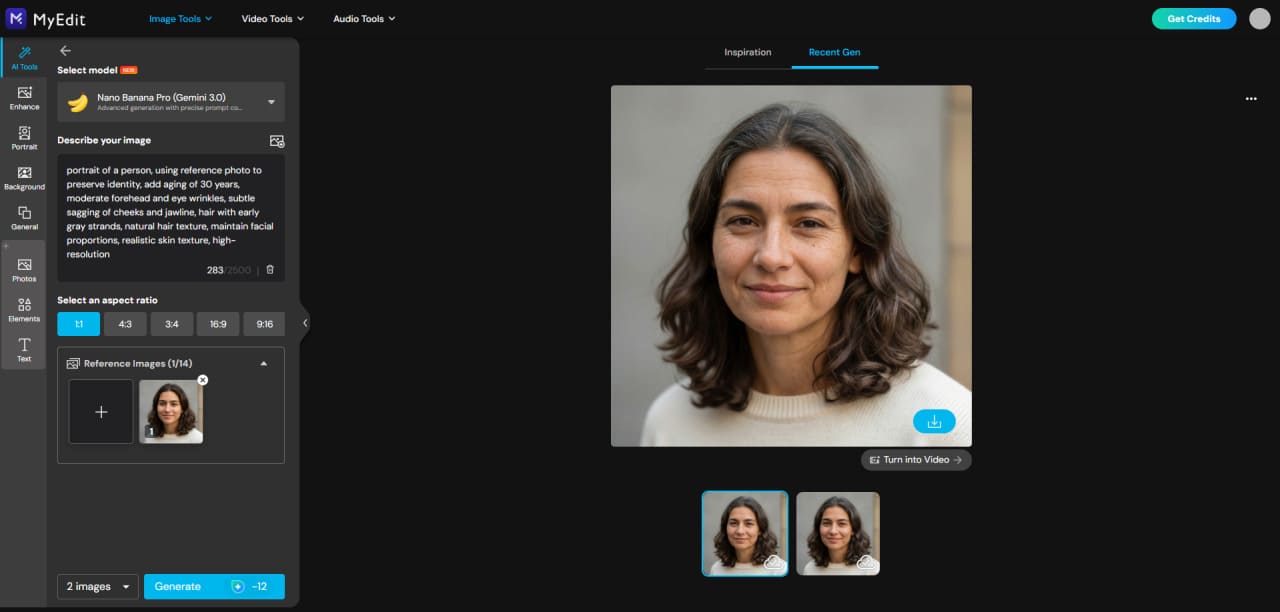
Generate Your Aged Photo:
Click Generate and wait a few seconds.
If you want a different look, you can adjust the prompt or try a new angle with the same reference photo.


Best 20 Old Age Filter Prompts You Need to Try
Below are the most effective aging prompts you can use with MyEdit to turn a reference photo into a realistic older version. Each effect includes a link anchor so you can show a before/after example later in the article.
Best Old Age Filter Prompts: Realistic Aging
- Age +20 Years (Natural, Subtle Aging)
- Age +30 Years With Light Wrinkles
- 70-Year-Old Realistic Version
- 80-Year-Old Version With Deep Wrinkles
- 90-Year-Old Super Aged Version
- Future Self With Gray Hair & Age Spots
- Aged Version With Soft Silver Hair Glow
- Old Age Filter With Natural Skin Sagging
- Realistic Aged Face With Sun Damage
- Future Version With Subtle Aging (Light Wrinkles)
Best Old Age Filter Prompts: Expression-Based Aging
- Smiling Elderly Version (Wrinkles Around Eyes)
- Serious Elderly Version (Sharper Wrinkles)
- Laughing Elderly Version With Crow’s Feet
- Elderly Version With Tired Eyes & Dark Circles
- Elderly Version With Soft, Gentle Expression
Best Old Age Filter Prompts: Stylized Aging
- Cartoon-Style Elderly Face
- Hyper-Realistic Cinematic Aged Face
- Vintage Portrait–Style Elderly Look
- Sci-Fi Futuristic Old Age Version
- Old Age Fantasy Wizard / Elder Mystic Look
Best Old Age Filter Prompts: Realistic Aging
Use a clear reference image so the AI can preserve the subject’s facial identity and proportions while adding realistic aging effects.
1. Age +20 Years (Natural, Subtle Aging)
This prompt ages a face by around 20 years. The AI adds subtle wrinkles, light skin sagging, and early signs of graying hair, keeping facial features fully recognizable.


Prompt sample: "portrait of a person, using reference photo to preserve identity, add natural aging of 20 years, subtle forehead and eye wrinkles, light skin sagging on cheeks and jawline, early graying hair around temples, realistic hair texture, maintain facial proportions, high-resolution"
2. Age +30 Years With Light Wrinkles
This prompt ages a face by about 30 years. The AI introduces moderate forehead lines, crow’s feet around the eyes, slight sagging in cheeks and jawline, and graying hair with natural highlights.


Prompt sample: "portrait of a person, using reference photo to preserve identity, add aging of 30 years, moderate forehead and eye wrinkles, subtle sagging of cheeks and jawline, hair with early gray strands, natural hair texture, maintain facial proportions, realistic skin texture, high-resolution"
3. 70-Year-Old Realistic Version
This prompt generates a realistic 70-year-old face. Deep wrinkles appear on the forehead and around the eyes, cheeks and jawline show more sagging, and hair is mostly gray with natural highlights.


Prompt sample: "portrait of a person, using reference photo to preserve identity, age to 70 years, deep forehead and eye wrinkles, sagging cheeks and jawline, mostly gray hair with natural highlights, realistic hair texture, preserve facial proportions, high-resolution, natural skin texture"
4. 80-Year-Old Version With Deep Wrinkles
This prompt creates an 80-year-old face. The AI emphasizes deep wrinkles on the forehead, around eyes, and mouth, pronounced skin sagging, and hair fully gray with subtle texture details.


Prompt sample: "portrait of a person, using reference photo to preserve identity, age to 80 years, deep forehead, eye, and mouth wrinkles, pronounced sagging cheeks and jawline, fully gray hair with natural texture, maintain facial proportions, high-resolution, realistic skin details"
5. 90-Year-Old Super Aged Version
This prompt produces a 90-year-old face. The AI adds very deep wrinkles, significant sagging of cheeks and jawline, age spots, thin gray hair, and realistic skin texture for a highly aged appearance.


Prompt sample: "portrait of a person, using reference photo to preserve identity, age to 90 years, very deep forehead, eye, and mouth wrinkles, sagging cheeks and jawline, age spots, thin gray hair, realistic skin texture, maintain facial proportions, high-resolution"
6. Future Self With Gray Hair & Age Spots
This prompt generates a future-aged version of a face with medium wrinkles, sagging skin, graying hair, and natural age spots, creating a realistic look of someone decades older.


Prompt sample: "portrait of a person, using reference photo to preserve identity, add future aging with moderate wrinkles, sagging skin on cheeks and jawline, gray hair, age spots, maintain facial proportions, realistic skin texture, high-resolution"
7. Aged Version With Soft Silver Hair Glow
This prompt creates a subtle aged version with silver-gray hair glow, light wrinkles, mild sagging, and a soft natural appearance suitable for a gentle aging effect.


Prompt sample: "portrait of a person, using reference photo to preserve identity, subtle aging with silver-gray hair glow, light forehead and eye wrinkles, mild sagging of cheeks and jawline, maintain facial proportions, realistic skin texture, high-resolution"
8. Old Age Filter With Natural Skin Sagging
This prompt emphasizes natural skin sagging along the cheeks, jawline, and neck, with light to medium wrinkles and partially gray hair, producing a realistic aged effect.


Prompt sample: "portrait of a person, using reference photo to preserve identity, natural skin sagging on cheeks, jawline, and neck, light to medium forehead and eye wrinkles, partially gray hair, maintain facial proportions, realistic skin texture, high-resolution"
9. Realistic Aged Face With Sun Damage
This prompt produces a realistic aged look with moderate wrinkles, slight skin sagging, graying hair, and sun damage such as faint spots and texture changes on the skin.


Prompt sample: "portrait of a person, using reference photo to preserve identity, realistic aging with moderate wrinkles and skin sagging, graying hair, subtle sun damage and age spots, maintain facial proportions, realistic skin texture, high-resolution"
10. Future Version With Subtle Aging (Light Wrinkles)
This prompt adds subtle aging to the face, including light wrinkles on the forehead and around the eyes, minor skin sagging, and early graying hair, preserving a youthful but aged look.


Prompt sample: "portrait of a person, using reference photo to preserve identity, subtle future aging with light forehead and eye wrinkles, minor sagging of cheeks and jawline, early graying hair, maintain facial proportions, realistic skin texture, high-resolution"
Best Old Age Filter Prompts: Expression-Based Aging
These prompts create older versions of a face while emphasizing specific expressions. The AI preserves identity and facial proportions, adjusting wrinkles, sagging, and hair to match the chosen expression.
11. Smiling Elderly Version (Wrinkles Around Eyes)
This prompt generates an elderly face with a warm smile. Crow’s feet and laugh lines appear naturally, cheeks lift slightly, and hair shows gray highlights, creating a joyful aged look.


Prompt sample: "portrait of a person, using reference photo to preserve identity, smiling elderly version, natural crow’s feet and laugh lines, lifted cheeks, light sagging of jawline, partially gray hair with natural highlights, maintain facial proportions, realistic skin texture, high-resolution"
12. Serious Elderly Version (Sharper Wrinkles)
This prompt creates a serious aged face. The AI emphasizes sharper forehead and eye wrinkles, slight frown lines, sagging cheeks and jawline, and gray hair, producing a dignified elderly appearance.


Prompt sample: "portrait of a person, using reference photo to preserve identity, serious elderly version, sharp forehead and eye wrinkles, frown lines, sagging cheeks and jawline, gray hair, maintain facial proportions, realistic skin texture, high-resolution"
13. Laughing Elderly Version With Crow’s Feet
This prompt creates a laughing elderly face. Crow’s feet are pronounced, cheeks are raised, mouth lines deepen naturally, and hair shows subtle graying for a lively, aged expression.


Prompt sample: "portrait of a person, using reference photo to preserve identity, laughing elderly version, pronounced crow’s feet and mouth lines, lifted cheeks, subtle gray hair, maintain facial proportions, realistic skin texture, high-resolution"
14. Elderly Version With Tired Eyes & Dark Circles
This prompt produces an aged face with a fatigued appearance. The AI adds gentle sagging, fine wrinkles, slight under-eye puffiness, dark circles, and gray hair for a realistic tired look.


Prompt sample: "portrait of a person, using reference photo to preserve identity, elderly version with tired eyes, fine wrinkles, slight sagging cheeks and jawline, dark under-eye circles, partially gray hair, maintain facial proportions, realistic skin texture, high-resolution"
15. Elderly Version With Soft, Gentle Expression
This prompt creates a gentle, calm elderly face. Wrinkles are soft and subtle, cheeks and jawline show mild sagging, eyes convey warmth, and hair is lightly grayed for a serene aged look.


Prompt sample: "portrait of a person, using reference photo to preserve identity, elderly version with soft gentle expression, subtle forehead and eye wrinkles, mild sagging of cheeks and jawline, partially gray hair, maintain facial proportions, realistic skin texture, high-resolution"
Best Old Age Filter Prompts: Stylized Aging
These prompts create older versions of a face with artistic or thematic styles. The AI preserves identity while applying stylistic aging effects such as cartoonish, cinematic, vintage, sci-fi, or fantasy looks.
16. Cartoon-Style Elderly Face
This prompt transforms a face into a cartoon-style elderly version. The AI exaggerates facial features like wrinkles and cheek sagging in a playful, stylized way while maintaining recognizable identity and realistic hair texture.


Prompt sample: "portrait of a person, using reference photo to preserve identity, cartoon-style elderly face, exaggerated wrinkles on forehead and around eyes, slight sagging cheeks and jawline, gray hair with cartoon texture, maintain facial proportions, high-resolution"
17. Hyper-Realistic Cinematic Aged Face
This prompt generates a cinematic, hyper-realistic aged version. Deep wrinkles, realistic sagging, and detailed gray hair are combined with dramatic lighting and cinematic textures for a polished movie-like appearance.


Prompt sample: "portrait of a person, using reference photo to preserve identity, hyper-realistic cinematic aged face, deep forehead and eye wrinkles, sagging cheeks and jawline, gray hair with realistic texture, dramatic lighting, maintain facial proportions, high-resolution"
18. Vintage Portrait–Style Elderly Look
This prompt gives a vintage portrait aesthetic. The AI adds aging with soft wrinkles, mild sagging, and gray hair while applying subtle sepia tones or soft lighting to mimic classic photography styles.


Prompt sample: "portrait of a person, using reference photo to preserve identity, vintage portrait-style elderly face, soft wrinkles, mild sagging cheeks and jawline, gray hair, subtle sepia tones, soft lighting, maintain facial proportions, high-resolution"
19. Sci-Fi Futuristic Old Age Version
This prompt creates a futuristic aged version. The AI adds sleek, slightly metallic or glowing hair strands, subtle facial wrinkles, and sci-fi-inspired textures for an imaginative elderly look.


Prompt sample: "portrait of a person, using reference photo to preserve identity, sci-fi futuristic elderly face, subtle wrinkles on forehead and around eyes, mild sagging of cheeks and jawline, gray hair with metallic or glowing highlights, maintain facial proportions, high-resolution"
20. Old Age Fantasy Wizard / Elder Mystic Look
This prompt produces a fantasy-themed elderly face, resembling a wizard or elder mystic. Deep wrinkles, long flowing gray hair, and mystical textures or subtle magical glow are added while keeping facial identity clear.


Prompt sample: "portrait of a person, using reference photo to preserve identity, elderly fantasy wizard look, deep wrinkles, long flowing gray hair, mystical textures or subtle magical glow, maintain facial proportions, high-resolution"
Expert Tips for More Natural Old Age Filter Photos
Applying an old age filter can be fun, but a few smart adjustments make the results look more realistic. Here are expert tips to get the most natural aged photos using MyEdit.
1. Use a Clear Frontal Reference Photo
Choose a well-lit, frontal photo with minimal shadows and no heavy filters. The AI relies on this reference to preserve facial identity, proportions, and hair details while adding aging effects.
2. Adjust the Age Intensity
Not every photo needs extreme aging. Start with subtle changes (+10 to +30 years) to see how wrinkles, sagging, and gray hair appear before trying more dramatic transformations.
3. Pay Attention to Hair and Eyebrows
Gray or silver highlights in hair, slightly thinned eyebrows, and natural hair texture make the aged face more believable. Mention these details in your prompt for better results.
4. Keep Skin Texture Realistic
Subtle wrinkles, gentle sagging, and slight skin discoloration create a realistic effect. Avoid overly sharp or exaggerated lines unless you want a stylized or humorous look.
5. Match Lighting and Background
If your reference photo has natural lighting, try to keep the same conditions in the prompt description. This helps the AI blend aging effects seamlessly with the original photo.
6. Experiment With Expressions
Facial expression affects how aging appears. Smiles create crow’s feet, while serious expressions show deeper forehead and frown lines. Tailor your prompt depending on the mood you want.
7. Test Multiple Prompts
Even subtle wording changes can impact results. Try different combinations like “light wrinkles with silver hair” or “soft sagging and age spots” to see which best matches your vision.
8. Use MyEdit’s Gemini 2.5 or Higher
For optimal realism, select Gemini 2.5 or above when generating aged faces. It maintains identity consistency across multiple prompts while producing detailed, high-resolution results.
9. Review and Refine
After generating, compare before/after images and tweak prompts if necessary. Adjust hair color, wrinkle intensity, or skin tone for a final, natural look.
The MyEdit Old Face Filter That Shows You What You’ll Look Like
Discover how MyEdit lets you see yourself at any age, from subtle aging to dramatic transformations. Whether you want a single photo transformation or a smooth aging animation over time, MyEdit makes it easy.
AI Image Generator with Face Reference


Use the AI Image Generator to upload one or more reference photos and guide the AI with a simple prompt. MyEdit preserves identity while allowing you to apply aging, style, or expression changes—perfect for realistic old face filters or creative portrait experiments.
- Accurate face preservation: Keeps key facial features while applying aging effects.
- Flexible styling: Works for any individual, group, or family photo.
- Fast results: High-quality images generated in seconds.
- Detailed transformations: Customize wrinkles, gray hair, sagging, or facial expressions for realistic results.
AI Image to Video: Aging Animations

Create realistic aging animations with the AI Image to Video tool. For the best results, provide a first frame (current age) and a last frame (target age). The AI generates smooth transitions between these ages, showing how a person might naturally age over time. Perfect for before/after aging sequences, exploring age progression in decades, or sharing fun “future self” videos.
- Seamless aging animation: Smooth transitions from young to elderly while keeping identity intact.
- Customizable age progression: Control how subtle or dramatic the aging changes appear.
- High-quality output: Generates clean frames for GIFs or short video clips.
- Works with any portrait: Single or multiple faces can be animated consistently.
By providing start and end frames, MyEdit ensures your aging animation looks natural, maintaining facial features while adding realistic wrinkles, gray hair, and subtle sagging. It’s the easiest way to visualize what you or your loved ones may look like in the future.
Related Articles:
- Best Funny AI Prompts to Create Hilarious Images
- How to Generate AI Baby Dance Video
- How to Create a Funny AI Cat Video
Old Age Filter FAQ
An old-age filter is an AI-powered tool that transforms your face in a photo or video to show how you might look when older. It adds realistic wrinkles, gray hair, sagging, and other age-related details. You can try this easily with MyEdit to generate a realistic older version of yourself using a reference photo.
You can get an old face filter through apps and online tools. One of the easiest ways is using MyEdit. Simply upload a clear reference photo, choose an aging prompt, and the AI will generate a realistic older version of your face in seconds.
To edit your face to look older, upload a frontal photo to an AI tool like MyEdit and use prompts describing the age, wrinkles, gray hair, and subtle sagging you want to see. The AI preserves your facial identity while applying natural aging effects.
The “old man filter” is just a variation of the old-age filter. You can achieve it by uploading a reference photo and specifying an older male appearance in MyEdit’s AI prompt. The tool will apply realistic facial aging while keeping your features recognizable.
To see yourself age over time in a video, use MyEdit. Provide a first frame (current age) and a last frame (target age), and the AI will generate a smooth aging animation showing how your face evolves naturally over time.
While no tool can predict the future perfectly, AI old-age filters like MyEdit use your facial features to simulate realistic aging. By generating multiple aged versions with subtle changes, you can get a good idea of how you might look in the future.
You can create your own old-age filter using AI tools like MyEdit. Upload a reference photo, define the aging effects (wrinkles, gray hair, sagging), and generate a custom aged version. You can save it as a photo or even create a video animation showing progressive aging.
Snapchat used to have old-age filters in their Lens carousel, but availability changes over time. For a more customizable and realistic old-age effect, try MyEdit, which allows you to control age intensity, hair color, and facial details.
TikTok occasionally releases aging filters in its effects library. For a more consistent and realistic experience, use MyEdit to upload a reference photo and generate an older version, which you can then download and share on TikTok.
Instagram often rotates or removes older face filters, so some old-age filters may no longer be available. Instead, you can use MyEdit to create a realistic old face version from your photo anytime, with full control over age, expression, and style.


