






How to Turn Any Photo into a Painting Using AI (+ 30 Best Prompts)

Turning photos into paintings is no longer reserved for professional artists. Thanks to AI art filters, anyone can transform an ordinary picture into a gallery-worthy oil painting, watercolor, or sketch — in seconds, with zero design skills required.
With MyEdit's AI Image Generator, simply upload your photo as a reference and describe the art style you want — the AI handles the rest, transforming your picture into a stunning painting in seconds.
- Why Turn Photos into Paintings?
- How to Turn a Photo into a Painting
- Best Prompts to Turn Pictures into Art
- MyEdit: Best AI Art Filter
- Photo to Painting FAQ
Photo to Painting: The AI Art Trend You Need to Try

What if you could transform an ordinary photo into a stunning oil painting, a delicate watercolor, or a bold line drawing — in seconds? Thanks to AI art filters, this is no longer reserved for professional artists or expensive software. Millions of people are now turning their pictures into art, and the trend is only accelerating.
So why are so many people turning their photos into paintings? Here are the most popular reasons:
- Personalized wall art: Transform a family photo, travel snapshot, or portrait into a painting-style print worthy of framing.
- Creative social media content: Stand out on Instagram or TikTok with unique art effects that go far beyond standard filters.
- Gifts & keepsakes: A photo turned into a watercolor or oil painting makes a deeply personal and memorable gift.
- Artistic experimentation: Explore different painting styles — from impressionism to anime — without any drawing skills.
- Professional projects: Designers and content creators use painting filters to produce unique visuals for brands, campaigns, and editorial work.
The best part? You don't need a tablet, a stylus, or years of art training. With the right AI art filter, all you need is a photo — and the result can look like it took hours to create.
How to Turn Any Picture into a Painting with AI (No Design Skills Needed)
Turning a photo into a painting has never been easier. With MyEdit's AI Image Generator, you can transform any picture into a stunning work of art in just a few steps — no brushes, no software, no experience required. Here's exactly how to do it:
- Go to the AI Image Generator to start turning your photo into a painting.
-
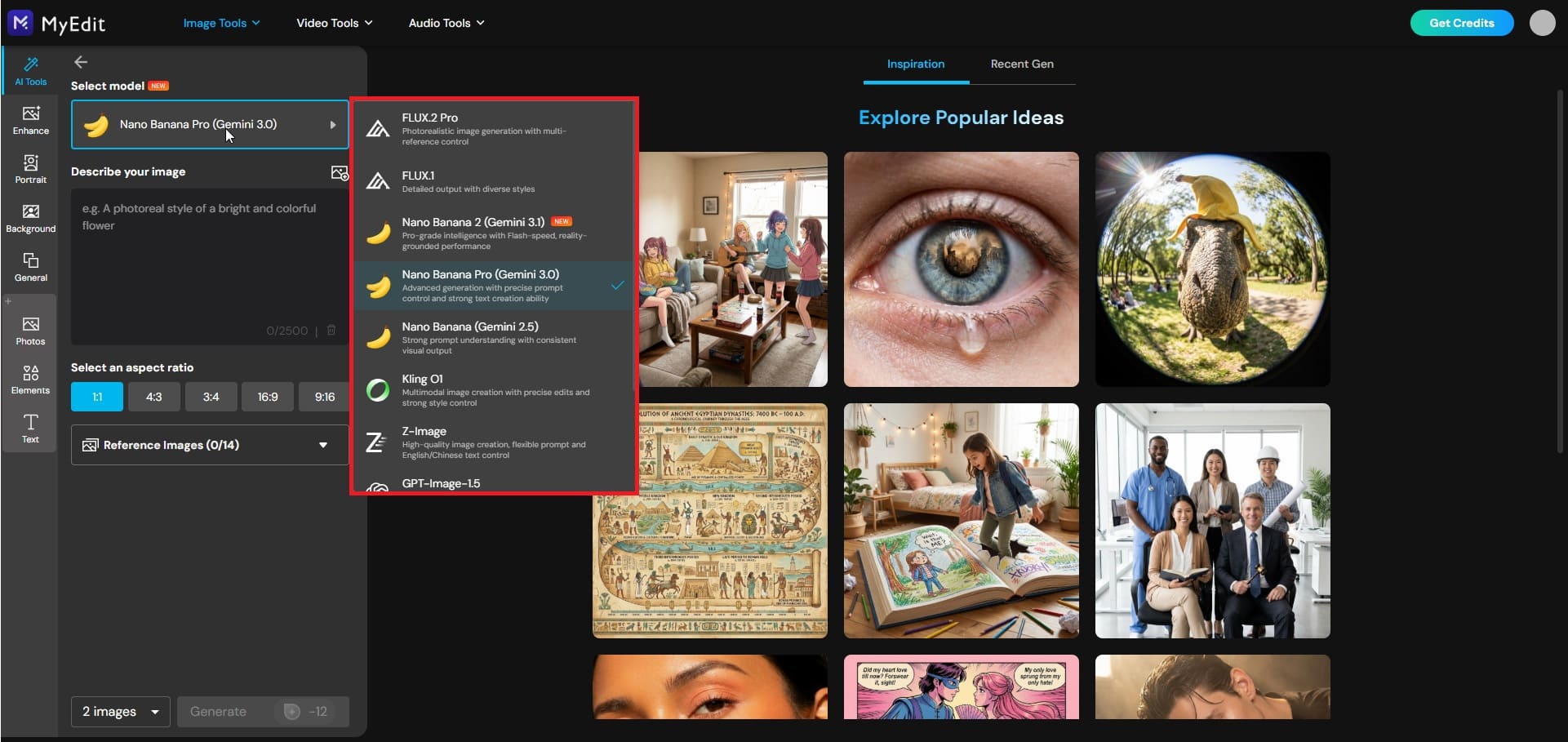
Choose your AI model: For the most realistic and detailed painting results, select an advanced model to ensure rich textures, accurate lighting, and true-to-life color reproduction in your artwork.
-
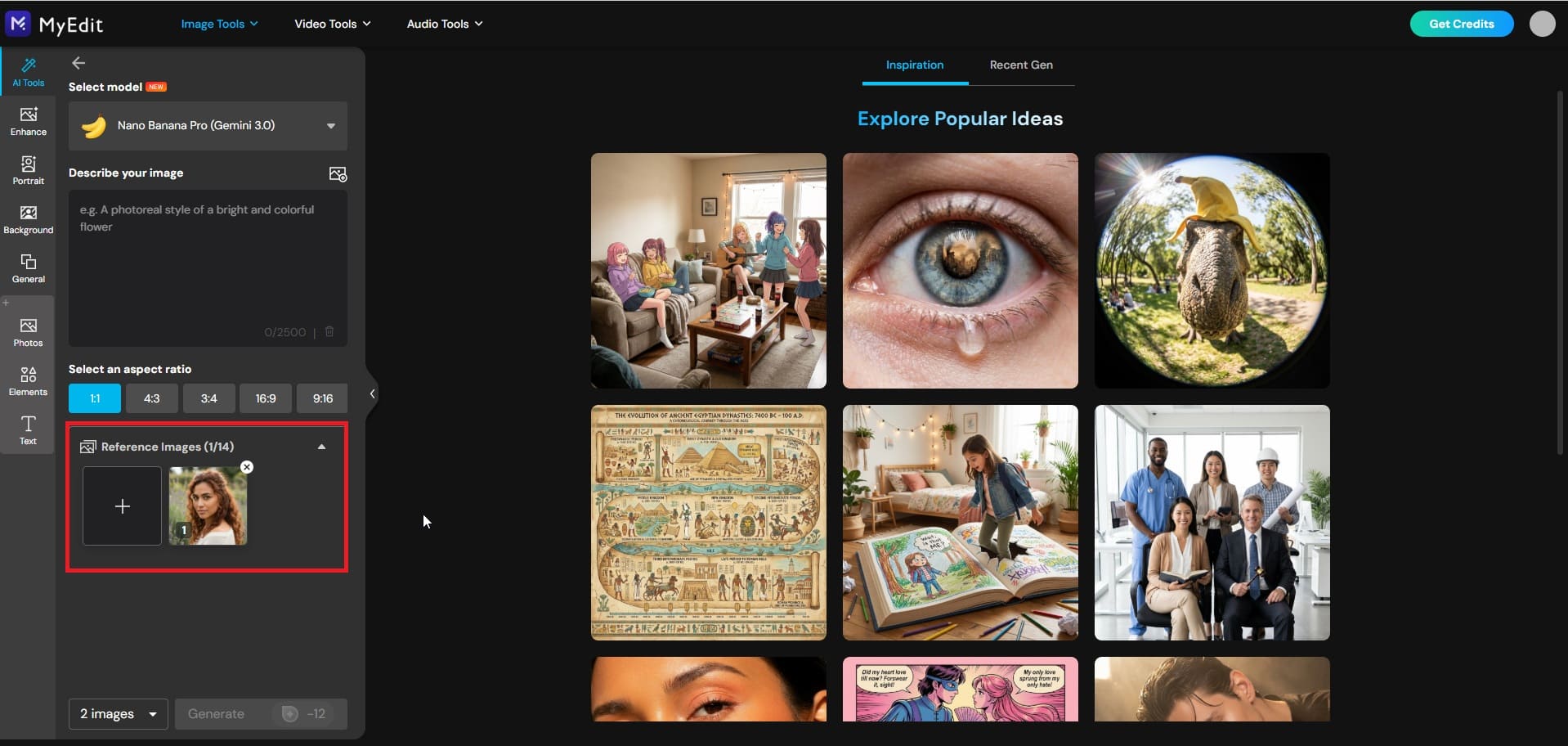
Upload your reference photo: Select the picture you want to transform — a portrait, landscape, travel shot, or any image works. The AI will use it as the visual base for your painting.
-
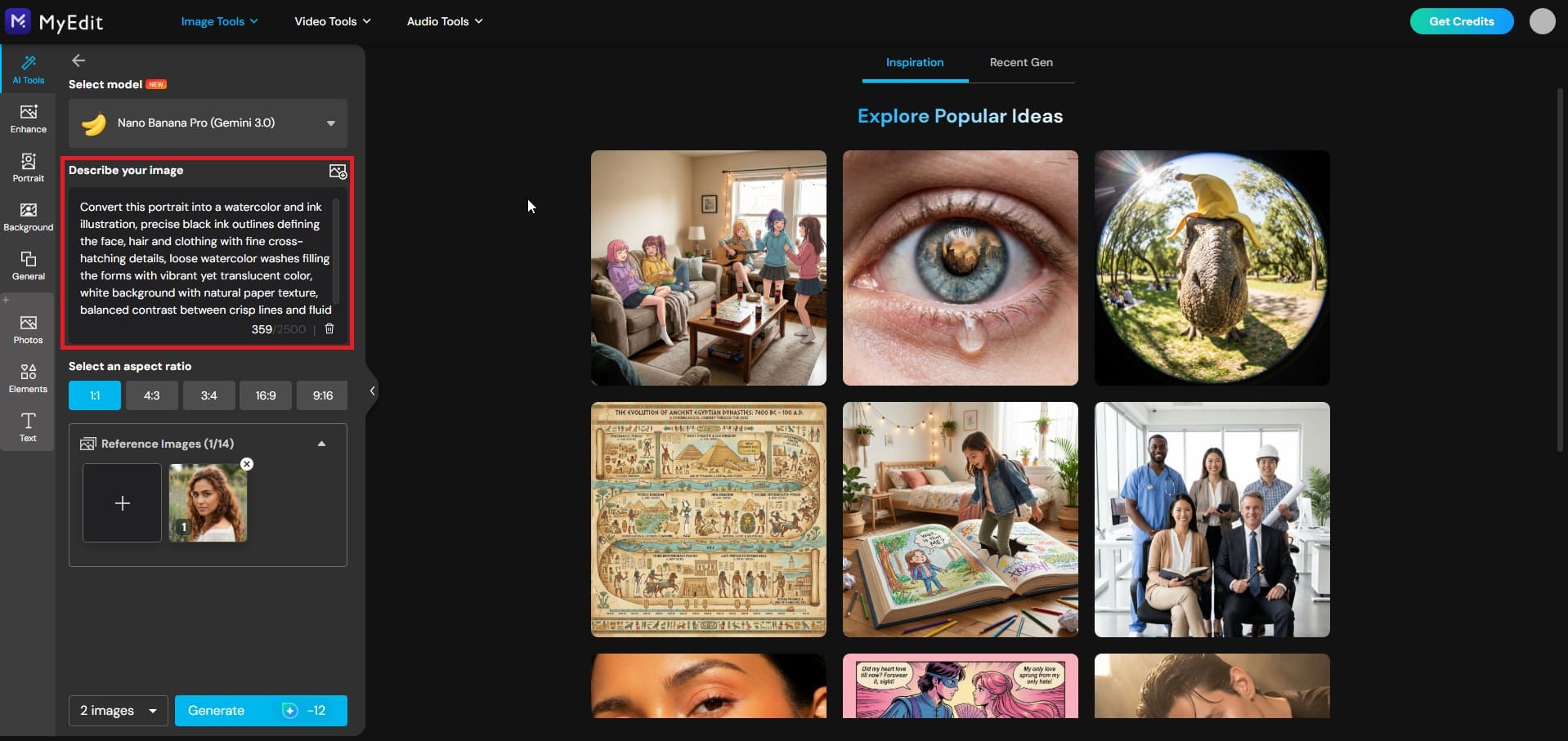
Enter your painting prompt: Describe the art style, mood, and effects you want (e.g., oil painting with warm tones and visible brushstrokes, or delicate watercolor with soft edges and pastel colors). The more specific your prompt, the better your result.
-
Generate your painting: Click Generate and let the AI apply the painting filter to your photo. In seconds, your picture is transformed into a polished, gallery-worthy piece of art.
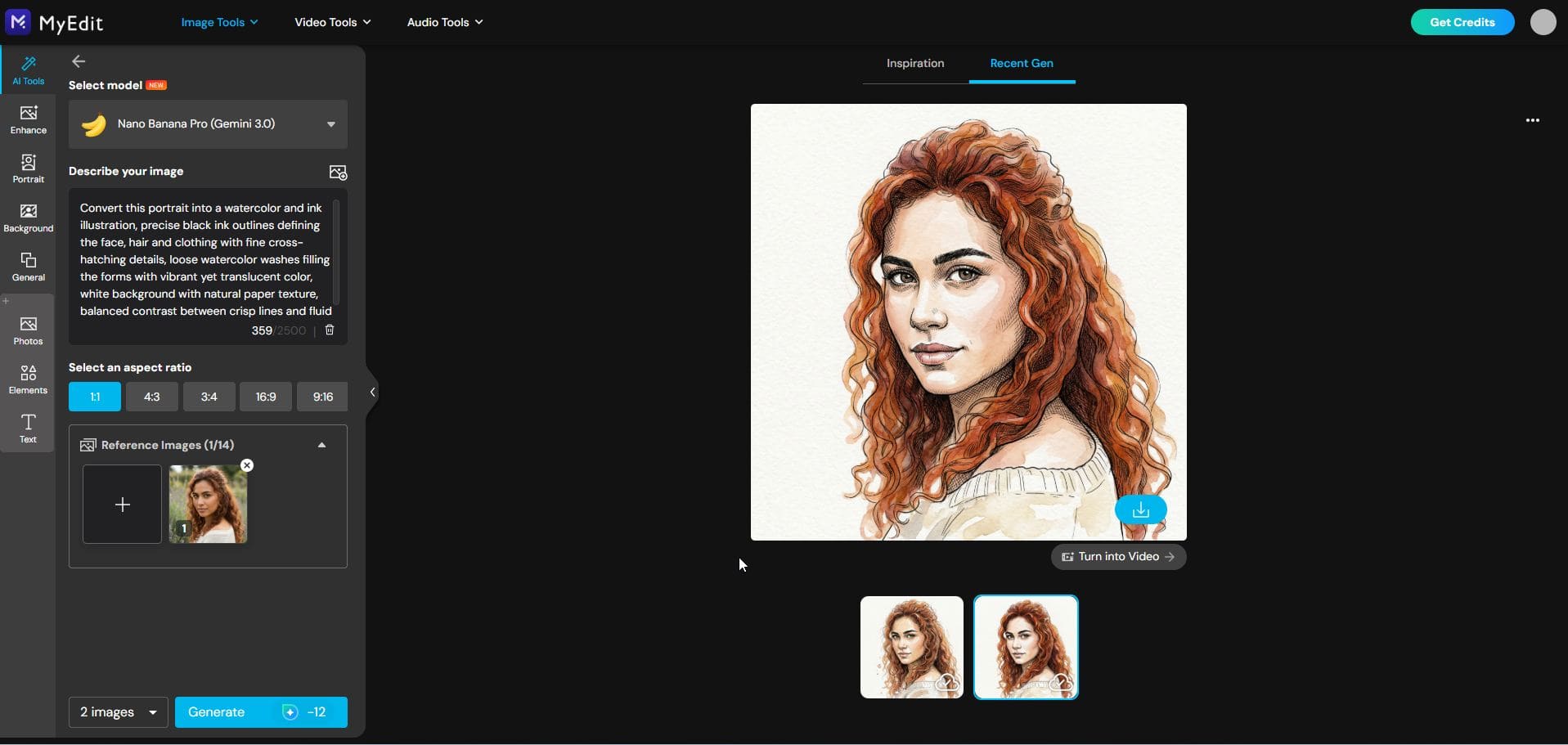


Not sure which painting style to choose? The next section covers ready-to-use prompts organized by art style — from oil painting and watercolor to line drawing and beyond.
25 Best AI Prompts to Turn Pictures into Art (By Style)
Ready to transform your photos into stunning artwork? Below you'll find carefully crafted AI prompts organized by painting style. Simply copy the prompt that matches your desired art effect, paste it into MyEdit's AI Image Generator along with your reference photo, and watch the magic happen.
Oil Painting Prompts
- Classic Portrait Oil Painting with Rich Brushstrokes
- Dark Baroque-Style Oil Painting Portrait
- Warm-Toned Couple Oil Painting with Golden Light
- Outdoor Portrait Oil Painting with Painterly Background
- Still Life Oil Painting with Palette Knife Texture
Watercolor Prompts
- Soft Watercolor Portrait with Pastel Tones
- Watercolor & Ink Portrait with Defined Outlines
- Dreamy Watercolor Couple with Soft Color Bleed
- Full-Body Watercolor Portrait with Flowing Color Wash
- Outdoor Watercolor Portrait with Natural Background Bleed
Pencil, Sketch & Line Drawing
- Realistic Pencil Sketch Portrait with Fine Details
- Minimalist Continuous Line Drawing of a Face
- Charcoal Portrait with Deep Shadows and Contrast
- Ink Cross-Hatch Portrait with Textured Line Work
- Sketch-Style Couple Drawing with Loose Pencil Strokes
Impressionist Painting Prompts
- Impressionist Portrait with Loose Dappled Light
- Van Gogh-Inspired Swirling Portrait with Bold Colors
- Monet-Style Couple in a Sun-Dappled Garden
- Full-Body Impressionist Portrait with Vibrant Color Strokes
- Plein Air Impressionist Outdoor Portrait with Natural Light
Anime & Cartoon Prompts
- Studio Ghibli-Style Anime Portrait with Soft Colors
- Bold Anime Character Portrait with Dynamic Lighting
- Cute Chibi-Style Cartoon Self-Portrait
- Comic Book Pop Art Portrait with Bold Outlines
- Anime-Style Couple Illustration with Pastel Background
Gouache & Flat Illustration Prompts
- Gouache Portrait with Bold Colors and Flat Shading
- Modern Flat Illustration Portrait with Graphic Shapes
- Retro Editorial Gouache Portrait with Muted Tones
- Mid-Century Modern Portrait with Geometric Color Blocks
- Children's Book Style Gouache Character Portrait
Oil Painting Prompts
Oil painting is the most timeless and sought-after art style for photo transformations. These prompts will give your photos rich texture, depth, and that classic painted-from-life quality. Copy and paste them directly into MyEdit's AI Image Generator along with your reference photo.
1. Classic Portrait Oil Painting with Rich Brushstrokes
Ideal for portraits and headshots — transforms any face photo into a museum-worthy oil painting with visible, expressive brushwork.


Prompt sample: "Transform this photo into a classic oil painting portrait, rich and expressive brushstrokes, warm earthy color palette, soft directional lighting on the face, deep shadows, painterly texture on skin and clothing, Renaissance-inspired composition, high detail, using reference photo"
Pro Tip: Works best with close-up or mid-shot portraits. The more visible the face, the richer the painted detail.
2. Dark Baroque-Style Oil Painting Portrait
Ideal for dramatic, moody portraits — inspired by Caravaggio and Rembrandt, this style turns any face photo into a powerful, high-contrast masterpiece.


Prompt sample: "Transform this portrait into a dark Baroque-style oil painting, deep black background, dramatic single-source lighting illuminating the face and shoulders, rich jewel-toned clothing with fine fabric texture, strong chiaroscuro contrast, detailed skin rendering, inspired by Caravaggio, museum-quality finish, using reference photo"
Pro Tip: Plain or dark backgrounds in your reference photo will make the Baroque contrast effect significantly more powerful.
3. Warm-Toned Couple Oil Painting with Golden Light
Perfect for couple photos or portraits with natural light — recreates the warm, glowing atmosphere of candlelit Old Masters paintings with an intimate, romantic feel.


Prompt sample: "Turn this couple photo into a warm-toned oil painting, golden hour light casting soft amber and honey tones across both subjects, Rembrandt-style chiaroscuro lighting, rich shadows with glowing highlights, smooth yet textured brushwork, painterly skin tones, intimate and timeless mood, using reference photo"
Pro Tip: Reference photos with warm or sunset lighting will amplify the golden atmosphere. Works equally well with solo portraits.
4. Outdoor Portrait Oil Painting with Painterly Background
Great for outdoor portraits and travel photos featuring people — the AI renders the subject in detailed brushwork while transforming the background into soft, impressionistic painted scenery.


Prompt sample: "Transform this outdoor portrait into a rich oil painting, subject rendered with detailed and expressive brushwork, natural background softened into impressionistic painterly scenery, warm ambient light, cohesive color palette between subject and environment, visible brushstrokes throughout, timeless and elegant mood, using reference photo"
Pro Tip: Photos taken in parks, gardens, or natural settings work best — the AI has more background texture to work with and creates a beautifully balanced composition.
5. Full-Body Portrait Oil Painting with Rich Costume Detail
Perfect for full-length photos — captures not just the face but the entire figure, with special attention to clothing texture, fabric folds, and compositional elegance reminiscent of classical portraiture.


Prompt sample: "Convert this full-body portrait into a classical oil painting, entire figure rendered with rich painterly detail, elaborate fabric textures and costume detail on clothing, dignified and elegant pose, warm studio lighting with soft shadows, deep and richly colored background, inspired by John Singer Sargent, museum-quality composition, using reference photo"
Pro Tip: Works best with full-length photos where the entire outfit is visible — the more detail in the clothing, the more impressive the final painting result.
Watercolor Prompts
Watercolor is one of the most beloved styles for turning photos into art — soft, dreamy, and deeply personal. Whether you want a delicate pastel portrait or a bold ink-and-watercolor hybrid, these prompts will transform your photos into stunning watercolor paintings. Copy and paste them directly into MyEdit's AI Image Generator along with your reference photo.
6. Soft Watercolor Portrait with Pastel Tones
Ideal for close-up portraits and selfies — creates a gentle, ethereal watercolor effect with soft edges, light color washes, and a dreamy, romantic atmosphere.


Prompt sample: "Transform this portrait photo into a soft watercolor painting, delicate pastel color palette with gentle pinks, lavenders and soft blues, light washes of color bleeding naturally at the edges, loose and fluid brushwork, white paper texture showing through, luminous and airy mood, using reference photo"
Pro Tip: Works best with evenly lit portrait photos — avoid harsh shadows as they can muddy the delicate pastel tones in the final result.
7. Watercolor & Ink Portrait with Defined Outlines
Perfect for portraits where you want both structure and softness — crisp ink outlines anchor the composition while watercolor washes add color, depth and artistic flair.


Prompt sample: "Convert this portrait into a watercolor and ink illustration, precise black ink outlines defining the face, hair and clothing with fine cross-hatching details, loose watercolor washes filling the forms with vibrant yet translucent color, white background with natural paper texture, balanced contrast between crisp lines and fluid color, using reference photo"
Pro Tip: Close-up portraits with clear facial features produce the most striking ink detail — the AI has more to work with when the face fills most of the frame.
8. Dreamy Watercolor Couple with Soft Color Bleed
Ideal for couple photos, engagement shots, or any two-person portrait — the soft color bleed effect creates a romantic, painterly atmosphere that feels timeless and emotional.


Prompt sample: "Transform this couple photo into a dreamy watercolor painting, soft and romantic color palette with warm blush pinks and golden tones, colors bleeding naturally into each other at the edges, loose fluid brushwork capturing both subjects with gentle detail, soft white background fading in at the edges, intimate and emotional mood, using reference photo"
Pro Tip: Photos where the couple is close together — hugging, touching foreheads, or holding hands — produce the most cohesive and emotionally resonant watercolor compositions.
9. Full-Body Watercolor Portrait with Flowing Color Wash
Great for full-length portraits, fashion shots, or any photo where the entire figure is visible — the flowing color wash creates a dynamic, editorial watercolor effect from head to toe.


Prompt sample: "Convert this full-body portrait into an editorial watercolor painting, entire figure rendered with flowing color washes from top to bottom, loose expressive brushwork on clothing and hair, colors transitioning fluidly through the composition, facial features softly but clearly defined, white paper background with natural paint bleed at the edges, fashion illustration aesthetic, using reference photo"
Pro Tip: Full-length photos with a plain or simple background work best — too much background detail can compete with the flowing color wash effect on the figure.
10. Outdoor Watercolor Portrait with Natural Background Bleed
Perfect for outdoor portraits in parks, gardens, or natural settings — the AI renders the subject in soft watercolor detail while letting the background dissolve into beautiful abstract color bleeds.


Prompt sample: "Transform this outdoor portrait into a soft watercolor painting, subject rendered with gentle but clear watercolor detail, natural background of greenery or sky dissolving into loose abstract color bleeds, warm and harmonious color palette, light and shadow translated into translucent washes, organic and natural mood, white paper texture visible throughout, using reference photo"
Pro Tip: Photos taken in green or floral settings are ideal — the AI translates natural colors like greens, blues and earth tones into the most beautiful watercolor background bleeds.
Pencil, Sketch & Line Drawing Prompts
Pencil and line drawing styles are among the most searched art effects for photo transformations — clean, expressive, and striking in their simplicity. Whether you prefer hyper-realistic pencil sketches or bold minimalist line art, these prompts will turn your photos into beautiful hand-drawn style illustrations. Copy and paste them directly into MyEdit's AI Image Generator along with your reference photo.
11. Realistic Pencil Sketch Portrait with Fine Details
Ideal for portraits and headshots — transforms any face photo into a highly detailed pencil sketch that looks like it was drawn by hand over hours.


Prompt sample: "Transform this portrait photo into a highly realistic pencil sketch drawing, fine detailed graphite lines capturing facial features, hair texture and skin tone, subtle shading with soft gradients from light to dark, white paper background, precise and delicate linework around the eyes and lips, artist-quality hand-drawn aesthetic, using reference photo"
Pro Tip: High-resolution portrait photos with clear facial features produce the most detailed and impressive pencil sketch results.
12. Minimalist Continuous Line Drawing of a Face
Perfect for a modern, artistic portrait effect — the continuous single-line technique creates an elegant, minimalist illustration that captures the essence of a face in one unbroken stroke.


Prompt sample: "Convert this portrait into a minimalist continuous line drawing, single unbroken black line flowing elegantly to define the face, hair and shoulders, no shading or fill, clean white background, modern and artistic aesthetic, the line varying subtly in weight to suggest depth and expression, using reference photo"
Pro Tip: Simple, clean portrait photos with a plain background work best — the minimalist style shines when the composition is uncluttered.
13. Charcoal Portrait with Deep Shadows and Contrast
Great for dramatic, moody portraits — the charcoal drawing style creates rich, velvety blacks and soft smudged highlights that give any face photo a raw, expressive energy.


Prompt sample: "Transform this portrait into a dramatic charcoal drawing, rich velvety black shadows with soft smudged transitions, strong contrast between dark and light areas, expressive textured marks on the face and hair, rough paper grain texture visible throughout, highlights lifted with an eraser effect, raw and emotional artistic style, using reference photo"
Pro Tip: Photos with strong directional lighting or high contrast between light and shadow produce the most striking charcoal drawing results.
14. Ink Cross-Hatch Portrait with Textured Line Work
Ideal for bold, graphic portrait illustrations — the cross-hatch technique uses layered ink lines to build shadow, depth and texture, creating a striking editorial drawing effect.


Prompt sample: "Convert this portrait into a detailed ink cross-hatch drawing, layered diagonal and perpendicular ink lines building up shadow and depth across the face and clothing, denser hatching in dark areas and sparse lines in highlights, clean white background, precise and deliberate linework, editorial illustration style inspired by classic pen and ink portraiture, using reference photo"
Pro Tip: Portraits with strong contrast and clearly defined shadows give the cross-hatch technique the most to work with — flat or evenly lit photos may produce less dramatic results.
15. Sketch-Style Couple Drawing with Loose Pencil Strokes
Perfect for couple photos, engagement shots or any two-person portrait — the loose sketch style captures both subjects with an intimate, spontaneous quality that feels personal and heartfelt.


Prompt sample: "Transform this couple photo into a loose sketch-style pencil drawing, expressive and spontaneous pencil strokes capturing both subjects with warmth and energy, light gestural lines suggesting clothing and hair, faces rendered with slightly more detail than the rest, soft shading with hatched pencil marks, white paper background, intimate and personal artistic mood, using reference photo"
Pro Tip: Candid or natural couple photos work better than stiff posed shots — the loose sketch style thrives on movement, emotion and natural body language.
Impressionist Painting Prompts
Impressionism is one of the most beloved painting styles of all time — loose, expressive brushwork, vibrant color, and a focus on light and mood over rigid detail. These prompts will transform your photos into stunning Impressionist-style paintings inspired by the great masters. Copy and paste them directly into MyEdit's AI Image Generator along with your reference photo.
16. Impressionist Portrait with Loose Dappled Light
Ideal for close-up portraits and headshots — captures the subject in soft, flickering light with the loose, spontaneous brushwork that defines classic Impressionism.


Prompt sample: "Transform this portrait photo into an Impressionist painting, loose and spontaneous brushwork capturing the face and shoulders, soft dappled light breaking across the skin with warm golden and cool shadow tones, vibrant yet harmonious color palette, visible individual brushstrokes throughout, painterly background with soft color suggestions, inspired by Renoir, using reference photo"
Pro Tip: Photos taken in natural outdoor light or near a window produce the most authentic Impressionist dappled light effect.
17. Van Gogh-Inspired Swirling Portrait with Bold Colors
Perfect for bold, expressive portrait transformations — Van Gogh's signature swirling brushwork and intense color palette turn any face photo into a dramatically powerful piece of art.


Prompt sample: "Convert this portrait into a Van Gogh-inspired oil painting, thick swirling brushstrokes flowing dynamically across the face, hair and background, bold and intense color palette with deep blues, vivid yellows and rich greens, heavily textured impasto paint surface, expressive and emotional energy throughout the composition, post-impressionist style, using reference photo"
Pro Tip: Portraits with expressive faces or dynamic hair work especially well — Van Gogh's swirling technique thrives on movement and texture.
18. Monet-Style Couple in a Sun-Dappled Garden
Ideal for couple photos or portraits taken outdoors — Monet's dreamy, light-filled style dissolves hard edges into shimmering color, creating a romantic and timeless painted scene.


Prompt sample: "Transform this couple photo into a Monet-style Impressionist painting, soft shimmering light filtering through garden foliage onto both subjects, loose feathery brushstrokes dissolving hard edges into pure color and light, pastel greens, warm pinks and golden yellows dominating the palette, figures integrated naturally into the sun-dappled garden environment, romantic and serene mood, using reference photo"
Pro Tip: Photos taken in gardens, parks or any green outdoor setting will give the AI the most natural color palette to work with for an authentic Monet effect.
19. Full-Body Impressionist Portrait with Vibrant Color Strokes
Great for full-length portraits and fashion shots — the entire figure is rendered in bold, energetic Impressionist brushwork with a vibrant color palette that makes the subject leap off the canvas.


Prompt sample: "Convert this full-body portrait into a vibrant Impressionist painting, entire figure rendered with bold energetic brushstrokes from head to toe, richly saturated color palette with complementary tones creating visual vibrancy, loose treatment of clothing and background, face captured with slightly more detail than surroundings, dynamic and alive painterly energy throughout, inspired by Berthe Morisot, using reference photo"
Pro Tip: Full-length photos with colorful clothing or an interesting background give the Impressionist color palette the most material to work with.
20. Plein Air Impressionist Outdoor Portrait with Natural Light
Perfect for outdoor portraits in any natural setting — the plein air style captures the subject bathed in real natural light, with the surrounding environment painted in loose, atmospheric Impressionist strokes.


Prompt sample: "Transform this outdoor portrait into a plein air Impressionist painting, subject rendered with warm natural daylight falling across the face and figure, surrounding environment painted in loose atmospheric brushstrokes suggesting trees, sky or water, harmonious natural color palette of greens, blues and warm earth tones, spontaneous and fresh painterly quality, captured-in-the-moment outdoor mood, using reference photo"
Pro Tip: Any outdoor photo works well for this style — the AI is particularly good at translating natural daylight into the warm, luminous quality that defines plein air Impressionist painting.
Anime & Cartoon Prompts
Anime and cartoon styles are among the most popular art effects for photo transformations — fun, expressive, and endlessly creative. Whether you want a dreamy Studio Ghibli portrait or a bold comic book illustration, these prompts will turn your photos into stunning animated-style artwork. Copy and paste them directly into MyEdit's AI Image Generator along with your reference photo.
21. Studio Ghibli-Style Anime Portrait with Soft Colors
Ideal for portraits and selfies — recreates the warm, hand-painted aesthetic of Studio Ghibli films with soft pastel colors, gentle shading and that unmistakable sense of wonder and nostalgia.


Prompt sample: "Transform this portrait photo into a Studio Ghibli-style anime illustration, soft hand-painted aesthetic with warm pastel color palette, large expressive eyes with detailed iris, smooth skin with subtle cel-shading, soft flowing hair with delicate highlights, gentle and dreamy background with soft bokeh, warm and nostalgic mood inspired by Hayao Miyazaki, using reference photo"
Pro Tip: Portraits with a natural smile or gentle expression work best — the Ghibli style thrives on warmth and emotional softness rather than intense or dramatic expressions.
22. Bold Anime Character Portrait with Dynamic Lighting
Perfect for creating a powerful, cinematic anime character from any portrait — dynamic lighting, sharp linework and intense colors give the subject a dramatic, action-ready energy.


Prompt sample: "Convert this portrait into a bold anime character illustration, sharp and precise ink outlines, dramatic rim lighting with deep shadows and vivid highlights, intense and saturated color palette, highly detailed eyes with dynamic reflections, expressive and powerful facial expression, cinematic composition, professional anime studio quality, using reference photo"
Pro Tip: Photos with strong directional lighting or a confident, intense expression will produce the most dramatic and powerful anime character results.
23. Cute Chibi-Style Cartoon Self-Portrait
Great for a fun, playful transformation — the chibi style exaggerates features into an adorable miniature cartoon character with an oversized head, big eyes and a sweet, cheerful personality.


Prompt sample: "Transform this portrait into a cute chibi-style cartoon character, exaggerated proportions with oversized round head and small body, large sparkling expressive eyes, simplified and rounded facial features capturing the subject's likeness, soft pastel color palette, clean cel-shaded illustration style, cheerful and playful mood, simple gradient background, using reference photo"
Pro Tip: Clear, well-lit front-facing portrait photos give the AI the best reference for capturing your likeness in the chibi style — side angles or partially obscured faces may reduce accuracy.
24. Comic Book Pop Art Portrait with Bold Outlines
Ideal for bold, graphic portrait transformations — inspired by Roy Lichtenstein and classic comic book art, this style turns any face photo into a striking, high-contrast pop art illustration.


Prompt sample: "Convert this portrait into a bold comic book pop art illustration, thick black outlines defining all facial features and hair, Ben-Day dot pattern in shadow areas, flat primary color fills with no gradients, strong graphic contrast between black outlines and solid color areas, speech bubble optional, dynamic and energetic composition, inspired by Roy Lichtenstein, using reference photo"
Pro Tip: Simple, expressive portrait photos with a clear face and minimal background clutter produce the cleanest and most striking pop art results.
25. Anime-Style Couple Illustration with Pastel Background
Perfect for couple photos, best friend portraits or any two-person shot — the soft anime illustration style captures both subjects with romantic, pastel-toned charm and delicate detail.


Prompt sample: "Transform this couple photo into a romantic anime-style illustration, both subjects rendered with soft cel-shaded anime aesthetics, large expressive eyes with detailed highlights, smooth skin with gentle shading, pastel background with soft bokeh and floating light particles, warm and romantic color palette of blush pinks and soft lilacs, intimate and emotional mood, professional anime illustration quality, using reference photo"
Pro Tip: Photos where both subjects are close together and clearly visible work best — the AI needs to capture two faces accurately so the clearer the reference, the better the result.
Gouache & Flat Illustration Prompts
Gouache and flat illustration styles bring a bold, graphic quality to photo transformations — opaque colors, clean shapes and a distinctly modern artistic aesthetic. From retro editorial portraits to playful children's book characters, these prompts will turn your photos into striking illustrated artwork. Copy and paste them directly into MyEdit's AI Image Generator along with your reference photo.
26. Gouache Portrait with Bold Colors and Flat Shading
Ideal for portraits and headshots — gouache's opaque, matte finish and bold color blocking create a striking, poster-like portrait with a distinctly contemporary art feel.


Prompt sample: "Transform this portrait photo into a gouache painting, opaque and matte color fills with bold flat shading, strong graphic shapes defining the face and hair, limited but vibrant color palette with deliberate color blocking, smooth paint surface with no visible brushstrokes, clean edges between color areas, contemporary portrait illustration aesthetic, using reference photo"
Pro Tip: Portraits with strong facial features and good contrast work best — gouache's flat shading style relies on clear light and shadow areas to define the face.
27. Modern Flat Illustration Portrait with Graphic Shapes
Perfect for a clean, contemporary portrait illustration — inspired by modern digital illustration, this style reduces facial features into elegant geometric shapes with a sophisticated, design-forward aesthetic.


Prompt sample: "Convert this portrait into a modern flat illustration, simplified facial features rendered as clean geometric shapes, bold graphic color blocking with a carefully curated limited palette, no gradients or shadows, strong silhouette with clear shape language, minimal background with a single flat color, contemporary editorial illustration style inspired by modern graphic design, using reference photo"
Pro Tip: Front-facing portraits with a plain background give the AI the clearest shape reference — the flatter and simpler the composition, the more refined the flat illustration result.
28. Retro Editorial Gouache Portrait with Muted Tones
Great for a vintage, editorial portrait effect — muted gouache tones and a retro color palette give any face photo the feel of a classic 1960s magazine illustration or mid-century book cover.


Prompt sample: "Transform this portrait into a retro editorial gouache illustration, muted and desaturated color palette of dusty terracottas, sage greens and warm creams, flat opaque paint application with subtle texture, simplified facial features with a slightly stylized quality, vintage 1960s magazine illustration aesthetic, elegant and sophisticated mood, aged paper background texture, using reference photo"
Pro Tip: Portraits with a timeless, classic quality work best — avoid photos with very modern clothing or backgrounds as they can clash with the vintage editorial aesthetic.
29. Mid-Century Modern Portrait with Geometric Color Blocks
Ideal for bold, graphic portrait transformations — inspired by mid-century modern design, this style breaks the subject into clean geometric color blocks with a retro poster art quality.


Prompt sample: "Convert this portrait into a mid-century modern illustration, subject broken into bold geometric color blocks with clean hard edges, retro color palette of mustard yellow, burnt orange, teal and cream, flat graphic treatment of face and hair with strong simplified shapes, poster art composition, inspired by mid-century American graphic design and Bauhaus aesthetics, using reference photo"
Pro Tip: Simple, uncluttered portrait photos with a clear face and minimal background detail produce the cleanest and most striking geometric color block results.
30. Children's Book Style Gouache Character Portrait
Perfect for a warm, whimsical portrait transformation — the children's book illustration style renders the subject as a charming, storybook character with soft gouache textures and a playful, heartwarming quality.


Prompt sample: "Transform this portrait into a children's book style gouache illustration, subject rendered as a warm and lovable storybook character, soft matte gouache textures with gentle color palette of warm pinks, soft yellows and cozy earth tones, slightly rounded and simplified facial features retaining the subject's likeness, charming and expressive eyes, whimsical and heartwarming mood, soft textured background suggesting a storybook world, using reference photo"
Pro Tip: This style works beautifully for children's portraits and family photos — the warm, rounded gouache aesthetic is especially flattering for younger subjects and creates wonderful personalised gift artwork.
MyEdit: The Best AI Art Filter to Turn Any Picture into a Work of Art
MyEdit is an all-in-one AI creative platform designed to turn photos into stunning artwork — no design skills, no software downloads, no learning curve. Whether you want a classic oil painting, a dreamy watercolor, or a bold anime illustration, MyEdit gives you everything you need in one place.
AI Image Generator — Turn Photos into Paintings with Any Style


AI Image Generator is MyEdit's most powerful tool for turning pictures into art. Simply upload your reference photo, paste one of the prompts from the section above, and let the AI apply the painting filter of your choice. The tool supports multiple advanced AI models — including Nano Banana (Gemini 2.5 & 3), Flux, and GPT-Image-1 — each delivering a different quality and style of output. For the most realistic and detailed painting transformations, the advanced models consistently produce gallery-worthy results with rich texture, accurate color, and faithful likeness to your reference photo.
This is the tool used for every prompt example in this article — making it the natural starting point for anyone looking to turn their photos into paintings, sketches, watercolors, or any of the art styles covered above.
AI Art Template Mode — Instant Painting Filters in One Click

AI Art Template is the fastest way to apply a painting filter to your photos — no prompts required. Choose from hundreds of built-in art style presets covering oil painting, watercolor, anime, sketch, impressionism and more. Simply select a template, upload your photo, and your picture is transformed into art in seconds. Template Mode is ideal for users who want quick, polished results without the creative guesswork — perfect for social media content, gifts, or rapid style experimentation across multiple photos.
AI Image-to-Video — Bring Your Paintings to Life
AI Image to Video takes your photo-to-painting transformation one step further — animating your artwork into a short, shareable video. Once you've turned your picture into a painting using the AI Image Generator or Template Mode, use this tool to add movement and life to the result. Animate portraits, couple paintings, or art-style transformations with custom motion prompts or ready-made templates. The result is a dynamic, eye-catching video that performs exceptionally well on Instagram Reels, TikTok, and Pinterest — turning your static art filter into a scroll-stopping piece of content.
Why MyEdit Is the Best Tool to Turn Pictures into Art
- No design skills needed: Upload, prompt, generate — the entire photo-to-painting process takes under a minute.
- Multiple AI models: Choose between different models depending on the level of detail, realism, and style you want.
- Virtually any art styles supported: From oil painting and watercolor to anime, charcoal, gouache and beyond — all covered in one platform.
- Template Mode for instant results: Skip the prompts entirely and apply professional painting filters with a single click.
- Animate your artwork: Unique Image-to-Video feature lets you bring your painted portraits to life for social media.
- Web-based and accessible: No software to download — works directly in your browser on any device.
Related Articles:
- ChatGPT Image Ideas & Photo Editing Prompts
- Ultimate Guide to Nano Banana Pro
- Gemini Polaroid Trend Using the Best Prompts
FAQ About Turning Photos into Paintings with AI
MyEdit is one of the best AI tools to turn photos into paintings — it combines an advanced AI Image Generator with reference photo support, multiple art styles, and a one-click Template Mode for instant painting filters. Unlike basic filter apps, MyEdit lets you describe the exact painting style you want using prompts, giving you precise, gallery-quality results across oil painting, watercolor, anime, sketch, impressionism and more.
The easiest way to turn a photo into a painting is with an AI image generator like MyEdit. Simply upload your reference photo, type a prompt describing the painting style you want (for example: "classic oil painting portrait with warm tones and visible brushstrokes"), and click Generate. The AI applies the painting filter to your photo and delivers a finished result in seconds — no design skills or software required.
For turning photos into line drawings, pencil sketches, or charcoal illustrations, MyEdit is a top choice — it supports detailed sketch-style prompts that give you precise control over the drawing style, from realistic pencil sketches to minimalist continuous line art. Other popular options include Prisma and Adobe Firefly, though these offer less prompt-based customization than MyEdit.
A painting filter is a preset effect that applies a fixed artistic style to your photo automatically — fast and simple, but with limited customization. An AI art effect goes further: it uses artificial intelligence to genuinely reimagine your photo in a chosen art style, generating new textures, brushstrokes, and color palettes rather than just overlaying a filter. The result is significantly more realistic and detailed — much closer to an actual painting.
Yes — AI tools like MyEdit can turn any photo into a line drawing, pencil sketch, or ink illustration using a simple text prompt. Just upload your reference photo and describe the drawing style you want, such as "minimalist continuous line drawing of a face" or "realistic pencil sketch with fine details." The AI translates your photo into the chosen line art style in seconds.
Yes, turning your own photos into paintings using AI is generally legal, especially for personal use. If you own the original photo, you are free to transform it into any art style you choose. For commercial use, the legal landscape is still evolving — AI-generated content is not currently protected by copyright law in the United States , meaning purely AI-generated works cannot be copyrighted. However, works made by or with the assistance of artificial intelligence can still be copyrighted, provided a human author is involved in the creative process . Always check the terms of service of the AI tool you use before selling or publishing AI-generated artwork commercially.
The best photos for AI painting transformations share a few common qualities: good lighting, a clear subject, and reasonable resolution. For portraits, front-facing or three-quarter angle shots with soft natural light tend to produce the most detailed and flattering results. For landscapes, photos with strong light and shadow contrast or taken during golden hour work best. Avoid blurry, heavily filtered, or very low-resolution photos as these limit the AI's ability to generate fine detail.
MyEdit offers free access to its AI Image Generator, allowing you to turn photos into paintings without any upfront cost. Simply visit MyEdit, upload your reference photo, enter your desired painting style as a prompt, and generate your artwork for free. For unlimited generations and access to premium art styles and templates, a MyEdit subscription unlocks the full range of painting filters and AI art effects.
The most popular and reliably impressive painting styles for portrait photos are classic oil painting, watercolor, and anime illustration. Oil painting produces rich, timeless results with great facial detail. Watercolor creates a softer, more romantic feel. Anime styles are especially popular for younger subjects or social media content. The 30 prompts in this article cover all of these styles with specific recommendations for portrait use.

The CyberLink Editorial Team is composed of product testing specialists and content creation experts with over 20 years of hands-on experience and rigorous research in the multimedia editing industry. As the official voice of CyberLink, the team consistently delivers practical, easy-to-follow tutorials across video, photo, and audio editing, while highlighting AI innovations, product insights, and emerging industry trends. Their work empowers millions of creators worldwide each year to elevate their content. Beyond the blog, the team actively shares editing tips and product updates across YouTube, Facebook, Linkedin and Pinterest.
😎 Outside of their work, they enjoy capturing travel moments and meticulously editing photos and videos for their social channels.


