






The Ultimate AI Prompt Guide: Images, Videos & Creative Ideas

AI prompts let you create stunning images, portraits, characters, and videos in minutes.
This guide covers popular AI models, trending creative prompts, and step-by-step tips for creating perfect images and videos for social media, storytelling, or just for fun.
Try turning ideas into visuals with MyEdit AI Image Generator or bring them to life with MyEdit Text-to-Video & Image-to-Video.
- What Are AI Prompts?
- How AI Prompts Work
- General Prompt Guides
- Prompts by AI Model
- Seasonal & Holiday Prompts
- Portrait & People Prompts
- Specialty & Trend Prompts
- How to Use AI Prompts with MyEdit
- AI Prompts FAQs
Everything You Need to Know About AI Prompts

AI prompts are text instructions that guide artificial intelligence models to generate content — whether images, videos, or text. They are the foundation of AI creativity, and understanding how they work is key to getting high-quality results.
Here’s a quick overview of the process:
- Text Prompt: You write a description of what you want the AI to generate.
- AI Model: The AI interprets your prompt and processes it according to its training and capabilities.
- Generated Output: The AI produces the content you requested — an image, video, or text.
Key things to know about AI prompts:
- Definition: A prompt is a set of instructions that tells the AI what to create.
- Purpose: Prompts guide the AI so the results match your vision.
- Applications: Use prompts for images, videos, text content, characters, hairstyles, or even memes.
- Key Elements of a Prompt:
- Subject (what you want to generate)
- Style (realistic, cartoon, cinematic, etc.)
- Composition (angle, perspective, framing)
- Lighting & mood (daylight, dramatic, soft, etc.)
- Optional details (color palette, accessories, background)
- Why They Matter: Well-crafted prompts lead to higher-quality results, saving time and reducing frustration.
💡 Pro Tip: Start with a simple prompt, then gradually add details like style, composition, and mood. This improves the AI output significantly.
Understanding How AI Prompts Generate Images, Videos, and More

AI prompts don’t just magically produce content — they follow a process that transforms your text into images, videos, or text outputs. Understanding this process helps you write prompts that generate better results consistently.
- Input Your Prompt: Start with a clear description of what you want the AI to generate. Include details like subject, style, mood, and composition.
- AI Interpretation: The AI model reads your prompt and interprets it based on its training and learned patterns, preparing to generate content.
- Content Generation: The AI produces the requested output — an image, video, or text. Different models may handle outputs differently, so results can vary.
- Refinement: You can tweak your prompt or settings to refine the results, improving style, composition, and accuracy. Iteration helps you get closer to your desired output.
Pro Tip: Small changes in wording can dramatically affect AI output. For example, specifying “cinematic lighting” or “cartoon style” will guide the AI toward very different results.
Key elements that influence AI prompt results:
- Subject: The main object or scene you want to generate.
- Style: Realistic, cartoon, cinematic, anime, etc.
- Composition: Camera angle, perspective, and framing.
- Lighting & Mood: Daylight, dramatic, soft, dark, etc.
- Details: Background elements, accessories, colors, or textures.
Tip: Using “negative prompts” to specify what you don’t want (e.g., “no text on image”) helps AI avoid unwanted elements.
Optional visual enhancements for this section:
- A step-by-step flowchart showing: Prompt → AI Model → Generated Output → Refinement.
- Side-by-side examples of a simple prompt vs a detailed prompt to show the difference in output.
General AI Prompt Guides & Inspiration
Getting started with AI prompts can feel overwhelming, but this section will guide you through **photo, video, drawing, and creative prompts**, providing inspiration and examples so you can start generating impressive AI outputs today.
AI Art Prompts for Stunning Images

Prompt sample: "Surreal human figure made of glowing light particles, dark background, cinematic lighting, ultra-detailed digital art."
For beginners, AI Art Prompts: Complete Starter Guide is a perfect starting point. Learn how to describe subjects, style, lighting, and mood to generate **realistic or artistic images**. It’s ideal for understanding how AI interprets prompts and produces high-quality results.
Ready-to-Use AI Image Prompts


Prompt sample: "Fantasy royal portrait, ornate crown and robes, cinematic lighting, mystical background, 8K, using reference face."
If you’re looking for ready-to-use inspiration, check out Best AI Image Prompts for Any Generator. It includes prompts from cinematic landscapes to cozy lifestyle scenes, showing how small wording changes can dramatically affect results. Perfect for experimenting and building your own prompt library.
AI Video Prompts for Dynamic Scenes
Prompt sample: "Futuristic hovercars racing through neon city streets, rain reflections, dynamic follow cam, cinematic lighting, 4K."
For AI video creation, Best AI Video Prompts (Universal Guide) provides universal prompts that work across different AI video tools. Learn to describe scenes, motion, and style to produce smooth, coherent video outputs, from dynamic cityscapes to animated character interactions.
Drawing & Sketch Prompts for AI


Prompt sample: "Transform my photo of a couple holding hands into a romantic pencil sketch, capturing soft facial features, natural expressions, subtle shading on clothes and hair, realistic hand-drawn textures on paper."
Artists and hobbyists will enjoy Drawing Prompts: Creative Ideas for AI & Sketching. This guide shows how simple sketches or doodles can inspire AI-generated images, making it perfect for experimentation and learning AI prompt effects.
Funny & Creative AI Prompts


Prompt sample: "Baby showing overdramatic reaction faces, exaggerated expressions, humorous and whimsical, vibrant and highly detailed."
For a playful and creative twist, explore Funny AI Prompts for Creative & Hilarious Outputs. This guide features prompts for humorous, quirky, or unexpected outputs, helping you learn while experimenting. The before/after visuals above show the type of results achievable with imaginative prompts.
Best AI Prompts for Popular Models (Midjourney, Gemini, Nano Banana & More)
With so many AI tools available, it can be tricky to know where to start. This guide introduces the most popular AI models, explaining their strengths, typical use cases, and linking to our in-depth guides so you can explore more prompts and inspiration.
ChatGPT Prompts


Prompt sample: “Create a caricature of a gamer at a dramatic setup with oversized headphones and multiple screens, excited energetic expression, exaggerated facial features, cartoon style, preserve identity, dynamic composition, bright playful colors.”
ChatGPT is a versatile model for imaginative image concepts, playful caricatures, and storytelling visuals. People use it to generate **fun, creative outputs** or to quickly mock up ideas. For inspiration, explore ChatGPT Image Prompt Ideas, follow current trends in ChatGPT Caricature Trend, or try narrative-driven concepts with Charlie & Lola ChatGPT Prompt.
Gemini Prompts


Prompt sample: “Polaroid-style single portrait, soft natural lighting, casual pose, vintage feel, high-resolution, using reference face.”
Gemini is best for photo-realistic portraits, lifestyle photography, and fashion or hairstyle concepts. Users often choose it to create **high-quality images of people, couples, or hairstyling inspiration**. Explore general photography prompts in Gemini AI Photo Prompts, couples in Gemini Couple Photo Prompts, hairstyling in Gemini Hairstyle Prompts, and gender-specific prompts with Girls Gemini Prompt, Boys Gemini Prompt, or Gemini Prompts for Boys/Men.
Stable Diffusion Prompts

Prompt sample: “Epic fantasy castle on a floating island in the clouds, magical waterfalls, soft glowing light, high fantasy illustration, ultra-detailed, cinematic composition, vibrant colors.”
Stable Diffusion is ideal for precise, controllable AI art and detailed illustrations. It’s widely used for fantasy landscapes, sci-fi concepts, and high-detail artworks where small prompt changes can dramatically affect results. Discover techniques and prompts in Stable Diffusion Prompts.
NovelAI Prompts

Prompt sample: “Anime warrior boy with spiky blue hair, futuristic armor, holding a glowing sword, dynamic pose, cinematic lighting.”
NovelAI specializes in consistent anime-style characters, illustrations, and storytelling scenes. People use it to maintain character continuity, generate manga or anime-inspired artwork, and create dynamic illustrations. Learn more in NovelAI Image Prompts.
Sora Video Prompts
Prompt sample: “Distracted Boyfriend meme scene, recreated in the style of a 1920s silent film, grainy texture, exaggerated facial expressions and poses, dramatic vintage lighting, cinematic composition, over-the-top acting, period-accurate costumes and background.”
Sora excels at cinematic videos, motion-heavy scenes, and expressive storytelling. Users create **short films, memes, or dynamic scenes with precise motion control**. See more prompts and inspiration in Best Sora 2 Prompts.
Veo 3 Video Prompts
Prompt sample: “Basketball player performing slam dunk, slow-motion close-up, crowd cheering, 8-second cinematic angle, 4K.”
Veo 3 is designed for high-quality slow-motion cinematics, sports, and nature footage. Users rely on it for **detailed motion tracking and smooth video output**. Explore examples and prompts in Best Veo 3 Prompts.
Grok Prompts


Prompt sample: “Fashion editorial portrait, minimal background, elegant pose, cinematic lighting, soft shadows, using reference photo.”
Grok is perfect for dramatic fantasy, high-contrast editorial imagery, and stylized portraits. Creators use it to produce **bold, visually striking art**. Full examples can be found in Best Grok Prompts for Images.
Nano Banana Prompts


Prompt sample: “Remove unwanted objects using reference image, fill background seamlessly, preserve main subject and lighting, maintain natural details.”
Nano Banana specializes in 3D-style characters, playful visuals, and object manipulation. It’s popular for **mockups, animated-style renders, and creative 3D outputs**. See more prompts in Best Nano Banana Prompts.
Holiday & Seasonal AI Prompts for Images and Videos
Celebrate the seasons with AI prompts designed for holidays and special occasions. These guides show how to create festive images and videos for Christmas, New Year, Valentine’s Day, Easter, and more.
Christmas AI Prompts

Prompt sample: “Santa Claus delivering gifts at night, snowy rooftop, glowing windows, sleigh full of presents, flying reindeer, starry sky, cinematic lighting, magical Christmas atmosphere, ultra-detailed, realistic style.”
Christmas prompts are perfect for creating cozy winter scenes, festive illustrations, greeting cards, and social media content. People use these prompts to design holiday visuals quickly without needing traditional art skills. Get more ideas and variations in Christmas AI Image Prompts.
New Year AI Prompts


Prompt sample: “Luxury New Year 2026 evening portrait, champagne glass, warm ambient lights, festive atmosphere, cinematic photography, 8K.”
New Year prompts work well for animated or static celebration scenes, and fireworks graphics. Users create social media posts in a few minutes. Find more ideas in Happy New Year AI Prompt.
Valentine’s Day AI Prompts


Prompt sample: “Couple embracing in a garden, fairy lights twinkling, cinematic lighting, romantic composition, photorealistic style, 8K.”
Valentine’s Day prompts are ideal for romantic illustrations, social media graphics, and couple-themed content. They’re used to generate cozy, intimate, or whimsical scenes in seconds. Explore additional prompts in Valentine’s Day AI Image Prompts.
Easter AI Prompts


Prompt sample: “Use this reference photo of the family and transform it into a cheerful Easter scene with bunnies and colorful eggs in a sunny garden, warm spring lighting, playful and lively atmosphere, realistic shadows and textures.”
Easter prompts are great for playful spring scenes, kids’ content, social media posts, and greeting cards. Users often generate cheerful, colorful visuals quickly without illustration experience. Full inspiration and variations are available in Best Easter AI Prompts.
AI Prompts for Portraits, Characters & People
Portraits and character generation are some of the most popular AI uses. Whether you want realistic headshots, stylized caricatures, creative characters, or hairstyle inspiration, these tools help you capture expression, style, and personality in your prompts.
ChatGPT Portrait & Caricature Prompts


Prompt sample: “Exaggerate features of a chef with giant kitchen tools, playful cartoonish style, humorous expression, emphasize uniform and hat, keep facial identity recognizable, bright colors, dynamic pose, high detail.”
ChatGPT can generate fun caricatures and creative headshots. Explore different styles and trends in ChatGPT Caricature Trend.
Gemini Girls Portrait Prompts


Prompt sample: “Use the attached image of the model as facial reference and physical features. Black and white high-fashion editorial portrait of uploaded person, wearing a loose white blouse. The lighting is soft and diffused, creating a dreamlike, ethereal quality. High-key photography, white background, minimalist composition. The subject looks directly at the camera with a confident, piercing gaze. Vogue magazine aesthetic.”
Gemini Girls prompts are perfect for creating photo-realistic female portraits. Explore more in Girls Gemini Prompt.
Gemini Boys & Men Portrait Prompts


Prompt sample: “Man editorial portrait, dramatic framing, studio lighting, realistic skin and hair, confident expression, using reference photo.”
Gemini Boys & Men prompts are ideal for creating photo-realistic portraits of boys, teens, and adult males. Explore more in Boys Gemini Prompt and Gemini Prompts for Boys/Men.
Gemini Couple Portrait Prompts


Prompt sample: “Couple embracing indoors under warm candlelight, cozy atmosphere, realistic expressions, using reference photo.”
Gemini Couple prompts work best for paired portraits and lifestyle photography. Explore more in Gemini Couple Photo Prompts.
Gemini Hairstyle Portrait Prompts


Prompt sample: “Woman with soft curtain bangs, face-framing, smooth texture, natural shine, realistic hair flow, soft indoor lighting, using reference photo.”
Gemini Hairstyle prompts are great for showcasing haircuts, styles, and fashion inspiration. Explore more in Gemini Hairstyle Prompts.
Professional Headshot AI Prompts


Prompt sample: “C-Level executive in a professional studio, dark business suit, neutral gray background, soft studio lighting, confident expression, realistic high-resolution corporate headshot.”
Perfect for corporate or LinkedIn-ready images, explore AI Prompts for Professional Headshots for tips on generating polished and realistic headshots.
Trending & Specialty AI Prompts for Creative Ideas
Discover AI prompts that reflect the latest trends and creative niches. From playful and humorous outputs to logos, couple videos, and pop culture-inspired concepts, these prompts are perfect for social media, storytelling, and creative experimentation.
Funny & Whimsical AI Prompts


Prompt sample: “A serious-looking cat wearing a business suit, sitting at a corporate boardroom table, ultra-detailed, cinematic lighting, realistic fur texture, humorous yet professional atmosphere.”
For a creative and playful twist, check Funny AI Prompts for Creative & Hilarious Outputs for inspiration on generating unexpected, quirky, and humorous images.
Charlie & Lola Trend Prompts


Prompt sample: “Illustrate in the distinct Charlie & Lola cartoon style: bold black outlines, flat vibrant colors, minimal shading, playful proportions, exaggerated expressive faces, whimsical and childlike aesthetic, simple and clean backgrounds, energetic and lively composition, true to the original show’s hand-drawn look.”
Explore Charlie & Lola ChatGPT Prompt for prompts based on this popular character series, great for narrative and illustrative creativity.
Candy & Festive Themed Prompts


Prompt sample: “Transform this couple portrait into a Candy Cane Wonderland, candy-striped outfits, snowy peppermint forest, glowing snow, oversized candy canes, warm festive lighting, photorealistic holiday atmosphere.”
Check Candy Cane AI Photo Prompts for seasonal and playful visual prompts suitable for creative holiday or fantasy content.
Midjourney Logo & Branding Prompts

Prompt sample: “AI-inspired logo, geometric shapes, digital grid style, flat vector design, monochrome or gradient, modern tech branding .”
For AI-generated logos and branding concepts, explore Midjourney AI Logo Prompts, ideal for startups, graphic designers, or creative projects.
AI Couple Video Prompts
Prompt sample: “Wide shot of a couple walking hand-in-hand away from the camera on a sandy beach during sunset. They look at each other and laugh, walking slowly towards the ocean. Waves crashing gently, wind blowing through their hair/dress, warm golden hour lighting, photorealistic.”
Learn to generate AI video content focused on couples with AI Couple Video Prompts, perfect for storytelling, social media, or creative cinematic clips.
ChatGPT Caricature Trend


Prompt sample: “Hand-drawn cartoon caricature, exaggerated facial features, playful expressions, bold line style, whimsical cartoon effect, preserve identity, vibrant colors.”
Follow current trends in caricature creation with ChatGPT Caricature Trend, useful for social media, marketing, or entertainment content.
How to Use AI Prompts in MyEdit for Images & Videos (Step-by-Step)
Learn how to quickly generate images and videos using AI prompts in MyEdit, with easy step-by-step guidance for both media types.
How to Generate Images with AI Prompts in MyEdit
Ready to bring your AI ideas to life? MyEdit makes it easy to transform your concepts into images or videos, whether you want realistic portraits, artistic illustrations, or playful creations.
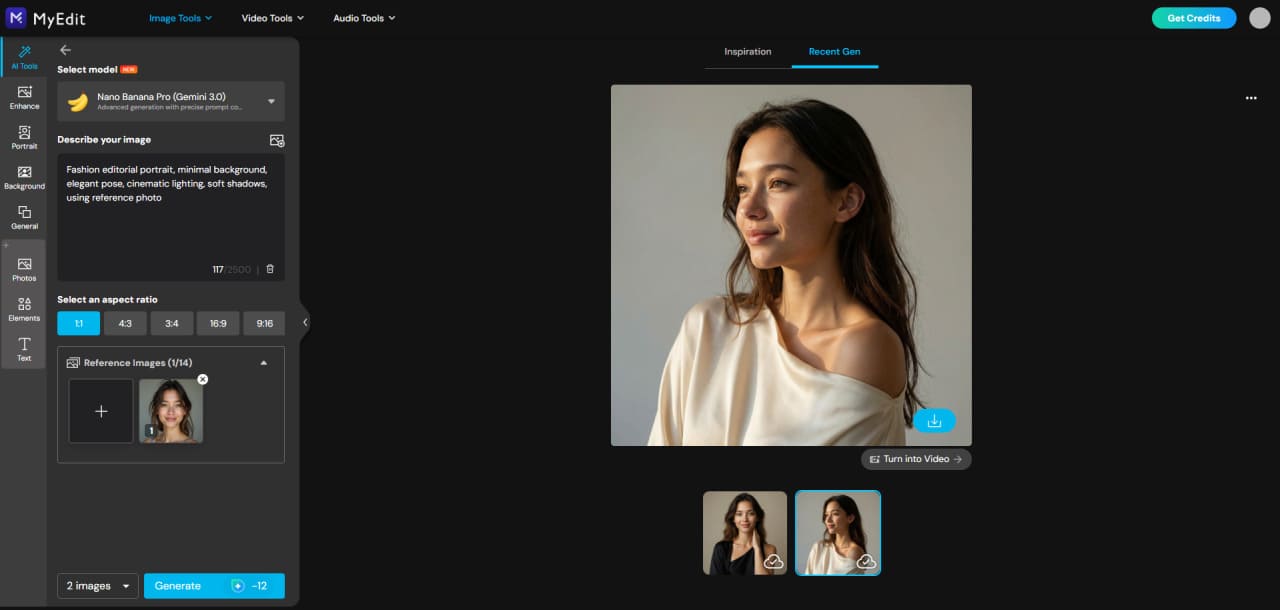
- Open MyEdit: Launch AI Image Generator to start your project.
-
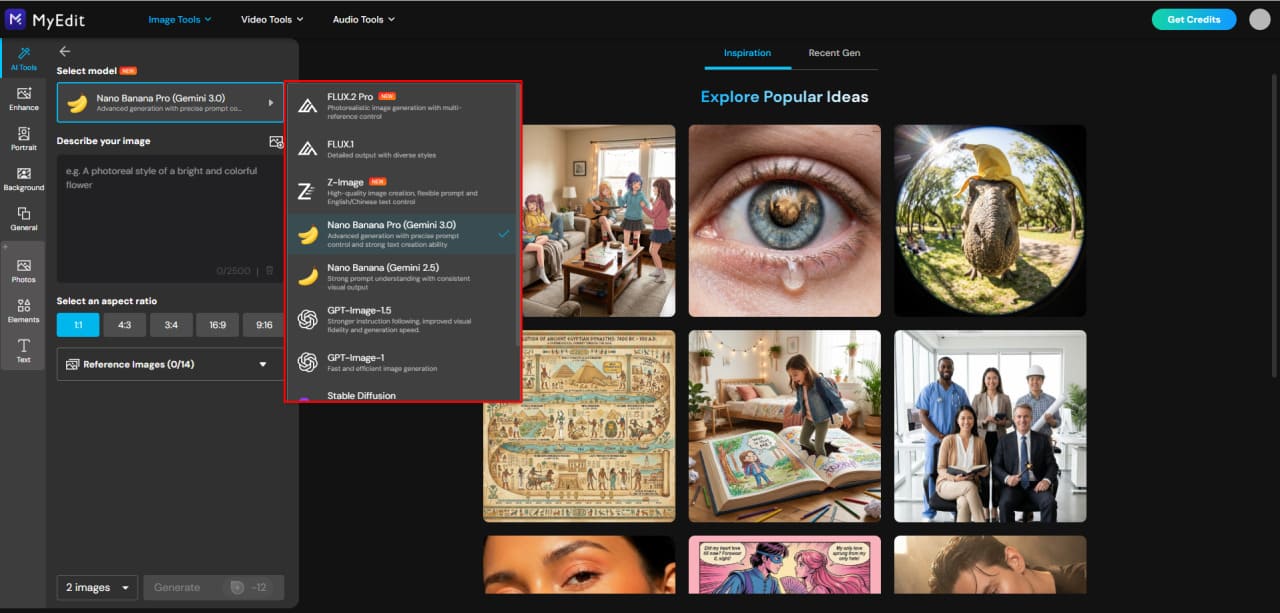
Choose Your AI Model:
Pick the model that suits your desired style. For example, Gemini or ChatGPT for portraits, Stable Diffusion for detailed art, Nano Banana for 3D-style or playful results.
-
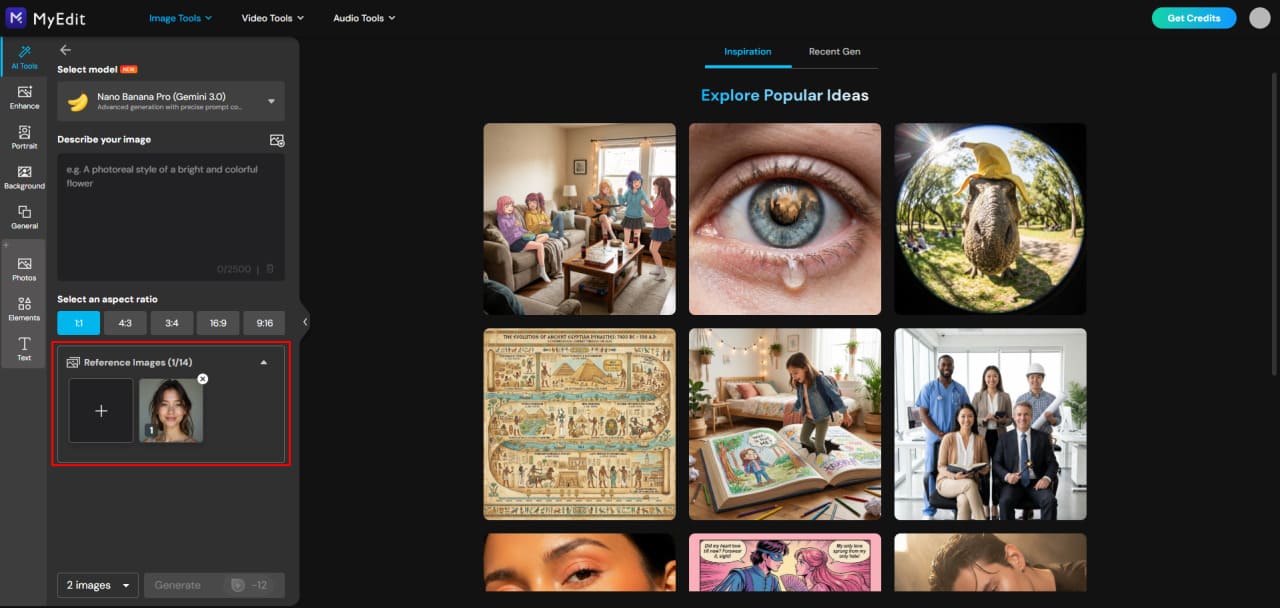
Upload Your Reference (Optional):
Add an image if your prompt needs a reference. Some models allow multiple references for consistent likeness, while others work best from text alone.
-
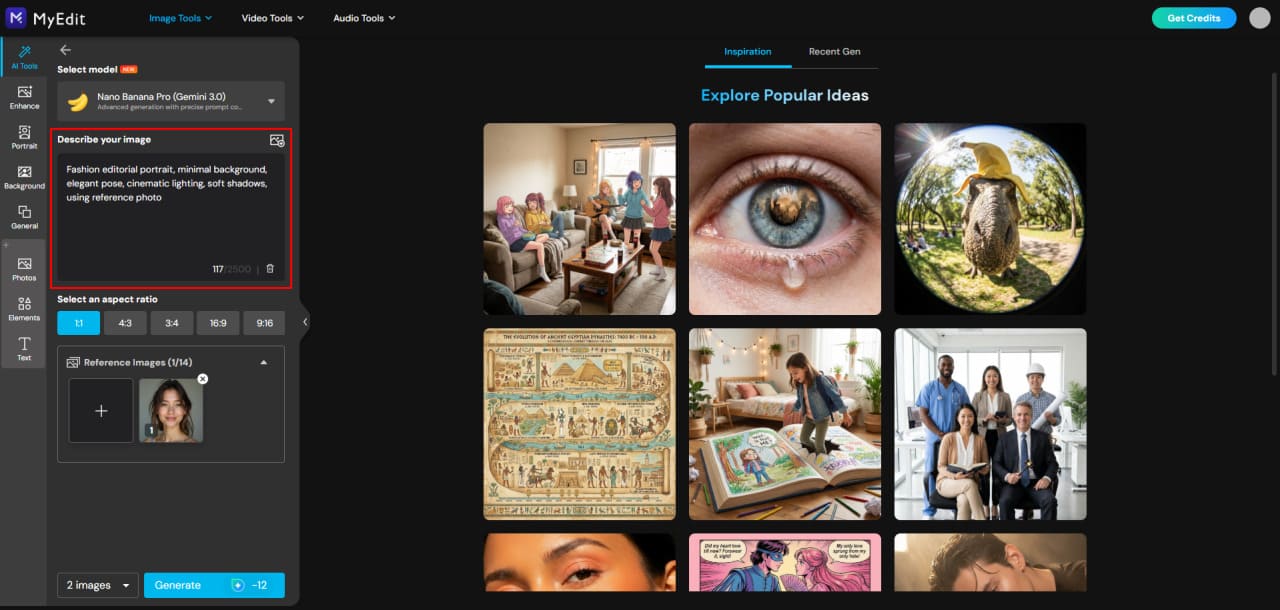
Enter Your Prompt:
Describe exactly what you want the AI to generate. You can use a sample from the prompt guides above and tweak it for your project.
-
Generate Your Output:
Click Generate to see the result. Adjust your prompt or model if you want different variations or styles.


How to Create Videos Using AI Prompts in MyEdit
Whether you want to turn text ideas or images into animated videos, MyEdit makes the process fast and simple. Follow these step-by-step guides to create eye-catching AI videos in minutes.
Create AI Videos from Text Prompts
Turn your written ideas into dynamic videos with MyEdit Text to Video. Perfect for storytelling, scene creation, or seasonal content.
- Open MyEdit: Launch the AI Video Generator in your browser—no downloads needed.
-
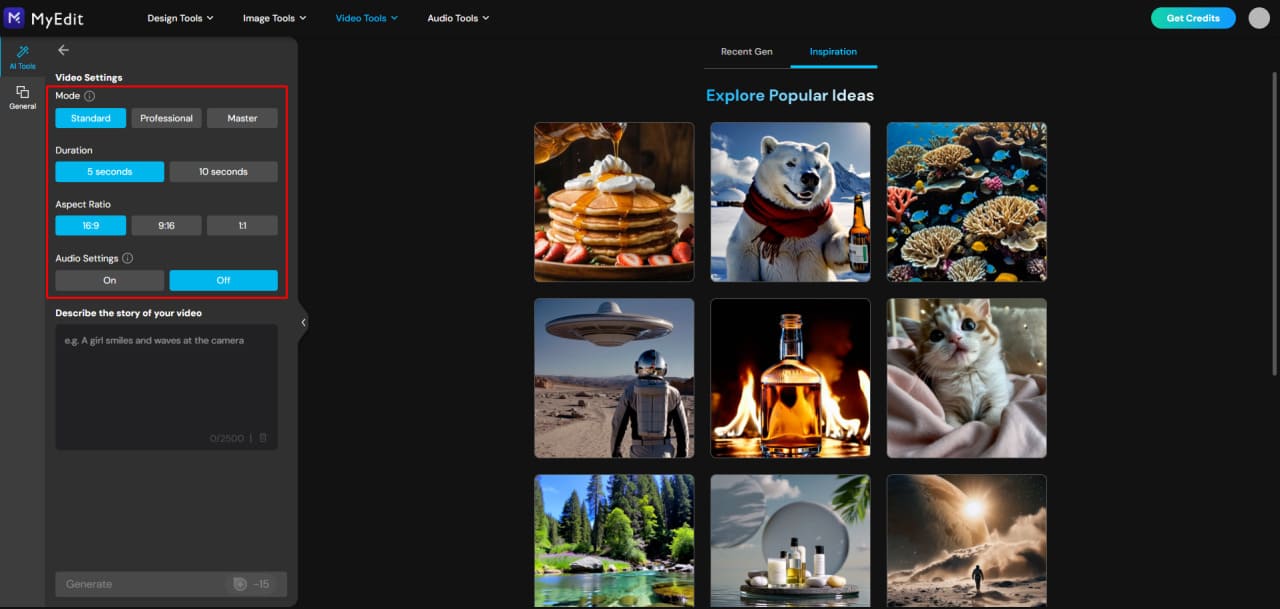
Choose Mode & Settings: Pick a generation mode—Standard, Professional, or Master—for increasingly advanced results. Set your video duration, aspect ratio, and audio preferences.
Tip: Standard and Professional create background music; Master adds spoken dialogue.
-
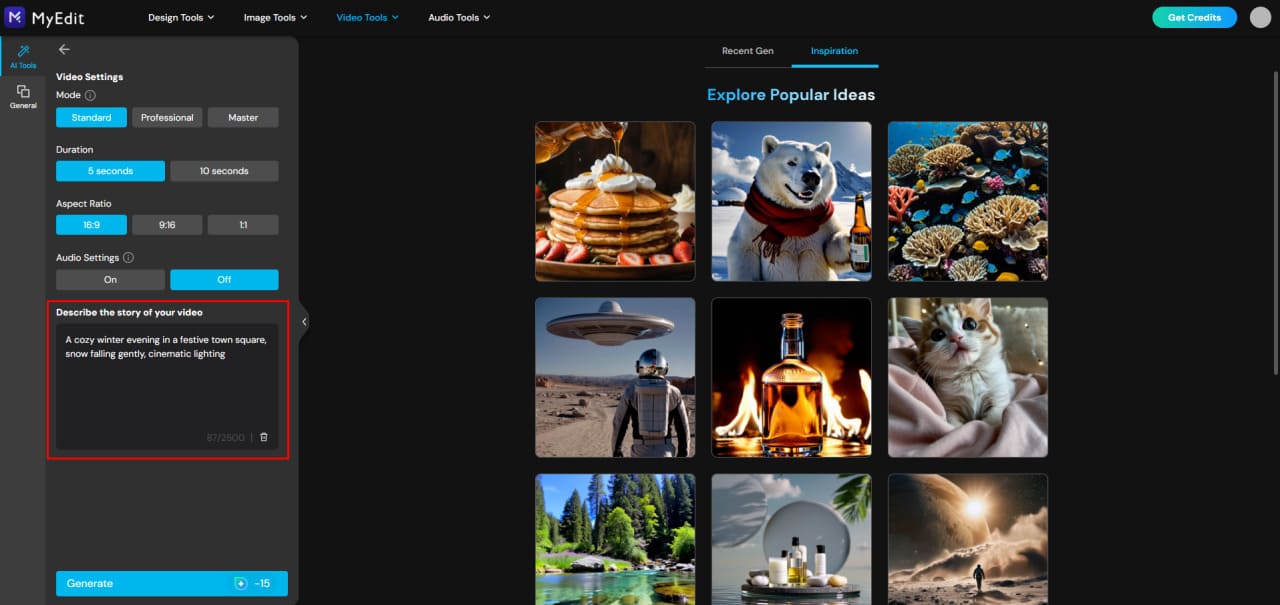
Enter Your Prompt: Type a clear, descriptive prompt to guide the AI.
Example: “Snowy winter village at night, glowing lights, people celebrating, cinematic lighting.”
-
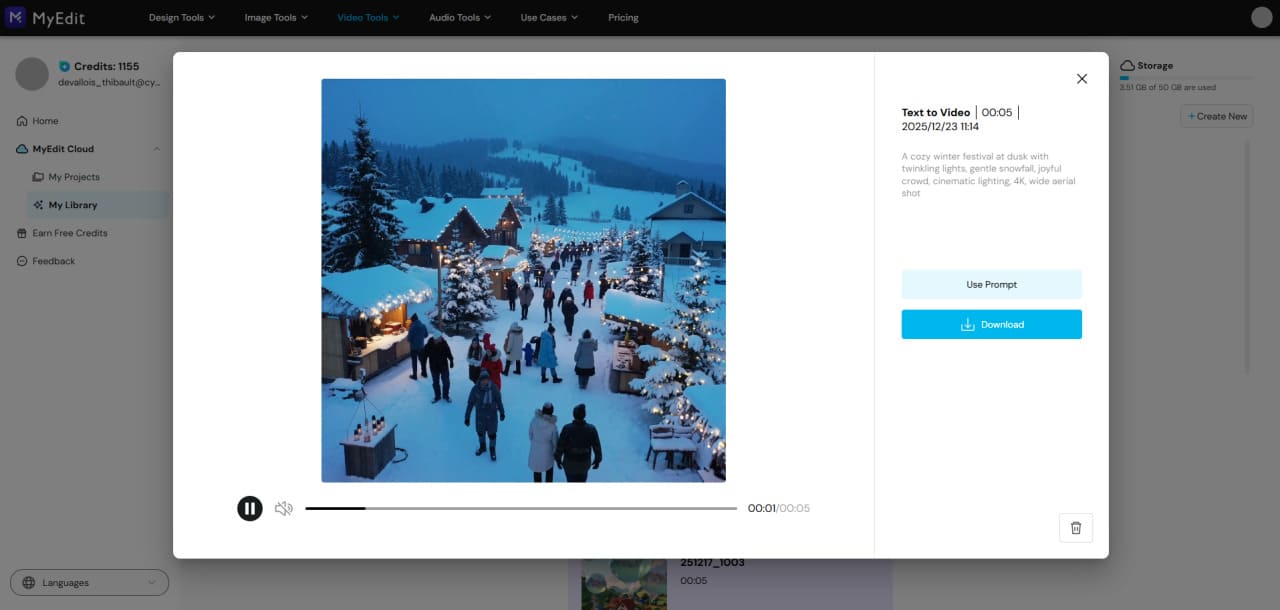
Generate & Download: Click Generate to create your video. Preview it, then download or share your creation instantly.


Animate Images into AI Videos
Bring static images to life with MyEdit Image to Video. Great for portraits, product shots, or any visual content you want to animate.
- Open MyEdit: Launch the AI Image to Video Generator in your browser.
-
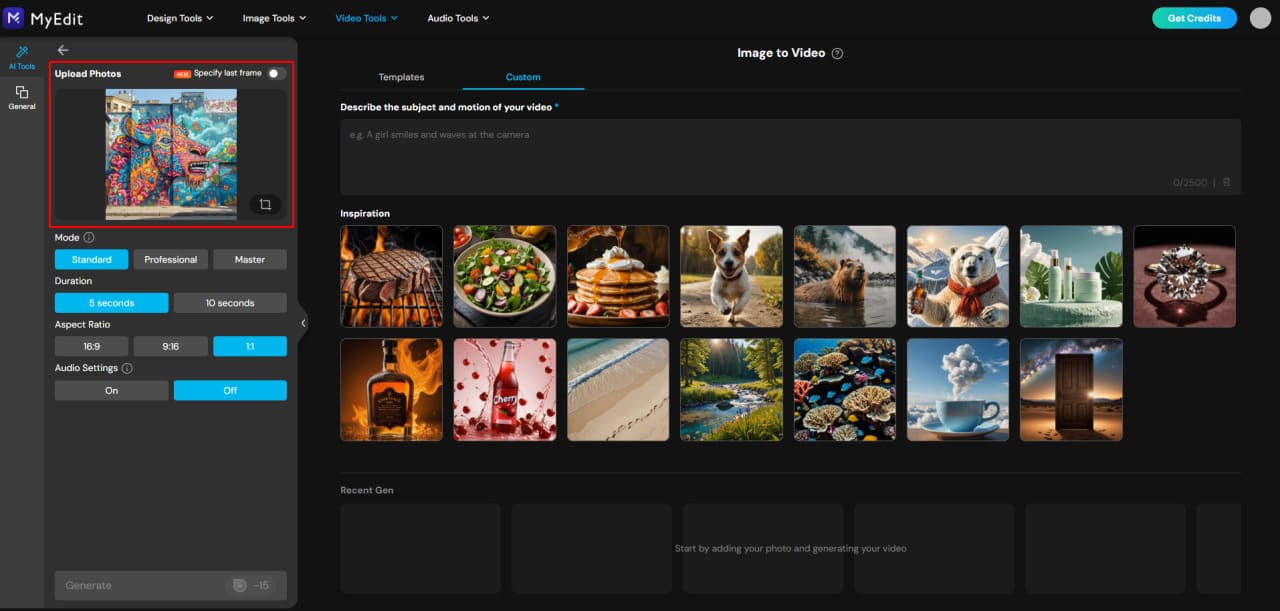
Upload Your Image: Add a photo you want to animate. Single or multiple images are supported depending on the AI model.
-
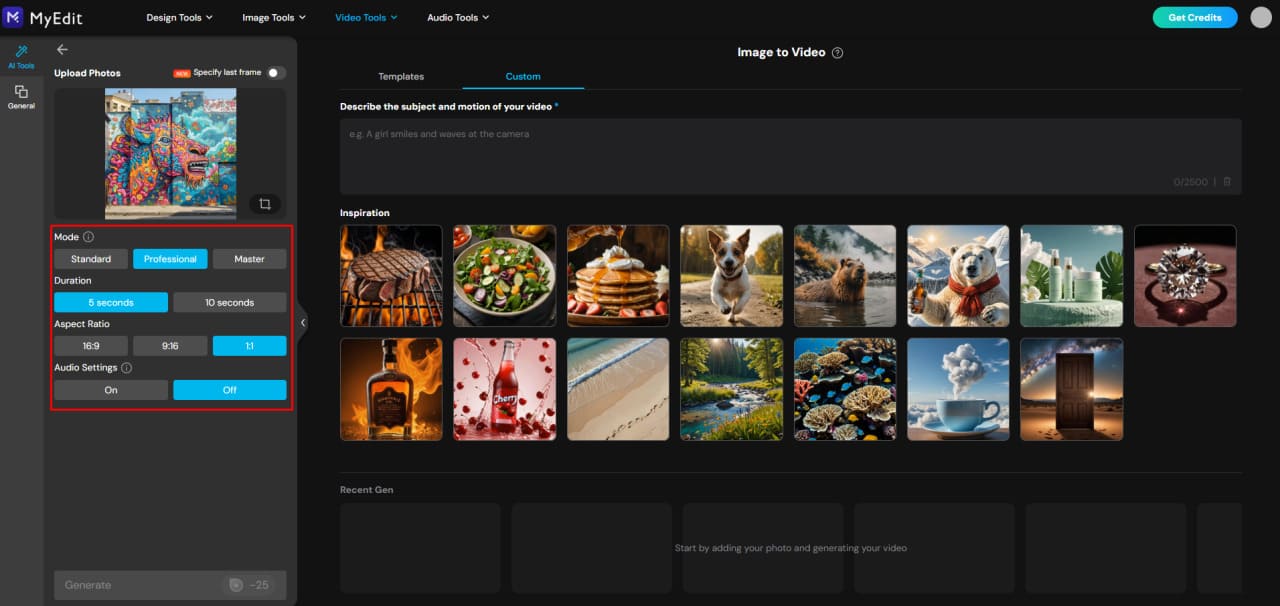
Choose Mode & Settings: Pick Standard, Professional, or Master modes for progressively more advanced results. Set duration, aspect ratio, and audio options.
Tip: Master mode can generate spoken dialogue while other modes add background audio.
-
Use Templates or Custom Prompts: Apply a ready-made animation template for quick results, or enter a custom prompt for full creative control.
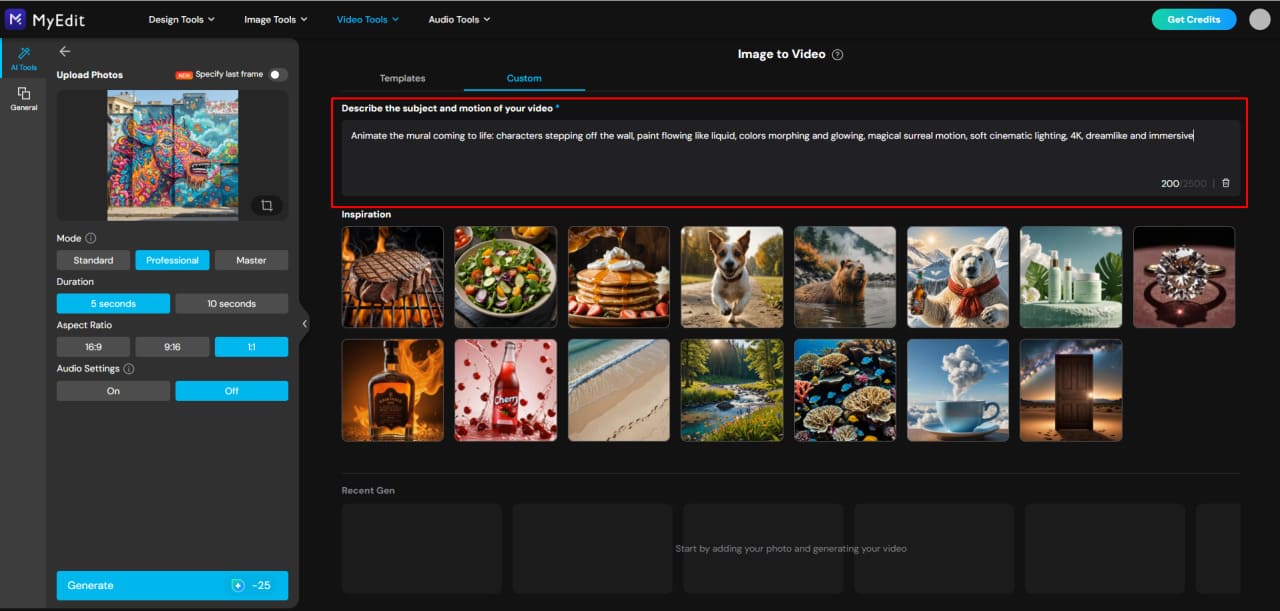
Pro Tip: Templates are quick and polished; custom prompts let you fully personalize your animation.
-
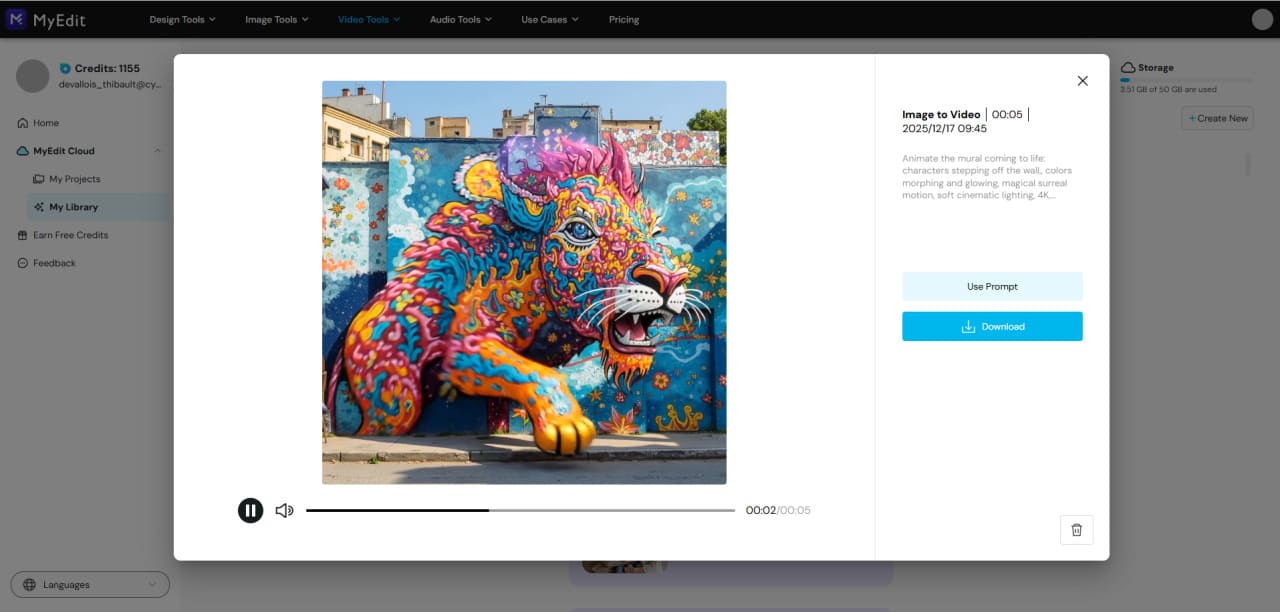
Generate, Preview, and Share: Let the AI process your image, then preview, download, or share your animated video instantly.


AI Prompts FAQs
AI prompts are text instructions you give to AI tools to generate images or videos. They describe subjects, style, lighting, mood, and composition. With MyEdit, you can easily test prompts across multiple models for both images and videos.
Effective AI prompts are clear, detailed, and descriptive. Include information about the subject, environment, style, lighting, and mood. Using MyEdit, you can experiment with prompt variations to see real-time results across different AI models.
For realistic portraits or character illustrations, Gemini, ChatGPT, and Nano Banana are popular choices. MyEdit lets you access all these models in one platform, making it simple to create consistent, high-quality characters.
Yes! AI video tools like Sora and Veo 3 can generate videos from text or animate images. With MyEdit, you can do the same using a variety of popular AI models, choosing different styles and levels of realism, all in a fast and beginner-friendly interface.
Absolutely. You can generate festive images and videos for Christmas, New Year, Valentine’s Day, and more. MyEdit provides templates and pre-set prompts to quickly create seasonal content with minimal effort.
Most AI tools allow commercial use, but always check the platform’s terms. With MyEdit, all generated content can be used for personal or commercial projects, including marketing, social media, and professional presentations.
Yes. You can transform sketches or reference photos into fully styled AI images. MyEdit supports image-to-image generation, letting you refine details, change styles, or animate your creations.
No technical skills are required. With MyEdit, you can start from ready-made prompts, templates, or example prompts, then tweak them to create custom images and videos effortlessly.


