


5 Best Apps to Remove People from Photos on iPhone and Android (2026)
Photobombers, tourists, and unwanted passersby can ruin an otherwise perfect shot. These AI-powered apps can remove a person from any photo in seconds, right from your iPhone or Android.
- Best Overall (iOS and Android): Use PhotoDirector. AI-powered removal tool with brush precision, automatic background fill, and a full photo editor, completely free.
- Best for Beauty Retouching: Use YouCam Perfect. Combines object removal with face and body beautification tools.
- Best for Speed: Use TouchRetouch. Removes people, power lines, and objects in seconds with minimal effort.
- Best for Advanced Control: Use Snapseed. Google's free editor with a Healing tool and deep manual customization.
- Best Online (No Download): Use MyEdit. Remove people from photos directly in your browser with AI, no install needed.
- 5 Best Apps to Remove a Person from Photos
- How to Remove a Person from Photos for Free
- 4 Best Ideas to Remove People from Photos
- Download the Best Free App
- FAQ
5 Best Apps to Remove People from Photos on iPhone and Android (2026)
- PhotoDirector: Best Overall App to Remove People from Photos
- YouCam Perfect: Best for Beauty Touch-Ups and Object Removal
- TouchRetouch: Best App for Removing Objects Quickly
- Snapseed: Best for Advanced Photo Customization
- Lightleap: Best for Photo Retouching and Sky Replacement
1. PhotoDirector: Best Overall App to Remove People from Photos


Platforms: Android, iOS
Key Features:
- AI-powered removal tool with automatic background fill
- Adjustable brush size for precise selection
- Full photo editor including overlays, background replacement, and light effects
- New content and AI features updated monthly
PhotoDirector is the best free app to remove a person from photos on iPhone and Android. The AI Removal tool lets you brush over any person or object, then automatically analyzes and fills the background for a clean, seamless result. You can zoom in and adjust the brush size for precision, and use the Eraser tool to fine-tune the selected area before removing.
Beyond removal, PhotoDirector offers animated decorations, background replacement, blur effects, and overlays, making it a complete photo editor rather than a single-feature tool.

Try the free PhotoDirector app on iOS and Android now!

2. YouCam Perfect: Best App for Beauty Touch-Ups and Object Removal

Platforms: Android, iOS
Key Features:
- Intelligent object removal tool
- Face and body beautification including teeth whitening, blemish removal, and face reshape
- 1000+ exclusive filters, collages, and stickers with Premium
- Cloud backup to access photos across multiple devices
YouCam Perfect combines people removal with a full beauty editing suite. The intelligent object removal tool erases unwanted people or background objects and fills the gap cleanly in seconds. It's the best option if you want to combine removal with portrait retouching in a single app.
3. TouchRetouch: Best App for Removing Objects and People Quickly

Platforms: Android, iOS
Key Features:
- Removes complex objects including power lines, street signs, and people
- Brush and Lasso selection tools
- Quick Repair feature for micro imperfections
TouchRetouch is purpose-built for fast, accurate object removal. Select a portion of the object with the Brush or Lasso tool and the app removes the rest automatically, no precision required. It handles complex shapes like power lines and mesh that other apps struggle with. Best used alongside a more comprehensive editor like PhotoDirector for full editing control.
4. Snapseed: Best Free App for Advanced Photo Customization

Platforms: Android, iOS
Key Features:
- Healing tool for removing background objects and minor imperfections
- Deep customization of filters, colors, and tones
- Non-destructive editing with full undo history
Snapseed is Google's free photo editor with a Healing tool for removing objects and distant background distractions. It's best for advanced users who want fine control over the final result. The Healing tool works well for simple backgrounds but is less effective for removing people in complex scenes, where PhotoDirector's AI gives cleaner results.
5. Lightleap: Best App for Photo Retouching with Object Removal

Platforms: iOS, Android
Key Features:
- Heal tool to remove people and objects from photos
- AI sky replacement and photo filters
- Built-in tutorials guiding you through the removal process
Lightleap combines people removal with sky replacement, filters, and photo retouch tools in one visually polished app. The Heal tool walks first-time users through the removal process step by step, making it a good entry point for beginners. Free and premium versions are available.
How to Remove a Person from Photos on iPhone and Android for Free

Removing people from photos is quick and easy with PhotoDirector. Here's how to do it:
- Download the PhotoDirector App (Free on iPhone and Android)
- Tap "Edit" and Choose the Photo
- Go to "Tools" and Tap "Removal"
- Tap "Remove" and Let AI Fill the Background
Head to the App Store or Google Play Store to download it for free.
Brush over the person you want to remove. Use the Eraser to refine the selection area for a precise result.
4 Best Ideas to Remove People from Photos
Say Goodbye to Your Ex

Have a photo with someone you'd rather forget? PhotoDirector's AI Removal tool makes it effortless to erase any person and replace the background seamlessly, even against complex scenes.
Get Rid of Photobombers in a Second
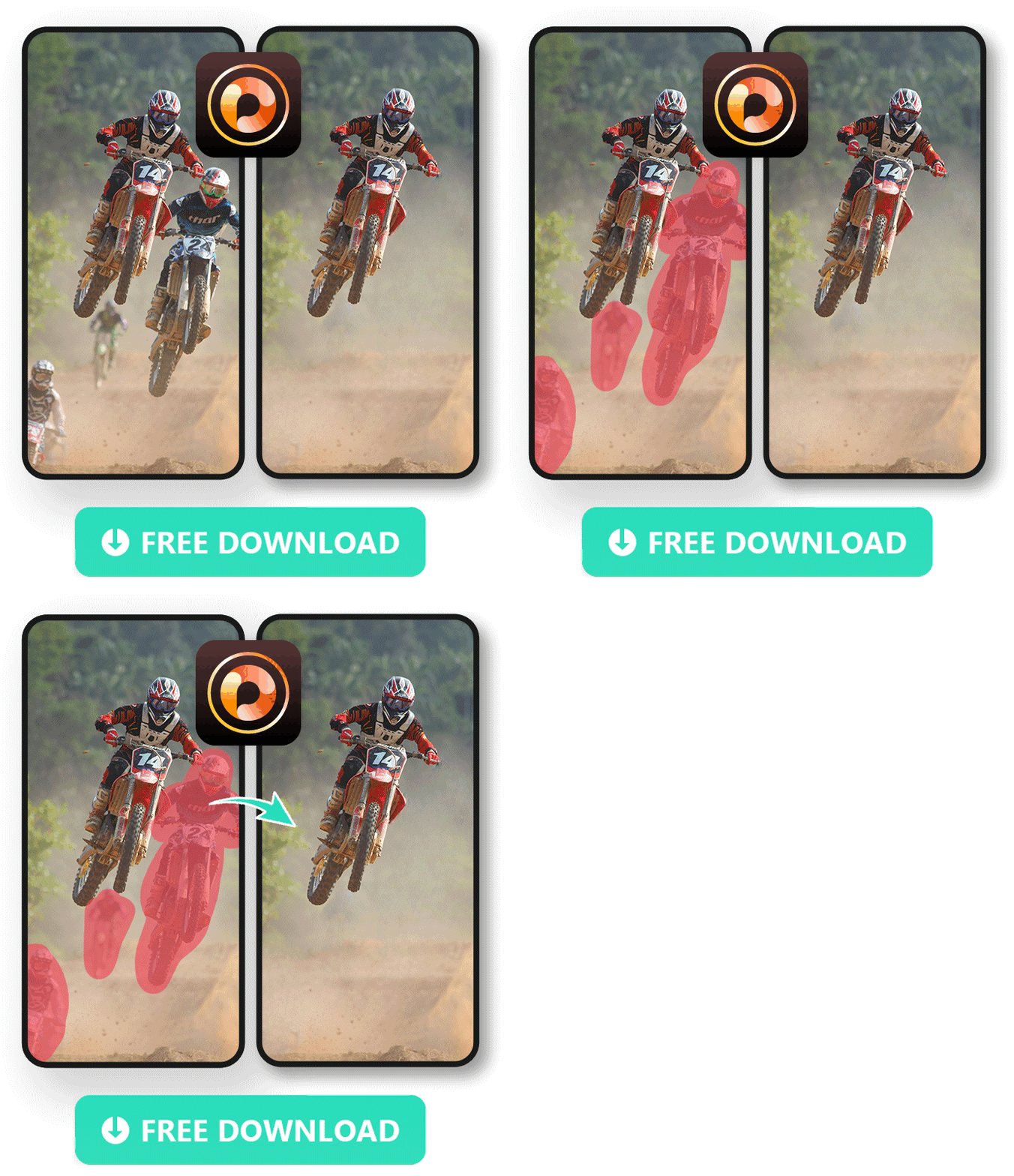
When someone walks into your shot at the wrong moment, PhotoDirector can remove them completely. The AI fills the background automatically so there's no trace they were ever there.
Be the Spotlight at Special Moments
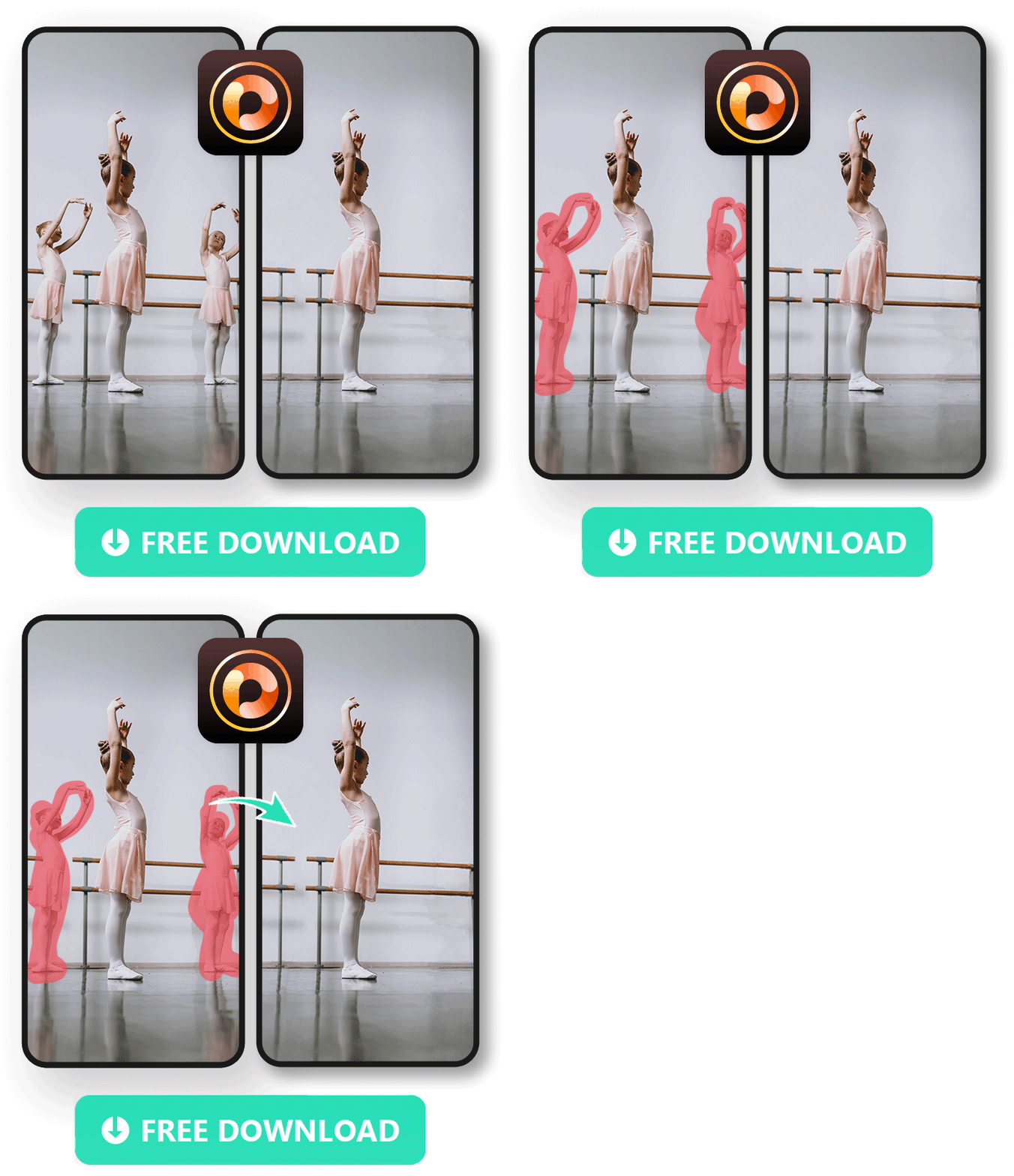
Capturing a special moment like a first ballet recital? Remove background distractions so the star of the photo gets all the attention.
Get an Artistic Photoshoot without Distractions

Removing people from a scene lets you focus on composition and create cleaner, more artistic shots without distractions competing for attention.
Download the Best Free App to Remove People from Photos
PhotoDirector is the best free app to remove people from photos on iPhone and Android. Its AI Removal tool automatically fills the background after removal, even against complex scenes, with no expert editing skills required.
FAQ: Best Apps to Remove People from Photos
PhotoDirector is the best free app to remove people from photos on iPhone and Android. Its AI Removal tool automatically fills the background after selection, works against complex backgrounds, and includes a full photo editor at no cost with no ads.
Download PhotoDirector for free from the App Store or Google Play. Tap Edit, choose your photo, go to Tools and tap Removal. Brush over the person you want to remove, then tap Remove. The AI fills the background automatically.
MyEdit is the best online tool to remove people from photos. Upload your image, paint over the person you want to remove, and the AI erases them and fills the background without any download required.
The most common situations are photobombers ruining a planned shot, tourists in the background of travel photos, an ex-partner in old pictures, or background distractions at events like recitals or weddings. AI removal tools like PhotoDirector handle all of these cases in seconds.
Look for: AI-powered automatic background fill, adjustable brush precision, support for complex backgrounds, and compatibility with both iOS and Android. Bonus features like sky replacement, filters, and portrait tools make an app more versatile for everyday editing beyond just removal.

The CyberLink Editorial Team is composed of product testing specialists and content creation experts with over 20 years of hands-on experience and rigorous research in the multimedia editing industry. As the official voice of CyberLink, the team consistently delivers practical, easy-to-follow tutorials across video, photo, and audio editing, while highlighting AI innovations, product insights, and emerging industry trends. Their work empowers millions of creators worldwide each year to elevate their content. Beyond the blog, the team actively shares editing tips and product updates across YouTube, Facebook, Linkedin and Pinterest.
😎 Outside of their work, they enjoy capturing travel moments and meticulously editing photos and videos for their social channels.


