







Swap Faces Instantly: US Guide to AI Head Swap Tools Online

- What is Head Swap: An AI-powered technique that replaces a person's head while seamlessly preserving the original body, background, and lighting.
- Fast & Easy Process: Use MyEdit to upload your face, select a target style, and generate a realistic result in under 10 seconds without any editing skills.
- Creative Possibilities: Perfect for experimenting with new hairstyles, transforming into meme characters, or swapping faces with friends for social media fun.

What is Head Swap?
Head swap is a photo or video editing technique that replaces one person’s head with another while keeping the original body and background remaining the same.
In the past, doing this required complicated and time-consuming work with Photoshop or other difficult-to-use photo editors.
However, thanks to the advance of AI and facial recognition technology, the AI recognizes facial structure, blends skin tones, and matches lighting to create a seamless result.
Head swaps are used worldwide for memes, profile photos, and creative content, with particularly high popularity among users in the US who favor realistic and fun results.
Use AI tools responsibly. Do not edit, modify, or share images of others without their explicit consent. Unauthorized use may violate privacy, publicity, or other legal rights. Users are responsible for securing proper permissions.
How to Do a Head Swap Online
To perform a head swap online, upload your original image, select the face you want to replace, and add the new face you want to insert. The AI automatically analyzes facial landmarks and merges the replacement head into the photo with consistent lighting and proportions. This process works on desktop and mobile browsers and requires no editing skills. Most US-friendly head swap tools complete the swap in under 10 seconds.
- Go to MyEdit and click “AI Face Swap”
- Upload a photo featuring the face you want to use
- Select a target image from the library or upload your own via Target Style
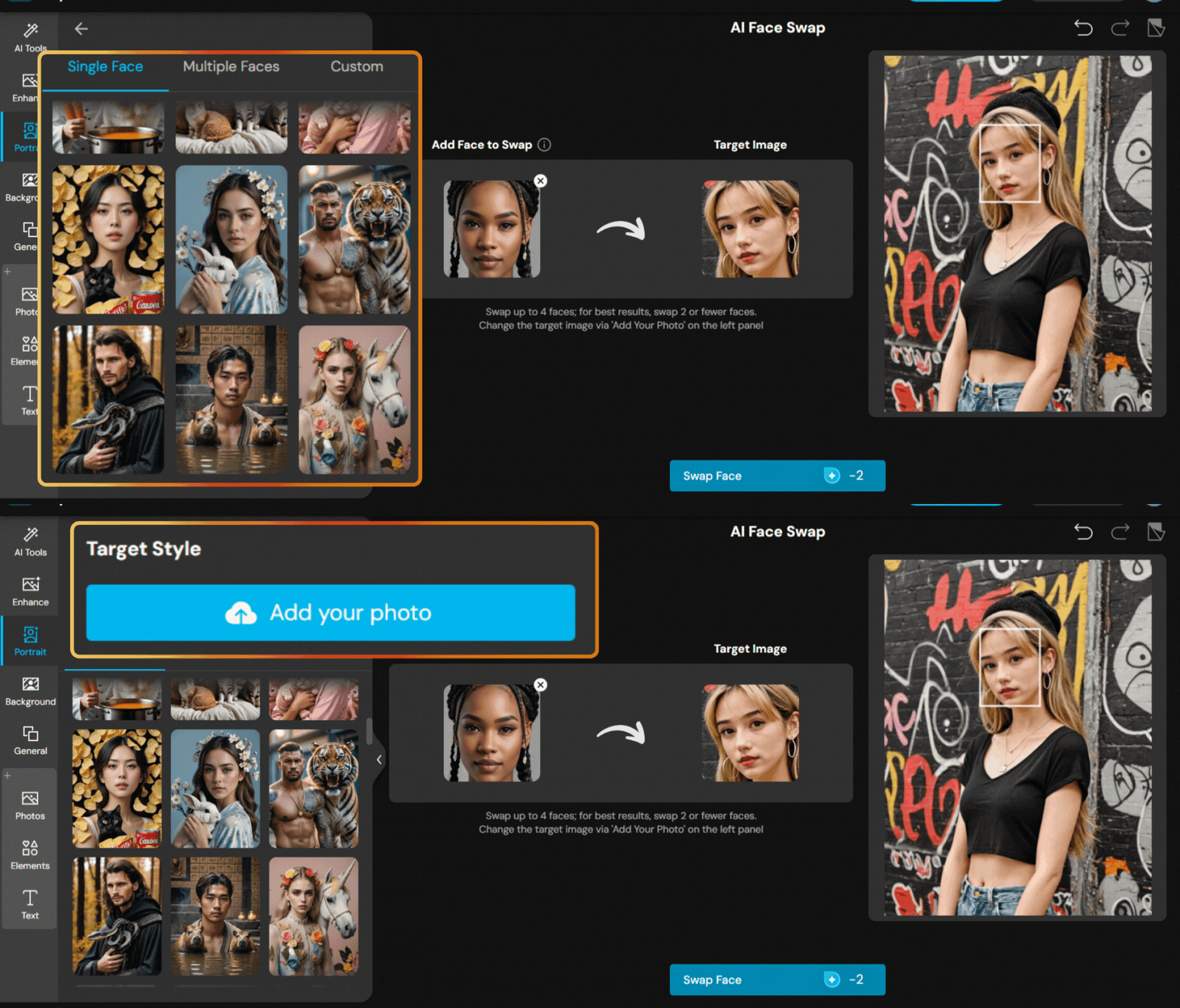
- Once you're ready, accept the terms of service and privacy policy, then click Generate
- Save and share your masterpiece


Try 3 Fun AI Head Swap Ideas
Experiment with various looks and hairstyles

Wondering what you’d look like in the outfits or hairstyles that look amazing on celebrities? Try a head swap to see if you can pull off your idol’s style and look stunning!
Become a meme character

Tired of sending the same old memes to your friends? Create your own by swapping your face onto a meme character and make your group chat even more fun!
Swap heads with friends

Curious how you'd look with your best friend’s face? Use your latest selfie together to swap faces and see if you can rock your bestie’s look. Share the fun online and challenge your friends to join in!
FAQ About AI Head Swap
The AI analyzes facial features in the source and target images, aligns them, and blends the swapped face seamlessly onto the new image using advanced algorithms. The best part is AI face swap only changes the face and keeps the background and character’s outfits and hairstyles the same.
As long as you use reputable apps or platforms that respect your privacy and follow data protection guidelines, AI face swap is safe and fun. Always read the terms of service and privacy policies before doing a face swap.
It depends on the app’s terms and any copyright or likeness rights involved. Always check usage rights before using AI-generated images commercially.
Clear, well-lit photos with faces looking forward usually produce the best results. Extreme angles or poor lighting can reduce accuracy.
Yes, head swaps are legal for personal use, but you should avoid using someone’s face in misleading or harmful contexts.
Yes, several US-accessible tools such as MyEdit offer free head swaps with basic features and unlimited simple edits.
No. AI tools perform full head swaps automatically, with no manual masking or blending required.

The CyberLink Editorial Team is composed of product testing specialists and content creation experts with over 20 years of hands-on experience and rigorous research in the multimedia editing industry. As the official voice of CyberLink, the team consistently delivers practical, easy-to-follow tutorials across video, photo, and audio editing, while highlighting AI innovations, product insights, and emerging industry trends. Their work empowers millions of creators worldwide each year to elevate their content. Beyond the blog, the team actively shares editing tips and product updates across YouTube, Facebook, Linkedin and Pinterest.
😎 Outside of their work, they enjoy capturing travel moments and meticulously editing photos and videos for their social channels.


