




The 10 Best Free AI Voice Generators for 2026


With recent advancements in Artificial Intelligence, AI-powered voice generators are becoming increasingly accurate and realistic.
These tools allow you to convert text into speech effortlessly, enabling voiceovers for podcasts, YouTube videos, and even audiobooks, making content more accessible to everyone.
In this article, we’ll explore the best AI voice generators, and show you how to create a voice from text. Let’s dive into how these powerful tools can enhance your content creation process!
- Best Free AI Voice Generators to Try
- How to Use an AI Voice Generator
- Benefits of Free AI Voice Generators
- AI Voice Generator FAQs
Top 10 Free AI Voice Generators to Try in 2026
Here are some of the top AI text reader tools that can help you effortlessly convert text into speech and improve productivity:
- PlayHT (Web Browser)
- Speechify (Web Browser)
- MyEdit (Web Browser)
- Naturalreaders (Web Browser)
- PowerDirector App (Android/iOS)
- PowerDirector (Windows/Mac)
- Notevibes (Web Browser)
- Text to Speech (Android)
- Balabolka (Windows)
- Panopreter (Windows/Mac)
1. PlayHT

Available on: Web Browser
Popular features:
- Wide variety of voice profiles tailored for different needs
- Voice cloning for custom voice replication
- Audio timeline to manage dialogue creation easily
PlayHT is an intuitive online text-to-speech platform designed to convert text into natural-sounding audio.
It features a user-friendly interface and allows for multi-voice dialogue creation, making it ideal for storytelling or presentations. The audio timeline simplifies managing conversations, letting users fine-tune voice delivery with ease.
Voice cloning is another standout feature, enabling you to replicate personal or authorized voices for creative projects.
While the free version offers basic functionality, premium plans unlock access to additional voices, languages, and extended character limits.
In our experience, PlayHT provides incredibly realistic voice cloning. Generating a custom voice only took a few minutes of sample audio. With over 800 AI voices across 142 languages, the pronunciation features are top-notch, allowing us to specify exactly how acronyms and unique names should be spoken. However, the sheer number of options can make finding the perfect voice slightly time-consuming.
Pricing: Free version available (limited to 5,000 words). Premium plans start at $39/month for advanced features and expanded capabilities.
2. Speechify

Available on: Web Browser
Popular features:
- Wide range of voice profiles with various accents
- Easy script import for faster voice generation
- Add videos, images, and music to complete your project
Speechify is an easy-to-use online tool that allows you to convert text to voice using a variety of voice profiles.
It’s ideal for creating simple voiceovers and video content, where you can import your script and sync it with images and videos.
The platform also offers a library of free stock images, videos, and music that you can use to enhance your project.
While it’s great for quick and straightforward voiceover work, Speechify doesn’t provide the advanced editing features that apps like PowerDirector offer for more complex video projects.
Speechify excels at accessibility. We found the Chrome extension incredibly useful for reading long articles aloud at up to 5x speed while multitasking. The 200+ high-quality voices, particularly the celebrity options like Snoop Dogg, are fun, though perhaps less suited for corporate videos. The OCR function for scanning and reading physical documents is highly accurate.
Pricing: Free basic version available. Premium version is $139/year (billed annually).
3. MyEdit
Available on: Web browser
Popular features:
- Multiple natural-sounding voice profiles, including various accents and languages
- Different speech styles available (e.g., sad, cheerful, formal, casual)
- Additional AI features for voice modulation and subtitle creation
- Easy-to-use platform directly accessible via browser, no download required
MyEdit is an online platform offering a wide range of AI-powered audio and photo tools, all accessible directly through your browser with no need to download software.
The platform excels in generating natural-sounding voices from text, allowing users to select from a variety of voice profiles that best suit their needs.

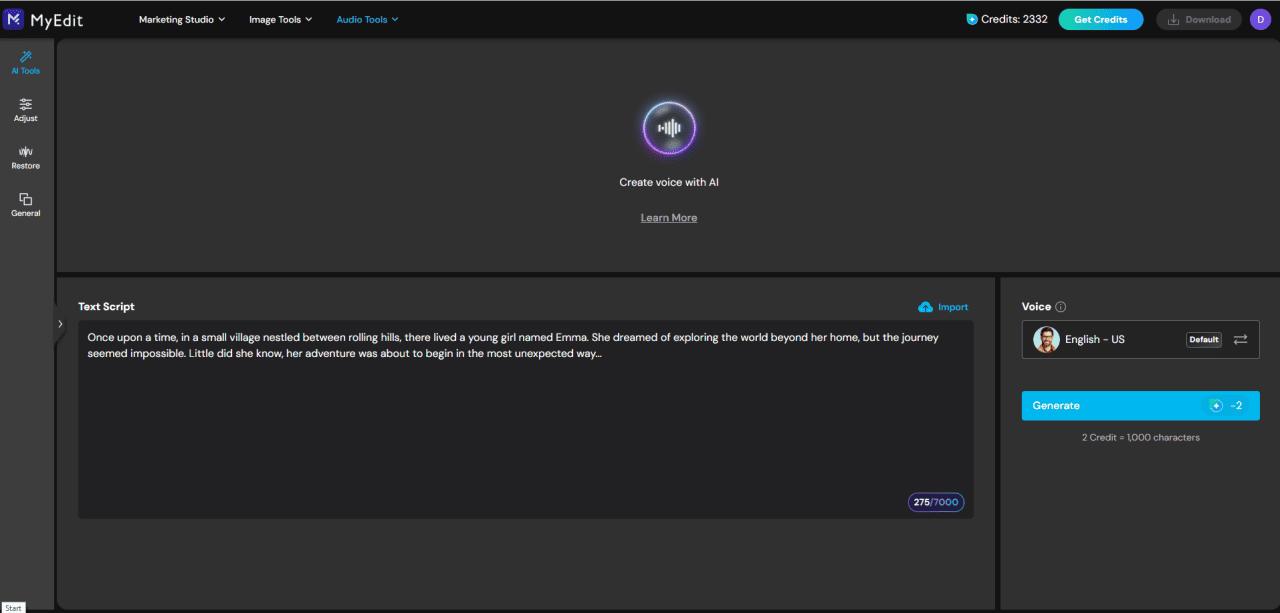
Users can input text manually or upload a .txt file, then choose from various voice options, including different accents, genders, and speech styles such as cheerful or formal.
Beyond voice generation, MyEdit also offers AI-powered features like voice modulation, audio-to-text transcription, and dialogue enhancement, making it a versatile tool for content creators.
MyEdit stands out for its simplicity and the high quality of its emotional voice profiles. We generated a customer service script, and the formal tone sounded professional and natural. The daily credit refresh is a great feature for casual users, though heavy users will quickly hit the character limits on the free tier.
Pricing: Free to use with 1 credit for every 1,000 characters converted to voice. A premium subscription is available for $4.17 USD/month (billed annually).
4. Naturalreaders

Available on: Web Browser
Popular features:
- Wide range of voice profiles across multiple languages
- Import text from PDFs, text files, or web pages
- OCR feature to extract text from images, photos, or screenshots
NaturalReaders is a straightforward and versatile text-to-speech tool that makes document and web page reading effortless.
Whether you need to convert text from uploaded files or scan an image to extract readable content, this platform has you covered.
The standout feature is its Optical Character Recognition (OCR) tool, which transforms scanned images, photos, or screenshots into readable text.
Pairing this with its diverse selection of voice profiles and customizable speech settings makes NaturalReaders a practical solution for accessibility and productivity needs.
NaturalReaders proved to be an excellent tool for studying and proofreading. Uploading a lengthy PDF was seamless, and the reader navigated the document flawlessly. The Premium voices are noticeably more human-like than the free ones, which can sound a bit robotic. The interface is clean, making it a solid choice for educational purposes.
Pricing: Free version available. Premium plans start at $9.99/month (or $59.99/year), offering commercial usage rights and access to all voice profiles.
5. PowerDirector App

Available on: iOS and Android
Popular features:
- Create voiceovers from text in multiple languages
- Realistic and varied voice profiles for both men and women
- Comprehensive video editing tools accessible for all users
- Automatic and customizable subtitle generation
PowerDirector is the go-to mobile app for social media creators, offering AI-driven tools to enhance your content.
Quickly generate lifelike voiceovers from text with customizable voice profiles in multiple languages. Fine-tune pitch, speed, and tone for a personal touch.

With AI features like automatic subtitles, background music enhancement, and real-time video effects, PowerDirector makes it easy to create standout videos for platforms like Instagram, TikTok, and YouTube.
We tested the PowerDirector app by creating a quick TikTok vlog. The text-to-speech feature integrated seamlessly with the video timeline. Generating a voiceover and matching it with auto-generated subtitles took mere minutes. It is incredibly convenient to have a high-quality voice generator built directly into a full-featured mobile video editor.
Pricing: Free trial available. Premium version starts at $5.99 USD/month to access additional features, including the ability to import and finalize results.
6. PowerDirector

Available on: Windows & Mac
Popular features:
- Extensive voice generator with multiple AI voice profiles
- Automatic subtitle creation
- Various templates for effects, titles, transitions, etc.
- Easy integration of text-to-speech for voiceovers
PowerDirector is a popular video editing software that offers a wide array of AI tools to help users create stunning videos quickly and easily.
One of its standout features is the ability to generate natural-sounding voiceovers from text, offering a variety of voice profiles for different use cases. This feature allows creators to add virtual, lifelike voices to their videos with minimal effort.

In addition to voice generation, PowerDirector includes essential video editing tools such as face-blurring, cartoon conversion of clips, and trendy AI effects.
Whether you're editing a simple video or working on a more complex project, PowerDirector’s combination of easy-to-use features and advanced AI tools makes it an excellent choice for video creators.
Using PowerDirector on the desktop provides a robust editing experience. The text-to-speech function is deeply integrated, allowing for precise synchronization with video clips. We found the voices to be clear and professional, perfect for tutorial videos or presentations. The overall workflow is smooth, though navigating the extensive feature set might take a little time for beginners.
Pricing: Free version available. Premium version starts at $4.58 USD/month (billed annually). The Text-to-Speech tool requires 1 credit per use.
7. Notevibes

Available on: Web Browser
Popular features:
- Extensive library of over 225 natural voice profiles
- Advanced editor for customizing speech and dialogues
- Export options in multiple formats
Notevibes is an intuitive online text-to-speech platform offering a wide range of realistic voices to transform text into audio instantly.
The free version allows up to 300 characters per conversion and includes a preview of premium voice profiles for testing.
The premium version unlocks all voice profiles and offers advanced customization options, such as adjusting tone, pitch, volume, and even inserting custom pauses for a more natural flow.
Notevibes supports over 25 languages, making it ideal for personal and professional projects alike.
Notevibes offers a surprisingly granular level of control over the generated audio. We liked the ability to manually insert pauses and adjust the emphasis on specific words, which helped create a more natural-sounding narration. The interface is clean and straightforward. However, the very tight character limit on the free version means you essentially have to upgrade for any meaningful project.
Pricing: Free version available. Personal Premium plans start at $19/month (or $96/year if billed annually), giving you access to millions of characters.
8. Text to Speech

Available on: Android
Popular features:
- Multiple language support
- Audiobook creation module
- Adjustable voice pitch, speed, and volume
Text to Speech (TTS) is an easy-to-use mobile app for Android that converts text into speech across several languages.
It offers a variety of voice profiles, with options to adjust pitch, speed, and volume for a more personalized experience.
Users can upload .pdf or .txt files to listen to audiobooks or manually enter text to generate speech.
However, it's not designed for video or podcast voiceovers as it doesn’t support video file uploads.
For a basic mobile app, Text to Speech gets the job done quickly. It’s very handy for listening to PDF documents on the go. The voices are standard system voices, so they lack the nuanced emotion of advanced AI tools, but they are perfectly adequate for reading text aloud. The ads in the free version can be somewhat intrusive.
Pricing: Free basic version with ads. Premium version starts at $0.99/month.
9. Balabolka

Available on: Windows
Popular features:
- Supports multiple text and e-book file formats
- Customizable voice settings, including speed and tone
- Ability to save audio output in various formats
Balabolka is a user-friendly software designed to read text aloud, whether from documents, e-books, or other text-based files.
It’s ideal for users who prefer listening over reading, providing an accessible and practical solution for lengthy materials.
The tool allows full customization of voice parameters, such as pitch and reading speed, enabling a tailored listening experience.
Audio can also be exported in formats like MP3 or WAV for offline use.
Balabolka is a reliable, albeit older, piece of software. It successfully read various document formats during our test, and the ability to save the output directly to MP3 is very practical. It relies on the Microsoft Speech API voices installed on your computer, so the quality is entirely dependent on your system rather than advanced cloud-based AI.
Pricing: 100% Free.
10. Panopreter

Available on: Windows & Mac
Popular features:
- Minimalist and user-friendly interface
- Control over volume, speed, and tone
- Quick import of text files for conversion
Panopreter is a straightforward tool for converting text into speech. Users can type directly into the interface or import text files, making it quick and efficient.
Once the text is processed, the playback feature allows you to preview the generated voice, and you can save the audio in WAV format if satisfied.
However, the software offers limited voice profiles, with no support for French voices, which may result in less-than-perfect outputs for non-English texts.
Panopreter is very utilitarian. It converts text to audio files quickly and without fuss. In our testing, it handled plain text files easily, but the interface feels quite dated. Like Balabolka, it relies on system voices, so don't expect the hyper-realistic emotional AI voices found in modern web-based platforms.
Pricing: Free basic version available. Premium standard version is a one-time payment of $32.95.
How to Use an AI Voice Generator for Text-to-Speech
How to Generate Voiceovers Online with AI
Follow these simple steps to create a virtual voice from text using an online AI voice generator like MyEdit:
- Step 1 : Log in to MyEdit's Text-to-Speech tool
- Step 2 : Enter or Upload Your Text
- Step 3 : Select a Voice Profile
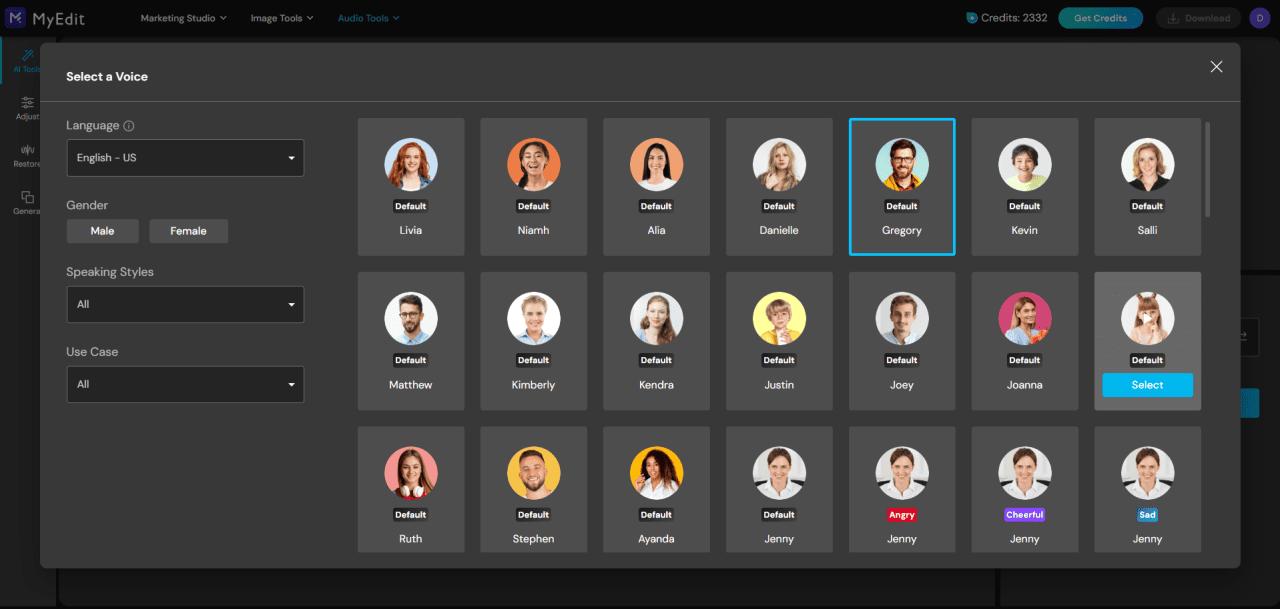
Choose from various voice profiles, filtering by language, gender, tone, or use case.
- Step 4 : Generate and Export Your Result
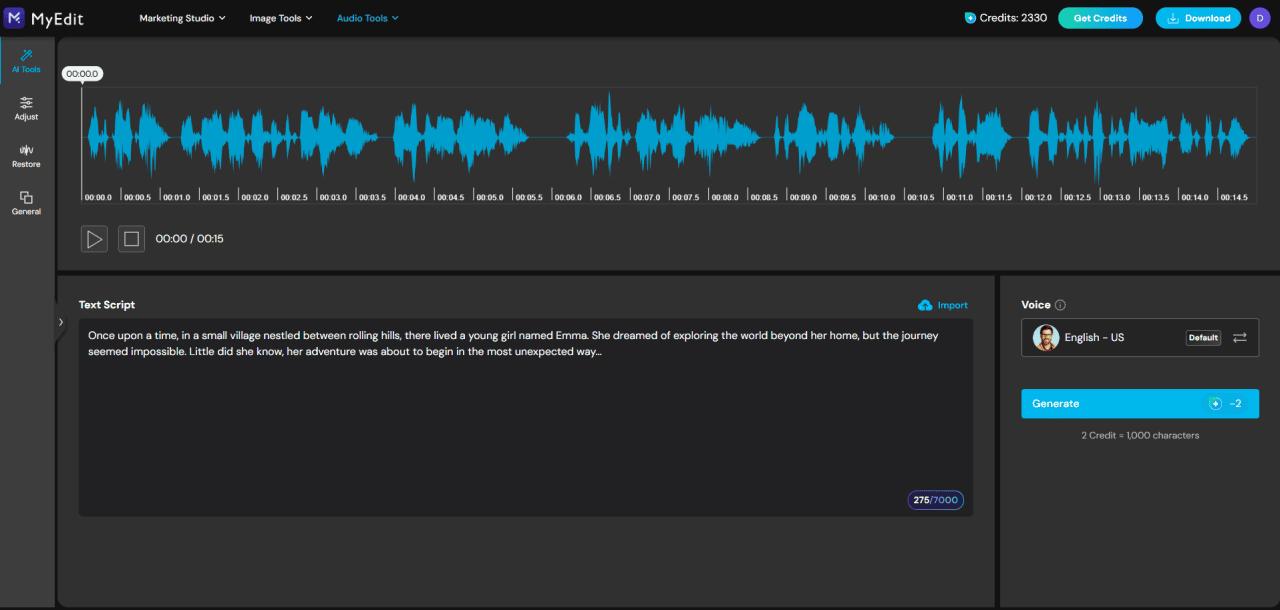
Click "Generate" to create the audio, then download the result as an .mp3 file.


Generate AI-Powered Voices on PC for Free
Here's how you can create a voiceover for your videos using PowerDirector:
- Step 1 : Download PowerDirector for Free
Download from the App Store for iOS and Android. - Step 2 : Create a Project and Add Text
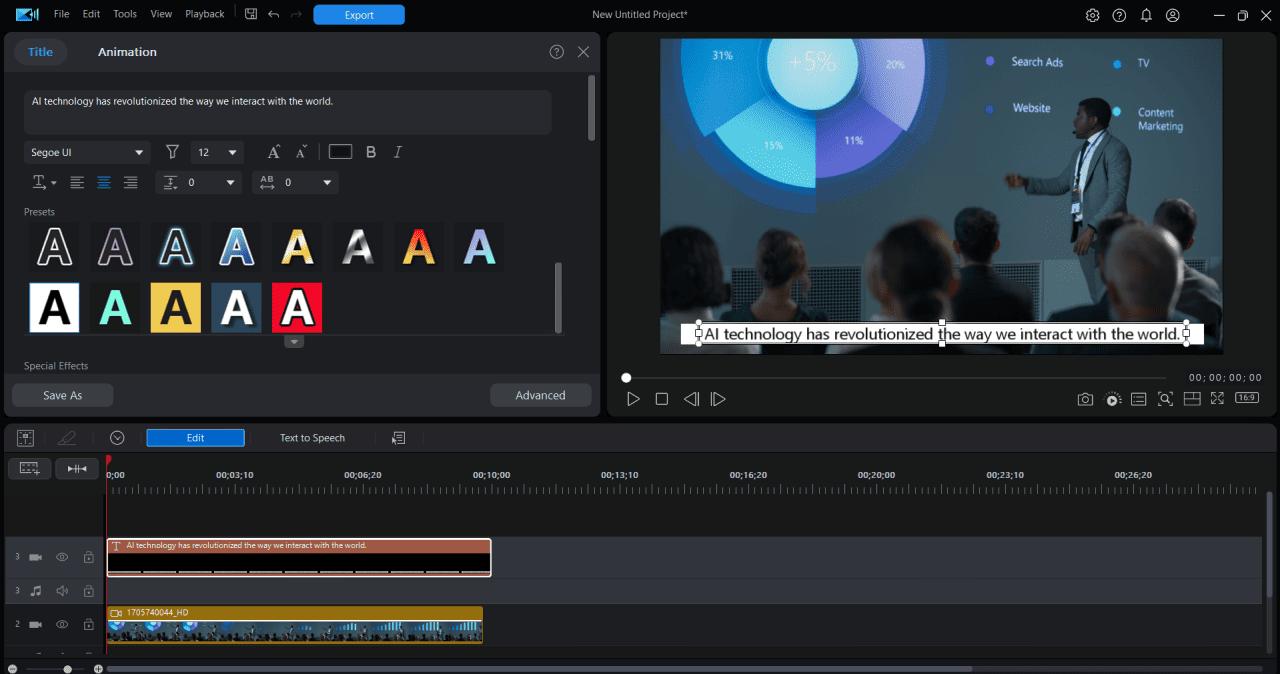
Launch the software, go to "Titles" and drag a title template onto the timeline, and customize its content.
Tip: Enhance your text by using templates to style it as a caption or a title. - Step 3 : Select "Text to Speech" above the timeline, and Choose a Voice Profile
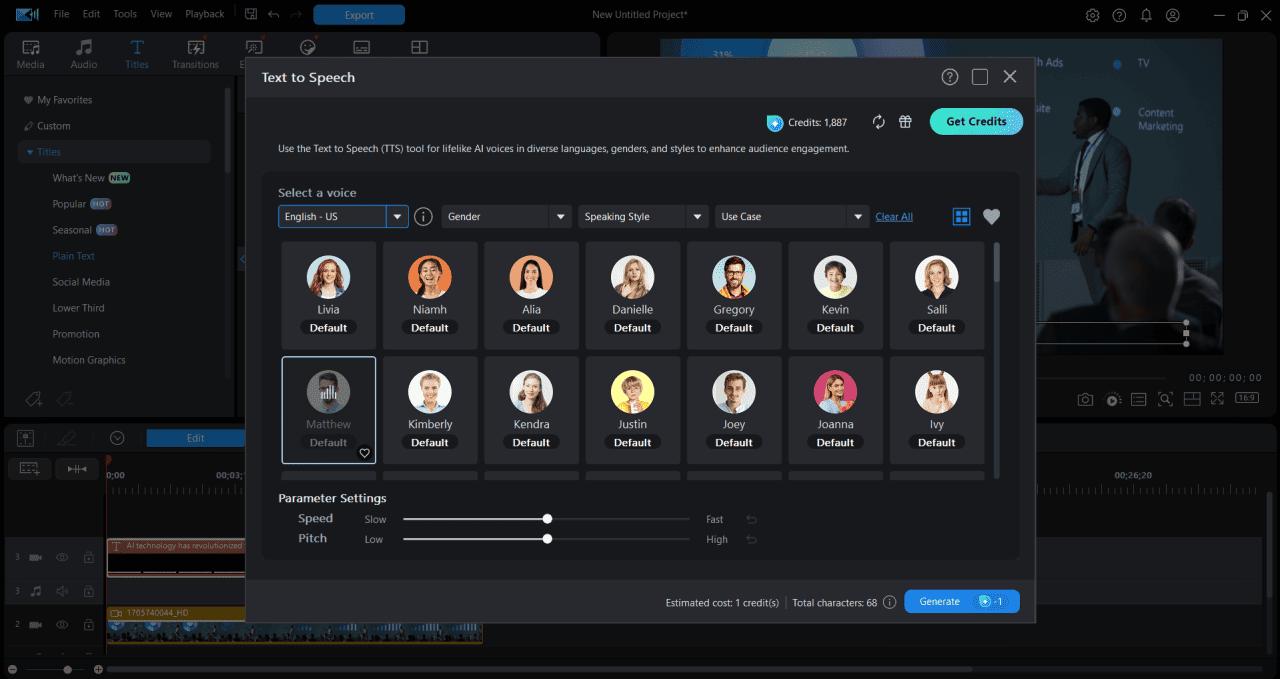
- Step 4 : Generate Your AI Voiceover
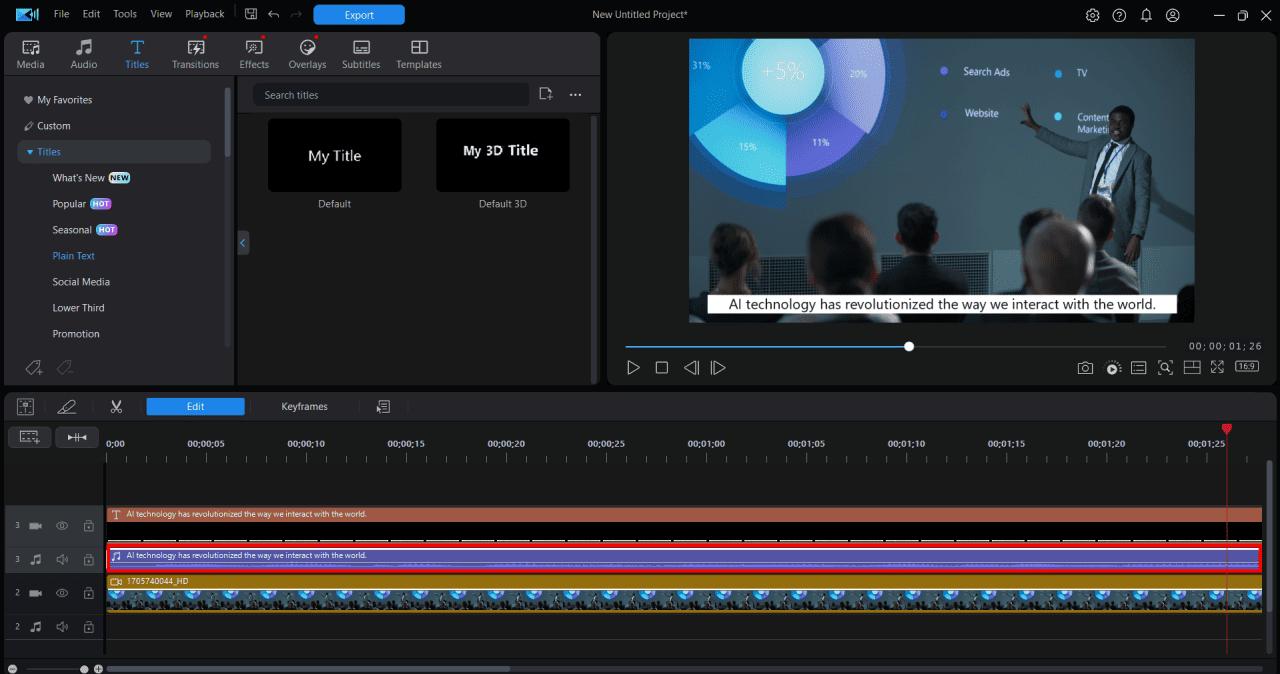
Click "Generate" (1 credit per use) to create the voiceover, then add other media to complete your video project.

How to Create AI Voices on Mobile
Here's how to use PowerDirector's AI voice generator to create a voiceover from text from mobile:
- Step 1 : Download PowerDirector App for Free
Download from the App Store for iOS and Android.PowerDirectorBest AI Video Editing App - Step 2 : Create a Project and Import Your Video
Open the app, create a new project, and import the video clips you want to work with.
- Step 3 : Access the AI Voice Generator Tool
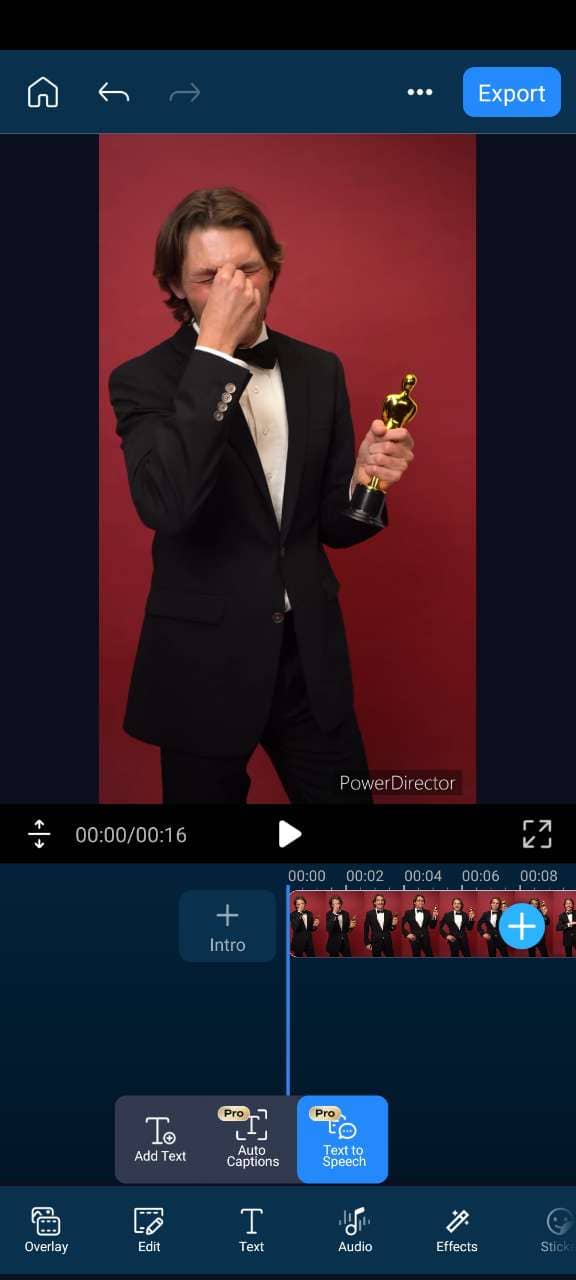
Navigate to the "Text to Voice" tool from the bottom menu to begin generating your voiceover.
- Step 4 : Enter the Text for Voice Generation

Type the text you want to convert into speech using the AI voice generator.
- Step 5 : Select a Voice Profile
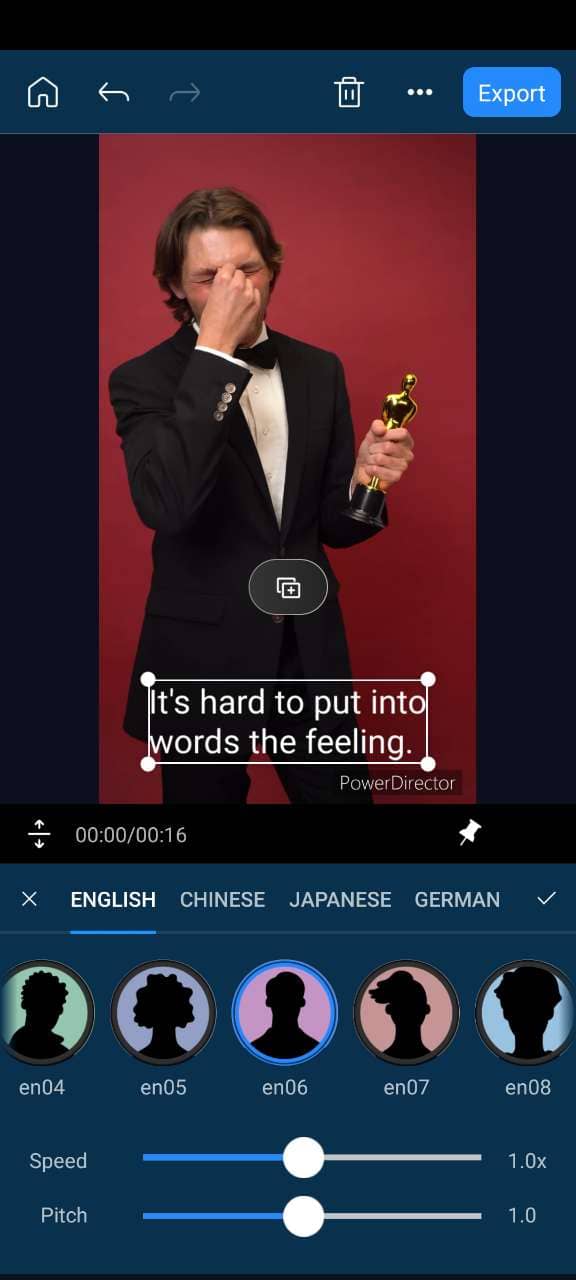
Choose a voice profile that fits your project and adjust the volume, speed, and pitch to customize the voiceover.
- Step 6 : Add the Voiceover to Your Project
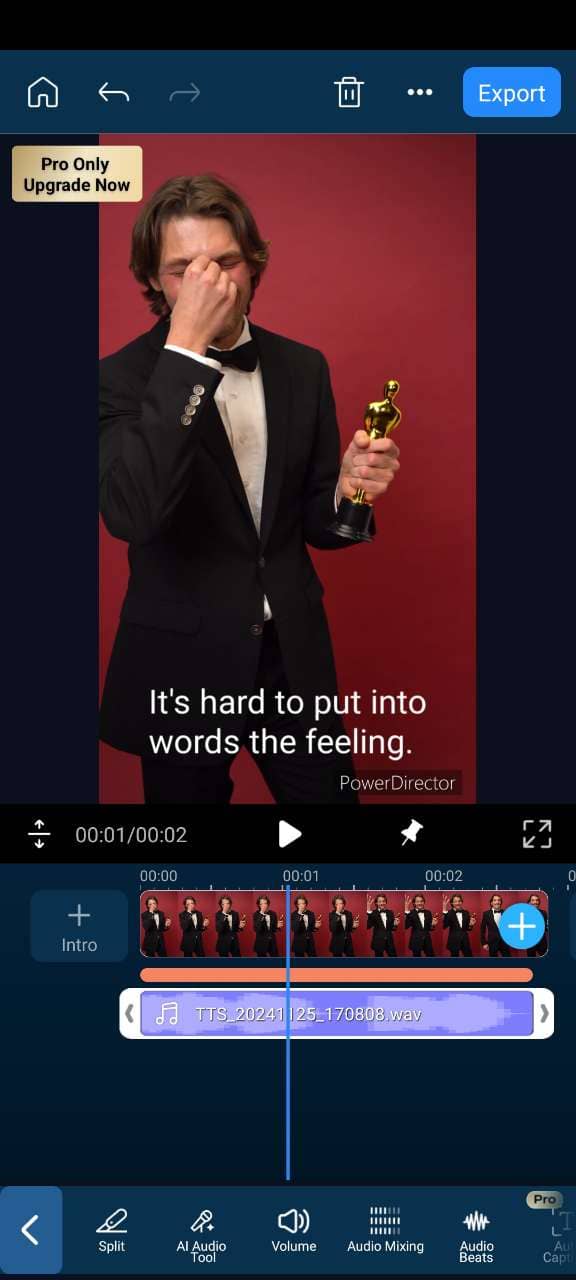
Once the voiceover is generated, it will automatically be added to your timeline, allowing you to reposition it as needed to complete your video.


The Benefits of Using Free AI Voice Generators
AI text-to-speech enhances learning, accessibility, and creativity while saving time and effort.
Voiceovers and Dubbing
They save time and money, offering professional narration without needing a studio or matching vocal tone manually.
Educational Assistance
Perfect for converting notes or books into audio, helping auditory learners absorb content more effectively.
Accessibility for the Visually Impaired
These tools enable visually impaired users to access written content through clear, natural-sounding audio.
Audio Content Creation
Ideal for generating audiobooks, museum guides, or store announcements efficiently and at scale.
Boosting Productivity
Useful for reviewing drafts, multitasking, or turning written materials into audio for hands-free convenience.
Start Creating with AI Voice Generators Today
AI voice generators are revolutionizing content creation, making it easier than ever to produce professional voiceovers and text-to-speech outputs. From videos to audiobooks, these tools offer endless possibilities for creators and businesses alike.
Whether you’re enhancing a video project or creating accessible audio content, AI tools simplify the process with just a few clicks. They deliver high-quality results that save time and effort, no matter your experience level.
For an all-in-one solution, try an online platform like MyEdit that offers AI voice generation alongside other creative tools. Start transforming your content today!
FAQs About the Best AI Voice Generators
Yes, there are free AI voice generators like MyEdit, which offers a limited number of characters for text-to-speech conversion. For more features, a premium version is available.
MyEdit is one of the best AI voice generators, offering natural-sounding voices, customization options, and multi-language support, making it ideal for various uses.
- PlayHT (Web Browser)
- Speechify (Web Browser)
- MyEdit (Web Browser)
- Naturalreaders (Web Browser)
- PowerDirector App (Android/iOS)
- PowerDirector (Windows/Mac)
- Notevibes (Web Browser)
- Text to Speech (Android)
- Balabolka (Windows)
- Panopreter (Windows/Mac)
- Sign up on MyEdit's Text-to-Speech tool
- Enter or upload your text
- Choose a profile from voice options
- Click "Generate" to create the voice
- Log in to MyEdit's Text-to-Speech tool
- Upload a file or type in your text
- Select a voice profile
- Generate the voice
Yes, MyEdit allows commercial use of AI-generated voices with the premium version, which offers full commercial rights.
AI voice generators like MyEdit provide highly accurate, natural-sounding voices, suitable for professional use such as voiceovers and podcasts.

The CyberLink Editorial Team is composed of product testing specialists and content creation experts with over 20 years of hands-on experience and rigorous research in the multimedia editing industry. As the official voice of CyberLink, the team consistently delivers practical, easy-to-follow tutorials across video, photo, and audio editing, while highlighting AI innovations, product insights, and emerging industry trends. Their work empowers millions of creators worldwide each year to elevate their content. Beyond the blog, the team actively shares editing tips and product updates across YouTube, Facebook, Linkedin and Pinterest.
😎 Outside of their work, they enjoy capturing travel moments and meticulously editing photos and videos for their social channels.


