



Best 6 AI Text-to-Video Generators in 2026 (Free & Paid)

AI text-to-video generators can turn a written prompt or script into a polished video in minutes. We tested the top platforms across quality, ease of use, and value to bring you this shortlist.
- Best for Cinematic Quality: Use Runway. Native audio generation, advanced camera controls, and the highest visual fidelity of any AI video tool available today.
- Best for Desktop Editing: Use PowerDirector. Combines AI Text-to-Video, Image-to-Video, AI Talking Avatars, and a full video editor in one free download.
- Best Free Online Tool: Use MyEdit. Browser-based, no install needed. Generate short video clips from text prompts in seconds.
- Best for Social Media Videos: Use InVideo. AI copilot generates a script, applies stock footage, and adds a voiceover automatically.
- Best for Avatar and Training Videos: Use Synthesia. Hyper-realistic AI avatars that speak your script in 130+ languages.
- 6 Best AI Text to Video Generators
- Best AI Video Generator Compared
- How to Generate Text-to-Video Content
- FAQ About AI Text to Video Generators
6 Best AI Text to Video Generators in 2026
- Runway: Best for Cinematic AI Video Quality
- Pika: Best for Converting Text Prompts into Video Clips
- PowerDirector: Best AI Text to Video Software for Desktop
- MyEdit: Best Free Online AI Text to Video Generator
- InVideo: Best AI Video Generator for Social Media
- Synthesia: Best AI Text to Video Generator for Avatars
1. Runway: Best AI Text to Video Generator for Cinematic Quality

Compatibility: Web-based
Best for: Creative, experimental, and cinematic video projects
In our hands-on testing with Runway's latest models, the visual fidelity and physics simulation were nothing short of cinematic. The addition of native audio generation and highly precise camera controls makes it an incredibly powerful tool. While the sheer number of advanced parameters presents a slight learning curve for beginners, it remains the undisputed industry standard for professional AI video creation.
Key Features
- High-fidelity text-to-video and image-to-video
- Native audio generation integrated into clips
- Advanced camera controls and precision motion tools
Price: Free version
Premium subscription: Starts at $12/month
Runway is the industry benchmark for AI-generated video. Input a script, prompt, or image and get highly realistic, cinematic results with physical accuracy, native sound effects, and an advanced editing suite. It is the go-to choice for professionals working on high-end video production and storytelling.
2. Pika: Best AI Tool for Converting Text Prompts into Video Clips

Compatibility: Web-based
Best for: Converting text prompts into full video sequences
Pika (Pika Labs) is incredibly accessible for generating dynamic video clips from text or image prompts. We found its lip-syncing and sound effect generation features to be standout additions that easily bring scenes to life. While the free version allows for quick testing, generating consistent, high-resolution outputs often requires a premium plan.
Key Features
- Text-to-video conversion
- Customizable templates
- AI voiceovers and music
Price: Free version
Premium subscription: Starts at $8/month
Pika turns text prompts into dynamic video content with customizable templates, AI-generated voiceovers, and fast processing. Its lip-syncing and sound effect generation make it particularly strong for social media, marketing, and content-driven projects where speed and ease of use matter most.
3. PowerDirector: Best AI Text to Video Software for Desktop

Compatibility: Windows and Mac
Best for: Comprehensive video editing with AI text-to-video, image-to-video, and AI avatars
PowerDirector successfully bridges the gap between traditional timeline video editing and modern AI generation. Its AI Text-to-Video and AI Talking Avatars integrate seamlessly into the editing workflow, making it highly practical for users who want both generative AI and robust post-production tools in one place.
Key Features
- AI Text-to-Video Generator
- Image-to-Video
- AI Video Translator
- AI Talking Avatars
Price: Free
Premium subscription available for $5/month
PowerDirector is the best choice if you want both AI video generation and a full editing suite in one tool. Convert scripts into fully edited videos, transform images into dynamic video content, translate videos automatically, and generate AI talking avatars, all within a single timeline-based workflow.
Download PowerDirector!
4. MyEdit: Best Free Online AI Text to Video Generator

Compatibility: Web-based
Best for: Quick, free AI-generated videos from text prompts with no download required
MyEdit is highly convenient for users who want to generate quick video clips or AI images directly from their browser without installing heavy software. In our experience, its text-to-video tool is straightforward and intuitive, perfect for short social media teasers, though it lacks timeline editing and avatar generation found in dedicated video editors.
Key Features
- Text-to-video generation via AI prompts
- Image-to-Video Generator
- AI Image Generator
- AI Object Eraser and Replace
Price: Free
Credits pack starting at $10
MyEdit is the easiest way to generate a video from text with nothing to install. Type a prompt, set your aspect ratio and duration, and the AI produces a ready-to-share clip in seconds. Ideal for social media teasers, product visuals, and quick creative content.
Try MyEdit now and create videos in seconds!
5. InVideo: Best AI Video Generator for Social Media Content

Compatibility: Web-based
Best for: Social media content creation
InVideo's AI copilot acts like an automated video producer. You just type a topic, and it generates a script, applies stock footage, and adds an AI voiceover. It's a huge time-saver for YouTube shorts or faceless channels. However, if the AI selects imperfect stock footage, replacing clips manually can sometimes feel a bit rigid.
Key Features
- Text-to-video functionality
- Voice-over support
- Media library access
Price: Free version
Premium subscription: Starts at $28/month
InVideo works like an automated video producer: type a topic, and the AI copilot generates a script, selects stock footage, and adds a voiceover. Its extensive template library covers business, education, and social media niches, making it the strongest option for creators who produce regular video content at scale.
6. Synthesia: Best AI Text to Video Generator for Avatar Videos

Compatibility: Web-based
Best for: AI avatar videos for training, presentations, and multilingual marketing
Synthesia is the gold standard for AI avatar generation. Testing reveals its avatars are strikingly lifelike, with excellent lip-syncing across dozens of languages. It is perfectly suited for corporate training, presentations, and localized marketing, although it isn't designed for generating highly dynamic, action-packed video scenes.
Key Features
- 130+ hyper-realistic AI avatars
- Text-to-speech in 120+ languages
- Customizable scene templates
Price: Free demo
Premium subscription: Starts at $18/month
Synthesia turns a written script into a video featuring a lifelike AI avatar delivering the content on screen. With support for 120+ languages and 130+ avatar options, it is the best tool for corporate training videos, onboarding content, and localized marketing at scale.
Best AI Text to Video Generators Compared: Features, Pricing and Performance
| Tool | Best For | AI Features | Price | Link |
|---|---|---|---|---|
| Runway | Cinematic AI video quality | High-fidelity text-to-video, native audio, advanced camera controls | Free / From $12/month | Try Runway |
| Pika | Text prompt to video clips | Text-to-video, customizable templates, AI voiceovers | Free / From $8/month | Try Pika |
| PowerDirector | Desktop AI video editing | Text-to-Video, Image-to-Video, Talking Avatar, Video Translator | Free / From $5/month | Free Download |
| MyEdit | Free online text-to-video | Text-to-Video, Image-to-Video, AI Image Generator, AI Object Replace | Free / Credits from $10 | Try MyEdit |
| InVideo | Social media video at scale | Text-to-Video, AI Script Generator, Stock Footage Library | Free / From $28/month | Try InVideo |
| Synthesia | AI avatar and training videos | AI Talking Avatars, 120+ Languages, Customizable Scenes | From $18/month | Try Synthesia |
How to Create AI Text to Video Content
How to Use PowerDirector AI Text to Video Software
Creating AI-generated video content from text has never been easier. Here is a simple guide to using PowerDirector's Text-to-Video tool:
- Download and Install PowerDirector: Start by downloading and installing the free PowerDirector video editing software on your device.
Download from the App Store for iOS and Android. - Open the Text-to-Video Tool: Launch PowerDirector and access the Text to Video tool directly from the main dashboard or launcher.
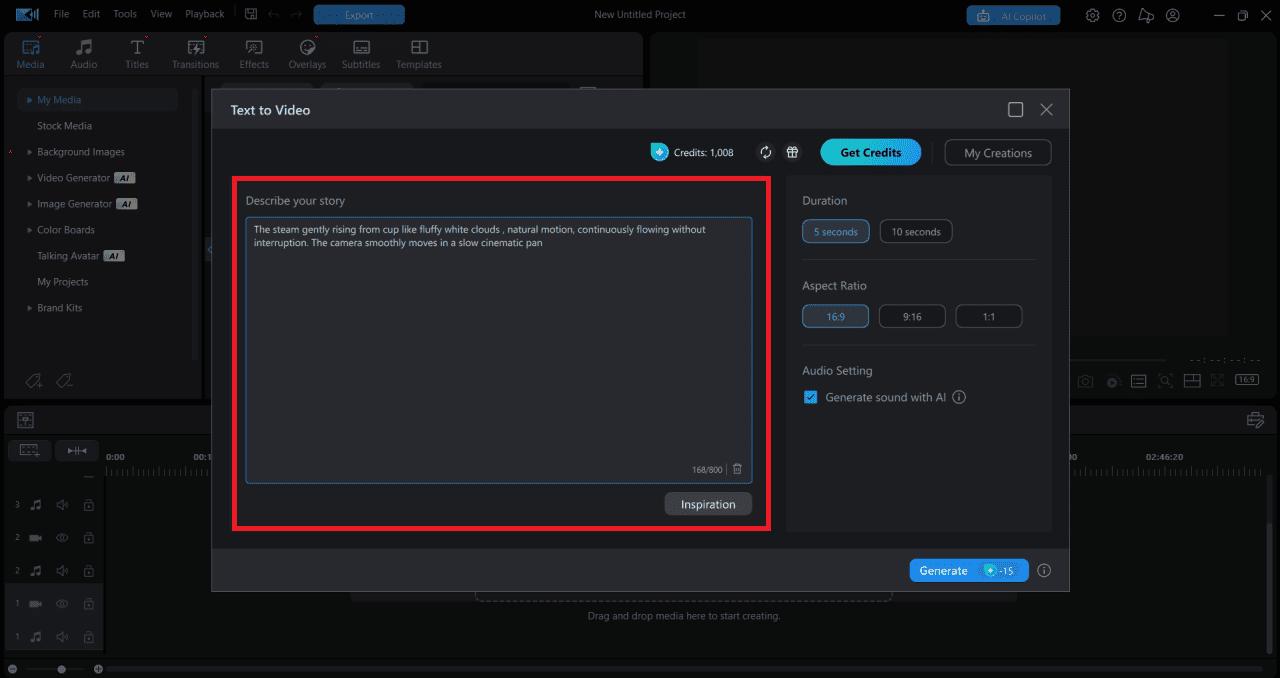
- Describe Your Story: Input all the details of your story, including the topic, characters, scenes, and actions. The more detailed you are, the better the result.
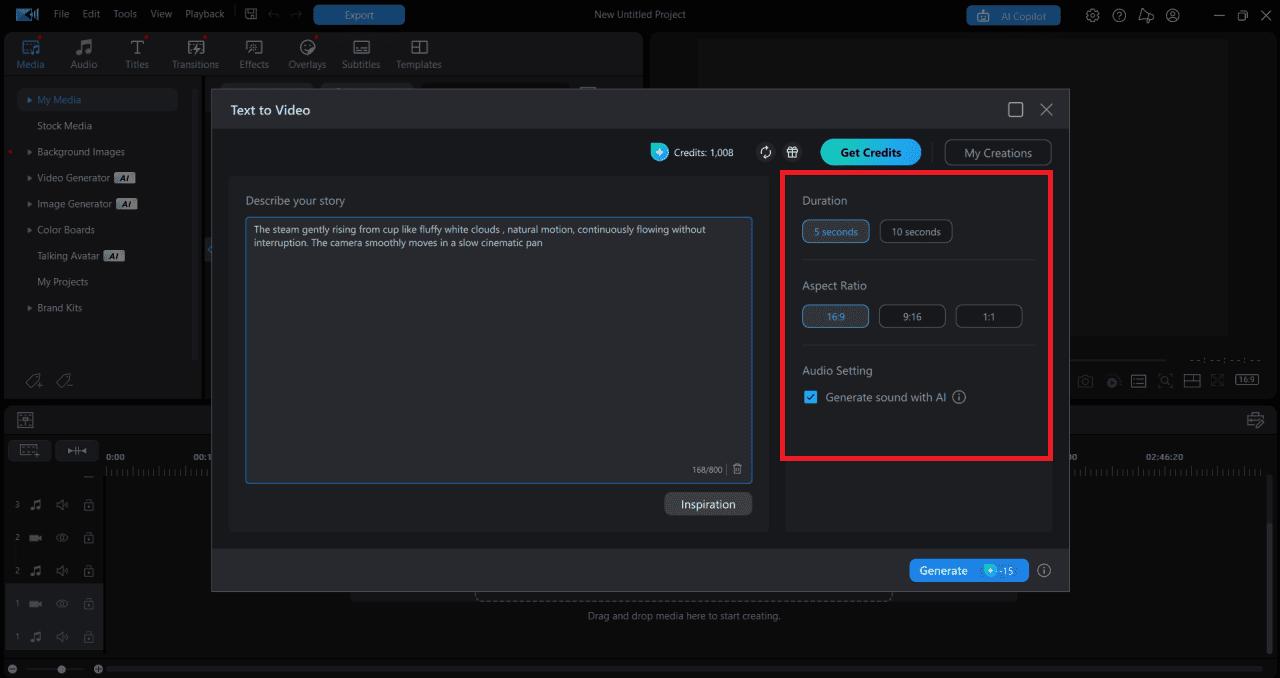
- Set Your Video Preferences: Choose your video settings such as duration, aspect ratio, and whether you want the AI to generate a background soundtrack.
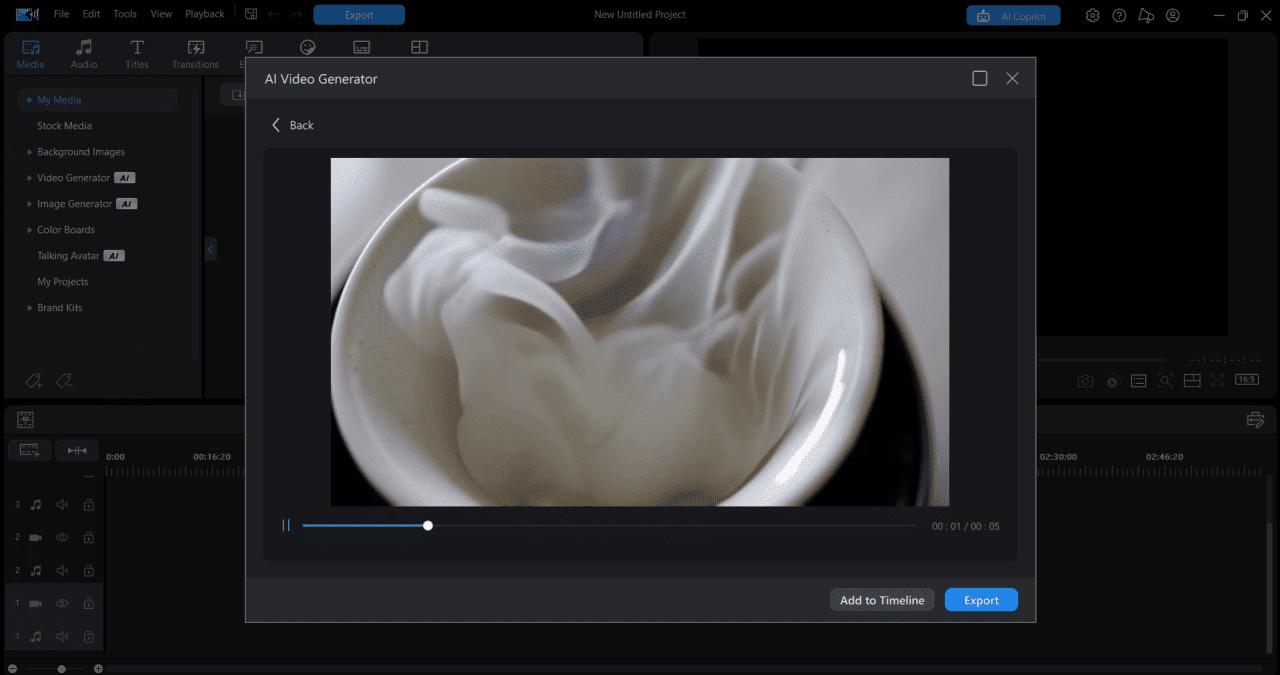
- Generate Your AI Video: Hit the Generate button and let PowerDirector's AI create a video that matches your script. Preview and adjust as needed.
- Share Your Video: Export and share directly to social media or save for your project.


How to Use MyEdit Online AI Text to Video Generator
MyEdit makes it simple to turn text prompts into videos directly online. No downloads, no complex tools.
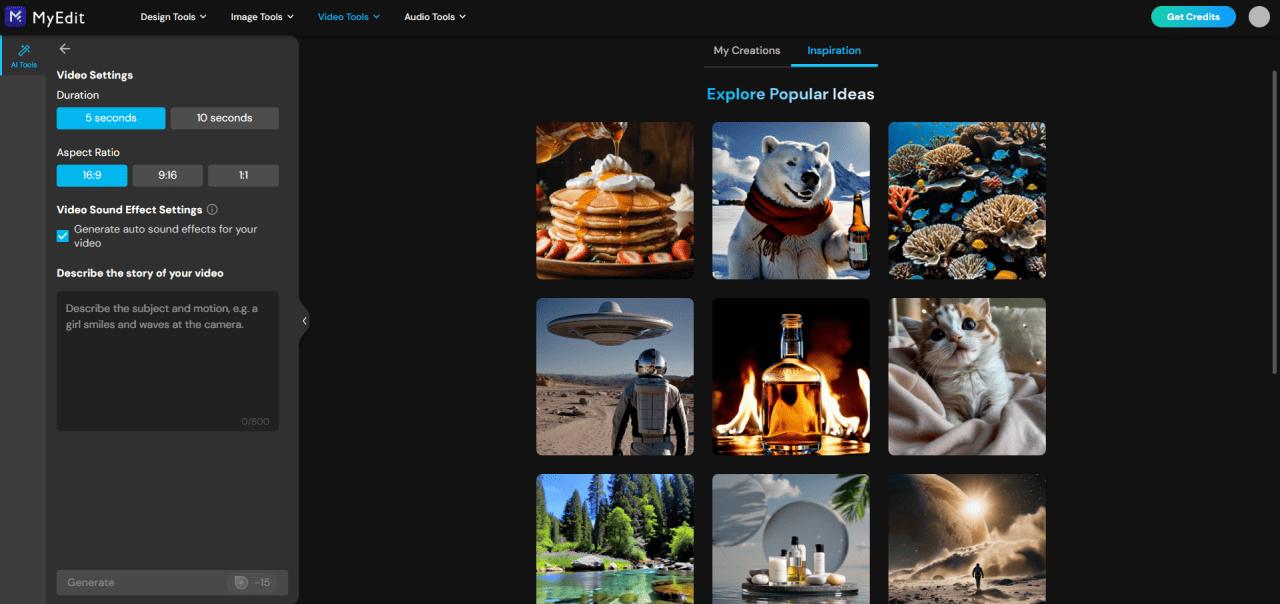
- Open the Text-to-Video Tool: Go to the MyEdit online platform and select the Text to Video feature.
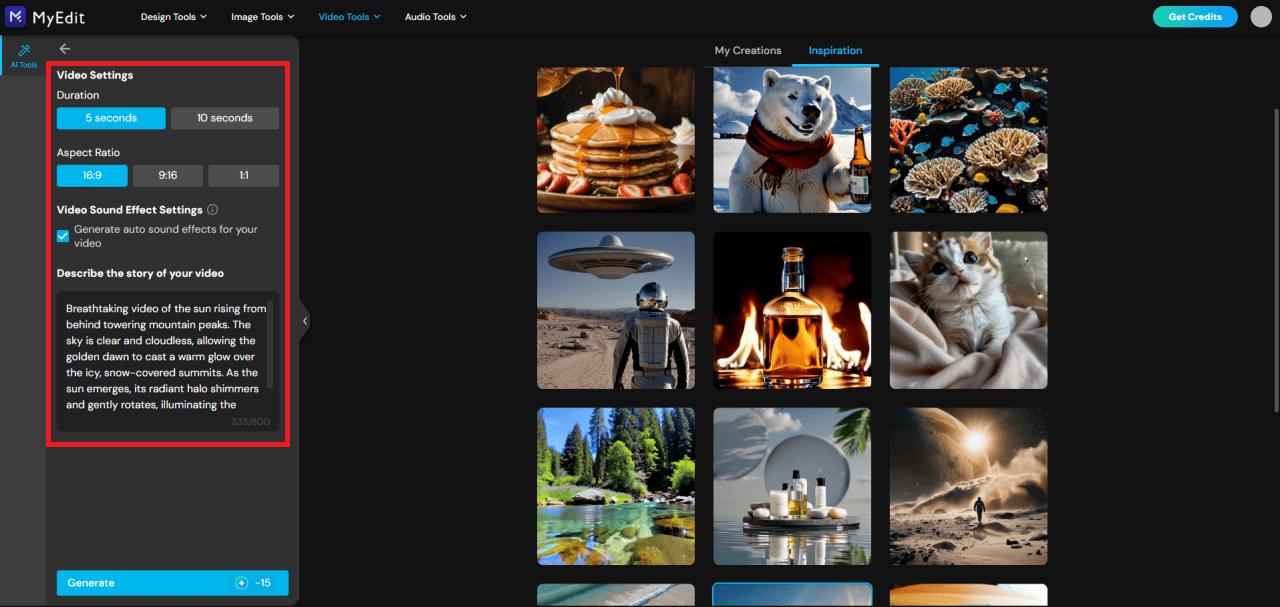
- Set Your Video Details: Choose your video's duration and aspect ratio, then type a prompt describing the video you want to create.
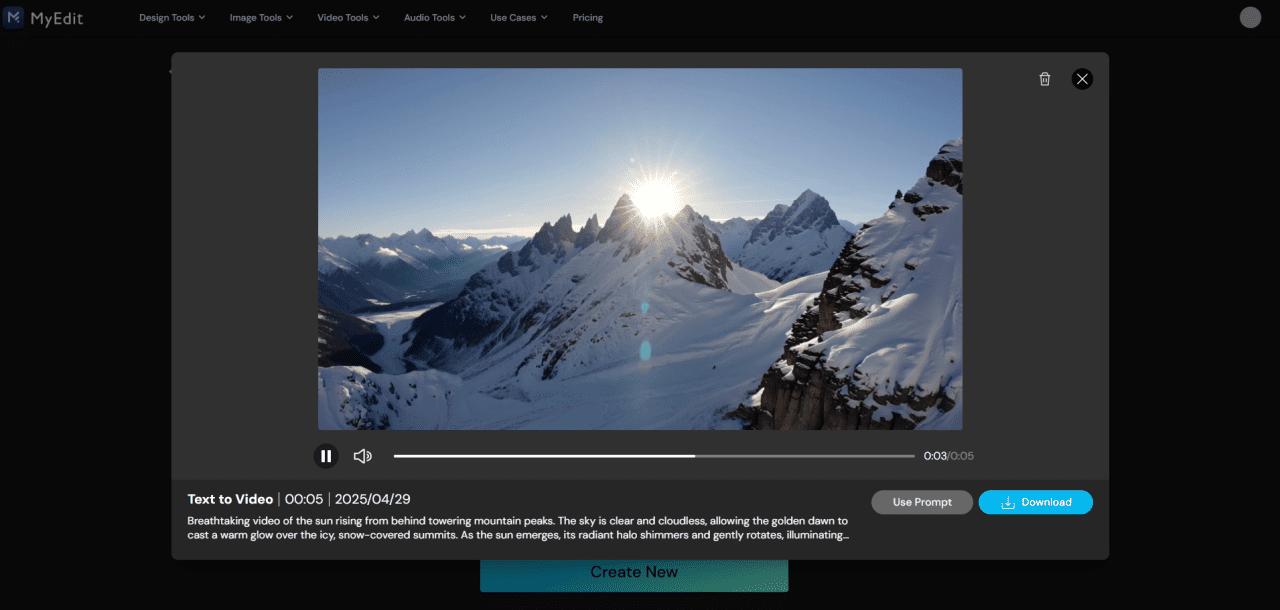
- Generate and Download: Click Generate, let the AI bring your idea to life, then download and share instantly.


FAQ About AI Text to Video Generators
PowerDirector is one of the best AI tools for turning a written script into a video. Its Text-to-Video feature lets you describe your story, characters, and scenes, then automatically generates video content based on your input. It's ideal for social media, promos, and YouTube content.
MyEdit is the best free online AI text to video generator. It requires no download, generates video clips directly from text prompts in seconds, and offers an Image-to-Video tool and AI image generator alongside it.
Yes. AI tools like PowerDirector and Runway can turn plain text into full video clips. Type a video description, adjust settings like aspect ratio and length, and the AI generates a polished video complete with visuals, sound, and effects.
Yes. MyEdit offers free text-to-video generation online with no download required. PowerDirector also offers a free version of its AI Text-to-Video tool for desktop users.
- Runway
- Pika
- PowerDirector
- MyEdit
- InVideo
- Synthesia
- Download and install PowerDirector
- Open the Text to Video feature from the launcher
- Type your story description including characters, scene, and actions
- Choose your video preferences such as duration, aspect ratio, and sound
- Click Generate and let the AI create your video
- Go to MyEdit online (no download needed)
- Select the Text to Video feature
- Enter your text prompt and choose video settings
- Click Generate and download your video instantly

The CyberLink Editorial Team is composed of product testing specialists and content creation experts with over 20 years of hands-on experience and rigorous research in the multimedia editing industry. As the official voice of CyberLink, the team consistently delivers practical, easy-to-follow tutorials across video, photo, and audio editing, while highlighting AI innovations, product insights, and emerging industry trends. Their work empowers millions of creators worldwide each year to elevate their content. Beyond the blog, the team actively shares editing tips and product updates across YouTube, Facebook, Linkedin and Pinterest.
😎 Outside of their work, they enjoy capturing travel moments and meticulously editing photos and videos for their social channels.


