






Best Clipchamp Alternatives in 2026 (Free & Paid)

In today’s fast-growing content landscape, choosing the right video editing software is essential. Tools like Clipchamp and PowerDirector are among the most popular options for creators.
Clipchamp is a browser-based online video editor developed by Microsoft, offering quick editing with templates and cloud access. Many users search for clipchamp free options, pricing details, and feature limitations before getting started.
This guide covers Clipchamp pricing, features, and tutorials, and compares it with powerful clipchamp alternatives. You’ll see how different tools perform in terms of ease of use, AI features, editing capabilities, and cost, in order to help you find the best option that suits your editing needs.
- What Is Clipchamp Video Editor?
- Is Clipchamp Free or Paid? (Pricing Explained)
- How to Use Clipchamp Online (Step-by-Step Guide)
- Clipchamp Limitations: When Does It Fall Short?
- 6 Best Clipchamp Alternatives (Free & Paid)
- Clipchamp vs Alternatives: Full Comparison Table
- Conclusion: Is Clipchamp Worth It?
- Clipchamp FAQ
What Is Clipchamp Video Editor?

Clipchamp is a user-friendly, browser-based video editor acquired by Microsoft in 2021. Natively integrated into Windows 11 and available on iOS, it offers a streamlined experience for quick content creation.
Unlike professional tools like DaVinci Resolve, Clipchamp focuses on speed and simplicity. With a simple interface and social media-ready templates, it is designed to help anyone create high-quality videos in minutes.
Key Features:
- Drag-and-drop editing timeline
- Built-in templates and stock media
- Text, transitions, and basic effects
- Screen and webcam recording
- Automatic subtitles with AI
- AI text-to-speech
Is Clipchamp Free or Paid? (Pricing Explained)
Clipchamp free plan is available, but it comes with limitations. Access to its advanced features (4K export, brand kits, filters and additional effects) is linked to the Microsoft 365 subscription. Here is a table to help you understand the plans and what they offer.
| Plan | Price | Export Quality | Cloud storage |
|---|---|---|---|
| Free | US$0 | Up to 1080p | Not included |
| Microsoft 365 Personal | US$9.99/month · US$99.99/year | Up to 4K + Brand Kits | 1 TB on OneDrive |
| Microsoft 365 Family | US$12.99/month · US$129.99/year | Up to 4K + Brand Kits | Up to 6 TB on OneDrive (1 TB per person, up to 6 users) |
💡Key Takeaway: Microsoft 365 Benefits
- Best Value: The Family plan supports up to 6 users (1 TB storage each), making it the most cost-effective way to unlock Premium features for a team or household.
- Device Limit: Both Personal and Family plans allow you to sign in on up to 5 devices simultaneously.
- Premium Perks: A subscription removes watermarks on premium assets and unlocks 4K exports, advanced filters, and branding tools.
- Trial: Includes a 30-day free trial for new subscribers (both Personal & Family Plans).
How to Use Clipchamp Online (Step-by-Step Guide)

- Go to Clipchamp online video editor and sign in with your Microsoft account.
- Create a new project or choose a template
- Upload media (video, images, audio)
- Drag the elements to the timeline and edit the clips (cut, trim, add transitions)
- Add text, effects, or music
- Export video in up to 1080p
Note:
Clipchamp exports are currently limited to MP4 format at 30 FPS. If your project requires 60 FPS for high-motion gaming clips or specialized formats like MOV or WebM, consider a more advanced editor.
Clipchamp Limitations: When Does It Fall Short?

While Clipchamp video editor is convenient, it has some drawbacks:
Limited Advanced Editing Features
- No keyframes: You can’t precisely animate position, scale, or opacity
- No advanced color correction: Only basic brightness and contrast adjustments
- Limited timeline control: Fewer options for multi-layer or complex edits
Limited AI Tools
- No advanced AI object removal or tracking
- Limited auto-editing or smart cut features
- Fewer AI-powered effects and enhancements
Limited Customization & Plugins
- No third-party plugins or extensions
- Limited control over effects and transitions
- Fewer export customization options (only exports MP4 format at 30 FPS)
Not Ideal for Professional Workflows
- No support for high-end formats or workflows
- Limited tools for team collaboration or large projects
- Not suitable for film, commercial, or complex content production
6 Best Clipchamp Alternatives (Free & Paid)
1. PowerDirector - Best Clipchamp Alternative Overall
Compatibility: Windows, Mac, iOS, Android
Price: Free
*Premium features available for free for 30 days, then $5.00/monthFull Comparison Tabl
PowerDirector is a feature-rich video editor known for its AI-powered editing tools and trendsetting updates (such as the AI Anime Effect and AI Text-Based Editing), making it a strong upgrade from Clipchamp.
Pros
- Advanced AI tools (background removal, object detection)
- Supports 4K video
- Provides professional editing features and continuously updated creative packs
Cons
- Free version includes watermark
- Access to stock libraries requires a paid subscription

2. AVS Video Editor – Best Budget Option
Compatibility: Windows
Price: Free
*Paid options available at $49/year or $79 for unlimited access
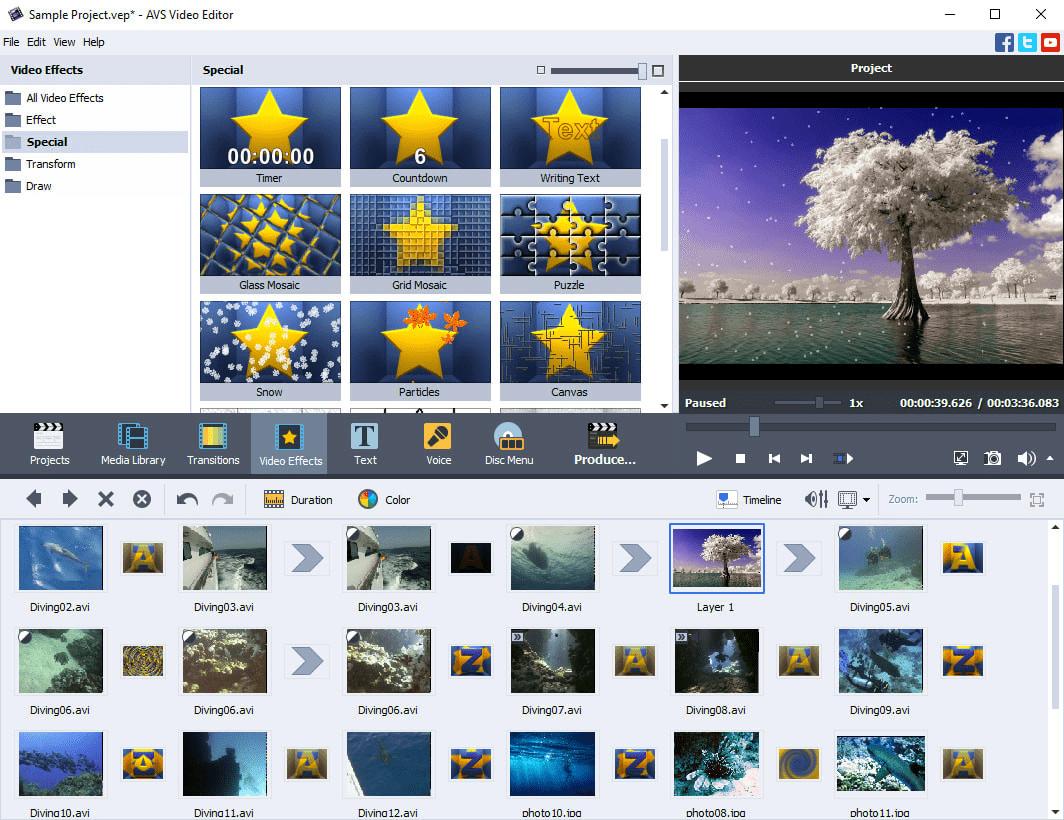
AVS Video Editor is a simple and affordable tool for basic editing on Windows. It also offers tools for audio tracks, backgrounds, audio-visual effects, overlay, and text. It’s a good choice for Windows users who want an affordable alternative to Clipchamp without needing advanced features.
Pros
- Freemium and affordable one-time pricing options
- Supports a wide range of video formats and resolutions
Cons
- Watermarked exports in free version
- Outdated interface
- Lacks AI or advanced editing tools
3. Camtasia – Best for Tutorials

Compatibility: Windows, Mac
Price: Paid plans from $39/year
*Free trail available for 30 days (with watermark)
Camtasia is a specialized video editor focused on screen recording and educational content creation. It combines recording, editing, and annotation tools in one platform, making it ideal for tutorials and training videos. Users can also add dynamic cursors, interactive annotations, and quizzes to the videos, making it especially ideal for instructional content.
Pros
- Best-in-class screen recording tools
- Easy to create tutorials and presentations
- AI-assisted enhancements (such as audio optimization)
Cons
- Free trial exports with watermark
- Expensive compared to alternatives
4. DaVinci Resolve – Best for Professionals

Compatibility: Windows, Mac, Linux
Price: Free
*Studio available for $295 (one-time fee)
DaVinci Resolve is a professional-grade editor that combines editing, color grading, visual effects, and audio post-production in one platform. Compared to Clipchamp, it offers unmatched control and quality, especially with its powerful free version.
Pros
- No watermark in free version
- AI-powered tools such as AI IntelliScript, AI Animated Subtitles and AI Multicam SmartSwitch
Cons
- Steep learning curve
- Requires powerful hardware
5. Filmora – Best for Beginners

Compatibility: Windows, Mac, iOS, Android
Price: Free
*Paid plans available from $49.99/year or $79.99 one-time payment
Filmora is a user-friendly editor that balances ease of use with creative features, ideal for content creators and users who are new to editing. With its extensive library of effects, templates, and transitions, Filmora makes it effortless to produce eye-catching, professional-grade content in minutes. It’s more feature-rich than Clipchamp while remaining easy to learn.
Pros
- Rich templates, effects and transitions library
- AI tools such as text-based editing, AI Copilot assistant, and AI music/thumbnail generation
Cons
- Watermark on free version
- Some features require subscription to access
6. Movavi Video Editor – Simple & Fast Editing

Compatibility: Windows, Mac, Online
Price: Paid plans from $54.95/year
*Free trail available for 30 days (with watermark)
Movavi Video Editor is a clean and intuitive editor designed for quick and efficient video creation. It offers features like motion tracking, chroma key, templates, auto adjustment and color correction tools while keeping the interface simple. It’s a good step up from Clipchamp for users who want more features without complexity.
Pros
- Easy-to-use interface
- Cross-platform support (although feature lacks on the online version)
Cons
- Some tools and effects require paid access
- Limited functionality in the web-based editor compared to the full software
Clipchamp vs Alternatives: Full Comparison Table
| Tool | Operating System | Without Watermark? | Price | Key Features | Export Quality |
|---|---|---|---|---|---|
| Clipchamp | Web, Windows | ✅ Yes | Free Upgrade available from $9.99/month | Templates, basic editing | Up to 1080p |
| PowerDirector | Windows, Mac, iOS, Android | 💰 Unlock with Premium | Free Premium from $5.00/month | AI tools, pro editing | Up to 4K+ |
| AVS Video Editor | Windows | ❌ Unlock with paid options | Free Upgrade from $49/year or $79 one-time fee | Basic editing tools | Up to 4K+ |
| Camtasia | Windows, Mac | ❌ Unlock with paid plans | Free for 30 days Paid plans from $39/year | Screen recording, tutorials | Up to 4K+ |
| DaVinci Resolve | Windows, Mac, Linux | ✅ Yes | Free Upgrade available for $295 | Pro editing, color grading | Up to 4K+ |
| Filmora | Windows, Mac, iOS, Android | ❌ Unlock with paid options | Free Paid plans from $49.99/year or $79.99 one-time fee | Effects, templates | Up to 4K+ |
| Movavi | Windows, Mac | ❌ Unlock with paid plans | Free for 7 days Paid plans from $54.95/year | Simple editing | Up to 4K+ |
Conclusion: Is Clipchamp Worth It?
Clipchamp is a solid online video editor for beginners and quick edits. Its free plan makes it accessible, but it lacks advanced features and support for professional use.
If you need more flexibility, AI tools, or higher-level editing, choosing a clipchamp alternative like PowerDirector or DaVinci Resolve is a better long-term solution.
Clipchamp FAQ
Yes. Tools like PowerDirector, DaVinci Resolve, and Filmora offer more advanced features, AI tools, and control for editing than Clipchamp.
It depends on your needs. CapCut is better for mobile editing and social media trends, while Clipchamp is more suited for simple browser or PC-based editing.
Yes, Clipchamp free plan includes basic editing tools and 1080p export, but some features and templates are limited.
Clipchamp has limited advanced features and fewer AI tools compared to high-end editing suites like DaVinci Resolve or PowerDirector.
Yes. Clipchamp is developed by Microsoft, making it a safe and reliable video editor for general use.
Yes. Tools like DaVinci Resolve offer a fully free version with no watermark and professional-level features.
Clipchamp is integrated with Microsoft accounts, but premium features such as 4K export, brand kits, and additional effects require additional subscription plans.
No. Microsoft has moved toward a "Cloud-First" architecture for Clipchamp, so the video editor requires an internet connection to function.


