






AI Hugging Trend: How to Make AI Hug Videos for Free

Want to hop on the "Hug My Younger Self" trend or hug your favorite idols? With AI hugging filters, you can instantly create one!
Let’s see how to generate an AI hugging video online with the best online AI hugging generator. Even better, beyond the popular hug-my-younger-self trend, you can experiment with other creative AI hugging ideas to go viral on social media.
- What is Gemini Hug My Younger Self Trend?
- How to Make an AI Hug Video Online
- 7 Viral Ideas to Make AI Hugging Videos from Photos
- How to Use an AI Hugging Filter on Your Phone
- AI Hug FAQ
What is Gemini Hug My Younger Self Trend?
“Hug My Younger Self” is a viral AI‐image editing trend using Google Gemini’s Nano Banana. People upload two images (one from childhood and one from their present self) and ask AI to combine them into a single frame, featuring a heartwarming scene of their past and present selves embracing each other.

Why Is the Trend So Popular?
The Gemini Hug My Younger Self trend isn’t just another AI filter. It resonates because it taps into emotions, storytelling, and easy shareability. Here’s why people everywhere are embracing it:
- Emotional resonance and nostalgia: People can reconnect with their past selves in a powerful way. Seeing your present self embrace your childhood self often sparks feelings of growth, reflection, and even comfort, making the experience deeply personal and moving.
- Self-compassion and healing: The Images become symbolic gestures of self-love, showing support for the younger version of yourself and acknowledging the journey you’ve taken. It feels therapeutic, almost like giving your inner child a much-needed hug.
- Aesthetic appeal: The AI outputs are visually polished, often styled with soft lighting, vintage tones, or Polaroid-like borders. This nostalgic yet modern look makes the images highly shareable and perfect for social media feeds.
- Simplicity and accessibility: Thanks to Gemini’s Nano Banana feature, anyone can join in. The process is as simple as uploading two photos and entering a prompt, so even non-tech users can create professional-looking results in seconds.
How to Generate Hug My Younger Self Photo with Gemini
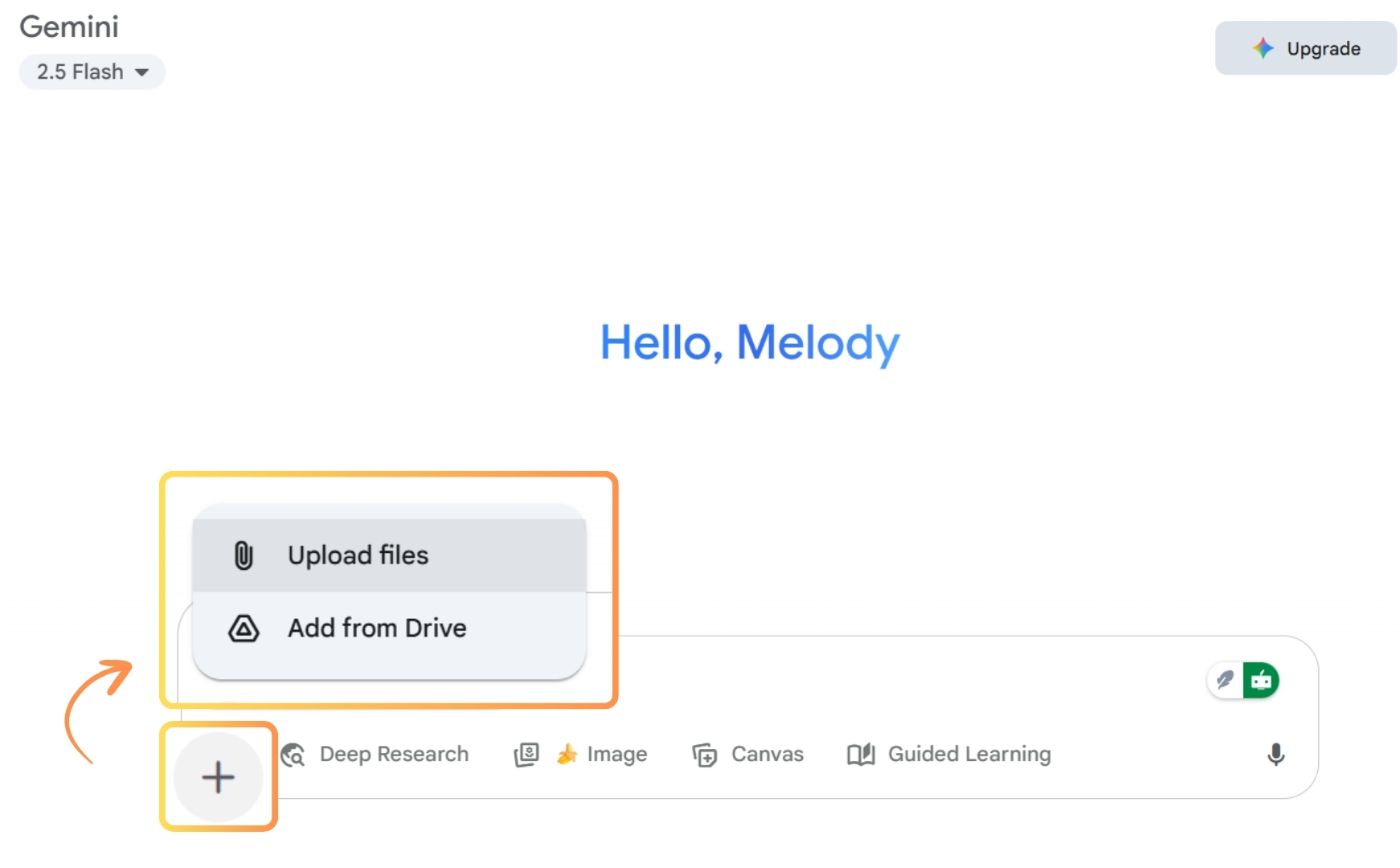
- Go to Geminiand upload your photos—one of your present self and the other of your younger self—via “add files.”
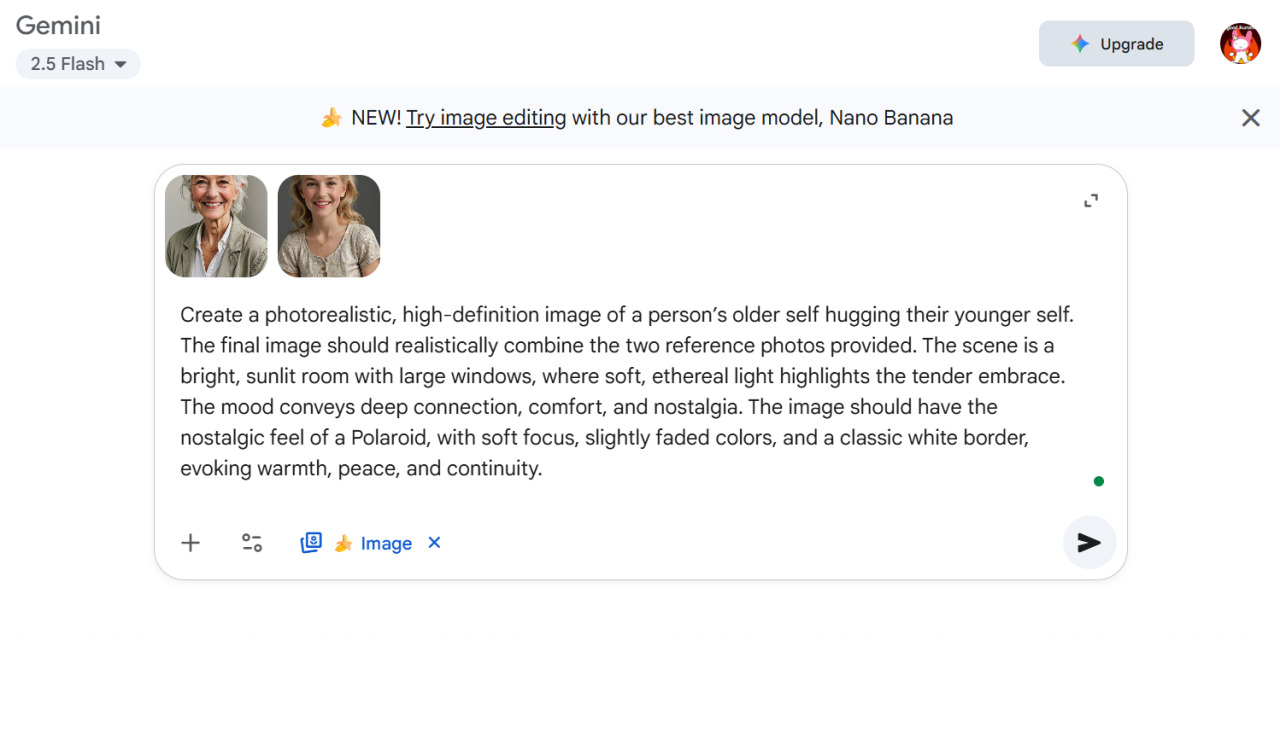
- Copy and paste the following prompt, which gives clear instructions to generate a nostalgic photo of you hugging your younger self.
Recommended Prompts
Create a photorealistic, high-definition image of a person’s older self hugging their younger self. The final image should realistically combine the two reference photos provided. The scene is a bright, sunlit room with large windows, where soft, ethereal light highlights the tender embrace. The mood conveys deep connection, comfort, and nostalgia. The image should have the nostalgic feel of a Polaroid, with soft focus, slightly faded colors, and a classic white border, evoking warmth, peace, and continuity.
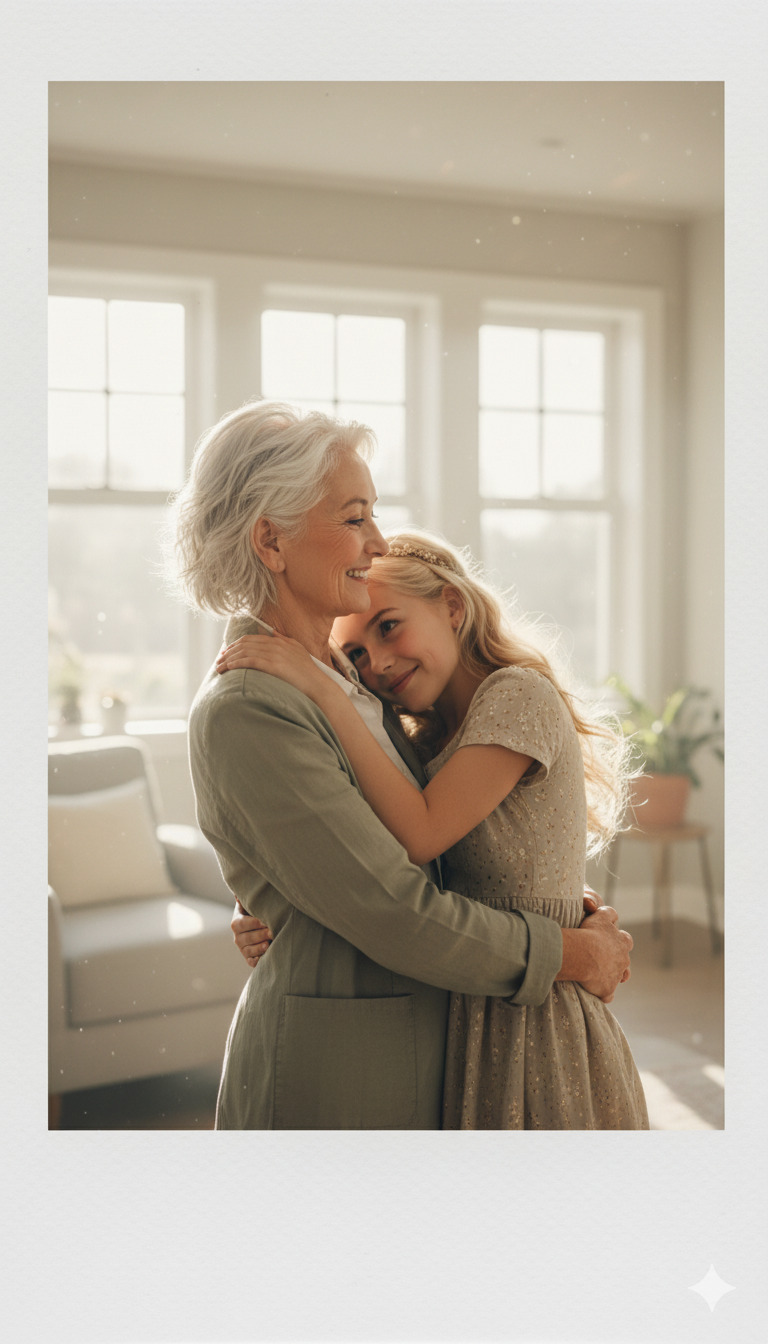
- Click “🍌 Images” to create the artwork. In seconds, you will receive a realistic and heartwarming photo featuring you from different points in time.


How to Make an AI Hug Video Online
- Go to MyEdit and find “Image to Video Template” online
- Upload your photos
- Select “Warm Hug” template for a sweet hugging video
- Preview & share to show the magic hug
Either 1 photo with two people or 2 sole photos for different people is allowed for you to generate your hugging video.


7 Viral Ideas to Make AI Hugging Videos from Photos
- Hug Your Younger Self - Hug yourself at ages 5, 18, and 30! See how much you've grown since then.
- Lost Loved Ones Reunion - An AI hugging filter lets you enjoy intimate moments with your lost family members or pets in a clip once again. It’s also a heartfelt gift to send someone a video of them hugging loved ones who have passed away.
- What if XXX Celebrities Hug You? - No need to be a fan desperately scrambling for tickets anymore! AI hugging videos create a special chance to interact with your idols or any celebrities that you won't meet in real life. Besides hugging, you can also have a hand heart, dance a slow waltz or even fight with them!
- Cute Animals Healing Hug - After an exhausting day, let those fluffy cuties soothe you. If you want to hug some rare or extinct animals, just give it a try.
- Memes Characters Hug - Make memes more funny and show others your creativity!
- Hug for Your Far-Away Love - Send the hugging video to your far-away loved ones to tell them how much you miss them. Add some text and effects to make the hugging video more unique.
- Best Friends Hug - Hug or have a hand heart with your bestie and declare your friendship!


Learn How to Make Your Photos Move With Fun Features
Check out these trending articles:
- AI Kissing Video Trend: How to Create Your Own for Free with AI
- How to Animate a Picture: 5 Apps that Make Pictures Move
- Best AI Animation Generator to Turn Video into Animation
- Fun Gift Ideas for Couples (That Feel Personal and Playful)
How to Use an AI Hugging Filter on Your Phone
- Download and install PowerDirector on your phone for free
- Open “Image to Video” feature on the homepage
- Select your photos
- Choose “Warm Hug” template and tap the generate button
- Preview & share your lovely hugging video
You can upload either 1 photo with two people or 2 separate photos for different people to generate your hugging video.


Try the Best AI Hug Video Generator - MyEdit
Create AI Hugging Videos Online with the best free AI Hug Generator. Besides the AI hugging filter, MyEdit provides other motion templates, such as AI swimsuit, tender kiss, fighting, dollify, inflate and dance group, to help you generate videos from photos! It also offers great flexibility by allowing you to input prompts. Try making your first AI hugging video and explore the customization feature to bring your imagination to life.

AI Hug FAQ
An AI hug video is a video driven by AI that stimulates two individuals hugging each other, often from images or text prompts. It allows you to generate sweet hugging videos with loved ones, celebrities, or animals.
PowerDirector is definitely the best of all! It provides the most natural hug and flow as real as you are hugging the other one in real life. If you want to try more moves, there are a variety of templates like slow waltz, kissing, and high five to choose from. Customizable moves are also available; just input the prompt and see the magic of AI!
To make people hug AI for free, you can try the filter via an app or directly online. Apps like PowerDirector and online tools like MyEdit allow you to generate AI hugging videos with just a few clicks!
Of course! It’s easy to use the AI hugging filter to generate a hugging video with 2 photos, one when you were young and the other one from now.
You can make an AI hugging video with their photos and yours on your phone or online using the “Image to Video” feature. If you want to cook, sing, or dance with them, the feature can also help you generate the clip.
You can hug your idol with the AI hugging filter! Even if you haven't had a chance to take a picture with your idol together yet, you can generate an AI hugging video with two sole photos featuring different people.


