



Black Hair Filter: Find Out What You’d Look Like with Black Hair

Ever asked yourself, “what would I look like with black hair?” Now you can find out in seconds — no salon visits or hair dye needed.
With the help of AI-powered black hair filter apps like PhotoDirector, you can instantly see yourself with bold, dark hair. It’s a fun, risk-free way to experiment with a new hair color and decide if black is your perfect look. Try it now!
- Why Use a Black Hair Filter?
- The Best Free App for Black Hair Filter
- See What You’d Look Like with Black Hair
- Black Hair Filter FAQ
Why Use a Black Hair Filter?

Changing your hair color is a big commitment — but a black hair filter gives you the freedom to explore a bold new look without making it permanent.
Whether you’re thinking about going darker, curious about how you’d look with rich jet-black locks, or just want to have fun editing selfies, a virtual hair color tool makes it easy.
Here’s why people love using a black hair filter:
- Test different shades of black without dyeing your hair.
- See how dark hair complements your skin tone and features.
- Share fun hair transformations on social media.
- Explore dramatic, bold styles from the comfort of your phone.
Best App for Black Hair Filter: PhotoDirector

If you’re looking for a fast, free, and realistic way to try a black hair filter, PhotoDirector is the app you need.
This AI-powered photo editing app lets you transform your current hair into bold, jet-black hairstyles in seconds. Rather than just changing your hair color, you can experiment with different lengths, cuts, bangs, and styles — all in a rich, glossy black shade.
Why Choose PhotoDirector?
- Free to download on Android & iOS.
- AI accurately detects your hair and applies natural-looking black hairstyles.
- Explore a variety of hairstyles: long, short, with bangs, layered looks, and more — all in black.
- No photo editing experience required.
Ready to try it out? Download PhotoDirector and see for yourself!
How to See What You’d Look Like with Black Hair
Wondering what you’d look like with black hair? Here’s how to try it instantly with PhotoDirector’s black hair filter:
- Download and install PhotoDirector – Get the free app on your Android or iOS device.
- Open the AI Hairstyle tool – Navigate to the “Custom” section.
- Pick the black hair color – Select the black shade to apply to your hair.
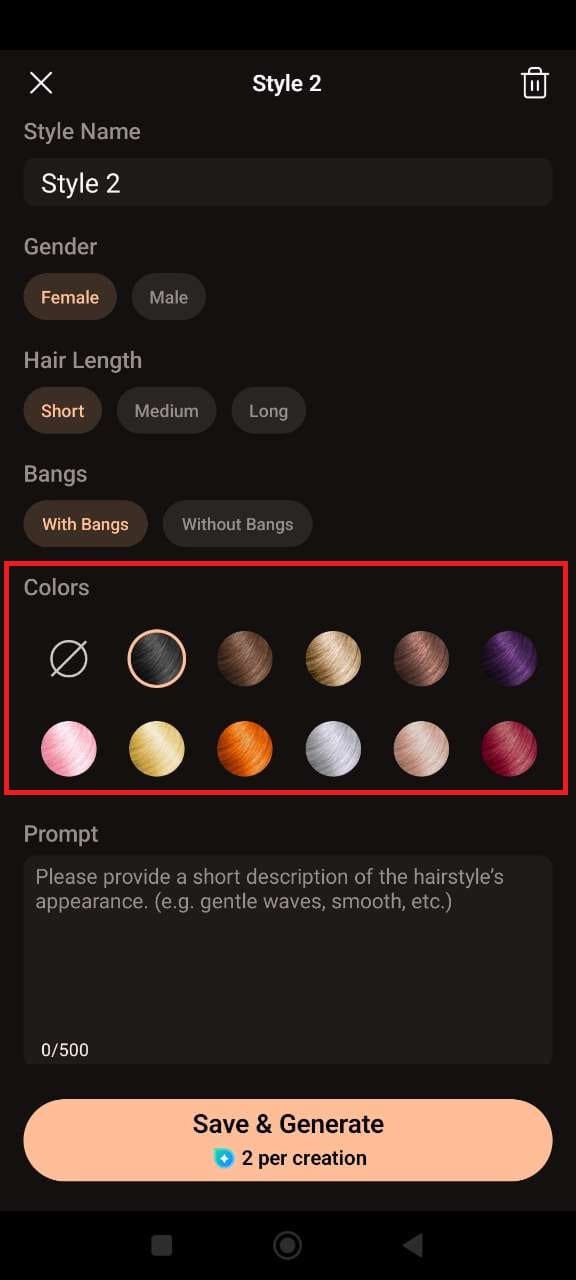
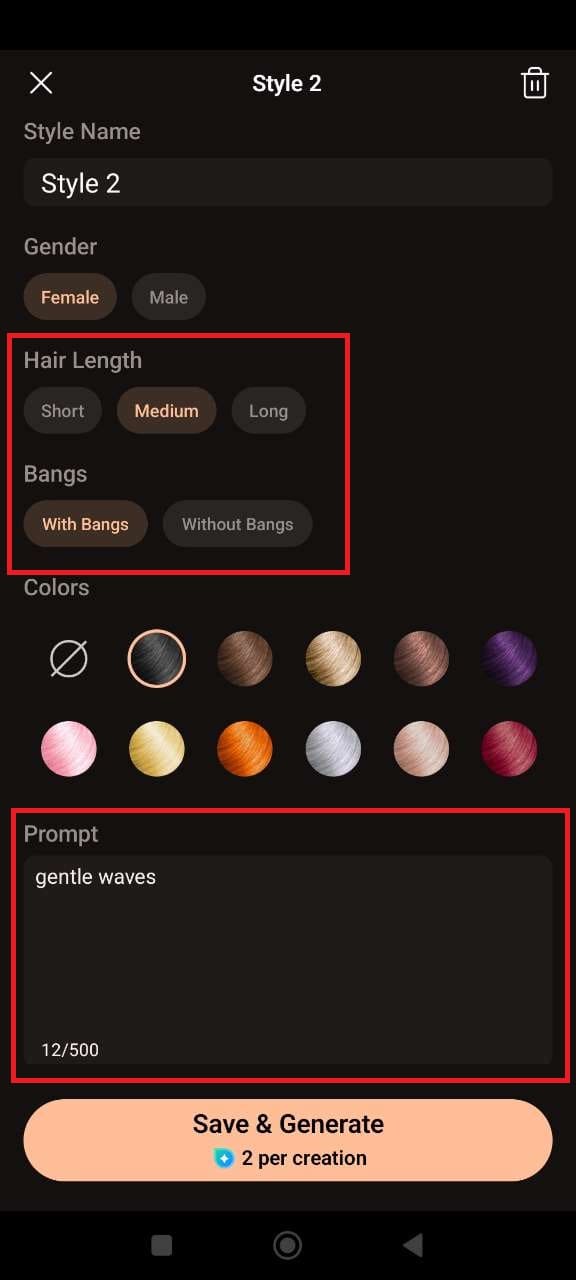
- Customize your hairstyle – Choose your hair length, add bangs if you like, and type a prompt for your desired look — for example: “long wavy hair with curtain bangs” or “short sleek bob.”
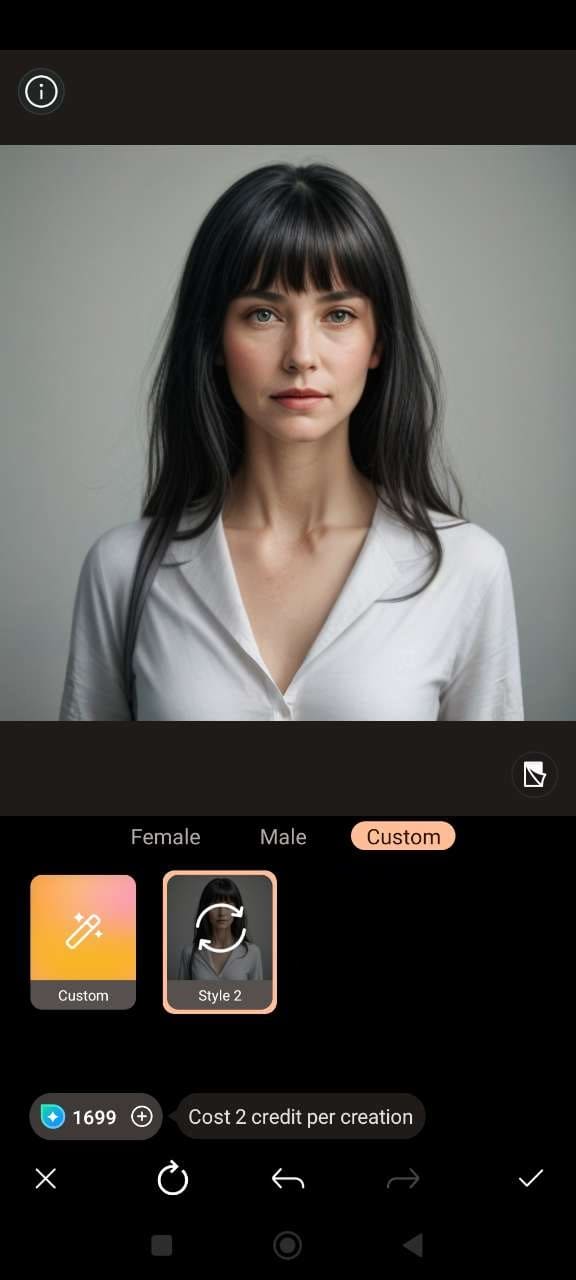
- Apply the filter, then save or share – Let the AI generate your black hairstyle and download or post it in seconds.


Black Hair Filter FAQ
To see what you’d look like with black hair, you can use a free app like PhotoDirector. The app lets you upload a photo and apply a black hair filter instantly. Simply select the black shade, choose your hair length and style, and let the AI transform your look in seconds!
If you're curious about whether black hair would suit you, PhotoDirector is the perfect app to find out. The AI-powered tool lets you experiment with black hair in different styles, lengths, and bangs, so you can easily visualize how it looks on you and decide if it’s your new favorite look!
Yes! PhotoDirector is a fantastic app to see yourself with black hair. It uses advanced AI technology to apply a black hair filter on your photo. You can try various styles, lengths, and add bangs, all at no cost, making it the best app for this transformation!
Using PhotoDirector on your iPhone is easy! Download the app for free, upload your photo, and apply the black hair filter. You can then adjust the hair length, add bangs, or customize your hairstyle by typing a prompt for the perfect black hair look. It’s a fun, quick, and free way to see yourself with black hair!
The free app you need to see yourself with black hair is PhotoDirector. Available on both iPhone and Android, this app allows you to easily experiment with black hair in different styles and lengths. You can quickly try on a variety of looks and save or share your new transformation!

The CyberLink Editorial Team is composed of product testing specialists and content creation experts with over 20 years of hands-on experience and rigorous research in the multimedia editing industry. As the official voice of CyberLink, the team consistently delivers practical, easy-to-follow tutorials across video, photo, and audio editing, while highlighting AI innovations, product insights, and emerging industry trends. Their work empowers millions of creators worldwide each year to elevate their content. Beyond the blog, the team actively shares editing tips and product updates across YouTube, Facebook, Linkedin and Pinterest.
😎 Outside of their work, they enjoy capturing travel moments and meticulously editing photos and videos for their social channels.


