






21 Creative Christmas AI Prompts for MidJourney, Gemini, MyEdit, DALL·E & More

The holiday season is all about magic, memories, and festive creativity.
Whether you want to craft personalized holiday cards, bring festive scenes to life, or make fun seasonal illustrations, AI image prompts can help you do it all.
For a seamless experience and access to powerful AI tools, MyEdit is the perfect companion for your holiday creations.
- Why Use Christmas AI Image Prompts?
- Best Christmas Prompts for Midjourney, Gemini & More
- How to Generate Christmas Images with AI Prompts
- Bring Your Christmas Ideas to Life with MyEdit
- Christmas AI Image Prompt FAQ
Why Use Christmas AI Image Prompts?

Christmas AI image prompts help you guide AI tools to create better-looking holiday images. Instead of getting random results, you can control the style, mood, and details of your Christmas visuals using precise descriptions.
Key Benefits of Using Christmas AI Prompts
- Better image quality – Control lighting, colors, style, and atmosphere
- Save time – Create Christmas images in seconds, not hours
- Consistent style – Keep the same look across all your visuals
- Works with popular AI tools – Midjourney, Gemini, ChatGPT & MyEdit
- Multiple use cases – Cards, social media, ads, posters, thumbnails
- Unique visuals – No need for stock photos
You Can Create All Types of Christmas Images
- Cozy winter scenes
- Santa Claus and elves
- Cute cartoon illustrations
- Realistic Christmas portraits
- Festive products and decorations
Trending AI Christmas Prompt: Candy Cane AI
This Christmas, the Candy Cane AI trend is taking over! Transform any portrait—couples, family, or pets—into a festive Candy Cane Wonderland with candy-striped outfits, snowy peppermint forests, glowing lights, and oversized candy canes. It's a magical way to create shareable holiday images in seconds.


Prompt sample: "Transform this couple portrait into a Candy Cane Wonderland, candy-striped outfits, snowy peppermint forest, glowing snow, oversized candy canes, warm festive lighting, photorealistic holiday atmosphere"
Want more festive inspiration? Check out more Candy Cane AI prompts in this article and create your own magical Christmas AI images!
20 Best Christmas AI Image Prompts for Midjourney, Gemini & More
Here are 20 ready-to-use Christmas AI image prompts that work with Midjourney, Gemini, ChatGPT, MyEdit, and other AI tools. Click any prompt below to jump directly to the details and examples.
- Cozy & Classic Scenes
- Santa & Christmas Characters
- Personalized Portraits
- Artistic Styles & Illustrations
- Marketing & Social Media Visuals
1. Cozy & Classic Scenes
Cozy Living Room with Christmas Tree & Fireplace
This prompt generates a warm and festive Christmas living room scene, perfect for holiday cards, social media posts, or cozy winter illustrations. Imagine a glowing fireplace, decorated Christmas tree, wrapped gifts, and soft ambient lighting.

Prompt sample: "Cozy Christmas living room scene, glowing fireplace, decorated Christmas tree, wrapped gifts on the floor, soft warm lighting, snow outside window, ultra-detailed, realistic photography style, cinematic holiday atmosphere"
Pro Tip: Add "cartoon style" for a playful look, or "cinematic lighting" for more realistic effects. You can also specify "family portrait included" to create personalized images.
Snowy Winter Village at Night
Create a charming winter village covered in snow at night, with glowing windows, snow-covered roofs, and twinkling street lights. Ideal for holiday cards, digital art, or festive social media content.

Prompt sample: "Snowy winter village at night, glowing windows, snow-covered rooftops, twinkling street lights, cozy festive atmosphere, ultra-detailed, cinematic lighting, winter holiday scene, realistic style"
Pro Tip: Add "cartoon style" for a whimsical illustration, or "photorealistic" for realistic winter photography vibes.
Family Opening Gifts on Christmas Morning
Capture the joyful moment of a family opening gifts on Christmas morning. Include a decorated tree, wrapped presents, and happy expressions for a warm and festive feel.

Prompt sample: "Family opening gifts on Christmas morning, decorated Christmas tree, wrapped presents, joyful expressions, cozy indoor lighting, realistic photography style, cinematic holiday moment"
Pro Tip: Include "snow falling outside window" for extra atmosphere, or "cartoon style" for playful illustrations suitable for greeting cards.
Christmas Dinner Table Scene
Generate a festive Christmas dinner table scene with delicious food, candles, decorations, and a warm atmosphere. Perfect for holiday invitations or festive social media posts.

Prompt sample: "Christmas dinner table scene, festive food, candles, decorations, cozy warm lighting, holiday atmosphere, ultra-detailed, cinematic photography style"
Pro Tip: Add "birds-eye view" for a modern Instagram style, or "painting style" for artistic illustrations.
2. Santa & Christmas Characters
Santa Claus Delivering Gifts at Night
Create a magical scene of Santa Claus delivering gifts on Christmas night. Think of a snowy rooftop, glowing windows, a sleigh full of presents, and flying reindeer under a starry sky.

Prompt sample: "Santa Claus delivering gifts at night, snowy rooftop, glowing windows, sleigh full of presents, flying reindeer, starry sky, cinematic lighting, magical Christmas atmosphere, ultra-detailed, realistic style"
Pro Tip: Add "cartoon style" for a whimsical illustration, or "cinematic lighting" for a realistic, dramatic night scene.
Cute Christmas Elves Workshop
Generate a lively scene inside Santa’s workshop with cheerful elves making toys, colorful decorations, and playful holiday details. Perfect for illustrations, greeting cards, or festive designs.

Prompt sample: "Cute Christmas elves workshop, cheerful elves making toys, colorful decorations, festive lights, playful holiday scene, ultra-detailed, cartoon style, vibrant colors, cinematic holiday atmosphere"
Pro Tip: Include "snow outside window" for extra seasonal charm, or "Disney style" for whimsical, storybook-like illustrations.
Modern Santa Portrait (Realistic Style)
Create a high-quality, realistic portrait of Santa Claus with his classic red suit, white beard, and warm, friendly expression. Ideal for cards, marketing, or personalized holiday content.

Prompt sample: "Modern Santa Claus portrait, realistic style, red suit, white beard, warm friendly expression, ultra-detailed, cinematic lighting, holiday vibe, high-resolution"
Pro Tip: Specify "studio lighting" for professional photography style, or "cartoon style" for a playful, kid-friendly version.
3. Personalized Portraits
Individual Christmas Portrait
Create a warm, festive portrait celebrating Christmas. Perfect for personal greetings, profile images, or holiday keepsakes. Include a decorated tree, holiday outfit, and cozy indoor lighting.

Prompt sample: "Christmas portrait, decorated Christmas tree in background, holiday outfit, warm cozy indoor lighting, joyful expression, ultra-detailed, cinematic photography style, festive holiday atmosphere"
Pro Tip: Add "snow falling outside window" for extra seasonal charm, or "cartoon style" for a greeting card-friendly illustration.
Festive Profile Picture / Holiday Avatar
Create a festive holiday-themed profile picture with Christmas accessories and winter vibes. Ideal for social media, email signatures, or online holiday greetings.

Prompt sample: "Festive Christmas avatar portrait, Santa hat, Christmas lights background, cheerful expression, cozy lighting, ultra-detailed, cartoon or realistic style, social media ready"
Pro Tip: Add "snowflake background" for extra holiday flair, or "Disney style" for playful, stylized avatars.
Vintage Christmas Portrait
Create a retro-style Christmas portrait inspired by classic holiday photography from the 1940s–1970s. Perfect for nostalgic greeting cards, artistic prints, and unique holiday visuals with old-school charm.

Prompt sample: "Vintage Christmas portrait, 1950s holiday style, retro outfit, soft warm lighting, film grain texture, muted colors, classic studio photography, nostalgic Christmas atmosphere"
Pro Tip: Add "polaroid photo effect" for instant nostalgia, or "Hollywood golden age lighting" for dramatic vintage portraits.
4. Artistic Styles & Illustrations
Cute Cartoon Christmas Illustration
Create a fun and playful cartoon-style Christmas illustration. Include Santa, elves, gifts, and colorful decorations for a cheerful holiday scene.

Prompt sample: "Cute cartoon Christmas illustration, Santa, elves, colorful decorations, gifts, playful holiday scene, vibrant colors, ultra-detailed, whimsical style"
Pro Tip: Add "soft lighting" for a cozy feel or "Disney style" for storybook charm.
Disney-Style Christmas Scene
Generate a magical Christmas scene in a Disney-inspired style. Perfect for greeting cards, holiday animations, or whimsical artwork.

Prompt sample: "Disney-style Christmas scene, magical lighting, whimsical characters, festive decorations, ultra-detailed, vibrant colors, cinematic holiday illustration"
Pro Tip: Add "snow falling" for seasonal atmosphere or "storybook perspective" for a classic Disney feel.
Anime Christmas Illustration
Create a vibrant anime-style Christmas illustration. Include expressive characters, festive outfits, snow, and holiday lights for a dynamic and colorful scene.

Prompt sample: "Anime Christmas illustration, expressive characters, festive outfits, snow, holiday lights, ultra-detailed, vibrant colors, whimsical scene"
Pro Tip: Include "chibi style" for a cute version or "dynamic angle" for a cinematic effect.
Watercolor Christmas Painting
Generate a soft and elegant watercolor-style Christmas painting. Ideal for greeting cards, posters, or decorative artwork.

Prompt sample: "Watercolor Christmas painting, soft brush strokes, festive decorations, glowing lights, cozy atmosphere, ultra-detailed, elegant holiday illustration"
Pro Tip: Add "hand-painted texture" for a realistic watercolor effect or "soft pastel colors" for a gentle, cozy vibe.
Magical Christmas Night with Light Effects & Snow
Create a magical Christmas night scene with glowing lights, falling snow, and a festive atmosphere. Perfect for wallpapers, holiday banners, or cinematic illustrations.

Prompt sample: "Magical Christmas night, glowing lights, falling snow, festive atmosphere, ultra-detailed, cinematic lighting, vibrant colors, holiday scene"
Pro Tip: Add "long exposure lighting effects" for a dreamy feel or "fantasy style" for extra magical impact.
5. Marketing & Social Media Visuals
Christmas Product Mockup (Gift Box, Mug, T-Shirt)
Create realistic Christmas product mockups for gifts, mugs, t-shirts, or other merchandise. Perfect for online stores, promotional campaigns, and holiday catalogs.

Prompt sample: "Christmas product mockup, gift box, mug, t-shirt, festive decorations, realistic lighting, ultra-detailed, high-resolution, commercial-ready holiday design"
Pro Tip: Add "studio background" for professional e-commerce presentation or "snowy outdoor scene" for a seasonal vibe.
Christmas Advertisement Banner
Generate festive advertisement banners for Christmas promotions. Include bold holiday visuals, vibrant colors, and seasonal elements for social media, websites, or emails.

Prompt sample: "Christmas advertisement banner, bold festive visuals, seasonal decorations, vibrant colors, holiday sale, ultra-detailed, social media ready, cinematic lighting"
Pro Tip: Specify "wide format" for website banners or "portrait format" for Instagram stories and ads.
Christmas Website Hero Image
Create a captivating hero image for Christmas-themed websites. Include festive decorations, warm lighting, and attention-grabbing compositions to engage visitors.

Prompt sample: "Christmas website hero image, festive decorations, warm lighting, cozy holiday atmosphere, ultra-detailed, cinematic composition, high-resolution"
Pro Tip: Add "wide cinematic crop" for hero section or "interactive design elements" for web animation effects.
YouTube Christmas Thumbnail
Create eye-catching YouTube thumbnails for Christmas videos. Include festive elements, bold text space, and visually striking compositions to attract clicks.

Prompt sample: "YouTube Christmas thumbnail, festive decorations, bold text area, high contrast colors, visually striking composition, ultra-detailed, cinematic holiday style"
Pro Tip: Include "close-up elements" for high impact on small screens or "cartoon style" for playful YouTube content.
Instagram Christmas Post / Story Visual
Create visually engaging Christmas posts or stories for Instagram. Include festive backgrounds, holiday props, and vibrant colors to grab attention on social feeds.

Prompt sample: "Instagram Christmas post, festive background, holiday props, vibrant colors, engaging composition, ultra-detailed, story format, social media ready"
Pro Tip: Add "vertical layout" for stories or "square layout" for posts, and "animated elements" for extra engagement.
How to Generate Christmas Images with the Best AI Prompts
Creating magical Christmas visuals with AI only takes a few clicks. Whether you’re generating cozy holiday scenes, festive illustrations, or personalized portraits, follow these simple steps with MyEdit.
- Go to MyEdit: Open the AI Image Generator directly in your browser—no installation required.
-
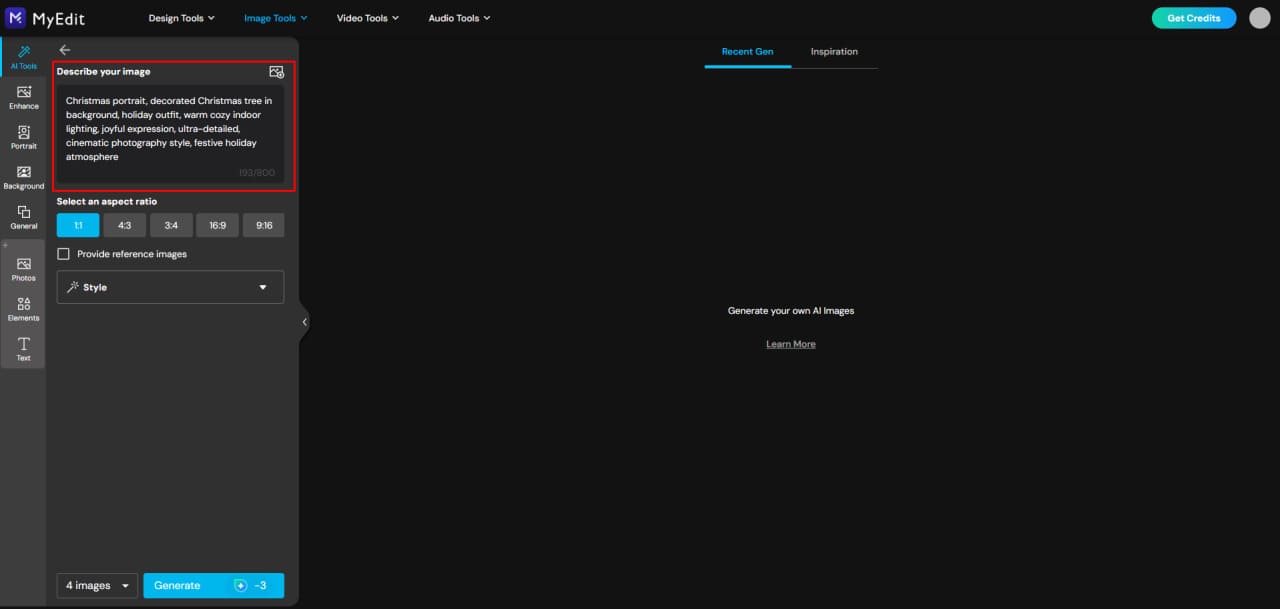
Enter Your Christmas Prompt: Copy one of our Christmas AI prompts from this article or write your own. Add details like style, lighting, mood, and setting for better results.
-
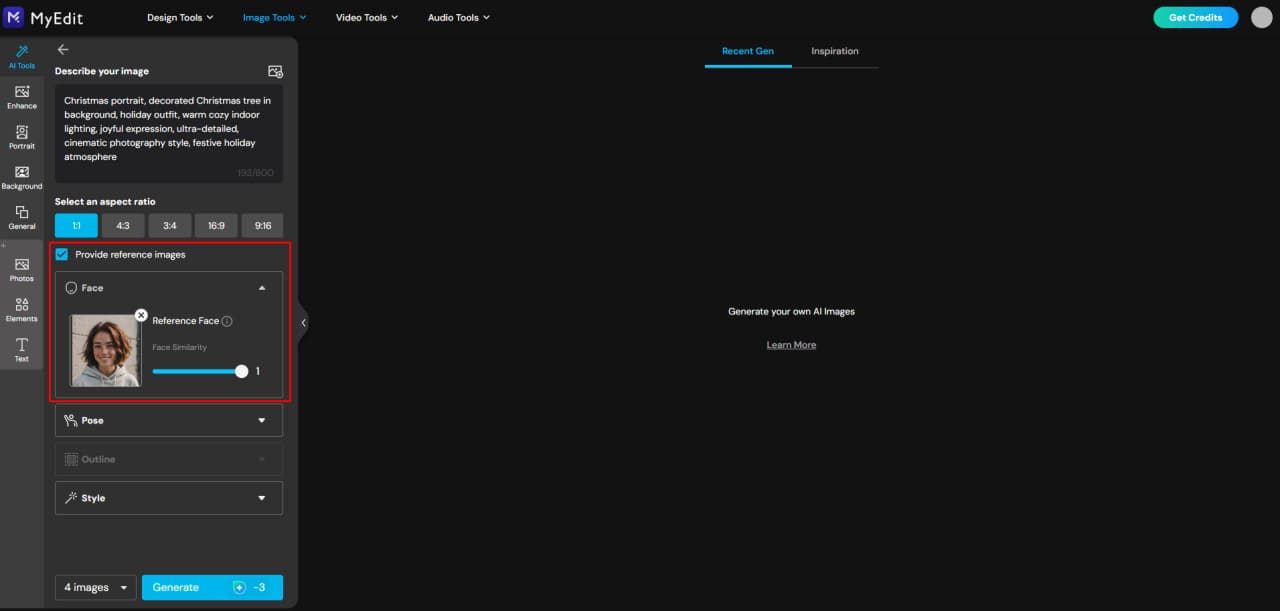
(Optional) Add a Reference Image: If you’re creating a portrait, you can upload a reference image to guide the face, pose, or overall composition.
-
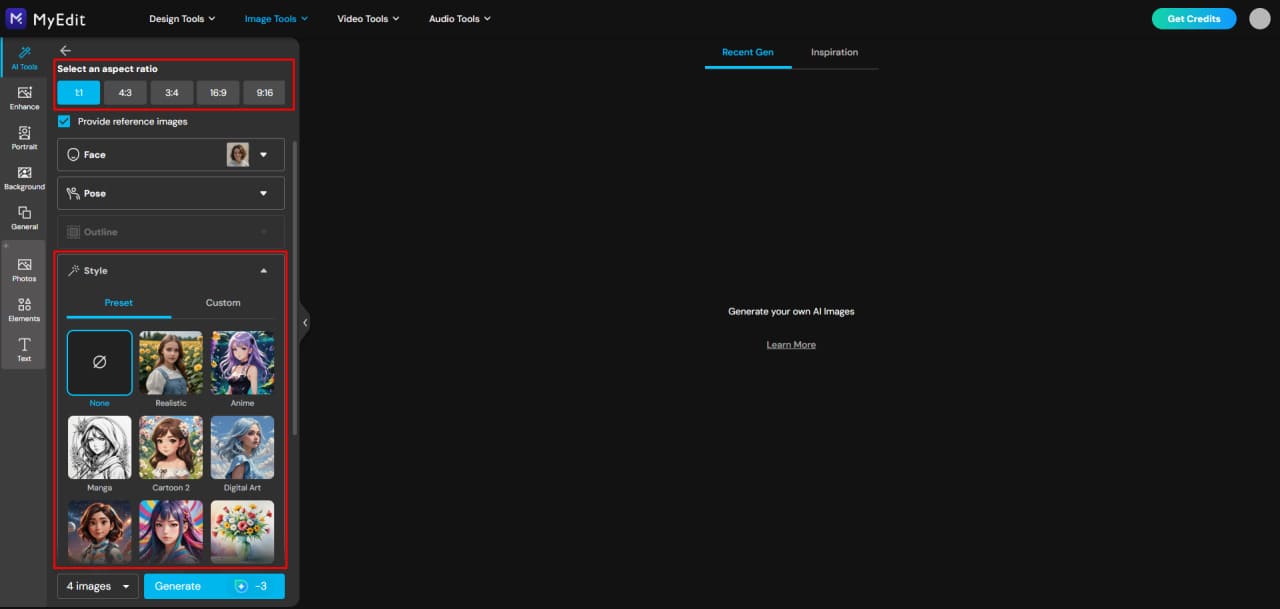
Adjust the Image Settings: Choose your aspect ratio, style reference (realistic, illustration, cinematic, vintage), and other visual options.
-
Generate Your Christmas Image: Once everything is set, click Generate and let the AI create your festive visual in seconds.
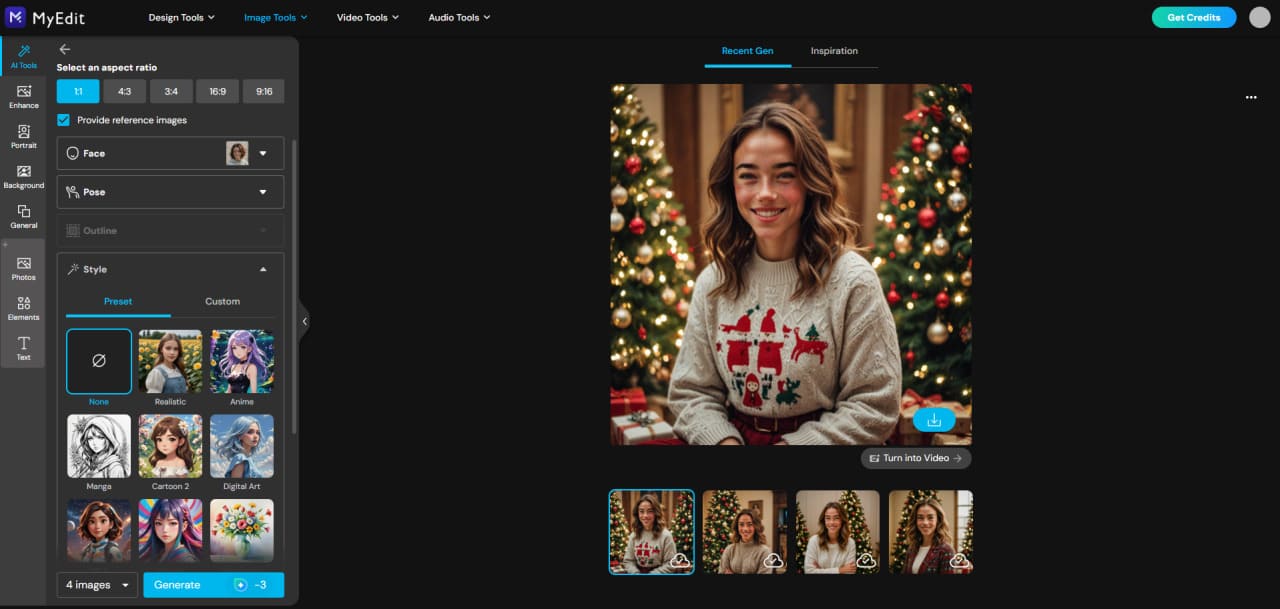


If you’re happy with the result, click the Download icon to save your image and share it on social media, use it for Christmas cards, marketing visuals, or festive digital content.
Turn Christmas Ideas into Art, Photos & Videos with MyEdit AI Tools
MyEdit offers a variety of creative tools to bring your Christmas ideas to life. Design festive images, animate holiday moments, create personalized portraits, or turn photos into magical content — all in just a few clicks. Capture and share your Christmas memories effortlessly with MyEdit.
AI Image Generator

The AI Image Generator allows you to create stunning Christmas visuals quickly and easily. You can generate highly detailed and realistic results from simple prompts, use a reference image to guide composition or style, and take advantage of tens of built-in templates, including Christmas-themed ones.
You can also convert an image into a text prompt to replicate a style you like and select the most popular aspect ratios for social media or print.
AI Art

AI Art lets you turn any photo into a beautiful artistic creation. Simply import your image, select a style, and it’s done. This tool is ideal for portraits and provides quick, precise results.
MyEdit offers hundreds of built-in templates for various styles — cartoon, anime, watercolor, realistic, and more — including many Christmas-themed options for festive illustrations and portraits.
AI Image to Video


With AI Image to Video, you can bring your Christmas visuals to life. This powerful tool converts static images into animated videos almost instantly.
You can choose from many templates covering all genres, including multiple Christmas themes, or create custom image-to-video content using your own prompts for full creative control. Fast generation ensures you can produce multiple videos without delay.
AI Replace


AI Replace allows you to add or swap any element in a photo — your creativity is the only limit. Simply brush over the section you want to change, type a prompt describing what you want added or replaced, and it’s done.
This is perfect for festive edits like adding a Santa hat, placing presents, or even replacing someone with Santa. Learn more about adding Santa hats here: Add a Santa Hat with MyEdit.
Related Articles:
- ChatGPT Image Ideas & Photo Editing Prompts
- Ultimate Guide to Nano Banana Pro
- Gemini Polaroid Trend Using the Best Prompts
Christmas AI Image Prompt FAQ
You can generate Christmas images by using AI tools like MyEdit, MidJourney, or Gemini. Simply enter a Christmas-themed prompt, choose a style, and click generate. For portraits, you can also add a reference image to guide the AI.
- Cozy Christmas Living Room: Cozy Christmas living room with decorated tree, glowing fireplace, wrapped gifts on the floor, soft warm lighting, ultra-detailed, realistic photography style, cinematic holiday atmosphere.
- Vintage Christmas Portrait: Vintage Christmas portrait, 1950s holiday style, retro outfit and hairstyle, classic Christmas decorations, soft warm lighting, heavy film grain, worn paper texture, nostalgic holiday mood.
- Snowy Winter Village: Snowy winter village at night, twinkling lights, snow-covered rooftops, children playing, warm street lamps, ultra-detailed, magical Christmas atmosphere, cinematic style.
- Santa & Christmas Characters: Santa Claus delivering gifts at night, reindeer in the sky, snow falling, cozy village in background, festive lighting, ultra-realistic, cinematic holiday scene.
- Cute Cartoon Christmas Scene: Cute cartoon Christmas illustration, happy children decorating a Christmas tree, playful elves, colorful lights, snow gently falling, vibrant and cheerful festive style.
Yes! Tools like MyEdit allow you to upload a reference image to guide the AI. You can create personalized family or individual portraits with holiday outfits, decorations, and festive lighting.
Popular options include MyEdit (for image generation, AI art, image-to-video, and AI replace), MidJourney, and Gemini. MyEdit is especially versatile because it combines multiple features in one tool.
Absolutely! With MyEdit’s AI Replace feature, you can brush over any section of your photo and type a prompt to add or replace elements, such as Santa hats, gifts, or holiday decorations.

The CyberLink Editorial Team is composed of product testing specialists and content creation experts with over 20 years of hands-on experience and rigorous research in the multimedia editing industry. As the official voice of CyberLink, the team consistently delivers practical, easy-to-follow tutorials across video, photo, and audio editing, while highlighting AI innovations, product insights, and emerging industry trends. Their work empowers millions of creators worldwide each year to elevate their content. Beyond the blog, the team actively shares editing tips and product updates across YouTube, Facebook, Linkedin and Pinterest.
😎 Outside of their work, they enjoy capturing travel moments and meticulously editing photos and videos for their social channels.


