






33 AI Prompts for Professional Headshots (LinkedIn, Business, and More)

A professional headshot used to mean booking a studio, picking an outfit two weeks early and waiting for proofs. AI generators changed the economics of that: you describe the person, the clothing, the room and the light, and you get a usable portrait for LinkedIn, a resume, a speaker bio or a company directory in about a minute.
What decides the result is the prompt. A vague request returns a generic face; a prompt that names attire, background, lighting and expression returns something you would actually put on a profile. Below are 33 headshot prompts grouped by profession, each with the reasoning behind it and one lever to adjust when the first attempt misses. We ran every one of them through MyEdit's AI Image Generator using GPT-Image-2, and the before and after images on this page are the output.
Equipment and date: Windows 11 laptop, Google Chrome (latest version), MyEdit running in the browser, August 2026.
What we did: generated all 66 example images on this page (33 before and after pairs) with GPT-Image-2 inside MyEdit's AI Image Generator, at 6 credits per generation and under a minute each, for 396 credits in total. The single animated example was produced with Kling 3.0 in MyEdit's Image to Video tool, at 20 credits for a 5-second clip.
What we verified separately: the model line-up and the per-model input limits on MyEdit's AI Image Generator page; the free daily credit allowance on MyEdit's pricing page; Kling availability on the Image to Video page; and the current image model behind ChatGPT, in August 2026.
Scope limit: every portrait on this page is AI-generated, including the "before" reference images. No real person's photo was used. We did not run these prompts through ChatGPT, Gemini, Midjourney or any other generator, so we cannot say how each one renders there. We also did not test how AI headshots perform in a real hiring, client or platform-review context.
- Why Generate Your Professional Headshot Using AI
- 33 AI Headshot Prompts You Can Copy and Paste
- How to Generate Your Professional AI Headshot
- MyEdit Tools for Professional Headshots
- FAQ About AI Professional Headshots
Why Generate Your Professional Headshot Using AI

An AI headshot is not a replacement for a good photographer. It is a replacement for the profile picture you currently have, which for most people is a cropped holiday photo or a five-year-old company badge shot. Judged against that, the case is straightforward:
- Speed and cost: a generation takes under a minute. In MyEdit, one image costs 6 credits, and free accounts claim 3 credits a day, so a single headshot is roughly two days of the free allowance. Premium plans start at $7 a month billed yearly ($84) or $18 month to month, and the plan screen lists 500 credits a month.
- Variations are nearly free in effort: the same prompt with one word changed gives you a second look. Trying five backgrounds with a photographer means five setups; here it means five prompts.
- Format control: you pick the aspect ratio up front, so the image arrives already shaped for a square LinkedIn avatar or a wider company-page banner instead of being cropped after the fact.
- Consistency across a team: running the same background, lighting and framing description for every person gives a directory page that looks deliberate rather than assembled.
Where AI Headshots Fall Short
Worth knowing before you commit. Generated portraits are strongest where the face is the subject and the room is context. They are weaker when the image has to prove something specific: your actual office, your actual team, a product you actually hold. Hands, lanyards, name badges and lettering on a wall are the first details to come out wrong, which is why almost every prompt below keeps the frame at head and shoulders.
There is also a disclosure question that has nothing to do with image quality. Some employers, publications and professional bodies have their own rules about AI-generated imagery in profiles and bios, and those rules differ by industry and by platform. Check the ones that apply to you before publishing, particularly for regulated fields such as medicine, law and finance.
Q: How much does an AI headshot actually cost?
A: In MyEdit, one generation with GPT-Image-2 costs 6 credits. Free accounts claim 3 credits per day, so a single image takes two days of free credits. Paid plans start at $7 a month billed yearly and list 500 credits a month, which covers roughly 83 generations.
Q: Do I need an existing photo of myself?
A: Not necessarily. You can generate a headshot from a text prompt alone, but uploading a reference photo is what makes the result look like you rather than like a stock face. GPT-Image-2 accepts up to 16 reference images in a single request.
33 AI Headshot Prompts You Can Copy and Paste
These prompts are written in plain description rather than tool-specific syntax, so they carry over to most generators. That said, we only ran them in one place, MyEdit with GPT-Image-2, and results shift between models. Nano Banana Pro tends toward photoreal skin detail, FLUX.2 Pro toward stylized looks, and GPT-Image-2 toward following a long prompt literally, which is why the longer prompts below are written the way they are.
How to Write a Headshot Prompt That Works
Every prompt in this list is built from the same five parts, in the same order. Learn the pattern and you can write your own for any role that is not covered here.
- Subject and role: "corporate director," "emergency room nurse," "freelance illustrator." The role does more work than any other word because it pulls in the clothing, the posture and the setting the model associates with it.
- Attire: name the garment and the color. "Tailored charcoal blazer" beats "professional clothing," which the model will interpret as a generic dark suit every time.
- Background: say what it is and how present it should be. Adding "softly blurred" or "shallow depth of field" keeps a described room from competing with your face.
- Lighting: "soft diffused lighting" flatters most faces; "cinematic side lighting" adds drama and shadow; "natural window light" reads as informal. This single phrase changes the mood more than anything else in the prompt.
- Expression and finish: close with the expression you want and the technical result, such as "realistic skin texture, high-resolution portrait." Skin texture is worth naming explicitly, because without it faces come out plastic.
One practical note: GPT-Image-2 accepts prompts of up to 8,000 characters, so there is no reason to compress. If a detail matters, write it in full rather than trusting an adjective to imply it.
Corporate & Executive Use Cases
- CEO Boardroom Portrait
- C-Level Executive Studio Shot
- Corporate Director Neutral Background
- Consultant LinkedIn Headshot
- Finance Professional Office Portrait
- Sales Executive Friendly Smile
- Board Member Classic Pose
- Marketing Director Modern Style
- Lawyer Authority Portrait
- Public Speaker Studio Headshot
Startup & Tech Professionals
- Startup Founder Casual Blazer
- Tech CEO Modern Co-Working Portrait
- Product Designer Creative Background
- Engineer Smart Casual Office
- Tech Employee Friendly Expression
Creative & Artistic Professionals
- Graphic Designer Colorful Studio
- Photographer Cinematic Lighting
- Writer Lifestyle Background
- Artist Expressive Eyes Portrait
- Videographer Studio Shot
Healthcare & Science Professionals
- Doctor Lab Coat Portrait
- Nurse Friendly Hospital Portrait
- Researcher Lab Equipment Background
- Healthcare Administrator Office Portrait
- Scientist Professional Lab Headshot
Education & Academia Professionals
- Professor Library Background
- Teacher Classroom Portrait
- Lecturer Office Studio Shot
- Academic Researcher Friendly Expression
Lifestyle & Remote Professionals
- Freelancer Home Office Portrait
- Digital Nomad Café Background
- Consultant Modern Neutral Studio
- Remote Worker Professional Casual
Corporate & Executive Prompts
Ten prompts for executives, managers and client-facing corporate roles. The common thread is restraint: dark or neutral tailoring, backgrounds that suggest a workplace without describing one in detail, and lighting soft enough that the face carries the image.
1. CEO Boardroom Portrait
For the photo that sits beside a leadership bio or a press quote. The boardroom is context, not subject, which is why the prompt asks for a neutral background rather than a described room: a fully rendered boardroom pulls attention to chairs and glass. If the first result reads as severe, replace "serious" with "composed" and add "slight smile, direct eye contact."


Confident CEO in a modern boardroom, tailored dark suit, neutral background, studio lighting, serious but approachable expression, realistic high-resolution corporate headshot
2. C-Level Executive Studio Shot
A studio setup for the places where the background should say nothing at all: annual reports, conference programs, board pages. Grey is specified deliberately, because a white backdrop can blow out against pale shirts and lighter skin tones and leave the subject floating. If the separation between shirt and wall looks thin, name a darker shade, such as "mid-grey seamless backdrop."


C-Level executive in a professional studio, dark business suit, neutral gray background, soft studio lighting, confident expression, realistic high-resolution corporate headshot
3. Corporate Director Neutral Background
The middle ground between a studio shot and a location shot: an office is implied but never detailed. A blazer instead of a full suit reads as senior without reading as formal, which suits internal directories and company About pages. Swap "tailored blazer" for a specific color if you want the image to sit inside a brand palette.


Corporate director in tailored blazer, neutral office background, soft diffused lighting, natural smile, realistic high-resolution headshot
4. Consultant LinkedIn Headshot
Written for the platform rather than the room. LinkedIn crops avatars to a circle, so this prompt keeps the framing tight and the background plain, which means nothing important gets cut at the corners. "Realistic skin texture" is doing real work here: without it, faces at LinkedIn's display size tend to come out smoothed to the point of looking synthetic.


Professional consultant, neutral office background, confident but approachable expression, soft lighting, realistic skin texture, LinkedIn-ready headshot
5. Finance Professional Office Portrait
Finance profiles are read for reliability before anything else, so this prompt deliberately avoids anything expressive. "Polished expression" is a narrower instruction than "smiling" and tends to return a closed-mouth, level look. If the result feels cold, add "subtle warmth in the eyes" rather than asking for a smile, which usually overshoots.


Finance professional in office setting, neutral background, polished expression, soft lighting, realistic high-resolution headshot
6. Sales Executive Friendly Smile
Client-facing roles are the one case where a genuine smile outperforms a neutral expression, because the photo is doing introductions before you do. The risk is a rendered smile that looks fixed. Adding "eyes crinkled" or "laughing slightly" to the prompt is what separates a warm result from a rictus, and it costs one generation to test.


Sales executive with friendly smile, neutral office background, soft lighting, realistic skin texture, professional client-facing headshot
7. Board Member Classic Pose
"Classic pose" is a compact instruction that pulls in a squared, slightly angled stance and a straight-on gaze, the arrangement used in annual reports for decades. It is the most conservative prompt in this group by design. If you need it to feel less formal, change the background instruction from "neutral" to "softly blurred office interior."


Board member in classic pose, neutral background, confident and professional expression, soft studio lighting, realistic high-resolution headshot
8. Marketing Director Modern Style
Marketing profiles have more license than most corporate roles, and this prompt uses it in the background rather than the clothing, which keeps the image usable on a formal company page. "Modern office" is vague on purpose: it returns clean lines and open space without committing to props that often render badly, such as screens with text on them.


Marketing director, modern office background, friendly confident expression, soft lighting, realistic professional headshot
9. Lawyer Authority Portrait
Legal profiles carry more weight than most, and firms often have their own standards for imagery on client-facing pages, so check yours before publishing. On the prompt itself, "formal attire" returns a dark suit and tie by default; if you want a different register, name it, since the model will not infer a firm's house style from the word "lawyer."


Lawyer in formal attire, neutral background, confident and authoritative expression, soft studio lighting, realistic professional headshot
10. Public Speaker Studio Headshot
Speaker bios are usually printed small and next to a talk title, so contrast matters more than detail. "Polished background" keeps the frame clean at thumbnail size. If the image is going onto an event page with a dark theme, add "lit against a dark background" so the portrait does not sit in a bright rectangle on the page.


Public speaker in studio, polished background, confident and engaging expression, soft lighting, realistic high-resolution headshot
Startup & Tech Professionals
Five prompts for founders, engineers and product people. The register here is smart casual rather than corporate, and the backgrounds are working spaces rather than studios, which is what makes these read as current rather than staged.
11. Startup Founder Casual Blazer
The blazer is the whole trick: it keeps the image usable in an investor deck while the absence of a tie keeps it from looking corporate. Co-working backgrounds render as glass, plants and light wood, which is generic enough to be safe. Change "confident smile" to "relaxed half smile" if the result looks like a stock photo.


Startup founder in casual blazer, confident smile, co-working space background, soft natural lighting, realistic skin texture, high-resolution professional headshot
12. Tech CEO Modern Co-Working Portrait
Distinct from the corporate CEO prompt in one respect: the setting is collaborative rather than closed. That difference does most of the positioning work, so leave the background instruction in even if you tighten the crop. "Smart casual" reliably returns an open-collar shirt or a fine-knit sweater; name the garment if you want something specific.


Tech CEO in smart casual attire, co-working office background, approachable expression, soft studio lighting, realistic skin texture, professional AI headshot
13. Product Designer Creative Background
Colour is the personality here, and blur is what stops it taking over. "Colorful blurred background" gives you a wash of tone behind the subject rather than shapes competing with the face, which is what happens if you describe a studio full of objects. Name two colours if you want the result to match a portfolio site.


Product designer with colorful blurred background, casual smart outfit, friendly confident expression, soft lighting, realistic skin texture, professional headshot
14. Engineer Smart Casual Office
Engineering profiles usually sit on internal team pages next to dozens of others, so consistency matters more than distinctiveness. This prompt is written to be repeatable: keep the background and lighting instructions identical across a whole team and only the person changes. Avoid adding screens or code to the background, which is where rendering artefacts appear.


Engineer in smart casual attire, neutral office background, approachable expression, soft lighting, realistic skin texture, professional AI headshot
15. Tech Employee Friendly Expression
The most neutral prompt in this group, and the one to start from if you are generating for someone whose role is hard to characterise. Everything in it is deliberately unspecific except the expression. Add a single detail, such as a garment colour or a window direction, when you want to differentiate one person from the rest of a team page.


Tech employee smiling, casual smart outfit, soft lighting, neutral office background, realistic skin texture, professional headshot
Creative & Artistic Professionals
Five prompts where the portrait is expected to show some point of view. These lean harder on lighting than on setting, because lighting changes mood without introducing objects the model has to render correctly.
16. Graphic Designer Colorful Studio
The instruction that matters is "subtle design elements," which asks for suggestion rather than content. Ask for posters, screens or lettering and you will get shapes that look like text but are not, which is the single most recognisable AI artefact in a portfolio context. Keep the background abstract and let the outfit carry the personality.


Professional headshot of a graphic designer in a colorful studio environment, creative yet clean background with subtle design elements, smart casual outfit, confident and approachable expression, soft studio lighting, realistic skin texture, high-resolution professional portrait.
17. Photographer Cinematic Lighting
Cinematic lighting means strong directional light and deep shadow, and it is the highest-risk lighting instruction in this list because it can lose half the face. "Moody yet balanced" is the counterweight that keeps detail in the shadow side. If the result is too dark, add "fill light on the shadow side" rather than reducing the contrast description.


Professional headshot of a photographer using cinematic lighting, moody yet balanced light, dark neutral background, calm confident expression, sharp facial details, realistic photography-style portrait.
18. Writer Lifestyle Background
Author photos are read differently from corporate headshots: informality is a feature, and window light is what signals it. Books are named in the prompt because a bookshelf reads correctly at a distance even when the spines are illegible, which is not true of screens or signage. Keep the shelf soft-focused and behind the shoulder.


Professional headshot of a writer in a lifestyle setting, cozy workspace background with books or desk, natural window light, thoughtful relaxed expression, realistic skin tones, professional editorial portrait.
19. Artist Expressive Eyes Portrait
A close-crop prompt, and the one that benefits most from a high-quality reference image, because at this framing the eyes are most of the picture. "Minimal background" is not decoration: it removes everything that would compete at close range. If the gaze looks glassy, add "catchlight in the eyes," which is the detail that reads as alive.


Professional artist headshot focusing on expressive eyes, minimal background, soft directional lighting, emotional yet professional expression, realistic texture, high-quality artistic portrait.
20. Videographer Studio Shot
Equipment in a background is a credential, but it is also the detail most likely to render as something that does not exist. "Subtle equipment" keeps it as silhouette. If you want a specific piece of kit visible, expect to generate several times, and consider producing the portrait clean and adding real equipment in a separate edit instead.


Professional headshot of a videographer in a studio setting, subtle equipment in background, modern lighting setup, confident focused expression, realistic skin texture, high-resolution professional portrait.
Healthcare & Science Professionals
Five prompts for medical, clinical and research profiles. One caution before you use them: many healthcare employers, medical boards and journals have specific rules about imagery in professional directories and publications. Confirm what applies to you before publishing a generated portrait in a clinical context.
21. Doctor Lab Coat Portrait
The lab coat is the entire signal, and it is also where errors show. Badges, embroidered names and stethoscope details frequently render as approximations, so keep the prompt at "clean lab coat" and crop above the pocket line. "Reassuring expression" is a better instruction than "smiling," which can undercut the register the photo needs.


Professional doctor headshot wearing a clean lab coat, neutral medical office or clinic background, soft balanced lighting, confident and reassuring expression, realistic skin tones, high-quality professional portrait.
22. Nurse Friendly Hospital Portrait
Warmth is the point, because this photo usually appears where patients will see it. Natural lighting is specified rather than studio lighting for exactly that reason: studio light reads as corporate. Keep the background instruction as "clean medical," since detailed ward backgrounds bring in equipment and signage that rarely survive scrutiny.


Professional nurse headshot in a hospital setting, soft natural lighting, friendly and approachable expression, clean medical background, realistic skin texture, professional healthcare portrait.
23. Researcher Lab Equipment Background
Lab glassware and instruments read convincingly as shapes and badly as specifics, which is why "subtle" carries this prompt. Directional lighting adds the depth that makes a lab look like a working space rather than a backdrop. If the equipment looks invented, reduce it further to "softly blurred laboratory interior."


Professional researcher headshot with subtle laboratory equipment in background, modern scientific environment, soft directional lighting, focused and intelligent expression, realistic detail, high-resolution portrait.
24. Healthcare Administrator Office Portrait
This one sits closer to the corporate group than to the clinical ones, and the prompt reflects that: office rather than ward, business lighting rather than natural light. Use it for leadership and operations profiles where the clinical setting would misrepresent the role. "Leadership expression" returns a level, unsmiling look, so soften it if you need approachability.


Professional healthcare administrator headshot in a modern office setting, clean background, balanced professional lighting, confident leadership expression, realistic skin tones, corporate healthcare portrait.
25. Scientist Professional Lab Headshot
The cleanest of the science prompts, and the safest for publication profiles because it commits to almost nothing in the background. Studio lighting inside a lab setting is a deliberate combination: it keeps the face evenly lit while the room stays recognisable. Add a colour for the lab coat if the default white looks flat.


Professional scientist headshot in a laboratory environment, minimal clean background, soft studio lighting, calm confident expression, realistic texture, high-quality scientific portrait.
Education & Academia Professionals
Four prompts for faculty pages, course platforms and academic profiles. Academic portraits tolerate more background context than corporate ones, because the setting is part of the credential.
26. Professor Library Background
Books behind a subject work the way they do in author photos: legible as an idea, forgiving at low resolution. "Subtle academic elements" is the safety instruction that stops the model rendering signage or titled spines. This prompt suits faculty pages and conference programs, where the background is expected to carry some weight.


Professional professor headshot in a library setting, books and subtle academic elements in background, soft studio lighting, confident and approachable expression, realistic skin tones, high-resolution professional portrait.
27. Teacher Classroom Portrait
Natural light rather than studio light, because a school photo that looks corporate feels wrong to parents and students alike. "Minimal but relevant background elements" is the phrase doing the work: it keeps a classroom recognisable while avoiding whiteboards and wall displays, which are where invented lettering appears.


Professional teacher headshot in a classroom setting, natural light, friendly and approachable expression, minimal but relevant background elements, realistic skin tones, high-quality professional portrait.
28. Lecturer Office Studio Shot
Built for course landing pages and e-learning platforms, where the thumbnail is small and often sits over a coloured block. Minimal background and balanced lighting are what survive that treatment. This is the academic equivalent of the LinkedIn prompt: written for the display context rather than the room.


Professional lecturer headshot in a clean office studio, minimal background, soft balanced lighting, confident and approachable expression, realistic professional portrait.
29. Academic Researcher Friendly Expression
Deliberately ambiguous between office and lab, which makes it the right choice when someone's work spans both. It is also the most portable prompt in this section: change nothing but the background phrase and it adapts to a department page, a journal profile or a grant application. Keep "natural lighting" for the approachability the expression is asking for.


Professional academic researcher headshot, neutral office or lab background, friendly confident expression, soft natural lighting, realistic skin tones, high-resolution professional portrait.
Lifestyle & Remote Professionals
Four prompts for freelancers, contractors and distributed teams. The brief here is credibility without a corporate setting, which mostly comes down to using natural light and letting the room be slightly informal.
30. Freelancer Home Office Portrait
Clients hiring a freelancer are partly assessing whether the setup is real, so a home office that looks staged defeats the purpose. Window light is what makes it read as a room rather than a set. Resist adding a desk full of objects; a suggested corner works better than a described workspace.


Professional freelancer headshot in a home office environment, natural window light, casual smart outfit, confident and approachable expression, realistic skin tones, high-resolution professional portrait.
31. Digital Nomad Café Background
The loosest prompt in the set, and the one most dependent on blur. A café rendered sharply fills with other people, cups and signage, all of which invite scrutiny. "Subtle background blur" is not a style choice here, it is what makes the image hold up. Use this only where informality is genuinely appropriate.


Professional digital nomad headshot in a café or co-working space, casual smart attire, natural lighting, confident and approachable expression, subtle background blur, high-quality portrait.
32. Consultant Modern Neutral Studio
A cleaner counterpart to prompt 4, for independent consultants who need one image that works on a proposal, a profile and an invoice footer. The background commits to nothing, which is the point. If you are generating several images for one person, use this as the constant and vary only the outfit.


Professional consultant headshot in a modern neutral studio, smart casual outfit, clean background, soft balanced lighting, confident and approachable expression, realistic high-resolution portrait.
33. Remote Worker Professional Casual
Written for virtual team pages, where every photo was taken somewhere different and the page looks incoherent as a result. Standardising on this prompt across a distributed team fixes that without asking anyone to visit a studio. Keep "modern home-office background" identical for everyone and let the person be the variable.


Professional remote worker headshot, casual business outfit, modern home-office background, natural soft lighting, friendly confident expression, realistic skin tones, high-quality professional portrait.
How to Generate Your Professional AI Headshot with MyEdit
Every image on this page was produced with the workflow below. It runs in the browser, needs no installation, and takes about a minute per generation once your reference photo is uploaded.
- Open the AI Image Generator: go to MyEdit's AI Image Generator and sign in to claim your free daily credits.
-
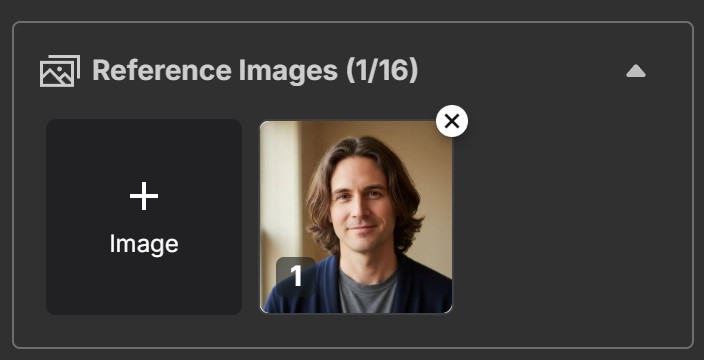
Upload your reference photo: add one or more portraits of yourself. The reference is what makes the output resemble you rather than a generic face, and a clear, front-facing, evenly lit photo gives the model the most to work with.
-
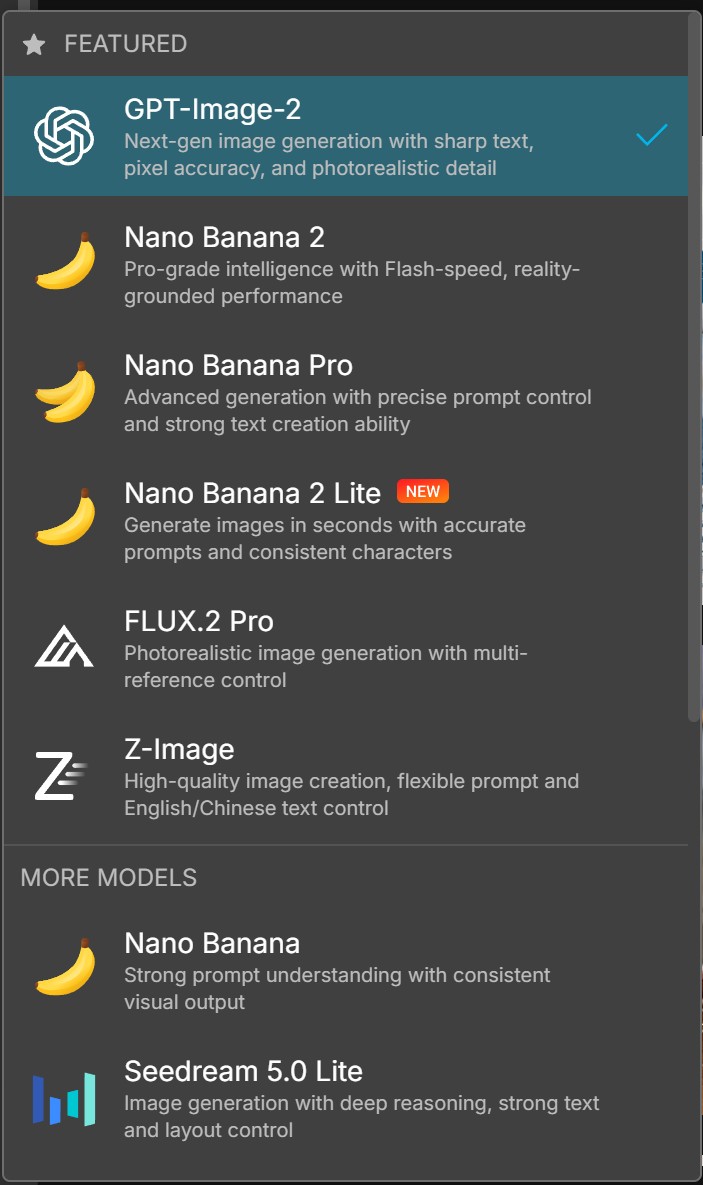
Choose your model: select GPT-Image-2 for the prompts in this guide. It follows long, detailed instructions closely, accepts up to 8,000 characters and takes up to 16 reference images. Nano Banana Pro is the alternative if you want photoreal skin detail and up to 4K output; FLUX.2 Pro suits stylized results.
-
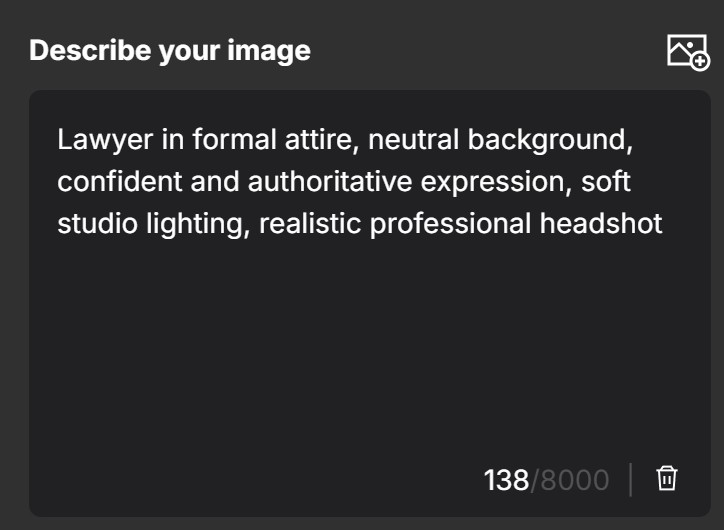
Write your headshot prompt: paste one of the 33 prompts above, or build your own using the five-part pattern: role, attire, background, lighting, expression and finish. Set the aspect ratio now rather than cropping later, since 1:1 is what most profile platforms display.
-
Generate and download: each generation costs 6 credits and completes in under a minute. Downloads carry no watermark and export as JPG at up to 4K. If the first result is close but not right, change one variable rather than rewriting the prompt, so you can tell which word did the work.
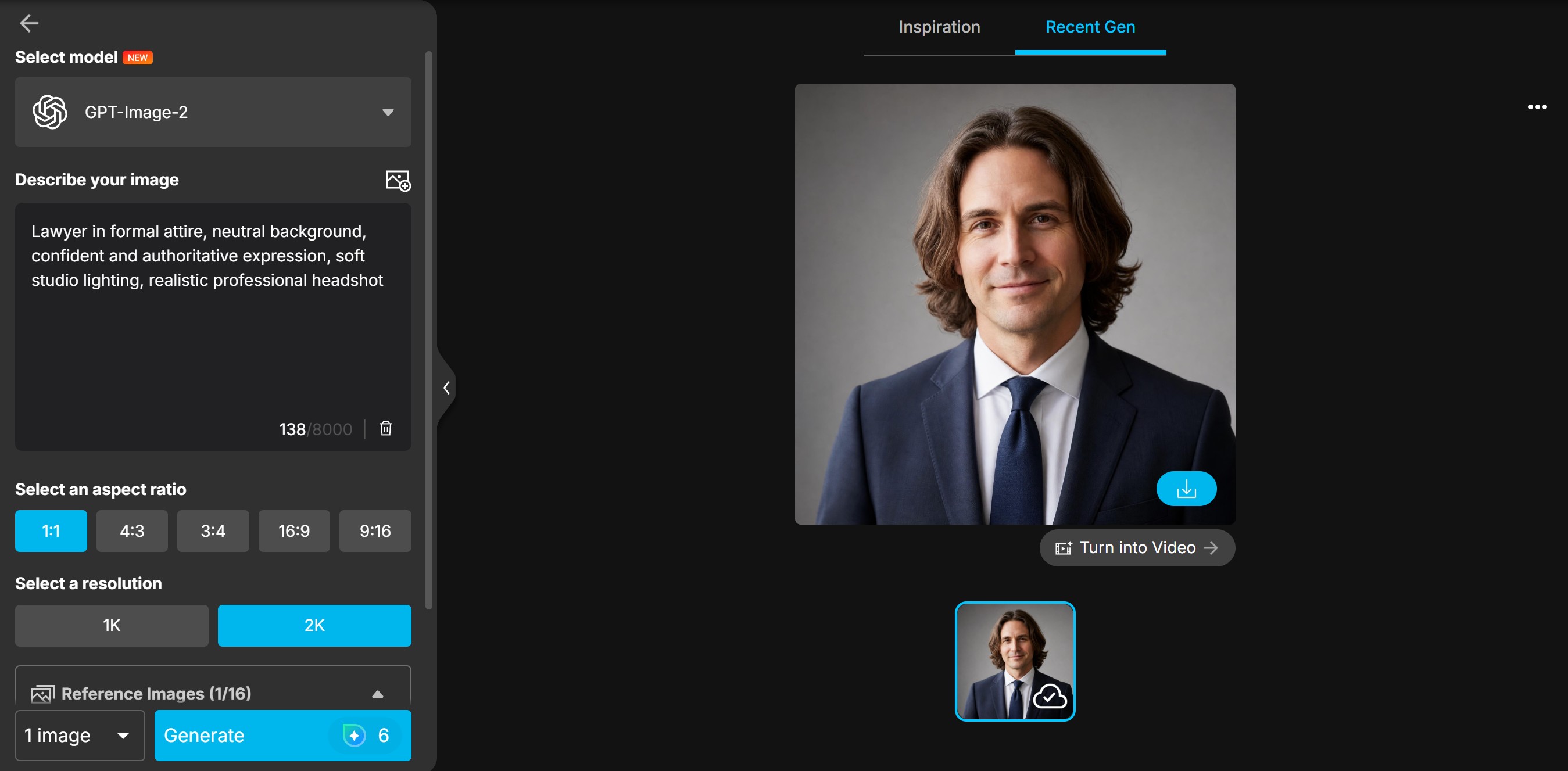


A realistic expectation on cost: at 6 credits per image and 3 free credits per day, the free allowance gives you one headshot every two days. Producing the 66 images on this page took 396 credits, which is inside a single month of a paid plan. Budget two or three generations per person if you want a result you are happy to publish.
Q: How long does one AI headshot take to generate?
A: Under a minute per image with GPT-Image-2 in MyEdit, running in Chrome on a Windows 11 laptop in August 2026. Generation happens on MyEdit's servers, so a faster computer does not shorten it.
Q: What resolution can I export?
A: MyEdit's AI Image Generator exports JPG at up to 4K with no watermark, and generated images can be used commercially.
MyEdit Tools for Professional Headshots
Four MyEdit tools cover the full path from a reference photo to a finished, published profile image. The first is the one this guide uses; the rest handle the cases the prompt list does not.
AI Image Generator


The AI Image Generator is where every prompt in this guide was run. It works from a text prompt alone or from a prompt plus a reference image, and it lets you switch between more than a dozen models without leaving the page, including GPT-Image-2, Nano Banana 2 (Gemini 3.1), Nano Banana Pro (Gemini 3.0), FLUX.2 Pro and Z-Image. Running the same prompt through two models and keeping the better result is the fastest way to find out which one suits a given face.
Its limitation: because the model is doing the interpreting, two runs of an identical prompt will not produce identical images. If you need a matched set across a team, expect to generate extras and select, rather than getting consistency on the first pass.
AI Headshot Generator


The AI Headshot Generator is the template route rather than the prompt route. Instead of describing attire and background, you pick from ready-made business looks with studio or office settings. It is the better choice when you want a predictable corporate result and do not want to iterate on wording, and the weaker choice when you need something the templates do not cover, which is exactly where the 33 prompts above come in.
Image to Video


Image to Video turns a finished headshot into a short clip with subtle motion, which some platforms accept for profile videos and intros. The example above was made with Kling 3.0 at 20 credits for a 5-second clip, and it is the only animated example on this page. You can also choose Veo, Seedance, PixVerse or Vidu, and audio-capable models can generate synchronized sound. Exports reach 1080p with no watermark, though the maximum varies by model.
AI Replace


AI Replace handles the fixes that are not worth a full regeneration. Brush over a region, describe the change, and the AI edits just that area: a background swapped for a different tone, a distracting object removed, a collar adjusted. It is usually the cheaper move when a headshot is 90% right, since you are correcting one detail instead of rolling the dice on a new generation.
Sources for This Guide:
The prompt writing and the tool workflow are ours. The product specifications, model names and credit figures below were verified against first-party sources in August 2026, because they change often enough that a stale figure would mislead.
- Model line-up, per-model input limits and export options: MyEdit, AI Image Generator.
- Free daily credit allowance and subscriber credit bonus: MyEdit, Credits and plans.
- Video model availability, audio support and export resolution: MyEdit, Image to Video.
- Current image model behind ChatGPT: GPT Image model history.
What is first-hand: the 33 prompts, the five-part prompt pattern, and every image and clip on this page, all produced in MyEdit in August 2026.
Related articles:
- 60+ Viral Gemini AI Prompts for Portraits, Couples and Families
- 37 Gemini AI Romantic Prompts for Couples You Can Copy and Paste
- Top 30 Valentine's Day AI Prompts for Couples
Transparency note:
MyEdit is a CyberLink product, and CyberLink publishes this blog. We have stated what each generation cost in credits, what the free daily allowance actually buys you, where the AI Image Generator is less consistent than a template tool, and which parts of this guide are first-hand versus verified from documentation, so you can judge the recommendation on the numbers rather than on our word.
FAQ About AI Professional Headshots
A good prompt names five things in order: the role, the attire, the background, the lighting and the expression, then closes with a technical instruction such as "realistic skin texture, high-resolution portrait." For example: "Professional headshot of a confident woman in a charcoal blazer, neutral studio background, soft diffused lighting, composed approachable expression, realistic skin texture, high-resolution." The role does the heaviest lifting, because it carries the posture and register the model associates with that job.
Write for the display context, not the room. LinkedIn crops profile pictures to a circle, so keep the framing at head and shoulders and the background plain: "Professional headshot of a man in a navy suit, studio lighting, neutral background, friendly and confident expression, realistic high-resolution." Set a 1:1 aspect ratio when you generate, so nothing important is lost to the crop, and always include "realistic skin texture," because faces render smoothed without it.
Yes. Image generation is built into ChatGPT and available on every plan, including the free tier, and since April 2026 it runs on GPT-Image-2. Older guides that say ChatGPT cannot generate images, or that it uses DALL·E 3, describe a setup that is no longer current. The same GPT-Image-2 model is one of the options inside MyEdit, alongside more than a dozen others, which is what we used for the examples on this page.
Yes. Google's image models are branded Nano Banana, and the current versions are Nano Banana 2 (Gemini 3.1), which favors speed and realism, and Nano Banana Pro (Gemini 3.0), which generates up to 4K with tighter prompt control. Both are available in MyEdit alongside GPT-Image-2, so you can run the same headshot prompt through each and keep the better result. Model names in this category change fast, so check the current line-up before assuming a version.
The same prompt structure works across models, so use the five-part pattern rather than writing something Nano Banana specific. Where the models differ is in what they favor: Nano Banana Pro tends toward photoreal skin detail and handles higher output resolution, while GPT-Image-2 follows a long, literal prompt more closely. If your prompt is short and descriptive, try Nano Banana Pro first; if it runs to several detailed clauses, GPT-Image-2 usually respects more of them.
One clear, front-facing, evenly lit photo is enough to get a recognizable result. More references help the model hold your features across different backgrounds and outfits. GPT-Image-2 accepts up to 16 reference images in a single request, which is the highest of the models available in MyEdit. Quality matters more than quantity: one sharp portrait beats five low-resolution or heavily filtered ones.
Partly, and the arithmetic is worth knowing before you start. In MyEdit, a free account claims 3 credits per day, and one generation with GPT-Image-2 costs 6 credits, so a single headshot takes two days of free credits. Premium plans start at $7 a month billed yearly, or $18 month to month, and the plan screen lists 500 credits a month. Downloads carry no watermark on either tier.
Images you generate in MyEdit can be used commercially, including for marketing, advertising, social media and client work, with no separate licensing step. Platform and employer rules are a separate question from licensing: some organizations and professional bodies have their own policies on AI-generated imagery in profiles and directories, particularly in regulated fields, so confirm what applies to you before publishing.
Three habits account for most of it. Ask explicitly for realistic skin texture, since models default to smoothing faces. Keep the frame at head and shoulders, because hands, badges and lettering are where errors show first. And describe backgrounds as softly blurred rather than in detail, which prevents invented objects and unreadable text appearing behind you. When a result is close but wrong in one place, edit that region with AI Replace instead of regenerating the whole image.
The CyberLink Editorial Team is composed of product testing specialists and content creation experts with over 20 years of hands-on experience and rigorous research in the multimedia editing industry. As the official voice of CyberLink, the team consistently delivers practical, easy-to-follow tutorials across video, photo, and audio editing, while highlighting AI innovations, product insights, and emerging industry trends. Their work empowers millions of creators worldwide each year to elevate their content. Beyond the blog, the team actively shares editing tips and product updates across YouTube, Facebook, Linkedin and Pinterest.
😎 Outside of their work, they enjoy capturing travel moments and meticulously editing photos and videos for their social channels.


