



Join the TikTok Squishy Toy Trend Safely with the AI Squish It Effect

The AI Squish Effect is the latest viral sensation on TikTok and other short-form video platforms. Inspired by the popular squishy toy trend, this fun video distortion turns faces and objects into hilarious, exaggerated shapes that grab attention fast.
Thanks to easy-to-use online AI tools like MyEdit, anyone can create viral-ready squish effect videos in seconds — no editing skills needed.
Let’s explore how the AI Squish Effect works and how you can use it to join the TikTok squishy toy trend safely and creatively.
- What Is the AI Squish Effect?
- How to Create an AI Squish Effect Video
- Top Use Cases for the AI Squish Effect
- Creative Ideas to Make Your Squish Videos Go Viral
- FAQs About the AI Squish Effect
What Is the Squishy Toy Trend on TikTok?
Why Is the Squishy Toy Trend Going Viral?
Source: TikTok
On TikTok, a growing number of videos show users slicing open colorful squishy toys or even microwaving and freezing them to create dramatic, gooey reveals. These clips are part of a wider trend in satisfying and ASMR-style content that focuses on texture and visual surprise.
- Trending tags: #SquishyToy, #NeeDoh, #SatisfyingVideo
- Often shows people cutting, squeezing, or popping toys for visual effect
- Popular among kids and teens who love sensory-style content
- Visual appeal comes from the slow, gooey, and colorful transformations that captivate viewers
- The tactile and ASMR-like qualities of the toys add to the trend’s addictive nature
- DIY culture encourages customization and personal spins on the basic squishy toy concept
⚠️The Dangerous Side of the Trend
While these videos might seem harmless, many young users are now trying to replicate them at home — with dangerous results:
- Children have suffered serious burns from microwaving gel-filled toys
- Some toys explode when overheated or frozen, causing facial injuries
- Doctors and toy manufacturers warn against heating or cutting open these toys
Introducing the AI Squish Effect: A Fun and Safe Alternative
The AI Squish Effect lets you recreate the same playful, exaggerated visuals — without any of the risks. This tool uses AI to digitally squash, stretch, or distort parts of your photo or video (like faces or objects) for a hilarious and eye-catching result.

Why Use the AI Squish Effect?
- No physical toys, slicing, or heating involved
- Works with both photos and videos
- Automatically detects faces and motion points for distortion
- Perfect for TikTok, Instagram Reels, YouTube Shorts, or memes
- One-click creativity — no editing skills required
So instead of trying risky trends at home, you can join the fun digitally — and still go viral.
Create Stunning AI Squish It Effect Videos for TikTok
If you’re looking for a simple way to apply the squish effect,MyEdit is a fantastic option. Its AI-powered features offer impressive precision, clean rendering, and a user-friendly experience—perfect for creators who want to stand out.
Here’s how to create a squish video using MyEdit:
- Go to MyEdit
Head over to MyEdit’s Image to Video tool.
- Pick Options & Customize
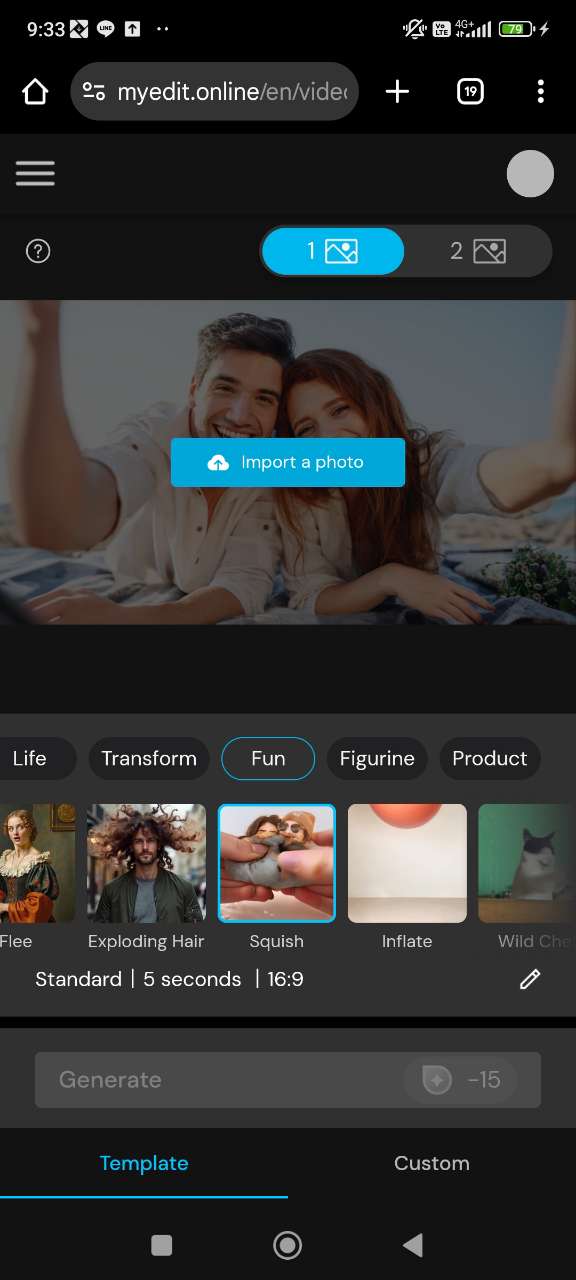
On the left menu bar labeled AI Tools, select Squish. Pick your desired settings, such as duration, aspect ratio, etc.
- Upload Your Photo
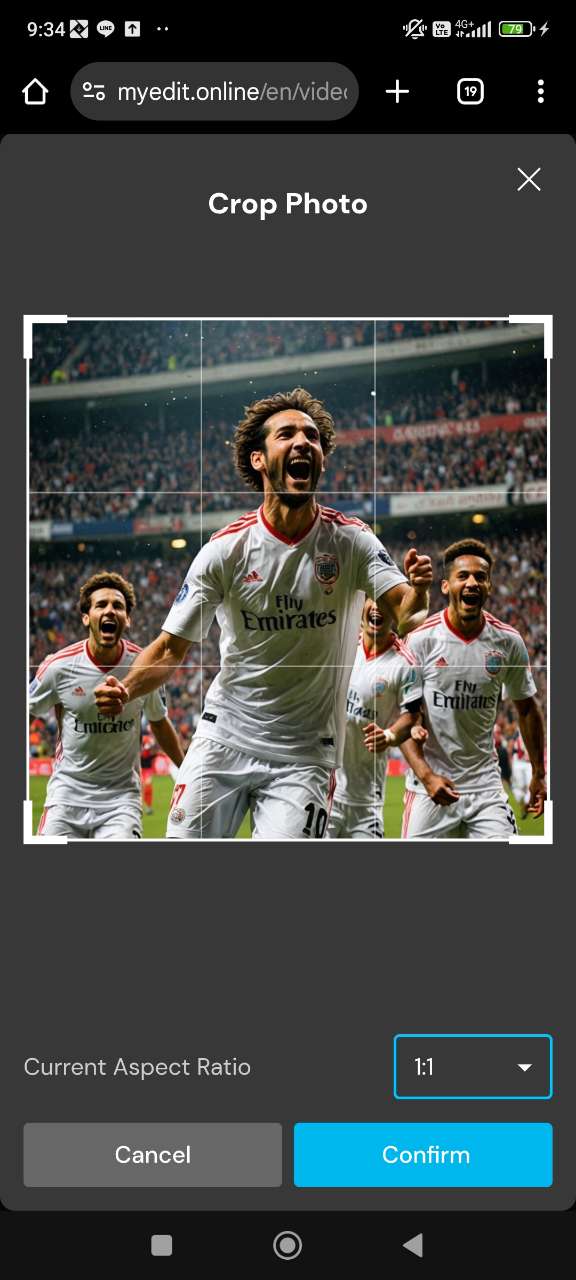
Upload the photo you want to animate. You may need to crop the photo based on the aspect ratio you selected.
- Generate the Squish It Effect
Click Generate on the AI Tools Menu bar on the left. It may take a few minutes for your video to generate.
- Download & Export
Once rendered, you can preview and download the squished video.




Top Use Cases for the AI Squish Effect
There’s more than one way to “squish” a video. Creators are constantly finding creative new ways to use this effect across genres. Here are a few of the most popular:
1. Reaction Videos

Exaggerate someone’s face or body during a funny or shocked moment to make reactions even more entertaining.
2. Pet Clips

Stretch your dog’s ears or squish your cat’s expression for added cuteness (and giggles).
3. Animated Story Intros

Create attention-grabbing intros or transitions in your short-form videos using timed squish distortions.
The possibilities are endless when you start combining the squish with sound effects, trending audio, or captions.
Creative Ideas to Make Your Squish Videos Go Viral
Ready to go beyond the basics? Here are some fun ways to make your squish edits even more share-worthy:
- Use trending audio: Pair the squish with popular sound clips or voiceovers for added humor.
- Add text overlays: Use funny captions or reactions to make your video relatable.
- Loop the squish: Turn it into a GIF-style loop that viewers want to replay
- Combine effects: Add a bounce, shake, or zoom alongside the squish for extra drama.
- Create a series: Use the squish as part of a recurring character, pet, or mini comedy sketch.
FAQs About the AI Squish Effect
The AI Squish Effect is a fun, animated distortion that stretches or compresses parts of an image or video — usually faces or objects — to create a dramatic or hilarious look. It’s powered by AI, so you get smooth, attention-grabbing results without manual editing.
The Squishy Toy Trend on TikTok involves users cutting, squeezing, or microwaving colorful squishy toys for visual and sensory satisfaction. These videos often go viral due to their gooey textures and satisfying reveals.
However, some of these DIY clips pose safety risks, especially when involving heat or sharp objects. As a safer and more creative alternative, the AI Squish It Effect digitally mimics the squish trend — no mess, no danger, just fun visual distortion using AI.
Yes! The AI Squish It Effect is 100% digital and safe for all ages. Unlike the physical squishy toy trend, which may involve cutting toys or using heat, this effect is created virtually using a photo and AI-powered animation.
It’s a great way for kids and teens to join the trend safely and creatively — no tools, no cleanup, just fun.
It’s easy! Just upload a photo to the Image to Video tool on MyEdit. Then, select the Squish option under AI Tools, customize the settings, and click Generate. In seconds, your photo is transformed into a squished video!
The effect works best with clear, front-facing photos. Try selfies, expressive portraits, or close-ups of pets or objects. Avoid cluttered backgrounds, and make sure the subject is well-lit for the most dramatic and fun squish results.
Absolutely! After generating your squish effect video with MyEdit, you can download it and post directly to TikTok, Instagram Reels, YouTube Shorts, or any social platform. The effect is optimized for mobile formats and designed to grab attention fast.
Yes! MyEdit works seamlessly on both desktop and mobile browsers. You can create squish effect videos anytime, anywhere — no app download required.
The AI Squish It effect works best on images — especially faces, pets, or objects — which are then animated into short videos using our image-to-video tool. While it may work on some video inputs, results are optimized for still images.

![How to Make a Meme on iPhone & Android [2026]](https://dl-file.cyberlink.com/web/content/b1313/l_Thumbnail.webp)


