







The Best Free AI Wedding Photo Generator (25 Prompts Included)

A professional wedding photoshoot costs money, takes weeks to organize, and requires everything to go perfectly on the day. For couples who simply want to visualize their look, test different dress styles, or create beautiful content before the big day, it is rarely a practical or affordable option.
MyEdit's AI wedding photo generator was built for exactly that. Just upload your picture, describe your vision, and let the AI handle the rest. No photographer, no studio, no budget required.
- Why Use AI for Wedding Photos?
- How to Create AI Wedding Photos
- Ready-to-Use AI Wedding Photo Prompts
- How to Try On Wedding Dresses with AI
- Best AI Wedding Photo Generator Tools
- AI Wedding Photos FAQ
From Couples to Vendors: Who Can Benefit from AI Wedding Photos?

Professional wedding photography is beautiful, but it comes with a serious price tag. AI wedding photos offer a practical and affordable alternative for anyone who needs high-quality wedding visuals without the cost of a full photoshoot.
- Engaged couples: Skip expensive pre-wedding shoots and visualize your big day in advance. Test dress styles, venues, and lighting moods at zero cost.
- Brides & grooms: Try on dozens of wedding dress or suit styles virtually using just a selfie, instead of booking multiple boutique appointments.
- Wedding planners: Create mood boards and concept visuals for clients without coordinating costly styled shoots.
- Photographers: Pitch creative directions to clients before investing time and budget in a real session.
- Wedding vendors: Generate promotional content and portfolio samples without hiring models or renting venues.
- Content creators & bloggers: Produce wedding visuals for articles, Pinterest, or social media without any production budget.
In short, an AI wedding photo generator gives you professional-looking results at a fraction of the traditional cost, whatever your role in the wedding world.
How to Generate Your Dream Wedding Photo with AI (Step by Step)
You do not need a professional camera, a studio, or even a photographer. With MyEdit's AI Image Generator, you can turn any casual photo into a polished, photoshoot-quality wedding portrait in seconds. Upload a single photo, a couple shot, or even separate individual photos to merge into one scene, then describe your vision and let the AI handle the rest. Here is exactly how:
- Go to the MyEdit's AI Image Generator to start creating your wedding portrait.
-
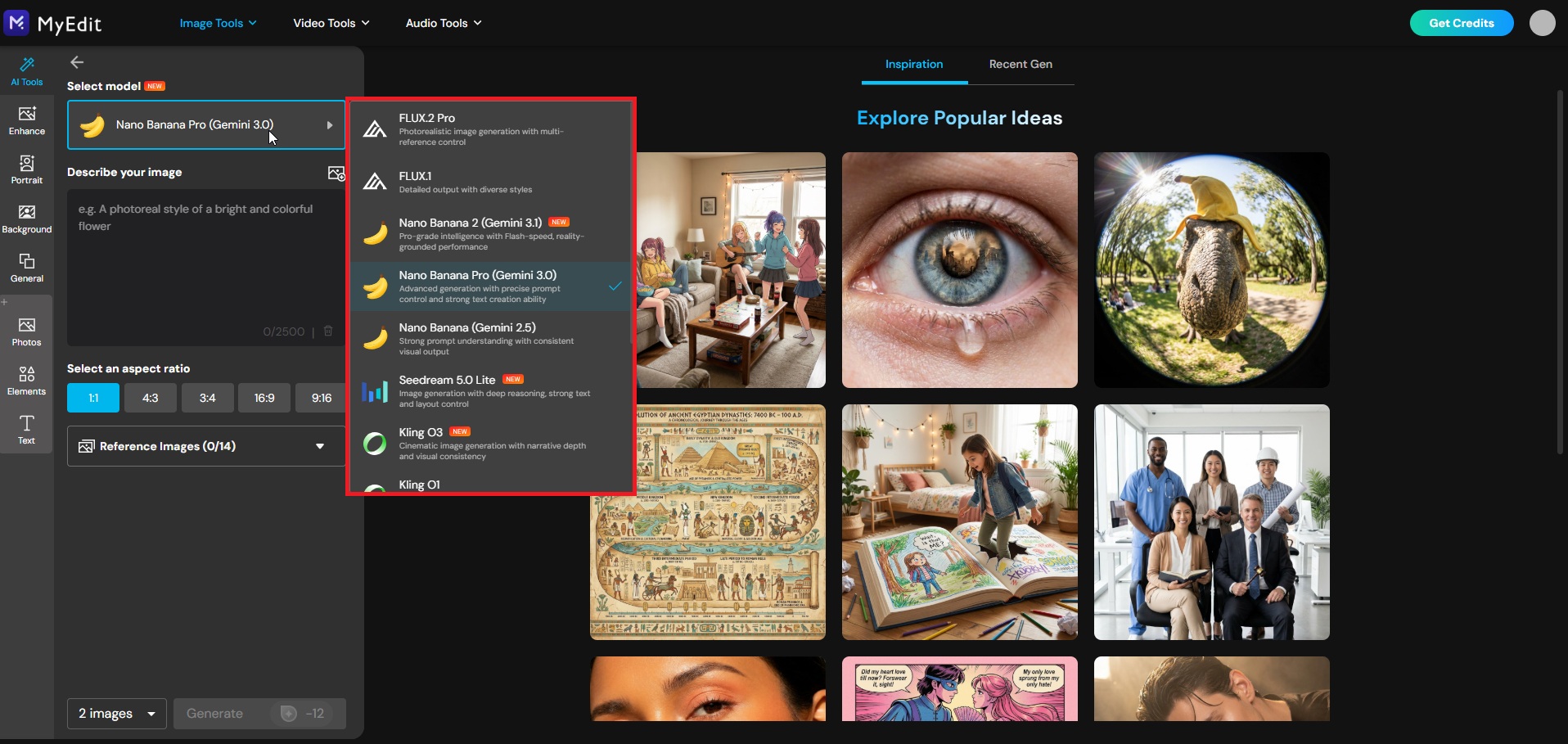
Choose your AI model: For the most realistic and detailed wedding portrait results, select an advanced model such as Nano Banana to ensure accurate skin tones, sharp facial details, and professional-quality lighting in your final image.
-
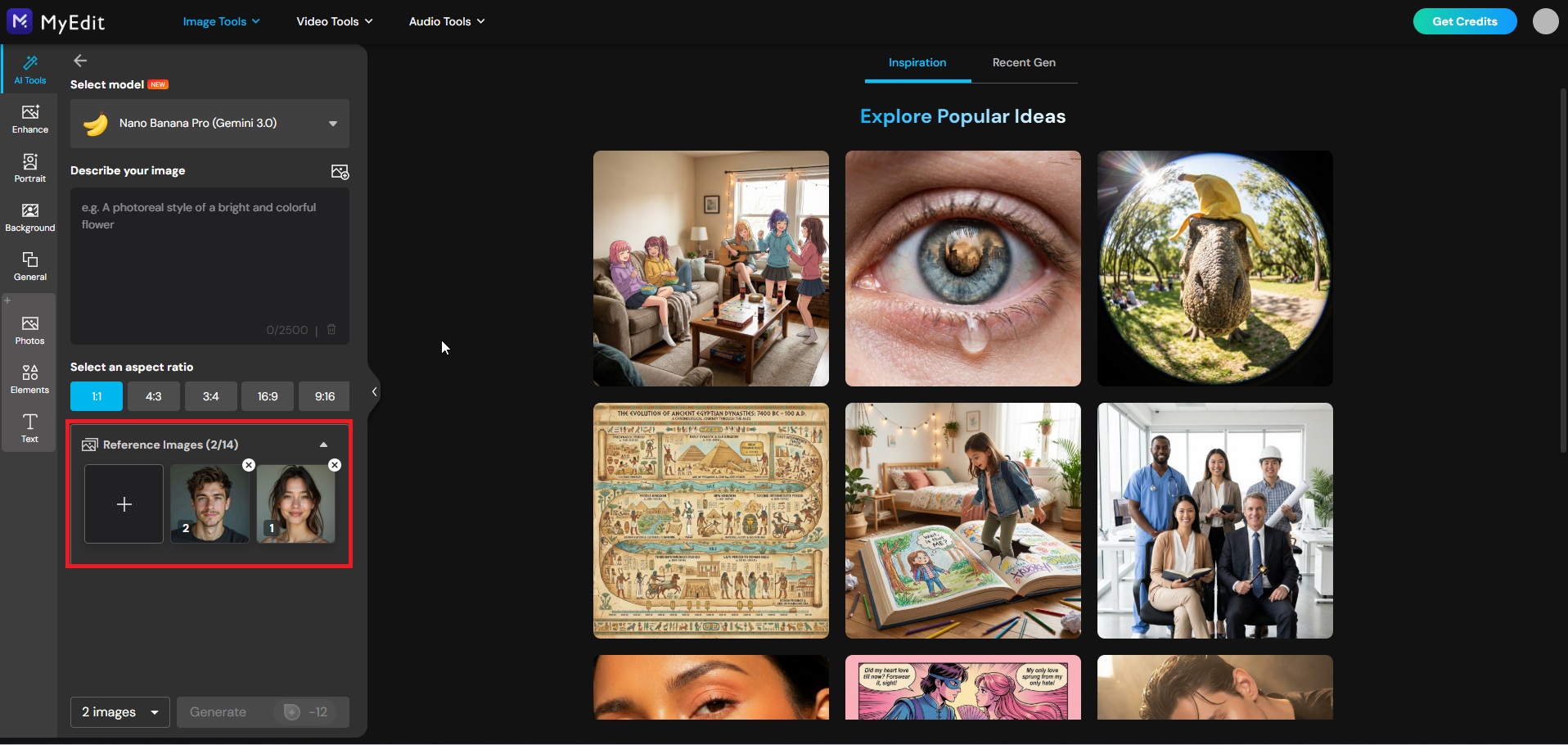
Upload your reference photo: Choose the photo you want to transform. You can upload a couple photo, a solo portrait, or even separate photos of two individuals to merge into a single wedding scene. The AI will use your uploaded image as the face and composition reference while completely reimagining the outfit, setting, and mood.
-
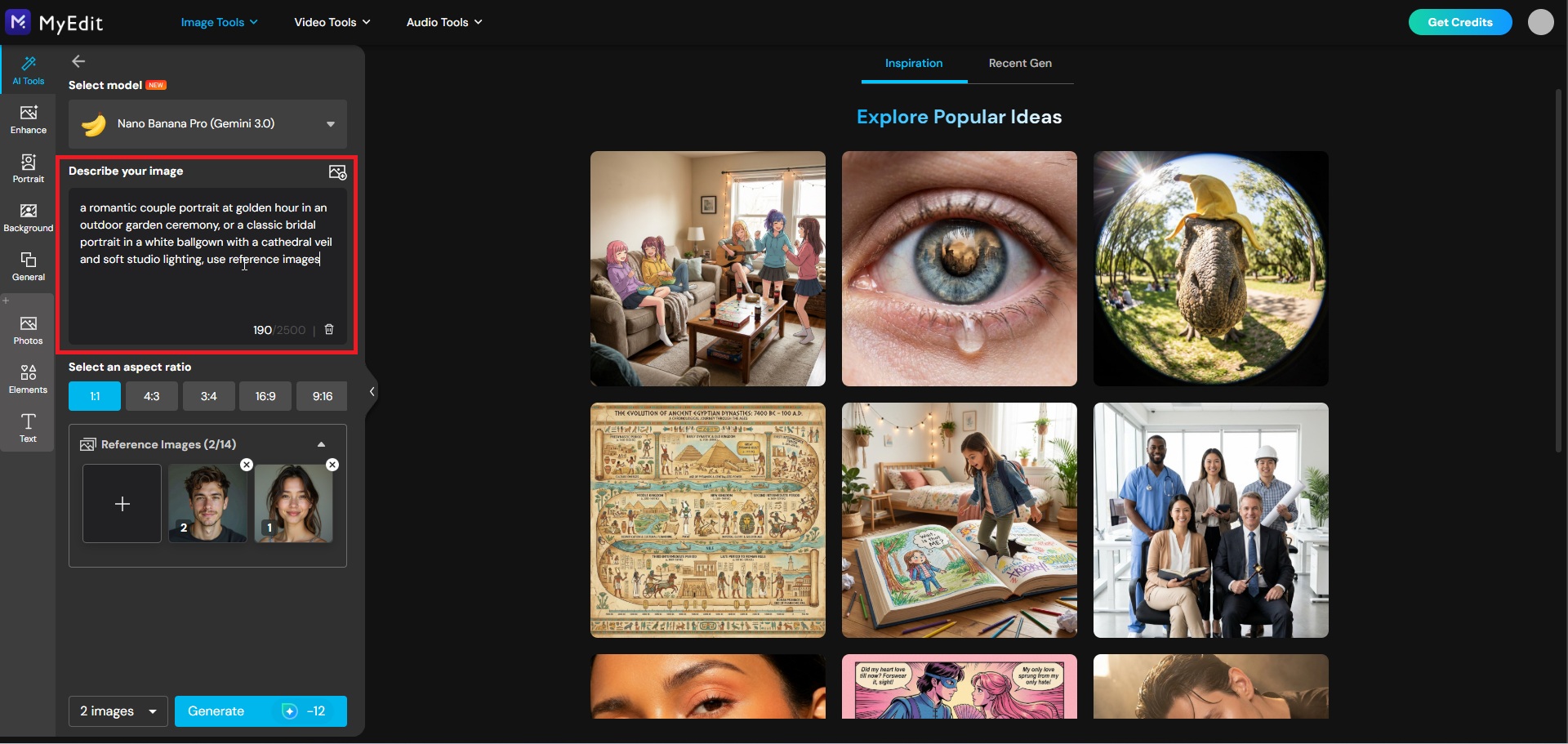
Enter your AI wedding photo prompt: Describe the style, setting, mood, and lighting you want, for example a romantic couple portrait at golden hour in an outdoor garden ceremony, or a classic bridal portrait in a white ballgown with a cathedral veil and soft studio lighting. Use any of the ready-made prompts from the section above for instant results.
-
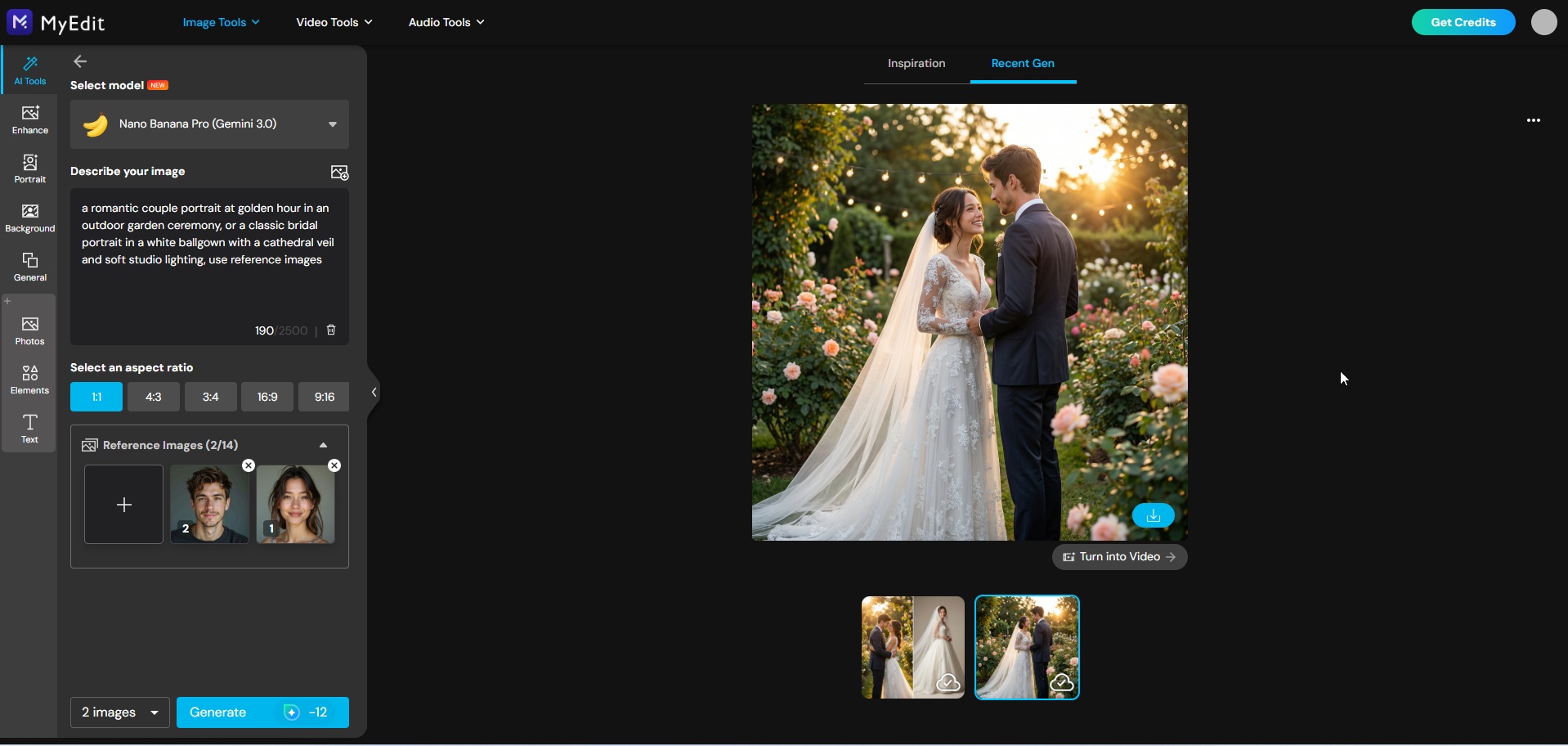
Generate your wedding portrait: Click Generate and let the AI do the work. In seconds, your everyday photo is transformed into a stunning, professional-quality wedding portrait.


Not sure which prompt to use? Browse our ready-to-use AI wedding photo prompts above for inspiration across every style and category.
25 Proven Prompts for Generating Stunning AI Wedding Photos
A good AI wedding photo prompt includes at least four elements: the outfit description, the setting, the lighting style, and the photographic mood. The more specific each element, the more realistic and personalized the output. The following prompts are structured around those principles, covering couple portraits, solo bridal and groom shots, cultural wedding styles, and bridal party photos.
AI Couple Wedding Photo Prompts
- Golden Hour Outdoor Ceremony Portrait
- Romantic Candlelit Reception Dance
- Cinematic Rainy Day Couple Portrait
- Luxury Ballroom Editorial Couple Shot
- Beach Sunset Couple Portrait
- Bohemian Forest Elopement Portrait
AI Bride Photo Prompts
- Classic White Ballgown Bridal Portrait
- Outdoor Garden Portrait with Floral Crown
- Modern Editorial Rooftop Bridal Shot
- Vintage Retro Bridal Portrait with Film Grain
- Luxury Hotel Getting-Ready Candid Shot
- Fine Art Minimalist Portrait with Dramatic Veil
AI Groom Photo Prompts
- Classic Black Tuxedo at Luxury Venue Entrance
- Relaxed Linen Suit Outdoor Natural Light Portrait
- Modern Editorial Urban Rooftop Groom Shot
- Vintage Suit Moody Dark Background Portrait
- Behind the Scenes Getting Ready Candid Moment
AI Cultural Wedding Photo Prompts
- Indian Bride in Red Lehenga with Marigold Decorations
- Chinese Traditional Red Qipao Bridal Portrait
- Japanese Bride in White Shiromuku Kimono
- Nigerian Wedding Colorful Aso-Ebi Portrait
- Western Boho Bride in Outdoor Meadow
AI Bridal Party Photo Prompts
- Bridesmaids in Dusty Rose Dresses Garden Portrait
- Full Bridal Party Luxury Venue Staircase Shot
- Fun Confetti Candid Bridal Party Portrait
AI Couple Wedding Photo Prompts
These prompts are designed to transform any photo of you and your partner into a stunning AI wedding portrait. Simply upload your picture as a face reference and copy the prompt into your favourite AI wedding photo generator. The pose, background, and styling will be completely reimagined.
1. Golden Hour Outdoor Ceremony Portrait
Perfect for couples who dream of a warm, romantic outdoor wedding shot. Transforms your reference photo into a cinematic portrait bathed in golden sunset light.


Prompt sample: "Transform this photo into a photorealistic wedding portrait, bride in an elegant off-shoulder A-line bridal gown with lace details and a long cathedral veil, groom in a tailored black tuxedo with white boutonniere, outdoor ceremony setting surrounded by blooming white roses and eucalyptus garlands, golden hour lighting with warm amber tones, soft bokeh background, romantic and cinematic mood, shallow depth of field, shot on 85mm lens, 8K resolution, using reference photo"
Pro Tip: Use a clear, well-lit photo where both faces are fully visible. The more detail you add about dress style and venue in the prompt, the more personalized the result.
2. Romantic Candlelit Reception Dance
Recreates the magic of a first dance in a warmly lit reception hall. Ideal for couples who want a dreamy, intimate portrait full of movement and emotion.


Prompt sample: "Transform this photo into a photorealistic wedding portrait, couple sharing their first dance in an elegantly decorated reception hall, bride in a flowing chiffon gown with delicate beading, groom in a classic black tuxedo, surrounded by hundreds of flickering candles and hanging fairy lights, warm golden ambient lighting, slight motion blur on dress to convey movement, emotional and intimate mood, shallow depth of field, shot on 85mm lens, 8K resolution, using reference photo"
Pro Tip: Mention the dress fabric in your prompt. Flowing materials like chiffon or silk catch candlelight beautifully and add realism to the generated image.
3. Cinematic Rainy Day Couple Portrait
For couples who love a moody, cinematic aesthetic. This prompt transforms your reference photo into a dramatic rainy day portrait with a deeply romantic atmosphere.


Prompt sample: "Transform this photo into a photorealistic cinematic wedding portrait, couple standing under a large ivory umbrella on a cobblestone street, bride in a sleek satin column gown, groom in a charcoal wool suit, soft rain falling around them with puddle reflections on the ground, overcast moody lighting with cool blue tones, cinematic and romantic atmosphere, slight film grain texture, shot on 85mm lens, 8K resolution, using reference photo"
Pro Tip: Adding "puddle reflections" and "film grain texture" to your prompt significantly enhances the cinematic quality of the output.
4. Luxury Ballroom Editorial Couple Shot
Inspired by high-fashion wedding editorials. Perfect for couples who want a polished, magazine-worthy portrait in a grand interior setting.


Prompt sample: "Transform this photo into a photorealistic luxury wedding portrait, couple standing in a grand ballroom with ornate gold chandeliers and marble floors, bride in a structured strapless ballgown with intricate embroidery and long white gloves, groom in a bespoke ivory dinner jacket with black trousers, dramatic overhead lighting with rich warm tones, high fashion editorial style, sharp focus, shot on 85mm lens, 8K resolution, using reference photo"
Pro Tip: Describing architectural details like "marble floors" and "gold chandeliers" helps the AI build a more convincing and luxurious background.
5. Beach Sunset Couple Portrait
A timeless classic for couples dreaming of a destination beach wedding. This prompt recreates the warmth and romance of a sunset ceremony by the sea.


Prompt sample: "Transform this photo into a photorealistic beach wedding portrait, couple standing barefoot on white sand at the water's edge, bride in a lightweight flowing chiffon gown with thin straps and a long train trailing in the sand, groom in a linen white suit with no tie, warm orange and pink sunset sky reflecting on the calm ocean behind them, soft natural backlighting, relaxed and joyful mood, shot on 85mm lens, 8K resolution, using reference photo"
Pro Tip: Specifying "barefoot" and "train trailing in the sand" adds small but impactful details that make the scene feel genuinely candid and natural.
6. Bohemian Forest Elopement Portrait
Ideal for free-spirited couples who love nature and intimate settings. This prompt creates a lush, romantic elopement scene deep in a sun-dappled forest.


Prompt sample: "Transform this photo into a photorealistic bohemian elopement portrait, couple standing in a lush forest clearing surrounded by tall ancient trees and wildflowers, bride in a flowing boho lace dress with long sleeves and a floral crown of dried pampas grass and eucalyptus, groom in relaxed earth-toned linen trousers and an open collar white shirt, soft dappled sunlight filtering through the tree canopy above, warm organic tones, dreamy and intimate mood, shot on 85mm lens, 8K resolution, using reference photo"
Pro Tip: Earth tones and natural textures like "pampas grass" and "linen" are key to nailing the bohemian aesthetic. Avoid mentioning anything too polished or structured.
AI Bride Photo Prompts
These prompts are designed to transform a single portrait into a breathtaking bridal photo. Upload your photo as a face reference and let the AI reimagine your look, styling, and surroundings completely.
7. Classic White Ballgown Bridal Portrait
The ultimate timeless bridal look. This prompt transforms your photo into an elegant, traditional bridal portrait in a stunning white ballgown.


Prompt sample: "Transform this photo into a photorealistic bridal portrait, subject wearing a voluminous white tulle ballgown with a sweetheart neckline, intricate lace bodice, and a long cathedral veil, soft romantic updo with loose curls and a delicate pearl hairpin, holding a cascading bouquet of white peonies and garden roses, standing in a softly lit grand church interior with stained glass windows in the background, warm diffused lighting, elegant and timeless mood, shot on 85mm lens, 8K resolution, using reference photo"
Pro Tip: Specifying the neckline style and veil length gives the AI much more precise styling direction and produces a more realistic and detailed result.
8. Outdoor Garden Portrait with Floral Crown
A romantic and fresh bridal look set in a blooming garden. Perfect for brides who love a natural, soft aesthetic with a touch of whimsy.


Prompt sample: "Transform this photo into a photorealistic bridal portrait, subject wearing a lightweight A-line ivory chiffon gown with flutter sleeves and a low open back, delicate floral crown made of fresh white ranunculus, blush roses and trailing greenery, holding a loose garden-style bouquet, standing in a sunlit outdoor garden surrounded by blooming wisteria and roses in soft pastel tones, gentle natural light with a warm golden hue, dreamy and romantic mood, shot on 85mm lens, 8K resolution, using reference photo"
Pro Tip: Naming specific flowers like "ranunculus" and "wisteria" rather than just "flowers" gives the AI much more to work with and creates a richer, more realistic floral scene.
9. Modern Editorial Rooftop Bridal Shot
For the fashion-forward bride who wants something bold and unexpected. This prompt creates a high-fashion editorial bridal portrait against an urban skyline backdrop.


Prompt sample: "Transform this photo into a photorealistic editorial bridal portrait, subject wearing a sleek minimalist crepe column gown with an architectural neckline and dramatic thigh-high slit, hair styled in a sharp low chignon, standing on a luxury rooftop terrace with a blurred city skyline at dusk behind her, cool blue and gold tones from the city lights, strong directional lighting, high fashion Vogue-style editorial mood, sharp focus, shot on 85mm lens, 8K resolution, using reference photo"
Pro Tip: Adding a reference to a specific magazine style like "Vogue-style editorial" gives the AI a strong aesthetic direction and consistently improves the overall composition.
10. Vintage Retro Bridal Portrait with Film Grain
For brides who love a nostalgic, old-world aesthetic. This prompt recreates the charm of vintage wedding photography with a warm, faded film look.


Prompt sample: "Transform this photo into a photorealistic vintage bridal portrait, subject wearing a 1960s-inspired tea-length lace dress with three-quarter sleeves and a modest neckline, classic bouffant updo with a small pillbox veil, holding a tight round bouquet of white gardenias and stephanotis, standing in a softly decorated vintage parlour with lace curtains and antique furniture, warm faded tones, visible film grain texture, nostalgic and romantic mood, shot on vintage 50mm lens, 8K resolution, using reference photo"
Pro Tip: Specifying a decade like "1960s-inspired" instantly anchors the entire aesthetic and helps the AI align the dress, hair, setting, and lighting into a coherent vintage look.
11. Luxury Hotel Getting-Ready Candid Shot
Captures the intimate behind-the-scenes mood of a bride getting ready. Perfect for a natural, emotional portrait that feels like a real wedding morning moment.


Prompt sample: "Transform this photo into a photorealistic candid bridal portrait, subject wearing a luxurious ivory silk robe with delicate lace trim, hair and makeup already done in a classic romantic style, sitting by a large window in a luxury hotel suite with soft morning light streaming in, bridal bouquet of white roses and ribbon resting on the windowsill beside her, warm and intimate atmosphere, slight lens flare from the window light, emotional and serene mood, documentary photography style, shot on 35mm lens, 8K resolution, using reference photo"
Pro Tip: The "documentary photography style" instruction is key here. It tells the AI to keep the composition natural and candid rather than overly posed or polished.
12. Fine Art Minimalist Portrait with Dramatic Veil
A sophisticated and artistic bridal portrait for brides who appreciate clean aesthetics and dramatic detail. This prompt creates a striking, gallery-worthy image.


Prompt sample: "Transform this photo into a photorealistic fine art bridal portrait, subject wearing a sleek minimalist ivory crepe gown with a deep V-back, dramatic cathedral veil billowing gently behind her as if caught in a soft breeze, hair pulled back in a clean low bun, minimal jewellery with a single delicate diamond drop earring, standing against a pure white seamless studio background, soft even studio lighting with subtle shadows, clean and artistic composition, fine art photography style, shot on 85mm lens, 8K resolution, using reference photo"
Pro Tip: Adding "as if caught in a soft breeze" to veil descriptions consistently produces more dynamic and visually interesting results than simply stating "veil flowing."
AI Groom Photo Prompts
These prompts are designed to transform any portrait into a polished, stylish groom photo. Upload your reference photo and let the AI handle the outfit, setting, and mood entirely.
13. Classic Black Tuxedo at Luxury Venue Entrance
A timeless and sophisticated groom portrait. This prompt creates a sharp, elegant image of the groom at the entrance of a grand wedding venue.


Prompt sample: "Transform this photo into a photorealistic groom portrait, subject wearing a tailored single-breasted black tuxedo with satin lapels, crisp white dress shirt, black bow tie, and a white gardenia boutonniere, standing confidently at the entrance of a grand stone manor with tall carved wooden doors and ivy-covered walls, warm afternoon sunlight casting soft directional shadows, elegant and composed mood, editorial photography style, shot on 85mm lens, 8K resolution, using reference photo"
Pro Tip: Describing the boutonniere flower adds a small but meaningful detail that significantly elevates the overall refinement of the generated portrait.
14. Relaxed Linen Suit Outdoor Natural Light Portrait
Perfect for the groom who prefers a relaxed, natural aesthetic over formal wear. This prompt creates a warm, approachable portrait in an outdoor setting.


Prompt sample: "Transform this photo into a photorealistic groom portrait, subject wearing a relaxed slim-fit sage green linen suit with a white open-collar shirt and no tie, light tan leather oxford shoes, small sprig of eucalyptus as boutonniere, standing in a sun-drenched olive grove with soft dappled light filtering through the trees, warm earthy tones, relaxed and joyful expression, candid lifestyle photography style, shot on 50mm lens, 8K resolution, using reference photo"
Pro Tip: Specifying the suit colour beyond just "linen suit" dramatically changes the final result. Sage green, dusty blue, and warm beige all produce very different moods.
15. Modern Editorial Urban Rooftop Groom Shot
For the groom with a bold, fashion-forward sense of style. This prompt generates a striking editorial portrait against a dramatic city backdrop.


Prompt sample: "Transform this photo into a photorealistic editorial groom portrait, subject wearing a sharp double-breasted navy blue suit with a white pocket square and no tie, standing on a luxury rooftop terrace at dusk with a blurred city skyline glowing behind him, dramatic side lighting with cool blue and warm gold tones from surrounding city lights, strong confident posture, high fashion GQ-style editorial mood, sharp focus, shot on 85mm lens, 8K resolution, using reference photo"
Pro Tip: Referencing a specific magazine like "GQ-style editorial" works just as well for groom shots as "Vogue-style" does for bridal portraits. It gives the AI a clear benchmark for composition and lighting quality.
16. Vintage Suit Moody Dark Background Portrait
A dramatic and atmospheric groom portrait inspired by classic film photography. Ideal for grooms who appreciate a dark, moody, old-world aesthetic.


Prompt sample: "Transform this photo into a photorealistic vintage groom portrait, subject wearing a 1940s-inspired three-piece charcoal grey suit with a subtle chalk stripe, white dress shirt with a spread collar, burgundy silk tie and matching pocket square, antique gold cufflinks, standing in front of a dark textured stone wall with dramatic single-source side lighting, deep shadows and rich contrast, warm sepia undertones, vintage film grain texture, brooding and distinguished mood, shot on vintage 50mm lens, 8K resolution, using reference photo"
Pro Tip: Combining "single-source side lighting" with "deep shadows and rich contrast" is the most reliable way to achieve a genuinely moody, cinematic result with AI portrait generators.
17. Behind the Scenes Getting Ready Candid Moment
A natural, intimate portrait capturing the quiet emotion of a groom getting ready on his wedding morning. Feels genuine rather than staged.


Prompt sample: "Transform this photo into a photorealistic candid groom portrait, subject partially dressed in suit trousers and a white dress shirt with the top button undone and sleeves rolled up, adjusting his cufflinks or tie in front of a large vintage mirror in a warmly lit hotel suite, soft morning window light illuminating the scene, suit jacket hanging neatly on a wooden valet stand visible in the background, relaxed and thoughtful expression, intimate documentary photography style, slight lens flare, shot on 35mm lens, 8K resolution, using reference photo"
Pro Tip: Small background props like "suit jacket on a valet stand" or "cufflinks on the dresser" add authenticity and storytelling depth to getting-ready portraits.
AI Cultural Wedding Photo Prompts
Celebrate the beauty and diversity of wedding traditions from around the world. These prompts are designed to recreate authentic cultural wedding aesthetics with rich detail, from traditional attire to ceremonial settings. Upload your reference photo and let the AI transform your look into a stunning cultural wedding portrait.
18. Indian Bride in Red Lehenga with Marigold Decorations
A vibrant and richly detailed portrait inspired by traditional Indian wedding aesthetics. Perfect for recreating the warmth and grandeur of a South Asian bridal look.


Prompt sample: "Transform this photo into a photorealistic Indian bridal portrait, subject wearing a heavily embroidered red and gold lehenga choli with a sheer dupatta draped over her head, adorned with traditional gold jewellery including maang tikka, jhumka earrings, layered necklaces and glass bangles, hands decorated with intricate henna patterns, surrounded by lush garlands of marigold flowers and rose petals, warm golden ceremonial lighting, rich and vibrant colour palette, elegant and regal mood, shot on 85mm lens, 8K resolution, using reference photo"
Pro Tip: Naming specific jewellery pieces like "maang tikka" and "jhumka earrings" helps the AI generate culturally accurate and detailed accessories rather than generic jewellery.
19. Chinese Traditional Red Qipao Bridal Portrait
An elegant portrait inspired by traditional Chinese wedding fashion. This prompt recreates the classic beauty of a qipao bridal look with authentic ceremonial details.


Prompt sample: "Transform this photo into a photorealistic Chinese bridal portrait, subject wearing a traditional red silk qipao with intricate gold phoenix and peony embroidery, mandarin collar and fitted silhouette, adorned with traditional gold hairpins and jade jewellery, soft elegant updo decorated with red and gold hair accessories, standing in front of a beautifully decorated ceremonial backdrop with red lanterns and cherry blossom branches, warm red and gold tones, graceful and refined mood, shot on 85mm lens, 8K resolution, using reference photo"
Pro Tip: Mentioning symbolic motifs like "phoenix and peony embroidery" adds meaningful cultural accuracy and produces much richer fabric detail in the generated image.
20. Japanese Bride in White Shiromuku Kimono
A serene and beautifully refined portrait inspired by traditional Japanese Shinto wedding ceremonies. Recreates the timeless elegance of the iconic white wedding kimono.


Prompt sample: "Transform this photo into a photorealistic Japanese bridal portrait, subject wearing a traditional white shiromuku kimono with layered white undergarments and an elaborate white tsunokakushi headpiece, classic white oshiroi makeup with softly defined eyes and pale pink lips, standing in a tranquil Japanese garden with moss-covered stone lanterns and a wooden torii gate visible in the background, soft overcast natural light, serene and ceremonial atmosphere, fine art photography style, shot on 85mm lens, 8K resolution, using reference photo"
Pro Tip: Including the "tsunokakushi headpiece" and "oshiroi makeup" in your prompt is essential for achieving an authentic Shinto bridal look rather than a generic white kimono portrait.
21. Nigerian Wedding Colorful Aso-Ebi Portrait
A bold and joyful portrait celebrating the vibrant elegance of Nigerian wedding fashion. Ideal for recreating the colour, richness, and energy of a West African celebration.


Prompt sample: "Transform this photo into a photorealistic Nigerian bridal portrait, subject wearing a richly patterned deep blue and gold aso-ebi fabric styled into an elegant off-shoulder gown with voluminous skirt, traditional gele headwrap tied in an elaborate fan style in matching fabric, adorned with coral beads, gold statement earrings and layered bracelets, standing against a beautifully decorated outdoor reception backdrop with colourful floral arrangements and warm string lights, vibrant and celebratory mood, shot on 85mm lens, 8K resolution, using reference photo"
Pro Tip: Describing the gele style as "tied in an elaborate fan style" is key to getting an accurate and impressive headwrap result. Generic references to "headwrap" rarely produce culturally accurate outputs.
22. Western Boho Bride in Outdoor Meadow
A relaxed and romantic portrait capturing the free-spirited essence of a bohemian Western wedding. Perfect for brides who love wildflowers, natural textures, and open landscapes.


Prompt sample: "Transform this photo into a photorealistic bohemian bridal portrait, subject wearing a flowing off-shoulder boho wedding dress in ivory with delicate eyelet lace trim and wide bell sleeves, loose wavy hair adorned with a wildflower crown of dried lavender, chamomile and baby's breath, holding an unstructured bouquet of dried pampas grass, sunflowers and ribbon streamers, standing in a golden wildflower meadow with tall grass swaying gently around her, warm late afternoon sun creating a natural soft backlight, dreamy and carefree mood, shot on 85mm lens, 8K resolution, using reference photo"
Pro Tip: Dried and wild botanicals like "pampas grass," "chamomile," and "lavender" are the defining elements of a boho aesthetic. Replacing them with classic roses or lilies will shift the style entirely.
AI Bridal Party Photo Prompts
These prompts are designed to transform a group photo into a stunning bridal party portrait. Upload your reference photo as a composition guide and let the AI recreate the full group in a beautifully styled wedding setting.
23. Bridesmaids in Dusty Rose Dresses Garden Portrait
A soft and romantic group portrait perfect for bridesmaids. This prompt creates a cohesive, elegant image with a fresh garden setting and a harmonious colour palette.


Prompt sample: "Transform this photo into a photorealistic bridesmaids portrait, group of women wearing coordinated dusty rose chiffon midi dresses in slightly varied styles, each holding a small bouquet of white ranunculus and trailing ivy, standing in a beautifully manicured garden with a rose-covered archway behind them, soft warm natural light, fresh and romantic atmosphere, editorial wedding photography style, sharp group focus, shot on 50mm lens, 8K resolution, using reference photo for group composition and face references"
Pro Tip: Specifying "slightly varied styles" for the bridesmaid dresses produces a more natural and modern result than identical outfits, which can look overly uniform in AI-generated images.
24. Full Bridal Party Luxury Venue Staircase Shot
A grand and impressive full group portrait on a sweeping staircase. This prompt creates a classic, formal bridal party image with a sense of scale and elegance.


Prompt sample: "Transform this photo into a photorealistic full bridal party portrait, bride in a white ballgown at the centre, bridesmaids in sage green satin midi dresses arranged on either side, groomsmen in matching charcoal grey suits with sage green pocket squares, all positioned on a sweeping marble staircase with ornate gold banisters inside a grand luxury venue, warm chandelier lighting from above, formal and celebratory mood, wide angle to capture full staircase, editorial wedding photography style, shot on 35mm lens, 8K resolution, using reference photo for group composition and face references"
Pro Tip: Coordinating the bridesmaid and groomsmen colours in your prompt creates a much more polished and visually cohesive group portrait. Mention both in the same prompt for best results.
25. Fun Confetti Candid Bridal Party Portrait
A joyful and energetic group shot full of movement and celebration. Perfect for capturing the fun, carefree spirit of a wedding party in full celebration mode.


Prompt sample: "Transform this photo into a photorealistic candid bridal party portrait, full group throwing handfuls of pastel confetti into the air outside a rustic barn venue, bride in a flowing white gown laughing with her eyes closed, bridesmaids in mismatched blush and champagne dresses, groomsmen in relaxed linen suits, golden confetti and flower petals suspended mid-air around the group, warm late afternoon sunlight, motion blur on confetti to convey energy and movement, joyful and spontaneous mood, documentary wedding photography style, shot on 35mm lens, 8K resolution, using reference photo for group composition and face references"
Pro Tip: Adding "motion blur on confetti" and "suspended mid-air" are the two most effective instructions for generating a convincing and dynamic confetti shot. Without them the confetti tends to look static and unrealistic.
How to Try On Your Dream Wedding Dress with AI (Directly at Home)
Finding the perfect wedding dress usually means booking multiple boutique appointments, trying on dozens of gowns, and spending hours second-guessing your choices. MyEdit's AI Clothes Changer lets you skip all of that. Upload your photo, pick any dress style or import an image of a gown you love, and see yourself wearing it in seconds. No appointments, no pressure, no budget required.
- Go to MyEdit's AI Clothes Changer to start trying on wedding dresses from the comfort of your home.
-
Upload your portrait photo: Choose a clear, front-facing photo of yourself for the best results. The AI will use it as your body and face reference while applying the dress realistically to your silhouette.
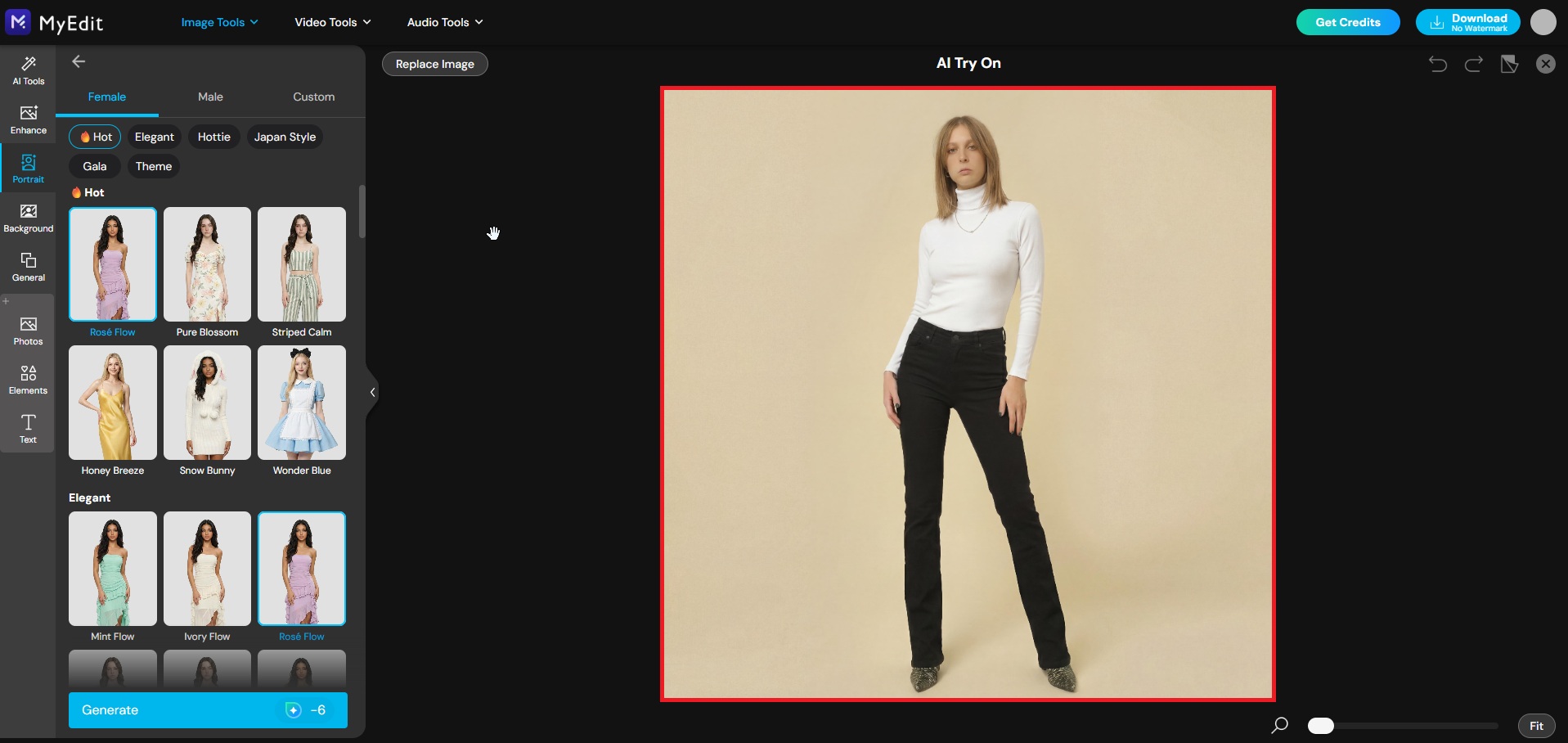
-
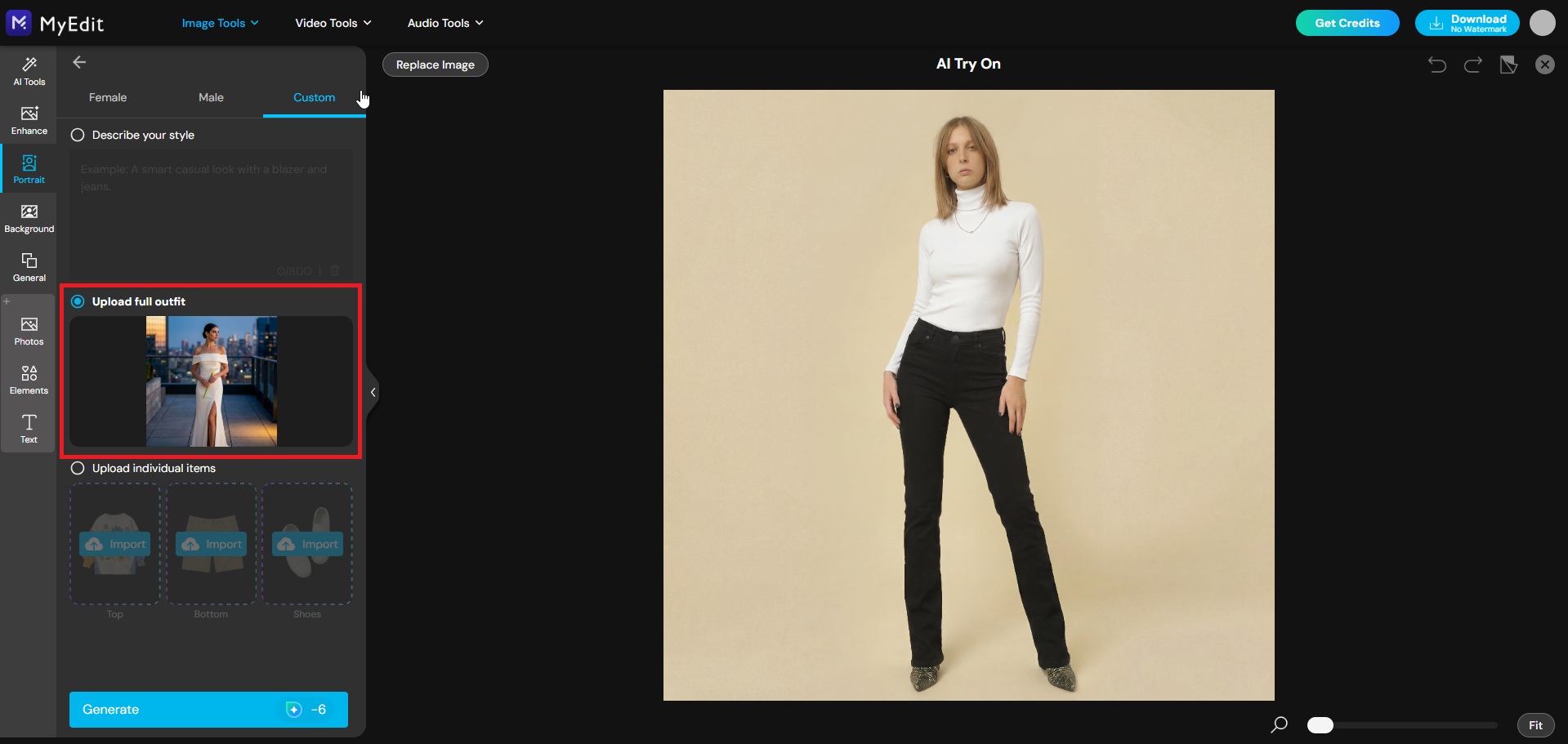
Go to the Custom tab: Choose how you want to find your dress. You can either describe the style you have in mind using a text prompt, for example a fitted ivory satin gown with a deep V-neckline and long train, or import a real dress image you found online to see exactly how it looks on you.
-
Generate your virtual wedding dress try-on: Click Generate and let the AI do the work. In seconds, you will see a realistic, photoshoot-quality result of yourself wearing your chosen wedding dress, ready to save, share, or compare with other styles.
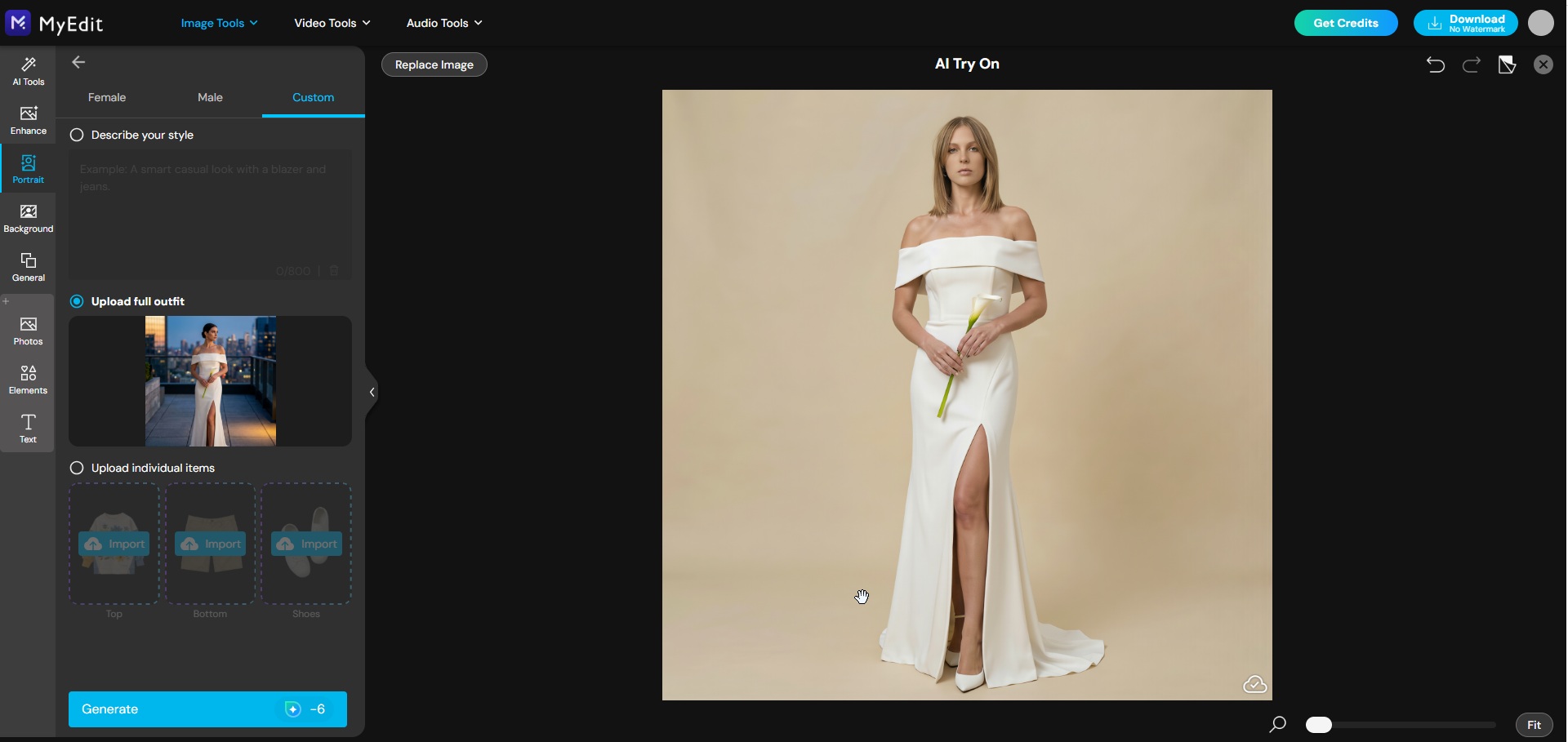


Try as many styles as you want before committing to a single appointment. From classic ballgowns to sleek minimalist designs, the only limit is your imagination.
3 Best AI Wedding Photo Generator Tools Ranked for 2026
Best AI Wedding Photo Generator Tools Ranked for 2026
Not all AI wedding photo generators deliver the same results. Some excel at realistic couple portraits, others at cultural styles or dress visualization. The three tools below were selected based on output quality, ease of use, free plan availability, and how well they handle wedding-specific use cases.
1. MyEdit: Best Free AI Wedding Photo Generator Overall

MyEdit is the most complete free AI wedding photo generator available in 2026. Unlike most tools that only generate images from text prompts, MyEdit combines an AI image generator with a dedicated AI clothes changer, letting users both create wedding portraits from scratch and visualize real dress styles on their own photo. It supports solo portraits, couple shots, and even separate individual photos merged into a single wedding scene, making it the most versatile option for couples, bloggers, and wedding vendors alike.
AI Image Generator is the core tool behind every transformation in this article. Upload your reference photo, paste any of the 25 prompts from the section above, and let the AI handle the rest. The tool supports multiple advanced AI models including Nano Banana (Gemini 2.5 & 3), Flux, and GPT-Image-1, each delivering a different level of detail and realism. For the most accurate and polished wedding portrait results, the advanced models consistently produce sharp facial details, professional lighting, and true-to-life colour reproduction.
This is the exact tool used for every before/after example in this article, making it the natural starting point for anyone looking to turn a casual photo into a photoshoot-quality wedding portrait.
AI Image to Video takes your wedding portrait one step further by animating it into a short, shareable video. Once you have generated your wedding portrait using the AI Image Generator, use this tool to add movement and bring the scene to life. Animate a golden hour couple portrait, a dramatic bridal editorial shot, or a cultural wedding portrait with subtle cinematic motion that makes it feel real and alive. The result performs exceptionally well on Instagram Reels, TikTok, and WhatsApp Status, turning your AI wedding photo into a scroll-stopping piece of content perfect for sharing before, during, or after the big day.
| Feature | Details |
|---|---|
| Free plan | Yes, no watermark |
| Couple photos | Yes, including separate photo merge |
| Cultural wedding styles | Yes, via custom prompts |
| Virtual dress try-on | Yes, dedicated AI clothes changer |
| Ease of use | Beginner friendly, no design skills needed |
Best for: Couples and content creators who want a free, all-in-one AI wedding photo tool with no watermark and video animation included.
Not ideal for: Users looking for pre-built themed wedding packages without writing prompts.
2. Fotor: Best for Versatile AI Wedding Photo Generation

Fotor is one of the most widely used online photo editing platforms, and its AI image generator makes it a solid option for creating wedding portraits from text prompts. It runs on advanced models including Nano Banana, Seedream, and Flux, and offers additional tools like an AI Clothes Changer and Image to Video. While it covers a similar feature set to MyEdit, the key difference comes down to cost: Fotor's free plan comes with limited daily credits and adds watermarks to exported images, with watermark-free downloads reserved for paid Pro subscribers.
| Feature | Details |
|---|---|
| Free plan | Yes, limited daily credits |
| Watermark-free | Pro plan only |
| Couple photos | Yes, via text prompt |
| Cultural wedding styles | Yes, via custom prompts |
| Virtual dress try-on | Yes, AI Clothes Changer available |
| Image to video | Yes, available |
| Ease of use | Beginner friendly, prompt enhancer included |
Best for: Users who want a versatile all-in-one AI image platform with multiple creative tools and do not mind upgrading for watermark-free results.
Not ideal for: Users looking for a completely free, no-watermark solution without a paid subscription.
3. DreamShootAI: Best for Couples and Cultural Wedding Styles

DreamShootAI is the most specialized wedding photo AI tool on this list. It is built specifically around couple photography and themed photoshoot packages, with dedicated options for Western weddings, Indian and Desi ceremonies, and engagement shoots. Users train a personal AI model from their own photos, which is then used consistently across all themes and styles. This produces more realistic and consistent results for couple portraits than most general-purpose AI generators. The main trade-off is that it operates on a paid subscription model, making it less accessible than MyEdit for users who need a free solution.
| Feature | Details |
|---|---|
| Free plan | No, subscription based |
| Couple photos | Yes, specialized couple AI model |
| Cultural wedding styles | Yes, dedicated Indian and Desi packages |
| Virtual dress try-on | No dedicated feature |
| Ease of use | Moderate, requires personal AI model training |
Best for: Couples who want the most realistic and consistent AI couple wedding portraits, especially for Indian or Desi wedding styles.
Not ideal for: Users looking for a free tool or a quick result without any setup time.
Related Articles:
- Romantic Valentine’s Couple Photoshoot Ideas
- Best AI Family Photoshoot Prompts
- Galentine’s Day Photo Shoot Ideas
AI Wedding Photo Generator: FAQ
Yes. AI wedding photo generators can create photorealistic wedding portraits from a text prompt or an uploaded reference photo. Modern tools like MyEdit use advanced AI models to generate detailed results including realistic skin tones, accurate clothing details, and professional-quality lighting, all without a camera, studio, or photographer.
Yes, and this is the most popular way to use an AI wedding photo generator. Simply upload a clear, front-facing portrait as your face reference, write a prompt describing the style, dress, setting, and mood you want, and the AI will reimagine the full scene while keeping your likeness. MyEdit's AI Image Generator supports this workflow directly and works with solo portraits, couple shots, and even separate individual photos merged into one scene.
Yes. Tools like MyEdit allow you to upload two individual photos and merge them into a single, cohesive wedding portrait. The AI aligns both faces, applies matching wedding attire, and places the couple into your chosen setting. This is particularly useful for couples who live in different locations or want to visualize their wedding look together before any photoshoot.
Yes. Several AI wedding photo generators offer free plans, but most add watermarks or limit resolution on free outputs. MyEdit is one of the few tools that is completely free to use with no watermark, making it the most accessible option for couples, bloggers, and wedding vendors who need professional-quality results without a subscription.
MyEdit is the best free AI wedding photo generator in 2026 for most users. It combines a powerful AI image generator with a dedicated virtual wedding dress try-on tool, supports couple photo merging, offers multiple advanced AI models including Nano Banana, Seedream, and Flux, and produces high-resolution results with no watermark. It covers every major use case in one platform, from bridal portraits and cultural wedding styles to animated wedding videos via its AI Image to Video feature.
The best AI wedding photo prompts include at least four elements: the outfit description, the setting, the lighting style, and the photographic mood. For example: "Photorealistic wedding portrait, bride in a fitted ivory satin gown with a deep V-neckline, outdoor garden ceremony, golden hour lighting, soft bokeh background, romantic and cinematic mood, shot on 85mm lens, 8K, using reference photo." The more specific the prompt, the more realistic and personalized the result. Browse the 25 ready-to-use prompts in this article for inspiration across every wedding style and category.
Yes. MyEdit's AI Clothes Changer lets you upload your own portrait photo and apply any wedding dress style to your image in seconds. You can either describe the dress using a text prompt or import an image of a real gown you found online to see exactly how it looks on you. It is a fast, free, and practical alternative to booking multiple boutique appointments before making a decision.
Yes, when generated with a detailed prompt and a clear reference photo, AI wedding photos are high-resolution and realistic enough for save-the-dates, wedding invitations, wedding websites, and social media posts. For best results, use an advanced AI model, provide a high-quality reference photo, and be as specific as possible in your prompt about the style, lighting, and setting you want.
Not entirely, and that is not really the point. A professional wedding photographer captures real, unrepeatable moments on the actual day. AI wedding photo generators serve a different purpose: visualizing looks and styles before the wedding, creating content for planning and inspiration, generating visuals for invitations and social media, and producing promotional content for wedding vendors. The two are complementary rather than interchangeable. That said, for couples on a tight budget who need high-quality wedding visuals for digital use, tools like MyEdit offer a genuinely professional-grade alternative at zero cost.

The CyberLink Editorial Team is composed of product testing specialists and content creation experts with over 20 years of hands-on experience and rigorous research in the multimedia editing industry. As the official voice of CyberLink, the team consistently delivers practical, easy-to-follow tutorials across video, photo, and audio editing, while highlighting AI innovations, product insights, and emerging industry trends. Their work empowers millions of creators worldwide each year to elevate their content. Beyond the blog, the team actively shares editing tips and product updates across YouTube, Facebook, Linkedin and Pinterest.
😎 Outside of their work, they enjoy capturing travel moments and meticulously editing photos and videos for their social channels.


