




Top 6 Viggle AI Alternatives for Motion Swap in 2026 (Tutorial Included)

Viggle AI popularized motion swap with its character-driven video generation, but it’s no longer the only viable option. In this guide, we’ll first explain what Viggle AI does and how its pricing works, then walk through 6 strong Viggle AI alternatives for motion swap in 2026.
⭐️ Key Takeaways
- Best for Beginners & Viral Trends: MyEdit is the most accessible choice for creating "dancing photo" trends. It packages the powerful Wan 2.2 model into a user-friendly interface.
- Best for Cinematic Realism: Kling AI is the industry leader for high-end visual fidelity. With its cinema-grade quality and precise Motion Brush, it is the top choice for filmmakers who need physically accurate, broadcast-quality motion.
- Best for Anime & Stylized Art: DomoAI is the "Cost Performance King" for 2D and stylized content. Unlike photorealistic tools, it respects the original artistic style, making it ideal for VTubers and animators.
- What Is Viggle AI? Features & Pricing Explained
- 6 Best Viggle AI Alternatives for Motion Swap
- Viggle AI vs. Alternatives: Comparison Chart
- How to Do Motion Swap with the Best Viggle AI Alternative
- FAQs About Viggle AI Alternatives
What Is Viggle AI? Features & Pricing Explained
Viggle AI is an AI video generation platform best known for character animation and meme creation. As soon as you land on the website, you’re greeted with a feed full of humorous short videos—most of them recreations of viral memes that have already taken off on social media.

Viggle AI lets you apply popular video motions to a single static character image, allowing the character to naturally dance, walk, or perform. The result is highly expressive, meme-ready videos that are instantly recognizable and fun to share.
Viggle AI Video Generation Features
- JST-1 Physics Engine: Character movements follow real-world physics, making actions like dancing and walking look natural with minimal distortion or breakdown.
- Mix Mode: Upload a character image and a motion video to fully replicate the original movements, with support for multi-character replacement.
- Animate / Move: Bring a static photo to life using text prompts or built-in motion templates.
- Lip Sync: Upload audio or text and the character will automatically sync mouth movements with facial expressions, even simulating singing effects.

Is Viggle AI Free?
Yes, Viggle AI does offer a free plan. After signing up, users can access basic video generation features every day, which is more than sufficient for beginners who want to experiment with character motion, meme videos, or short-form content.
Under the Free plan, you can generate up to five Relaxed-mode videos per day (with a watermark) and run two video generation tasks at the same time. Generated assets and videos are stored for 15 days. Overall, this free allowance is ideal for testing the platform before committing to a paid plan. For advanced features or higher-volume production, it’s best to refer to the official Viggle AI website.
If you’ve already used up Viggle AI’s daily free quota, find the output quality inconsistent, or prefer videos without prominent watermarks, MyEdit is a strong alternative. It not only supports motion imitation but also offers over 100 dynamic templates and the option to generate videos using custom prompts.
6 Best Viggle AI Alternatives for Motion Swap
- MyEdit — Best for beginners & quick templates
- DomoAI — Best for anime-style motion
- Kling AI — Best for realistic, cinematic motion
- Runway ML — Best for pro video workflow
- Pikaswaps — Best for creative motion experiments
- Pollo.ai — Best for multi-model access
MyEdit — Best for beginners & quick templates
Pros
- Offers a browser-based interface for easy access to the Wan 2.2 model.
- Supports flexible modes to either animate characters in-place or swap into new video scenes.
- Delivers motion with superior physical accuracy and reduced limb distortion compared to older models.
- Provides daily free credits, allowing beginners to test features without an upfront subscription.
Cons
- Tends to lose stability and detail in clips longer than 5-10 seconds.
- Prone to visual artifacts around hair and fingers during fast-paced or complex scenes.
- Struggles with non-human subjects, occasionally leading to failed or distorted transformations.
- Wan 2.2 Animate Model: Powered by the cutting-edge Wan 2.2 engine, specifically optimized for human motion generation.
- Character Motion Swap: Instantly map the movement of a reference video onto any static photo.
- Dual Generation Modes: Offers flexible options to animate characters within their original environment or swap them into a reference video's scene, effectively acting as a virtual stunt double.
- Flexible Framing Support: Capable of handling everything from full-body dance routines to upper-body gestures.
MyEdit Wan 2.2 Animate: The Most Accessible High-End Motion Transfer Tool
MyEdit’s new Wan 2.2 Animate feature essentially packages one of the most respected AI video models into a user-friendly web interface. Its core value lies in solving the "stiff animation" problem that plagued earlier image-to-video tools.
According to discussions on r/StableDiffusion, the Wan 2.2 model represents a significant leap forward in motion transfer technology. Users have praised its fluidity, noting that it drastically reduces the "uncanny valley" effect often seen in AI-generated dance videos. The model is particularly effective at handling complex choreography without breaking the character's skeletal structure—a common issue in previous generations.

However, as noted by technical reviewers, the tool is not without limitations. It is sensitive to input quality; specifically, the "shot type" of your reference video must match your source image for the best perspective results. Additionally, generating long-form content remains a challenge, with quality often degrading after the 10-second mark.
Verdict:
If you are a social media creator or a marketer looking to create eye-catching "dancing photo" trends or virtual avatars quickly, MyEdit offers the lowest barrier to entry with top-tier results. While it may not yet replace professional VFX tools for 4K long-takes, for short-form viral content, it is currently one of the best options on the market.
👉🏼 Check the tutorial here!
DomoAI — Best for anime-style motion
- DomoAI Character Animator: A specialized tool designed to bring static photos to life, particularly optimized for stylized and anime aesthetics.
- Motion to Video: Transform static character images into dynamic animations by uploading your own reference motion video.
- Style Preservation: Unlike generic video generators, DomoAI prioritizes keeping the original artistic style intact during movement.
- Viral Trend Templates: Features specialized presets for viral trends—such as the "AI Hug," "AI Kiss," and "Loop Animation".
DomoAI’s Character Animation feature essentially packages a powerful stylized motion engine into a user-friendly interface. Its core value lies in solving the "style consistency" problem that plagues many photorealistic image-to-video tools when dealing with art or anime characters.
Feedback from the r/PromptEngineering community suggests that DomoAI has carved out a unique niche against competitors like DeepMotion. Users argue that while other tools often force an "uncanny realism" that clashes with 2D art, DomoAI effectively interprets movement as "stylized motion"—similar to high-quality idle animations in video games. This makes it the go-to recommendation for creators making loopable Discord stickers or social assets.
In a recent 2025 comparison review by JPN GIRL, DomoAI was crowned the "Cost Performance King" among AI video tools. The reviewer noted that while top-tier models like Hailuo and Kling offer superior camera control and photorealism, DomoAI remains the most practical choice for creators due to its Relax Mode.
Verdict:
If you are an artist, VTuber, or social media creator looking to bring illustrations or anime characters to life, DomoAI is arguably the best tool in its class. While it may not compete with Kling for photorealism, its ability to respect artistic style while adding fluid motion makes it a unique and powerful asset for stylized content creation.
Kling AI — Best for realistic, cinematic motion
Pros
- Produces video quality with superior lighting, texture, and physical coherency compared to most competitors.
- Offers granular control by allowing users to paint specific areas and draw trajectory arrows to dictate exactly how elements move.
- Provides precise settings for Pan, Tilt, Roll, and Zoom, enabling cinematic storytelling that simple "image-to-video" tools lack.
- Allows users to extend generated clips multiple times to create longer, continuous sequences up to 3 minutes.
Cons
- The "Professional Mode" is expensive and burns through credits much faster than standard modes.
- Due to high global demand, generation queues can be significantly longer than simpler tools.
- Achieving the perfect motion often requires complex fine-tuning of tools and prompt engineering, unlike one-click beginner templates.
- Kling Native Model: Powered by Kuaishou's proprietary Transformer-based architecture, capable of generating 1080p cinematic footage with high temporal consistency.
- Motion Brush: A precision tool that lets you isolate specific elements in an image and define their movement path, preventing the "whole image warping" effect.
- Professional Mode: A high-performance setting that enhances prompt adherence, lighting consistency, and visual fidelity for broadcast-quality output.
- Video Extension Support: Solves the "short clip" limitation by allowing creators to seamlessly extend the last frame of a video for longer storytelling.
Kling AI is widely regarded as the current gold standard for photorealistic AI video generation. Kling prioritizes cinematic physics and texture quality, bridging the gap between AI generation and professional VFX.
According to discussions on r/aivideo, users consider Kling's Motion Brush a game-changer. This feature allows for "directed motion", such as making a car drive down a street or a hand wave—without distorting the rest of the image. While it lacks the "fun templates", its raw visual quality is unmatched for serious projects.
However, as noted by 2025 comparison review by JPN GIRL, this quality comes at a price. The tool is resource-intensive; "Professional Mode" generations are costly in terms of credits, and server queues can be slow during peak hours. Additionally, it lacks a dedicated "Character Motion Swap" module, meaning creators looking to simply "make a photo dance" might find the workflow more complex than using specialized tools like Viggle.
Verdict:
If you are a filmmaker, designer, or high-end content creator prioritizing visual fidelity and precise control, Kling AI is the industry leader. It is not the best tool for quick, viral memes (use MyEdit for that), but for creating realistic stock footage or cinematic shots, it is currently unrivaled.
Runway ML — Best for pro video workflow
Pros
- Allows users to paint up to 5 independent areas and assign unique movement directions to each.
- Features an "Ambient Noise" slider that effectively stabilizes static backgrounds while animating specific subjects.
- Works in tandem with global camera controls to create complex shots.
- Offers a browser-based workflow accessible directly via the web interface.
Cons
- High directional speed settings often cause subjects to detach from their shadows or background, creating a "cutout" look.
- Fine-tuning movement requires trial and error, which can quickly deplete monthly credits.
- Multi-Motion Brush: A precision tool that lets users paint over specific objects and assign independent trajectories to them, preventing the "whole image warping" effect.
- Ambient Noise Control: A unique parameter that adjusts the randomness of the unmasked areas. Setting this to zero helps freeze the background, ensuring only the brushed parts move.
- Horizontal & Vertical Controls: Provides numerical sliders for exact directional movement, giving animators measurable control rather than just random generation.
- Z-Axis (Proximity): Allows elements to move closer to or further from the camera, simulating 3D depth movement within a 2D generated video.
Runway’s Motion Brush feature essentially solves the "randomness" problem that plagues most AI video generators. By allowing creators to explicitly define "what moves" and "where it goes," it transforms the platform from a slot machine into a director's tool.
According to discussions on r/runwayml, the Multi-Motion Brush is considered a "game-changer" for complex scenes—such as making a car drive left while clouds drift right. Users appreciate that it separates subject motion from camera movement, a distinction that simpler tools often fail to make. However, the community also notes that achieving perfect physics often requires keeping the motion values low (under 3.0) to avoid distorting the subject.
According to Cybernews, while the tool offers superior control, it faces a trade-off in visual fidelity. Since the Motion Brush is most optimized for the Gen-2 architecture, users sometimes have to choose between the high-definition realism of Gen-3 (which relies more on prompt adherence) and the precise control of Gen-2's brush tools. Additionally, "floating limb" artifacts remain a common challenge when animating human subjects in complex lighting.
Verdict:
If you are a filmmaker or VFX artist who needs specific things to happen in a shot , Runway's Motion Brush is currently the most professional tool for the job. While it may lack the raw photorealism of the latest Gen-3 Alpha or Sora models, its ability to "direct" the scene makes it indispensable for controlled video production.
Pikaswaps — Best for creative motion experiments
Pros
- Uses advanced inpainting to swap specific objects while maintaining original lighting and shadows.
- Supports both text prompts and reference images for precise definition of the new object.
- Features a brush-based interface for precise manual selection of areas to edit.
- Generates surreal, meme-friendly transformations perfect for viral social media content.
Cons
- Struggles to track objects in fast-moving scenes, often causing the swapped item to detach or float.
- Optimized strictly for short clips under 5 seconds, with longer videos resulting in morphing artifacts.
- Exhibits unpredictable physics suitable for creative edits rather than photorealistic VFX.
- PikaSwaps (Inpainting): A specialized feature within Pika Art that allows users to replace specific elements in a video without re-generating the entire scene.
- Modify Region: A selectable brush tool that isolates the area for generation, preventing the AI from hallucinating changes in the background.
- Reference Image Control: Enables "Image-to-Swap" workflows where you upload a photo of a product or character to replace an existing element in the video.
- Creative Effects Suite: Often used in conjunction with "Pikaffects" (Melt, Squish, Inflate) to create stylized or humorous edits rather than photorealistic VFX.
PikaSwaps (a key feature of the platform) essentially democratizes VFX for the TikTok generation. By allowing creators to "swap" items in a video with a simple text prompt, it solves the "reshoot" problem—if you want a different prop, you just ask the AI to change it.
According to discussions on r/generativeAI, Pika is often described as "pure chaos energy." Users note that while tools like Runway are for precise "clean shots," PikaSwaps excels at exploration and creative accidents. It is the go-to recommendation for making pattern-interrupt clips or surreal visuals where strict realism isn't the goal.
However, a guide from Magic Hour points out the tool is not a replacement for professional compositing software like Nuke or After Effects. The "PikaSwaps" feature works best on stable shots with clear subjects. If the camera moves too fast, the AI struggles to track the object, leading to "jittery" results. Furthermore, the 5-second constraint means it's strictly for short-form content.
Verdict:
If you are a content creator looking to make viral memes, surreal art, or quick "magic trick" edits for social media, PikaSwaps is the most fun and accessible tool available. However, for photorealistic VFX work where physics must be perfect, it falls short of competitors like Kling or Runway Gen-3.
Pollo.ai — Best for multi-model access
Pros
- Aggregates multiple top-tier models and the native Mimic Motion tool into a single platform.
- Allows users to upload a custom reference video to drive the character's movement.
- Features a beginner-friendly "Template Mode" for viral trends.
- Provides a daily free credit allowance.
Cons
- The credit system is often criticized as confusing, with different costs for "model tokens" versus "effect tokens."
- Mimic Motion generations can suffer from "identity drift," where the character's face slowly morphs into the reference video's actor.
- Mimic Motion Engine: A web-based implementation of advanced motion transfer algorithms, designed to map full-body movement from a reference video onto a static photo.
- Multi-Model Hub: Uniquely positions itself as an aggregator, allowing users to switch between Kling, Hailuo, and generic video models if the native tool fails.
- Custom Motion Transfer: Supports "Vid2Vid" workflows where you can upload your own dance or acting footage as the driving source.
- Viral Trend Templates: Includes one-click presets for social media trends that simplify complex workflows.
Pollo.ai serves as a comprehensive suite for AI video creation. Its standout Mimic Motion feature brings the power of advanced motion transfer technology to a simple web interface, allowing creators to make any photo dance or act based on a reference video.
According to discussions on r/generativeAI, Pollo.ai is praised as a "one-stop shop" for creators who don't want to manage multiple subscriptions. Users appreciate that if the Mimic Motion tool produces a glitchy result, they can instantly switch to the integrated Kling or Hailuo models within the same platform to try again. It is frequently recommended for its "AI Hug" and "AI Kiss" generators, which have become staples for viral TikTok content.
However, a recent review from Autoposting highlights that the convenience comes with a "mixed bag" of reliability. While the Mimic Motion tool is powerful, it struggles with complex hand movements and occlusions, often resulting in "morphing" artifacts. Furthermore, users warn that the credit system can be opaque, with high-quality renders burning through daily allowances faster than expected.
Verdict:
If you are an experimenter who wants access to multiple AI video models and viral motion templates under a single roof, Pollo.ai is the best value aggregator on the market. While it may lack the specialized precision of a dedicated pro tool, its versatility makes it the perfect "sandbox" for discovering which model works best for your specific shot.
Viggle AI vs. Alternatives: Comparison Chart
| Tool | Best For | Key Feature | Style & Realism | Control Level | Link |
|---|---|---|---|---|---|
| Viggle AI | Viral Social Content | Mix / Animate (Motion Transfer) | 3D / Stylized Character | Low (Templates) | Try Now |
| MyEdit | Beginners | Wan 2.2 Templates | Standard Realism | Low (Automated) | Try Now |
| DomoAI | Anime Creators | Stylized Motion Swap | Anime / 2D / 3D | Medium | Try Now |
| Kling AI | Pro Filmmakers | Motion Brush & Physics | Cinema-Grade Photorealism | High (Granular) | Try Now |
| Runway ML | VFX Artists | Multi-Motion Brush | High-End Commercial | High (Director Mode) | Try Now |
| PikaSwaps | Creative Experiments | Inpainting & Modify Region | Surreal / Creative | Medium | Try Now |
| Pollo.ai | Multi-Model Access | Mimic Motion Aggregator | Versatile (All-in-One) | Medium | Try Now |
How to Do Motion Swap with the Best Viggle AI Alternative
In this section, we will demonstrate how to animate a photo of the Mona Lisa using the meme clip:
- Go to the MyEdit "Character Motion Swap" page and click "Get Started."
- Upload your photo and the reference video for the motion. We recommend using footage with a single character for the most stable results.
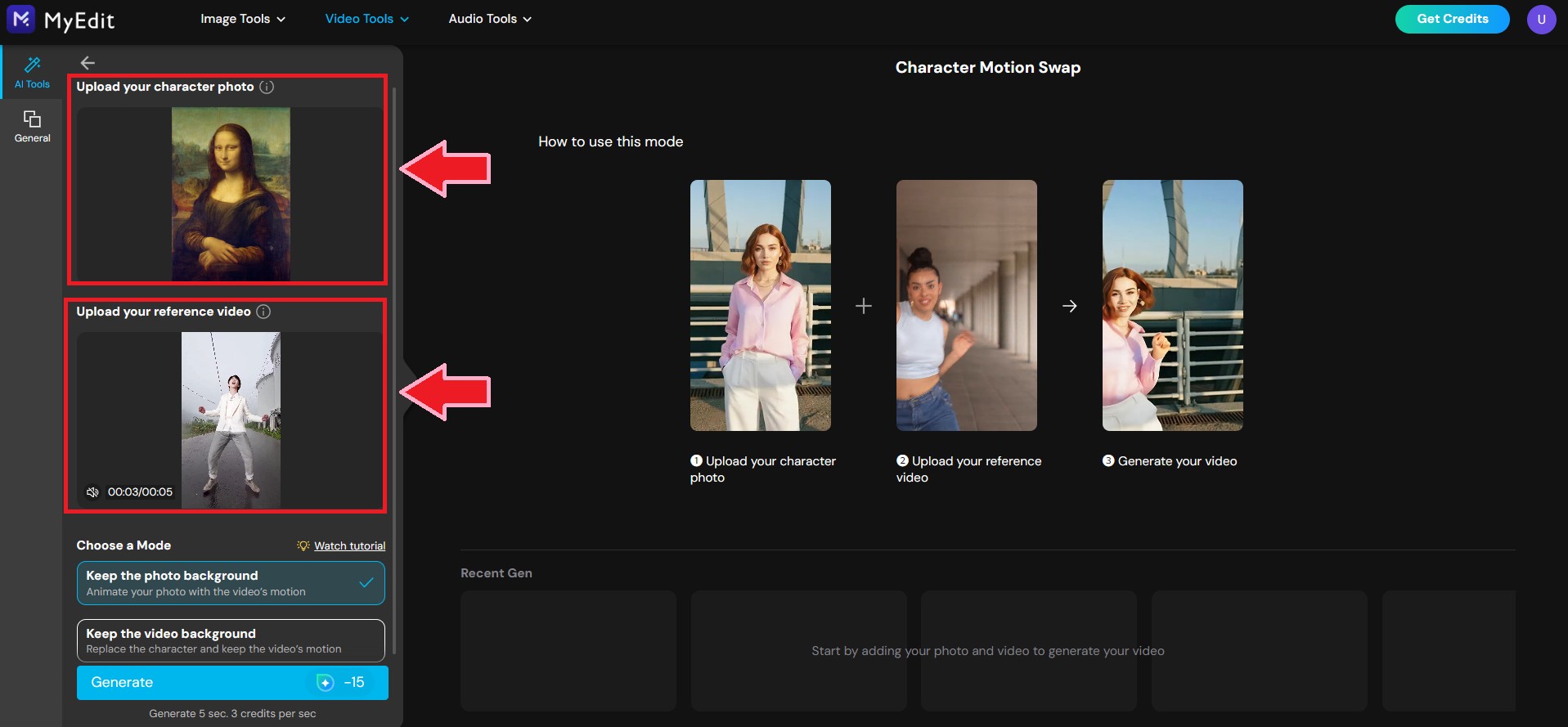
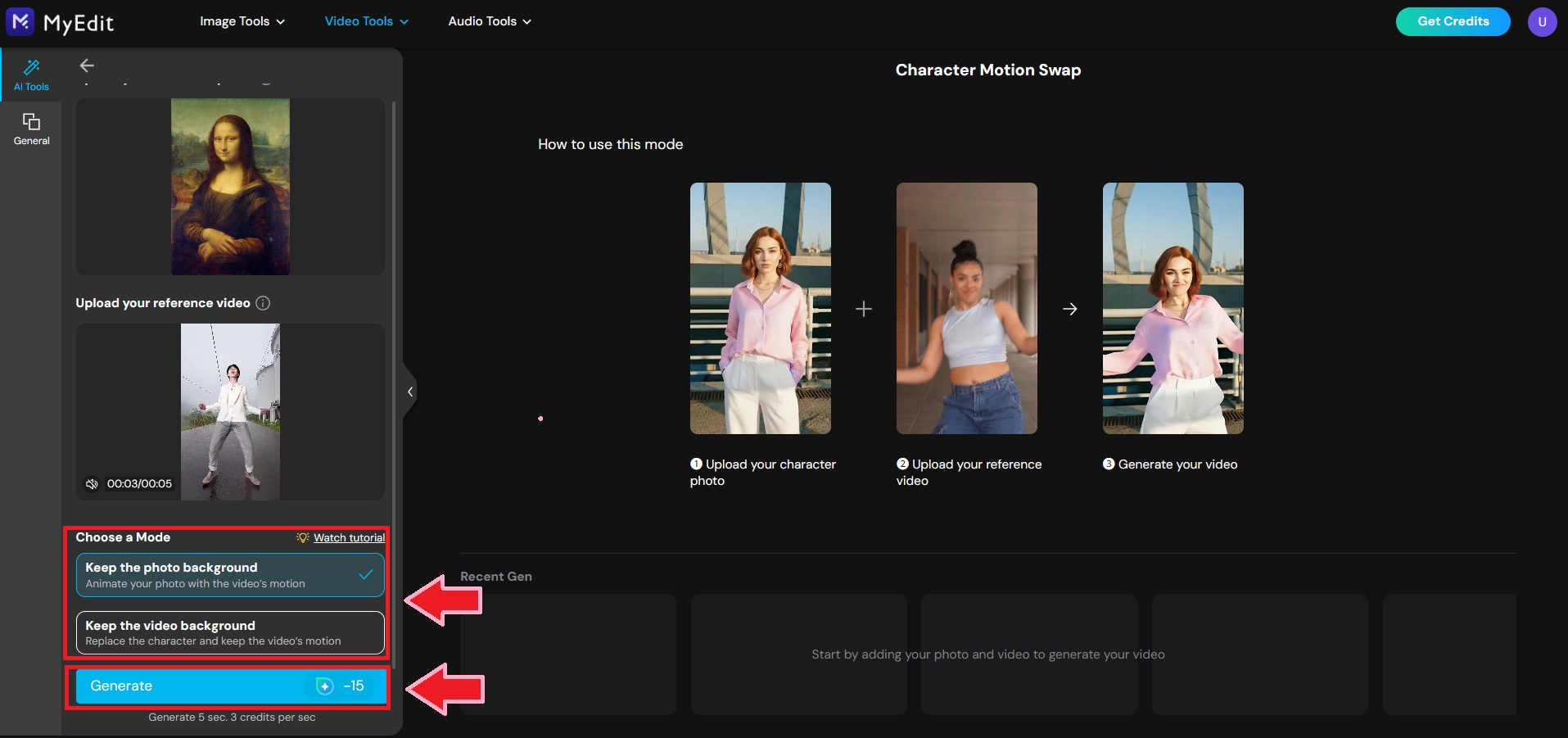
- Select your Background Mode to determine whether to prioritize the photo's original background or the video's background. Once selected, click "Generate."
Here, we chose to preserve the photo's background, meaning the Mona Lisa will perform the actions from the video within her original setting.
- Once generation is complete, click the download icon to save the video to your device.


With just these four steps, creating viral meme effects is incredibly simple. Best of all, the generated video retains the original BGM, ensuring the moves sync perfectly with the rhythm.
Come experience the Wan 2.2 Animate technology on MyEdit yourself and start creating fun, viral-worthy short videos today!
The tools mentioned in this article are intended for artistic creation, visual design, style simulation, and legitimate entertainment purposes only. Users are expected to operate them with respect and legality. When using AI tools, do not input or generate prompts involving illegal or inappropriate content. Furthermore, please avoid unauthorized deepfake operations or other actions that infringe on privacy or reputation.
FAQs About Viggle AI Alternatives
Viggle AI is a generative AI video platform specializing in controllable character animation. It allows users to transform static photos into moving videos using text prompts or reference footage. It is particularly famous for its ability to seamlessly place characters into viral dance clips and memes using its motion transfer technology.
- Visit the official Viggle AI website and select "Mix," currently the most popular feature for creating memes.
- Upload your assets: use Section A for the motion video and Section B for the character photo.
- Once uploaded, choose your preferred background mode. Then, click "MIX" to start generating.
- After generation is complete, the result will appear on the right panel. Simply click to preview the video and download your final creation.
Viggle AI excels at seamlessly blending static images with video motion. It supports character replacement and motion mimicry, and comes equipped with built-in trending meme templates. Often referred to as the ultimate "Meme Generator," it allows users to create natural-looking short videos quickly and easily.
Yes. Viggle AI offers a free plan that allows you to generate 5 videos per day in "Relaxed" mode (with watermarks) and run 2 concurrent generation tasks. Generated assets are stored for 15 days, making it perfect for beginners to try out the service without any cost.
Yes. MyEdit is another powerful AI video generation tool. Powered by Wan 2.2 Animate technology, it allows you to upload a photo and a reference video to make the character naturally mimic the movements. It preserves facial features and body proportions, resulting in smooth, high-quality AI videos.
Cyberlink AI Research Team specializes in tracking the fast-moving world of generative AI. We deliver clear insights that help creators navigate emerging tools and technologies. Our work focuses on competitive AI tool analysis and trends across video and photo creation, helping creators stay ahead in an ever-evolving AI landscape.


